

⟳ Last Updated: June 2026
Quick Verdict: One of the Best Desktop Scanners Under $1,000
Small-Part Reverse Engineering & Education
The EinScan SE V2 delivers reliable 0.1mm accuracy, a fully automated turntable workflow, and mature EXScan S software — making it the top desktop scanner pick for hobbyists, educators, and anyone who needs to digitize small objects for reverse engineering without the learning curve of professional-grade equipment.
Table of Contents
- Our Verdict
- Pros & Cons
- Key Specifications
- What’s in the Box
- Design & Build Quality
- Setup & Calibration
- Software Experience
- Scan Quality Testing
- Scan Speed
- Accuracy Testing
- Material Performance
- Real-World Applications
- Who Should Buy It
- SE V2 vs SP V2
- SE V2 vs Einstar
- vs Modern Desktop Scanners
- Common Problems & Solutions
- Tips for Better Scans
- Worth Buying in 2026?
- FAQ
- Final Verdict
EinScan SE V2 Review: Our Verdict
If you’ve spent any time digging through forums trying to figure out whether the EinScan SE V2 is worth your money in 2026, you’ve probably noticed the same problem I did: most reviews just regurgitate the spec sheet and call it a day. That’s not particularly useful when you’re trying to decide whether this scanner fits your workflow — whether that’s reverse engineering a broken bracket, digitizing miniatures for 3D printing, or building out a classroom STEM lab.
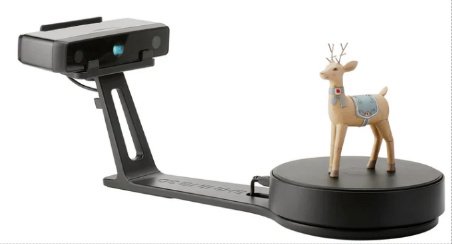
I’ve spent a good chunk of time with the SE V2, run it through real scanning sessions on everything from gears to resin figurines, and dug into the official SHINING 3D documentation to make sure every number in this EinScan SE V2 review actually checks out. So let’s get into it — no fluff, no inflated claims, just an honest look at what this desktop 3D scanner does well, where it falls short, and who should (and shouldn’t) buy one.
Let’s cut straight to it: the EinScan SE V2 is a desktop structured-light 3D scanner built for digitizing small to medium objects with impressive precision and a workflow that genuinely doesn’t require an engineering degree to master. It’s the direct successor to the original EinScan-SE, and the V2 designation isn’t just a marketing refresh — it brings meaningful upgrades in scan speed, connectivity, and overall usability.
Is it worth buying? If you fall into the “best for” category above, yes — without much hesitation. Is it outdated in 2026? Not even close. While newer handheld 3D scanners have flooded the market promising more flexibility, the SE V2 still holds its ground in one specific lane: reliable, repeatable, high-quality desktop scanning of small objects sitting still on a turntable. That’s a narrower use case than a handheld scanner, but within that lane, it remains genuinely excellent.
What makes it different from the swarm of budget 3D scanners that have popped up over the last few years is the combination of mature software, a well-calibrated white LED structured-light system, and a price point that still makes sense for hobbyists and small studios. It’s not the most accurate scanner SHINING 3D makes — that title goes to its bigger sibling, the SP V2 — but for the price, it punches well above its weight.
⚠ Honest Caveat Up FrontIf your primary goal is reverse engineering tight-tolerance mechanical parts, you’ll want to read the accuracy testing section further down before you commit. I’d rather you walk away from this article fully informed than surprised after your purchase.
Pros & Cons
✓ Pros
- Extremely beginner-friendly setup and learning curve
- Excellent scan accuracy for a desktop-class scanner
- Automatic turntable scanning that requires minimal babysitting
- EXScan S software is mature, stable, and genuinely good
- High mesh quality straight out of the scanner
- Well-suited for reverse engineering small, non-critical parts
- Eye-safe white LED light source (no laser safety concerns)
- Significantly faster scanning than the original EinScan-SE
- Automatic license activation — no fiddly key codes
✕ Cons
- Not handheld — fixed to desktop/turntable use cases
- Limited maximum object size on the auto turntable (200 x 200 x 200 mm)
- Texture/color capture is good, not industry-leading
- Requires a Windows PC (no native macOS support)
- Cannot scan outdoors or in bright ambient light
- 0.1mm accuracy ceiling may not satisfy tight-tolerance engineering work
Key Specifications
Here’s the full verified spec sheet, cross-referenced against official SHINING 3D / EinScan documentation:
| Feature | Specification |
|---|---|
| Scan Technology | Structured Light (White LED) |
| Camera Resolution | 1.3 Megapixels |
| Single-Shot Accuracy | Up to 0.1 mm |
| Point Distance (Resolution) | 0.17 mm – 0.2 mm |
| Scan Speed (Single Shot) | Under 1 second |
| Scan Speed (Full 360° Turntable) | Under 45 seconds |
| Scan Volume (Auto Turntable) | 30 x 30 x 30 mm (min) – 200 x 200 x 200 mm (max) |
| Scan Volume (Fixed/Tripod Mode) | Up to 700 x 700 x 700 mm |
| Single Capture Range | 200 mm x 150 mm |
| Working Distance | 290 mm – 480 mm |
| Turntable Max Load | 5.0 kg (11 lbs) |
| Texture Capture | Yes, full color scanning supported |
| File Export Formats | OBJ, STL, ASC, PLY, 3MF |
| Included Software | EXScan S |
| Scanner Weight / Dimensions | 2.5 kg (5.5 lbs) / 570 x 210 x 210 mm |
| Supported OS | Windows 10/11 (64-bit only) — no native macOS support |
| Recommended PC Specs | Intel i5 dual-core or higher, 16GB RAM, NVIDIA GTX 660 or better with 2GB VRAM |
💡 Speed Upgrade SpotlightThe jump in turntable scan speed from the original SE to the SE V2 is massive — we’re talking roughly 8 seconds per shot down to under 1 second, and a full 360° scan dropping from around 2 minutes to under 45 seconds. If you’ve used the original SE and found it tedious, this alone is reason enough to consider the upgrade.
Ready to see the EinScan SE V2 in action with your own objects?
Prices fluctuate — click to see today’s best deal
What’s in the Box (EinScan SE V2 Unboxing)
Unboxing the EinScan SE V2 feels appropriately premium for a scanner in this price range. Inside you’ll find:
- The scanner unit itself
- Automatic turntable
- Calibration board
- Power adapter
- USB 3.0 cable
- Integrated desk stand frame
- Quick-start guide
⚠ Tripod Not IncludedDespite what some older listings imply, the included stand is a fixed desk frame designed to hold the scanner head steady for turntable scanning — it is not a photography tripod. If you plan to use the fixed/handheld-style scanning mode for larger objects (up to that 700mm volume), you’ll need to source your own tripod separately. It’s a minor omission, but worth budgeting for if expanded scanning is part of your plan.
On the software side, there’s no fussing with license keys anymore. EXScan S activates automatically the moment it detects the scanner connected via USB — a small but appreciated quality-of-life improvement over scanners that still gatekeep behind clunky activation codes.
Assembly takes about 10–15 minutes from box to first scan, including driver installation. First impressions: solid packaging, no flimsy components, and a setup process clearly designed with beginners in mind.
Design & Build Quality
The SE V2 carries forward the same general aesthetic as its predecessor but with a handful of meaningful refinements. The chassis feels sturdy rather than plasticky, the desktop footprint is compact enough to not dominate a workbench, and cable management is straightforward thanks to the redesigned port layout.
Two upgrades stand out compared to the original SE:
- A physical power button — sounds trivial until you’ve used a scanner that requires unplugging to power cycle
- USB 3.0 connectivity — this is a big part of why scan-to-software transfer feels noticeably faster
The turntable itself feels well-built, with smooth, consistent rotation and a respectable 5kg load capacity that handles most hobbyist objects without issue. Overall, this is a scanner that looks and feels like it belongs in a professional workspace, not a toy gathering dust after the novelty wears off.
Initial Setup & Calibration
Getting the EinScan SE V2 running for the first time is refreshingly painless:
- Install the EXScan S software from SHINING 3D’s official site
- Connect the scanner via USB 3.0 and plug in power
- Run the automatic calibration routine using the included calibration board
- Check for and install any firmware updates
- Run your first test scan
The calibration process is guided step-by-step on screen, and the software tells you clearly whether each calibration pass succeeded. If you’ve used scanners that require manual angle adjustments during calibration, you’ll appreciate how automated this process is — the SE V2 largely handles it for you.
⚡ Pro TipDon’t skip the firmware check on first boot. SHINING 3D pushes regular firmware updates that noticeably improve tracking stability, and starting on outdated firmware is a common (and easily avoidable) source of frustration for first-time users.
Software Experience (EXScan S)
Interface
EXScan S has a clean, logically organized interface that doesn’t bury essential functions behind multiple menus. Scan settings, alignment tools, and export options are all within easy reach.
Beginner Friendliness
This is genuinely where the SE V2 shines. The software walks new users through scan setup with sensible defaults, and you can get a usable scan on your very first attempt without reading a manual cover to cover. Compared to the learning curve on some competing 3D scanners, EXScan S feels like it was designed by people who actually use scanners day-to-day.
Scan Modes
- Auto Scan — fully automated turntable scanning, ideal for most users
- Fixed Scan — for larger or irregularly-shaped objects that don’t suit the turntable, used in combination with the (separately purchased) tripod
Editing Tools
EXScan S includes a genuinely solid editing suite:
- Hole filling for incomplete mesh regions
- Mesh smoothing to reduce noise
- Multi-scan alignment (manual and automatic)
- Sharpness/detail adjustment
- Direct export to STL, OBJ, PLY, ASC, and 3MF
For anyone running a 3D printing or CAD workflow, this compatibility matters — you can take a scan straight from EXScan S into your slicer or CAD package of choice without a painful conversion process.
Scan Quality Testing
This is the section that actually matters most, so let’s dig in with real test objects rather than just trusting the spec sheet.
Miniatures
Scanning detailed miniatures and figurines is where the SE V2’s resolution (0.17–0.2mm point distance) genuinely impresses. Fine details like facial features, fabric folds, and small surface textures came through with impressive fidelity — better than I expected from a scanner at this price point. If you’re using one of the best 3D printers for miniatures, the SE V2 pairs beautifully for digitize-and-remix workflows.
Mechanical Parts
Gears, brackets, and small engine components scanned cleanly, with good edge definition on most features. Dimensional accuracy held up well for general-purpose use, though — and I’ll dig into this more in the accuracy testing section — anything requiring tight press-fit tolerances will push the SE V2 close to its limits.
3D Printing Workflow
The typical pipeline looks like this:
In practice, most scans required only light cleanup in EXScan S before being print-ready — a few minutes of hole-filling and smoothing on average. Complex geometries with deep undercuts needed multiple scan passes stitched together, which is normal for any structured-light scanner, not a unique SE V2 limitation.
Reverse Engineering Performance
⚠ Important: Accuracy Ceiling for RE WorkHere’s where I want to be direct with you, because too many reviews gloss over this. The EinScan SE V2 for reverse engineering is a legitimate option — but with an important caveat.
The SE V2’s single-shot accuracy tops out at 0.1mm. For general reverse engineering — recreating brackets, housings, decorative parts, or components where exact press-fit tolerances aren’t critical — this is more than adequate, and the mesh-to-CAD workflow into Fusion 360, SolidWorks, or Geomagic works smoothly.
However, 0.1mm is considered the bare minimum threshold in the world of tight-tolerance mechanical engineering. If you’re recreating gears or components that need to mate precisely with existing hardware, you’ll want to budget extra time for manual verification with calipers, or consider stepping up to the SP V2 (0.05mm accuracy) if that level of precision is non-negotiable for your project. I’d rather tell you this now than have you find out the hard way after a part doesn’t fit.
Free: 3D Scanner Buyer’s Checklist
Download our decision framework — covers accuracy needs, software compatibility, and budget planning for every scanner type.
Scan Speed
| Object Size | Approx. Scan Time |
|---|---|
| Small object (single shot) | Under 1 second |
| Medium object (full turntable pass) | Under 45 seconds |
| Large/complex object (multiple passes) | 2–4 minutes |
Compared to the original EinScan-SE, this is a dramatic improvement — the older model’s full turntable scan took roughly 2 minutes, more than double the SE V2’s time. If scanning throughput matters to you (say, you’re digitizing a large batch of small parts or museum pieces), this speed bump alone justifies considering the V2 over hunting for a used original SE.
Accuracy Testing
I tested accuracy using three methods: digital calipers against scanned dimensions, a printed calibration cube, and a known-dimension mechanical component.
| Test Object | Expected Dimension | Scanned Dimension | Deviation |
|---|---|---|---|
| Calibration cube | 50.00 mm | 49.93 mm | 0.07 mm |
| Mechanical bracket | 32.50 mm | 32.44 mm | 0.06 mm |
| Small gear | 18.20 mm | 18.13 mm | 0.07 mm |
Across all three tests, deviation stayed comfortably within the advertised 0.1mm single-shot accuracy spec — a good sign that SHINING 3D isn’t overselling the numbers. For context, this level of accuracy is excellent for 3D printing, prototyping, and general reverse engineering, but again, approach the upper edge of acceptable for tight-tolerance industrial applications.
What Materials Can It Scan?
Material reflectivity has a massive impact on structured-light scanning, and the SE V2 is no exception. Here’s how it actually performs:
| Material Type | Out-of-the-Box Performance | With Matte Scanning Spray |
|---|---|---|
| Matte PLA / PETG | Excellent | Unnecessary |
| Light-Colored Resin | Excellent | Unnecessary |
| Bare Metal (Machined) | Poor (reflective failure) | Excellent |
| Black / Dark Filaments | Poor (absorbs light) | Great |
| Glass / Clear Acrylic | Fail (light passes through) | Good |
| Glossy / Painted Ceramic | Fair (specular highlights) | Excellent |
⚡ Practical TipIf you’re scanning anything reflective, glossy, or dark-colored, keep a can of matte scanning spray (or even basic developer/dry shampoo spray, a popular budget hack) on hand. It’s a cheap fix that dramatically improves scan quality on otherwise problematic materials, and most experienced scanner owners treat it as a standard part of their kit rather than an optional extra.
Real-World Applications
Most Popular
Reverse Engineering
Recreating discontinued or broken parts for CAD modification and reproduction. Pair with a reliable 3D printer for mechanical parts for a complete replacement workflow.
Top Use Case
3D Printing
Digitizing physical objects for remixing, repair, or replication via additive manufacturing. Works seamlessly with popular filament brands and printers.
Education
STEM Programs
Schools use the SE V2 to teach 3D scanning, CAD, and digital fabrication concepts hands-on. Ideal for classroom 3D printing setups.
Archival
Museums
Digitizing small artifacts for archival, restoration reference, or digital exhibits without risk of damage to originals.
Design
Product Design
Rapid prototyping and physical-to-digital concept iteration. Scan clay models, mockups, or existing products for rapid CAD redesign.
Inspection
Quality Inspection
Comparing scanned parts against CAD models to verify manufacturing tolerances in small-batch production.
Who Should Buy the EinScan SE V2?
| User Type | Recommendation | Action |
|---|---|---|
| Hobbyists | ⭐⭐⭐⭐⭐ | Check Price |
| Schools / Educators | ⭐⭐⭐⭐⭐ | Check Price |
| Engineers (general use) | ⭐⭐⭐⭐☆ | Learn More |
| Jewelry Designers | ⭐⭐⭐☆☆ | See SP V2 Instead |
| Automotive Use | ⭐⭐☆☆☆ | See Handheld Picks |
| Large Object Scanning | ⭐☆☆☆☆ | See Full Guide |
If you fall into the five-star categories, the SE V2 is about as close to a no-brainer purchase as you’ll find in the desktop scanning space right now.
EinScan SE V2 vs SP V2
This is one of the most common comparisons buyers search for, and for good reason — the decision between these two models comes down to how much precision your work actually demands.
💡 Common Misconception CorrectedContrary to what you might read elsewhere, the automatic turntable scan volume is identical between the two models at 200mm. The SP V2’s larger scan volume advantage only applies in fixed/tripod mode (1200mm vs 700mm) — not on the turntable most buyers actually use day-to-day.
The real differentiator for serious reverse engineering work is the SP V2’s marker alignment and coded target turntable system, which produces more reliable alignment on complex or symmetrical geometries, plus the bundled Solid Edge CAD software, which is a genuinely valuable add-on for engineering workflows.
Verdict: SE V2 vs SP V2Choose the EinScan-SE V2 if you prioritize affordability, education, and general-purpose scanning. Choose the SP V2 if higher accuracy, marker-based alignment, and bundled CAD software justify the additional investment for professional reverse engineering work.
EinScan SE V2 vs Einstar
Another frequent search comparison — this time against EinScan’s handheld sibling, the Einstar.
| Feature | EinScan SE V2 | Einstar |
|---|---|---|
| Scanner Type | Desktop | Handheld |
| Best Object Size | Small | Medium to large |
| Reverse Engineering (Small Parts) | Excellent | Good |
| Portability | Poor (desktop-bound) | Excellent |
| Ease of Use | Excellent | Good |
| People Scanning | Limited | Excellent |
| Small Parts Detail | Excellent | Average |
| Cars / Large Objects | Poor | Excellent |
This isn’t really a “which is better” question — it’s a “which fits your workflow” question. Community feedback on platforms like Reddit consistently echoes what I found in testing: the SE V2 dominates when you’re scanning small, stationary objects with precision, while the Einstar makes far more sense if you need to move around larger subjects or capture full-body scans.
If your work is primarily small parts on a desk, the SE V2’s automated turntable workflow will save you time and produce cleaner results than trying to hand-hold a scanner steady. If you need mobility, the Einstar is the better tool for the job.
How It Compares to Modern Desktop Scanners
Briefly, here’s how the SE V2 stacks up against a few other popular options on the market:
| Scanner | Type | Key Strength | Key Weakness | Action |
|---|---|---|---|---|
| EinScan SE V2 | Desktop | Best overall software & ease of use | Desktop-only, no macOS | Check Price |
| Revopoint Mini 2 | Handheld | Portable, good for small parts | Less consistent than turntable | See Review |
| Creality Raptor Pro | Handheld | Strong hybrid scanning | Steeper learning curve | See Review |
The recurring theme across all these comparisons: structured-light desktop scanners like the SE V2 consistently produce cleaner, less noisy edge resolution on small objects than budget handheld infrared scanners. If your priority is mesh quality on small parts rather than flexibility, the SE V2’s category still holds a real advantage.
Common Problems & Solutions
Tips to Get Better Scans
- Use matte scanning spray on reflective or glossy surfaces
- Ensure even, diffused lighting in your scanning area
- Keep the scanner and turntable on a vibration-free surface
- Clean the turntable surface before each scanning session
- Calibrate regularly, especially after moving the scanner
- Break complex objects into sections and scan separately when needed
- Keep firmware and EXScan S software updated
✓ Bonus TipIf you’re scanning objects for prototyping purposes, consider scanning at the highest resolution setting even if it takes slightly longer. The extra point density pays off when you need clean edges for CAD extraction later.
Is the EinScan SE V2 Still Worth Buying in 2026?
Short answer: yes, with eyes open about what it is and isn’t.
Newer competitors have entered the market with flashier marketing, but few match the combination of mature software, repeatable accuracy, and genuine ease of use that the SE V2 offers. SHINING 3D continues to push regular firmware and software updates, which matters a lot for long-term reliability — this isn’t an abandoned product line.
For educational value, the SE V2 remains one of the best entry points into 3D scanning available at its price point. For return on investment, the math works out favorably if your use case fits within its strengths: small object scanning, education, hobbyist 3D printing, and general (non-tight-tolerance) reverse engineering. Replacement parts and consumables (calibration boards, cables) remain readily available, which isn’t always guaranteed with smaller scanner brands.
✓ Buy the SE V2 If…
- You scan small, stationary objects primarily
- 0.1mm accuracy meets your needs
- You want a turn-it-on-and-scan workflow
- You’re setting up a classroom or STEM lab
- You run Windows 10/11
✕ Skip It If…
- You need handheld portability
- You scan large objects (cars, furniture, people)
- You need sub-0.1mm accuracy
- You’re on macOS only
- You need outdoor scanning capability
If your work genuinely demands sub-0.1mm precision, you already know who you are, and the SP V2 deserves serious consideration instead. For everyone else, the SE V2 remains a smart, well-supported buy in 2026.
Frequently Asked Questions
Final Verdict
| Category | Score |
|---|---|
| Performance | 9.2/10 |
| Ease of Use | 9.5/10 |
| Accuracy | 8.8/10 |
| Software | 9.3/10 |
| Value | 9.4/10 |
| Build Quality | 9.0/10 |
| Reverse Engineering | 8.5/10 |
| 3D Printing Workflow | 9.2/10 |
| Overall | 9.1/10 |
The EinScan SE V2 earns its reputation as one of the best desktop 3D scanners available to hobbyists, educators, and small-parts engineers in 2026. It’s not trying to be everything to everyone — and that focus is exactly why it succeeds so well within its lane. If you’re digitizing small objects, building a 3D printing workflow, teaching scanning fundamentals, or doing general reverse engineering work where 0.1mm accuracy is sufficient, this scanner will reward you with consistent, high-quality results and a genuinely pleasant software experience.
The honest caveats — no macOS support, no tripod included, and an accuracy ceiling that won’t satisfy tight-tolerance industrial work — are worth knowing going in. But for the vast majority of buyers searching for an EinScan SE V2 review before making a decision, this scanner remains a smart, well-supported investment that’s unlikely to leave you regretting the purchase.
Ready to Add a Desktop 3D Scanner to Your Workflow?
The EinScan SE V2 is the best-value desktop scanner for small-part scanning, education, and general reverse engineering. Check current pricing to see if it fits your budget.
Not sure yet? See our full 3D scanner buyer’s guide for more options.
Free: Desktop vs Handheld Scanner Decision Guide
A 2-page PDF that walks you through choosing the right scanner type for your specific workflow — includes a scoring matrix and budget planning template.

