

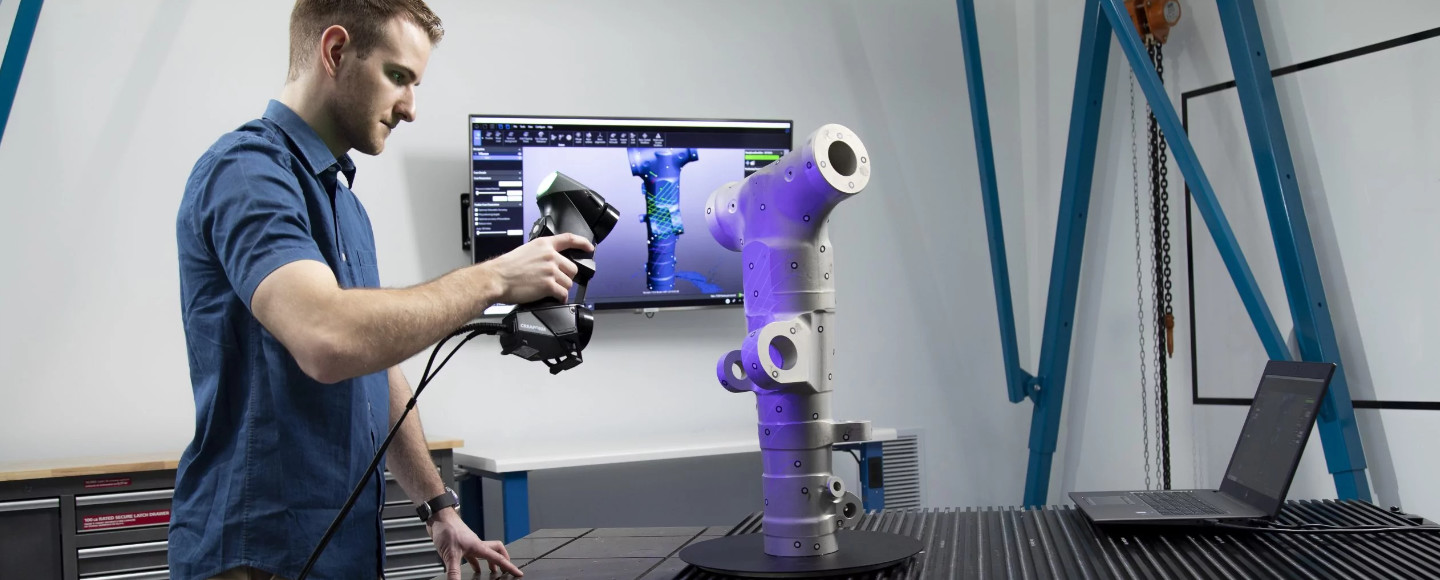
Quick Answer: A 3D scanner works by projecting structured light or a laser beam onto an object, then using sensors to capture how that light deforms across the surface. Those measurements are converted into millions of XYZ coordinate points — called a point cloud — which software stitches together into a full 3D mesh model. Modern scanners use AI-assisted processing to clean up noise, fill holes, and align multiple scans in real time. The whole process typically takes seconds to minutes depending on object size and scanner type.
So you’ve been seeing 3D scanners pop up everywhere — on YouTube builds, in engineering forums, maybe even at your dentist’s office — and you’re wondering: how does this thing actually work? You’re not alone. Whether you’re a maker, a designer, an engineer, or just someone who wants to digitize a special object, understanding what happens inside that device will help you pick the right tool and use it well.
This guide breaks down exactly how 3D scanners work — from the physics of light projection all the way to exporting a print-ready file. We’ll also cover the different types of 3D scanning technologies, real-world uses, what they cost in 2026, and whether one is actually worth buying for your situation. Let’s get into it.
Ready to buy? Check out our tested recommendations for the Best 3D Scanners of 2026
Table of Contents
- What Is a 3D Scanner?
- 3D Scanner vs. 3D Modeling Software
- What Are 3D Scanners Used For?
- How Does a 3D Scanner Work? (Core Principles)
- Step-by-Step Scanning Process
- Types of 3D Scanning Technologies
- How Does a Handheld 3D Scanner Work?
- How Does a 3D Body Scanner Work?
- How Does a 3D Dental Scanner Work?
- 3D Scanner-to-Printer Workflow
- 3D Scanner Price Guide (2026)
- Key Factors That Affect Scan Quality
- Pros and Cons of 3D Scanners
- Is a 3D Scanner Worth It in 2026?
- Frequently Asked Questions
What Is a 3D Scanner?
A 3D scanner is a device that captures the physical shape of a real-world object and converts it into a digital 3D model. Think of it like a camera — but instead of capturing a flat 2D photo, it captures depth, geometry, and sometimes texture across an entire surface.
Where a regular camera sees color and light, a 3D scanner measures distances and coordinates. The result is a digital replica of the object you scanned — accurate enough for reverse engineering, quality inspection, medical modeling, or 3D printing.
A 3D scanner typically captures two things:
- Geometry — the exact shape and dimensions of the object
- Texture — the color and surface detail
Higher-end scanners capture both simultaneously; entry-level ones may focus on geometry only.
3D Scanner vs. 3D Modeling — Read This Before Going Further
This is probably the most important thing to clarify upfront, because a lot of people get burned by this confusion. A 3D scanner and 3D modeling software are not the same thing, and they solve very different problems.
A 3D scanner replicates real-world objects that already exist. You scan a shoe, a machine part, a person’s face — and you get a digital copy of that exact thing.
3D modeling software (CAD) builds objects from scratch using mathematical precision. You design a bracket, a housing, a concept vehicle — starting with nothing but your imagination and measurement specs.
The best workflows often combine both: scan an existing object to get the base geometry, then refine or modify it in CAD. This is called a hybrid workflow, and it’s what most professional reverse engineers use.
Bottom Line: If you want to design perfect mechanical parts from scratch → learn CAD. If you want to copy or digitize existing physical objects → use a 3D scanner. If you want to do both → you’re on the path to becoming a serious maker.
Want to start with 3D design software? Check out our guides to the Best Free CAD Software and the Best 3D Modeling Software.
What Are 3D Scanners Used For?
3D scanner uses are broader than most people think. If you’re wondering whether a 3D scanner fits into your life or workflow, here’s a breakdown by industry and use case:
Industrial and Reverse Engineering
This is the bread and butter of professional 3D scanning. Engineers scan legacy parts (especially ones with no surviving CAD files), compare manufactured parts against design specs, and inspect complex assemblies for defects. Industries like aerospace, automotive, and consumer electronics rely on this daily. See the top 3D scanners for reverse engineering.
Medical and Dental
3D dental scanners have transformed how dentists and orthodontists work. Intraoral scanners replace messy physical molds with fast, comfortable digital scans. In the broader medical field, 3D body scanners help with prosthetics fitting, surgical planning, and custom implant design.
3D Printing and Hobbyists
This is where most new buyers come from. You want to scan an object — a vintage toy, a custom part, a broken bracket — and print a replica or replacement. A 3D scanner is the bridge between the physical and digital world for makers. Check the best 3D scanners for 3D printing.
Gaming, AR, and VR
Game studios and VFX houses scan real actors, props, and environments to create hyper-realistic digital assets. What used to require weeks of manual 3D modeling can now be done with a scan in hours.
Architecture and Construction
Large-scale LiDAR scanners are used to capture entire buildings, construction sites, and heritage structures. The result is a precise digital twin that architects, engineers, and preservationists can work with remotely.
Need the right scanner for your use case? See Our Top Picks by Category
How Does a 3D Scanner Work? (Core Principles Explained)
At a fundamental level, all 3D scanners do the same thing: they measure the surface of an object by projecting something (light, laser, or infrared) onto it and recording how that projection interacts with the surface. Here’s how the process breaks down into stages:
Stage 1: Data Capture
The scanner projects a light pattern, laser line, or infrared dots onto the surface of the object. As this projection hits a surface that isn’t perfectly flat, it deforms — curves, bends, and distorts according to the object’s shape. Sensors (usually cameras) on the scanner detect this deformation.
The angle between the projector and the sensors, combined with the known properties of the light, allows the scanner to calculate depth — precisely how far each point on the surface is from the sensor. This is the core physics of 3D scanning.
Stage 2: Point Cloud Generation
As the scanner captures data — whether in a single shot or across multiple frames — it converts all those depth measurements into a point cloud. A point cloud is exactly what it sounds like: a massive collection of XYZ coordinates in 3D space, each one representing a tiny spot on the surface of the object.
High-end scanners generate millions of points per second. Each point is essentially a vote on where the surface is. The denser the point cloud, the more detailed and accurate your final model will be.
Stage 3: Mesh Creation
A raw point cloud isn’t particularly useful on its own — it’s just data. The scanner’s software (or post-processing software like Meshmixer or the proprietary app) connects those points into a mesh: a web of polygons (usually triangles) that forms the visible surface of your 3D model.
Once meshed, the model can be exported in common formats like STL (for 3D printing), OBJ (for texture mapping and rendering), or STEP/IGES (for CAD workflows). From that point, it behaves like any other 3D file.
The ‘Hidden Engine’ — Software and AI Processing (Critical for 2026)
Here’s something most beginner guides skip over, and it’s actually one of the most important factors when choosing a scanner in 2026: the software and processing engine behind the hardware.
A scanner’s raw sensor is only half the story. The other half is what happens to that data after it’s captured. Modern scanners use sophisticated algorithms — increasingly powered by AI and machine learning — to do the following in real time:
- Frame stitching: As you move the scanner around an object, software continuously aligns new frames to previous ones using geometry matching or tracking markers
- AI-driven mesh fusion: Multiple overlapping scans are fused together into one seamless surface, automatically resolving conflicts and filling gaps
- Noise reduction: Eliminating stray points caused by reflections, ambient light interference, or sensor noise
- Hole filling: Automatically detecting and patching areas the scanner missed, such as deep recesses or occluded surfaces
| Processing Type | Pros | Cons |
|---|---|---|
| Cloud Processing | ✓ Faster for weaker PCs ✓ No powerful GPU needed |
✗ Requires stable internet ✗ Privacy considerations |
| Local (GPU-Based) Processing | ✓ Faster for professionals with GPUs ✓ Full data control |
✗ Requires capable hardware ✗ Higher upfront cost |
For most hobbyists, cloud processing works fine. For professionals dealing with sensitive parts or large datasets, local GPU-based processing gives you speed and control. This is one of the reasons that scanners from brands like Revopoint and Artec invest heavily in their companion software — because the hardware is only as good as what processes the data.
How Does a 3D Scanner Work Step by Step?
If you prefer a linear walkthrough of the entire process from object to file, here it is:
- Position the object: Place your object on a turntable (for desktop scanners) or hold the handheld scanner and prepare to move around it. Ensure lighting is controlled and the surface is accessible.
- Scanner projects light or laser: The device emits structured light patterns, a laser line, or infrared dots onto the object’s surface.
- Sensors capture surface distortion: Cameras or sensors detect how the projection deforms across the surface geometry.
- Depth is calculated per frame: Using triangulation or time-of-flight math, the scanner computes precise distance measurements for every captured point.
- Multiple scans are aligned: As the scanner moves, each new frame is matched to previous frames using geometry, markers, or photogrammetry-style alignment — this is called registration.
- Point cloud is generated: All aligned frames merge into a single dense cloud of XYZ coordinates representing the full object surface.
- Mesh is created from the point cloud: Software connects the dots into a polygon mesh — your 3D model takes shape.
- Model is cleaned and exported: Holes are filled, noise is removed, and the file is exported as STL, OBJ, or your desired format.
Pro Tip: The quality of your scan is heavily influenced by steps 1 and 2. Good object positioning and controlled scanning conditions can save you hours of cleanup in post-processing.
Types of 3D Scanning Technologies (Compared)
Not all 3D scanners work the same way under the hood. The technology used determines accuracy, speed, cost, and what kinds of objects you can scan. Here’s a full comparison:
| Technology | Best For | Accuracy | Price Range | Learning Curve |
|---|---|---|---|---|
| Structured Light | Hobbyists / Prosumers | High | $$$ | Easy |
| Laser Triangulation | Industrial / Engineering | Ultra-High | $$$$ | Moderate–Hard |
| Time-of-Flight (LiDAR) | Large Spaces / Architecture | Medium | $$–$$$$ | Medium |
| Photogrammetry | Budget Users / Beginners | Variable | $ | Easy |
Structured Light Scanners
Structured light is currently the most popular technology for consumer and prosumer 3D scanners — and for good reason. The scanner projects a series of known light patterns (usually grids or stripes) onto the object. Two or more cameras observe how those patterns deform, and from that data, the software triangulates the 3D coordinates.
The result is fast, highly detailed scans that are easy enough for beginners to operate but accurate enough for professional workflows. Brands like Revopoint and Creality build their flagship devices around structured light, and it’s the technology we’d gently steer most readers toward for general-purpose use.
- Best for: Small to medium objects, prototyping, reverse engineering, heritage digitization
- Accuracy: Sub-millimeter on quality devices
- Weakness: Struggles with transparent, black, or highly reflective surfaces
How Does a 3D Laser Scanner Work?
Laser triangulation scanners work by projecting a laser line (or dot) onto the object and using a camera positioned at a known angle to observe where that laser lands. Because the angle between the laser and the camera is fixed, any displacement of the laser spot from the expected position indicates depth.
This geometry — called triangulation — is extraordinarily precise. Laser scanners are the workhorses of industrial inspection, automotive manufacturing, and aerospace QA. They can measure features down to microns in some cases.
The trade-off? They’re typically slower, more expensive, and more sensitive to environmental conditions than structured light scanners. They’re overkill for most hobbyists but indispensable in professional manufacturing.
- Best for: Precision parts, industrial QA, complex geometry with tight tolerances
- Accuracy: Extremely high — often below 0.05 mm
- Price: $3,000–$50,000+ for industrial-grade devices
Time-of-Flight (LiDAR) Scanners
Time-of-Flight scanners measure the time it takes for a laser pulse to leave the scanner, hit a surface, and return. Since light travels at a known speed, the travel time translates directly to distance. LiDAR (Light Detection and Ranging) is the most common implementation of this principle.
LiDAR excels at large-scale scanning: buildings, construction sites, outdoor terrain, and vehicles. Your iPhone 12 Pro and newer Android flagships include a LiDAR sensor — which is why Apple’s built-in scanning apps and third-party tools like Polycam can generate rough 3D models of rooms and outdoor spaces.
The limitation is resolution: ToF scanners trade fine surface detail for range and speed, making them less ideal for small, intricate objects.
- Best for: Architecture, construction, large spaces, automotive exteriors
- Accuracy: Medium — typically 1–5 mm depending on range
- Exciting development: iPhone and iPad LiDAR has democratized entry-level room scanning
Photogrammetry (2026 Update)
Photogrammetry is technically not a scanner — it uses regular photographs to reconstruct 3D geometry. Software analyzes overlapping photos to identify common points and calculate the 3D position of every surface visible across the images.
Traditionally this required a DSLR, a turntable, and hours of post-processing in software like Agisoft Metashape. In 2026, the game has changed dramatically. Smartphone apps using Gaussian splatting algorithms (like Luma AI, Polycam, and others) can now generate surprisingly good 3D captures just by walking around an object with your phone.
Photogrammetry remains the most budget-friendly entry point into 3D scanning. Accuracy is variable and depends heavily on photo quality, lighting, and surface texture, but for creative projects, props, and concept captures, it’s an incredible starting point.
- Best for: Beginners, budget-limited users, outdoor environments, large organic objects
- Cost: Free to ~$200 for good apps and software
- Watch: Gaussian splatting is reshaping photogrammetry in 2025–2026
How Does a Handheld 3D Scanner Work?
Handheld 3D scanners combine the scanning technology above — usually structured light — with an integrated motion-tracking system. As you physically move the scanner around the object, it continuously captures new frames and stitches them together in real time using geometry alignment or visual tracking markers.
Most handheld scanners offer multiple tracking modes: feature tracking (using the object’s own geometry), marker tracking (using adhesive reflective targets placed on or around the object), and in some cases, hybrid tracking that combines both.
Pros of Handheld Scanning:
- Portability — scan objects that can’t be moved
- Flexibility — capture objects of varying size with a single device
- Speed — walk around an object and you’re done in minutes
Cons of Handheld Scanning:
- Slight accuracy trade-off vs. fixed desktop scanners
- Operator skill affects scan quality — shaky hands or too-fast movement causes errors
- Trickier to scan very small objects consistently
Handheld scanners like the Revopoint RANGE 2 and Creality Raptor have made this technology accessible to makers and professionals alike at prices that were unthinkable five years ago. If you’re on the fence, a quality handheld is the most versatile choice for most users.
Looking for a handheld scanner? The Revopoint POP 3 Plus offers the best balance of accuracy and ease of use.
How Does a 3D Body Scanner Work?
3D body scanners use an array of structured light projectors and cameras arranged around the subject to capture the full human body in a single instant — or a very short sequence. Unlike handheld scanners (where the scanner moves around the object), body scanners keep the subject still and move the sensor array, or fire multiple sensors simultaneously.
The result is a complete full-body mesh in seconds — accurate enough to measure waist circumference, limb proportions, posture, and body composition.
Common Applications:
- Fitness and health tracking: Measuring body composition changes over time
- Custom apparel sizing: Some fashion brands use body scanning to produce made-to-measure clothing
- Medical and prosthetics: Creating precisely fitted prosthetic limbs and orthotics
- Sports science: Analyzing body proportions and posture for athletic optimization
Consumer-grade body scanning is also creeping into smartphones — iPhone’s TrueDepth camera and LiDAR can generate rough body scans through apps, though professional medical-grade body scanners remain expensive, specialized equipment.
How Does a 3D Dental Scanner Work?
If you’ve been to a dentist or orthodontist recently, there’s a good chance you’ve experienced a 3D dental scanner without realizing it. Instead of biting into an uncomfortable physical mold, a small wand was waved around your teeth. That wand is an intraoral structured light scanner.
How does a 3D dental scanner work exactly? The intraoral scanner projects structured light patterns from a small tip that fits comfortably in the mouth. Micro-cameras inside the device capture the deformation of that light across your teeth and gums, building a precise 3D model of your dental anatomy in real time — visible on the dentist’s screen as you scan.
Why This Matters:
- Faster: Scans complete in 2–5 minutes vs. 20+ minutes for physical impressions
- More accurate: Digital scans eliminate the distortion and shrinkage of physical mold materials
- CAD/CAM integration: The digital scan feeds directly into milling software to produce crowns, aligners, and implants with no manual steps
- Patient comfort: No gagging, no mess, no waiting for molds to set
Brands like Align Technology (makers of Invisalign), 3Shape, and Dentsply Sirona lead this segment with scanners costing $20,000–$40,000 for clinical-grade devices. But the workflow those expensive machines enable is exactly the same principle as your desktop structured light scanner — just miniaturized and sterilizable.
How Does the 3D Scanner-to-Printer Workflow Work?
This is another common point of confusion: a 3D scanner is not a 3D printer. They’re complementary tools, not the same device. Here’s exactly how the workflow connects them:
- Scan: Use your 3D scanner to capture the object’s geometry. Export the raw scan.
- Edit: Import into mesh editing software (Meshmixer, ZBrush, Blender, or your scanner’s native app) to clean up the model, fill holes, and remove noise.
- Slice: Import the clean STL or OBJ into slicing software like Bambu Studio, PrusaSlicer, or Cura, which converts the model into printer instructions (G-code).
- Print: Send to your 3D printer and run the job.
Gotcha: The raw scan file is almost never ready to print directly. Budget time for editing — it’s the step most beginners underestimate. Scan cleanup can take anywhere from 5 minutes on a simple object to several hours on a complex one.
Want to know which slicer to use? See our guide to the Best Slicer for 3D Printing.
3D Scanner Price Guide (2026)
Let’s talk money, because this is usually the deciding factor. 3D scanner prices have dropped dramatically over the past five years, but the range is still enormous — from free phone apps to six-figure industrial systems.
| Tier | Price Range | Best For | Example Devices |
|---|---|---|---|
| Budget | $0–$500 | Beginners, casual hobbyists | Smartphone apps, Creality Raptor |
| Mid-Range | $500–$2,000 | Makers, designers, small studios | Revopoint RANGE 2, Creality Otter |
| Professional | $2,000–$10,000+ | Engineers, medical, industrial | Artec Eva, Shining3D EinScan Pro |
Budget Tier: $0–$500
At the very bottom, you have smartphone photogrammetry apps — many are free or under $30 — that use your phone’s cameras and (if available) LiDAR to generate basic 3D scans. These are great for exploring the technology but limited in accuracy and detail.
The first dedicated desktop scanners start appearing around $200–$500, though at this price point you should expect limited resolution and restricted object size. Consider them starter tools, not production-grade devices.
Mid-Range Tier: $500–$2,000
This is the sweet spot for most serious hobbyists, independent designers, and small studios. At this price range you get structured light scanners capable of sub-millimeter accuracy, decent working volumes, and software that actually speeds up your workflow rather than slowing it down.
Devices like the Revopoint RANGE 2 (great for medium-to-large objects), Creality Raptor (excellent value for beginners), and similar prosumer scanners live in this range. For most people reading this guide, the mid-range tier offers the best return on investment.
Professional Tier: $2,000–$10,000+
Professional 3D scanners are engineered for consistent accuracy across production environments. You’re looking at devices like the Artec Eva and Artec Leo, Shining3D EinScan Pro, and FARO units. These devices justify their cost through scan speed, accuracy specifications that can be cited in engineering reports, and software ecosystems that integrate with professional CAD platforms.
If your livelihood depends on accurate scan data — you’re in manufacturing, medical, or forensic work — the investment pays for itself quickly. If you’re a hobbyist, it’s probably more scanner than you need.
💡 Value Insight: For most makers, designers, and engineers who don’t work at industrial scale, a mid-range handheld structured light scanner in the $600–$1,200 range will cover 90% of use cases. The diminishing returns above $2,000 are real unless your work genuinely requires sub-0.05mm precision.
Ready to compare specific devices? See our curated list of the Best 3D Scanners tested by our team.
Key Factors That Affect 3D Scan Quality
Buying a great scanner is step one. Getting great scans out of it is step two — and it requires understanding what actually impacts quality. Here are the main variables:
- Lighting conditions: Structured light scanners project their own light, but ambient light (especially direct sunlight) can wash out the projected pattern and destroy scan quality. Scan indoors or in controlled lighting whenever possible.
- Surface reflectivity: Mirrors, polished chrome, and shiny plastics scatter or absorb the projected light unpredictably. This is one of the most common frustrations for new scanner owners.
- Surface color: Very dark or black surfaces absorb light rather than reflecting it back to the sensor. Matte black objects are notoriously difficult to scan.
- Object resolution: Tiny details smaller than the scanner’s resolution will be missed or blurred. Know your device’s stated accuracy spec and match it to your use case.
- Operator skill: How you move the scanner, how much overlap you include between frames, and whether you use tracking markers all affect the final result significantly.
- Software quality: Two scanners with identical hardware can produce very different results depending on the processing algorithms in their companion software.
The Problem with Difficult Surfaces
Let’s be direct: three types of surfaces will frustrate even experienced users with otherwise excellent scanners. Transparent objects (glass, clear plastic), highly reflective metals (polished stainless, chrome), and matte black surfaces are the classic problematic trio.
The physics is simple: structured light and lasers need consistent, diffuse reflection from the surface to calculate geometry accurately. Transparent objects let the light pass through; reflective surfaces scatter it in unpredictable directions; black surfaces absorb it. In all three cases, the sensor doesn’t get the signal it needs.
The Solution: Scanning Sprays
The pro solution is scanning spray — a temporary matte coating applied to the object before scanning. These sprays (brands like AESUB and Helling are popular) deposit a thin, even layer of matte white particles on the surface that provides the perfect diffuse reflection for scanning. After the scan, the spray evaporates or wipes off cleanly, leaving no residue.
It sounds almost too simple, but scanning spray is genuinely a game-changer for difficult objects. Many professional scan jobs that would otherwise be impossible are completed in minutes after a quick coat.
Pros and Cons of 3D Scanners
✅ Advantages
- Dramatic time savings vs. manual measurement or CAD modeling of existing objects
- High accuracy — quality scanners capture geometry that would be impossible to measure manually
- Enables reverse engineering of parts with no surviving drawings or CAD files
- Opens up digital workflows for physical objects — from prototyping to preservation
- Increasingly affordable — prosumer scanners now rival professional quality from 5 years ago
⚠️ Limitations
- Cost — even mid-range scanners represent a meaningful investment
- Scan cleanup is required — raw scans almost always need editing before use
- Learning curve — getting great scans consistently takes practice
- Surface limitations — some materials genuinely resist scanning without workarounds
- Software dependency — you’re often locked into the manufacturer’s ecosystem
Is a 3D Scanner Worth It in 2026?
Here’s an honest take: for the right person, absolutely yes. For the wrong use case, it’s an expensive gadget that collects dust. Let’s break this down:
✅ A 3D scanner is WORTH buying if you:
- Regularly need to replicate, modify, or reverse-engineer physical objects
- Work in product design, prototyping, or mechanical engineering
- Run a 3D printing operation and want to add scan-to-print capabilities
- Work in healthcare, orthopedics, or custom manufacturing
- Create digital art, game assets, or VFX content from physical sources
❌ A 3D scanner is probably NOT worth it if you:
- Only design from scratch in CAD and never work with existing physical objects
- Are a casual 3D printing hobbyist who only prints downloaded models
- Expected it to eliminate post-processing — scan cleanup is unavoidable
The honest truth: most people who buy a mid-range handheld 3D scanner in 2026 find it opens up workflows they didn’t know they needed. It’s the tool that bridges the physical and digital world — and once you have it, you’ll wonder how you worked without it.
Looking for the best options at every price? Read our full guide to the Best 3D Scanners — we’ve tested and ranked the top picks for makers, engineers, and professionals.
Frequently Asked Questions
How accurate are 3D scanners?
Accuracy varies widely by technology and price. Consumer photogrammetry apps on smartphones typically achieve 1–5 mm accuracy. Mid-range structured light and handheld laser scanners hit 0.1–0.5 mm. Professional industrial scanners can achieve 0.02–0.05 mm or better. For most 3D printing and prototyping applications, 0.1–0.3 mm is more than sufficient.
Can a 3D scanner scan anything?
Almost anything — with the right preparation. Transparent, shiny, and matte black surfaces are the main exceptions, but these can be handled with scanning spray. Extremely small objects (under ~1 cm) may challenge mid-range scanners that lack a micro-scanning mode. Very large objects like vehicles or buildings require LiDAR or multi-scan setups.
Can I use my phone as a 3D scanner?
Yes, especially if you have a newer iPhone or flagship Android with a LiDAR sensor. Apps like Polycam, Scaniverse, and Luma AI can generate usable 3D captures. Quality is significantly below dedicated hardware — expect rough geometry and limited detail — but for concept work, spatial planning, and photogrammetry experiments, phone scanning is a legitimate entry point.
Do 3D scanners work in the dark?
Most structured light and laser scanners project their own light and work in low-light or dark conditions — in fact, some perform better without ambient light interference. Photogrammetry-based scanners and apps, however, rely on natural or ambient lighting for camera-based photo capture and do not function well in the dark.
What is the best 3D scanner for beginners?
For beginners with a modest budget, photogrammetry apps on a smartphone are the no-cost entry point. For those ready to invest in dedicated hardware, structured light scanners in the $500–$1,000 range from brands like Revopoint and Creality offer the best combination of ease of use, scan quality, and software support. Check our Best 3D Scanner guide for specific, tested recommendations.
📥 Download: 3D Scanner Buyer’s Checklist
Get our printable PDF checklist covering all the key specs, questions to ask before buying, and our top 3 recommendations at every price point.
Final Thoughts
3D scanning has crossed a threshold in 2026 — the technology that used to live exclusively in aerospace labs and dental clinics is now genuinely accessible to makers, designers, and engineers at almost every budget level. Understanding how a 3D scanner works isn’t just academic knowledge; it directly affects which device you choose, how you set up your scans, and what results you can realistically expect.
Whether you’re reverse engineering a vintage part, digitizing a custom sculpture, fitting a prosthetic, or just exploring what’s possible — there’s a 3D scanner that fits your workflow and your budget. The key is matching the right technology to the right job, and now you have the knowledge to do exactly that.
Ready to take the next step? Our team has hands-on tested the top scanners at every price point. Start with our guide to the Best 3D Scanners and find the one that’s right for you.
“I started with phone scanning apps, then upgraded to the Revopoint POP 3 Plus after reading this guide. Being able to scan broken parts and print replacements has saved me hundreds of dollars and countless trips to the hardware store.”
Related Reading:

