

So you’ve been going down the resin 3D printing rabbit hole, and now you’re staring at three acronyms — SLA, DLP, and MSLA (LCD) — wondering what on earth the difference is and which one you should actually buy. Trust me, you’re not alone. This is one of the most Googled questions in the 3D printing world, and honestly, most of the answers out there are either outdated, overly technical, or quietly trying to push you toward the most expensive option.
Here’s the thing: the resin 3D printing landscape has changed dramatically in the last couple of years. What was true in 2022 or even 2024 may not be the best advice for 2026. The technology has matured, prices have dropped, and — this is the big one — the printer that most people searching for ‘SLA vs DLP’ actually need is neither SLA nor DLP.
In most cases, what you’re actually looking for is an MSLA printer (also called an LCD resin printer). We’ll get to why in a moment.
This guide is going to cut through the noise. We’ll break down how each technology actually works, where each one shines and falls short, and then give you a clear, honest recommendation based on what you actually want to do with your printer. No fluff, no unnecessary jargon — just the real talk you’d get from a friend who’s been printing resin for years.
By the end of this article, you’ll know exactly which type of resin 3D printer is right for you, and you’ll feel confident pulling the trigger on a purchase.
Quick Navigation
- Quick Answer (TL;DR)
- What Is SLA 3D Printing?
- What Is DLP 3D Printing?
- What Is MSLA (LCD) 3D Printing?
- Key Differences Comparison
- Resolution Truth in 2026
- Speed Comparison
- Full Cost Breakdown
- Resin Compatibility
- Which Should You Choose?
- SLA vs DLP vs FDM
- Best Printers in 2026
- Pros and Cons Summary
- FAQ
- Final Verdict
🎁 Free Download: 2026 Resin Printer Buyer’s Checklist
Get our exclusive PDF checklist with the 12 critical features to look for when buying a resin printer in 2026. Includes exposure settings cheat sheet and maintenance calendar.
SLA vs DLP — Quick Answer (TL;DR)
Not everyone has time to read a full breakdown, so here’s the short version:
| Feature | SLA (Laser) | DLP (Projector) | MSLA (LCD Mask) |
|---|---|---|---|
| Light Source | UV Laser | UV Projector | UV LED + LCD |
| Surface Finish | ⭐ Smoothest | High | High |
| Print Speed | Slow | ⭐ Fast | ⭐ Fast |
| Reliability | Moderate | ⭐ Highest | Moderate |
| Entry Price | $3,000+ | $2,000+ | $200–$800 |
| Best For | Dental/Jewelry | Production/Business | Hobbyists/Enthusiasts |
See the Best Resin 3D Printers for 2026 →
Full roundup with hands-on reviews and current prices
What Is SLA 3D Printing? (Laser-Based Resin Printing)
SLA stands for Stereolithography Apparatus. It’s actually the original resin printing technology — invented back in the 1980s — and it works by using a focused UV laser beam to trace and cure each layer of resin, point by point, line by line.
Think of it like drawing with a very precise light pen on the surface of liquid resin. The laser moves across each layer in a continuous vector path, which means it can produce incredibly smooth curves and fine details — especially on organic shapes, like dental models, jewelry casts, or figurines with flowing lines.
Where SLA Shines
- Smoothest surface finish of any resin technology, especially on curved surfaces
- True vector-based curing means no pixel grid artifacts
- Exceptional precision — ideal for dental appliances, jewelry masters, and engineering models
- Mature, well-established ecosystem with a huge variety of specialized resins
Where SLA Falls Short
- Slow — because the laser traces point-by-point, larger prints take a long time
- Moving parts (galvo mirrors) add mechanical complexity and potential failure points
- High cost — professional SLA printers from Formlabs start around $3,000 and go up from there
- Not cost-effective for batch printing or high-volume production
Principle of Operation
SLA printers use photopolymer resins to print models. Resins are light-sensitive polymers that solidify under the influence of a certain spectrum of UV radiation.
A laser beam is used to harden the resin by focusing on particular points with the help of mirrors. The beam sequentially “draws” a slice of the model. Therefore, gradually, layer by layer, the model is printed on the desktop.

How SLA Technology Works
There are two options for positioning the print bed – top and bottom.
Table Top
Visually, the table top printbed looks like an inverted FDM machine. The model is printed upside down on such a machine. The table moves during printing from bottom to top.
The module with the laser is located at the bottom of the machine, under the bath with polymer. The bottom of the bath is usually made of silicone. The area transmits UV radiation well and practically nothing sticks to it.

Table Top Printer Model
The table top print bed is the most popular solution for desktop SLA printers.
Table Below
Here, the laser module is located at the top of the printer above the resin bath, and the print bed. During printing, the laser module gradually descends downward, immersed in the resin.
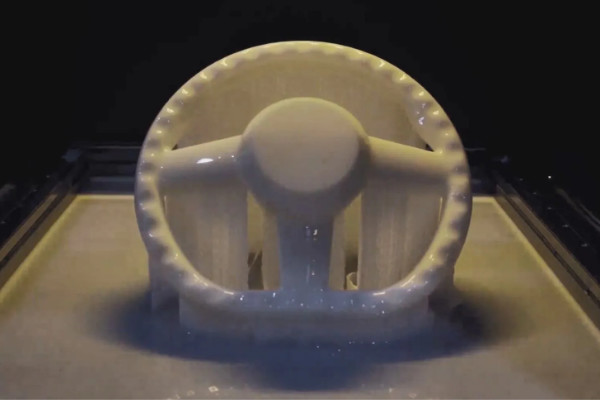
Under Table Industrial SLA
This arrangement is traditionally used in industrial machines with a large print area. The only inconvenience is that the tray must always be filled with photopolymer. Also, when you change the type of resin, you have to completely drain all the photopolymer and thoroughly wash the bath.
Print Example
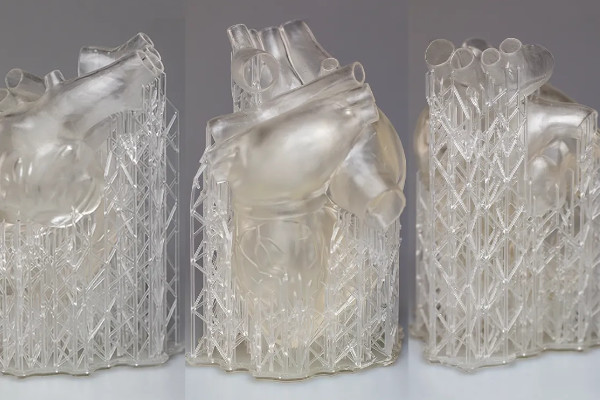
Cardiac muscle printed on Formlabs Form 3

Rings printed with SLA technology

Spoon prototype

Butterfly Figurine Printed on Formlabs Form 3
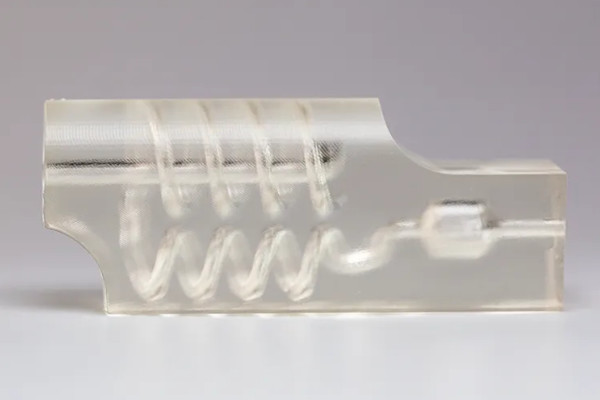
Technical model

Snow shovel prototype. Manufactured on Formlabs Form 3L
Companies like Formlabs have done an amazing job of making SLA accessible and user-friendly, but there’s no getting around the price point. Unless precision is non-negotiable for your workflow, there are better options in 2026.
What Is DLP 3D Printing? (Projector-Based Resin Printing)
DLP stands for Digital Light Processing. Instead of a moving laser, a DLP 3D printer uses a UV projector (similar to a digital cinema projector) to flash an entire layer of the print at once. The projector displays a mask of the layer shape, curing all of the resin in that layer simultaneously.
This is a fundamentally different approach from SLA, and the speed advantage is significant. Whether you’re printing a small ring or a full dental tray, the cure time per layer is roughly the same — because the whole layer is exposed at once, not traced line by line.
Where DLP Excels
- Speed — entire layers cure at once, making DLP significantly faster than SLA
- Consistency — projector-based systems produce very uniform results layer to layer
- No moving optical parts — there are no galvo mirrors, which means fewer mechanical failure points
- Excellent for batch production, dental labs, and industrial workflows
DLP’s Limitations
- Resolution is pixel-based, which can cause ‘voxel’ artifacts on very fine curved surfaces
- Higher upfront cost than MSLA — professional DLP systems start at $2,000 and go well above $10,000
- Projector bulbs can degrade over time, though modern LED-based DLP systems have largely addressed this
Principle of Operation
DLP 3D printers use photopolymer resin to print models. However, unlike SLA, the light source is not a beam, but a DLP projector.
DLP 3D printers are significantly faster because the projector used illuminates the entire layer at once. In contrast, with SLA, the laser only illuminates a small area at a time.
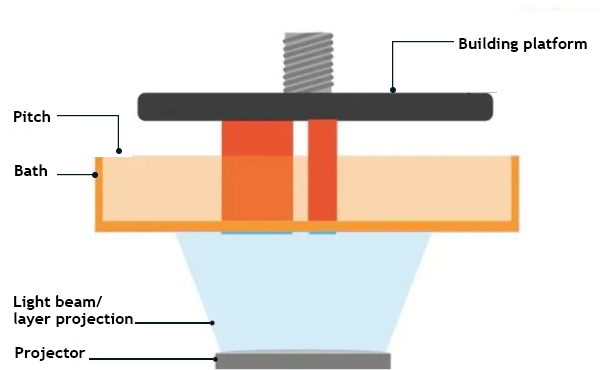
How DLP technology works
The projector is located at the bottom of the printer, under the resin container. The bottom of the container is usually made of transparent, wear-resistant film. The film transmits UV radiation well and nothing sticks to it. Moreover, the film can be easily replaced in case it breaks.
Print Examples

DLP printed ring lot
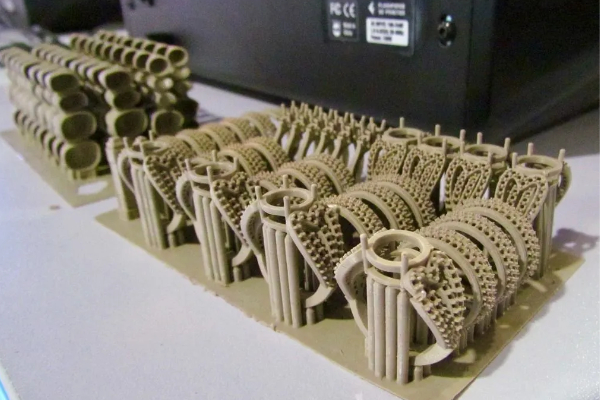
Ring samples printed on FlashForge Hunter

Props for miniatures 28 mm

Jaw mockup made by FlashForge Hunter
For hobbyists and home users, however, DLP is overkill. You’d be spending three to ten times as much for speed advantages that only matter if you’re printing hundreds of parts per week.
What Is MSLA (LCD) 3D Printing — And Why It Dominates in 2026
MSLA stands for Masked Stereolithography Apparatus. It’s also commonly called LCD resin printing or simply ‘resin 3D printing’ in consumer contexts. Like DLP, MSLA cures an entire layer at once — but instead of a projector, it uses a matrix of UV LEDs behind an LCD screen.
The LCD screen acts as a mask. It blocks UV light in the areas that should remain liquid, and allows it through where you want the resin to cure. The result is a full-layer cure in one shot — fast, efficient, and cost-effective.
Here’s what makes MSLA special: the LCD screen is cheap to manufacture and easy to replace. That’s the key insight that changed the entire resin printing industry. By removing the expensive laser and galvo system of SLA, and replacing the costly projector of DLP with an affordable LCD panel, manufacturers were able to build capable machines that sell for a fraction of the price.
Why MSLA Is the Default Choice for 90% of Buyers in 2026
- Entry-level MSLA printers now sell for as little as $200–$300, with enthusiast models in the $400–$800 range
- Resolution has exploded — you can now buy MSLA printers with 12K and even 16K resolution LCD screens
- Tilt-release vat systems (like those on the Elegoo Saturn 4 Ultra and Bambu Lab Photonic M1) dramatically reduce print failures
- Integrated resin heating systems improve layer adhesion and print consistency
- Print speeds have caught up to DLP for most practical use cases
The one real downside of MSLA? The LCD screen wears out over time. You’re typically looking at 2,000–4,000 hours of use before the screen needs replacing. The good news: replacement screens typically cost $30–$80, and the process is usually straightforward. It’s a manageable maintenance cost that’s easy to factor into your budget.
Principle of Operation
LCD technology almost completely copies DLP. However, instead of a project, LCD 3D printers are fitted with LEDs. Under the bath is an LCD display (similar to the display of a smartphone or tablet). The display is dimmed in some places and lets in light only in the right places.

How LCD technology works
Since the module with the screen and LEDs is located at the bottom of the printer, the bottom of the resin container is transparent. As with DLP, transparencies are commonly used.
Print Example

Small miniature made with Anycubic Photon Mono
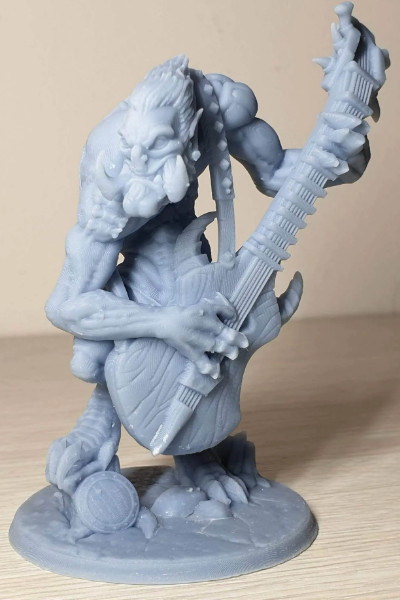
Troll printed on an LCD machine
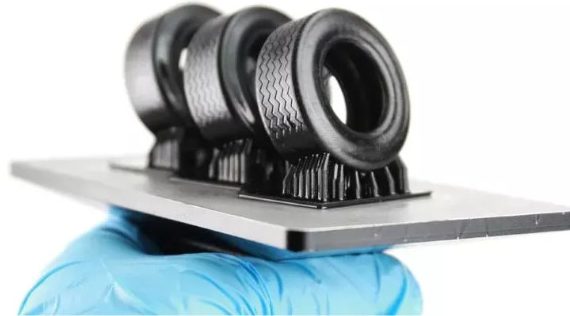
RC tires made of soft polymer

Castle model made with Phrozen Sonic Mini 4K
Anycubic Photon Zero figurine

Troll printed on an LCD printer
Is MSLA Right for You? Quick Checklist
- ☐ You’re a hobbyist, maker, or enthusiast
- ☐ Budget is under $1,000
- ☐ You want high detail without professional-grade prices
- ☐ You’re printing miniatures, props, prototypes, or jewelry
- ☐ You don’t need 24/7 production capability
- ☐ You’re comfortable with basic maintenance (LCD replacement)
If you checked 4+ boxes, MSLA is your best bet.
SLA vs DLP vs LCD — The Key Differences That Actually Matter
Now that you understand how each technology works, let’s look at the factors that actually matter when you’re making a purchase decision in 2026. I’ve added a column for post-processing integration, because this is increasingly becoming a differentiating factor between systems.
| Feature | SLA | DLP | MSLA (LCD) |
|---|---|---|---|
| Print Speed | Slow | Fast | Fast |
| Surface Quality | Best | Very High | Very High |
| Resolution | Analog/Vector | Pixel-based | Pixel-based (12K–16K) |
| Entry Price | $3,000+ | $2,000+ | $200–$800 |
| Maintenance | High (galvos) | Low | Medium (LCD swap) |
| Resin Ecosystem | Strong | Strong | Growing fast |
| Post-Processing | ⭐ Advanced (Formlabs) | ⭐ Advanced (SprintRay) | Basic to Mid |
| Automation Options | ⭐ Yes | ⭐ Yes | Growing |
| Best Use Case | Dental/Jewelry/Precision | Production/24-7 Business | Hobbyist/Prosumer |
One thing worth noting here is the post-processing and wash-and-cure ecosystem. Formlabs has built out an impressive automated workflow for SLA — their Form Wash and Form Cure stations are essentially plug-and-play. SprintRay has done the same for DLP in the dental space. MSLA is catching up, with products like the Elegoo Mercury Plus and Anycubic Wash & Cure stations, but the SLA and DLP ecosystems are currently more mature for professional, hands-off workflows.
SLA vs DLP Resolution — The Truth in 2026
This is probably the most misunderstood part of the SLA vs DLP vs MSLA debate, and it’s worth spending some real time here because the advice floating around online is often outdated.
The traditional narrative goes like this: SLA is better than DLP because it uses a laser (which is inherently smooth and analog), while DLP and MSLA are pixel-based and therefore show ‘jaggies’ or voxel artifacts on curved surfaces. And a few years ago, that was largely true.
In 2026? The gap has nearly closed for most use cases.
Why SLA Still Has a Technical Edge on Resolution
SLA’s laser traces a continuous path — it’s literally drawing in light. There are no pixels. On a perfectly smooth curved surface, like the inside of a ring or a dental crown margin, this can produce results that are genuinely superior to pixel-based technologies.
For applications where this level of precision is clinically or commercially critical — dental devices, jewelry casting, micro-engineering — SLA’s vector-based approach is still worth the investment.
Why the Gap Has Mostly Closed for Everyone Else
Here’s what’s changed: modern MSLA printers now ship with 12K and even 16K resolution LCD screens. At that pixel density, individual pixels are so small that the naked eye cannot perceive them in the final print — especially after sanding or painting.
On top of that, modern slicing software now includes sophisticated anti-aliasing algorithms. These tools blend pixel edges before the print starts, mathematically smoothing out what would otherwise be visible pixel steps. Combined with high-resolution screens, the result is prints that are virtually indistinguishable from SLA output to the untrained eye.
The only exceptions remain truly professional applications where micron-level accuracy is non-negotiable. For everyone else — miniatures, cosplay props, prototypes, jewelry models, mechanical parts — a quality MSLA printer will absolutely deliver the goods.
Scope of Application of SLA, DLP and LCD 3D Printers
Dentistry
Accuracy is very important in dentistry. Even a slight distortion of even 0.1 mm can make the painstaking work of making a crown or prosthesis useless.
SLA 3D printers are used for dentistry because of their high accuracy. Check the models below made by some of the printers.
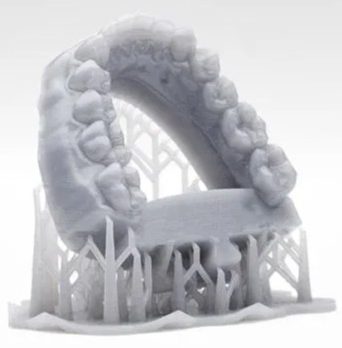
Jaw model

Aligner made using 3D printing
In addition to the accuracy of the printer, the choice of material plays an important role. It is necessary to use special resins with a low percentage of shrinkage.
Here are some guides on dental 3D printing:
- Choosing a Phrozen Dental 3D Printer
- Best 3D Printers for Dentistry
- How to Choose a Dental 3D Printer
Jewelry production
The full potential of photopolymer printers is being unleashed in the jewelry industry. In addition to accuracy, detail and perfect surface quality are very important.
Check some of the prints made by the 3D printers.
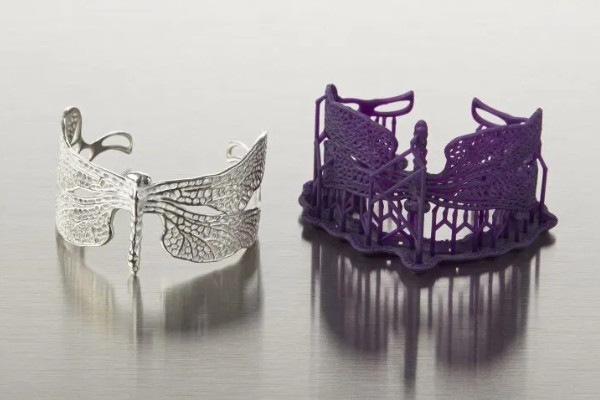
Ring made from burnt-out photopolymer
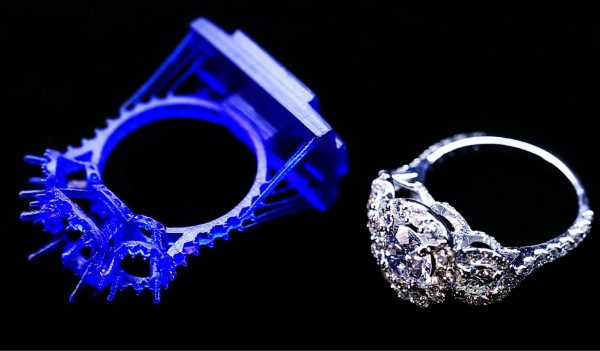
From model to finished product
Previously, such products had to be very painstakingly cut by hand or made from wax on high-precision CNC machines. But now, you can make a digital model and, using a printer and fired resin, quickly produce the required number of products ready for casting.
Prototyping
Resin 3D printers are also used for printing prototypes, making master models, etc. Below are some print examples made using the printers.

Helmet and other prototypes made on a photopolymer printer

Case prototypes
FDM technology is not suitable for everything. Sometimes, you need to quickly make a mock-up of a future product with a smooth surface. In such a case, professional photopolymer printers can easily cope with this task.
Hobby
Affordable resin 3D printers have become a great help for miniature lovers. It is much easier to model and print a 28 mm figurine of your favorite hero than to make it by hand.
Check the print examples of some of the models made using resin 3D printers.

Soviet motorcyclist in 28mm scale

“Spare parts” for miniature 28mm
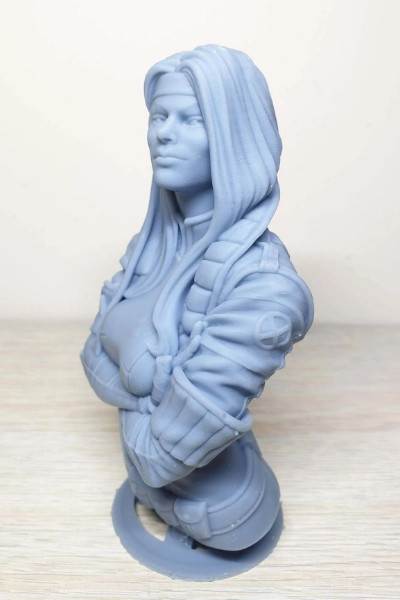
Moreover, large decorative figurines made using resin 3D printers are more accurate than those made using FDM printers. After the LCD printer has finished its work, you don’t have to smoke the model for a long time to smooth out the layers.
For example, check this model of the bust of a girl.

Bust of a girl
Layout
FDM printers can be used for large and schematic layouts. However, their accuracy is not sufficient for making small parts.
When you have a 3D model, you can quickly make an accurate and detailed model of a building or an entire block.
Here are some print examples made using photopolymer 3D printers.

Model of the statue of V.I. Lenin
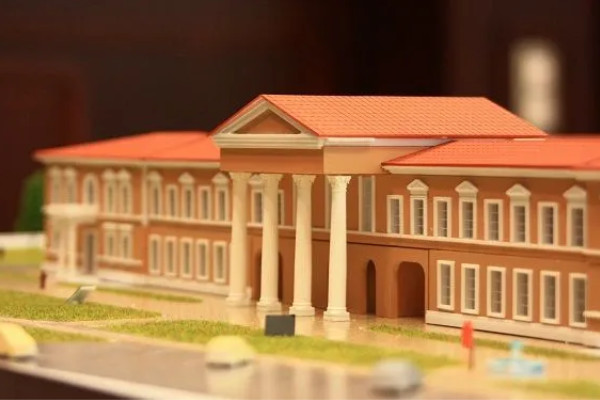
Printed and painted building model
SLA vs DLP Printing Speed — And Why It Matters More Than You Think
Let’s be direct here: SLA is slow. Not slow in an annoying way for occasional prints — slow in a ‘this is a real business constraint’ way if you’re trying to run any kind of production operation.
SLA printers cure resin point-by-point, which means the larger your print (or the more detail it contains), the longer each layer takes. A single large SLA print might take 8–16 hours. DLP and MSLA printers, on the other hand, cure an entire layer in a single exposure — typically somewhere between 1 and 10 seconds per layer. The size and complexity of the print model has almost no effect on layer cure time.
What Does This Mean in Practice?
- Batch printing: With DLP or MSLA, you can fill the entire build plate with parts and they cure at the same speed as a single part. Try that with SLA and you’ll be waiting all night.
- Business workflows: If you’re a dental lab running a DLP printer like the SprintRay Pro 2, you can cycle through multiple print jobs in a single day. An SLA setup simply can’t match that throughput.
- Weekend hobbyists: If you’re printing a few miniatures on a Sunday afternoon, print speed matters less. But it still feels great when a 4-hour job becomes a 90-minute job.
Modern MSLA printers have also introduced some clever speed innovations worth knowing about. Tilt-release vat systems (as opposed to the traditional peel or lift-and-lower mechanism) allow for faster, smoother layer separations with fewer failures. Combined with faster UV LEDs and optimized exposure profiles, some 2026 MSLA machines are genuinely competitive with DLP on speed.
SLA vs DLP Price — The Full Cost Breakdown
Let’s talk money, because this is where the three technologies diverge most dramatically.
Upfront Printer Cost
- SLA: Professional SLA printers from Formlabs (the dominant brand) start at around $3,500 for the Form 4 and go up significantly from there. You’re buying precision engineering, a closed ecosystem, and serious professional support.
- DLP: The DLP landscape is broader. Professional dental-focused machines from SprintRay start at around $5,000–$8,000. Mid-tier DLP options like the Anycubic Photon Ultra 2 are available for $500–$1,200, though these aren’t really comparable to the professional models in terms of consistency.
- MSLA: This is where the value is genuinely staggering. You can buy a capable MSLA printer — the Elegoo Mars 5 Ultra, for example — for under $400. Flagship prosumer MSLA machines like the Elegoo Saturn 4 Ultra or the Bambu Lab Photonic M1 sit in the $500–$800 range.
Ongoing Operating Costs
The printer is only part of the equation. Here’s what you’ll actually spend over time:
- Resin: Resin costs are broadly similar across all three technologies. Most standard resins run $20–$50 per kilogram. Specialized engineering or dental resins can run $80–$200+ per kilogram, but that applies equally to all three printer types.
- SLA maintenance: Galvo mirrors and laser components can degrade. Formlabs’ closed ecosystem means you’re buying their resins and their components, which are priced accordingly. The resin tanks also need regular replacement ($50–$80 each).
- DLP maintenance: Modern LED-based DLP projectors are very durable. Vat replacement is similar to SLA. Overall, DLP tends to have the best uptime-to-cost ratio for production environments.
- MSLA maintenance: LCD screens wear out. Replacement screens typically cost $30–$80, and most intermediate users replace them every 1–2 years depending on print volume. This is genuinely a manageable cost.
Total Cost of Ownership (3 Years)
*Includes printer, resin, maintenance, and replacement parts over 3 years of regular use
SLA vs DLP Resin — Is There Actually a Difference?
Here’s a question that comes up a lot: do you need different resins for SLA, DLP, and MSLA printers? The answer is: mostly no, but the details matter.
In terms of the basic chemistry, most resins are broadly compatible across technologies. Standard hobby resins, ABS-like resins, water-washable resins, and many specialty formulations will work in both MSLA and DLP printers, and some are compatible with SLA as well.
Where things get more nuanced:
- Closed ecosystems: Formlabs SLA printers use proprietary, cartridge-based resins. This gives you a curated, well-tested experience, but you’re locked into Formlabs’ pricing.
- Exposure calibration: Even if a resin is technically compatible with your printer, performance depends heavily on proper exposure settings. Different printers cure resin at different intensities, and the same resin may need significantly different layer exposure times between an SLA, DLP, and MSLA machine.
- UV wavelength: SLA lasers typically operate at 405nm. Most DLP and MSLA systems also use 405nm LEDs, but some industrial DLP systems use different wavelengths. Always verify compatibility before buying specialty resins.
For the vast majority of users, resin compatibility isn’t a significant decision factor. The MSLA resin ecosystem is now massive — hundreds of resins from brands like Elegoo, Anycubic, Siraya Tech, Phrozen, and more are well-supported, with community-tested exposure profiles available online.
SLA vs DLP vs MSLA — Which Should You Actually Choose? (The Honest Guide)
Okay, here’s the section you’ve been waiting for. Let’s match the technology to the actual use case, no hedging.
| Your Use Case | Best Technology | Recommended Machine |
|---|---|---|
| Tabletop miniatures & figurines | MSLA | Elegoo Mars 5 Ultra |
| Jewelry masters / casting | SLA or MSLA | Formlabs Form 4 / Saturn 4 Ultra |
| Dental appliances / models | SLA or DLP | Formlabs Form 4 / SprintRay Pro 2 |
| Batch production / business | DLP | SprintRay Pro 2 / Asiga Max UV |
| General hobby / cosplay props | MSLA | Elegoo Saturn 4 Ultra |
| First resin printer / beginner | MSLA | Elegoo Mars 5 Ultra |
| Large-format prints | MSLA | Anycubic Photon Mono M7 Max |
| Engineering prototypes | MSLA or DLP | Bambu Lab Photonic M1 |
The pattern is pretty clear. Unless you have a specific professional need — dental, jewelry, or high-volume production — MSLA is the right call. It’s not a consolation prize. In 2026, MSLA machines are genuinely capable, mature, and well-supported. The early days of dodgy LCD panels and inconsistent layer adhesion are long gone.
Compare Current Prices on Top MSLA Printers →
Saturn 4 Ultra, Mars 5 Ultra, Photon M7 Max, and Bambu Lab Photonic M1 — all in one place
SLA vs DLP vs FDM — Which Technology Is Actually Better?
We should address the bigger question that many first-time buyers have: should you even be getting a resin printer, or would an FDM (Fused Deposition Modeling) printer be better?
This is genuinely a ‘different tools for different jobs’ situation. Here’s the honest breakdown:
When FDM Wins
- Structural strength: FDM printers can print in engineering materials like PETG, ASA, PC, nylon, and carbon fiber composites. If you need parts that will actually take load or withstand heat, FDM is your technology.
- Large prints: FDM build volumes are typically much larger. A large print volume FDM printer like the Bambu Lab X1C can print objects that would be impossible on most resin machines.
- Cheaper to run: Filament is generally cheaper per unit volume than resin, especially for large objects.
- Less messy: There’s no toxic liquid to handle, no IPA washing, no UV curing station required. FDM is significantly more beginner-friendly from a safety standpoint.
When Resin Wins (SLA, DLP, or MSLA)
- Surface detail: Resin printing produces significantly finer surface detail than FDM. Layer lines are typically 25–100 microns on resin vs. 100–300 microns on FDM, and resin surfaces are smooth right off the printer.
- Miniatures and small parts: FDM simply cannot compete with resin for small-scale, highly detailed objects. Miniatures, jewelry, dental models, action figure parts — resin every time.
- Surface finish: Resin prints require minimal post-processing to achieve a professional appearance. FDM prints typically require sanding, priming, and filling to achieve comparable results.
Many experienced makers own both an FDM printer and a resin printer, using each for what it does best. If you have to choose one, base the decision on what you want to print most.
Best SLA, DLP, and MSLA Printers in 2026
Let’s get specific. Here are the printers we’d actually recommend in 2026, organized by technology and use case.
Best Entry-Level MSLA
- ✓ Elegoo Mars 5 Ultra
- ✓ 9K Mono LCD
- ✓ Tilt-release vat
- ✓ Perfect for beginners
Best Overall MSLA
- ✓ Elegoo Saturn 4 Ultra
- ✓ 12K Mono LCD
- ✓ Resin heating system
- ✓ Best value in 2026
Best Large Format
- ✓ Anycubic Photon Mono M7 Max
- ✓ 12K resolution
- ✓ Massive build volume
- ✓ Batch printing king
🔷 Best SLA Printers — Professional Precision
Formlabs Form 4 — The professional SLA standard. If you’re in a dental lab, engineering firm, or jewelry studio, the Form 4 delivers unmatched consistency, a mature resin ecosystem, and proper professional support. It’s expensive, but it’s built for exactly this purpose. Starting at around $3,500.
Formlabs Form 4L — The large-format version of the Form 4, for when you need SLA precision at scale. Ideal for creating full dental arches, large jewelry collections, or engineering assemblies in a single print. The build volume is a game-changer for professional workflows.
🔷 Best DLP Printers — Production and Business
SprintRay Pro 2 — The gold standard for dental DLP printing. The Pro 2 is engineered for all-day, every-day production use. Integrates seamlessly with SprintRay’s wash and cure ecosystem, and the company provides proper clinical-grade material validation. If you’re a dental professional, this is your machine.
Asiga Max UV — Another serious professional DLP option with a strong presence in dental, audiology (hearing aid shells), and jewelry. Known for exceptional accuracy and a robust, configurable resin ecosystem.
Anycubic Photon Ultra 2 — For users who want DLP technology without the full professional price tag. A prosumer-level DLP machine that offers genuine speed advantages over MSLA at a more accessible price point.
🔷 Best MSLA Printers — The Choice for Most Buyers
Elegoo Saturn 4 Ultra — Our top pick for prosumers and serious enthusiasts. The Saturn 4 Ultra features a 12K mono LCD, a tilt-release vat system for faster and more reliable prints, and an integrated resin heating system. It’s the machine that makes you wonder why you’d spend more.
Bambu Lab Photonic M1 — Bambu Lab’s entry into the resin space brings the same polished, user-friendly approach they’re known for in FDM. The Photonic M1 features excellent software integration, smart auto-calibration, and a refined out-of-box experience. A strong choice if you value ease of use alongside performance.
Elegoo Mars 5 Ultra — The best entry-level MSLA printer you can buy right now. Excellent print quality, small footprint, and a price that makes it an easy first purchase. If you’re new to resin printing, start here.
Anycubic Photon Mono M7 Max — For those who need a large MSLA build volume without going to SLA or DLP. The M7 Max offers a massive build plate with impressive 12K resolution. Perfect for printing larger props, figures, or batch-running many smaller parts simultaneously.
Want Hands-On Reviews Before You Buy? →
Check out our full review series for each of these printers — real test prints, real user experience, real verdict.
Pros and Cons Summary — The Quick Reference
SLA (Stereolithography)
- ✅ Smoothest surface finish, especially on organic curves
- ✅ Vector-based curing — no pixel artifacts
- ✅ Best-in-class precision for professional applications
- ✅ Mature, validated resin ecosystem (especially Formlabs)
- ❌ Expensive — entry price is $3,000+
- ❌ Slow — not suitable for batch production
- ❌ Moving parts (galvo mirrors) add maintenance complexity
- ❌ Closed ecosystems can lock you into proprietary materials
DLP (Digital Light Processing)
- ✅ Fast — entire layers cure at once
- ✅ Consistent and reliable for production environments
- ✅ No moving optical parts — simpler mechanically
- ✅ Best uptime ROI for business use
- ❌ Higher upfront cost than MSLA
- ❌ Pixel-based resolution (though largely mitigated in 2026)
- ❌ Professional models can be very expensive ($5,000–$20,000+)
MSLA / LCD
- ✅ Best value — incredible capability at $200–$800
- ✅ Fast layer cures (mono LCDs)
- ✅ High resolution — 12K and 16K screens available
- ✅ Huge and growing resin ecosystem
- ✅ Most buyer-friendly ecosystem with active communities
- ❌ LCD screens wear out and need periodic replacement
- ❌ Less mature post-processing automation vs. SLA/DLP
- ❌ Quality varies widely between brands — research matters
Frequently Asked Questions
What is the difference between SLA and DLP 3D printing?
SLA (Stereolithography) uses a UV laser to cure resin point-by-point in a continuous path, while DLP (Digital Light Processing) uses a UV projector to cure an entire layer of resin at once. This makes DLP significantly faster than SLA for most print jobs. SLA tends to produce slightly smoother curves due to its vector-based curing approach, while DLP is preferred for production environments where speed and consistency are prioritized.
Is DLP better than SLA for 3D printing?
It depends entirely on your use case. DLP is better than SLA for speed, production volume, and business workflows — especially in dental labs and manufacturing environments. SLA is better for applications where surface finish precision is critical, like fine jewelry or dental crown margins, and where the smoother, vector-based output justifies the higher cost and slower speed.
What is MSLA in 3D printing?
MSLA stands for Masked Stereolithography Apparatus. It works by placing an LCD screen between an array of UV LEDs and the resin vat. The LCD acts as a mask, allowing UV light to pass through only in the areas that correspond to the current print layer. Like DLP, MSLA cures entire layers at once. It’s the most common consumer resin printing method in 2026, offering an excellent balance of price, performance, and print quality.
Can I use the same resin in an SLA, DLP, and MSLA printer?
In most cases, yes — though with some important caveats. Most standard hobby and engineering resins are broadly compatible across all three technologies. The key variable is exposure calibration: each printer cures resin at a different intensity, so you’ll need to adjust layer exposure times. Formlabs SLA printers use a proprietary cartridge system with locked resins. Most DLP and MSLA printers accept third-party resins freely.
Which resin 3D printer is best for beginners in 2026?
For beginners, an MSLA printer is the clear recommendation. The Elegoo Mars 5 Ultra offers exceptional print quality at a beginner-friendly price, with a large and supportive community online. The MSLA format is easy to work with, well-documented, and benefits from years of accumulated wisdom in places like Reddit’s r/resinprinting community. You don’t need to spend more than $300–$400 to get excellent results.
Are MSLA printers as good as SLA printers?
For most applications in 2026, yes — and in some ways better. Modern MSLA printers with 12K–16K screens, anti-aliasing slicers, and tilt-release vat systems produce prints that are functionally indistinguishable from SLA output for the vast majority of use cases. The only area where SLA still holds a clear advantage is in true precision applications (dental, jewelry) where the vector-based, non-pixelated curing produces marginally superior results on curved surfaces.
How long do LCD screens last in MSLA printers?
LCD screens in MSLA printers typically last 2,000–4,000 hours of print time, depending on usage patterns and the specific screen used. Most casual hobbyists will get 1–3 years out of their original screen. Replacement screens typically cost $30–$80 and can be swapped in 10–20 minutes on most printers. It’s a manageable and expected maintenance cost, not a dealbreaker.
Final Verdict — Which Resin 3D Printer Should You Buy in 2026?
Let’s bring it all home. After everything we’ve covered, here’s the clear, confident recommendation:
| If You Are… | Get This Technology | Our Top Pick |
|---|---|---|
| A hobbyist, maker, or enthusiast | MSLA | Elegoo Saturn 4 Ultra |
| Just starting out with resin printing | MSLA | Elegoo Mars 5 Ultra |
| Printing minis, cosplay, or props | MSLA | Anycubic Photon Mono M7 Max |
| A jewelry professional / casting master | SLA or MSLA | Formlabs Form 4 |
| A dental professional or lab | SLA or DLP | SprintRay Pro 2 |
| Running a production business | DLP | SprintRay Pro 2 |
| Want the best value all-rounder | MSLA | Bambu Lab Photonic M1 |
Here’s the bottom line: if you’re reading this article trying to decide between SLA and DLP, there’s a very good chance what you actually need is an MSLA printer. Don’t let the traditional ‘SLA vs DLP’ framing lead you toward spending more than you need to. In 2026, MSLA machines deliver professional-quality results at hobbyist prices, and the technology is only getting better.
The printers we’ve recommended — the Saturn 4 Ultra, Mars 5 Ultra, Photon M7 Max, and Bambu Lab Photonic M1 — are all machines we’d feel good recommending to a friend. They represent the current best-in-class at each price point, and any of them will give you an excellent entry into the world of resin 3D printing.
Check out our full hands-on reviews and price comparisons for the Saturn 4 Ultra, Mars 5 Ultra, Photon M7 Max, and more — all the information you need in one place.
Happy printing.

