

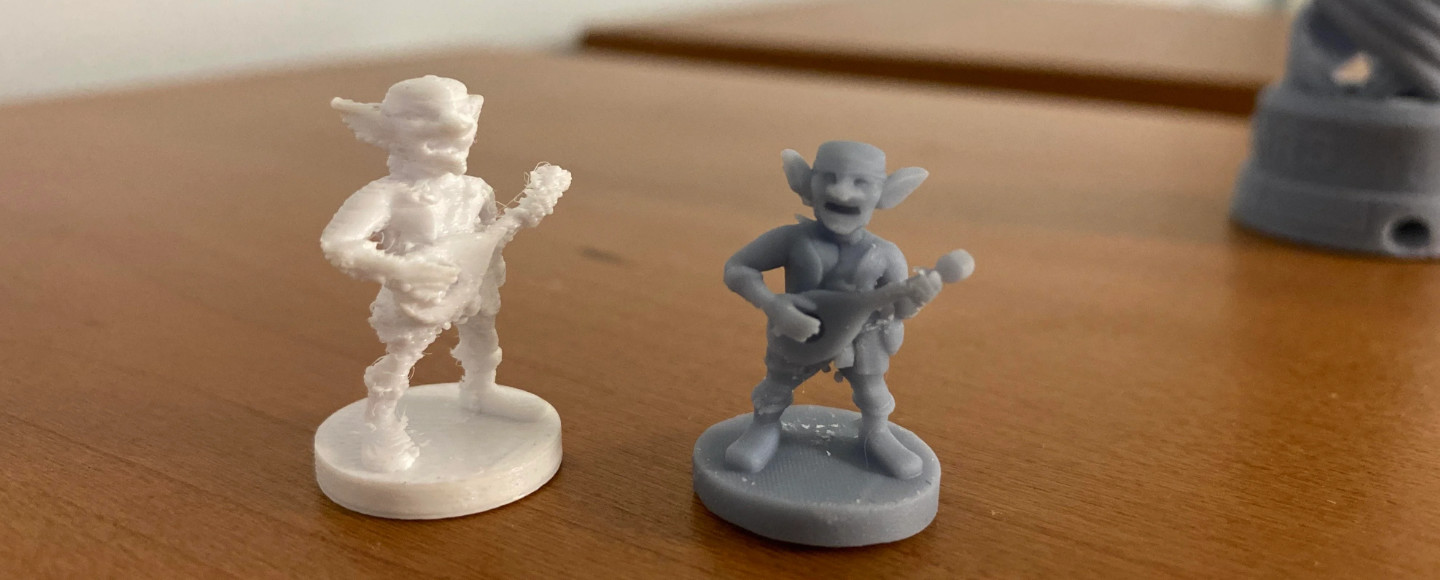
So, you’ve decided you want a 3D printer. You’ve done some Googling, fallen down a Reddit rabbit hole, and now you’re staring at two completely different-looking machines wondering: FDM or SLA? Filament or resin? Which one is actually worth your money?
Here’s the honest answer: both are great — but for completely different things. The problem is that most comparisons online are either written by people selling you something, or they’re so deep in the specs that they forget to explain what actually matters in real life.
That’s not what this is. This guide cuts through the noise and tells you exactly which technology is right for your specific situation — whether you’re a total beginner, a miniature painter, an engineer prototyping functional parts, or just someone who wants to print cool stuff without losing your mind.
📌 2026 Technology Update
High-speed FDM machines now push 300–500mm/s on CoreXY setups. SLA printers have jumped to 12K and 14K resolution, and tough engineering resins have gotten dramatically better. So if you read a comparison from a couple of years ago, some of that advice is already outdated. Let’s get into it.
FDM vs SLA – Quick Comparison (TL;DR Table)
Not here for the deep dive? No problem. Here’s the short version:
| Feature | FDM | SLA |
|---|---|---|
| Print Quality | Visible layer lines | Ultra-smooth |
| Speed | Fast (300–500mm/s) | Faster for batch small parts |
| Strength | Strong (PLA, PETG, ABS) | Brittle unless tough resin |
| Material Cost | Low ($15–$30/kg) | Higher ($25–$60/500ml) |
| Printer Cost | Budget-friendly ($200–$600) | Entry-level ($200+), hidden costs |
| Ease of Use | Beginner-friendly | Messier, post-processing required |
| Best For | Functional parts, large prints | Miniatures, jewelry, detailed models |
| Safety | Generally safe | Resin is toxic — PPE required |
⚡ Quick Verdict
Choose FDM for strength, affordability, and ease of use. Choose SLA when surface quality and fine detail are non-negotiable.
Ready to find your perfect printer?
Still with me? Good. Let’s break down exactly what makes each technology tick — and more importantly, what that means for you.
What Is FDM 3D Printing? (The Filament Method Explained)
FDM stands for Fused Deposition Modeling — though you’ll also see it called FFF (Fused Filament Fabrication). It’s the technology behind the most popular consumer 3D printers in the world, and chances are, it’s what you picture when someone says ‘3D printer.’
Here’s how it works: a spool of plastic filament (usually 1.75mm in diameter) feeds into a heated nozzle called a hotend. The nozzle melts the plastic and deposits it layer by layer onto a build plate, building up your object from the bottom up. This process is called thermoplastic deposition — you’re essentially drawing with melted plastic, one layer at a time.
✅ What FDM Does Well
- Affordable to buy and run — entry-level printers start around $200, and filament costs $15–$30 per kilogram
- Strong, functional parts — materials like PETG, ABS, ASA, and Nylon are genuinely tough
- Large build volumes — many FDM printers offer 220mm x 220mm or larger beds
- Beginner-friendly — load filament, slice your file, hit print
- Wide material compatibility — PLA, PETG, ABS, ASA, TPU, Nylon, carbon fiber-filled filaments, and more
- Fast iteration — print, test, tweak, repeat
❌ Where FDM Falls Short
- Visible layer lines — the stacked-layer look is the trade-off for speed and cost
- Lower surface detail — fine textures, tiny text, and intricate geometry don’t reproduce as crisply
- Warping and stringing — especially with ABS and high-temp materials, you’ll need to dial in settings
The 2026 generation of CoreXY machines like the Bambu Lab P1S and Creality K1 Max have made FDM faster and more reliable than ever. These aren’t the fiddly printers of five years ago — they’re genuinely capable production tools.
💡 Bottom Line on FDM
It’s the practical workhorse of 3D printing. If you need something that works, fits, holds together, and doesn’t cost a fortune — FDM delivers.
What Is SLA 3D Printing? (The Resin Method Explained)
SLA stands for Stereolithography Apparatus — the original resin printing technology. When people say FDM vs resin, they’re usually referring to SLA (and its close cousin, MSLA/LCD resin printing). The core idea is fundamentally different from FDM: instead of building up melted plastic, SLA uses UV light to cure liquid photopolymer resin into a solid.
In traditional SLA, a UV laser traces each layer of your model onto the surface of the resin. In the more common (and more affordable) MSLA/LCD variants, a monochrome LCD screen exposes an entire layer at once using UV light — which is why modern resin printers are so dramatically faster than older SLA machines.
The result of this UV polymerization process? Incredibly fine detail, smooth surfaces, and dimensional accuracy that FDM simply cannot match at a similar price point.
✅ What SLA Excels At
- Surface quality — smooth, almost injection-mold-like finishes straight off the printer
- Resolution — 12K and 14K LCD screens in 2026 can resolve details smaller than 0.05mm
- Dimensional accuracy — tight tolerances make SLA ideal for dental, jewelry, and engineering prototypes
- Miniatures and figurines — the level of detail is extraordinary
- Batch printing — print dozens of small parts simultaneously without sacrificing quality
❌ Where SLA Is Challenging
- Post-processing is mandatory — every print needs washing (usually in IPA) and UV curing
- Resin handling requires care — liquid resin is toxic, requires gloves, good ventilation, and careful disposal
- Higher running costs — resin is more expensive per volume than filament
- Smaller build volumes — most resin printers max out around 200mm x 125mm
- Brittleness — standard resins crack and shatter under stress (though tough and engineering resins have improved significantly in 2026)
💡 Bottom Line on SLA
If visual perfection is your goal — if you’re painting miniatures, creating display pieces, or prototyping something that needs to look flawless — SLA is in a different league. But it comes with a steeper learning curve and more ongoing effort.
FDM vs SLA Print Quality: Surface Finish vs Precision
This is where the two technologies are furthest apart, and it’s the biggest factor for most buyers.
Visual Quality — What You Can See
FDM prints have visible layer lines. Even a well-tuned printer with a 0.1mm layer height will leave striations on curved and angled surfaces. You can reduce this with sanding, priming, and post-processing, but it takes time and skill. On flat, vertical surfaces, FDM can look excellent — but on organic shapes and curved surfaces, the layering shows.
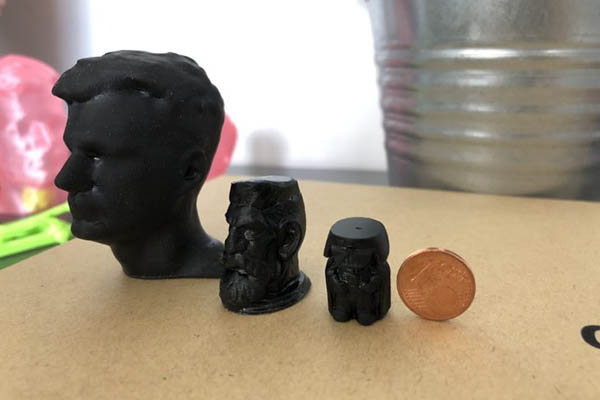
FDM prints have visible layers
SLA prints look almost magically smooth. Because the UV curing process doesn’t rely on stacking melted beads of plastic, the surface finish is limited primarily by the screen resolution — and at 12K or 14K in 2026, that resolution is exceptional. When you pull a miniature off an SLA printer, it often looks better than the digital render.
🔍 Real-World Observation
If you’ve ever held a high-quality resin print next to an FDM print and wondered why one looks like a toy and the other looks like a prototype, this is why. The technology is fundamentally different.
Dimensional Accuracy — What You Can Measure
This is where things get more nuanced. FDM has improved considerably, but typical dimensional tolerances hover around ±0.2mm, and warping (especially on larger ABS prints) can push that further. For parts that need to snap-fit together or interface with hardware, this matters.
SLA prints, by contrast, can achieve tolerances tighter than ±0.1mm under the right conditions. The main source of dimensional error in resin printing is photopolymer shrinkage during curing — but with careful calibration and the right exposure settings, SLA parts fit precisely.
| Application | Winner | Why |
|---|---|---|
| Engineering fit (small parts) | SLA | Tighter tolerances, better detail |
| Large structural parts | FDM | Minor dimensional variation matters less |
| Display models | SLA | Superior surface finish |
| Functional prototypes | FDM | Speed and material properties |
FDM vs SLA Strength: Which Prints Are Tougher?
Here’s one of the most common misconceptions: people assume that because SLA prints look more premium, they must be stronger. In most cases, that’s backwards.
Standard SLA resin is brittle. Drop a resin print on a hard floor and it often shatters. The photopolymer crosslinks during curing in a way that creates a rigid but brittle matrix. It’s great for preserving detail, but it doesn’t absorb impact or flex under load.
FDM thermoplastics, on the other hand, are real engineering materials. PETG is tough and impact-resistant. ABS has good temperature resistance and durability. Nylon is flexible, self-lubricating, and extremely durable. Even basic PLA, while not the strongest option, outperforms standard resin in most mechanical use cases.
Need strong, functional parts? See our top picks for Best 3D Printers for Prototyping
The 2026 Update on SLA Strength
It’s worth noting that tough resins and engineering resins have come a long way. Products like Siraya Tech Blu, Elegoo ABS-Like resin, and Phrozen’s engineering resins offer significantly improved impact resistance and flexibility compared to standard resins from a few years ago. If you need the detail of SLA but more durability, these are increasingly viable options.
Real-World Strength Comparison
| Application | Recommended Technology |
|---|---|
| Functional brackets, enclosures, jigs | FDM (PETG or ABS) |
| Display models, figurines, visual prototypes | SLA |
| Snap-fit clips, living hinges | FDM (TPU or PETG) |
| Dental models, jewelry castings | SLA |
| High-impact mechanical parts | FDM (Nylon or CF-filled) |
| Fine mechanical tolerances with light loads | SLA (engineering resin) |
⚡ Strength Rule of Thumb
If it needs to survive real use, default to FDM. If it needs to look incredible and won’t be stressed mechanically, go SLA.
FDM vs SLA Speed in 2026: Killing the Outdated Myths
The old saying used to be that SLA is slow and FDM is fast. In 2026, that’s only half-true — and it depends entirely on what you’re printing.
How Fast Is Modern FDM?
The current generation of CoreXY FDM printers has shattered previous speed limits. Machines like the Bambu Lab P2S, Creality K1 Max, and various Voron-derived printers routinely print at 300–500mm/s with input shaping and pressure advance compensating for the vibration. A print that would have taken 6 hours on a budget Ender 3 can now be done in under 2 hours on a modern speed machine.
For single, large objects — think a 200mm vase, a helmet section, or a drone chassis — modern FDM is genuinely fast.
How Does SLA Speed Compare?
Here’s the thing about resin printing: it’s layer-based, and each layer takes roughly the same amount of time to expose regardless of how many parts are on the build plate. That means if you fill the build plate with 20 small parts, you print them all in the same time it would take to print one. For batch production of small, detailed items — jewelry blanks, miniatures, dental models — SLA is dramatically faster per-unit.
But for single large objects, SLA is slower because build volumes are smaller and you often have to orient parts diagonally to maximize the print area.
The Speed Verdict
- Single large object — FDM wins (especially on CoreXY machines)
- Batch of small, detailed parts — SLA wins by a wide margin
- Quick functional prototype — FDM (faster setup, no washing/curing)
- Production miniatures or jewelry — SLA (more efficient per-unit)
FDM vs SLA Cost Breakdown: The True Cost in 2026
Let’s talk money — and let’s be brutally honest about the full picture, because the sticker price on a resin printer is only part of the story.
| Cost Item | FDM | SLA |
|---|---|---|
| Printer (entry-level) | $200–$400 | $200–$350 |
| Printer (mid-range) | $400–$700 | $350–$600 |
| Material per kg/L | $15–$30/kg | $25–$60/500ml |
| IPA (cleaning) | Not needed | $15–$25/L |
| UV Curing Station | Not needed | $30–$80 |
| Safety Gear (PPE) | Not needed | $20–$40 ongoing |
| FEP Film Replacement | Not needed | $10–$20 each |
| Maintenance (annual) | Low (~$30–$60) | Moderate (~$80–$150) |
The Hidden Costs of SLA (Read This Before You Buy)
This is where a lot of first-time resin printer buyers get surprised. The printer itself might seem comparably priced to an FDM machine — but the ongoing costs tell a different story:
⚠️ Hidden SLA Costs
- Isopropyl Alcohol (IPA): You need this to wash every single print. A litre goes fast. This is an ongoing cost that adds up, especially if you’re printing frequently.
- Nitrile gloves and respirator: Liquid resin is toxic. You’ll need to handle it carefully every time — gloves are not optional, and good ventilation or a respirator is strongly recommended.
- UV curing station: After washing, prints need UV curing to finish hardening. Many entry-level resin printers don’t include one. Budget $30–$80 extra.
- FEP film replacement: The clear film at the bottom of the resin vat degrades over time and needs periodic replacement. Figure on replacing it every few hundred layers of printing, or when you start seeing clouding.
- Failed prints waste resin: Resin prints fail more dramatically than FDM. A failed print wastes the resin that was already in the vat — and you’ll have failed prints, especially early on.
None of this means SLA is a bad investment. It means you need to go in with clear eyes about what you’re actually signing up for. If you’re just dipping your toes into 3D printing, FDM is the much more forgiving entry point.
On a budget? FDM is your best bet for low running costs.
Cost Per Successful Print
When you factor in material cost, waste rate, and consumables, FDM comes out significantly cheaper per successful print for most use cases. SLA becomes more cost-competitive when you’re printing batches and when the detail it provides has genuine value (like professional miniature production or dental workflows).
FDM vs SLA for Beginners: Where Should You Start?
If you’re brand new to 3D printing, the choice here is pretty clear: start with FDM.
SLA adds a layer of complexity that can be genuinely overwhelming when you’re still learning the basics. You’re dealing with toxic liquids, mandatory post-processing, UV curing timing, FEP film maintenance, and a much less forgiving failure mode. When a resin print fails and the model sticks to the FEP instead of the build plate — which happens — it can be a significant cleanup job.
Safety and Environment
This is a bigger factor than people often admit. FDM filament is generally safe to handle, and while you should have decent ventilation, it’s not chemically hazardous in the way resin is. SLA resin, on the other hand, is photosensitive and can cause skin sensitization with repeated exposure. You need gloves every time, proper disposal of waste resin and contaminated IPA, and a workspace with good airflow.
For a parent setting up a printer for kids, or someone in a small apartment without ventilation options, FDM is the clear winner from a safety standpoint.
✅ Verdict for Beginners
Start with FDM. Get comfortable with slicing, bed adhesion, and print settings. Once you’re confident — and if you want the fine detail that only resin provides — then explore SLA. You’ll appreciate it much more if you already understand the basics.
New to 3D printing? Start your journey with our beginner-friendly picks.
FDM vs SLA for Miniatures: Is Filament Finally Catching Up?
This is the question that miniature hobbyists — Warhammer players, D&D enthusiasts, historical modelers — ask constantly. And it’s a fair question, because FDM has improved dramatically.
🎨 Honest Answer
For miniatures in 2026, SLA still wins. It’s not even particularly close.
Why SLA Dominates for Miniatures
The level of detail you can achieve with a 12K or 14K resin printer is extraordinary. Individual scale chainmail links. Hair strands. Facial expressions on a 28mm figure. Rivets on armor. These aren’t things FDM can currently reproduce, no matter how well you tune it.
The smooth surface finish of SLA also means you spend less time prepping before painting. Resin miniatures are closer to ‘print and paint’ — which is exactly what miniature hobbyists want.
How Close Is FDM Getting?
The 0.2mm nozzle FDM setups have gotten better at reproducing detail than they were even two years ago. If you have a well-tuned, high-end FDM machine and you’re printing at 0.05mm layer heights with a 0.2mm nozzle and a very slow print speed, you can get results that are genuinely impressive. But you need to spend a lot of time on calibration, and the layer lines are still visible without post-processing.
For casual miniature printing where you don’t mind some surface prep — or for large-scale terrain where layer lines matter less — FDM is a reasonable option. But if you want the best miniatures and you want them consistently without extensive post-processing? SLA is the answer.
| Miniature Type | Recommended Technology |
|---|---|
| Tournament-level painted miniatures | SLA |
| Dungeon terrain and scatter pieces | FDM (acceptable quality, much faster) |
| Hero models with fine detail | SLA |
| Large scale scenery (buildings, walls, trees) | FDM |
Ready to print professional-quality miniatures?
FDM vs SLA vs SLS vs DLP: The Full Technology Breakdown
You might have seen the FDM vs SLA vs SLS vs DLP comparison floating around and wondered where DLP and SLS fit. Here’s a quick, honest breakdown:
| Technology | How It Works | Best For |
|---|---|---|
| FDM Fused Deposition Modeling |
Filament-based extrusion through heated nozzle | Mainstream choice. Affordable, strong, beginner-friendly. The workhorse. |
| SLA Stereolithography |
UV laser cures liquid resin point-by-point | Original resin technology. High detail. Generally what ‘resin printing’ means colloquially. |
| MSLA/LCD Masked SLA |
LCD screen exposes entire layer at once via UV array | Most consumer “SLA” printers are actually MSLA. Faster than true SLA. Affordable. |
| DLP Digital Light Processing |
Projector cures entire layers at once | Very fast, excellent accuracy. Common in professional/dental applications. More expensive. |
| SLS Selective Laser Sintering |
Laser fuses powder (usually nylon) layer by layer | No support structures needed. Excellent mechanical properties. Industrial-grade ($5,000–$15,000+). |
For most people reading this, the choice is FDM vs resin (MSLA). SLS is excellent but priced for professionals and serious enthusiasts. DLP overlaps heavily with SLA for practical purposes.
📌 Key Takeaway
For the vast majority of buyers in 2026: FDM or MSLA resin. Everything else is niche or industrial. Don’t overthink it.
FDM vs SLA: Which One Should You Actually Choose?
Alright — this is the part where we stop hedging and get specific. Here’s a decision framework that works for most people:
| If You Want To… | Choose |
|---|---|
| Print miniatures or ultra-detailed models | SLA |
| Build functional parts, brackets, or enclosures | FDM |
| Keep costs low overall | FDM |
| Get smooth, ready-to-display finishes | SLA |
| Print large objects | FDM |
| Get started with 3D printing as a beginner | FDM |
| Create dental, medical, or jewelry prototypes | SLA |
| Print flexible or high-temp resistant parts | FDM (TPU/Nylon/ABS) |
The 30-Second Self-Quiz
Not sure where you fall? Answer these questions honestly:
- Do you want to just hit print and get parts without a chemistry lesson? → FDM
- Are you excited about painting detailed figurines or creating display-quality models? → SLA
- Do you have a dedicated workspace with ventilation and don’t mind a proper workflow? → SLA is worth considering
- Are you setting up a printer in a living space, bedroom, or shared area? → FDM for safety and convenience
- Is your main use case functional parts, cosplay props, or RC components? → FDM
- Do you need to produce multiples of small, identical, detailed parts? → SLA wins on efficiency
💡 Pro Tip
Still genuinely torn? Buy FDM first. If you outgrow it and find yourself wishing for more detail, you’ll know exactly why you want to add a resin printer. Many serious makers have both.
Made your decision? Check out our top picks for each technology.
Best FDM and SLA Printers in 2026: Our Top Picks
Here are our honest recommendations based on performance, reliability, and real-world value — not just specs on paper.
Best FDM Printers in 2026
Budget Pick
Creality Ender 3 V3 SE
At around $180–$220, the Ender 3 V3 SE is genuinely impressive for its price. Auto bed leveling, direct drive extruder, and a significantly improved hotend compared to its predecessors. If you want to get into FDM printing without a big commitment, this is the safest entry point. It prints reliably, the community support is huge, and upgrades are easy to find.
Best for: Complete beginners, anyone on a tight budget, first-time 3D printer owners.
Check Latest Price on Amazon Check Latest Price on Official Website
Mid-Range Pick
Bambu Lab P1S
The Bambu Lab P1S sits around $600 and represents the best value in mid-range FDM in 2026. CoreXY motion system, 300mm/s+ print speeds out of the box, multi-color capability with the AMS add-on, and a slicing ecosystem that genuinely makes printing easier. This is the machine that turned a lot of skeptics into believers.
Best for: Makers who want speed and reliability without spending Bambu X1C money.
Check Latest Price on Amazon Check Latest Price on Bambu Store
High-End Pick
Bambu Lab X1-Carbon
If budget isn’t your primary constraint and you want the best FDM experience available in 2026, the X1-Carbon ($1,199) is the benchmark. Carbon fiber reinforced build chamber, LiDAR-assisted first layer calibration, AI spaghetti detection, 500mm/s capable speeds. It’s the printer that professional prototypers and content creators trust for consistent, high-quality output.
Best for: Professional users, high-volume printing, anyone who wants the best.
Best SLA (Resin) Printers in 2026
Beginner Resin
Elegoo Saturn 4
Elegoo has consistently delivered excellent value in the resin space, and the Saturn 4 continues that tradition. 12K resolution LCD, a 218 x 123mm build plate, and an updated tilt-release mechanism that significantly reduces print failures. At around $300–$350, it offers professional-grade resolution at an accessible price.
Best for: Miniature painters, hobbyists wanting their first resin printer, anyone moving up from a smaller machine.
High-Detail Pick
Phrozen Sonic Mighty 12K / 16K
Phrozen’s Sonic Mighty series has earned a reputation for exceptional XY resolution and build quality. If you’re producing professional miniatures for sale, dental models, or jewelry masters, the detail-per-dollar ratio here is hard to beat. Fast layer exposure times and a robust build mean it can handle production volumes without issues.
Best for: Serious miniature hobbyists, small-scale production, professional resin workflows.
💡 Pro Tip
Whatever printer you buy, factor in the total kit. A resin printer ‘starter kit’ should include the printer, a wash & cure station, nitrile gloves, IPA, and a ventilated workspace. Budget accordingly.
Final Verdict: FDM vs SLA in 2026
Here’s the bottom line, stated clearly:
FDM is practical, strong, affordable, and beginner-friendly. In 2026, modern CoreXY machines have made it faster than ever. If you need functional parts, large prints, or just want to get started without complexity — FDM is your technology. The running costs are lower, the safety considerations are minimal, and the ecosystem is mature and well-supported.
SLA is precise, smooth, and visually stunning. For miniatures, jewelry, dental models, and any application where surface quality is the priority, nothing at a similar price point touches it. The 2026 generation of 12K and 14K resin printers, combined with improved tough resins, has made the technology more capable than ever. Just go in knowing the post-processing workflow and the ongoing costs.
The good news? You don’t have to make a permanent choice. Many makers start with FDM and add a resin printer later when they have a specific use case for it. The two technologies complement each other beautifully.
But if you’re buying your first machine today? Pick the one that matches what you’re actually going to print — and don’t overthink it. Both technologies are genuinely excellent in 2026. The best printer is the one you actually use.
Frequently Asked Questions: FDM vs SLA
Is SLA Better Than FDM?
It depends entirely on your use case. SLA produces superior surface quality and detail, making it better for miniatures, display models, and visual prototypes. FDM is better for strength, large prints, and cost-effectiveness. Neither is objectively ‘better’ — they serve different purposes.
Is FDM or SLA Stronger?
FDM prints are generally stronger, especially when using materials like PETG, ABS, or Nylon. Standard SLA resin is brittle and prone to cracking under impact. That said, tough engineering resins available in 2026 have significantly closed this gap for light-to-medium mechanical applications.
Which Is Cheaper — FDM or SLA?
FDM is cheaper overall. Filament costs $15–$30/kg, maintenance is minimal, and there are no consumable chemicals to purchase. SLA resin costs more per volume, and the total system cost (IPA, curing station, PPE, FEP replacements) adds up significantly over time.
Is SLA Worth It for Beginners?
Only if you have a specific need for resin’s quality — like miniature painting. For general-purpose learning and experimentation, FDM is far more forgiving and beginner-friendly. Start with FDM and add SLA when you know exactly what you want it for.
Why Is SLA More Detailed Than FDM?
SLA uses UV light to cure liquid resin at a resolution determined by the LCD screen’s pixel pitch — in modern 12K and 14K printers, this means individual pixels smaller than 0.05mm. FDM is limited by the nozzle diameter (minimum ~0.2mm) and the tendency of melted plastic to slightly spread on deposition. The UV polymerization process simply allows for a level of precision that thermoplastic extrusion can’t match.
Can You Print Miniatures with FDM?
Yes, but with limitations. A well-tuned FDM printer with a 0.2mm nozzle can produce respectable miniature terrain and larger figures. For fine-detail 28mm miniatures with sharp faces and intricate armor, SLA is the superior choice — and most experienced miniature hobbyists will tell you the same.
What Is the Difference Between SLA and MSLA?
True SLA uses a UV laser to trace each layer. MSLA (Masked SLA), also called LCD or resin printing, uses a UV LED array and an LCD mask to expose entire layers simultaneously. Most consumer resin printers sold today as ‘SLA’ are actually MSLA — the distinction matters mainly for understanding speed and mechanism, not for practical printing decisions.
Ready to Make Your Decision?
Check out our curated picks for the best FDM and SLA printers in 2026 — updated with the latest pricing, real-world reviews, and our honest recommendations.
📥 Free Download: 3D Printer Buying Checklist
Not sure which printer is right for you? Download our free checklist to compare features, costs, and use cases side-by-side. Make the right decision the first time.

