


Updated for 2026
TL;DR — The 30-Second Version
Ataraxia Art Flexible PLA
Flexible PLA gives you a rubbery, bendable print without the direct-drive extruder and slow-speed headaches of TPU. It’s the easiest on-ramp into flexible printing — ideal for phone cases, grips, gaskets, and light wearables that live indoors. If your part needs true stretch, oil resistance, or outdoor durability, that’s TPU’s job.
Table of Contents
If you’ve spent any time in 3D printing forums, you’ve probably seen someone ask the same question a hundred different ways: “Can I just print something bendy without buying a whole new extruder setup?” That question is exactly why Flexible PLA exists, and it’s exactly why you’re here.

I’ll be straight with you from the jump, because that’s the only way this guide is worth your time: Flexible PLA is not TPU. It doesn’t try to be. It’s a different tool built for a different job, and once you understand why it exists, you’ll know in about thirty seconds whether it belongs on your spool rack or not.
Let’s get into it.
Quick Answer: What Is Flexible PLA?
Flexible PLA is a modified PLA filament blended with elastomeric additives so it bends, compresses, and springs back instead of snapping like standard PLA. It typically sits around 85–92A on the Shore hardness scale — softer than rigid plastics, but firmer and more forgiving to print than true TPU. It’s far easier to dial in than TPU because it tolerates Bowden extruders and standard print speeds reasonably well, which makes it a strong fit for phone cases, grips, gaskets, and light wearables. Should beginners buy it? Yes, if your goal is “something with a bit of squish that won’t fight my printer.” If you need genuine rubber-like stretch for outdoor or mechanical parts, skip ahead to the TPU comparison below.
Bottom LineBuy Flexible PLA if you want a rubbery texture without the setup headaches of TPU. Skip it if you need indestructible, oil-resistant, or heavy-duty industrial parts — that’s TPU’s job.
What Is Flexible PLA?
Let’s clear up the confusion first, because most articles online either oversell this material or misrepresent it entirely.
Flexible PLA (sometimes labeled FPLA, Soft PLA, or Bouncy PLA depending on the brand) starts with the same polylactic acid base as ordinary PLA filament, then gets blended with thermoplastic elastomers to soften the polymer chain structure. The result is a filament that bends, twists, and compresses under pressure, then returns to its original shape — instead of cracking the way standard PLA does the moment you try to flex it.
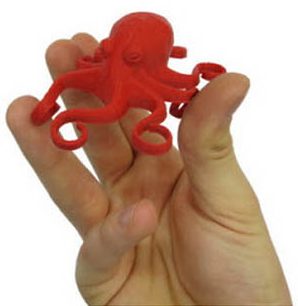
Here’s the part most buyers don’t realize until they’re staring at a snapped print: regular PLA has essentially zero practical flexibility. It’s a rigid, somewhat brittle thermoplastic. Try to bend a thin PLA bracket more than a few degrees and it will crack, not flex. Flexible PLA exists specifically to solve that problem for makers who want some give in a part without committing to a full elastomer like TPU.
The Shore Hardness Number You Need to Know
Manufacturers measure flexibility using the Shore hardness scale, and this single number tells you almost everything about how a filament will feel and behave:
- Shore D scale (PLA, PETG, ABS): rigid plastics. Standard PLA sits around 83D — hard and stiff.
- Shore A scale (TPU, TPE, Flexible PLA): the softer, rubber-like end of the spectrum. The lower the number, the squishier the material.
Most dedicated flexible PLA filament on the market lands around 85A to 92A, depending on the brand and formulation. For context, that’s roughly comparable to a firm shoe sole or a stiff bicycle tire — flexible enough to bend and compress, but not soft enough to stretch like a rubber band.
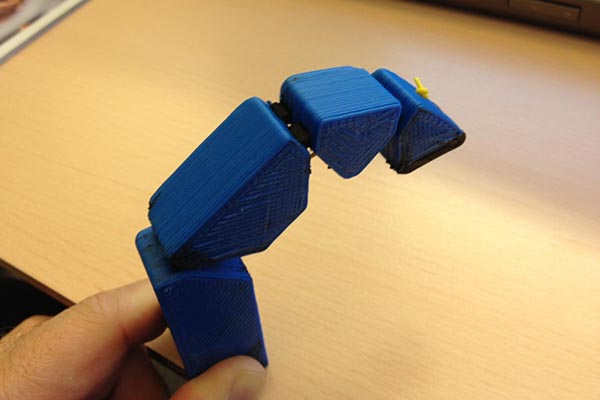
Expert TipThis is the most important thing to understand before you buy a spool: flexible PLA gives you “bend,” not “stretch.” If your project needs a part to elongate to several times its original length and snap back — think rubber bands, wristbands, or shoe insoles — that’s a TPU job, and we’ll cover exactly when to make that call in the next section.
Why Flexible PLA Exists in the First Place
TPU has been the default flexible filament for years, and for good reason — it’s genuinely excellent at what it does. But TPU also comes with real friction: it usually needs a direct drive extruder, it strings if your retraction settings aren’t dialed in, and it’s notoriously fussy on machines that weren’t built with flexible filament in mind.
Flexible PLA filament was developed to bridge that gap. Because it’s PLA-based, it inherits PLA’s biggest advantages — low printing temperature, minimal warping, and forgiving behavior on machines with Bowden extruders that would choke on true TPU. You get a meaningful amount of flex without needing to upgrade your hardware first.
Flexible PLA Quick-Start Cheat Sheet
Grab our free 1-page settings card with optimal temperatures, speeds, and retraction values for every major flexible PLA brand. Print it, pin it to your wall, and stop guessing.
Flexible PLA vs TPU: The Real Showdown
If you searched for “flexible PLA,” there’s a very good chance the real question rattling around in your head is: “Should I just buy TPU instead?” Let’s answer that right now, before you scroll past it.
The Comparison Table
| Feature | Flexible PLA | TPU |
|---|---|---|
| Softness | Moderate (85–92A) | High (typically 82–98A) |
| Elasticity / Stretch | Limited — bends, doesn’t stretch far | Excellent — stretches 300–600%+ |
| Printability | Easy — works on Bowden & direct drive | Moderate-Hard — direct drive strongly preferred |
| Retraction Tolerance | ✓ Forgiving | ✕ Poor — needs minimal retraction |
| Warping | Very low (PLA-based) | Low, but bed adhesion needs tuning |
| Bed Adhesion | Strong, sometimes too strong | Good once dialed in |
| Print Speed | 40–90 mm/s depending on brand | 15–35 mm/s typically |
| Durability (flex fatigue) | Moderate | Excellent |
| Chemical & Oil Resistance | ✕ Weak | ✓ Excellent |
| Abrasion Resistance | Moderate | Excellent |
| Beginner Friendly | ✓ Yes | Moderate — steeper learning curve |
| UV / Outdoor Resistance | ✕ Poor | ✓ Good to excellent |
The Difference Most Guides Miss: Chemistry, Not Just Feel
Here’s the detail that separates a real workshop guide from a content-mill article: Flexible PLA and TPU are not just “softer and harder” versions of each other — they’re chemically different families of plastic, and that changes what they can survive.
TPU is a true elastomer. It has excellent resistance to oils, greases, fuels, and many solvents, which is exactly why it shows up in automotive parts, gaskets, and industrial seals. Flexible PLA, on the other hand, is still fundamentally a PLA derivative. It degrades faster than TPU when exposed to skin oils, solvents, UV light, and outdoor weather. If you’re printing a shift knob, an RC car bumper that’s going to eat mud and gasoline splash, or anything that lives outside for months, flexible PLA is the wrong tool, full stop. TPU will outlast it by a wide margin in those environments.
✓ Choose Flexible PLA If…
- You want a phone case, grip, or hinge with some give, printed on whatever printer you already own
- You’re using a Bowden extruder and don’t want to fight your machine
- You want fast iteration without recalibrating your entire slicer profile
- Your part lives indoors and won’t see oil, grease, or constant UV exposure
- You’re a beginner who wants a taste of flexible printing before committing to TPU
✕ Choose TPU If…
- You need genuine elasticity — stretch-and-snap-back performance, not just bend
- The part will face automotive, outdoor, or heavy-handling environments
- You need abrasion resistance for soles, wheels, or grips that see real wear
- Chemical or oil exposure is part of the part’s job (gaskets, seals, automotive trim)
- You already have a direct drive extruder and don’t mind slower print speeds
Still not sure which flexible filament is right for your project?
Covers Shore hardness ranges, AMS-compatible brands, and beginner-friendly TPU picks.
Flexible PLA vs Regular PLA
Before you get too deep into the TPU comparison, it’s worth pausing on the more basic question: how different is flexible PLA from the standard PLA you probably already have sitting on a spool right now?
| Feature | PLA | Flexible PLA |
|---|---|---|
| Rigidity | High (Shore ~83D) | Low to moderate (Shore ~85–92A) |
| Flexibility | Minimal — cracks under bending stress | Moderate — bends and compresses |
| Ease of Printing | Excellent, the easiest filament category | Good, but needs slower speeds and tuning |
| Strength | High tensile strength, brittle under impact | Lower tensile strength, higher impact tolerance |
| Layer Adhesion | Excellent | Good, slightly more prone to inconsistency |
| Temperature Resistance | Low (softens ~55–60°C) | Similar or slightly lower |
| Price | Lowest of all common filaments | Premium, often 2–4x standard PLA |
Who Should Choose Each
Regular PLA is still the right call for the vast majority of prints — figurines, miniatures, prototypes, brackets, anything rigid and structural. If your part doesn’t need to bend, don’t pay the flexible-PLA premium for nothing.
Flexible PLA earns its keep specifically when a print needs to absorb an impact, flex around a corner, or compress slightly without cracking — and you want that benefit without buying a second spool of TPU and reconfiguring your whole printer for it.

Best Flexible PLA Filament in 2026
Important — Don’t Confuse These CategoriesA lot of big-name filament brands you’d expect to see here — Polymaker, eSUN, ColorFabb, Fiberlogy, Recreus — sell excellent flexible filament, but it’s TPU or TPC, not true flexible PLA. ColorFabb’s varioShore and Recreus’s Filaflex are fantastic flexible filaments, but they’re TPU-based elastomers. Fiberlogy’s FiberFlex line and FormFutura’s FlexiFil are TPU and TPC respectively, not PLA derivatives.
That’s not a knock on those brands — it’s just an important distinction if you’re specifically shopping for flexible PLA and want to avoid buying the wrong category by accident. So this list focuses on the brands actually making PLA-based flexible filament, plus a note on what to do if you decide TPU is the better fit after all.
Best Overall
Ataraxia Art Flexible PLA
Purpose-built, patented flexible PLA formula with consistent 89A Shore hardness across 14+ Pantone-matched colors. Works on both Bowden and direct drive — a genuine differentiator versus most TPU.
Pros
- Patented formula, consistent 89A hardness
- Bowden & direct drive compatible
- 14+ Pantone-matched colors
- 190–220°C — firmly PLA-friendly
Cons
- Oxidizes fast if left unsealed
- Can stick too aggressively to PEI
- 0.5–0.6mm nozzle recommended
Best for Beginners
FlashForge PLA Flexible
Engineered to stretch roughly 4x its original length while remaining genuinely PLA-easy to print. FDA-compliant, food-safe, and biodegradable — with tight ±0.02mm dimensional accuracy.
Pros
- ~4x stretch while staying PLA-easy
- FDA-compliant & food-safe
- Works on Bowden setups
- Tight ±0.02mm accuracy
Cons
- Less color variety
- Direct drive still preferred
Best for Pet Projects
YXPOLYER Flexible PLA
Food-safe, FDA-compliant formula specifically marketed for dog chew toys and pet-safe items. 92A Shore hardness gives a noticeably bouncier feel with genuine rebound for ball-type prints.
Pros
- FDA food-contact compliant
- 92A — noticeably bouncier
- Great for pet toys & balls
- Low warping, easy bed adhesion
Cons
- Needs TPU-style handling despite PLA base
- Narrower color range
Best for Ball Prints
BIQU PLA-HR Flexible
Purpose-built “Flexi Tough” formula aimed specifically at airless basketball and ball-type prints. Compatible with most FDM printers without major hardware changes.
Pros
- Built for bouncy ball prints
- No major hardware changes needed
Cons
- Narrow use-case focus
- Limited independent reviews
What If You Decide You Actually Want TPU?If reading the comparison table above convinced you that TPU is the better fit for your specific project — outdoor parts, oil exposure, true elastic stretch — that’s a completely valid outcome of reading this guide. Our best TPU filament breakdown covers the Shore hardness range you’ll actually want, which brands handle Bambu AMS systems safely, and which TPUs are easiest for a first-timer to print successfully.
Flexible PLA Print Settings and Temperature
This is one of the highest-traffic questions in flexible filament printing, and for good reason — get these settings wrong and you’ll spend an afternoon fighting clogs instead of printing.
The Printable Settings Table
| Setting | Recommended Range |
|---|---|
| Nozzle Temperature | 190–220°C |
| Bed Temperature | 40–60°C |
| Print Speed | 30–60 mm/s (see speed reality check below) |
| Retraction Distance | 0.5–2mm (minimal — less is more) |
| Retraction Speed | 20–30 mm/s |
| Cooling Fan | 30–60%, low on the first layers |
| Flow Rate | 100–115% |
| Layer Height | 0.16–0.24mm |
| Initial Layer Height | Slightly thicker than normal, ~0.24–0.3mm |
| Drying Temperature | 50–60°C for 4–6 hours if exposed to humidity |
| Nozzle Size | 0.4mm minimum; 0.5–0.6mm recommended for smoother flow |
The Print Speed Reality Check
Here’s something worth saying plainly, because it’ll save you a frustrating first print: if you’re used to throwing standard PLA at 300–500 mm/s on a modern Bambu Lab or Klipper-tuned CoreXY machine, flexible PLA is going to feel painfully slow by comparison. Even on a well-tuned direct drive setup, you’ll typically want to cap speeds around 30–40 mm/s, with some brands tolerating up to 60–90 mm/s once you’ve dialed in flow and cooling.
Yes, your high-speed machine is going to feel like it’s crawling. Here’s why that’s worth accepting: flexible filaments compress and buckle under the back-pressure that high speeds create in the nozzle. Slowing down isn’t a limitation of your printer — it’s the material telling you it needs time to extrude cleanly instead of compressing inside the hot end.
Expert TipIf you’re running a Bambu Lab or Klipper-based machine, check your slicer’s max volumetric speed setting for flexible materials — most flexible PLA needs to stay capped well below the values you’d run for standard or high-speed PLA, generally in the low single digits of mm³/s.
Extruder Tension Calibration: The Setting Nobody Talks About
Here’s a detail that separates someone who’s actually printed flexible PLA from someone who’s only read about it: standard dual-gear extruders with aggressive, sharp teeth can chew up flexible PLA before it even reaches the hot end.
Extruders like the Bondtech BMG or Sprite are designed with high gear tension to bite firmly into rigid filament. That same aggressive grip can compress and deform soft flexible PLA, causing it to buckle in the gap between the gears and the hot end rather than feeding smoothly.
The fix: back off your extruder’s tension screw slightly — typically a quarter to half turn looser than your standard PLA setting — so the gears grip firmly enough to feed the filament without crushing it. If you notice small dents or flat spots on the filament before it enters the hot end, that’s your sign to loosen tension further.
Nozzle and Bed Temperature in Practice
Nozzle temperature for flexible PLA generally runs close to standard PLA temperatures, sometimes slightly higher to keep the material flowing smoothly through a slightly larger nozzle. Going too low causes under-extrusion and weak layer bonding; going too high increases the risk of oozing and stringing since the material is already softer than rigid PLA.
Bed temperature in the 40–60°C range gives you reliable adhesion. One quirk worth knowing: flexible PLA often adheres too well to aggressively textured PEI sheets, making first-layer removal a wrestling match. If that happens, try lowering bed temperature slightly or using a thin release agent rather than fighting it bare-handed.
Drying matters more than most beginners expect. Like all PLA, flexible PLA is hygroscopic — it pulls moisture from the air — and because it’s softer to begin with, that moisture shows up fast as popping sounds, surface bubbles, and inconsistent extrusion. Store it in a sealed bag with desiccant between prints, and run it through a proper filament dryer at 50–60°C for several hours if it’s been exposed to humid air.
A Note on Enclosures
Standard PLA generally hates enclosures because trapped heat causes heat creep up the hot end. Flexible PLA is a little different: a slightly warm, draft-free ambient environment can actually help reduce edge curling on larger structural prints, since the material cools and contracts more predictably without sudden temperature swings. You don’t need a full enclosed printer, but keeping the print area away from direct drafts is worth doing.
Flexible PLA Printing Tips From the Workshop
These are the details that separate a clean print from a stringy mess, gathered from what actually trips people up in practice rather than what looks good in a spec sheet.
Print Slow, Especially at First
We covered the speed reality check above, but it’s worth repeating as a standalone habit: when you load a new flexible PLA filament for the first time, start conservative — 30–40 mm/s — and only push faster once you’ve confirmed clean extrusion on a test piece.
Direct Drive Beats Bowden, But Bowden Isn’t Disqualified
Unlike true TPU, most flexible PLA formulas are explicitly designed to tolerate Bowden extruders, which is one of its biggest practical advantages. That said, direct drive will always give you shorter, more controllable filament paths and fewer buckling issues. If you’re on Bowden and getting inconsistent extrusion, that’s your first thing to suspect.
Dry Your Filament Before You Need To
Don’t wait for popping sounds and bubbly surfaces to start drying your filament — build it into your routine, especially if you live somewhere humid or you’ve left a spool out for more than a day or two. A good filament dryer pays for itself quickly when you’re working with flexible materials.
Increase Wall Count for Functional Parts
If a part needs to flex repeatedly without tearing — a hinge, a living-joint-style bracket — increase your wall count (typically 3–4 perimeters) rather than relying on infill alone. The walls are doing most of the structural work in a flexible part.
Avoid Over-Retraction
Flexible PLA is more forgiving than TPU here, but it’s not infinitely forgiving. Excessive retraction distance or speed can stretch and deform the softer filament inside the extruder path, leading to under-extrusion on the next segment. Keep retraction distance modest and test from there.
Nail the First Layer
A clean first layer matters even more with flexible PLA because failed adhesion tends to show up as a curling, lifting mess rather than a clean detach. Level your bed carefully and consider a slightly thicker initial layer height for better surface contact.
Use a Brim for Anything With a Small Footprint
Because flexible PLA flexes under its own print stresses, small-footprint parts are more prone to lifting at the corners. A brim gives the print extra surface area to anchor itself while the lower layers cool and stabilize.
Best Applications for Flexible PLA
Flexible PLA earns its place in a print farm or home setup across a genuinely wide range of everyday, practical projects:
If your project lands in this list and lives indoors, away from chemicals and constant UV exposure, flexible PLA is very likely the right call.
Printing phone cases or wearables? Make sure your printer can handle flexible filament reliably.
Direct drive picks that make TPU and flexible PLA printing effortless.
Pros and Cons of Flexible PLA
Pros
- Easier than TPU — tolerates Bowden extruders and standard speeds far better than true elastomers
- Better layer adhesion in many cases, since the PLA base bonds predictably
- More forgiving of retraction and cooling settings than TPU or TPE
- Less stringing than aggressive TPU formulas, especially at moderate speeds
- Good surface finish — smoother results than many flexible filaments straight off the spool
- More affordable than true TPU on a per-spool basis from most brands
Cons
- Not extremely flexible — bends and compresses, but doesn’t stretch like a true elastomer
- Lower abrasion resistance than TPU, so it wears faster in high-friction applications
- Lower chemical and heat resistance — degrades faster around oils, solvents, and UV exposure
- Fewer dedicated brands — the genuine flexible-PLA category is narrower than the TPU market
- Can still require slower speeds than standard PLA, so it’s not a true drop-in replacement
Common Flexible PLA Printing Problems and Fixes
Think of this as the troubleshooting section for the handful of issues that actually show up in practice — not the theoretical list you’ll find in a spec sheet.
| Problem | Most Likely Cause | Fix |
|---|---|---|
| Excessive Stringing | Nozzle temp too high, retraction too low, or wet filament | Drop nozzle temp 5°C increments, increase retraction slightly, dry filament 4–6 hrs |
| Under-Extrusion | Extruder tension crushing filament, or nozzle temp too low | Loosen extruder tension ¼ turn, increase nozzle temp or flow rate. Check for flat spots on filament |
| Poor Layer Adhesion | Print speed too fast for layer bonding, or low nozzle temp | Slow down (especially first layers), confirm temperature is mid-range not low-end |
| Filament Buckling | Excessive extruder tension, high speeds, or tight Bowden tube bends | Loosen gear tension, drop speed, check Bowden tube routing for sharp turns |
| Doesn’t Stick to Bed | Bed temp too low, or non-textured surface | Increase bed temp within range, add glue stick on smooth glass beds |
| Corners Curl | Insufficient edge adhesion, or cooling too aggressively too early | Add a brim, verify bed leveling at corners, reduce fan speed on first layers |
| Weak Parts | Insufficient wall count, or speed too fast for layer fusion | Increase perimeters to 3–4 for load-bearing parts, verify temp and speed in range |
Most Common Failure: Filament BucklingFilament buckling is the single most common failure point with flexible PLA and deserves the most attention. It happens when the soft filament compresses under back-pressure instead of feeding forward. The fix is almost always a combination of looser extruder tension + slower speed + smoother Bowden tube path. If you see flat spots or dents on the filament before it enters the hot end, you’ve found your culprit.
Still wrestling with print quality issues? Our troubleshooting guide covers every common problem across all filament types.
Flexible PLA Price Guide
Flexible PLA commands a premium over standard PLA, which makes sense given the specialized formulation — but it’s worth knowing roughly where your money should land so you don’t overpay or undershoot on quality.
| Tier | Approx. Price (1kg) | What You’re Getting |
|---|---|---|
| Budget | $20–$28 | Functional flexible PLA, narrower color range, basic spec sheets |
| Mid-Range | $28–$38 | Better dimensional accuracy, wider color selection, more consistent batches |
| Premium | $38–$50+ | Patented formulas, tighter tolerances, included storage accessories |
Cost vs Standard PLA
Expect to pay roughly 1.5x to 3x what you’d pay for a comparable spool of standard PLA. That premium reflects the specialized elastomer additives and tighter manufacturing tolerances needed to keep a softer filament dimensionally consistent.
Cost vs TPU
Flexible PLA and TPU pricing actually land in a similar range at the budget and mid tiers, which makes the decision less about cost and more about which material actually fits your application — refer back to the Flexible PLA vs TPU section above if cost was your main hesitation.
Is Premium Filament Worth It?
For anything functional — parts that will flex repeatedly, get handled often, or need to look consistent across a multi-color project — yes, the premium tier earns its price through tighter tolerances and more predictable printing. If you’re just testing whether flexible PLA suits your workflow at all, a budget spool is a perfectly reasonable way to find out before committing to a larger order.
Food Safety, Sanding, Painting, and Moisture FAQs
Is Flexible PLA Food Safe?
Some flexible PLA filaments are sold as food-safe and FDA-compliant in their raw, unprinted state — YXPOLYER and FlashForge both market food-grade formulations, for example. However, food safety in the raw filament does not automatically mean a printed part is food-safe. FDM printing creates microscopic layer gaps and ridges that can harbor bacteria, and most home printers use brass nozzles that may introduce trace amounts of other metals. If food contact is essential to your project, look specifically for filament marketed as food-safe and avoid direct, repeated food contact with printed parts unless they’re sealed with a food-safe coating.
Can Flexible PLA Be Sanded or Painted?
Sanding flexible PLA is possible but more frustrating than sanding rigid PLA — the material’s give means sandpaper tends to deform the surface rather than cut it cleanly, so go slow and use a firm backing if you’re trying to smooth a surface. Painting works reasonably well with flexible paints or fabric-style paints that can move with the material; rigid spray paints and primers tend to crack once the part flexes, since they don’t share the substrate’s elasticity.
Does Flexible PLA Absorb Moisture?
Yes, and noticeably faster than standard PLA in many cases, since the elastomer additives tend to be more hygroscopic. Store opened spools in a sealed bag with desiccant, and invest in a proper dry box or filament dryer if you print flexible PLA regularly — it’ll save you from stringing and bubbling issues before they start. For drying, 50–60°C for 4–6 hours is the typical sweet spot; check your specific brand’s recommendation since formulations vary. For a deeper dive into proper storage methods, see our guide on drying 3D printer filament.
Frequently Asked Questions
No. Most flexible PLA sits around 85–92A Shore hardness with limited stretch, while TPU ranges more widely and generally offers true elastic stretch of 300% or more. Flexible PLA bends and compresses; TPU stretches and snaps back.
Yes, more so than TPU. It tolerates a wider range of speeds, works on Bowden extruders without major modification in many cases, and forgives retraction settings more readily than true elastomers. If you’re just getting started with flexible printing, this is the gentlest entry point available.
Yes. Ender 3 printers (including the Bowden-equipped V2 and newer models like the Ender 3 V3 SE) can print flexible PLA successfully, especially with a slightly loosened extruder tension and conservative print speeds around 30–40 mm/s.
It’s recommended for the smoothest results, but unlike TPU, it’s not strictly required. Many flexible PLA brands explicitly support Bowden setups, which is one of the material’s biggest practical advantages. Check out our guide to the best 3D printers for TPU and flexible filament if you’re considering a hardware upgrade.
Not reliably for long-term exposure. Its PLA base means it degrades faster than TPU under UV light and temperature swings. For outdoor parts, TPU is the more durable choice.
It has reasonable short-term water resistance for incidental exposure, but it’s not designed for submersion or constant moisture contact, and prolonged wet exposure can degrade the print over time.
Like standard PLA, it’s derived from renewable plant-based sources and is technically biodegradable under industrial composting conditions, though most consumer recycling streams aren’t equipped to process it. Check with your local facility before assuming standard recycling applies.
Most dedicated flexible PLA filaments fall between 85A and 92A, depending on the brand and formulation — firmer than typical 90–98A TPU at the soft end, but in a comparable range overall.
A properly printed and stored part can last years under normal indoor use. Lifespan drops significantly with UV exposure, repeated extreme flexing beyond the material’s fatigue limit, or contact with oils and solvents.
Final Verdict: Who Should Actually Buy Flexible PLA?
If you’ve made it this far, you already have a clearer picture than most buyers searching this term today. Here’s the short version to act on.
✓ Buy Flexible PLA If…
You want indoor-use parts with genuine bend and compression — phone cases, grips, light gaskets, hinges, novelty prints — and you’d rather not overhaul your printer’s hardware or slicer profile to get there. It’s the easiest on-ramp into flexible printing that exists right now.
✕ Skip Flexible PLA If…
Your part needs true elastic stretch, will face oil or chemical exposure, lives outdoors, or has to survive serious abrasion. That’s TPU’s job, and no amount of clever settings will make flexible PLA perform like a true elastomer in those conditions.
The VerdictFlexible PLA is a niche but genuinely useful material that solves a real problem: it lets you print parts with bend and compression on any FDM printer — Bowden or direct drive — without the learning curve of TPU. It won’t replace TPU for serious mechanical or outdoor work, but for indoor phone cases, grips, gaskets, hinges, and novelty prints, it’s the most accessible flexible option on the market. Ataraxia Art is the clear top pick for consistency and color range; FlashForge is the safest bet for first-timers.
Best Overall
Ataraxia Art Flexible PLA
Patented 89A formula, 14+ colors, Bowden & direct drive compatible.
Best for Beginners
FlashForge PLA Flexible
FDA-compliant, food-safe, ~4x stretch, gentlest learning curve.
Best for Pet Projects
YXPOLYER Flexible PLA
FDA food-contact safe, 92A bounce, ideal for chew toys & bouncy prints.
Still Deciding Between Flexible PLA and TPU?
We’ve tested both extensively across dozens of printers. Our TPU filament guide breaks down exactly which Shore hardness, brand, and setup fits your specific project — so you buy the right spool the first time.
Related Reading
- Best TPU Filament Guide — for when true elastomer performance is what your project actually needs
- What Is PLA Filament? Complete Beginner’s Guide — understand the base material inside and out
- PETG vs PLA: Which Should You Choose? — another common filament crossroad worth understanding
- Best Filament Dryers for Home Workshops — essential gear if you’re printing flexible materials regularly
- Best 3D Printers for Flexible Filament — direct drive picks that make flexible printing effortless
- The Ultimate Guide to Drying 3D Printer Filament — proper storage and drying techniques for all filament types
- Strongest 3D Printer Filament Guide — if you need functional, load-bearing parts and flexible PLA isn’t strong enough
- Best 3D Printer Filament Brands — our full ranked breakdown of every major brand tested

