

If you’ve been shopping around for a mid-range enclosed CoreXY printer and keep circling back to the QIDI Q2, you’re not alone. This machine has quietly built a solid reputation among makers who want Bambu Lab-level speed and material versatility — but refuse to get locked into a closed ecosystem. In 2026, that’s a real tension worth talking about.
Here’s the thing: the QIDI Q2 is genuinely impressive. It packs an active heated chamber, Klipper firmware out of the box, and serious engineering material capability into a relatively compact footprint. But it also has quirks — real-world issues that a glossy spec sheet won’t tell you about. Heat creep with PLA. A learning curve that might frustrate beginners. A software experience that’s better when you ignore the included app entirely.
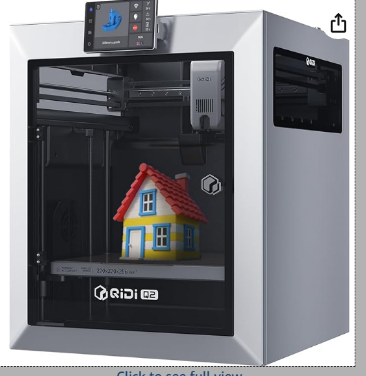
This review covers all of it — the good, the not-so-good, and everything in between — so you can make a confident buying decision rather than finding out the hard way.
Ready to upgrade your 3D printing game? Check today’s best price on the QIDI Q2:
Table of Contents
- Quick Verdict (TL;DR)
- Key Specs at a Glance
- What Is the QIDI Q2?
- Unboxing & Setup Experience
- Build Quality & Mechanical Design
- Performance & Print Quality
- Speed vs. Flow Rate
- Software & Ecosystem
- Open vs. Closed Ecosystem Battle
- QIDI Box Multi-Material System
- Common Problems & Solutions
- Upgrades and Mods
- Head-to-Head Comparisons
- Who Should Buy the QIDI Q2?
- Price and Value for Money
- Final Verdict
- Frequently Asked Questions
Quick Verdict (TL;DR for Buyers)
Best for: Makers who want high-speed printing, open firmware control, and the ability to run engineering-grade materials like ABS, Nylon, and carbon fiber composites without paying Bambu Lab prices.
Not ideal for: Absolute beginners who want a plug-and-play experience. If you’re expecting to unbox it and print without any calibration or learning curve, the QIDI Q2 will frustrate you.
Bottom line: The QIDI Q2 is one of the strongest open-ecosystem CoreXY printers available in 2026 at its price tier. If you’re a serious hobbyist, an advanced maker, or running a small prototyping operation, it deserves a serious look.
Key Specs at a Glance (2026 Buyer Focus)
Before we dive deep, here’s what actually matters for buyers evaluating this machine in 2026 — not just a raw spec dump, but the numbers that influence real-world printing decisions:
| Spec | Detail |
|---|---|
| Build Volume | 230 × 230 × 230 mm |
| Max Print Speed (Advertised) | 500–600 mm/s |
| Realistic Print Speed | 200–350 mm/s (quality prints) |
| Volumetric Flow Rate | ~40 mm³/s |
| Nozzle Temperature | Up to 300°C |
| Bed Temperature | Up to 120°C |
| Active Chamber Temperature | Up to 65°C |
| Extruder Type | Direct Drive |
| Supported Materials | PLA, PETG, ABS, ASA, Nylon, PA-CF, PC, TPU |
| Connectivity | LAN / WiFi / USB |
| Firmware | Klipper (Fluidd / Mainsail access) |
| Safety Certification | MET Certified |
| Belt System | 1.5GT (reduced VFA vs standard 2GT) |
A few of these specs deserve special attention. The active heated chamber reaching 65°C is a big deal — most machines at this price point either skip it or offer passive heating that barely makes a dent. And the MET Certification matters if you’re using this in a school, makerspace, or lab environment where compliance is required.
The volumetric flow rate of ~40 mm³/s is your real throughput limiter, not the top-line speed figure. We’ll come back to this.
What Is the QIDI Q2? (2026 Market Positioning)
QIDI Technology has been building enclosed printers longer than most people give them credit for. The Q2 sits in the middle of their 2026 lineup:
QIDI Q2
Mid-Range
- Compact enclosed CoreXY
- Focus of this review
- Best value for engineering materials
QIDI Plus 4
Prosumer Tier
- Larger build volume
- Higher throughput
- Best for production work
QIDI Max 4
Industrial
- Large-format
- Industrial-leaning
- For serious production needs
The Q2’s pitch is clear: engineering-grade performance in a compact footprint, at a price that doesn’t require you to sell a kidney. Its main competitors are the Bambu Lab P1S and the Creality K2 Plus, both of which have their strengths — but both also make trade-offs the Q2 doesn’t.
Bambu trades openness for polish. Creality trades maturity for price. QIDI has positioned the QIDI Q2 as the machine for people who want real control without sacrificing the features that make enclosed CoreXY printing worthwhile.
Think of it this way: If you want a printer that works great right out of the box and you’ll never look under the hood — buy the Bambu. If you want a machine you can grow with, tune, modify, and push into materials most printers won’t touch — the QIDI Q2 makes a compelling case.
Compare prices and grab yours today:
Unboxing & Setup Experience
QIDI’s packaging is consistently one of the better experiences in the budget-to-mid-range space. The QIDI Q2 arrives well-protected with foam inserts, and the included accessories are actually useful rather than token gestures. You get a scraper, a USB drive with files and documentation, spare nozzles, and some PTFE tubing.
Setup is semi-plug-and-play. You’re not assembling a kit — the machine arrives largely pre-built. But you will spend some time on:
- Auto bed leveling calibration — The Q2’s mesh leveling works well, but it’s worth running a fresh calibration before your first print rather than trusting factory settings.
- Input shaping (resonance compensation) — This is where Klipper earns its keep. Running the ADXL345-based input shaping calibration will meaningfully improve print quality at speed. It takes maybe 15 minutes and it’s worth doing.
- First print — Use the included test file first. It’ll tell you a lot about whether your machine is dialed in.
Setup Time Estimates:
- Experienced users: 30–60 minutes
- Complete beginners: Plan for a few hours, and expect some Googling
Build Quality & Mechanical Design
The QIDI Q2 feels solid. The full metal frame doesn’t flex, the enclosure panels fit snugly, and the overall build inspires confidence that this machine can handle extended print sessions without developing weird resonance issues over time.
The CoreXY motion system is well-implemented. Toolhead movement is smooth, the rails are properly tensioned out of the box, and the overall assembly quality is noticeably better than machines in a similar price range from a couple of years ago.
One mechanical detail worth highlighting: The Q2 uses 1.5GT belts rather than the more common 2GT belts. In practice, this means reduced Vertical Fine Artifacts (VFA) — those faint repeating patterns you sometimes see on the sides of prints. It’s a small but real quality-of-life improvement that shows QIDI has been paying attention to the right feedback.
The print bed uses a PEI-coated spring steel flex plate. First-layer adhesion is excellent across most materials, and removing prints is easy — let the bed cool and they pop off. No scraping required for most materials.
The enclosure sealing is competent. It’s not hermetically sealed, but it’s good enough to maintain stable chamber temperatures for ABS and Nylon printing, which is the real test.
Build Quality Highlights
| Component | Quality Assessment |
|---|---|
| Frame | Full metal, no flex, solid construction |
| Enclosure Panels | Snug fit, competent sealing |
| Motion System | Smooth CoreXY, properly tensioned rails |
| Belts | 1.5GT (reduced VFA vs standard 2GT) |
| Print Bed | PEI-coated spring steel flex plate |
| Overall Assembly | Noticeably better than similar-priced competitors |
Performance & Print Quality (Real-World Testing)
Let’s break down how the QIDI Q2 performs with different materials in real-world conditions:
PLA Printing
PLA prints beautifully on the Q2 — fine detail, smooth surfaces, good bridging performance. But there’s a critical caveat every Q2 owner eventually learns:
⚠️ IMPORTANT WARNING: You need to vent the lid (or disable chamber heating entirely) when printing PLA. The heated chamber that makes this machine great for engineering materials will cause heat creep with PLA if you’re not careful. Heat creep in the cold zone of the hotend leads to clogs, failed prints, and frustration.
Fix: Open the lid or keep the chamber temperature off — simple and effective, but not obvious to beginners.
PETG Printing
PETG is a natural fit for the Q2. It runs cleanly, bridges well, and produces parts with good surface finish. You’ll likely see some minor stringing depending on your retraction settings, but a few test prints will get you dialed in quickly. PETG is one of those “set it and forget it” materials once you have a profile you trust.
ABS and ASA Printing
This is where the QIDI Q2 genuinely shines. The active heated chamber maintaining temperatures up to 65°C makes a dramatic difference with ABS and ASA.
✓ ABS/ASA Performance Benefits:
- Warping eliminated — the plague of unenclosed ABS printing is effectively gone
- Layer adhesion improves — stronger, more reliable parts
- Dimensional accuracy — prints come out true to spec
If you’ve been printing ABS in an open-frame printer and dealing with constant warping and cracking, printing the same material in the Q2 will feel like cheating.
Nylon and Carbon Fiber Composites
For functional parts that need to be strong, stiff, and heat-resistant, the Q2’s combination of an enclosed heated chamber and a high-temperature hotend capable of 300°C opens up the full range of engineering filaments.
Nylon prints solidly. Carbon fiber composites (PA-CF, PLA-CF) produce genuinely impressive structural parts.
⚠️ Note on Abrasive Filaments: If you’re running abrasive filaments like carbon fiber or glass fiber regularly, install a hardened steel nozzle. The stock brass nozzle will wear out faster than you’d expect with these materials.
Real-World Print Quality Summary
| Material | Quality Rating | Notes |
|---|---|---|
| PLA | ⭐⭐⭐⭐⭐ | Excellent with proper ventilation |
| PETG | ⭐⭐⭐⭐⭐ | Natural fit, minimal tuning needed |
| ABS/ASA | ⭐⭐⭐⭐⭐ | Outstanding – heated chamber shines |
| Nylon | ⭐⭐⭐⭐ | Solid performance, needs drying |
| PA-CF/PLA-CF | ⭐⭐⭐⭐ | Excellent with hardened nozzle |
| TPU | ⭐⭐⭐⭐ | Good results with direct drive |
Surface finish is excellent at moderate speeds (150–250 mm/s). Dimensional accuracy is good — parts fit together, threads work, tolerances are consistent. Layer consistency holds up well even at higher flow rates. Where you’ll see the most trade-offs is at the very top-end speeds, which we’ll address next.
Ready to print engineering-grade materials? Get the QIDI Q2 today:
Speed vs. Flow Rate: What Actually Matters in 2026
Marketing materials for the QIDI Q2 throw around numbers like 500–600 mm/s. And technically, the toolhead can move that fast. But here’s the thing nobody talks about enough: print speed and print quality are two different conversations.
The real performance ceiling for the Q2 — and for most CoreXY printers at this price — is the volumetric flow rate of approximately 40 mm³/s. This is the actual limiting factor. Once you’re pushing more plastic through the hotend than it can melt, you get under-extrusion, poor layer bonding, and rough surfaces.
Understanding Volumetric Flow vs. Speed
At 40 mm³/s, you can run legitimately fast print speeds with standard 0.4mm nozzles and typical layer heights. But you’re not going to outrun a machine with a higher-flow hotend by simply turning up the speed dial.
Where does this leave the Q2 compared to the competition?
The Q2 is fast — meaningfully faster than most bed-slingers, and competitive with other enclosed CoreXY machines in its price bracket. But it’s not class-leading in raw throughput. Machines with high-flow hotend options or multi-extruder setups can technically push more plastic faster.
For most use cases — prototyping, functional parts, detailed models — the Q2’s speed is more than adequate.
Practical Takeaway:
- ❌ Don’t buy this machine thinking you’ll be printing at 600 mm/s with perfect results
- ✅ Do buy it knowing that at 200–300 mm/s, you’ll get excellent parts in a fraction of the time of a budget machine
Software & Ecosystem (2026 Reality Check)
QIDI Studio
Let’s be direct: QIDI Studio is essentially a reskinned version of OrcaSlicer. That’s not inherently bad — OrcaSlicer is excellent software — but it does mean you’re not getting something proprietary or uniquely optimized. QIDI Studio works, but it can feel a bit rough around the edges with occasional interface quirks and inconsistent updates.
The Better Workflow
✓ PRO TIP: If you want the best print results, switch to native OrcaSlicer with QIDI Q2 profiles. The community-maintained profiles are genuinely well-tuned, and OrcaSlicer’s interface is cleaner and more feature-rich than the QIDI-branded version. This is a five-minute setup and it makes a real difference.
Klipper Firmware and Full Control
Here’s where the QIDI Q2 separates itself from the Bambu Lab crowd: it runs Klipper firmware out of the box, with full access to both Fluidd and Mainsail front-ends. This means you can:
- Tune pressure advance for cleaner corners and better dimensional accuracy
- Run resonance compensation calibration (input shaping) for vibration-free high-speed printing
- Adjust virtually any parameter in the printer’s behavior through the Klipper config files
- Connect third-party tools and monitoring systems
For makers who know their way around Klipper — or who want to learn — this is enormously powerful. For beginners who just want to hit print and walk away, it can be overwhelming.
Software Capabilities Comparison
| Feature | QIDI Q2 | Typical Closed System |
|---|---|---|
| Firmware Access | ✅ Full Klipper control | ❌ Locked down |
| Configuration Files | ✅ Editable | ❌ Proprietary |
| Pressure Advance Tuning | ✅ Full access | ⚠️ Limited |
| Input Shaping | ✅ ADXL345 support | ⚠️ Varies |
| Third-Party Slicers | ✅ Full compatibility | ⚠️ Often limited |
| Community Mods | ✅ Encouraged | ❌ Discouraged |
The 2026 Ecosystem Battle: Open vs. Closed
This is the conversation that defines the current 3D printing market, and the QIDI Q2 sits squarely on the “open” side of it.
The QIDI Approach
- ✅ Full Klipper control
- ✅ Community modifications welcome
- ✅ Third-party filament works without NFC tags
- ✅ You own your machine fully
The Bambu Approach
- ✅ Tight ecosystem integration
- ✅ Exceptional out-of-box experience
- ✅ Strong AMS multi-material system
- ⚠️ Firmware is closed
- ⚠️ Modification is discouraged
Neither approach is universally right. The honest breakdown:
Choose QIDI Q2 If You:
- ✅ Value control and modification freedom
- ✅ Want community support and mods
- ✅ Need long-term flexibility
- ✅ Are willing to invest learning time upfront
- ✅ Want to use any filament brand
Choose Bambu Lab P1S If You:
- ✅ Value plug-and-play reliability
- ✅ Want seamless software integration
- ✅ Don’t care about digging into firmware
- ✅ Prefer convenience over customization
- ✅ Want the most refined AMS experience
The Q2’s elevator pitch for 2026: “Bambu-speed performance with Ender-level freedom.” It’s not a perfect machine, but it’s a machine you genuinely own.
QIDI Q2 Combo & QIDI Box: An AMS Alternative Worth Considering
If you’re looking at the QIDI Q2 Combo bundle, it includes the QIDI Box — the brand’s answer to Bambu Lab’s AMS multi-material system.
What the QIDI Box Actually Does
The QIDI Box is more than a filament storage unit. It features:
- Active heated storage up to 65°C — critical for moisture-sensitive engineering filaments like Nylon and TPU
- Tangle detection — alerts you when filament tangles before they cause mid-print failures
- NFC filament recognition — automatically identifies compatible QIDI filament spools and applies appropriate settings
✓ This is genuinely useful if you work with hygroscopic materials that need to stay dry. Keeping Nylon in a heated, humidity-controlled enclosure can be the difference between a successful print and a brittle, bubbly mess.
The Real-World Downsides
Multi-material printing with the QIDI Box has limitations you should understand before buying:
⚠️ Purge waste is significant. Single-nozzle multi-material systems require purging between color/material changes, and that purged material — sometimes called the “poop” — adds up fast. For models with many color transitions, you’ll waste a meaningful amount of filament.
⚠️ Frequent color switching is inefficient. If you’re dreaming of printing detailed multi-color miniatures or highly complex gradient models, this system will frustrate you. It’s not optimized for that use case.
QIDI Box Best Use Cases
| Use Case | Suitability |
|---|---|
| Different engineering materials in sequence | ✅ Excellent |
| Keeping filament dry during long prints | ✅ Excellent |
| Simple dual-material support/model combinations | ✅ Good |
| Multi-color miniatures | ⚠️ Inefficient |
| Complex gradient models | ⚠️ Inefficient |
How It Compares to Bambu AMS and Creality CFS
| Feature | QIDI Box | Bambu AMS | Creality CFS |
|---|---|---|---|
| Heated Storage | ✅ Up to 65°C | ❌ No | ⚠️ Varies |
| Multi-Color Refinement | ⚠️ Basic | ✅ Excellent | ⚠️ Basic |
| Purge Efficiency | ⚠️ Standard | ✅ Better | ⚠️ Standard |
| Software Integration | ⚠️ Good | ✅ Excellent | ⚠️ Good |
The Bambu AMS is more refined for consumer multi-color printing, with better purge efficiency and tighter software integration. The Creality CFS (CFS = Compatible Filament System) is similar in capability to the QIDI Box. Neither competitor fully solves the single-nozzle purge waste problem — that’s a hardware limitation of the entire category.
Get the complete QIDI Q2 Combo with QIDI Box:
QIDI Q2 Common Problems (Real-World Issues in 2026)
No honest review skips this section. Here are the issues you’ll actually encounter with the QIDI Q2:
1. Heat Creep with PLA
⚠️ This is the most frequently reported issue with new Q2 owners, and it’s entirely preventable once you know about it. PLA has a low glass transition temperature. When you’re printing PLA in a heated chamber, the ambient temperature in the enclosure can heat the cold zone of the hotend enough to cause the filament to soften before it’s supposed to, leading to jams.
✓ Fix: Open the lid or turn off chamber heating when printing PLA. Simple and effective.
2. Z-Banding and VFA (Vertical Fine Artifacts)
The 1.5GT belt system is an improvement over 2GT, and it does reduce VFA — but it doesn’t eliminate it entirely. In some scenarios, especially at certain speeds with certain materials, you’ll see faint horizontal banding on prints.
✓ Fix: This is often tunable through Klipper’s input shaping calibration and pressure advance settings. Worth spending time to dial in.
3. Firmware and Software Quirks
QIDI Studio has occasional bugs — interface freezes, profile syncing issues, and sometimes settings that don’t stick the way you’d expect.
✓ Workaround: Switching to OrcaSlicer is genuinely better anyway, so this is more of an annoyance than a dealbreaker.
4. Maintenance Requirements
Like any high-performance printer, the Q2 requires maintenance:
| Component | Maintenance Need | Frequency |
|---|---|---|
| Extruder Drive Gears | Inspect and replace when slipping | Every 3-6 months (heavy use) |
| Nozzle | Cold pull, replace when worn | Monthly or as needed |
| Belt Tension | Check and adjust | Every 2-3 months |
| Rails | Clean and lubricate | Every 3-6 months |
5. Noise Levels
The Q2 is not a quiet machine. It’s moderate in noise output — not whisper-quiet like some modern printers claim to be, but not unbearably loud either.
Consider: If you’re printing in a bedroom or shared space, you may want to run prints during the day or invest in some acoustic dampening.
Quick Problem-Solution Reference
| Problem | Solution | Difficulty |
|---|---|---|
| Heat creep with PLA | Vent lid / disable chamber heat | Easy |
| Z-banding / VFA | Input shaping + pressure advance | Medium |
| QIDI Studio bugs | Switch to OrcaSlicer | Easy |
| Nozzle clogs (CF/GF) | Use hardened steel nozzle | Easy |
| Noise in shared space | Acoustic dampening / day printing | Varies |
QIDI Q2 Upgrades and Mods
One of the genuine advantages of an open-ecosystem machine: a community of people who have already figured out how to make it better.
Must-Have Upgrades
Hardened Steel Nozzle
Essential
- Required for abrasive filaments (CF, GF, glow)
- Lasts dramatically longer than brass
- Prevents mid-print failures
- Budget: $10-20
OrcaSlicer Profiles
Free
- Community-tuned profiles
- Noticeably better results
- Cleaner interface
- 5-minute setup
Improved Cooling Fans
Optional
- Better overhang performance
- Higher static pressure
- Great for detailed PLA
- Various price points
Optional Mods
- Camera integration for remote monitoring (easy to set up through Klipper’s Moonraker interface)
- Airflow modifications for improved chamber temperature uniformity
- LED upgrades for better print visibility
One Important Caveat
Do the math before heavy modding: If you find yourself planning a significant modding budget on top of the Q2’s purchase price, compare that total to the QIDI Plus 4 price — which ships with better throughput and more capability out of the box. Sometimes the right upgrade is the next model up.
Head-to-Head Comparisons
QIDI Q2 vs. Bambu Lab P1S
This is the matchup most buyers are actually thinking about.
| Feature | QIDI Q2 | Bambu Lab P1S |
|---|---|---|
| Price | ✅ Lower | ⚠️ Higher |
| Speed (Flow Rate) | ~40 mm³/s | ✅ Higher flow |
| Firmware | ✅ Open Klipper | ❌ Closed |
| Modification Freedom | ✅ Full | ⚠️ Limited |
| Out-of-Box Experience | ⚠️ Requires tuning | ✅ Excellent |
| AMS System | ⚠️ QIDI Box (basic) | ✅ More refined |
| Material Capability | ✅ Comparable | ✅ Comparable |
| Third-Party Filament | ✅ Full support | ⚠️ Some friction |
The Bambu Lab P1S is a genuinely excellent machine. It’s faster (due to a higher-flow hotend), its AMS multi-material system is more refined, and its software integration is exceptional. If you want to print and walk away — reliably, repeatedly — the P1S is hard to argue with.
But the P1S has real trade-offs. Firmware is closed. Third-party filament support has had friction. Bambu’s ecosystem decisions affect your printer in ways you can’t control. And it costs significantly more.
The QIDI Q2 gives you open Klipper firmware, full modification freedom, comparable material capability, and a meaningfully lower price. You trade away some throughput ceiling and plug-and-play convenience.
Verdict: P1S for beginners and convenience seekers. Q2 for makers who want control.
QIDI Q2 vs. Creality K2 Plus
| Feature | QIDI Q2 | Creality K2 Plus |
|---|---|---|
| Build Volume | 230³ mm | ✅ Larger |
| Engineering Materials | ✅ Better capability | ⚠️ Less capable |
| Klipper Flexibility | ✅ More open | ⚠️ Less open |
| Brand Support | ⚠️ Growing | ✅ Established |
| Price Point | Comparable | Comparable |
The Creality K2 Plus is another enclosed CoreXY competitor worth considering. It offers a larger build volume and Creality’s established support ecosystem. But it’s less open than the Q2 and generally less capable with engineering-grade materials at this price point.
The QIDI Q2 wins on material versatility and Klipper flexibility. The K2 Plus wins on build volume and brand support resources.
QIDI Q2 vs. QIDI Plus 4
If budget isn’t the primary constraint, the QIDI Plus 4 is the better printer. It offers higher volumetric flow, a larger build plate, and higher overall throughput — making it significantly more capable for production use.
The Q2 makes sense if compact footprint matters, or if the Plus 4’s price is outside your budget. It’s a stepping-stone printer that could graduate to the Plus 4 when you’re ready.
QIDI Q2 vs. QIDI Q2C: A Critical Distinction
This comparison trips people up, so let’s be explicit.
| Feature | QIDI Q2 | QIDI Q2C |
|---|---|---|
| Active Heated Chamber | ✅ Up to 65°C | ❌ Limited/None |
| ABS Printing | ✅ Reliable | ⚠️ Difficult |
| Nylon Printing | ✅ Reliable | ⚠️ Difficult |
| CF Composites | ✅ Excellent | ⚠️ Limited |
| Price | Higher | ✅ Lower |
| Best For | Engineering materials | PLA/PETG only |
⚠️ Critical Buying Advice: If you ever want to print ABS, Nylon, or CF blends reliably, you need the Q2, not the Q2C. The Q2C is a capable PLA/PETG printer at a lower price point — but if engineering materials are in your future, don’t buy the wrong machine.
Ready to make your decision? Check current pricing:
Who Should Buy the QIDI Q2?
✅ You’re a Great Fit for the Q2 If You Are:
- ✅ An experienced maker or hobbyist who wants open-source Klipper control
- ✅ Someone who needs to print engineering-grade materials (ABS, ASA, Nylon, PA-CF) reliably
- ✅ A small business, product developer, or engineer using the printer for functional prototyping
- ✅ A 3D printing enthusiast who has outgrown basic bed-slingers
- ✅ Cost-conscious but unwilling to compromise on material capability
- ✅ Willing to invest time learning and tuning
- ✅ Someone who values long-term platform control
❌ The Q2 is Probably Not Right for You If You Are:
- ❌ A complete beginner who has never tuned a 3D printer
- ❌ Expecting the Bambu Lab experience (unbox, click print, done)
- ❌ Someone who wants zero ongoing tuning, calibration, or maintenance
- ❌ A high-volume print farm operator needing maximum throughput
- ❌ Only printing PLA or PETG (there are cheaper options)
- ❌ Unwilling to learn Klipper or firmware configuration
“The QIDI Q2 replaced two printers in my workshop. It handles ABS and Nylon better than machines costing twice as much. Yes, there’s a learning curve, but once dialed in, it’s a workhorse.”
★★★★★
Price and Value for Money (2026 Perspective)
The QIDI Q2 is priced firmly in the mid-range enclosed CoreXY segment. In 2026, that means you’re competing against the Bambu Lab P1S (significantly more expensive) and the Creality K2 Plus (comparable pricing, different trade-offs).
At its price point, the Q2 represents strong value for its material capability. You’re essentially getting a machine that can run the same engineering filaments as printers costing substantially more, packaged in a compact, well-built enclosure with Klipper control.
Hidden Costs to Factor In
| Item | Cost | Priority |
|---|---|---|
| Hardened Steel Nozzle | $10–20 | Essential for CF/GF |
| Spare Brass Nozzles | $5–10 | Good to have |
| Profile Tuning Time | Time investment | Rewarding but real |
| Potential Mods | Varies | Compare to Plus 4 price |
Overall Value Assessment: For what the Q2 delivers — enclosed CoreXY, active heated chamber, Klipper firmware, MET certification, and a modding-friendly architecture — the value proposition in 2026 is compelling.
Final Verdict: Is the QIDI Q2 Worth It in 2026?
After spending significant time with the QIDI Q2, the verdict is genuinely positive — with important asterisks.
✓ This is one of the best open-ecosystem CoreXY printers available in its price tier in 2026. It punches above its weight in material capability, offers real Klipper-based control that advanced users will appreciate, and produces excellent print quality when dialed in.
⚠️ The weaknesses are real: It’s not fully beginner-friendly, PLA printing requires some awareness of the heat creep issue, and the software experience is better when you step away from QIDI Studio to OrcaSlicer. These aren’t dealbreakers — they’re just the price of admission to a machine you can actually control.
If you’re comparing the Q2 to the Bambu Lab P1S: the Bambu is a more polished consumer product. The Q2 is a more capable maker’s tool. Both are good at what they do. The question is what you’re actually trying to do.
Our Recommendation
Bottom Line Recommendation
If you’re an intermediate-to-advanced maker, engineer, or prototyper who values open-source flexibility, engineering material capability, and long-term platform control — buy the QIDI Q2. It will reward the investment with years of capable, tunable, expandable 3D printing.
If you’re still building experience and want the most plug-and-play enclosed CoreXY experience possible, the Bambu Lab P1S is worth the extra cost.
Make the smart choice for your workshop:
Frequently Asked Questions
Is the QIDI Q2 good for beginners?
Honestly, not really — at least not as a first machine. The Q2 requires some knowledge of calibration, Klipper tuning, and material-specific settings to get the best results. An experienced beginner willing to learn can absolutely grow into it, but it shouldn’t be your first 3D printer.
Can the QIDI Q2 print carbon fiber filaments?
Yes, but you’ll need a hardened steel nozzle (not the stock brass one). PA-CF, PLA-CF, and similar carbon fiber composite filaments run well on the Q2 thanks to the high-temp hotend and heated chamber. Just protect your nozzle.
What is the QIDI Box and do I need it?
The QIDI Box is an active heated filament dry storage and multi-material feeder system. You don’t need it for great single-material printing, but it’s genuinely useful if you work with moisture-sensitive engineering filaments or want basic multi-material capability. It’s included in the Q2 Combo bundle.
Is the QIDI Q2 better than the Bambu Lab P1S?
It depends on your priorities. The Bambu Lab P1S has a more polished out-of-box experience and more refined AMS system. The QIDI Q2 offers open Klipper firmware, full modification freedom, and comparable material capability at a lower price. For makers who value control: Q2. For those who value convenience: P1S.
What are the biggest QIDI Q2 problems to watch out for?
The most common issues are: heat creep with PLA when the chamber is heated (fix: vent the lid), occasional QIDI Studio software bugs (fix: use OrcaSlicer instead), and nozzle wear with abrasive filaments (fix: use a hardened steel nozzle). None of these are dealbreakers with proper awareness.
Do I need to buy upgrades for the QIDI Q2?
For standard PLA/PETG/ABS printing, the machine performs well stock. For carbon fiber and abrasive filaments, a hardened steel nozzle is essentially mandatory. Switching to OrcaSlicer costs nothing but time and noticeably improves results. Heavy modding is optional and should be evaluated against the cost of upgrading to the QIDI Plus 4 instead.
What is the difference between the QIDI Q2 and QIDI Q2C?
The Q2 has an active heated chamber that can reach 65°C, enabling reliable ABS, Nylon, and carbon fiber printing. The Q2C is a “lite” version without active chamber heating, making it better suited for PLA and PETG. If engineering materials are in your plans at all, buy the Q2.
What’s the realistic print speed I can expect?
While the Q2 is advertised at 500-600 mm/s, realistic quality printing happens at 200-350 mm/s. The limiting factor is the volumetric flow rate of approximately 40 mm³/s. At moderate speeds, you’ll get excellent quality in a fraction of the time of budget machines.
Is the QIDI Q2 MET certified?
Yes, the QIDI Q2 is MET Certified. This matters if you’re using this in a school, makerspace, or lab environment where compliance is required.
What slicer should I use with the QIDI Q2?
While QIDI Studio is included, we strongly recommend switching to OrcaSlicer with community-maintained QIDI Q2 profiles. It’s free, produces noticeably better results, and has a cleaner, more feature-rich interface. Setup takes about 5 minutes.
Have questions about the QIDI Q2 that this review didn’t cover? Drop them in the comments — we regularly update this article based on reader feedback and new real-world testing data.
Ready to take your 3D printing to the next level? The QIDI Q2 is waiting:
Get Your QIDI Q2 Today → Check Amazon Price
Prices and availability subject to change. Last updated: 2026.

