


If you’ve been keeping an eye on the 3D printing space lately, you’ve probably seen the FLSUN S1 come up time and again in conversations about speed. And honestly, that’s with good reason — this machine is genuinely jaw-dropping to watch in motion. But here’s the thing: after using it extensively, the real question isn’t just how fast it goes. It’s whether all that speed translates into a printer you’d actually want to live with day after day.
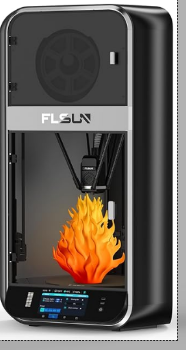
The FLSUN S1 Delta 3D Printer is a fully enclosed, high-speed FDM machine built on delta kinematics — a motion system quite different from the CoreXY printers that dominate most maker workshops. With a maximum print speed of 1,200 mm/s and acceleration hitting 40,000 mm/s², it’s the kind of machine that makes a Bambu Lab P1S look like it’s moving in slow motion. The build volume is massive for a delta: Ø320 mm × 430 mm, making it one of the most capable tall-print machines you can buy at this price point.
Ready to Experience Ultra-Fast Printing?
Get the FLSUN S1 at the best available price today.
But this review isn’t just a spec sheet walkthrough. We’ve put the FLSUN S1 through hundreds of hours of real-world use — from quick prototypes to full cosplay helmets — and we’ll give you the unvarnished truth about what it’s like to own and operate one in 2026. We’ll also compare it to the newer FLSUN S1 Pro and discuss whether delta printers still make sense in a market crowded with fast CoreXY machines.
Table of Contents
- FLSUN S1 Key Specifications
- Unboxing and First Impressions
- Build Quality and Mechanical Design
- Setup, Calibration, and Software Experience
- Print Speed Performance
- Volumetric Flow Rate and Real Printing Limits
- Print Quality and Real-World Results
- Delta Advantage: Perfect for Tall Prints
- Materials Compatibility
- The Delta Tax: Maintenance and Calibration
- FLSUN S1 vs S1 Pro
- Delta vs CoreXY: Should You Choose the S1?
- Pros and Cons
- Who Should Buy the FLSUN S1?
- Is the FLSUN S1 Still Worth It in 2026?
- Frequently Asked Questions
FLSUN S1 Key Specifications
Before we dive into the experience, here’s a full look at what you’re working with:
| Specification | Detail |
|---|---|
| Build Volume | Ø320 mm × 430 mm (circular bed, tall cylinder) |
| Maximum Print Speed | 1,200 mm/s |
| Maximum Acceleration | 40,000 mm/s² |
| Max Volumetric Flow Rate (PLA) | 110 mm³/s |
| Max Volumetric Flow Rate (PETG) | ~60–80 mm³/s (practical) |
| Nozzle Temperature | Up to 350°C |
| Bed Temperature | Up to 120°C |
| Extruder Type | Dual-gear direct drive |
| Auto Leveling | Yes – one-click, LIDAR-assisted |
| Firmware / OS | Klipper (vanilla-compatible) / FLSUN OS |
| Connectivity | Wi-Fi, USB |
| Screen | 5-inch color touchscreen with speedometer display |
| Weight | ~95–100 lbs (43–45 kg) |
| Dimensions | 500 × 595 × 1,030 mm |
| Filament Diameter | 1.75 mm |
| Nozzle Size (stock) | 0.4 mm hardened steel |
A few things worth explaining here. Delta printers achieve extreme speeds partly because the print head itself is very lightweight — instead of carrying a heavy motor and extruder block around, all three motors are stationary on the frame, connected to the effector via lightweight carbon fiber arms. This reduces moving mass dramatically, which is why acceleration figures like 40,000 mm/s² are possible without the whole printer shaking itself apart.
That 110 mm³/s volumetric flow rate for PLA is the real headline though. Volumetric flow rate measures how much filament your hotend can actually melt and push through the nozzle per second — and it’s the true ceiling on printing speed. Once you exceed it, you get under-extrusion no matter how fast the motors can move. At 110 mm³/s with PLA, the S1’s hotend is genuinely one of the most capable on any consumer printer. For PETG, expect practical limits closer to 60–80 mm³/s depending on temperature and layer settings.
Unboxing and First Impressions
Let’s start with something nobody warns you about enough: this printer is enormous. The FLSUN S1 arrives in a crate large enough that you’ll genuinely want a hand truck. It weighs roughly 95–100 lbs (about 43–45 kg), so plan your workspace in advance. This isn’t a printer you’ll be moving around casually.
The packaging is well-engineered for a machine of this scale. The printer ships almost fully assembled — the main task on arrival is attaching the front door panels and glass enclosure pieces, which takes about 30 to 45 minutes. Compared to building a machine like an Ender 3 from scratch, the S1’s setup is refreshingly simple.
In the box you’ll find everything you need to get started: a full toolkit including wrenches, screwdrivers, wire cutters, and a spatula; a spare hotend kit; nozzle cleaning tools; grease; a USB drive with slicer software; a printed user manual; a materials rack; and a 200g test spool of PLA.
The first impression once it’s assembled is genuinely striking. The S1 has a sleek, futuristic aesthetic that stands out compared to the utilitarian look of most FDM printers. The 5-inch color touchscreen is among the best control interfaces I’ve seen on a consumer 3D printer — clear, responsive, and it even includes a speedometer visualization showing the print head’s current velocity. It’s a small detail, but it tells you something about how proudly FLSUN leans into the speed identity of this machine.
Build Quality and Mechanical Design
The delta tower structure of the S1 is built around a steel enclosure frame that houses three vertical belt-driven rail systems. Three lightweight carbon fiber arms connect from the top of each rail carriage to the central effector — the moving print head assembly. It’s an elegant geometry that looks complex but is actually quite reliable once properly calibrated.
The carbon rods are high quality and lightweight, which is crucial — every gram saved on the moving effector translates to better high-speed performance. The ball joints connecting the arms to the effector and carriages are well-machined and show minimal play out of the box.
The hotend assembly uses a dual-gear direct drive extruder — both gears grip the filament simultaneously, which significantly reduces skipping and inconsistent extrusion, especially important at extreme speeds. The 80W ceramic heating element heats up quickly and maintains temperature stability during fast moves. Cooling is handled by a CPAP turbo fan running at up to 40,000 rpm, which is capable of cooling a freshly laid layer within approximately one second — a critical feature for maintaining quality at high speeds.
The all-metal frame ensures stability even under the dynamic forces generated at 40,000 mm/s² acceleration. Vibration compensation is handled in firmware via input shaping algorithms, which further smooths out the motion at high speeds. Cable management inside the enclosure is reasonably tidy, though you’ll want to double-check the routing after initial assembly to ensure nothing is in the path of the moving arms.
Setup, Calibration, and Software Experience
Once physically assembled, the initial calibration workflow is where many new delta printer owners hit their first wall. Unlike Cartesian printers where bed leveling is relatively straightforward, delta calibration involves ensuring all three towers are at perfectly equal heights and that the effector sweeps through an exact spherical arc. The S1 handles this with a one-click auto-leveling routine using LIDAR-assisted detection, which is genuinely impressive — it works well right out of the box for most users.
Master Your Delta Printer
Struggling with Delta calibration? Download our free FLSUN S1 Advanced Calibration Guide & Cheat Sheet to get perfect prints every time.
The firmware-side calibration — including resonance compensation (input shaping) and pressure advance settings — does require some tuning to get the best results. The good news is that the S1 ships with reasonable defaults that are workable from the start, and the Klipper ecosystem has extensive documentation to help you dial things in further.
For users transitioning from Cartesian printers, the learning curve is real but manageable. The biggest conceptual shifts are understanding that the build area is circular (not rectangular), that tall prints near the edges of that circle lose a bit of diameter, and that delta-specific calibration concepts like delta radius and effector geometry require a bit of study. Give it a weekend and you’ll be comfortable.
Software Ecosystem and Klipper Customization
One of the strongest selling points of the FLSUN S1 for experienced makers is its fully open Klipper firmware implementation. Unlike printers that lock you into proprietary firmware, the S1 allows you to run vanilla Klipper directly — meaning you can use the full Klipper documentation, install community macros, and configure virtually every aspect of machine behavior.
Remote monitoring and control work via Moonraker integration, and you can attach a camera for time-lapse and real-time monitoring. The FLSUN World app provides remote start/stop/pause functionality and file upload over Wi-Fi, though it’s not as polished as Bambu Lab’s app ecosystem. It’s functional and gets the job done.
Community firmware modifications are active and growing. If you’re comfortable with Klipper configuration, the S1 becomes a highly customizable machine — custom print profiles, modified cooling behaviors, multi-fan coordination, you name it. This openness is a meaningful advantage over more closed ecosystems and is one of the reasons enthusiasts gravitate toward FLSUN machines.
Print Speed Performance
Alright, the part everyone’s been waiting for. The FLSUN S1 Delta 3D Printer is genuinely, legitimately fast. We printed a Benchy in approximately 8 minutes. That’s not a carefully staged marketing demo — that’s the real number, and it’s extraordinary.
In typical real-world use, running at 300–600 mm/s with appropriate layer heights and flow settings, the S1 consistently produces good-quality prints faster than virtually anything else in this price range. The acceleration figure of 40,000 mm/s² means the machine reaches its travel speed almost instantly, which is especially advantageous on prints with lots of short moves — something CoreXY machines can struggle with.
The delta geometry gives the S1 a natural advantage on curved and circular tool paths. Because all three motors contribute to every movement (unlike CoreXY where only two axes move), the effector can trace smooth arcs with lower jerk forces. This shows up most clearly on cylindrical prints and curved surfaces, which come out notably cleaner than on many comparably priced CoreXY machines.
During testing, the print head movement at top speed is genuinely mesmerizing — a blur of motion that the stock camera barely captures. Motion noise is significant at full speed (more on that shortly), but stability is impressive. The frame handles the dynamic loads without visible flexing.
Volumetric Flow Rate and Real Printing Limits
Here’s the honest technical conversation that marketing materials often avoid: the 1,200 mm/s top speed is a mechanical ceiling, not a practical printing speed. What actually limits your real-world print speed is the hotend’s maximum volumetric flow rate — how fast it can reliably melt and extrude filament.
Real-World Volumetric Flow Limits (mm³/s)
At 110 mm³/s with PLA, the S1 has an exceptionally high flow ceiling. But to actually hit 1,200 mm/s with a 0.4mm nozzle at 0.2mm layer height, you’d need a flow rate far beyond what any consumer hotend can sustain. In practice, print speed is set by the combination of nozzle size, layer height, line width, and the hotend’s thermal capacity.
For PLA at 0.4mm nozzle and 0.2mm layer height, most users report comfortable quality speeds in the 250–500 mm/s range before flow becomes the bottleneck. Pushing above that with standard settings causes under-extrusion artifacts, particularly on small features. Larger nozzles (0.6mm or 0.8mm) can leverage more of that high flow rate and produce functional parts considerably faster.
For PETG, the practical flow rate ceiling drops due to the slower thermal transfer of the material. Expect quality speeds of roughly 150–300 mm/s with PETG at standard settings. This is still considerably faster than most printers, but it’s important to set expectations correctly — running at PETG speeds, the S1 is perhaps 3–4x faster than a typical mid-range printer, not 10x.
Print Quality and Real-World Results
Surface Finish
Surface finish on the S1 at moderate speeds (200–400 mm/s for PLA) is genuinely excellent. Walls are smooth, layer lines are consistent, and the CPAP cooling system does a great job preventing layer drooping. At maximum speeds, quality degrades as expected — surface artifacts increase and fine details lose definition. The key is finding your own speed/quality balance, which most users settle somewhere between 300–500 mm/s for everyday use.
Dimensional Accuracy
Dimensional accuracy is a mixed story. In our testing, calibrated prints came within 0.1–0.2mm of target dimensions consistently, which is acceptable for functional parts and prototyping. However, some early reviewers found that the stock FLSUN Slicer settings produced accuracy issues — a strong argument for switching to OrcaSlicer with community profiles before drawing conclusions about what the machine is capable of.
Overhang Performance
Overhangs up to about 45° print cleanly without supports at moderate speeds. The CPAP turbo cooling gives the S1 a genuine advantage here compared to printers with weaker cooling systems. Beyond 45–50°, support structures are recommended, particularly at higher speeds. At slower speeds, the S1 handles 55–60° overhangs reasonably well.
High-Speed Artifacts
At speeds above 600 mm/s, you’ll start to see ringing artifacts (ghosting) on walls and surfaces near sharp corners. Input shaping in Klipper reduces this significantly but doesn’t eliminate it entirely at extreme speeds. For display-quality prints, tuning down to 300–400 mm/s is recommended. For rapid prototyping where surface aesthetics don’t matter, pushing the speed is completely reasonable.
Delta Advantage: Perfect for Tall Prints
Here’s where the FLSUN S1 really distinguishes itself from CoreXY competition. The delta architecture gives the S1 a usable print height of 430 mm — and critically, maintains excellent speed and stability at that height. Many CoreXY printers slow down significantly on tall prints due to resonance and stability concerns as the Z-axis rises. Delta geometry doesn’t share this weakness to the same degree, as the effector height doesn’t affect the machine’s fundamental dynamics.
In practical terms: the S1 is the printer to reach for when you need to print full cosplay helmets in a single piece, tall architectural models, elongated vases and vessels, full-height prop pieces, and structural prototypes with significant height. The circular build plate is Ø320 mm at the base and maintains a substantial diameter all the way up — losing only about 45 mm of headroom at the very maximum cone-shaped extreme of the build volume.
We printed a full adult-sized helmet in a single print session that would have required splitting on most other machines. The result, after light sanding and priming, was indistinguishable from a multi-part assembly. For cosplay makers, prop builders, and anyone who regularly prints tall objects, this capability alone may justify the purchase.
Materials Compatibility
The FLSUN S1’s 350°C nozzle and enclosed build chamber give it a reasonable range of material compatibility:
- PLA — Excellent. This is where the S1 shines brightest, leveraging maximum flow rate and speed.
- PETG — Very good. Somewhat slower than PLA, but quality is strong and adhesion is reliable.
- TPU — Works well at reduced speeds, around 50–100 mm/s. The direct drive extruder handles flexible filaments properly.
- ABS — Printable with the enclosure, but chamber temperature is passive rather than actively heated. ABS warping can occur on larger, flat prints.
- ASA — Similar situation to ABS. Manageable but not ideal. The S1 Pro’s active chamber heating addresses this limitation.
It’s worth noting that while 350°C capability sounds like it opens up engineering materials, the S1 (as opposed to the Pro) doesn’t actively heat the chamber. For true ABS/ASA/Nylon printing reliability, an actively heated enclosure makes a meaningful difference. If engineering materials are a core part of your workflow, factor this in when deciding between the S1 and S1 Pro.
The Delta Tax: Maintenance and Calibration
Let’s have an honest conversation about what it means to own a delta printer long-term. This is the “delta tax” — the additional tuning and maintenance attention that delta geometry demands compared to Cartesian machines.
Belt tension symmetry is critical on a delta printer. All three belts must be tensioned identically, because any imbalance manifests as geometric errors in the print. This is worth checking every 50–100 hours of printing. The S1 makes belt access reasonably straightforward, but it’s a step that CoreXY owners simply don’t worry about in the same way.
Arm length calibration — ensuring all six carbon rods are exactly the same length — is another delta-specific concern. FLSUN ships the arms pre-measured and matched, but joint wear over time can introduce tiny length differences that compound into print errors. Checking and recalibrating arm geometry every few months of heavy use is recommended.
Effector joint wear is the most significant long-term maintenance concern. The magnetic ball joints connecting the arms to the effector experience repetitive stress at high speeds. They’re built to last, but they’re a consumable part — plan to replace them after several hundred hours of heavy printing. Replacement joints are available from FLSUN and third-party suppliers.
None of this is a dealbreaker, but it does require more engaged ownership than plug-and-play alternatives. The S1 rewards makers who enjoy understanding and maintaining their machines. If you want to load a file and never think about the mechanics, a Bambu Lab machine is probably a better fit.
Long-Term Reliability and Maintenance
After extended use, a few patterns emerge. The carbon rods hold up remarkably well — the material is rigid, lightweight, and doesn’t fatigue or flex under normal operating conditions. The ball joints, as mentioned, do show wear over hundreds of hours, which is expected and manageable.
Fan longevity is worth monitoring. The CPAP turbo fan running at 40,000 rpm is working extremely hard. Bearing noise developing after 6–12 months of heavy use has been reported by some users in community forums. Replacement fans are available and the swap is straightforward. Consider it a scheduled maintenance item.
Hotend maintenance on the S1 follows standard FDM practice: cold pulls to clear partial clogs, occasional nozzle replacement, and periodic inspection of the heat break. The hardened steel nozzle is durable with abrasive materials but does wear over time with carbon fiber or glow-in-the-dark filaments. Keep a few spare 0.4mm hardened nozzles on hand.
Firmware updates from FLSUN have been reasonably consistent since launch, addressing calibration and slicer integration improvements. The community around Klipper is active and provides additional support. Long-term, the open firmware architecture is a meaningful advantage — this isn’t a machine that will become obsolete because the manufacturer stops pushing updates.
Noise Levels and Stability
Here’s where some honest honesty is needed. The FLSUN S1 is loud. At full print speed, noise levels push toward 67–70 dB — comparable to a loud conversation or background music. The CPAP fan is the primary culprit, followed by belt drive noise and the rush of air inside the enclosure.
If you’re printing in a dedicated workshop or garage, this is completely fine. If your 3D printer lives in your bedroom or a shared living space, you’ll want to schedule prints for times when the noise is acceptable, or consider the S1 Pro (which reduces noise to approximately 55 dB through improved fan systems).
Frame stability during fast printing is impressive. The steel enclosure and robust frame design absorb dynamic forces effectively, and the machine doesn’t walk or vibrate across the table even at high acceleration. Long prints of 6+ hours complete without the printer shifting position, which speaks to the mechanical rigidity of the design. Setting the printer on a foam anti-vibration mat is still a worthwhile addition.
FLSUN S1 vs S1 Pro
The FLSUN S1 Pro arrived on the market in late 2024, and the question everyone asks is: is the upgrade worth it? Here’s the direct comparison:
FLSUN S1
- Passive Enclosure
- ~67-70 dB Noise
- Standard Auto-Level
- Basic Air Filtration
- Great for PLA/PETG
FLSUN S1 Pro
- Active Heated Chamber (65°C)
- ~55 dB Noise (Quieter)
- Upgraded Leveling Algo
- HEPA + Carbon Filter
- Supports PA, PC, Fiber-filled
The most meaningful real-world differences are noise (55 dB vs. 67–70 dB), the active heated chamber (65°C on the Pro vs. passive on the S1), the upgraded leveling algorithm, and the improved closed-loop motor stability. The Pro’s first-layer consistency is noticeably better, particularly on flat-bottomed prints. If you’ve seen reviews noting occasional wobble on the first layer of S1 prints, the Pro addresses this directly.
Since pricing at current sale prices is comparable between the two, the Pro is the stronger recommendation for new buyers. The only scenario where the base S1 makes more sense is if you find it at a significantly lower price and primarily print PLA/PETG rather than engineering materials.
Delta vs CoreXY: Should You Choose the S1?
This is the real question in 2026, when fast CoreXY printers like the Bambu Lab P1S and Creality K1 Max have pushed the speed envelope significantly. So when does the S1’s delta architecture actually give you something those machines can’t?
The S1 Wins When:
- You need that tall build volume — 430 mm of height vs. the K1 Max’s 300 mm and P1S’s 256 mm is a substantial difference for cosplay and prop work.
- You prioritize smooth circular toolpath execution for genuinely cleaner curved surfaces at equivalent speeds.
- You want the best price-to-speed ratio in the market.
The CoreXY Case is Stronger When:
- Rectangular build area matters (delta’s circular bed wastes corners).
- You want lower maintenance complexity.
- You print lots of flexible or engineering-grade filaments requiring active chamber control.
- Noise level is a firm constraint.
The honest answer: for most people’s workflows, a good CoreXY machine is probably the more practical all-rounder. But for the specific use cases where the S1 excels — tall prints, rapid cylindrical prototyping, speed-focused PLA work — it’s still the best tool for the job.
Pros and Cons
Pros
- Extreme printing speed — fastest consumer FDM machine available at this price point
- 430 mm build height — exceptional tall-print capability, prints full cosplay helmets in one piece
- Excellent curved surface quality thanks to delta motion geometry
- Open Klipper firmware — fully customizable, large community support
- Strong CPAP turbo cooling for quality overhangs and bridging
- Built-in filament dryer — keeps filament in optimal condition during printing
- AI-assisted monitoring — detects spaghetti, clogs, and debris
Cons
- Delta calibration complexity — more maintenance-intensive than Cartesian machines
- Loud at full speed — 67–70 dB is significant for home environments
- Hotend flow rate limits real top-speed printing — maximum spec is not practical printing speed
- Circular build plate — wastes corners, not ideal for rectangular parts
- Very heavy (95–100 lbs) — not a portable or easily repositioned machine
- Stock slicer is inadequate — OrcaSlicer required for quality results
- Passive enclosure limits ABS/ASA/Nylon reliability compared to actively heated alternatives
Who Should Buy the FLSUN S1?
Speed-Focused Makers and Rapid Prototypers
If your workflow involves printing lots of iterations quickly — think product designers, engineers, and makers who burn through filament testing ideas — the S1’s speed advantage compounds over time. What might be a 4-hour print on a standard machine becomes a 45-minute print on the FLSUN S1. Over weeks and months of iterating, that time savings is transformative.
Cosplay Prop and Helmet Creators
This might be the S1’s single strongest use case. The 430 mm build height prints a full adult helmet in one continuous piece. The circular build plate accommodates round helmet shapes naturally. And the speed means a full helmet that might take 18–24 hours on a standard printer finishes in 8–12 hours on the S1. If you make cosplay props regularly, this machine is a genuine game-changer.
Delta Printer Enthusiasts
For makers who appreciate the elegance of delta kinematics and enjoy understanding their machines at a deeper level, the S1 is a deeply satisfying machine. The open Klipper architecture, strong community, and exceptional motion system make it a rewarding long-term platform.
Small Studios and Print Farms
The S1’s throughput makes it attractive for small-scale print production. A single S1 can outproduce multiple standard-speed machines on compatible geometry. For studios that print repetitive objects — product mockups, replacement parts, standardized components — the speed advantage is directly translatable to business efficiency.
Who Should Skip It
Complete beginners to 3D printing should start elsewhere. The delta calibration complexity and the need to use third-party slicers with community profiles require troubleshooting skills that come with experience. The Bambu Lab A1 Mini or Creality Ender 3 V3 SE will serve a newcomer far better. Also skip the S1 if your workspace can’t accommodate a 95-100 lb, 1-meter-tall machine, or if noise level in your environment is a hard constraint.
Is the FLSUN S1 Still Worth It in 2026?
The 3D printing market has moved fast since the S1 launched. CoreXY machines that were mid-range a couple of years ago now punch surprisingly hard on speed. So does the S1 still earn its place in 2026?
Yes — but with an important caveat. The base S1 is a harder recommend when the S1 Pro exists at comparable pricing with meaningful improvements across the board. If you’re buying today and both are available, the Pro is the smarter investment.
That said, if you find the original S1 at a discounted price — and they do go on sale — it remains one of the fastest consumer printers money can buy, with a build volume that competitors still haven’t matched at this price point. The tall-print capability and pure PLA/PETG speed are as relevant in 2026 as they were at launch.
Delta printers in general are experiencing something of a renaissance. Modern firmware, input shaping, and high-flow hotends have addressed the traditional weaknesses of the architecture while preserving its fundamental speed and curved-path advantages. The S1 sits at the forefront of this evolution.
Final Verdict
The FLSUN S1 Delta 3D Printer is a remarkable machine for the right user. It’s the fastest consumer FDM printer you can buy, period. Its 430 mm build height is a genuine competitive advantage for tall-print workflows. Its open Klipper architecture rewards experienced users with deep customization capability. And watching it print — a blur of motion that somehow produces recognizable objects in minutes — is genuinely thrilling even after hundreds of hours.
But it’s not a printer for everyone. The delta calibration learning curve is real. The noise at full speed is significant. The stock slicer needs to be replaced immediately. And new buyers in 2026 should strongly consider the S1 Pro over the base S1 unless they’re finding the original at a meaningfully lower price.
For speed-focused makers, cosplay creators, rapid prototypers, and delta enthusiasts, the FLSUN S1 remains one of the most compelling machines in its class. Buy it with realistic expectations, invest a weekend in learning its quirks, and it will reward you with speed and capability that very few other machines can match.
Get the FLSUN S1 Today
Don’t miss out on ultra-fast printing speeds.
Frequently Asked Questions
Is the FLSUN S1 Good for Beginners?
No. The FLSUN S1 is not recommended for complete beginners to 3D printing. Delta kinematics require understanding unique calibration concepts, the stock slicer needs to be replaced with OrcaSlicer, and troubleshooting print quality issues requires experience with FDM printers. Beginners should start with something like the Creality Ender 3 V3 SE or Bambu Lab A1 Mini, then consider upgrading to the S1 once they have a solid foundation.
How Fast is the FLSUN S1 Really?
Mechanically, the S1 can move at 1,200 mm/s with 40,000 mm/s² acceleration. In real-world printing, most users run at 300–600 mm/s for good quality PLA prints — still 3–5x faster than a standard mid-range printer. A Benchy prints in approximately 8 minutes. Larger objects that might take 8–10 hours on a standard machine finish in 2–4 hours on the S1 at quality print speeds. The 1,200 mm/s maximum is real but flow-rate limited; practical everyday speeds still lead the consumer market.
What Materials Can the FLSUN S1 Print?
The S1 reliably prints PLA, PETG, TPU, ABS, and ASA. Its 350°C nozzle opens up some higher-temperature materials, but the passive enclosure (rather than actively heated chamber) limits reliability with true engineering filaments like Nylon and Polycarbonate. For those materials, the FLSUN S1 Pro with its active 65°C heated chamber is a significantly better choice.
Is the FLSUN S1 Better than the S1 Pro?
For new buyers in 2026, the S1 Pro is the stronger recommendation at comparable pricing. The Pro adds an actively heated chamber, meaningfully reduced noise (55 dB vs. ~70 dB), an improved leveling algorithm with better first-layer consistency, enhanced vibration compensation, HEPA + activated carbon filtration, and expanded engineering material support. If you find the base S1 at a significant discount, it remains excellent for PLA and PETG work — but the Pro’s improvements are real and worthwhile at similar price points.
What Slicer Should I Use with the FLSUN S1?
Use OrcaSlicer. Community-developed FLSUN S1 profiles for OrcaSlicer are well-tested and deliver dramatically better results than the stock FLSUN Slicer. Cura works with manual profile setup, as does PrusaSlicer. The built-in FLSUN Slicer has improved since launch but the community consensus remains firmly in favor of OrcaSlicer for the best quality results.
Disclosure: This post contains affiliate links. If you purchase through these links, we may earn a commission at no extra cost to you.

