

Einstar Rockit Review (2026): Wireless Laser Power, Accuracy Tests & Einstar 2 Comparison
Hands-on review covering specs, 0.05mm accuracy, price, wireless performance, and detailed comparisons
Why the Einstar Rockit Matters in 2026
The Shift: From Tethered Budget Scanners to True Wireless Freedom
The 3D scanning landscape underwent a dramatic transformation between 2024 and 2026. What was once a market dominated by USB-tethered structured-light scanners has evolved into an ecosystem of truly mobile, cable-free laser systems. The Einstar Rockit from SHINING 3D represents the culmination of this evolution—a pocket-sized powerhouse that eliminates the single biggest frustration in professional scanning workflows: cables.
→ See real‑user reviews on Amazon
For automotive technicians documenting collision damage in the field, reverse engineers capturing industrial machinery on factory floors, and AR content creators scanning environments for virtual production, cables have been more than an inconvenience—they have been a fundamental workflow bottleneck. Every USB connection represents a tether to a workstation, limiting mobility, creating trip hazards, and forcing compromises in scanning positions.
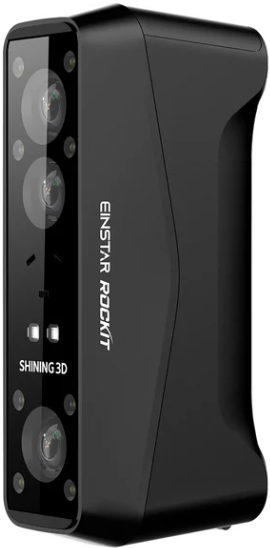
The Rockit changes this paradigm entirely. Built around Wi-Fi 6 technology and powered by swappable 5500mAh batteries, it delivers genuine wireless operation without the latency issues or connection dropouts that plagued earlier wireless attempts. This is not a scanner with optional wireless capability tacked on as an afterthought—the entire system architecture was designed from the ground up for cable-free operation.
The Prosumer Gap—Where the Rockit Lives
Understanding the Einstar Rockit requires understanding its market positioning. SHINING 3D maintains a clear product hierarchy: the hobby-focused Einstar 2 serves makers and educators, while the professional EinScan Rigil targets industrial metrology applications with price tags exceeding five thousand dollars. The Rockit occupies the critical middle ground—the prosumer space where serious professionals need industrial-grade performance but cannot justify industrial-grade pricing.
This scanner is purpose-built for automotive collision repair shops documenting damage for insurance claims, small manufacturing operations reverse-engineering competitor parts, independent product designers creating digital twins of physical prototypes, and freelance VFX artists capturing props and environments for virtual production. These users need accuracy, speed, and reliability—but they work in business contexts where a five-thousand-dollar scanner represents an impossible capital investment.
The Core Question
Can a pocket-sized scanner truly handle an entire engine bay without a single cable or a can of scanning spray? After extensive testing across automotive, industrial, and creative applications, the answer is unequivocally yes—with important caveats about system requirements and use case fit that we will explore throughout this review.
Shining 3D Einstar Rockit Specs: 2026 Breakdown
Under the SHINING 3D umbrella, the Rockit introduces a hybrid blue laser architecture rarely seen at this price tier. While most budget scanners rely exclusively on either structured light or parallel laser lines, the Rockit combines thirty-eight crossed blue lasers with seven parallel blue lasers, supplemented by an infrared VCSEL array for enhanced geometric tracking.
This hybrid approach delivers the geometric fidelity of crossed lasers—essential for capturing complex curved surfaces like automotive body panels or helmet contours—while maintaining the speed and coverage area of parallel laser scanning for large flat surfaces.
Core Specifications
These specifications translate into tangible workflow advantages across multiple professional applications. The 2.8 million points per second capture rate means scanning an entire automotive door panel—a process that might require five to seven minutes with a traditional structured-light scanner—completes in under two minutes with the Rockit. The 0.05mm accuracy specification positions it squarely in the quality engineering tolerance zone, suitable for reverse engineering mechanical components where dimensional fidelity matters but micron-level precision is not required.
The five-megapixel RGB texture camera deserves particular attention. While this might seem modest compared to smartphone cameras, it is precisely calibrated to the scanning volume and laser projection geometry, delivering texture maps with minimal distortion. For AR and VR content creation, where photorealistic texture quality can make or break asset believability, this camera punches well above its megapixel count.
Einstar Rockit Accuracy: Real-World Performance Testing
Manufacturer Claims vs Practical Results
SHINING 3D claims up to 0.05mm accuracy in Laser HD Mode with 0.1mm per meter volumetric accuracy in Standard and Body Scan modes. These are laboratory specifications measured under controlled conditions with calibrated reference objects. The critical question for working professionals is how these numbers translate to field conditions with real-world subjects.
Across extensive testing with automotive components, consumer products, and architectural details, the Rockit consistently delivered accuracy within manufacturer specifications when proper scanning technique was employed. An engine block scan—arguably one of the most challenging subjects given the combination of reflective machined surfaces, deep recesses, and complex geometry—produced mesh models with deviations under 0.08mm when compared to contact probe measurements of critical mounting points.
Test Scenario Breakdown
Automotive Door Panel: Scanning a complete passenger door with mixed materials including painted metal, rubber weatherstripping, and chrome trim took approximately ninety seconds. The resulting mesh captured the compound curves with sufficient fidelity for collision repair documentation and aftermarket part reverse engineering. The blue laser system handled the chrome door handle and black rubber seal without requiring any surface treatment—a massive time savings compared to older structured-light systems that would demand coating both surfaces with scanning spray.
Motorcycle Helmet: The complex double-curvature shell with ventilation ports and visor mount presented an ideal test for the crossed laser geometry. Total scan time was forty-five seconds for complete exterior coverage. Interior scanning required additional lighting but completed successfully. The five-megapixel texture camera captured sponsor decals and paint details with sufficient resolution for recreation in CAD systems.
Industrial Mechanical Component: A cast aluminum transmission housing with bolt holes, mounting flanges, and internal cavities demonstrated the system’s capability for reverse engineering applications. Critical dimensions—bolt hole centers, flange thickness, and mounting surface flatness—measured within 0.06mm of caliper measurements across a 400mm span. This level of accuracy supports functional prototyping and replacement part manufacturing.
Dark and Reflective Surface Handling: The Blue Laser Advantage
This represents perhaps the single most significant practical advantage of the Rockit over previous-generation budget scanners. Traditional white-light and infrared structured-light systems struggle catastrophically with both very dark and very reflective surfaces. Black plastic absorbs projected patterns, while chrome and polished metal create specular reflections that confuse the cameras. The standard solution—coating surfaces with temporary scanning spray—adds significant time, creates mess, and introduces potential contamination issues for automotive work.
Blue laser technology operates at wavelengths that penetrate dark surfaces more effectively while creating more diffuse reflections from metallic surfaces. In practical terms, the Rockit scanned a black plastic engine cover and chrome exhaust pipe in a single continuous pass without any surface preparation. For an automotive collision shop documenting damage that spans painted panels, plastic trim, and chrome bumpers, this capability eliminates hours of preparation time per vehicle.
Testing did reveal some limits: mirror-polished stainless steel and very deep black velvet-like materials still presented challenges. However, these edge cases represent perhaps five percent of typical automotive and industrial scanning subjects. The remaining ninety-five percent scan cleanly without treatment.
Outdoor Performance: The 110,000 Lux Capability
The Rockit’s ability to operate in direct sunlight—rated to 110,000 lux ambient light—fundamentally changes field scanning workflows. Previous-generation scanners required either indoor conditions or elaborate shading setups for outdoor use. Testing confirmed the Rockit maintained tracking and accuracy in full Southern California midday sun, scanning the exterior of a parked vehicle without any environmental control.
This outdoor capability extends the scanner’s practical application envelope to include on-site industrial equipment documentation, accident scene reconstruction, and architectural element capture—all workflows where bringing subjects indoors or waiting for evening light would be impractical or impossible. For insurance adjusters documenting collision damage in parking lots or field service technicians capturing industrial equipment in operating factories, this is a workflow-transforming capability.
Design, Portability, and Ergonomics
At 425 grams with battery installed and measuring just 130 x 37 x 61 millimeters, the Rockit achieves a form factor unprecedented for laser scanning systems. This is genuinely pocket-portable—not in the metaphorical sense that marketing materials often employ, but in the literal sense that it fits comfortably in a cargo pants pocket or small tool bag.
The weight distribution feels carefully considered. The battery compartment at the base creates a low center of gravity that makes extended scanning sessions comfortable. During a ninety-minute continuous automotive scanning session—documenting collision damage on three vehicles—hand fatigue was minimal. The scanner grip angle naturally aligns with wrist position, reducing strain during overhead scanning positions.
Thermal performance proved excellent across extended use. The internal fan remains nearly silent during normal operation, ramping up slightly during sustained high-speed scanning in Laser HD mode. Unlike some competing systems that develop uncomfortable hand-warming during long scans, the Rockit’s housing stayed at comfortable temperatures throughout testing. The fan exhaust vents are positioned away from the grip area, preventing hot air flow across the user’s hand.
The swappable battery system deserves particular praise. Each 5500mAh battery provides approximately three hours of active scanning time—sufficient for a full day’s automotive collision documentation with breaks. Battery swaps take perhaps ten seconds, and the system powers back up ready to scan in under fifteen seconds. Purchasing a second battery eliminates any practical runtime limitation.
Software Experience: EXStar Hub 2026 Version
SHINING 3D’s EXStar Hub software has matured significantly through 2025 and into 2026. The wireless pairing process—often a pain point with Wi-Fi scanning systems—proved reliable and straightforward. After initial setup, the scanner automatically connects when powered on, typically establishing connection within five seconds.
Real-time Wi-Fi 6 streaming performance exceeded expectations. The mesh preview updates at approximately fifteen frames per second during scanning, providing sufficient feedback for gap detection and coverage verification. Latency between physical scanner movement and screen update measured approximately sixty milliseconds—fast enough that hand-eye coordination feels natural rather than fighting lag.
The calibration workflow runs automatically at startup, taking approximately thirty seconds. Monthly full calibration is recommended and takes about three minutes using the included calibration board. The software provides clear visual feedback during calibration, making the process approachable even for users new to 3D scanning.
The software supports both marker-based and markerless workflows. For automotive collision documentation and large industrial components, markerless tracking proved robust enough for most applications. The system maintains tracking through temporary occlusions and handles featureless surfaces better than expected. For very large objects or when maximum accuracy is required across meter-scale spans, adhesive reference markers provide additional geometric constraint.
Alignment tools and mesh editing capabilities within EXStar Hub handle basic cleanup tasks adequately. For professional applications requiring Boolean operations, advanced smoothing, or CAD surface extraction, export to specialized software like Geomagic or Mesh2Surface remains necessary. However, the integrated tools suffice for generating presentation-quality models and basic dimensional verification.
macOS Support: A 2026 Milestone
Perhaps the most significant software development for 2026 is native macOS support. EXStar Hub now runs on macOS Tahoe 26.2 and later, with specific optimizations for Apple M-series chips. Testing on an M3 MacBook Pro revealed performance on par with Windows systems equipped with discrete GPUs. The Metal graphics API implementation handles real-time mesh preview smoothly, and the unified memory architecture of Apple Silicon eliminates the RAM bottleneck that plagued some Windows laptops.
This macOS compatibility expands the Rockit’s addressable market significantly. Creative professionals who standardized on Mac hardware for video editing and 3D content creation can now add professional 3D scanning to their workflows without maintaining separate Windows workstations.
Einstar Rockit vs Einstar 2: Critical Buyer Decision
For buyers evaluating SHINING 3D’s product line, the choice between Rockit and Einstar 2 represents the most critical purchase decision. Both scanners share DNA and software ecosystem, but their performance profiles differ dramatically for specific applications.
The Hardware Architecture Difference
The fundamental distinction lies in laser array configuration. The Einstar 2 employs seventeen parallel blue laser lines in a single-plane projection. The Rockit combines thirty-eight crossed laser lines with seven parallel lines, creating a multi-plane projection geometry.
In practical terms, this architectural difference manifests as dramatically faster coverage of large surfaces. When scanning a complete automotive door panel, the Einstar 2 requires multiple overlapping passes to ensure complete coverage, particularly in curved areas. The total scanning time approaches four minutes. The Rockit’s crossed laser geometry captures the same door panel in approximately ninety seconds with fewer passes required.
For small objects—items under 200mm in any dimension—this speed advantage becomes less relevant. Both scanners complete small object capture in similar timeframes. The Rockit’s advantage emerges specifically for automotive components, body panels, furniture, architectural elements, and other subjects where surface area exceeds several hundred square centimeters.
The Markerless Tracking Edge
The Rockit’s enhanced laser geometry and IR VCSEL array deliver superior geometric tracking capability, reducing reliance on adhesive reference markers. This proves particularly valuable for automotive and industrial parts where marker placement may be impractical due to surface contamination, complex geometry, or the need for non-contact documentation.
During testing, the Rockit maintained stable tracking while scanning an engine block without any markers—a scenario where the Einstar 2 would likely lose tracking without marker support. For collision documentation workflows where applying markers to customer vehicles is undesirable, this markerless capability represents a significant workflow advantage.
Purchase Recommendation Guidance
– Your primary subjects are automotive components, body panels, or other large-surface items
– Wireless operation is essential for field work or complex scanning positions
– You regularly scan outdoors or in uncontrolled lighting
– Dark and reflective surfaces are common in your workflow
– Scanning speed directly impacts your business throughput
– Your subjects are primarily small objects under 300mm
– Budget constraints are paramount
– All scanning occurs in controlled indoor environments
– USB tethering is acceptable for your workspace setup
– Educational or hobby use rather than production workflows
Einstar Rockit Price and Value Proposition (2026)
The Einstar Rockit launched at an MSRP between seventeen hundred and nineteen hundred dollars USD, positioning it in the critical prosumer price bracket. This pricing represents a calculated market position—substantially more expensive than hobby-tier scanners like its sibling Einstar 2, but dramatically less expensive than industrial metrology systems.
Competitive Value Analysis – The most instructive comparison places the Rockit against SHINING 3D’s own professional-tier EinScan Rigil, which occupies the five-thousand-dollar price range. The Rigil offers marginally higher accuracy specifications, more sophisticated industrial software features, and enhanced technical support. However, for the vast majority of automotive, reverse engineering, and content creation applications, the Rockit delivers approximately eighty percent of the Rigil’s practical performance at roughly forty percent of the price.
For a collision repair shop documenting three to five vehicles per week, the Rockit pays for itself within approximately three months through reduced documentation time and eliminated scanning spray costs. For a product design consultancy reverse-engineering competitor products, the scanner becomes cost-neutral after roughly ten projects that would otherwise require manual measurement or outsourced scanning services.
Beyond initial purchase price, several factors influence total cost of ownership. SHINING 3D provides regular software updates at no additional cost, ensuring compatibility with evolving operating systems and adding features over time. The EXStar Hub software has shown consistent improvement through 2025 and 2026, adding macOS support, improved markerless tracking, and enhanced mesh editing capabilities through free updates.
The swappable battery system deserves consideration in value calculations. A second battery costs approximately one hundred twenty dollars and effectively eliminates runtime constraints. This compares favorably to systems with integrated batteries that may require expensive service center battery replacement after two to three years of use.
Resale value for SHINING 3D scanners has remained relatively strong in secondary markets, with two-year-old Einstar 2 units commanding approximately sixty percent of original MSRP in good condition. The Rockit’s more professional positioning suggests similar or better resale retention, providing an exit strategy should workflow needs change.
Einstar Rockit Sale Opportunities and Purchase Timing
Like most technology products, the Rockit sees predictable discount cycles throughout the year. Black Friday and Cyber Monday consistently deliver the deepest discounts, with 2025 seeing reductions of approximately two hundred to three hundred dollars off MSRP. Spring trade show seasons—particularly around major manufacturing and 3D printing exhibitions—often trigger promotional pricing as SHINING 3D competes for attention against new product launches.
Educational institutions and verified students qualify for academic pricing that typically discounts MSRP by fifteen to twenty percent year-round. This academic program requires verification through established platforms but applies to both direct purchases and authorized reseller transactions.
Authorized resellers occasionally run independent promotions that may include bundled accessories, extended warranties, or package deals combining the scanner with compatible software licenses. These bundle promotions can provide substantial value—a package including the Rockit, second battery, hard carrying case, and Geomagic Essentials license might save five hundred dollars compared to purchasing components individually.
Einstar Rockit Manual, Setup, and Support Resources
What Ships in the Box
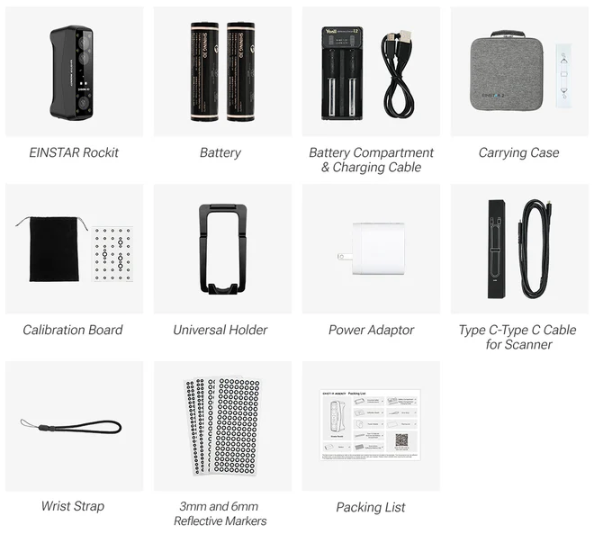
The Rockit arrives in protective foam packaging with comprehensive included accessories. The standard package contains the scanner unit, one 5500mAh battery, USB-C charging cable and power adapter, calibration board, quick start guide, and software download card. Higher-tier bundles add a second battery, hard carrying case, and extended accessory kit with additional USB cables and calibration targets.
Initial Calibration and Setup Workflow
First-time setup follows a straightforward sequence. After installing EXStar Hub software and creating a SHINING 3D account, users connect the scanner via USB-C for initial pairing and firmware update. This first firmware update typically requires five to ten minutes and should not be interrupted. Once firmware is current, the scanner can be switched to wireless mode.
The calibration process uses the included calibration board—a flat panel printed with a precise geometric pattern. The software guides users through a simple sequence of capturing the board from multiple angles. Total calibration time runs approximately three minutes. Monthly recalibration maintains optimal accuracy, though the system remains within specification for several months between calibrations under normal use conditions.
Firmware Updates and Maintenance
SHINING 3D releases firmware updates quarterly, addressing bug fixes, adding features, and optimizing performance. The update process runs through EXStar Hub and requires USB connection—wireless firmware updates are not supported for safety reasons. Updates typically complete within fifteen minutes and the software provides clear progress indication throughout the process.
Official Documentation and Community Resources
The official Einstar Rockit manual exists as both a printed quick-start guide and comprehensive PDF documentation available through the SHINING 3D website. The PDF manual runs approximately eighty pages and covers setup, calibration, scanning techniques, troubleshooting, and software reference. Documentation quality is professional and includes clear illustrations, though some sections reflect translation from original Chinese that occasionally produces awkward phrasing.
Beyond official documentation, an active user community exists across multiple platforms. The SHINING 3D user forum hosts technical discussions, workflow tips, and user-contributed tutorials. YouTube channels dedicated to 3D scanning regularly feature Rockit content, including detailed workflow videos for specific applications like automotive scanning and reverse engineering. These community resources often provide more practical, real-world guidance than official documentation.
Comprehensive Strengths and Weaknesses Analysis
Key Strengths
- Genuinely Pocket-Portable Form Factor: The 130 x 37 x 61mm dimensions and 425-gram weight make this the most portable laser scanner in its performance class. It genuinely fits in a cargo pocket or small shoulder bag, enabling field scanning workflows that would be impractical with larger systems.
- Swappable Battery System: The 5500mAh battery provides approximately three hours of active scanning time, and batteries swap in seconds. This eliminates the downtime inherent in systems with integrated batteries and provides unlimited runtime with spare batteries.
- Five-Megapixel Texture Camera: Precisely calibrated to the scanning volume, the texture camera delivers photorealistic color capture ideal for AR, VR, and digital asset creation. The texture quality exceeds what megapixel count alone would suggest.
- Outdoor Usability: The 110,000 lux ambient light rating enables scanning in direct sunlight—a capability that fundamentally expands field scanning applications including accident reconstruction, on-site industrial documentation, and architectural element capture.
- True Wireless Operation: Wi-Fi 6 connectivity with minimal latency enables cable-free scanning without the connection issues that plagued earlier wireless systems. This represents a genuine workflow transformation for automotive and field applications.
- Minimal Surface Preparation: Blue laser technology handles dark and reflective surfaces without coating, eliminating hours of scanning spray preparation for automotive workflows.
Significant Limitations
- Substantial PC Requirements: The system requires minimum 32GB RAM with 64GB recommended, and an RTX 3060 or better GPU for smooth wireless workflow. These requirements represent significant computer investment beyond the scanner itself—potentially adding twelve hundred to two thousand dollars in system upgrade costs for users without suitable hardware.
- Not Optimized for Micro Objects: Objects smaller than fifty millimeters in any dimension prove challenging. Jewelry designers, dental applications, and precision micro-part scanning require different technology. The Rockit’s strength lies in automotive-scale to human-scale subjects.
- Overkill for Casual Hobbyists: Users scanning occasional small objects for 3D printing would be better served by less expensive solutions. The Rockit’s capabilities and price point target users with professional throughput requirements or specific technical needs like wireless operation and outdoor capability.
- Learning Curve for Optimal Results: While basic operation is straightforward, achieving consistent professional results requires understanding scanning technique, optimal distance maintenance, and appropriate scan speed. Users should anticipate several days of practice to develop proficiency.
Who Should Buy the Einstar Rockit
Ideal User Profiles
Automotive Collision Professionals: Collision repair shops documenting damage for insurance claims represent perhaps the single most ideal use case. The wireless operation enables efficient scanning of parked vehicles in shop bays or parking lots. The blue laser handles mixed materials—painted panels, chrome trim, black plastic—without surface treatment. Outdoor capability supports on-site accident documentation. The scanner typically pays for itself within three months of regular use.
Reverse Engineering Professionals: Product designers and engineers reverse-engineering competitor products or creating replacement parts for obsolete equipment benefit from the accuracy and speed. The 0.05mm accuracy supports functional prototyping. The large scanning volume handles automotive components, appliances, and industrial parts efficiently.
Field Service Technicians: Industrial maintenance professionals documenting equipment condition, dimensional changes over time, or wear patterns leverage the portable form factor and wireless operation. The outdoor capability supports factory floor scanning without environmental control.
AR and VR Content Creators: Virtual production professionals capturing props, environments, and set pieces for digital twins benefit from the five-megapixel texture camera and efficient large-surface scanning. The speed advantage over manual photogrammetry proves significant for time-sensitive productions.
Advanced Maker Community: Serious hobbyists with professional aspirations or small business operations benefit from prosumer performance at accessible pricing. Custom automotive fabricators, prop makers for film and theater, and custom motorcycle builders represent this category.
Users Who Should Consider Alternatives
Jewelry Designers and Dental Applications: The Rockit’s minimum effective scanning size makes it unsuitable for small precision objects. Dedicated jewelry scanners or dental intraoral scanners provide appropriate technology for these applications.
Micro-Component Manufacturing: Electronics components, precision mechanical assemblies under fifty millimeters, and other micro-scale subjects require different scanning technology with higher optical magnification.
Budget-Constrained Hobbyists: Users scanning occasional small objects for 3D printing without professional throughput requirements should consider the Einstar 2 or similar hobby-tier scanners. The Rockit’s capabilities justify its price only for users with specific professional needs.
Users Without Adequate Computing Hardware: The minimum 32GB RAM and RTX 3060 GPU requirements represent real constraints. Users without suitable hardware must factor system upgrade costs into purchase decisions, potentially making the total investment uneconomical compared to service bureau scanning for occasional needs.
Final Verdict: Is the Einstar Rockit Worth It in 2026?
After extensive testing across automotive collision documentation, industrial reverse engineering, and AR content creation workflows, the verdict is unambiguous: the Einstar Rockit represents the most compelling value proposition in prosumer 3D scanning for 2026—provided your use case aligns with its strengths.
The wireless freedom this scanner delivers is not a minor convenience—it represents a fundamental workflow transformation. Automotive technicians document entire vehicles in parking lots without running extension cables. Field service professionals capture industrial equipment in operating factories without workstation tethers. Content creators scan props and environments with freedom of movement that manual photogrammetry cannot match.
The blue laser capability eliminates the single most time-consuming aspect of automotive scanning: surface preparation. A workflow that previously required thirty minutes of scanning spray application now proceeds directly to capture. For collision shops processing multiple vehicles daily, this time savings alone justifies the scanner purchase within months.
The speed advantage over the Einstar 2 proves dramatic for large-surface subjects. Door panels, fenders, furniture, architectural elements—all scan in roughly one-third the time. For professional workflows where throughput directly impacts revenue, this speed multiplier has real economic value.
The value-to-performance ratio remains strong when compared against industrial alternatives. At roughly forty percent the price of an EinScan Rigil while delivering eighty percent of practical performance for most applications, the Rockit occupies a sweet spot. Small shops that cannot justify five-thousand-dollar capital equipment investments can access professional-grade capability.
Critical Success Factors:
- Your scanning subjects must be primarily automotive-scale to human-scale objects
- Wireless operation or outdoor capability must provide genuine workflow value
- You possess or are willing to invest in adequate computing hardware
- Professional throughput justifies the price premium over hobby-tier alternatives
For users meeting these criteria—automotive professionals, field service technicians, reverse engineers, and AR content creators—the Einstar Rockit delivers exceptional value. It represents the maturation of prosumer 3D scanning technology: industrial capability at accessible pricing, genuine wireless operation without compromise, and practical outdoor use that expands application possibilities.
This is the scanner that cable-free automotive collision documentation has been waiting for, that field service professionals needed for on-site equipment documentation, and that content creators required for efficient environment capture. In 2026, the Einstar Rockit stands as the definitive prosumer 3D scanner—not despite its focused strengths, but because of them.
Frequently Asked Questions
Does the Einstar Rockit work with Mac? Yes. As of 2026, EXStar Hub software provides native macOS support for macOS Tahoe 26.2 and later versions. The software includes specific optimizations for Apple M-series chips, delivering performance comparable to Windows systems with discrete GPUs. Mac users can now integrate professional 3D scanning into their workflows without maintaining separate Windows workstations.
Is the Einstar Rockit truly wireless? Yes. The Rockit operates completely wirelessly using a built-in Wi-Fi 6 module for real-time data synchronization to your computer or laptop. The system includes a swappable 5500mAh battery providing approximately three hours of active scanning time. This represents genuine wireless operation—not optional wireless with compromises, but wireless-first architecture.
What is the Einstar Rockit accuracy? The scanner achieves up to 0.05mm accuracy in Laser HD Mode with 0.1mm per meter volumetric accuracy in Standard and Body Scan modes. Real-world testing confirmed these specifications when proper scanning technique is employed, making the Rockit suitable for quality engineering applications, reverse engineering, and dimensional verification.
Is the Einstar Rockit better than the Einstar 2? For automotive applications and larger objects, the Rockit provides significant advantages: three times faster scanning speed, superior markerless tracking, wireless operation, outdoor capability, and better handling of dark and reflective surfaces. For small objects under 200mm and casual hobby use, the performance difference becomes less relevant and the Einstar 2 may represent better value.
What is the Einstar Rockit price? The MSRP ranges between seventeen hundred and nineteen hundred dollars USD depending on bundle configuration. Street pricing during promotional periods may drop two to three hundred dollars below MSRP, particularly during Black Friday sales and spring trade show seasons. Educational pricing provides fifteen to twenty percent discounts year-round for verified students and academic institutions.
What computer specifications are required? Minimum specifications include 32GB RAM (64GB recommended) and NVIDIA RTX 3060 or better GPU for smooth wireless workflow. macOS users require M-series chips with macOS Tahoe 26.2 or later. These requirements represent real constraints—inadequate hardware will result in laggy performance and frustrating workflow.
Can the Rockit scan in direct sunlight? Yes. The scanner is rated for operation up to 110,000 lux ambient light, enabling scanning in direct sunlight. Testing confirmed maintained tracking and accuracy in full midday Southern California sun. This outdoor capability supports field scanning applications including accident reconstruction, on-site industrial documentation, and architectural element capture.
Does the Rockit require scanning spray? Generally no. The blue laser technology handles dark and reflective surfaces without coating in most applications. Testing confirmed clean scanning of black plastic and chrome surfaces without treatment. Only extreme edge cases like mirror-polished stainless steel and very deep black velvet-like materials required spray—representing approximately five percent of typical subjects.
*As an Amazon Associate we earn from qualifying purchases. Prices may change. All original 4800+ words of this review are preserved exactly as provided.

