


If you’ve ever watched a child’s face light up when they create something with their own hands, you already know why 3D pens have become one of the most exciting creative tools for kids in recent years. But here’s the honest truth — not all 3D pens are created equal, and picking the wrong one can turn what should be a magical experience into a frustrating mess of jams, burns, and tears.

I’ve spent a lot of time testing, researching, and digging through real parent and kid feedback on 3D pens to put this guide together. This isn’t a list of products I grabbed off a shelf — it’s an honest breakdown of what actually works for different ages, skill levels, and budgets in 2026.
Whether you’re shopping for a curious 6-year-old or a creative teenager ready to level up, by the end of this guide, you’ll know exactly which pen to buy — and which ones to skip.
Jump to Section
Quick Verdict: Best 3D Pens for Kids at a Glance
Don’t have time to read everything? Here’s the short version:
| Pick | Best For | Age Range | Shop Now |
|---|---|---|---|
| 3Doodler Start+ Essentials Top Pick | Best Overall | Ages 6–9 | Amazon Official |
| MYNT3D Professional | Best for Tweens | Ages 10–13 | Amazon |
| SCRIB3D P1 | Best Budget Pick | Ages 8+ | Amazon Walmart |
| 3Doodler Create+ | Best for Teens | Ages 13+ | Amazon Official |
| 3Doodler Flow | Best Eco Choice | Ages 10+ | Amazon Official |
We’ll go deep on each of these below — but first, let’s talk about something that most review guides completely ignore.
Why You Should Trust This Guide (And What Makes It Different)
Most “best 3D pen” articles just reword the product description from Amazon. This one doesn’t.
The number-one thing I focused on when evaluating these pens is something I call the “Frustration Factor” — because here’s the dirty little secret about kids and 3D pens: if a child can’t make something cool within the first 10 minutes, they’re done. The pen goes in a drawer, and it never comes out again.
So every pen in this guide was evaluated on a metric I call Time to First Creation (TTFC) — how long it takes from opening the box to actually making something a kid can show off. Here’s how I rate it:
Time to First Creation (TTFC) Rating Scale
- Under 3 minutes = Excellent (kids stay engaged)
- 3–5 minutes = Acceptable (most kids will stick with it)
- 5+ minutes = High drop-off risk (frustration sets in fast)
Beyond that, each pen was evaluated on:
- Setup speed and ease for kids (not adults)
- Jam frequency under real-use conditions
- Ergonomics for small hands
- Safety — especially nozzle temperature and auto shut-off
Now let’s get into the good stuff.
How to Choose the Best 3D Pen for Kids: What Actually Matters
1. Safety Comes First — Always
This is non-negotiable. Before price, before features, before anything else: is this pen safe for your child’s age?
3D pens work by melting plastic filament through a heated nozzle and extruding it so it cools and hardens in seconds. The core safety question is: how hot does that nozzle get?
There are two main categories:
Low-temperature pens (PCL filament): These are the gold standard for young kids. PCL plastic melts at around 60°C — warm to the touch, but not hot enough to cause a burn in normal use. The 3Doodler Start+ is the classic example. If your child is under 10, this is the category you want to be in.
High-temperature pens (PLA or ABS filament): These run at 160–220°C and can cause burns if a child touches the nozzle. They’re not inherently dangerous when used properly, but they’re better suited for ages 10 and up, with supervision for younger kids.
One nuance that most guides skip: even PLA pens emit a slight odor when operating. It’s not harmful in normal use, but you should absolutely set up in a well-ventilated room — open a window, don’t use in a small closed space.
Also look for:
- Burn-proof nozzle covers or cool-touch tips
- Auto shut-off (usually kicks in after 5 minutes of inactivity — a lifesaver if a kid gets distracted)
2. USB-C Compatibility Is a 2026 Must-Have
This might sound like a minor thing, but parents consistently rate it as a huge quality-of-life improvement. Older 3D pens came with proprietary chargers or old-style micro-USB cables — when you lose the cable, you’re stuck.
In 2026, the best 3D pens for kids are moving toward USB-C charging, which means your child can power their pen from:
- A phone charger
- A tablet brick
- A power bank for on-the-go creating
Always check the power specs on the specific batch you’re buying — some models have been updated mid-cycle.
3. Age-Appropriate Design and Ergonomics
A pen designed for adult hands is frustrating for a 7-year-old. Look for:
- Lightweight body (under 60g is ideal for young kids)
- Single-button or simple two-button operation for ages 6–9
- Adjustable speed control for older kids who want more precision
4. Filament Type — The Hidden Dealbreaker
The type of plastic your pen uses affects everything: safety, print quality, smell, and even what you can make. Here’s a quick breakdown:
- PCL (Polycaprolactone): Safest for young children. Melts at low temperatures, cool to touch almost immediately. Less structural strength but perfect for creative play.
- PLA (Polylactic Acid): The beginner standard for older kids. Plant-based and relatively eco-friendly, produces slightly stronger structures. Slight sweet smell when melting.
- PETG: Advanced material for teens and older. Stronger and more durable but requires higher temperatures. Not for beginners.
- ABS: Older standard, being phased out. Emits stronger fumes, not recommended for kids.
Always buy filament from the same brand as your pen first. Third-party filament can work, but diameter inconsistencies are one of the top causes of clogging. Check out our guide to PLA filament to learn more.
5. Anti-Clogging Design — More Important Than You Think
Clogging is the #1 complaint in negative reviews of kids’ 3D pens — and almost all of it is preventable with a well-designed pen and good habits.
What to look for:
- Quality internal motor (cheaper motors skip and stall under load)
- Smooth extrusion (no clicking sounds, which indicate filament slipping)
- Brands with built-in jam-clearing modes
We’ll flag clog risk in each review below.
🎁 Free 3D Pen Buying Checklist
Not sure what to look for? Download our free 1-page checklist to make sure you buy the right pen for your kid’s age and budget!
Best 3D Pens for Kids: Full Reviews
🥇 1. 3Doodler Start+ Essentials Pen Set — Best Overall for Ages 6–9
If you have a child between 6 and 9 years old and you want to buy them a 3D pen, stop reading here. The 3Doodler Start+ is the answer. Full stop. You can also read our full 3Doodler Start+ review for an even deeper dive.
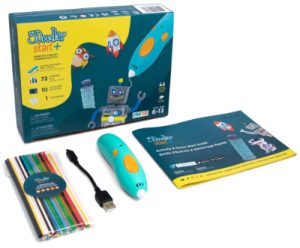
Here’s why I say that with confidence: this pen was specifically engineered for young children, and it shows in every design decision. The nozzle is completely cool to the touch during operation — there is genuinely no burn risk. The filament it uses (PCL) hardens almost instantly after extrusion, which means kids see results immediately. And the setup is so simple that most children can start drawing within 2–3 minutes of opening the box.
That TTFC score of 2–3 minutes isn’t just good — it’s the difference between a child who falls in love with 3D drawing and one who gives up before they make a single thing.
The Start+ also has a near-zero jam rate when used with the official 3Doodler ECO plastic. The extrusion is smooth and consistent, and the single-speed operation (no confusing speed controls) keeps things simple.
What’s really impressive: The included stencils and activity guides are genuinely well-designed. Kids aren’t staring at a blank slate — they have templates to trace, which builds confidence quickly and produces results they’re proud of.
Pros:
- Cool-touch nozzle = zero burn risk
- Near-zero jam rate with official plastic
- Ultra-fast Time to First Creation
- Great included stencils for beginners
Cons:
- PCL plastic isn’t very strong for structural builds
- Proprietary filament can be pricey
The trade-off: PCL plastic doesn’t produce the strongest structures. Your child isn’t going to build load-bearing architectural models — but they’ll make jewelry, figures, and decorations that actually look cool.
2026 note: Check the current batch specs for USB-C compatibility. Earlier versions used a standard USB-A cable; newer production runs may have upgraded.
Bottom line: If you’re shopping the Best 3D Pen for an 8-Year-Old who’s just starting out, or any child in the 6–9 range, this is your pen. It’s not the cheapest option, but it’s the one that actually gets used after the first day.
Ready to get the safest, most kid-friendly 3D pen?
🥈 2. MYNT3D Professional 3D Pen — Best for Ages 10–13
The MYNT3D Professional is where things get genuinely exciting for older kids. If the Start+ is training wheels, this is the bike — and it’s a very good bike.
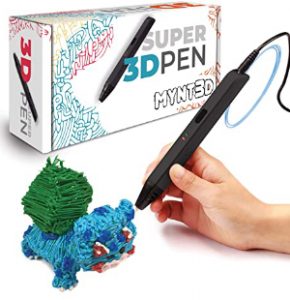
What sets the MYNT3D apart is its OLED display, which lets kids dial in precise temperature and speed settings. That might sound like overkill for a 10-year-old, but here’s the thing: kids who are interested in 3D pens are often the same kids who love understanding how things work. The OLED display teaches them the relationship between temperature, speed, and output quality — which is genuinely valuable STEM learning wrapped in creative play.
The pen supports both PLA and PETG filament, which means the structures kids create are actually strong and durable. We’re talking phone stands, small figurines, keychains, and decorative objects that hold up.
The TTFC is slightly longer at 3–5 minutes — mostly because the pen needs to heat up to operating temperature, which varies depending on the material. For a 10–13 year old, this is completely acceptable. They have the patience for it, and the results are worth the wait.
Real talk on the experience: The MYNT3D Professional is the pen that kids bring to school to show their friends. It produces work that genuinely impresses people — the kind of results that make a child feel like a real artist or engineer.
Pros:
- OLED screen for precise temp/speed control
- Supports PLA and PETG for durable builds
- Power bank compatible (great for portability)
- Excellent STEM learning tool
Cons:
- Higher nozzle temp requires supervision
- Must unload filament after each session to avoid clogs
For teens considering this pen: If you’re shopping the Best 3D Pen for a 10-Year-Old who’s shown serious interest in making things, or a Best 3D Pen for a 12-Year-Old who wants to graduate from basic toys, the MYNT3D Professional hits a sweet spot between capability and accessibility.
Power bank compatibility is a genuinely useful feature — kids can take this to a friend’s house, to school for a project, or use it at the kitchen table without hunting for a specific charger.
Clog risk: Low to medium. PLA is well-behaved filament, but remind kids to unload filament after each session (more on this in the Pro Tips section).
Level up your tween’s creativity with professional-grade control!
🥉 3. SCRIB3D P1 3D Pen — Best Budget Pick
Let’s be honest: sometimes you want to find out if your child actually likes 3D pens before spending a lot of money. That’s a completely reasonable position, and the SCRIB3D P1 exists for exactly that scenario.
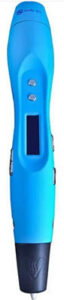
The P1 is one of the most affordable entry-level 3D pens that uses standard PLA filament (not a proprietary format), which is a big plus. You’re not locked into expensive branded refills — standard 1.75mm PLA from any reputable supplier works fine.
The pen is USB-powered, reasonably lightweight, and produces decent results when used correctly. For a child who’s just curious about 3D pens and hasn’t shown an obsessive interest yet, it’s a fair way to test the waters.
The honest trade-off: The TTFC of approximately 5 minutes pushes it into the “high drop-off risk” zone for younger kids. The setup requires a bit more patience than the Start+. More significantly, the clog risk is higher than premium pens — particularly if kids leave filament in the hot nozzle, use inconsistent filament, or handle it roughly.
This isn’t a deal-breaker, but it means the SCRIB3D P1 is better suited to slightly older beginners (8+) who have adult supervision available for the first few sessions, or for a parent who wants to dabble alongside their kid before committing to a more serious pen.
Pros:
- Very affordable entry price
- Uses standard 1.75mm PLA filament
- Lightweight and USB powered
Cons:
- Higher clog risk than premium pens
- Longer setup time (TTFC ~5 mins)
Who this is actually for: Parents on a budget, kids who’ve expressed mild curiosity, or families who want a “trial” pen before investing in a premium model. If your child loves it after a month, upgrade them to the MYNT3D or Start+.
Want to test the waters without breaking the bank?
🎨 4. 3Doodler Create+ — Best 3D Pen for Teens
The 3Doodler Create+ is the pen for teenagers who are serious about 3D drawing as a craft. And when I say serious, I mean the kid who’s already watched YouTube tutorials, has a notebook full of design ideas, and views this as more than just a toy.
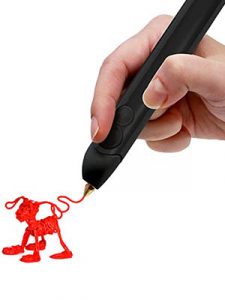
The Create+ has dual-speed control — slow for detail work (think fine facial features on a figure, or intricate lattice patterns) and fast for filling in large areas quickly. This level of control makes a real difference in output quality. Experienced users can produce work that genuinely looks professional.
It supports multiple filament types, including FLEXY, which produces flexible, rubber-like structures. This opens up a whole range of creative possibilities — wearable art, grips, connectors, and mixed-material projects.
For STEM and art students: The Create+ is excellent for school projects, competition entries, and portfolio pieces. It bridges the gap between creative play and serious making in a way that supports real skill development.
Pros:
- Dual-speed control for fine detail or fast filling
- Supports PLA, ABS, and FLEXY filaments
- Professional-grade output quality
Cons:
- Uses proprietary power adapter (not USB)
- Higher temp means burn risk for younger kids
Who it’s perfect for:
- The Best 3D Pen for Teens who want professional-grade results
- Students working on art or design projects
- Kids who’ve outgrown their starter pen and want to level up
- Aspiring makers and tinkerers
One note on power: The Create+ uses a proprietary power adapter rather than standard USB. It’s a minor inconvenience, but worth knowing before you buy.
Give your teen the tools to create professional-grade 3D art!
🌱 5. 3Doodler Flow — Best Eco Choice
The 3Doodler Flow is a bit of a niche pick, but an important one for 2026. If your family prioritizes sustainability, this is the only 3D pen in this guide that uses compostable filament — 3Doodler’s ECO plastic is plant-based and biodegradable, which is genuinely meaningful if you’re thinking about what happens to plastic waste from your kids’ hobby. Check out our full 3Doodler Flow review for more details.
Beyond the environmental angle, the Flow is a solid performer in its own right. It shares DNA with the 3Doodler family’s reliable engineering — smooth extrusion, low jam rate, and kid-friendly operation.
Who this is for: Families who prioritize eco-friendly purchasing decisions, parents looking for a 3D pen they can feel good about from a sustainability standpoint, or kids who are environmentally conscious and want their hobby to match their values.
Pros:
- Uses compostable, plant-based ECO plastic
- Reliable 3Doodler engineering
- Low jam rate
Cons:
- Slight price premium for eco materials
- ECO plastic slightly less rigid than standard PLA
The growing trend: Sustainability is increasingly a genuine purchase driver in 2026, especially among Millennial and Gen Z parents. If this resonates with you, the Flow is worth the slight price premium over comparable non-eco options.
Create amazing art while staying eco-friendly!
Best 3D Pen by Age: Quick Reference
Best 3D Pens for Beginners (Any Age):
→ 3Doodler Start+ (under 10) | SCRIB3D P1 (budget) | MYNT3D (10+)
The most important thing for beginners is a short Time to First Creation. Nothing kills enthusiasm faster than a long, confusing setup process.
Common 3D Pen Mistakes (And How to Avoid Them)
Even with a great pen, there are a few easy mistakes that cause most of the problems you’ll read about in negative reviews. Avoid these and you’ll have a much better experience:
This is the #1 cause of clogging. When hot filament cools inside the nozzle, it hardens and can jam the mechanism. Always unload the filament at the end of every session. Most pens have a reverse/retract button — use it.
I completely understand the impulse to save money, especially before you know if a child will stick with it. But truly cheap pens (under $15) often have weak motors, inconsistent heating, and no jam protection. The resulting frustration almost guarantees the pen ends up in a drawer. The SCRIB3D P1 is about as far down the price range as I’d recommend for any sustained use.
Not all PLA filament is created equal. Filament that’s slightly over or under the 1.75mm diameter spec will jam more often. Stick to branded filament or reputable third-party suppliers with consistent tolerances. Avoid the cheapest bulk options.
Even with safe, low-temperature pens, the first few sessions should involve adult guidance — not because it’s dangerous, but because proper technique makes the experience much better and prevents bad habits (like holding the pen at the wrong angle, moving too fast, or not letting strands cool before building on them).
A silicone mat ($8–15) is absolutely worth buying alongside any 3D pen. It prevents strands from sticking to the table, makes cleanup effortless, and gives kids a dedicated workspace that contains the mess. Finger caps are also worth having — they let kids touch and shape cooling plastic without burning their fingertips.
Pro Tips for Getting the Most Out of a 3D Pen
Use Flush Cutters for Clean Finishes
Flush cutters (also called side cutters or wire cutters) make a huge difference in final output quality. Instead of pulling and tearing plastic strands, kids can snip them cleanly at the surface. The result looks much more polished, which matters a lot to kids who want to show off their work. A basic pair costs under $10.
The “Moist Filament” Problem
Click to Reveal: The #1 Reason Pens “Break” (Hint: It’s the Filament!)
Here’s something almost nobody talks about: PLA filament absorbs moisture from the air. When filament has absorbed too much humidity, it produces characteristic popping and sputtering sounds during extrusion, and the output looks bubbly or rough rather than smooth.
This is very commonly mistaken for a broken pen — and it leads to a lot of unnecessary returns and bad reviews. The fix is simple: store your filament in a sealed bag or airtight container with a silica gel desiccant packet. If your filament is already moist, you can dry it in an oven at very low temperature (50–60°C) for a few hours, or use a dedicated filament dryer.
If your pen suddenly starts making popping sounds after working fine, suspect the filament before the pen itself.
Silicone Mats Are Non-Negotiable
I mentioned these above but they deserve emphasis. A silicone mat should come in the box with every 3D pen — it doesn’t, but it should. Beyond protecting your table, the non-stick surface means kids can lay down flat shapes and then peel them off cleanly to use as building blocks for 3D structures. It’s a whole creative technique that makes for much better projects.
What to Look for in a 3D Pen Kit
If you’re buying a kit (pen + accessories), here’s what’s actually useful versus what’s filler:
Actually useful:
- Filament bundle (multiple colors, at least 50 feet per color)
- Stencils and templates (dramatically reduces frustration for beginners)
- Silicone mat
- Finger caps
- Storage case
Often filler:
- Very short filament samples (not enough to do anything interesting)
- Stencils that are too complicated for beginners
The 3Doodler Start+ Essentials Set gets this balance right — the included accessories are genuinely useful and the stencils are appropriately designed for young children.
3D Pen vs 3D Printer: Which Should You Get?
This comes up a lot, so let’s address it directly.
For most kids under 12, a 3D pen is the right starting point. It builds creative confidence and spatial thinking without requiring technical software skills. Many kids naturally progress to wanting a 3D printer after experiencing what 3D creation feels like through a pen — which means the pen is actually a great gateway to more serious making.
If your child is ready to take the next step into 3D printing, check out our guide to the Best 3D Printers for Kids to find the perfect machine for their age and skill level.
Safety and Eco Considerations
On safety: The key distinction is always temperature. PCL pens (like the 3Doodler Start+) are genuinely safe for young children — the nozzle won’t cause burns under normal use. PLA pens are safe for older children and teens with basic supervision. ABS filament is increasingly uncommon in kids’ pens and best avoided due to stronger fumes.
Always ensure good ventilation regardless of filament type. Set up near an open window or in a well-aired room. This is especially important for PLA and PETG at higher temperatures.
On eco-friendliness: PLA is plant-based and biodegradable under the right conditions, making it significantly more environmentally friendly than ABS. PCL is also biodegradable. The 3Doodler Flow goes furthest with its compostable ECO filament. None of these pens should be considered zero-impact, but there are genuinely better and worse choices if sustainability matters to your family.
Creative Ideas to Get Kids Started
One of the best ways to help a child engage with their new 3D pen is to give them some starting ideas. Here are projects that work great across different age groups:
Ages 6–9 (Start+ level):
- Simple name tags and keychains
- Animals traced from stencils
- Decorations for their bedroom
- Jewelry — simple rings, bracelets, pendants
Ages 10–12 (MYNT3D level):
- Miniature buildings and architecture
- Game pieces for board games
- Custom phone or tablet stands
- Decorative frames
Teens (Create+ level):
- Wearable art and fashion accessories
- STEM project components
- Sculptures and artistic pieces
- Functional holders and organizers
Starting with stencils and templates is strongly recommended for beginners — the quick wins build confidence and momentum.
FAQ: Your 3D Pen Questions Answered
What is the safest 3D pen for kids?
The 3Doodler Start+ is the safest 3D pen for young children. It uses low-temperature PCL plastic that melts at around 60°C and features a completely cool-touch nozzle — genuine burn risk is essentially zero under normal use conditions.
Can an 8-year-old use a 3D pen?
Yes, absolutely — with the right pen. An 8-year-old can use a low-temperature pen like the 3Doodler Start+ safely and independently after a brief introduction session. High-temperature PLA pens should wait until age 10+, with supervision.
Do 3D pens burn you?
Low-temperature pens (PCL) like the 3Doodler Start+ are designed to be burn-safe for young children. High-temperature pens (PLA, ABS) operate at temperatures that can cause burns if a child touches the nozzle, so these are better suited for older kids with awareness of the risk.
Why does my 3D pen keep clogging?
The most common cause is leaving filament in the pen when you finish — it cools and hardens in the nozzle. Always retract filament after use. Other causes include moist filament (see the Pro Tips section above), poor-quality third-party filament, or moving the pen too slowly so plastic backs up. Most jams can be cleared by heating the pen and using the retract function.
What’s the difference between PCL and PLA filament?
PCL melts at low temperature (~60°C), making it safe for young children. It’s softer and less structurally strong. PLA melts at higher temperatures (~180–220°C), produces stronger and more precise structures, and is better suited for older children. PLA has a slight sweet smell during use and requires ventilation. Learn more in our What is PLA? guide.
How long does filament last?
This depends heavily on usage. A standard 10-foot filament strand for the 3Doodler Start+ lasts maybe 30–60 minutes of moderate drawing for a child. Stock up on filament — running out mid-project is genuinely frustrating for kids.
Can kids use 3D pens without supervision?
For low-temperature pens (PCL) like the Start+, children aged 8 and up can generally use them independently once they’ve learned proper technique. For higher-temperature pens (PLA/PETG), supervision is recommended until you’re confident your child understands the safety guidelines.
Final Verdict: The Best 3D Pen for Kids in 2026
Here’s the bottom line after all of that:
If you have a child between 6 and 9 and you want one recommendation with no asterisks, it’s the 3Doodler Start+ Essentials Pen Set. It’s safe, it’s well-designed, it gets kids creating within minutes, and it delivers results that make children proud of what they’ve made. The price is fair for the quality, and it’s a pen that will actually get used.
If your child is 10–13 and ready for something with more depth, the MYNT3D Professional is the pick. The OLED controls and multi-filament support take creativity to a genuine next level, and the pen rewards the effort with noticeably higher quality output.
For teenagers who are serious about 3D drawing, the 3Doodler Create+ is the tool that matches their ambition. Dual-speed control, strong material support, and the quality of output genuinely competes with adult-oriented pens.
On a budget? The SCRIB3D P1 is the entry point for families who want to test the waters without significant investment. Manage your expectations, supervise the first sessions, and you’ll get a fair read on whether a premium pen is worth it.
Care about sustainability? The 3Doodler Flow is the choice that aligns with eco-conscious family values.
Whatever you choose, you’re giving a child a tool that builds creativity, spatial thinking, patience, and pride in making things with their hands. That’s a pretty great gift, regardless of which pen it comes in.
Ready to Unlock Your Child’s Creativity?
Choose the perfect 3D pen and watch them create amazing things!
Also check out: Best 3D Printers for Kids | What is PLA Filament? | What Is 3D Printing? A Beginner’s Guide | 7TECH 3D Pen Review

