


ABS is a workhorse filament: strong, heat-resistant, and ideal for functional parts and mechanical prototypes. If your projects need toughness, impact resistance, or the ability to withstand higher temperatures, an ABS-capable machine is usually the right choice. This guide helps you find the best ABS 3D printer for your needs — whether you want a beginner-friendly model, a budget option under $1,000, or a high-performance machine for demanding parts.
Who should consider printing with ABS?
- Engineers & prototypers — for durable test parts and functional prototypes.
- Manufacturers & small shops — for jigs, fixtures, and end-use components.
- Hobbyists & makers — who need heat resistance (e.g., automotive, enclosures, tooling).
- Cosplayers & modelers — when parts must be sanded, acetone-smoothed, or painted.
Why Choose an ABS 3D Printer?
Key Advantages of ABS
- High heat resistance — ideal for automotive parts, tool housings, and components exposed to warm environments.
- Impact strength — more durable than PLA for moving parts and functional prototypes.
- Excellent post-processing — can be sanded smooth, drilled, tapped, or acetone-smoothed for a glossy finish.
- Good long-term stability — suitable for end-use parts that need structural integrity.
Challenges When Printing ABS
While ABS is versatile and durable, it also comes with a set of challenges that require the right printer setup. This is where choosing the best ABS filament printer becomes essential.
- Warping and layer separation — ABS contracts as it cools, causing lifting or cracking if the environment isn’t stable.
- Odor and fumes — requires good ventilation or a closed chamber.
- Higher temperature requirements — hotends need to reach 230–250°C or more.
- Heated bed necessary — at least 100°C to improve adhesion and reduce warping.
ABS Requires Proper Settings
Getting the most out of ABS depends heavily on your printing environment and slicer configuration. Later in this guide, you’ll find recommended best ABS 3D printing settings to help you dial in temperatures, fan behavior, and adhesion techniques for consistent results.
Key Features to Look for in an ABS 3D Printer
ABS requires stable temperatures, strong adhesion, and a controlled environment. Not every 3D printer is built for this, which is why understanding the essential features is key to choosing the best ABS 3D printer for your needs. Here’s what separates an ABS-capable machine from a standard beginner-friendly printer.
1. Heated Bed (100°C or Higher)
A heated bed minimizes warping and ensures that first layers stay firmly attached. ABS typically needs 100–110°C for reliable adhesion. Glass, PEI, and textured beds all work well when combined with the right temperature.
2. Enclosed Build Chamber
ABS is sensitive to drafts and temperature fluctuations. An enclosure helps maintain consistent warmth, which prevents cracks and layer separation. Fully enclosed printers or machines with optional enclosure kits are strongly recommended.
3. High-Temperature Hotend (230–260°C+)
ABS requires higher extrusion temperatures than PLA. A printer with an all-metal hotend ensures stability at 230°C and above without risking heat creep or clogs. This is essential for anyone looking for the best ABS filament printer.
4. Rigid Frame and Stable Motion System
High temperatures can affect print quality if the printer’s frame is not stable. CoreXY systems, metal frames, and stiff gantries all help produce accurate ABS prints with fewer vibrations.
5. Reliable Bed Adhesion Options
For consistent results, look for a printer that works well with:
- PEI build plates
- Heated glass with glue stick
- ABS slurry
- Textured spring steel sheets
6. Auto-Bed Leveling (Beginner-Friendly)
While not mandatory, auto-leveling is extremely helpful for anyone choosing their best ABS 3D printer for beginners or best beginner ABS 3D printer. It reduces setup time and keeps first layers consistent at high temperatures. When a printer combines these features, it becomes a reliable platform for ABS — minimizing warping, improving adhesion, and allowing users to print tough, functional parts with confidence.
Best ABS 3D Printers — Quick Comparison
| Printer Model | Build Volume | Max Nozzle Temp | Heated Bed / Enclosure | Price Range | Key Features / Rating |
|---|---|---|---|---|---|
| Bambu Lab H2S | 340 × 320 × 340 mm | ≤350°C (hardened steel) | Heated bed ≤120°C • Actively heated chamber 65°C | $1,249–$2,099 | 23 sensors, 3 AI cameras, HEPA+carbon filtration — Premium / Best Overall for ABS |
| Prusa CORE One | 250 × 220 × 270 mm | ≤300°C (hardened steel) | Heated bed ≤120°C • Active chamber heating 60°C | $949–$1,199 | CoreXY, open-source, factory profiles — Reliability / Precision ABS printing |
| Creality K2 Plus | 350 × 350 × 350 mm | ≤350°C (tri-metal) | Heated bed ≤120°C • Actively heated dual-zone chamber 60°C | $1,299–$1,499 | Large-format, multi-color CFS, AI cameras — Best Large-Format Value |
| QIDI Q2 Combo | 270 × 270 × 256 mm | ≤370°C (ceramic / bimetal nozzle) | Heated bed ≤120°C • Actively heated chamber 65°C | $999 (combo with QIDI Box) | CoreXY, 3-in-1 filtration, AI cameras, fire-resistant chamber — Engineering-grade ABS & safety |
| Flashforge Adventurer 5M Pro | 220 × 220 × 220 mm | ≤280°C (all-metal) | Heated bed ≤100°C • Fully enclosed, passive heating + HEPA+carbon filter | $500–$600 | Filtration, camera, beginner-friendly — Mid-range ABS / Budget pick |
Detailed Reviews of the Top ABS 3D Printers
Bambu Lab H2S — Premium All-in-One ABS Printing Hub
The Bambu Lab H2S is the ultimate ABS printer for professional and enthusiast makers who need a reliable enclosed system with advanced automation and AI-assisted features. Perfect for high-precision, warp-free ABS printing.
- Build Volume: 340 × 320 × 340 mm
- Max Nozzle Temp: ≤350°C (hardened steel)
- Bed Temperature: ≤120°C
- Chamber Temperature: Actively heated to 65°C
- Extruder: Single direct-drive with PMSM servo motor
- Connectivity: Wi-Fi, Ethernet, USB
- Key Features: 23 sensors, 3 AI cameras, HEPA + activated carbon filtration
Why it’s great for ABS: Active chamber heating, high-temp nozzle, and advanced filtration make it ideal for high-temp ABS and engineering filaments.
Pros: Premium performance, AI-assisted automation, reliable warp-free ABS prints.
Cons: Higher cost, advanced features may be overkill for beginners.
Ideal for: Professional users, makers with high-volume or precision ABS printing needs.
Prusa CORE One — Reliability & Open-Source Precision
Prusa’s CORE One combines CoreXY mechanics with active chamber heating and open-source flexibility, making it a reliable ABS printer with long-term upgrade potential.
- Build Volume: 250 × 220 × 270 mm
- Max Nozzle Temp: ≤300°C (hardened steel)
- Bed Temperature: ≤120°C
- Chamber Temperature: Actively heated to 60°C
- Extruder: Direct-drive Nextruder with 360° cooling
- Connectivity: Wi-Fi, USB, optional Ethernet
- Key Features: CoreXY, factory-tuned ABS profiles, open-source, optional MMU3 multi-color
Why it’s great for ABS: Fast chamber heating, open-source support, and reliable ABS profiles reduce trial-and-error printing.
Pros: Precision printing, excellent open-source community support, flexible filament options.
Cons: Slightly smaller build volume than large-format printers.
Ideal for: Beginners with some technical knowledge, makers seeking precision and reliability on ABS.
Creality K2 Plus — Large-Format ABS Value
The Creality K2 Plus offers a massive heated chamber, high-temp nozzle, and multi-color capability, making it ideal for large ABS prints without breaking the bank.
- Build Volume: 350 × 350 × 350 mm
- Max Nozzle Temp: ≤350°C (tri-metal)
- Bed Temperature: ≤120°C
- Chamber Temperature: Actively heated dual-zone 60°C
- Extruder: Single direct-drive dual-gear
- Connectivity: USB, Ethernet, Wi-Fi
- Key Features: CFS multi-color system, dual AI cameras, power-loss recovery, air purifier
Why it’s great for ABS: Large volume, active chamber, and robust temperature management enable warp-free, high-performance ABS printing.
Pros: Large build volume, multi-color option, competitive price.
Cons: Slightly more complex setup, premium features add cost.
Ideal for: Makers printing large parts or multi-color ABS projects.
QIDI Q2 Combo — Engineering-Grade ABS & Safety
The QIDI Q2 Combo combines high-temperature printing, active chamber heating, and comprehensive filtration for safe, warp-free ABS and other engineering filaments.
- Build Volume: 270 × 270 × 256 mm
- Max Nozzle Temp: ≤370°C
- Bed Temperature: ≤120°C
- Chamber Temperature: Actively heated to 65°C
- Extruder: Direct-drive dual-gear (hardened steel)
- Connectivity: Wi-Fi, Ethernet, USB
- Key Features: 3-in-1 air filtration, AI cameras, fire-resistant chamber, multi-color QIDI Box
Why it’s great for ABS: Extremely high nozzle temps, active chamber, and safety features ensure perfect ABS prints and engineer-grade filament support.
Pros: High-temp capability, excellent safety systems, multi-color printing.
Cons: Slightly heavier and more complex setup.
Ideal for: Professional users, engineering applications, safety-conscious ABS printers.
Flashforge Adventurer 5M Pro — Mid-Range Enclosed ABS Printer
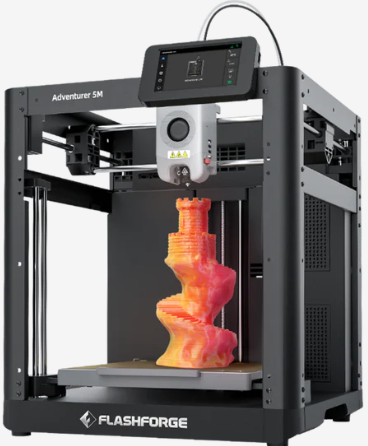
Designed for budget-conscious users, the Flashforge Adventurer 5M Pro provides a fully enclosed ABS printing environment with filtration and easy monitoring.
- Build Volume: 220 × 220 × 220 mm
- Max Nozzle Temp: ≤280°C
- Bed Temperature: ≤100°C
- Chamber Temperature: Passive heating via enclosure
- Extruder: Direct-drive
- Connectivity: Wi-Fi, Ethernet, USB
- Key Features: HEPA+carbon filtration, camera monitoring, power-loss recovery, quiet mode
Why it’s great for ABS: Fully enclosed chamber and filtration system reduce warping and fumes while staying budget-friendly.
Pros: Affordable, enclosed, beginner-friendly.
Cons: Smaller build volume, lower max nozzle temp.
Ideal for: Beginners, hobbyists, or small ABS projects on a budget.
Best ABS 3D Printing Settings
Achieving strong, warp-free ABS prints depends on getting your slicer settings dialed in. Below are the recommended settings that consistently work well across most printers listed above, especially when you’re using the best ABS 3D printer models.
1. Nozzle Temperature
ABS generally prints best at a higher extrusion temperature to ensure good layer adhesion and strength. Try:
- 230°C–250°C for standard ABS
- 250°C–270°C for tougher ABS blends or high-performance ABS
2. Heated Bed Temperature
Keeping the bed hot helps reduce warping and ensures the first layers stick well:
- 100°C–110°C for reliable adhesion
- Use a PEI sheet, glass, or ABS slurry to improve bed grip
3. Print Speed
ABS prefers a slightly slower print speed to maintain accuracy and reduce thermal stress:
- 40–60 mm/s for most layers
- Slower speeds (<40 mm/s) for small or delicate features
4. Fan Settings
Unlike PLA, ABS doesn’t like aggressive cooling. It’s better to keep the part cooling fan relatively low:
- 0–20% fan after the first few layers
- Only increase for bridging or small overhangs
5. Enclosure & Chamber Temperature
A controlled environment makes a huge difference with ABS. Most enclosed setups perform well at:
- 50–65°C chamber temperature helps reduce warping and cracking
- Don’t open the enclosure mid-print — thermal stability matters most
6. Layer Height
The right layer height can balance print quality and speed:
- 0.12–0.20 mm for strong, detailed parts
- 0.20–0.30 mm for faster prints with good strength
7. Adhesion Helpers
ABS can warp without proper adhesion, so use one of these:
- Brims or rafts — improves bottom layer bonding
- ABS slurry — a mixture of ABS and acetone applied to the bed
- PEI sheets — excellent adhesion with minimal mess
8. Retraction Settings
Optimize retraction to reduce stringing without causing clogs:
- Retraction distance: ~4–6 mm (Bowden) / ~1–2 mm (Direct drive)
- Retraction speed: 25–45 mm/s
9. Troubleshooting Common ABS Issues
- Warping: Increase bed temperature, use a brim or raft, and keep the enclosure closed.
- Layer cracking: Reduce cooling fan speed and maintain a stable chamber temperature.
- Stringing: Adjust retraction or lower the hotend temperature slightly.
These settings are a strong starting point, but every ABS filament brand and 3D printer behaves slightly differently. Always run a small calibration cube or test print when switching materials or machines.
Best ABS Filament Options
Choosing the right material is just as important as picking the best ABS 3D printer. Below are the top ABS filaments tested across multiple machines, focusing on strength, consistency, color range, and ease of printing.
| Brand | Key Strength | Tensile Strength | Best For | Price |
|---|---|---|---|---|
| Polymaker PolyLite ABS | Low odor, low warp | ~43 MPa | General prototyping | $21.99–22.99/kg |
| eSun ABS+ | Best anti-warp | ~60 MPa | Large flat prints | $16.99–23.99/kg |
| Hatchbox ABS | Highest consistency | ~43 MPa | Production printing | $23.99–42.99/kg |
| Overture ABS | Best budget | ~43 MPa | Hobbyists, students | $19.99–21.99/kg |
| IC3D ABS | Industrial-grade | ~43 MPa | End-use parts | $35/kg |
Top ABS Filament Brands
1. Polymaker PolyLite ABS – Best Overall Balance
This filament uses bulk-polymerized ABS resin designed to reduce odor and warping while maintaining excellent mechanical strength. It’s one of the most user-friendly options for both hobbyists and professionals.
- Tensile Strength: ~43 MPa
- Elongation at Break: ~20–30%
- Print Temp: 220–260°C
- Bed Temp: 90–110°C
- Colors: 15+ standard & specialty shades
- Price: Amazon | Official Website
Best For: general prototyping, functional parts, low-odor ABS printing.
2. eSun ABS+ – Best for Low-Warp Performance
Engineered for easier printing, ABS+ delivers noticeably lower warping and cracking. Excellent for larger models or users upgrading from PLA.
- Tensile Strength: ~60 MPa
- Elongation at Break: ~20%
- Print Temp: 210–230°C
- Bed Temp: 90–110°C
- Colors: 20+ bright & metallic options
- Price: Amazon | Official Website
Best For: large prints, complex geometries, users without a fully heated chamber.
3. Hatchbox ABS – Most Reliable & Consistent
Known for batch-to-batch quality control, Hatchbox ABS is trusted by print farms and professionals producing functional parts at scale.
- Tensile Strength: ~43 MPa
- Elongation at Break: ~20–30%
- Print Temp: 220–260°C
- Bed Temp: 90–110°C
- Colors: 25+ standard, translucent & specialty shades
- Price: Amazon
Best For: production printing, high-volume environments, demanding tolerances.
4. Overture ABS – Best Budget-Friendly Option
A cost-effective ABS designed with stable flow characteristics. Great for students, hobbyists, and heavy print volumes.
- Tensile Strength: ~43 MPa
- Elongation: ~20–30%
- Print Temp: 230–260°C
- Bed Temp: 100–110°C
- Colors: 18+ matte, glossy & silk variations
- Price: Amazon
Best For: budget projects, beginner ABS users, schools.
5. IC3D ABS – Premium Industrial Grade
Manufactured in the USA with professional tolerances and exceptional mechanical performance. Ideal for end-use parts.
- Tensile Strength: ~43 MPa
- Elongation: ~20–30%
- Print Temp: 220–260°C
- Bed Temp: 90–110°C
- Colors: 8–10 industrial shades
- Price: Amazon
Best For: industrial use, tooling, durable production parts.
Specialty ABS Filament Options
Tough ABS / High-Impact ABS
- Polymaker PolyMax ABS: ~65 MPa tensile strength; nano-reinforced for 30–40% higher impact resistance. $34.99/kg.
- Prusament ABS: Precision-made (±0.02 mm); excellent toughness; available in 12 colors. $29.99/kg.
Best For: protective equipment, automotive parts, drones, durable outdoor parts.
ABS+ / Low-Warp ABS
- eSun ABS+: 20% less warping; ideal for challenging models.
- MatterHackers PRO ABS: Additives for improved adhesion & low-odor printing. $39.99/kg.
Best For: large pieces, enclosures, printers without heated chambers.
Flame-Retardant ABS
- 3DXTech FR ABS: UL94 V-0 rated; self-extinguishing. $65–85/kg.
- Kimya ABS-ESD FR: Flame-retardant and anti-static; ideal for electronics. $75/kg.
Best For: electrical housings, battery holders, aerospace interiors.
Transparent ABS
- Taulman3D t-glase: 90% light transmission; PETT-based. $45/kg.
- Polymaker PolyFlex Transparent ABS: Clear ABS variant in 3 colors. $38/kg.
Best For: LED diffusers, optical parts, aesthetic lighting components.
Carbon Fiber ABS Composites
- 3DXTech CarbonX ABS: 15% carbon fiber; extremely stiff & low warp. $65/kg.
- Polymaker PolyLite ABS-CF: Smoother printing CF option with great dimensional accuracy. $55/kg.
Best For: structural brackets, RC parts, drone frames, high stiffness-to-weight applications.
ABS Filament Selection Guide
| Application | Recommended Filament | Reason |
|---|---|---|
| General prototyping | Polymaker PolyLite ABS | Balanced properties, low odor |
| Large flat parts | eSun ABS+ | Superior warp resistance |
| Production printing | Hatchbox ABS | Outstanding consistency |
| Electrical enclosures | 3DXTech FR ABS | UL94 V-0 flame rating |
| High-impact parts | Polymaker PolyMax ABS | 40% higher impact strength |
| Budget projects | Overture ABS | Cost-effective and easy to print |
| Structural components | 3DXTech CarbonX ABS-CF | Carbon fiber reinforcement |
Pro Tip: Always store ABS filament in airtight containers with desiccant packs. Moisture quickly affects print surface quality, strength, and dimensional accuracy — especially with carbon fiber and transparent ABS variants.
ABS Printing Tips for Beginners
ABS is stronger and more heat-resistant than PLA, but it requires the right print settings and environment to achieve consistent results. Below are the most important steps to avoid common issues like warping, cracking, and poor layer adhesion.
1. Use the Correct ABS Print Settings
- Nozzle Temperature: 230–260°C (depending on brand)
- Bed Temperature: 90–110°C
- Chamber Temperature: 50–70°C (or as close as possible)
- Cooling Fan: Off (or 0–10% for small details)
- Print Speed: 40–80 mm/s for standard ABS; up to 150+ mm/s on modern CoreXY printers
- Layer Height: 0.12–0.20 mm for best strength and detail
If you’re using a modern machine designed for high-temperature materials (like the Prusa Core One, QIDI Q2, or Bambu Lab H2S),
you can safely run higher speeds while maintaining excellent layer bonding.
2. Keep Airflow Away From the Print
Sudden temperature changes cause ABS to contract, leading to warping or layer cracks.
Keep the printer in an enclosure and away from AC vents, drafts, and open windows.
- Use a fully enclosed printer whenever possible.
- If your printer is open-frame, consider adding an aftermarket enclosure.
- Never use full cooling fan settings — it almost always causes cracks.
3. Improve Bed Adhesion
ABS shrinks as it cools, so strong adhesion is crucial for preventing corner lift.
Best adhesion methods:
- PEI smooth plate
- ABS slurry (ABS dissolved in acetone)
- Kapton tape
- Glue stick on glass
- BuildTak or textured surfaces
Clean your build plate regularly using 70–99% isopropyl alcohol. Finger oils noticeably reduce ABS adhesion.
4. Maintain a Stable Ambient Temperature
ABS prints best when the entire print area stays warm. A heated chamber or insulated enclosure prevents thermal stress,
especially on tall or wide parts.
- Set chamber temp to 50–65°C when possible.
- Close the enclosure during the entire print.
- Avoid opening doors or panels until the model cools down gradually.
5. Use Brims and Mouse Ears for Large Parts
For prints with large flat surfaces, these additions help counteract corner lift:
- Brim: 5–12 mm wide to increase surface contact
- Mouse ears: Circular tabs added to corners
- Raft: Useful for very stubborn models on glass or smooth plates
6. Dry Your Filament Before Printing
ABS absorbs moisture over time. Even a small amount causes bubbling, zits, and weak layer bonding.
Drying guidelines:
- Dry at 70–80°C for 4–6 hours
- Store in airtight containers with desiccant
- Use filament dryers for best consistency
7. Optimize ABS for Strength
If the goal is maximum durability, use the following adjustments:
- Higher nozzle temps: 245–260°C (improves layer bonding)
- Lower fan speed: 0%
- Higher infill: 40–60% for strong functional parts
- Adaptive layer height: Improves mechanical strength and appearance
8. Use ABS+ or Low-Warp ABS If You’re a New User
If you’re still learning ABS, materials like ABS+ or low-warp ABS
(eSun ABS+, Polymaker ABS+, MatterHackers ABS variants) offer much better printing stability,
especially on non-heated or partially heated chambers.
Why ABS+ is easier:
- Less shrinkage
- Reduced warping
- Better layer adhesion at lower temps
- Smoother surface finishes
9. Ventilate When Necessary
ABS releases fumes during printing. If your machine does not include a filtration system, consider:
- Printing in a well-ventilated room
- Using HEPA + activated carbon air filters
- Draft-free ventilation to avoid cooling the print
10. Test Small Calibration Models First
Before printing large parts, run quick calibration prints to dial in the settings for your specific filament brand:
- Temperature towers
- Retraction tests
- Bed adhesion tests
- Warping test cubes
Every brand of ABS behaves slightly differently, so testing saves time and avoids wasted material.
How to Choose the Right ABS 3D Printer
Choosing the best ABS 3D printer depends on your budget, skill level, and the type of projects you plan to create. ABS requires higher temperatures and better thermal stability than PLA, so not every machine is suitable for it. Use the checklist below to narrow down your options and select a printer that matches your needs.
1. Consider Your Budget
Under $1,000: You’ll find capable enclosed machines with solid bed temps and reliable print quality.
- Best Under $1000: Flashforge Adventurer 5M Pro, QIDI Q2 Combo (when discounted)
- Best Budget Option: Flashforge Adventurer series
If you need higher chamber temperatures, CoreXY motion, or advanced features like AI monitoring, mid-range and premium models may be the better choice.
2. Evaluate Your Skill Level
Some ABS printers are designed for beginners, while others require more tuning and maintenance.
- Best for Beginners: Flashforge 5M Pro (simple setup, enclosed chamber)
- Easy but Powerful: Prusa Core One
- Advanced Users: Bambu Lab H2S, QIDI Q2 Combo, Creality K2 Plus
Before deciding, think about how much manual calibration you’re willing to do. Modern AI-assisted machines reduce setup time dramatically.
3. Check Thermal Requirements for ABS
To print ABS without warping, your printer should have:
- Nozzle Temperature: 250°C or higher (ideal 280–350°C)
- Bed Temperature: 100–120°C
- Enclosed Chamber: 50–65°C (passive or active)
- All-metal hotend: Essential for long-term durability
All five printers in this guide meet or exceed these requirements.
4. Think About Build Volume
Are you printing small functional parts, or larger mechanical prototypes?
- Large-Format Jobs: Creality K2 Plus
- Medium to Large Builds: Bambu H2S, QIDI Q2 Combo
- Compact Enclosed Designs: Flashforge 5M Pro
If you regularly print enclosures, robotics parts, or automotive components, consider a machine with at least 300×300×300 mm of space.
5. Match the Printer to Your Use Case
| Use Case | Recommended Printer | Why |
|---|---|---|
| Beginners | Flashforge Adventurer 5M Pro | Fully enclosed, quiet, minimal tuning. |
| High-speed functional parts | Bambu Lab H2S | Extremely fast with 65°C chamber and automation. |
| Professional engineering materials | QIDI Q2 Combo | 370°C nozzle + 65°C chamber + full filtration. |
| Large-format ABS | Creality K2 Plus | Huge 350×350×350 mm volume with active heating. |
| Reliable 24/7 operation | Prusa Core One | Open-source, serviceable, accurate, predictable. |
6. Further Reading
If you’re a new user and want a simpler machine to start your journey, check our full guide on the best 3D printers for beginners. If you want broader recommendations across all materials and categories, see our list of the best 3D printers.
FAQs About ABS 3D Printing
Is ABS better than PLA?
ABS is stronger, tougher, and far more heat-resistant than PLA, making it the better option for functional or mechanical parts. PLA is easier to print and produces less odor, but it softens at low temperatures and is not ideal for parts exposed to heat or stress.
Can beginners print with ABS?
Yes, beginners can print ABS, but only with an enclosed printer and proper bed temperatures. Models like the Flashforge Adventurer 5M Pro and Prusa Core One make the process much easier because they maintain chamber heat and reduce warping.
What is the best temperature for ABS printing?
Most ABS filaments print best at:
- Nozzle: 230–260°C
- Bed: 100–110°C
- Chamber: 50–65°C for minimal warping
Some industrial ABS blends require up to 270–300°C, especially reinforced or flame-retardant variants.
How do I reduce warping when printing ABS?
ABS warping is usually caused by uneven cooling. You can reduce it by:
- Using an enclosed or actively heated chamber
- Turning off part-cooling fans
- Keeping bed temps at 100–110°C
- Using adhesives like ABS slurry, Magigoo, or PEI sheets
- Slowing the first layer for better adhesion
- Drying your filament to reduce moisture-induced cracking
What is the best budget ABS 3D printer for beginners?
The Flashforge Adventurer 5M Pro is one of the best budget options because it comes fully enclosed, includes excellent safety features, and requires minimal calibration. It consistently handles ABS with less warping than open-frame printers.
Conclusion: Choosing the Best ABS 3D Printer for Your Needs
ABS remains one of the most valuable materials for functional, durable, and heat-resistant 3D prints. Whether you’re creating mechanical parts, brackets, enclosures, or prototypes, printing ABS successfully comes down to choosing the right machine and using stable temperature control.
The five printers reviewed above represent the strongest ABS performers through 2026 — from the ultra-capable Bambu Lab H2S and engineering-focused QIDI Q2 Combo to beginner-friendly options like the Flashforge Adventurer 5M Pro. Each offers strong thermal management, reliable extrusion, and the features needed to prevent the warping and cracking that typically challenge ABS printing.
For buyers on a budget, the Adventurer 5M Pro delivers dependable ABS output without the higher price tag. For professionals or print farms, the Prusa Core One, Creality K2 Plus, and QIDI Q2 provide superior consistency, upgrade paths, and long-term value.
Your final choice should be based on your skill level, print volume, workspace, and the kind of projects you plan to build. If you’re unsure where to begin, review the comparison table above or jump back to the detailed breakdown for each model.

