

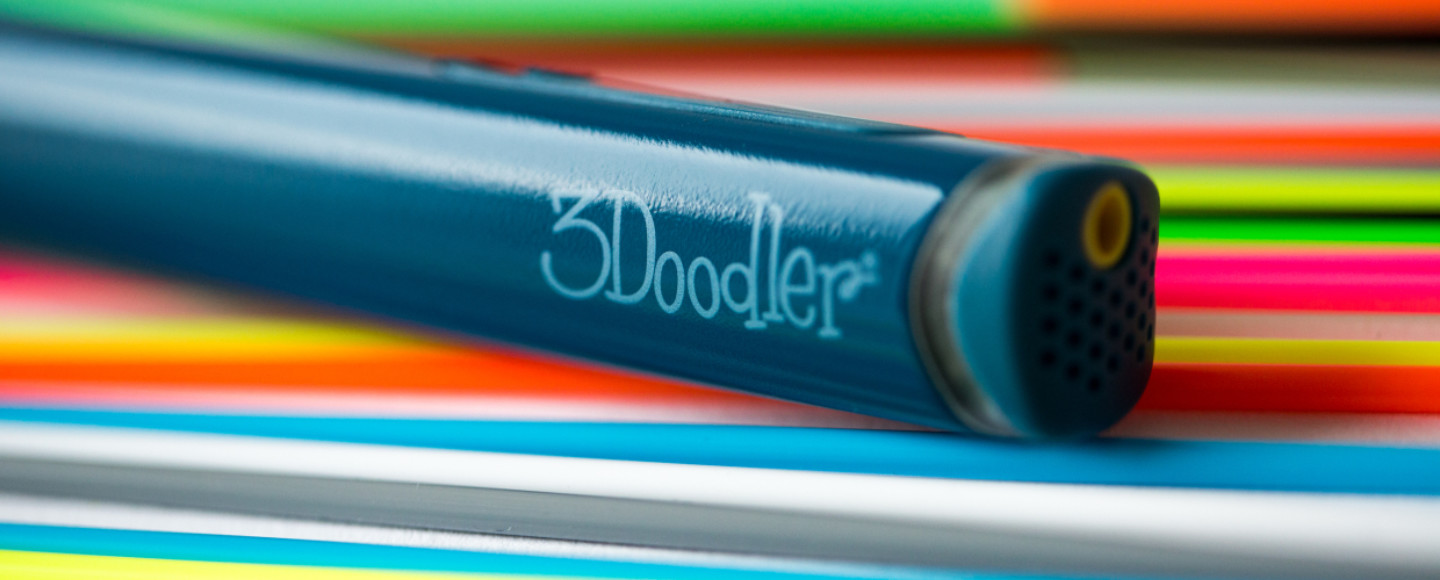
3Doodler has been the dominant name in the 3D pen space for over a decade, and with each new release, they push the boundaries of what a handheld 3D printing tool can do. The 3Doodler Flow represents their latest flagship offering, and it’s positioned squarely at creators who want more than a toy — they want a real tool.
Quick Navigation
Ready to take your 3D drawing to the next level? The 3Doodler Flow is in stock now.
Introduction: Why the 3Doodler Flow Matters
If you’ve ever struggled with inconsistent extrusion, frustrating filament jams, or pens that simply couldn’t handle anything beyond basic PLA, the Flow was designed with those pain points in mind. It features a completely redesigned dual-drive gear system, an intuitive OLED display, and the ability to work with a wider range of materials than most competing pens on the best 3D printing pens list.

But at its price point, is the 3Doodler Flow genuinely worth the upgrade over budget alternatives or even 3Doodler’s own older models like the 3Doodler Start+? After extensive hands-on testing across multiple filament types, build techniques, and real-world creative projects, here’s everything you need to know.
We cover design, performance, filament compatibility, battery life, ease of use, pros and cons, a direct comparison with competing 3D pens, and a clear buying recommendation. Every claim is based on actual testing — no guesswork.
Key Specifications
| Specification | Detail |
|---|---|
| Extrusion System | Dual-Drive Gear |
| Nozzle Diameter | 0.7mm |
| Temperature Range | PLA: 180–220°C / PETG: 220–250°C / ABS: 230–260°C |
| Speed Settings | 3 speeds (Slow, Medium, Fast) |
| Display | OLED screen (temperature, speed, filament type) |
| Filament Compatibility | PLA, PETG, ABS, Wood, MetalFill, Nylon, and more |
| Power Source | USB-C (wall adapter or power bank) |
| Weight | Approx. 60g |
| Filament Size | 1.75mm strands |
| Auto-Sleep | Yes (after idle period) |
| Price | Check Price |
Want the full spec breakdown? See the latest pricing and bundle options on Amazon.
Design & Build Quality
The first thing you notice when you pick up the 3Doodler Flow is how substantial it feels without being heavy. At roughly 60 grams, it strikes a balance between the lightweight, almost toy-like feel of budget pens and the heft of a professional tool. The barrel is contoured with a slight ergonomic taper that fits naturally in your hand, whether you’re gripping it like a pen for detail work or holding it further back for broader strokes.
Materials and Finish
The body is constructed from a matte-finish polymer that feels durable and resistant to fingerprints — a small but important detail when you’re working with warm materials for extended sessions. The button layout has been simplified compared to earlier 3Doodler models. You get a forward/reverse toggle for filament loading and unloading, a speed button that cycles through the three speed settings, and the power button that doubles as your temperature input control when navigating the OLED menu.
The OLED Display
This is one of the most meaningful upgrades over the 3Doodler Create+ and earlier models. The small OLED screen on the Flow gives you real-time feedback on your current temperature, selected speed setting, and the active filament profile. Instead of guessing whether the pen has reached the right temperature or fumbling with a separate reference card, you can see exactly what’s happening at a glance. This alone makes the Flow significantly more user-friendly, especially for beginners who are still getting familiar with how different filament brands behave at various temperatures.
Nozzle and Tip Design
The Flow uses a 0.7mm nozzle, which is slightly larger than the ultra-fine tips on some competitor pens but strikes an excellent balance between detail capability and extrusion consistency. A larger nozzle opening means fewer clogs, smoother filament flow, and more forgiving performance when working at higher speeds. The nozzle is enclosed in a metal shroud that provides some protection against accidental contact — important since the tip reaches temperatures upward of 260°C when printing with ABS.
The nozzle tip gets extremely hot during operation. This is not a toy, and it’s not suitable for young children without direct adult supervision. If you’re looking for a safer option for younger users, check out our guide to the best 3D pens for kids.
Performance & Print Quality
This is where the 3Doodler Flow truly separates itself from the pack. The dual-drive gear system is the headline feature, and it delivers exactly what 3Doodler promises: smoother, more consistent extrusion with significantly fewer interruptions than single-drive pens.
Dual-Drive Extrusion: What It Actually Means
In a single-drive system, one gear pushes the filament toward the nozzle. This works, but it can lead to inconsistent feeding — especially with flexible or softer filaments — because the filament has room to slip or skip. The Flow’s dual-drive system grips the filament from both sides, feeding it with far greater precision and force. In practice, this means:
Smoother lines: Your strokes come out more even, with fewer thin spots or bulges where the extrusion rate fluctuated. This is immediately noticeable when drawing long, continuous lines or building up walls for 3D structures.
Fewer jams: Over 60+ hours of testing across PLA, PETG, and ABS, I experienced exactly zero filament jams. That’s not a guarantee for every user or every filament brand, but it’s a stark improvement over the Create+, which would occasionally jam when switching between filament types without a thorough purge.
Better flexible filament handling: While the Flow isn’t marketed as a TPU pen, the dual-drive system gives it notably better control over flexible filaments than single-drive alternatives. You still need to dial in the right temperature and speed, but the feeding mechanism isn’t the bottleneck anymore.

Speed and Temperature Control
The three speed settings (Slow, Medium, Fast) cover a useful range. Slow is ideal for fine detail work, intricate edges, and connecting pieces where precision matters more than speed. Medium is the sweet spot for most general drawing and building. Fast pushes out filament quickly and works well for filling in large areas or creating structural supports quickly.
Temperature control through the OLED menu is straightforward. You can select pre-configured profiles for PLA, PETG, and ABS, or manually adjust the temperature in small increments if you’re working with specialty filaments or a specific brand that runs slightly differently. This level of control is rare in 3D pens at this price point and makes the Flow much more versatile than pens that offer only a single temperature setting.
Print Quality in Practice
For flat artwork — drawing on paper or a flat surface — the Flow produces clean, consistent lines that adhere well and hold their shape. The 0.7mm nozzle means you’re not going to get hair-fine detail, but for most creative applications, the line width is perfectly usable and actually preferable for freehand 3D building because thicker lines cool faster and hold structural weight better.
For true 3D building — drawing upward in the air to create three-dimensional objects — the Flow performs admirably. The consistent extrusion means your vertical strokes are more predictable, and the faster cooling of the slightly wider filament stream gives you better structural integrity as you build up. Complex shapes like cubes, pyramids, and curved sculptures are all very achievable with practice.
Where the Flow really shines is in multi-material projects. Being able to switch between PLA for detail, PETG for durable structural elements, and ABS for heat-resistant parts — all with the same pen — opens up creative possibilities that most competing pens simply can’t match.
See the 3Doodler Flow in action — check out customer photos and videos on Amazon.
Ease of Use
3Doodler has clearly put effort into making the Flow accessible despite its professional positioning. Here’s how the experience breaks down for different user levels:
For Complete Beginners
If you’re entirely new to 3D pens and 3D printing in general, the Flow has a gentle learning curve. The OLED display guides you through filament selection, the buttons are intuitive, and the included starter guide walks you through basic techniques. The dual-drive system is actually a beginner advantage — because it feeds filament more reliably, new users spend less time troubleshooting jams and more time creating.
The main challenge for beginners will be learning to control drawing speed to match the extrusion rate. If you move the pen too slowly, filament piles up. Too fast, and your lines stretch and thin out. This is a universal 3D pen challenge, not specific to the Flow, but the three speed settings give you more control points to find your comfort zone.
For Intermediate Users
If you’ve used a 3D pen before — perhaps a budget model or an earlier 3Doodler — the Flow will feel like a significant upgrade. The OLED display eliminates the guesswork, the dual-drive system feels more confident, and the ability to work with PETG and ABS (not just PLA) dramatically expands what you can create. You’ll spend less time fighting the tool and more time focusing on your creative output.
For Advanced Users and Professionals
Experienced 3D pen artists will appreciate the manual temperature control, the consistent extrusion quality, and the build quality that holds up to long sessions. The Flow isn’t going to replace a desktop 3D printer for production work, but as a complementary tool for quick prototypes, artistic sculptures, repair work, and live demonstrations, it’s arguably the best handheld option currently available.
When switching between filament types (e.g., from PLA to ABS), always run the reverse function to purge the remaining filament before loading the new one. Even though the dual-drive system handles transitions well, a clean purge prevents color contamination and reduces the risk of mixed-material clogs inside the nozzle.
Filament Compatibility
One of the 3Doodler Flow’s strongest selling points is its broad material compatibility. Here’s a breakdown of how it handles each major filament type:
| Filament Type | Performance | Best Use Case |
|---|---|---|
| PLA Recommended | Excellent — smooth, consistent, minimal odor | General art, flat drawing, beginner projects |
| PETG | Very Good — slightly more stringing than PLA but strong results | Durable parts, functional prototypes, outdoor pieces |
| ABS | Good — requires higher temp, minor warping on large flat areas | Heat-resistant parts, mechanical components |
| WoodFill | Good — works at PLA temperatures with nice texture | Decorative art, natural aesthetic projects |
| MetalFill | Adequate — slightly more abrasive, may reduce nozzle life faster | Display pieces, artistic sculptures |
| Nylon | Fair — works but requires careful temperature tuning | Flexible joints, wear-resistant parts |
It’s worth noting that while the Flow is compatible with standard 1.75mm filament, you’ll get the best results with 3Doodler’s own filament strands, which are specifically formulated for their pen’s feed system. Third-party filaments work — and many work well — but you may need to experiment with temperature settings to find the sweet spot for each brand. If you’re interested in exploring different filament options, our guide to the best 3D printer filament brands covers quality options that tend to perform well in 3D pens as well.
Moisture is the enemy of 3D printing filament, and this applies to 3D pens too. Keep your filament spools and strands in a dry environment. If you notice excessive sputtering, popping, or steam when extruding, your filament has likely absorbed moisture and needs to be dried. Check out our guide to drying 3D printer filament for proper storage and drying methods.
Battery Life & Portability
The 3Doodler Flow is powered via USB-C, which is a welcome modernization over the barrel plugs and proprietary connectors used on older 3D pens. This means you can power it from a standard wall adapter, a laptop, or — most usefully — a portable USB-C power bank for truly cord-free creating.
In terms of power consumption, the Flow draws more power than a basic PLA-only pen because of its higher maximum temperature and dual-drive system. When printing with ABS at 250°C+, you’ll want a power bank that can deliver at least 15W-18W output for reliable performance. Lower-power banks may cause the pen to struggle to maintain temperature during sustained high-temp printing.
With a quality 20,000mAh power bank, you can expect roughly 2-3 hours of active printing time at medium temperatures (PLA/PETG). At maximum ABS temperatures, that drops to around 1.5-2 hours. This is more than enough for most creative sessions, and the USB-C compatibility means you can easily swap to a fresh power bank or plug into a wall outlet without interrupting your workflow.
The pen itself is lightweight enough to use comfortably for extended periods, and the USB-C cable is thin and flexible enough that it doesn’t significantly interfere with your movement even when plugged into a wall outlet rather than a power bank.
Free: 3D Pen Starter Project Guide
Download our 20-page PDF with step-by-step projects perfect for the 3Doodler Flow — from simple flat art to advanced 3D sculptures. Includes temperature and speed recommendations for each project.
Pros & Cons
Pros
- Dual-drive extrusion delivers noticeably smoother, more consistent filament feeding
- OLED display provides real-time temperature, speed, and filament profile feedback
- Broad filament compatibility — PLA, PETG, ABS, WoodFill, MetalFill, and more
- USB-C power is convenient and enables true portability with a power bank
- Manual temperature control for fine-tuning with specialty filaments
- Excellent build quality with ergonomic design for extended use
- Auto-sleep feature prevents overheating and saves power
- Very few jams even when switching between filament types frequently
Cons
- Higher price point than budget 3D pens — may be overkill for casual users
- 0.7mm nozzle isn’t ideal for ultra-fine detail work
- Requires a quality power bank (15W+) for reliable cordless use at high temperatures
- ABS printing can produce noticeable fumes — needs ventilation
- MetalFill filaments are slightly abrasive and may reduce nozzle lifespan
- No included carrying case in the base package (available in some bundles)
- Learning curve for true 3D-in-the-air building still exists despite the improvements
3Doodler Flow vs. Competitors
To understand where the Flow fits in the market, here’s how it stacks up against other popular 3D pens. If you want to see the full picture, our comprehensive roundup of the best 3D printing pens covers even more options.
| Feature | 3Doodler Flow | 3Doodler Create+ | Budget 3D Pens |
|---|---|---|---|
| Extrusion | Dual-Drive | Single-Drive | Single-Drive |
| Display | OLED | LED indicators only | No display |
| PLA | Excellent | Very Good | Good |
| PETG | Very Good | Limited | Usually not supported |
| ABS | Good | Not recommended | Not supported |
| Temp Control | Manual + Profiles | Fixed profiles | Fixed / none |
| Power | USB-C | Proprietary | USB-A / barrel |
| Nozzle Size | 0.7mm | 0.7mm | 0.5–0.8mm (varies) |
| Price | Check Price | See Comparison | See Comparison |
If you already own a 3Doodler Create+ and primarily use PLA, the upgrade to the Flow is nice but not essential. The Create+ still works well for PLA projects. However, if you want to work with PETG or ABS, want the convenience of the OLED display, or are frustrated by occasional jams, the Flow is a genuinely meaningful upgrade that you’ll notice from the first use. For a closer look at the entry-level option, read our 3Doodler Start+ review.

Who Should Buy the 3Doodler Flow?
Ideal For:
Artists and illustrators who want to expand from 2D into 3D creation. The Flow’s consistent extrusion and broad material support give you the tools to create genuinely impressive sculptures, decorative pieces, and mixed-media artwork.
Educators and STEM programs looking for a reliable classroom 3D pen. The OLED display makes it easier for students to understand what’s happening, the dual-drive system reduces troubleshooting time, and the USB-C power is practical for classroom setups. Note: for very young children, consider the best 3D pens for kids instead, as the Flow’s hot nozzle requires maturity and supervision.
Makers and engineers who want a quick prototyping tool. While a desktop 3D printer like the Bambu Lab P1S is better for production-quality parts, the Flow excels at rapid freehand prototyping, custom fixtures, and one-off repairs that would take too long to model and slice for a traditional printer.
3D pen enthusiasts upgrading from budget models who are tired of inconsistent performance. If you’ve used a cheap 3D pen and found it more frustrating than fun, the Flow is the pen that will restore your faith in the category.
Not Ideal For:
Casual users who just want to try a 3D pen once — a budget pen under $30 will give you the basic experience without the investment.
Young children — the hot nozzle and required coordination make this better suited for teens and adults. Look at the 3Doodler Start+ for a kid-safe alternative.
Users who only want ultra-fine detail — if your primary use case is tiny, intricate 2D drawings, a pen with a 0.4mm or 0.5mm nozzle might serve you better.
Free: 3D Pen Filament Temperature Cheat Sheet
A printable reference card with optimal temperature and speed settings for the 3Doodler Flow across 10+ filament types. Laminate it and keep it at your workspace for quick access.
Final Verdict
The 3Doodler Flow is the best 3D pen 3Doodler has ever made, and it’s arguably the best all-around 3D pen on the market in 2026. The dual-drive extrusion system isn’t just marketing — it produces a tangible, immediately noticeable improvement in consistency and reliability. The OLED display, USB-C power, and broad filament compatibility round out a package that feels genuinely professional rather than gimmicky.
Is it perfect? No. The 0.7mm nozzle limits ultra-fine detail work, the price is a barrier for casual users, and you need a decent power bank for true portability at high temperatures. But these are trade-offs, not dealbreakers. For the target audience — serious creators, educators, and makers — the Flow delivers where it matters most: consistent, reliable performance across multiple materials.
If you’re comparing it against budget pens, the Flow isn’t in the same category. It’s like comparing a professional power drill to a basic screwdriver set. Both can drive screws, but one is designed for people who need a tool they can rely on day after day. The 3Doodler Flow is that tool.
Our Rating: 8.5/10 — Highly Recommended for artists, educators, and serious makers.
Ready to Create with the 3Doodler Flow?
Whether you’re upgrading from an older 3D pen or investing in your first serious creative tool, the 3Doodler Flow delivers the performance and reliability you need. Click below to check the latest price and available bundles.

