


A Complete, Hands-On Guide for Beginners and Experienced Makers Alike
Let’s be honest — when you first start looking into 3D printing filaments, the options can feel overwhelming. You’ve probably landed here because you’re staring at two filament spools and asking yourself: TPU vs PLA — what’s actually the difference, and which one should I buy?
You’re not alone. This is one of the most Googled questions in the 3D printing community, and for good reason. TPU and PLA are two of the most popular filaments on the market, but they couldn’t be more different in how they feel, print, and perform.
Here’s the thing: there’s no universally “best” filament. The right choice depends entirely on what you’re making. A decorative figurine has completely different requirements than a phone case or a flexible gasket. One filament will serve you brilliantly; the other might waste your weekend.
In this guide, we’re going to break down everything — from how each material feels in your hands, to how to dial in your TPU vs PLA print settings, to when you should skip both and reach for PETG instead. By the end, you’ll know exactly which filament is right for your next project, and you’ll be armed with the knowledge to make that decision confidently.
Let’s get into it.
🚀 Ready to start printing? Get our exclusive Filament Selection Cheat Sheet — a one-page PDF that tells you exactly which filament to use for any project.
⚡ Quick Decision Guide
- ✅ Choose PLA if you want: Easy printing, fast results, decorative or display models, beginner-friendly experience
- ✅ Choose TPU if you want: Flexible, rubber-like parts, impact resistance, functional components that bend without breaking
- 🔁 Consider PETG if you want: A balance of strength, flexibility, and heat resistance — the all-rounder in the middle
📋 Table of Contents
- TPU vs PLA: Key Differences at a Glance
- What Is PLA Filament?
- What Is TPU Filament?
- The Hidden Variable: Moisture Sensitivity
- Real-World Performance Comparison
- Direct Drive vs Bowden: The Critical Difference
- Understanding Flexibility Differences
- Strength and Durability Analysis
- Heat Resistance Comparison
- PLA vs TPU vs PETG: Three-Way Comparison
- Complete Print Settings Guide
- Environmental Impact 2026
- Definitive Decision Framework
- Common Mistakes to Avoid
- Pro Tips for Both Filaments
- Best Applications & Product Picks
- Frequently Asked Questions
- Final Verdict
TPU vs PLA: Key Differences at a Glance
Here’s a side-by-side comparison that covers all the major factors — we’ll dig into each of these in detail below:
| Feature | PLA | TPU | Winner |
|---|---|---|---|
| Flexibility | Rigid | Highly Flexible | TPU |
| Ease of Printing | Very Easy ⭐⭐⭐⭐⭐ | Difficult ⭐⭐ | PLA |
| Strength Profile | Strong but Brittle | Impact-Resistant | Depends |
| Heat Resistance | Low (~60°C) | Moderate (~80-100°C) | TPU |
| Print Speed | Fast (40-100 mm/s) | Slow (15-30 mm/s) | PLA |
| Moisture Sensitivity | Low | Very High (Critical) | PLA |
| Post-Processing | Easy (sand/paint) | Difficult | PLA |
| Time to First Print | ~15 minutes | 1-3+ hours of tuning | PLA |
| Beginner Failure Rate | Low | High | PLA |
| Cost | Affordable ($15-25/kg) | Moderate to High ($20-40+/kg) | PLA |
| Sustainability | Bio-based | Petroleum-based | PLA |
Table: TPU vs PLA Filament — comprehensive comparison across all major print and performance attributes.
🎯 Not sure which filament fits your project? Take our 30-second Filament Quiz and get a personalized recommendation instantly.
What Is PLA Filament? (And Why Everyone Loves It)
PLA (Polylactic Acid) is the undisputed champion of beginner-friendly 3D printing filaments. It’s bio-derived — made from renewable resources like cornstarch and sugarcane — which gives it a lower environmental guilt factor compared to petroleum-based plastics. But before you start composting your failed prints, let’s clear up a common misconception:
⚠️ Important Clarification
PLA is industrially compostable — not backyard compostable. It requires specific high-temperature industrial facilities operating at 50-60°C+ with specific microbe populations to break down properly. Don’t put it in your home compost bin expecting it to disappear. That said, it’s still a more sustainable choice than many alternatives.
From a printing standpoint, PLA is the definition of plug-and-play. It works on virtually every FDM printer with no heated bed required (though a slightly warm bed helps with adhesion), it doesn’t warp aggressively, and it produces clean, crisp surface finishes straight off the build plate.
Pros of PLA Filament
- Extremely easy to print — minimal tuning required
- Works on almost any FDM printer
- Clean, smooth surface finish — great for display models
- Available in hundreds of colors and specialty blends
- Affordable — one of the cheapest filaments available
- Biodegradable under industrial conditions
- Low warping and good layer adhesion
Cons of PLA Filament
- Brittle — snaps under impact or flex stress
- Poor heat resistance — starts to deform around 60°C
- Not suitable for functional parts under mechanical stress
- Degrades faster than ABS or PETG over time in harsh conditions
💡 Bottom Line for PLA
If you’re printing miniatures, cosplay props, decorative items, prototypes, or anything that sits on a shelf — PLA is your best friend. It’s fast, beautiful, and forgiving. Just don’t put it in your car dashboard or anywhere it might see serious heat or impact.
What Is TPU Filament? (The Flexible Powerhouse)
TPU (Thermoplastic Polyurethane) is the rubber of the 3D printing world. It’s a flexible, elastic material that can stretch, bend, compress, and spring back to its original shape — all without snapping or cracking. If PLA is dry spaghetti, TPU is a rubber band.
TPU is used in everything from commercial phone cases and shoe insoles to custom industrial gaskets and medical device components. It’s the go-to material when your part needs to survive real-world abuse — flexing, twisting, dropping, vibrating, or being squished repeatedly.
That said, printing with TPU filament is a completely different experience than PLA. It demands patience, the right hardware setup, and a willingness to do some dialing-in. But once you get it working? The results are remarkable.
Pros of TPU Filament
- Highly flexible and elastic — bends without breaking
- Excellent impact resistance — absorbs shock instead of shattering
- Long-term durability under repeated stress
- Higher heat resistance than PLA (~80-100°C)
- Great for functional parts, wearables, and mechanical components
- Rubber-like texture adds grip and comfort
Cons of TPU Filament
- Significantly harder to print — requires experience and patience
- Extremely moisture sensitive — must be dried before printing
- Slow print speeds required (15-30 mm/s)
- Difficult to post-process (sanding, painting challenging)
- More expensive than PLA
- Works best with direct drive extruders
💡 Bottom Line for TPU
If you’re making phone cases, flexible joints, car trim pieces, custom shoe inserts, cable protectors, or any part that needs real-world durability and flex — TPU is worth every hour you spend learning to print it right.
The Hidden Variable: Moisture Sensitivity (This Could Make or Break Your Prints)
Here’s something that catches a lot of people completely off guard when they first switch from PLA to TPU: TPU filament is extremely hygroscopic, which means it aggressively absorbs moisture from the surrounding air.
Why does that matter? Because wet filament is essentially ruined filament — at least temporarily. When you try to print TPU that has absorbed too much humidity, you’ll run into a range of frustrating problems:
- Excessive stringing and wispy hairs all over your print
- Bubbling and popping sounds during extrusion (that’s steam escaping)
- Dramatically weakened layer adhesion
- Surface defects, blobs, and rough textures
- Complete print failures, especially on fine details
To put this in perspective: PLA can sit on your desk for months and still print beautifully. A spool of TPU that’s been left out in a humid environment for even a few days may need thorough drying before your next print session.
💡 Pro Tip: Dry Your TPU
If you’re printing TPU seriously, a filament dryer is not optional — it’s essential.
- Recommended drying settings: 50-55°C for 4-8 hours before printing.
- For long-term storage: Keep TPU in sealed airtight containers with silica gel desiccant packs.
- If you hear popping or crackling during extrusion, that’s your cue: the filament needs drying immediately.
The good news is that this is a solvable problem — and it’s not unique to TPU. Many high-performance filaments like Nylon and PVA have the same issue. Once you invest in a quality filament dryer and get into the habit of dry storage, it becomes a non-issue. But going in without knowing this is one of the top reasons beginners get frustrated with TPU and give up too early.
TPU vs PLA for 3D Printing: Real-World Performance
Printability — The Biggest Difference You’ll Actually Feel
If you’ve ever printed with PLA, you know how satisfying it is. You load the filament, hit print, and walk away. The printer does its thing, and you come back to a finished part. That’s the PLA experience — reliable, predictable, and stress-free.
TPU is the opposite experience, especially at first. It’s a soft, flexible material — and that flexibility is exactly what makes it difficult to push through an FDM printer. Think about it: you’re trying to push a material that wants to squish, bend, and buckle through a narrow tube and out of a tiny nozzle at high speed. It fights you every step of the way.
Print too fast? The filament bunches up and clogs. Have too much retraction? It stretches and creates gaps. Run too hot? Stringing everywhere. The settings window for TPU is narrower, and the consequences of getting it wrong are messier.
This doesn’t mean TPU is impossible — it just means you need to slow down, tune carefully, and use the right setup.
Here is one of the best TPU filaments on the market:
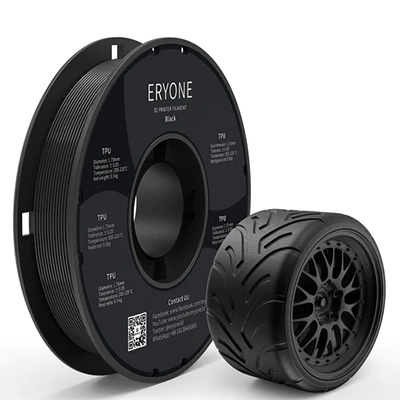
AVAILABLE ON ERYONE3D
Direct Drive vs Bowden Extruder: The Reality Check Nobody Tells You
This is genuinely one of the most important pieces of information in this entire guide, and it’s something a lot of comparison articles gloss over. So let’s be real with you:
🚨 The Hard Truth
Printing TPU on a Bowden setup is like trying to push a wet noodle through a long straw.
A Bowden extruder — like the kind found on popular printers like the Ender 3 — keeps the motor (extruder) separate from the hot end, connected by a long PTFE tube. For rigid filaments like PLA, this works perfectly fine. But for flexible TPU? The space between the extruder gears and the hot end is far too much opportunity for the soft filament to buckle, jam, and cause headaches.
A direct drive extruder, on the other hand, mounts the motor directly above the hot end, minimizing the filament’s travel distance. This gives TPU far less opportunity to go sideways (literally).
| Setup | PLA Experience | TPU Experience |
|---|---|---|
| Bowden Extruder | Perfect. Zero issues. | Possible, but expect frustration. Requires very slow speeds and often still clogs. |
| Direct Drive | Perfect. Zero issues. | Great experience. Still needs tuning but manageable. |
If you’re a beginner with a stock Ender 3 or similar Bowden printer, just know that TPU printing will be a much steeper learning curve. It’s not impossible — plenty of people do it — but it requires patience and precise settings. For the smoothest TPU experience, a direct drive upgrade or a printer like the Bambu Lab A1, Prusa MK4, or Creality K1 is a serious advantage.
TPU vs PLA Flex: Understanding the Flexibility Difference
This is probably the most visually dramatic difference between the two materials, and it’s actually the easiest to understand.
PLA is rigid. Press it, bend it, apply torque — and it resists right up until it snaps. There’s no flex, no give, no spring-back. It’s a lot like dry spaghetti: strong until it’s not, and then it breaks cleanly.
TPU is elastic. You can stretch it, bend it, squish it, twist it — and it springs back like a rubber band. This isn’t just a feature; it’s the entire reason TPU exists. It was literally designed to replicate the properties of rubber while remaining printable by standard FDM machines.
The Shore hardness of common 3D printing TPU ranges from around 85A to 95A — that’s the middle of the rubber hardness spectrum. Softer than a car tire, stiffer than a silicone wristband. The specific hardness varies by brand and formulation, so always check your filament spec sheet.
For TPU vs PLA flexibility: if your part needs to flex at all — even occasionally — TPU wins by an enormous margin. PLA will eventually fatigue and crack under repeated flex cycles where TPU will just keep bouncing back.
Strength and Durability: Which Filament Actually Holds Up?
“Strength” is one of those words that means different things depending on context. Let’s break it down:
PLA Strength
PLA actually has impressive tensile strength — meaning it resists pulling forces well. In raw numbers, PLA often outperforms TPU on tensile strength tests. But there’s a catch: PLA is brittle. It doesn’t deform before failure — it just snaps. Drop a PLA phone case on tile and it may shatter. Try to flex a PLA clip enough times and it breaks.
Here is one PLA filament that we recommend:
BUY ON ERYONE
TPU Strength
TPU shines in impact resistance and toughness — the ability to absorb energy without failing. When TPU takes a hit, it deforms (stretches or compresses) to absorb the shock and then recovers. This is exactly why phone cases, bumpers, and shoe soles are made from TPU-like materials rather than rigid plastics.
From a TPU vs PLA weight and density perspective: PLA sits around 1.24 g/cm³ while TPU ranges from approximately 1.10-1.30 g/cm³ depending on formulation. The difference in weight for most printed parts is negligible — so don’t let density be your decision factor. Focus on what kind of strength your application actually needs.
🔑 Strength Summary
- PLA = High tensile strength, low impact resistance. Strong until it suddenly isn’t.
- TPU = Moderate tensile strength, excellent impact resistance. Absorbs shock and recovers.
- Winner: Depends entirely on your use case.
After printing a model with TPU filament, you can use a mild soap to clean it.
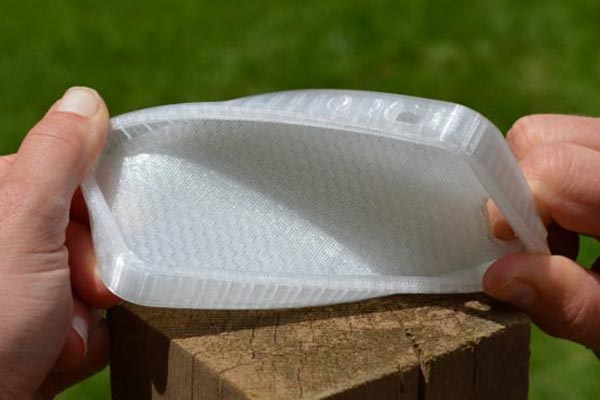
TPU vs PLA Heat Resistance: A Critical Difference
Heat resistance is where PLA’s biggest weakness becomes painfully obvious — sometimes literally. PLA begins to soften and deform at around 60°C. That doesn’t sound too low until you realize:
- A car dashboard on a sunny day can easily hit 70-80°C
- A dishwasher reaches 60-75°C during normal cycles
- Electronics enclosures under load generate considerable heat
- Outdoor applications in summer sun can surpass PLA’s limits
If you print a holder for your car’s phone mount in PLA and leave it on the dashboard during summer, you may come back to find it has warped beyond use. This has happened to many makers — don’t let it happen to you.
TPU’s heat resistance sits comfortably in the 80-100°C range depending on the specific formulation. That’s a meaningful improvement that opens up applications PLA simply can’t handle: car interior parts, enclosures for components that run warm, outdoor fixtures, and more.
Neither PLA nor TPU is an engineering-grade material for extreme heat applications — for that, you’d be looking at ABS, ASA, or Polycarbonate. But in the comparison of TPU vs PLA heat resistance, TPU clearly has the advantage for anything beyond room-temperature applications.
PLA vs TPU vs PETG: How Do They All Stack Up?
You’ve probably seen PETG mentioned alongside PLA and TPU, and for good reason — it occupies an interesting middle ground that makes it worth considering. Here’s how all three compare side by side:
| Feature | PLA | TPU | PETG |
|---|---|---|---|
| Ease of Use | ⭐⭐⭐⭐⭐ | ⭐⭐ | ⭐⭐⭐ |
| Flexibility | ⭐ | ⭐⭐⭐⭐⭐ | ⭐⭐ |
| Strength | ⭐⭐ | ⭐⭐⭐⭐ | ⭐⭐⭐⭐ |
| Heat Resistance | ⭐ | ⭐⭐⭐ | ⭐⭐⭐⭐ |
| Cost | ⭐⭐⭐⭐⭐ | ⭐⭐⭐ | ⭐⭐⭐⭐ |
| Best For | Beginners, Display | Functional, Wearable | All-Rounder |
Here’s how to think about the three-way choice:
- Best for beginners and decorative prints → PLA
- Best for flexible, rubbery, functional parts → TPU
- Best all-rounder for functional rigid parts → PETG
PETG hits a sweet spot that neither PLA nor TPU can touch: it’s reasonably easy to print, reasonably strong, has better heat resistance than PLA (~80°C), and is only moderately flexible. If you need a functional, rigid part that needs to handle some real-world stress, PETG is often the smart call. But PETG has zero flex — if your part needs to bend, PETG won’t save you. That’s still TPU’s domain.
The PLA vs TPU vs PETG question really boils down to: Are you printing for looks, for flex, or for functional durability? Answer that question and the right filament becomes obvious.
TPU vs PLA Print Settings: Your Complete Reference Guide
This is the section you’ll probably bookmark. Getting your settings right is the difference between a clean print and a tangled mess. Here’s a comprehensive breakdown of recommended TPU vs PLA settings:
| Setting | PLA | TPU |
|---|---|---|
| Nozzle Temperature | 190-220°C | 210-240°C |
| Bed Temperature | 0-60°C (optional) | 30-60°C |
| Print Speed | 40-100 mm/s | 15-30 mm/s |
| Retraction | Normal (2-7mm) | Minimal or Disabled |
| Cooling | High (fans on) | Moderate |
| Extruder | Any | Direct Drive Recommended |
| Moisture Prep | Not critical | Must dry before print |
PLA Print Settings Deep Dive
- Nozzle Temperature: 190-220°C — Start at 210°C and adjust based on your specific brand
- Bed Temperature: 0-60°C — Many printers skip the heated bed entirely for PLA
- Print Speed: 40-100 mm/s — PLA handles speed well; push it if you want fast results
- Cooling: Maximum fan speed recommended for clean overhangs and sharp details
- Retraction: Standard settings (2-7mm for Bowden, 0.5-2mm for direct drive)
- Infill: 10-20% for display prints; 30-50%+ for functional parts
TPU Print Settings Deep Dive
- Nozzle Temperature: 210-240°C — TPU needs more heat to flow reliably
- Bed Temperature: 30-60°C — A warm bed helps adhesion without warping risk
- Print Speed: 15-30 mm/s — This is non-negotiable. Go slow.
- Cooling: Moderate — Too much cooling can cause layer adhesion issues
- Retraction: Minimal or completely disabled — Retraction causes TPU to stretch and jam
- Infill: 15-30% for flexible results; higher infill makes parts stiffer
- First Layer: Very slow (10-20 mm/s) with slightly higher temperature for adhesion
🔧 Critical TPU Tip
Disable or heavily reduce retraction when printing TPU. This is the single most common cause of TPU print failures.
Excessive retraction causes the soft filament to stretch inside the tube or jam at the extruder gears.
Start with 0mm retraction and only add it back incrementally if you see severe stringing issues.
Sustainability and Environmental Impact: The 2026 Perspective
Environmental considerations are increasingly part of the buying decision for makers in 2026, and it’s worth having an honest conversation about what PLA and TPU mean for the planet.
PLA Environmental Profile
PLA’s bio-based origins — cornstarch, sugarcane, cassava root — give it a lower carbon footprint during production compared to petroleum-derived plastics. The marketing often calls it “biodegradable,” which is technically true but misleading: PLA requires industrial composting facilities operating at 50-60°C+ with specific microbe populations to break down within a reasonable timeframe. In a landfill, it behaves much like any other plastic.
That said, bio-derived feedstocks are still a step toward a more sustainable manufacturing model. PLA is the better environmental choice at the production end.
TPU Environmental Profile
TPU is petroleum-based and not biodegradable. There’s no sugarcoating that. However, TPU’s durability argument has merit: a well-printed TPU phone case that lasts four years creates less total waste than three PLA cases that crack and get discarded. Longevity is its own form of sustainability.
Both materials can be recycled in principle, though practical filament recycling infrastructure is still limited for most makers. The best approach for either material is to print thoughtfully, design for durability, and minimize failed prints.
When to Use TPU vs PLA: The Definitive Decision Framework
You’ve got all the information now. Let’s make the decision simple:
✅ Choose PLA If You…
- Are new to 3D printing and want to learn the craft without frustration
- Are printing decorative items, miniatures, figurines, or display models
- Need fast turnaround — prototype testing, concept models, quick iterations
- Are printing large objects where weight matters
- Are working with a Bowden-style printer and want reliable results
- Are on a tight filament budget
✅ Choose TPU If You…
- Need the final part to flex, stretch, compress, or bend
- Are printing phone cases, tablet bumpers, or protective covers
- Are making wearables — wristbands, custom insoles, flexible clips
- Need mechanical parts that absorb vibration or impact
- Are making cable organizers, grommets, or flexible hinges
- Have a direct drive printer or are willing to upgrade
- Need better heat resistance than PLA offers
💰 Real-World Use Case Examples
PLA: Tabletop RPG miniatures, architectural models, cosplay armor, cookie cutters, cable clips, planters
TPU: Phone cases, watch bands, RC car tires, shoe insoles, flexible phone stands, drone bumpers, custom gaskets
PETG: Tool holders, functional brackets, outdoor fixtures, food-safe containers, mechanical housings
Common Mistakes to Avoid (Learn From Others’ Pain)
Whether you’re team PLA or team TPU, these are the mistakes that waste the most time, filament, and sanity:
Common PLA Mistakes
- Printing too hot: Overheating PLA causes stringing, blobs, and surface defects. If your PLA is stringy, try dropping 5°C at a time.
- Skipping cooling: PLA needs good cooling, especially for overhangs and small detail work. Under-cooling causes drooping and poor surface quality.
- Ignoring storage: PLA is more moisture-resistant than TPU, but it still benefits from being stored sealed. Humid PLA prints rough and loses surface quality over time.
- Using PLA for heat-exposed applications: Your car, your dishwasher, your heat-generating electronics. Don’t do it. PLA will disappoint you.
Common TPU Mistakes
- Printing too fast: The number one TPU killer. 15-30 mm/s is your ceiling. Going faster causes jams, blobs, and spaghetti.
- Ignoring moisture: Printing wet TPU is like trying to weld wet metal. Dry your filament. Every. Time.
- Using too much retraction: TPU stretches instead of retracting cleanly. Minimize retraction or disable it entirely.
- Forcing a Bowden setup without optimizing: If you must print TPU on Bowden, use an all-metal hotend, tighten up any slack in the tube, and go even slower than you think necessary.
- Wrong infill settings: Too high infill makes TPU stiff and loses the flexibility advantage. Match your infill to the desired flex level of the final part.
Pro Tips: Getting the Best Out of Both Filaments
Pro Tips for PLA
- Store your PLA in resealable bags with silica gel for longer shelf life and consistent quality
- Use a brim for models with small footprints to improve first-layer adhesion
- For extremely clean surface finishes, try PLA+ formulations — they’re slightly tougher and often print smoother
- Ironing (a slicer feature) can give top surfaces an almost resin-like smoothness
- PLA responds extremely well to acetone-free sanding and acrylic paint — great for display prints
Pro Tips for TPU
- Always dry TPU before printing — a dedicated filament dryer at 50-55°C for 4-8 hours is the gold standard
- Use a direct drive extruder for the most reliable TPU experience
- Print the first layer extra slow (10 mm/s) for the best bed adhesion
- Add a slight temperature tower test when trying a new TPU brand — optimal temperature varies widely
- For very flexible parts, drop infill to 10-15% and use a flexible infill pattern like honeycomb or gyroid
- Glue stick or hairspray on the bed dramatically improves first-layer adhesion for TPU
Best Use Cases and Product Picks: Making Your Investment Count
Best Applications for PLA
PLA is the workhorse of display, prototyping, and decorative 3D printing. It excels in scenarios where precision, surface quality, and ease of production matter more than mechanical toughness:
- Tabletop gaming miniatures and terrain
- Architectural models and scale mockups
- Cosplay props, helmets, and decorative armor
- Custom organizers, desk accessories, and home decor
- Educational models and classroom demonstrations
- Rapid prototyping and proof-of-concept parts
- Cookie cutters, cookie stamps, and food presentation tools
📦 PLA Filament Recommendation
Looking for the best PLA filaments tested by real makers? Check out our full guide to the Best PLA Filaments.
Top picks include: Hatchbox PLA (best value), eSUN PLA+ (best strength), Polymaker PolyLite (best surface finish), and Bambu Lab PLA (best for Bambu printers).
Best Applications for TPU
TPU earns its reputation in real-world, functional applications where your printed part has to perform — not just sit there looking pretty:
- Custom phone cases and tablet bumpers
- Watch bands and fitness tracker straps
- RC car and drone custom tires and bumpers
- Custom shoe insoles and orthotic supports
- Cable management organizers and strain reliefs
- Flexible hinges, gaskets, and seals
- Anti-vibration feet and dampers for electronics
- Medical-adjacent wearables and assistive devices
📦 TPU Filament + Dryer Recommendations
Ready to dive into TPU printing? Check out our full guide to the Best TPU Filaments.
Our top filament picks: NinjaTek Cheetah (best for Bowden setups), eSUN TPU (great value), Polymaker PolyFlex (excellent balance of flex and detail).
And don’t forget: a filament dryer is essential for serious TPU work. See our Best Filament Dryers guide for top-rated picks.
🎁 FREE DOWNLOAD: The Complete Filament Selection Cheat Sheet
Get our one-page PDF that tells you exactly which filament to use for any project. Includes:
- ✅ Quick reference flowchart for PLA vs TPU vs PETG
- ✅ Optimal print settings for each material
- ✅ Moisture management checklist
- ✅ Hardware requirements guide
No spam. Unsubscribe anytime.
Frequently Asked Questions: TPU vs PLA
Is TPU stronger than PLA?
It depends on what you mean by “stronger.” PLA has higher tensile strength — it resists pulling forces better. But TPU wins decisively on impact resistance and toughness. TPU can absorb impacts and flex without breaking; PLA cannot. For functional parts that see real-world stress, TPU is the stronger practical choice.
Is TPU harder to print than PLA?
Yes — significantly. TPU requires slower print speeds, minimal retraction, moisture management, and ideally a direct drive extruder. PLA is one of the easiest filaments to print and works well out of the box on virtually any FDM printer. If you’re a beginner, start with PLA and work your way up to TPU.
Can beginners use TPU?
Yes, but manage your expectations. TPU is not a beginner filament. It requires more tuning, more patience, and the right hardware setup. That said, plenty of newer makers successfully print TPU after a few months of experience with PLA. Just don’t make TPU your very first filament — learn the basics first.
Is TPU more expensive than PLA?
Yes, generally. PLA is one of the most affordable filaments available, often running $15-25 per kilogram. TPU typically costs $20-40+ per kilogram depending on the brand and formulation. The gap has narrowed in recent years as TPU has become more mainstream, but PLA remains the budget-friendlier option.
Does TPU absorb moisture?
Yes — and aggressively so. TPU is highly hygroscopic and should be dried before every print session if it hasn’t been stored in an airtight container. Signs of wet TPU include popping/crackling sounds during extrusion, excessive stringing, and poor surface quality. A filament dryer is the most effective solution.
Can I print TPU on an Ender 3?
Yes, but it’s challenging due to the Bowden extruder setup. For better results on an Ender 3, slow your speed to 15-20 mm/s maximum, disable retraction, and consider upgrading to a direct drive extruder kit (several are available specifically for the Ender 3). Some users also wrap the PTFE tube tightly to minimize flex-induced jams.
What is better for outdoor use — TPU or PLA?
TPU is significantly better for outdoor use. PLA can warp and degrade in UV sunlight and moderate heat, making it unreliable for anything left outside. TPU handles heat, UV, and physical stress better. For extreme outdoor applications, ASA is even better than both.
“I wasted three spools of TPU before I found this guide. The moisture warning alone saved me hundreds of dollars. Now I print TPU phone cases that actually work — no more cracks, no more failures. The print settings table is permanently bookmarked on my phone.”
Final Verdict: TPU vs PLA — Which One Wins?
If we had to pick a single winner, PLA wins the beginner experience and TPU wins the functional performance category — but the honest answer is that they’re not really competing. They’re tools designed for different jobs.
PLA is the filament you reach for when you want fast, beautiful, reliable results with minimal setup friction. It’s the everyday workhorse for most makers, and it will serve you well for the vast majority of prints you’ll ever make.
TPU is the filament you pull out when PLA simply won’t cut it — when your part needs to flex, absorb impact, survive heat, or hold up in a real-world environment where rigid plastic would fail. It demands more from you as a printer operator, but it pays back that effort with performance that PLA genuinely cannot match.
🏁 Final Recommendation
- Just starting out? → Start with PLA. Learn the craft, dial in your settings, print confidently.
- Ready to level up? → Add a spool of TPU. Invest in a filament dryer. Take it slow.
- Want the best of both worlds? → Keep both in your workshop. Use PLA for display and prototyping; use TPU for functional parts.
- Need a heat-resistant, strong, easy-to-print middle ground? → PETG deserves a spot in your rotation too.
The makers who get the most out of 3D printing aren’t loyal to one filament — they know their materials, understand their strengths, and pick the right tool for each job. You’re now equipped to do exactly that.
Ready to Choose Your Next Filament?
Don’t waste money on the wrong material. Use our free cheat sheet to make the right choice every time.
Happy printing. 🖨️
Published on 3DTechValley.com | © 2026 3DTechValley. All rights reserved.

