


If you’ve been watching the professional resin 3D printing space, you already know that Formlabs doesn’t do anything halfway. Their machines tend to cost more, do more, and ask more from your budget than most alternatives. So when the Formlabs Form 4 dropped, the question wasn’t really whether it was good — it was whether it was worth it.
Spoiler: for the right buyer, it absolutely is. But there’s a lot of nuance packed into that answer, and that’s exactly what this review is here to unpack.

Whether you’re an engineering team looking to replace your aging Form 3, a dental lab evaluating high-throughput options, or a product designer tired of babysitting unreliable printers — this guide will walk you through everything you need to know. We’ll cover specs, real-world performance, pricing, the ecosystem, and the critical updates for 2026 (including one major unlock that changes the value equation entirely).
Ready to revolutionize your prototyping workflow? Check availability and pricing now.
Let’s get into it.
Table of Contents
- Formlabs Form 4 vs Form 3+ vs Form 4L
- Formlabs Form 4 Specifications
- Resolution vs. Real-World Surface Quality
- Formlabs Form 4 Price: What Does It Actually Cost?
- Formlabs Form 4 Build Volume
- Formlabs Form 4 Dimensions & Workspace
- Formlabs Form 4 Resin Compatibility
- Print Speed and Low Force Display Technology
- Software and Workflow: PreForm and Ecosystem
- Post-Processing: Form Wash and Form Cure
- Final Verdict: Is the Form 4 Worth It?
Formlabs Form 4 vs Form 3+ vs Form 4L: How Does It Stack Up?
Before we dive deep, let’s put the Form 4 in context. If you’re already in the Formlabs ecosystem — or considering it — you’re probably comparing the Form 4 against its siblings. Here’s the quick breakdown:
| Feature | Form 3+ | Form 4 | Form 4L |
|---|---|---|---|
| Technology | LFS (Laser) | LFD (MSLA) | LFD (MSLA) |
| Max Print Speed | 25 mm/h | ~100 mm/h | ~80 mm/h |
| Build Volume | 14.5 × 14.5 × 19.3 cm | 20 × 12.5 × 21 cm | 35.3 × 19.6 × 35 cm |
| XY Resolution | 25 microns | 50 microns | ~46 microns |
| Starting Price | ~$2,499 | ~$3,499 | ~$9,999 |
Speed Comparison: Form 3+ vs Form 4
Form 3+ (Laser):
25 mm/h
Form 4 (LFD):
100 mm/h (4x Faster)
The shift from the Formlabs Form 3 to the Form 4 isn’t just a hardware upgrade — it’s a complete technology pivot. The Form 3 and Form 3+ used Formlabs’ proprietary Low Force Stereolithography (LFS) system, which relies on a laser to cure resin point by point. The Form 4 abandons that approach entirely in favor of Low Force Display (LFD) technology — essentially a next-generation MSLA system that cures an entire layer at once using a high-resolution light source.
The result? Print speeds that are genuinely in a different league. The Form 4 is approximately four times faster than the Form 3+, which is not a marginal improvement — it’s the kind of speed jump that changes how you plan production workflows.
If you need even more build volume and are thinking seriously about production-scale printing, the Formlabs Form 4L is essentially the Form 4’s big sibling, offering a build envelope of 35.3 × 19.6 × 35 cm at a starting price of around $9,999. For most professional studios and labs, the standard Form 4 hits the sweet spot between capability and cost.
Comparing models? Secure your Form 4 today at MatterHackers.
Formlabs Form 4 Specifications: What You’re Actually Getting
Let’s talk numbers. Here’s what the Form 4 brings to the table:
| Specification | Detail |
|---|---|
| Technology | Low Force Display (LFD / MSLA) |
| XY Resolution | 50 microns |
| Minimum Layer Height | 25 microns |
| Max Print Speed | ~100 mm/h |
| Build Volume | 20 × 12.5 × 21 cm |
| Connectivity | WiFi, Ethernet, USB |
| Software | PreForm (cloud-connected) |
The Formlabs Form 4 resolution at 50 microns might look like a step down from the Form 3+’s 25-micron laser resolution — and on paper, you’d be right to raise an eyebrow. But here’s where it gets interesting.
Resolution vs. Real-World Surface Quality: Don’t Let the Numbers Fool You
This is one of the most misunderstood aspects of the Form 4, and frankly, it’s where a lot of reviews get it wrong.
Yes, the Form 4’s pixel size is 50 microns. But Formlabs uses sub-pixel anti-aliasing — a software-driven technique that smooths the boundaries between cured and uncured resin at the pixel level. The practical result is a surface finish that visually competes with systems operating at true 25-micron resolution.
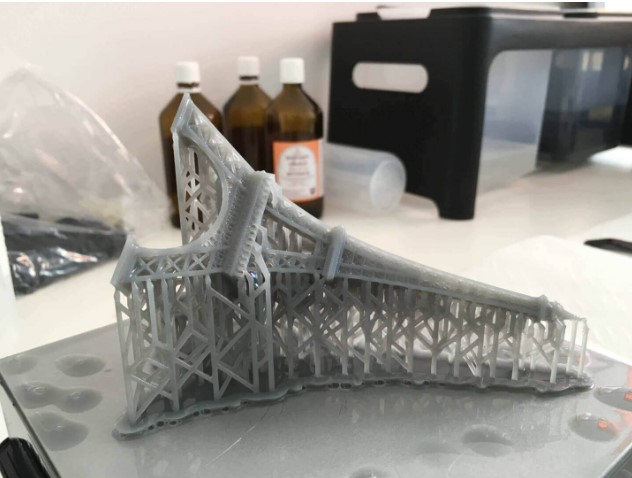
Think of it this way: a 4K TV with good upscaling can look sharper than a native 1080p panel with poor image processing. Pixel count is one part of the equation — how you use those pixels is what matters.
This also puts the “12K printer” marketing claims in proper perspective. You’ll find a flood of consumer MSLA printers advertising 12K or even higher resolution panels. What they often don’t tell you is that high pixel density doesn’t automatically translate to superior surface quality if the light source, resin chemistry, and software aren’t engineered to match. The Form 4’s 50-micron system, backed by Formlabs’ years of material science and print optimization, consistently produces parts that beat the visual output of many higher-resolution budget machines.
That said — if you’re producing extremely fine detail work (think: micro-jewelry or sub-0.1mm features), it’s worth knowing this limitation exists. For the vast majority of professional applications, the Form 4’s resolution is more than sufficient.
Formlabs Form 4 Price: What Does It Actually Cost in 2026?
Let’s talk money, because this is usually where the conversation gets uncomfortable.
- Standard Resin Compatibility
- LFD Technology
- 1 Resin Tank
- 1 Build Platform
- Includes Form Wash
- Includes Form Cure
- Extra Resin Tank
- Starter Resin Supply
- Best Value for Pros
- Biocompatible Validation
- Dental Specific Materials
- Clinical Workflow Support
- 2-Year Warranty Option
The Formlabs Form 4 price at $3,499 is the starting point, but it’s important to understand that the printer alone is only part of the story.
The True Cost of the Formlabs Ecosystem
One of the most common mistakes buyers make is calculating cost based on the printer price alone. The Formlabs ecosystem — while genuinely excellent — is a premium one. Here’s what you should factor into your total cost of ownership:
Stop Guessing Your Costs
Confused about resin costs vs. machine price? Download our Free 3D Printing ROI Calculator to estimate exactly how fast the Form 4 will pay for itself based on your specific volume.
Resin: Formlabs resins typically run $149–$250+ per liter, depending on the material. For comparison, third-party resins from brands like Elegoo or Siraya Tech can be had for $25–$50 per liter. That’s a significant per-part cost difference at scale.
Resin Tanks: The Form 4 uses proprietary resin tanks (called LT tanks for Long-Term), which have a limited lifespan and need to be replaced. Budget for recurring tank replacement costs.
Build Platforms: These don’t wear out quickly, but they are ecosystem-locked.
Service Plans: Formlabs offers service agreements that many professional buyers opt into for peace of mind. Worth considering if downtime would be costly for your operation.
Post-Processing: To get the most out of your prints, you’ll want the Form Wash and Form Cure units (more on these below), which add to the upfront investment.
The Formlabs Form 4 Complete Package bundles the printer with Form Wash, Form Cure, starter resin, a build platform, and a resin tank. It typically runs $6,500–$8,500 depending on configuration and any promotional pricing. For most buyers, this is the sensible starting point because you’ll need post-processing equipment regardless.
The bottom line on pricing: The Form 4 is expensive. But “expensive” and “not worth it” are different things. If you’re doing serious professional work where part quality, throughput, and reliability directly affect your bottom line, the math often justifies itself quickly.
Formlabs Form 4 Build Volume: How Much Space Are You Working With?
The Formlabs Form 4 build volume comes in at 20 × 12.5 × 21 centimeters. That’s a meaningful upgrade over the Form 3’s 14.5 × 14.5 × 19.3 cm envelope, and it opens up practical options that weren’t viable before.
What can you actually do with it?
Batch production: You can nest multiple smaller parts in a single print job, which directly multiplies throughput without multiplying machine costs. For dental labs printing multiple models per job, or product designers running overnight batches, this is a workflow game-changer.
Larger prototypes: Engineering teams working on bigger assemblies can print more full-sized components without breaking them into sub-parts and bonding later. This improves dimensional accuracy on complex assemblies.
Tall parts: The 21 cm Z-height is solid for printing tall, slender geometries that are challenging on shallower machines.
Formlabs Form 4 Dimensions: Workspace Requirements
From a physical footprint perspective, the Form 4 is a solidly-built, professional-grade machine — which means it’s not small. Here’s what you need to know for workspace planning:
- Do you have a stable, level surface capable of supporting 30+ lbs?
- Is there proximity to power and hardline internet (Ethernet preferred)?
- Do you have adequate ventilation or a fume extraction setup?
- Have you allocated adjacent space for Form Wash and Form Cure units?
The printer itself is designed for desktop or benchtop use, but given its weight and the surrounding workflow — resin handling, washing, curing — you’ll want to dedicate a proper workstation to it. Formlabs recommends well-ventilated spaces given resin fumes.
Ideal environments for the Form 4 include design studios with dedicated fab areas, dental labs (especially the Form 4B variant), engineering prototyping rooms, and professional maker spaces running commercial production. This is emphatically not a machine you’re going to squeeze onto a cluttered desk — nor should you want to.
Formlabs Form 4 Resin Compatibility: The Material Library
One of the perennial strengths of the Formlabs ecosystem is its material breadth. The Formlabs Form 4 resin library covers an impressive range of professional applications:
| Material Category | Example Use Cases |
|---|---|
| Standard Resins | General prototyping, form fitting, visual models. |
| Engineering Resins | Tough 2000: Impact resistance. Durable: Snap fits, living hinges. High Temp: Under-hood automotive, mold making. Rigid 10K: Stiff, glass-filled parts. |
| Flexible & Elastic | Gaskets, wearables, ergonomic grips, soft-touch robotics. |
| Dental & Biocompatible | Surgical guides, arch models, dentures (Requires Form 4B). |
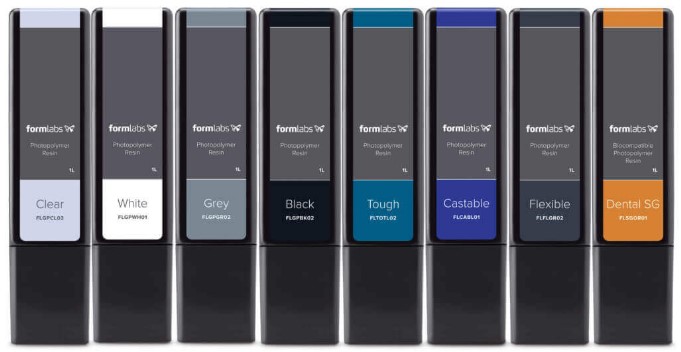 The material library continues to grow, and Formlabs has done an excellent job of formulating resins that are specifically tuned to the Form 4’s LFD exposure system — meaning you get predictable, validated results rather than trial-and-error.
Open Material Mode: The 2026 Game Changer
Here’s the update that significantly changes the value equation for the Form 4 in 2026.
Formlabs now offers Open Material Mode (OMM) as an optional upgrade for approximately $875. This unlocks the ability to use virtually any 405nm resin from third-party manufacturers — transforming the Form 4 from a closed-ecosystem machine into a hybrid open platform.
Why does this matter so much? Let’s be direct: the primary criticism of Formlabs machines has always been the locked ecosystem and the premium resin pricing. Open Material Mode directly addresses that objection.
For R&D labs testing novel materials or formulations, this is huge. For cost-sensitive production operations where resin volume is high and margins matter, the ability to run lower-cost third-party resins on a machine this capable is genuinely valuable. For material scientists and researchers who need to validate custom photopolymers, it’s practically essential.
Is OMM perfect? Not entirely — you lose some of the automation benefits (like automatic resin parameter loading) when using third-party materials, and you’ll need to dial in settings yourself. Print outcomes are not Formlabs-validated for third-party resins. But for buyers who’ve been holding off because of the closed ecosystem, OMM is the answer.
Print Speed and Low Force Display Technology: The Engineering Behind the Speed
Let’s talk about what actually makes the Form 4 fast — and why the speed is meaningful rather than just a marketing number.
Low Force Display (LFD) technology is Formlabs’ approach to MSLA printing, and the “Low Force” part is the key differentiator. Here’s the engineering problem it solves:
- The Peel Problem: In standard MSLA printing, the build platform lifts away from the FEP/nFEP film after each layer cures. This creates suction.
- The Force: This suction can delaminate parts or damage the film, forcing printers to move slowly to avoid failure.
- The LFD Solution: Formlabs uses a flexible release layer that dramatically reduces these peel forces.
- The Result: Lower force allows faster lift speeds + high-output light source = ~100 mm/h speeds.
In practical terms: a part that took 6–8 hours on a Form 3+ might complete in 1.5–2 hours on the Form 4. At professional scale, that’s not just a convenience — it’s a fundamental shift in how many print jobs you can run per day and how quickly you can iterate on designs.
One critical point: the speed is consistent across the full build platform. Some competing MSLA systems show speed degradation or quality inconsistency toward the edges of their build area. The Form 4’s engineering keeps results reliable whether you’re printing in the center or at the corners — which matters enormously for batch production where you’re filling the platform.
“We switched our whole fleet to Form 4 this year. The speed isn’t just marketing; it’s real. We went from running prints overnight to having finished prototypes ready before lunch. It changes the entire design cycle.”
Software and Workflow: PreForm and the Formlabs Ecosystem
Hardware is only half the story with professional 3D printing. Workflow software can make or break the experience, and this is an area where Formlabs has a genuine competitive moat.

PreForm is the print preparation software, and it’s excellent. Here’s what it handles:
Automatic orientation and support generation: PreForm analyzes your part geometry and suggests optimal print orientation to minimize supports, maximize surface quality, and reduce print time. You can override these suggestions manually, but for most users, the automatic recommendations are surprisingly good.
Cloud-based fleet management: This is where things get particularly compelling for teams. PreForm connects to Formlabs’ Dashboard cloud platform, which lets you monitor print status, review print history, and manage multiple machines remotely. If you’re running a dental lab with three Form 4s and one Form 4L, centralized management is not a luxury — it’s a necessity.
Remote printing: Send jobs to the printer from your design workstation without being physically present at the machine. Queue jobs, monitor progress, get notifications when prints complete. For busy teams, this workflow efficiency adds up significantly over the course of a week.
The software is updated regularly, and Formlabs has historically been responsive to user feedback in adding features and refining print parameter sets for new materials. This is the kind of ongoing software support you’re paying a premium for — and it’s worth it.
Post-Processing Ecosystem: Form Wash and Form Cure
A resin print coming off the build platform is not a finished part. It needs to be washed (to remove uncured resin) and then cured under UV light to reach its final mechanical properties. Formlabs’ post-processing ecosystem is designed to make this process as painless and consistent as possible.
Form Wash: An automated washing station that uses isopropyl alcohol (IPA) to remove uncured resin from fresh prints. You drop in the build platform, set the timer, and walk away. The automated agitation ensures consistent cleaning without the manual scrubbing and IPA splashing that comes with DIY setups. This matters more than it sounds — inconsistent washing directly affects part quality and surface finish.
Form Cure: A UV and heat curing station that completes the photopolymer crosslinking process. Formlabs pre-programs recommended cure cycles for each resin type, so there’s no guesswork. You get consistent mechanical properties batch after batch.
Together, Form Wash and Form Cure create a repeatable, professional post-processing workflow that reduces variables and operator error. If you’re running production quantities or need to document a validated process (as dental labs do), this is essential.
Get the full ecosystem experience. Purchase the Form 4 Complete Package today.
The Formlabs Form 4 Complete Package bundles both units with the printer, which is why it’s the recommended starting configuration for most buyers rather than the bare printer alone.
Formlabs Form 4 vs Form 4B: Which One Do You Need?
| Feature | Form 4 | Form 4B |
|---|---|---|
| Primary Use Case | Engineering, design, prototyping | Dental, medical, clinical |
| Material Library | Standard + engineering + flexible | Biocompatible, dental-validated |
| Regulatory Validation | No | Yes (for medical/dental use) |
| Starting Price | ~$3,499 | ~$6,300 |
The distinction here is fairly clear-cut. If you’re in a regulated clinical environment — printing dental models, surgical guides, medical devices, or anything that touches a patient — you need the Formlabs Form 4B. It’s validated for biocompatible resins and comes with the documentation and workflow support that clinical environments require.
If you’re doing product design, engineering prototyping, jewelry, architecture models, or general professional fabrication, the standard Form 4 is your machine. Don’t pay for the Form 4B if you don’t need its clinical capabilities.
Print Quality and Real-World Surface Finish
Talking about specs is one thing. What do parts actually look like off the Form 4?
Surface finish is exceptionally smooth for an MSLA system. The combination of LFD technology, sub-pixel anti-aliasing, and Formlabs’ resin formulations produces parts with a surface quality that often needs minimal post-processing to achieve a production-ready appearance. Layer lines are present at standard layer heights (as with any resin printer), but at 50-micron and especially 25-micron layer settings, they’re extremely fine.
Detail accuracy is excellent. Fine features, thin walls, and complex geometry reproduce faithfully. For engineering applications requiring tight tolerances, the Form 4 consistently delivers dimensional accuracy that makes it suitable for fit-testing, functional prototypes, and mold masters.
Repeatability is where the Form 4 particularly shines in a professional context. Part-to-part consistency across a batch, and batch-to-batch consistency over time, is markedly better than with consumer-grade MSLA machines. This is partly the machine, partly the validated resin chemistry, and partly the workflow software — but the net result is that you can trust the output in ways that matter for professional deliverables.
Common Use Cases:
- Functional prototypes: Validating form, fit, and function before tooling.
- Dental models: High detail for arches and gingiva (Form 4B).
- Jewelry: Castable Wax resin produces clean burnout.
- End-use parts: Low-stress applications where resin properties are sufficient.
Ease of Use and Reliability: The Professional-Grade Experience
This is something that’s harder to quantify in a spec sheet but is enormously important in day-to-day operation.
Cartridge-based resin system: The Form 4 uses resin cartridges that automatically dispense material into the tank as needed. You don’t manually pour resin or manage fill levels — the printer handles it. Cartridges snap in and out cleanly, and the system tracks remaining volume.
Auto resin handling: Beyond just dispensing, the Form 4’s sensor system monitors the resin level and alerts you before you run dry mid-print. For long overnight jobs, this kind of automation prevents the frustrating scenario of waking up to a failed print because the tank ran empty at 3am.
Minimal calibration: Unlike many consumer MSLA printers that require regular leveling checks, FEP tension adjustment, and exposure calibration for every new resin, the Form 4 handles most of this automatically. The machine validates itself and the software handles per-resin exposure settings. This is a major time-saver, especially for teams where the printer operator isn’t the in-house 3D printing expert.
Predictable results: This ties the above together — when you send a job to the Form 4, you can reasonably expect it to come out as designed. The machine doesn’t demand the same level of babysitting as budget MSLA printers, which matters enormously in professional environments where your time has a cost.
The Form 4’s reliability reputation in the field is strong. Formlabs has shipped many thousands of Form 3 machines with solid reliability records, and the Form 4 builds on that foundation with a simpler optical system (no moving laser galvanometer to calibrate or potentially fail).
Pros and Cons: The Honest 2026 Assessment
Speed that transforms workflows. The jump to ~100 mm/h print speeds is genuinely transformative for any operation that’s been bottlenecked by print time. Four times faster than the Form 3+ isn’t a rounding error — it’s a fundamentally different production rhythm.
Best-in-class software ecosystem. PreForm and the Formlabs Dashboard cloud platform are genuinely excellent and make multi-machine management and remote workflows practical rather than theoretical.
Reliable, repeatable output. Professional-grade consistency across parts and batches, with minimal operator intervention required.
Open Material Mode. The 2026 addition of OMM directly addresses the closed-ecosystem criticism and opens up significant cost-savings potential for high-volume users willing to do material dialing.
Strong and growing material library. Formlabs continues to expand its resin offerings, and the validated material ecosystem remains the deepest in the professional resin printing market.
High upfront cost. $3,499 for the printer alone, and $6,500+ for a proper complete setup, is a real barrier. Budget MSLA printers can produce decent results at a fraction of the price.
Ecosystem lock-in (with caveats). Even with Open Material Mode available, the default experience is the closed Formlabs ecosystem with premium resin pricing. OMM requires an additional $875 investment and more hands-on material management.
OMM isn’t free. While the availability of Open Material Mode is a significant positive, it does require an extra purchase. It’s not a built-in feature — it’s an upgrade.
Not for hobbyists or light users. If you’re printing occasionally for personal projects, the value proposition here is very hard to justify. There are excellent consumer machines at 10–15% of the Form 4’s price that will serve hobby use perfectly well.
Who Should Actually Buy the Formlabs Form 4?
Let’s get specific, because this machine isn’t for everyone — and being honest about that is the most useful thing this review can do.
- Engineering teams doing functional prototyping: If your team’s design-to-prototype cycle is a bottleneck, and you’re spending significant time waiting on prints or dealing with failed jobs, the Form 4’s speed and reliability will pay for itself.
- Product designers and design studios: High-quality surface finish, wide material selection, and reliable turnaround make the Form 4 excellent for client-facing prototypes and presentation models.
- Dental labs: The Form 4 (and especially the Form 4B) is purpose-built for dental workflows. If you’re not already using a Formlabs machine, the Form 4’s throughput advantage over the Form 3+ makes it the compelling upgrade choice.
- R&D labs and material researchers: With Open Material Mode, the Form 4 is now a genuinely appealing platform for research applications that require material flexibility alongside precision and reliability.
- Production prototyping operations: Teams that run the printer multiple times per day will see the speed advantage compound rapidly. More throughput without adding machines directly improves economics.
- Hobbyists and makers on tight budgets. Machines like the Bambu Lab X1C (FDM) or Elegoo Saturn (MSLA) offer excellent results at dramatically lower prices for non-professional use.
- Buyers who can’t justify the ecosystem cost. If resin cost is going to be a persistent concern and you’re not purchasing Open Material Mode, the Formlabs ecosystem pricing is a real ongoing expense to honestly assess.
- Users who only need occasional, low-volume prints. The Form 4’s strengths are best realized at volume. Occasional use doesn’t justify the investment.
Final Verdict: Is the Formlabs Form 4 Worth It in 2026?
Here’s the bottom line, stated as clearly as possible.
The Formlabs Form 4 is no longer just an incremental update to the Form 3 — it’s a genuine platform shift. The move to Low Force Display technology, the dramatic speed improvement, the expanded build volume, and the addition of Open Material Mode as an upgrade path collectively make this one of the most complete professional resin 3D printing solutions available in 2026.
Is it expensive? Yes, unambiguously. But “expensive” in professional tools means something different than in consumer products. If the Form 4 enables your engineering team to iterate faster, your dental lab to serve more patients, or your design studio to deliver prototypes in days instead of weeks — the ROI calculation often makes the price tag look reasonable.
The addition of Open Material Mode in 2026 is particularly significant because it removes the single biggest objection to the platform: ecosystem lock-in. With OMM, the Form 4 now appeals to a meaningfully wider buyer profile — from cost-conscious production operations to R&D labs that need material flexibility.
If you’re a professional in engineering, dental, or product design and you’re serious about integrating a high-capability, high-reliability resin printer into your workflow — the Formlabs Form 4 belongs at the top of your shortlist. Not because it’s the cheapest option, but because it’s one of the best options at what professional buyers actually need from a machine: speed, reliability, quality, and a workflow that doesn’t fight you.
For those on the fence, the Form 4 Complete Package is the right way to buy. You’ll need Form Wash and Form Cure anyway, and the bundle pricing makes more economic sense than buying components piecemeal.
Don’t let bottlenecks slow down your production. Upgrade to the Form 4 today.
*Have questions about whether the Form 4 is the right fit for your specific workflow? The use case and budget details matter — the “best” printer is always the one that matches your actual production needs. You can explore more specs and purchasing options via the links above.*

