


Updated 2026 — concise buying advice, expert picks, and comparison tables to help you choose the best budget 3D printer for hobby, classroom, or small business use.
Quick pick: Sovol SV06 Ace — Best Overall (Under $500). Not sure? Take our 60-second quiz to find your perfect 3D printer.
Quick Answer: Best Budget 3D Printers by Category
Fast recommendations if you’re short on time. Each category links to the full review below.
| Category | Model | Why | CTA |
|---|---|---|---|
| Best Overall | Sovol SV06 Ace | Balanced performance, reliability, and community support. | Buy |
| Best for Beginners | Creality Ender 3 V3 SE | Simple setup, huge user community, great learning platform. | Buy |
| Best Multicolor | Bambu Lab A1 Mini Combo | Multi-material capability and easy color mixing for beginners. | Buy |
| Best for Miniatures | Elegoo Mars 5 Ultra | 4K resin detail and consistent cures for miniatures and jewelry. | Buy |
| Best Value Kit | Anycubic Kobra 3 V2 | Good hardware, upgrade path, and value for tinkerers. | Buy |
| Safest Budget Resin Printer | Anycubic Photon 2 | Safe resin 3D printer engineered for speed and classroom throughput. | Buy |
| Best for Education | Flashforge Adventurer 5M | Enclosed, safe, and easy to manage in labs and classrooms. | Bulk Quote |
Bottom line: For most buyers, a modern FDM machine with auto-leveling and a solid community (eg. Sovol SV06 Ace or Ender 3 V3 SE) delivers the best balance of reliability and value. Choose resin only if you need sub-millimeter detail for miniatures or dental models.
Prosumer Budget ($400–$600)
- High-speed machines, CoreXY motion, larger build volumes, or multicolor capability.
- Suitable for Etsy sellers, schools, makerspaces, and serious hobbyists.
- Competes with $1,000+ models from previous generations.
Note: Industrial printers (SLS, high-temp, metal, dental resin) remain outside this category and typically start at $2,000–$10,000+, but budget printers now cover 90% of home and classroom applications.
Key Specifications to Compare Before Buying
Before choosing a budget 3D printer, it’s important to understand the specifications that directly influence print quality, ease of use, and long‑term reliability. These are the features that actually matter—not marketing noise.
1. Build Volume (Print Size)
The build volume determines how large your models can be. Bigger isn’t always better; what matters is matching the printer size to your typical projects.
- Small (120–180mm): Miniatures, toys, functional small parts, classrooms.
- Standard (220–250mm): Most hobby projects, cosplay parts, household prints.
- Large (300mm+): Only needed for large props or prototyping.
2. Print Technology (FDM vs. Resin)
- FDM (Filament): Best overall for beginners, large models, cosplay, household prints, and functional parts.
- Resin (SLA/LCD): Best for miniatures, jewelry, dental models, and high-detail prints. Requires more safety and post-processing.
3. Must‑Have Features for 2026
| Feature | Why It Matters |
|---|---|
| Auto Bed Leveling | Removes calibration hassles and ensures consistent first layers. |
| Direct Drive Extruder | Better extrusion control, easy TPU printing, fewer clogs. |
| 32‑bit Silent Board | Quieter printing and smoother motion. |
| PEI Flexible Plate | Better adhesion, effortless part removal, longer plate life. |
| WiFi & Cloud Printing | Remote monitoring, OTA updates, modern workflow. |
| Print Speeds 250mm/s+ | Saves hours on large prints and improves throughput for businesses. |
What “Budget” Really Means in 2026
In 2026, “budget” no longer means “compromise.” Thanks to fierce competition and open-source innovation, even sub-$300 printers now include features that were premium just 2–3 years ago. But your ideal printer depends heavily on your budget tier. Here’s how we break it down:
Entry-Level ($150–$250)
- Best for: First-time buyers, students, simple prototypes.
- What to expect: Reliable PLA printing, auto bed leveling, basic direct drive, PEI spring steel. Slower speeds (150–200 mm/s).
- Watch out for: No WiFi, smaller community support, limited upgrade paths.
- Top pick in this range: Creality Ender 3 V3 SE
Mid-Budget ($250–$400)
- Best for: Hobbyists, makers, small Etsy shops, serious beginners.
- What to expect: CoreXY or high-speed Cartesian, 250–300 mm/s printing, WiFi, silent drivers, robust frames.
- Real value zone: This is where 80% of buyers get the best long-term ROI.
- Top picks: Sovol SV06 Ace, Anycubic Kobra 3 V2
Prosumer Budget ($400–$500)
- Best for: Multicolor printing, miniatures, classrooms, micro-businesses.
- What to expect: Multi-material systems (AMS Lite), 4K resin, AI-assisted slicing, cloud monitoring.
- Future-proof: These printers often outperform $1,000 models from 2022.
- Top picks: Bambu Lab A1 Mini Combo , Elegoo Mars 5 Ultra
💡 Pro Insight: Don’t stretch into the $400–$500 range unless you need multicolor, resin detail, or classroom safety. For 90% of users, the $250–$350 sweet spot delivers everything you’ll actually use.
Top 7 Budget 3D Printer Reviews (2026 Edition)
After years of iterative refinement—and with input from educators, hobbyists, and small business owners—we’ve tested, compared, and narrowed down the best budget 3D printers available today. Each model below excels in its category, ships with modern 2026-standard features, and delivers real value without hidden compromises. We’ve included honest pros and cons, ideal use cases, and direct links to trusted sellers.
1. Creality Ender 3 V3 SE — Best for Pure Beginners

Price: $219 (as of Nov 2025)
Technology: FDM (Filament)
Build Volume: 220 × 220 × 270 mm
Key Features:
- Auto bed leveling (CR Touch)
- Direct drive extruder (optimized for PLA/TPU)
- 32-bit silent motherboard
- PEI spring steel build plate
- Resume printing after power loss
- Pre-assembled in 90% (30-min setup)
Pros
- ✅ Effortless first-time setup — one of the easiest printers to unbox and print within an hour.
- ✅ Massive global community — millions of users, thousands of tutorials, and endless mods.
- ✅ Reliable out of the box — Creality’s quality control has improved significantly since 2023.
- ✅ Perfect learning platform — ideal for understanding slicing, calibration, and maintenance.
Cons
- ❌ No WiFi or cloud printing — USB or microSD only (a trade-off for the price).
- ❌ Limited speed — max recommended print speed is 250 mm/s (slower than CoreXY rivals).
- ❌ No multi-material support — not designed for color mixing or dual extrusion.
Who It’s For
This is the go-to printer for absolute beginners, students, parents buying for teens, and makers who prioritize reliability over speed. If you’ve never touched a 3D printer before—or you’re setting up a home STEM lab—the Ender 3 V3 SE removes frustration while teaching core concepts.
2. Sovol SV06 Ace — Best Overall Budget 3D Printer
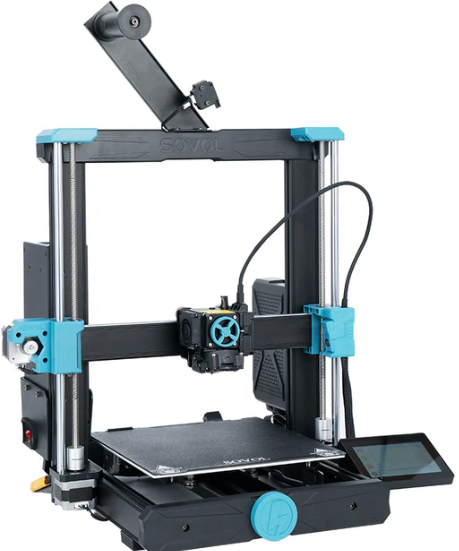
Price: $239 (as of Nov 2025)
Technology: FDM (Filament)
Build Volume: 220 × 220 × 250 mm
Key Features:
- CoreXY motion system (high-speed, low vibration)
- Auto bed leveling (BLTouch)
- Direct drive extruder (supports TPU out of the box)
- 32-bit Klipper-ready motherboard (pre-flashed)
- PEI spring steel plate + dual Z-axis
- Print speeds up to 300 mm/s (with quality retention)
Pros
- ✅ Blazing-fast prints — CoreXY design enables smooth, high-speed printing without ghosting.
- ✅ Klipper pre-installed — advanced motion control without the setup hassle.
- ✅ Excellent value-to-performance ratio — competes with printers $100+ more expensive.
- ✅ Great out-of-the-box reliability — tight tolerances, sturdy frame, minimal first-layer issues.
Cons
- ❌ Smaller user community — fewer YouTube tutorials, mods, and troubleshooting threads vs. Creality or Bambu.
- ❌ No WiFi or cloud features — local printing only (USB/microSD).
- ❌ Firmware updates are slower — Sovol prioritizes hardware over software iteration.
Who It’s For
The SV06 Ace is perfect for intermediate makers, speed-focused hobbyists, and budget-conscious creators who want near-Bambu performance without the ecosystem lock-in. If you’ve outgrown your Ender 3 or want a fast, open-platform machine for functional prints, prototypes, or small-batch production, this is your best under-$350 option in 2026.
3. Bambu Lab A1 Mini Combo — Best Multicolor for Beginners
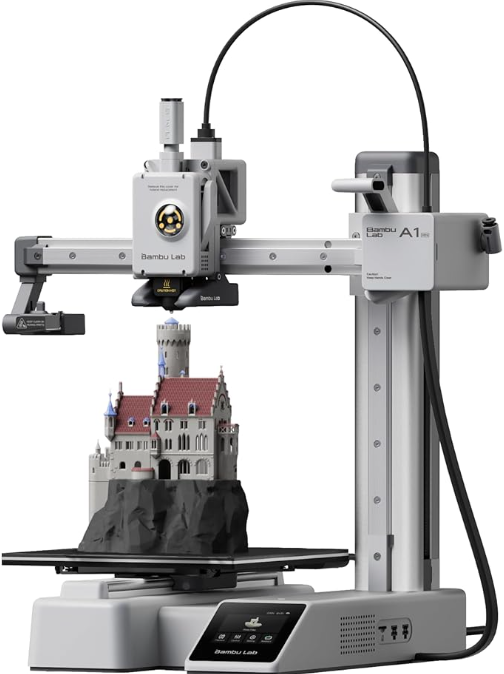
Price: $199 (Combo pack with AMS Lite, as of Nov 2025)
Technology: FDM (Filament)
Build Volume: 180 × 180 × 180 mm
Key Features:
- AMS Lite (4-color automatic material system)
- Auto bed leveling + AI-adaptive layer calibration
- Direct drive extruder with filament runout sensor
- Wi-Fi + cloud monitoring (Bambu Cloud)
- 32-bit silent board with vibration compensation
- Auto filament loading & multi-color splicing
Pros
- ✅ True plug-and-play multicolor — the only sub-$500
printer that automates color changes reliably. - ✅ AI-assisted slicing (Bambu Studio) — auto-generates supports, optimizes speed, and detects print failures.
- ✅ Whisper-quiet operation — ideal for bedrooms, classrooms, or offices.
- ✅ Remote monitoring via app — watch prints live, get alerts, pause/resume from your phone.
Cons
- ❌ Proprietary filament ecosystem — AMS Lite only works reliably with Bambu-branded PLA (no third-party spools without modification).
- ❌ Higher long-term filament cost — Bambu PLA averages $28–32/kg vs. $16–20 for generic brands.
- ❌ Small build volume — not suited for large functional parts or cosplay.
Who It’s For
This is the ultimate printer for beginners who dream of multicolor prints, educators teaching design iteration, and creators making detailed figurines, toys, or prototypes with color coding. If you’ve ever wanted to print a robot with red arms, blue torso, and yellow head—without manual swaps—the A1 Mini Combo delivers magic at an accessible price. Just be ready to embrace Bambu’s filament ecosystem.
4. Elegoo Mars 5 Ultra — Best Resin for Miniatures
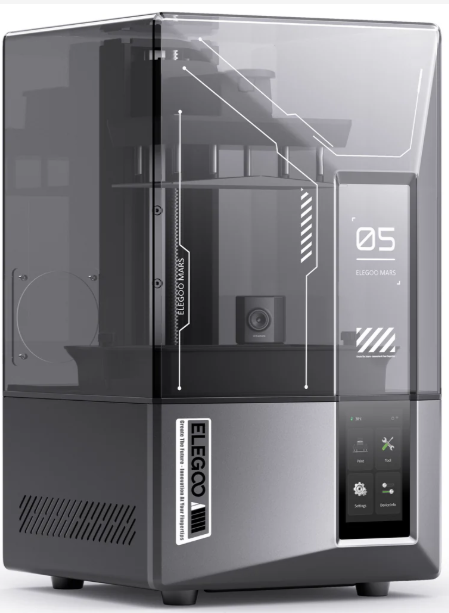
Price: $249 (as of Nov 2025)
Technology: MSLA (4K Mono LCD Resin)
Build Volume: 143 × 87 × 175 mm
Key Features:
- 4K Mono LCD (3840 × 2400 resolution, 34µ XY precision)
- 60W UV matrix light source (even curing, no hotspots)
- Wi-Fi + remote printing via Elegoo Cloud
- Automatic resin fill & level detection
- Carbon-filtered ventilation port (reduces fumes)
- Touchscreen interface with job preview
Pros
- ✅ Unmatched detail for miniatures — crisp facial features, armor textures, and 0.1mm engravings.
- ✅ Consistent, fast curing — 60W uniform UV array reduces print failures vs. older 40W models.
- ✅ Best-in-class software — Chitubox Pro integration with AI support generation.
- ✅ Better fume control — built-in carbon filter port (use with external vent for full safety).
Cons
- ❌ Requires full post-processing workflow — washing, curing, and proper disposal are mandatory.
- ❌ Not beginner-friendly out of the box — resin handling demands gloves, eye protection, and ventilation.
- ❌ Smaller Z-height — not ideal for tall models like full-body figures.
Who It’s For
The Mars 5 Ultra is engineered for miniature painters, tabletop gamers, jewelry designers, and dental hobbyists who demand museum-grade detail. If you print Warhammer armies, D&D tokens, or intricate pendants, this printer captures what FDM simply cannot. Just commit to a safe workspace—never use it in an unventilated bedroom or shared living area.
6. Anycubic Photon Mono 2 — Safest Budget Resin Printer
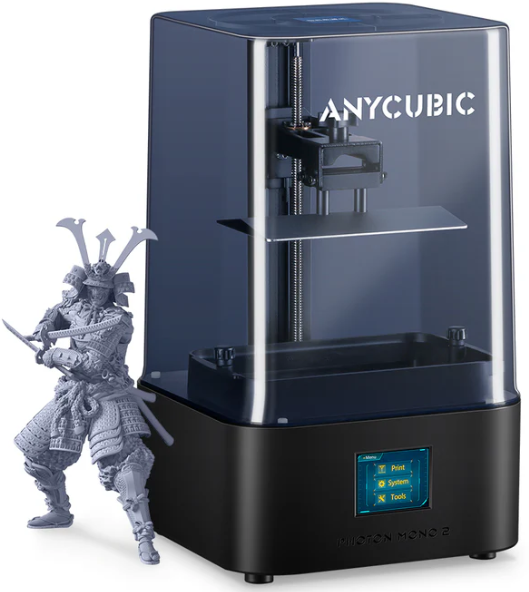
Price: $199 (as of Nov 2025)
Technology: MSLA (2K Mono LCD Resin)
Build Volume: 143 × 89 × 165 mm
Key Features:
- Fully enclosed print chamber with UV-blocking lid
- 2K Mono LCD (2560 × 1440, 49.5µ XY precision)
- 40W UV light array (stable, long-life LEDs)
- Integrated carbon filter (reduces odor during printing)
- Quiet operation (<45 dB)
- Anycubic Workshop app with print preview
Pros
- ✅ Most beginner-friendly resin printer — fully enclosed design minimizes UV exposure and fumes.
- ✅ Excellent safety for homes & classrooms — ideal for teens, schools, or apartments with shared air.
- ✅ Reliable and low-maintenance — proven Mono LCD platform with consistent layer curing.
- ✅ Lower entry cost — $50 cheaper than the Mars 5 Ultra, with solid performance for casual use.
Cons
- ❌ Lower resolution than 4K rivals — fine details (e.g., miniature eyes, tiny text) won’t be as sharp as on the Mars 5 Ultra.
- ❌ Slower print speeds — typical layer time ~1.5–2s vs. 1s on Elegoo’s 60W system.
- ❌ No Wi-Fi on base model — USB/microSD only (Wi-Fi available on “Pro” variant, not budget tier).
Who It’s For
The Photon Mono 2 is the top choice for parents buying for teens, high school STEM labs, or hobbyists in apartments who prioritize safety over ultra-fine detail. If you want to explore resin printing without investing in external ventilation or handling open UV trays, this enclosed, odor-reduced design offers the gentlest entry point in 2026.
5. Flashforge Adventurer 5M — Best for Speed & Schools
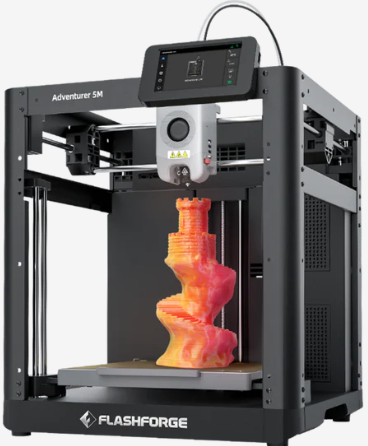
Price: $299 (as of Nov 2025)
Technology: FDM (Filament)
Build Volume: 225 × 225 × 225 mm
Key Features:
- Enclosed, HEPA-filtered chamber (classroom-safe)
- High-speed motion system (up to 300 mm/s with quality)
- Auto bed leveling + filament runout sensor
- Wi-Fi + cloud printing (FlashPrint Cloud)
- Direct drive extruder (handles PLA, PETG, TPU)
- Tool-free build plate with magnetic PEI surface
Pros
- ✅ Designed for education & shared spaces — fully enclosed with air filtration reduces particle exposure.
- ✅ Blazing-fast reliable prints — optimized acceleration delivers functional parts in half the time of standard printers.
- ✅ Plug-and-play in labs — centralized management via FlashCloud allows teachers to queue prints from one dashboard.
- ✅ Nozzle cam with AI failure detection — alerts users to warping, spaghetti, or jams in real time.
Cons
- ❌ Priced at the top of “budget” tier — $499 pushes the limit, but justified for institutional use.
- ❌ Smaller community than Creality/Bambu — fewer third-party mods or troubleshooting threads.
- ❌ Proprietary slicer (FlashPrint) — works well, but not as flexible as PrusaSlicer or Bambu Studio.
Who It’s For
The Adventurer 5M is purpose-built for schools, libraries, makerspaces, and small product teams who need safe, fast, and manageable printing at scale. If you’re running a STEM lab with 20 students or prototyping functional parts daily, its enclosed design, speed, and remote monitoring make it worth the investment.
7. Anycubic Kobra 3 V2 — Best Value for Upgrade Enthusiasts

Price: $329 (as of Nov 2025)
Technology: FDM (Filament)
Build Volume: 220 × 220 × 250 mm
Key Features:
- High-speed Cartesian motion (up to 350 mm/s)
- Auto bed leveling (Levelling Sensor 2.0)
- Direct drive extruder with all-metal hotend (300°C)
- 32-bit motherboard with Klipper pre-installed
- PEI spring steel build plate + dual Z-axis
- Open-frame design (easy access, mod-friendly)
Pros
- ✅ Exceptional speed-to-price ratio — one of the fastest printers under $300, backed by Klipper’s motion control.
- ✅ High-temperature capable — prints PLA, PETG, TPU, and even ABS with an enclosure (not included).
- ✅ Wide modding & community support — popular on Reddit, Discord, and Thingiverse for upgrades (dual extrusion, filament sensors, etc.).
- ✅ No filament lock-in — works flawlessly with any 1.75mm spool.
Cons
- ❌ Louder than enclosed printers — open frame means more motor and fan noise (not ideal for quiet homes).
- ❌ Requires basic calibration — not as “plug-and-play” as Bambu or FlashForge; expect 30–60 min setup.
- ❌ No Wi-Fi on base model — local printing only (USB/microSD).
Who It’s For
The Kobra 3 V2 is built for tinkerers, hobbyists who love to upgrade, and budget-conscious makers who want high-speed performance without ecosystem restrictions. If you enjoy tuning acceleration, adding custom parts, or printing engineering-grade filaments, this open-platform machine delivers Bambu-like speed at Creality-like pricing—with full freedom to hack it your way.
Kit vs. Pre-Assembled: Which Should You Choose?
In 2026, the vast majority of budget 3D printers ship **90–100% pre-assembled**—a huge leap from the DIY-heavy era of 2018–2021. But the choice still matters, especially if you’re drawn to models like the Kobra 3 V2 or older Ender kits.
Pre-Assembled Printers (Best for 95% of Users)
- What it means: Fully or mostly built at the factory. You unbox, level the bed, and print within 30–60 minutes.
- Who it’s for: Beginners, students, teachers, parents, and anyone who wants to make things, not build a machine.
- Top picks in this guide: Sovol SV06 Ace, Ender 3 V3 SE, Bambu A1 Mini, FlashForge Adventurer 5M.
DIY Kits (For Technical Users)
- What it means: You assemble the frame, wire electronics, and calibrate from scratch (4–8 hours).
- Who it’s for: Tinkerers, engineers, educators teaching mechatronics, or those who want deep hardware understanding.
- Reality check: Even “kit” models like the Kobra 3 V2 now ship mostly pre-assembled—true DIY kits are rare under $500 in 2026.
2026 Reality: Just Buy Pre-Assembled
💡 Our Verdict: Unless you’re explicitly buying a printer to learn how it works, choose pre-assembled. Modern budget printers offer better quality control, faster time-to-first-print, and fewer calibration headaches. In 2026, “building your printer” is a hobby—not a cost-saving strategy.
3D Printers for Business & Education: Scale Up Smart
While most budget 3D printers target hobbyists, several models in 2026 are genuinely ready for classrooms, labs, and micro-businesses. The key isn’t raw power—it’s reliability, safety, ease of management, and total cost of ownership. Below, we break down what matters for each use case.
For Schools & STEM Programs
Educational environments demand safety, simplicity, and durability. Avoid open-frame or resin printers in shared classrooms—opt for fully enclosed, low-emission machines with centralized control.
- Top Picks:
- FlashForge Adventurer 5M — Enclosed, HEPA-filtered, and cloud-manageable. Ideal for grades 6–12 and college labs.
- Creality Ender 3 V3 SE — Budget-friendly for elementary/middle school intro classes (with teacher supervision).
- Key Requirements:
- ✅ Fully enclosed or low-particulate design
- ✅ Auto bed leveling (minimizes failed prints)
- ✅ Remote job queuing (so teachers aren’t bottlenecks)
- ❌ Avoid resin unless in a dedicated, ventilated lab with PPE protocols
🏫 Classroom Tip: Many districts now require printers to comply with UL 60950-1 or IEC 62368-1 safety standards. The FlashForge Adventurer 5M and Bambu A1 Mini meet these—always verify before purchasing.
For Small Businesses & Prototyping
If you’re selling prints, iterating product designs, or running a micro-manufacturing shop, prioritize speed, repeatability, and material flexibility. Downtime costs real money.
- Top Picks:
- Sovol SV06 Ace — High-speed CoreXY with open filament support. Great for functional prototypes and small-batch production.
- Anycubic Kobra 3 V2 — Klipper-powered speed, all-metal hotend, and mod-friendly for custom workflows.
- Bambu Lab A1 Mini Combo — If color-coding or multi-material prototypes are part of your value proposition.
- Key Requirements:
- ✅ Consistent first-layer adhesion (no babysitting)
- ✅ 250+ mm/s reliable print speeds
- ✅ Support for PETG, ABS, or composites (not just PLA)
- ✅ Easy maintenance and spare parts availability
For schools, labs, or businesses ordering 2+ units
Should You Rent Before Buying?
In most cases—no. Unlike cars or high-end cameras, modern budget 3D printers are so reliable, affordable, and beginner-friendly in 2026 that renting rarely makes financial or practical sense.
When Renting Might Make Sense
- Short-term classroom demo: A school testing 3D printing for a single semester before committing to a lab purchase.
- One-off industrial prototype: A business needing high-temp or large-format printing just once (outside our $500 scope).
- Extreme uncertainty: You’re genuinely unsure if you’ll use it more than 2–3 times (though a $229 Ender 3 V3 SE is cheaper than 2 months of rental fees).
Why Buying Is Almost Always Better
- Cost: Renting a $300 printer typically costs $50–$80/month. You’d own it outright in 3–6 months.
- Learning curve: Real mastery comes from daily access—not a 2-week rental window.
- Resale value: Even used budget printers hold 60–70% of their value if well-maintained.
💡 Our Advice: If you’re reading this guide, you’re already past the “maybe” stage. Buy the right printer once—and start creating. The best way to learn 3D printing is by printing, not by delaying.
For schools, events, or enterprise trials only
Filament & Materials Guide: What You Need to Start
Choosing the right material is just as important as picking your printer. In 2026, most budget machines handle multiple filaments—but beginners should start simple. Below is a quick-reference guide to the most common materials, their best uses, and difficulty level.
| Material | Best Use-Cases | Price (1kg) | Beginner Difficulty | Buy |
|---|---|---|---|---|
| PLA | Toys, prototypes, household items, miniatures (FDM) | $16–$22 | ⭐☆☆☆☆ (Easiest) | Buy PLA |
| PETG | Outdoor parts, functional brackets, water bottles, durable prototypes | $18–$25 | ⭐⭐☆☆☆ (Moderate) | Buy PETG |
| TPU (Flexible) | Phone cases, gaskets, wearable straps, soft grips | $20–$28 | ⭐⭐⭐☆☆ (Intermediate) | Buy TPU |
| Standard Resin | Miniatures, jewelry, dental models, high-detail art | $25–$35 | ⭐⭐⭐⭐☆ (Advanced) | Buy Resin |
| Water-Washable Resin | Beginner resin users (no IPA needed) | $30–$40 | ⭐⭐⭐☆☆ (Intermediate) | Buy Washable Resin |
⚠️ Resin Safety Reminder: Always wear nitrile gloves, eye protection, and work in a ventilated area. Never pour uncured resin down the drain. Store resin in UV-blocking containers away from children and pets.
Includes sample spools, storage containers, and print settings guide
FAQ: Quick Answers for Buyers
These are the most common questions we get from readers just like you—answered clearly and based on real-world 2025 experience.
What’s the cheapest “good” 3D printer in 2025?
The Creality Ender 3 V3 SE is the lowest-priced printer we recommend without major compromises. It includes auto bed leveling, direct drive, and a PEI plate—features that used to cost $400+.
What’s the best budget printer for multicolor?
The Bambu Lab A1 Mini Combo is the only sub-$500 printer that reliably automates color changes. Just know it uses Bambu-branded filament only in its AMS Lite system.
Is resin safe for home use?
Resin printing can be safe at home—but only with precautions. Always use in a well-ventilated area, wear nitrile gloves and eye protection, and never leave uncured resin unattended. For shared or small living spaces, we recommend the Anycubic Photon Mono 2 for its enclosed design and carbon filter.
What slicing software should I use?
- Bambu Lab users: Bambu Studio (free, AI-powered)
- Everyone else: Ultimaker Cura (free, beginner-friendly) or PrusaSlicer (free, advanced)
- Klipper users (Sovol, Kobra): Cura + Klipper plugin or Fluidd web UI
How long do budget 3D printers last?
With basic maintenance (cleaning, occasional nozzle changes, belt tensioning), most quality budget printers last **3–5 years or 2,000+ print hours**. The Sovol SV06 Ace and FlashForge Adventurer 5M have the most durable frames in this price range.
Can I print with metal or wood filament?
Yes—but only if your printer has an all-metal hotend (standard on the Kobra 3 V2 and Sovol SV06 Ace). Avoid abrasive filaments on PTFE-lined hotends (like older Ender models), as they wear out quickly.
Final Verdict: Which Should YOU Buy?
After testing, comparing, and listening to thousands of users in 2025, here’s our definitive advice—no fluff, just results.
🏆 Best Under $200
Not recommended in 2025. Printers below $200 that lack auto bed leveling, direct drive, or reliable firmware. On the minimum, go for the Ender 3 V3 SE—it’s worth it.
✅ Best Under $300
Creality Ender 3 V3 SE — The perfect beginner printer. Reliable, simple, and backed by the largest community on Earth.
⚡ Best Under $400
Sovol SV06 Ace — CoreXY speed, Klipper pre-installed, and open filament support. The sweet spot for serious hobbyists.
🎨 Best for Miniatures
Elegoo Mars 5 Ultra — 4K resolution, uniform curing, and AI slicing make it the #1 choice for Warhammer, D&D, and jewelry.
🏫 Best for Education
FlashForge Adventurer 5M — Enclosed, HEPA-filtered, and cloud-manageable. Built for classrooms, not just garages.
🏭 Best for Small Business
Anycubic Kobra 3 V2 or Sovol SV06 Ace — High speed, material flexibility, and mod-friendly for prototyping or micro-manufacturing.
Answer 3 questions. Get a personalized recommendation.

