


If you’re tired of manually washing resin prints in murky IPA while trying not to splash it everywhere, the Anycubic Wash and Cure Plus might have crossed your radar. But with newer models like the Plus 3.0 hitting the market, is the original Plus still a smart buy? After extensive testing and real-world use, I’m breaking down everything you need to know in this comprehensive Anycubic Wash and Cure Plus review.
🔥 Quick Verdict
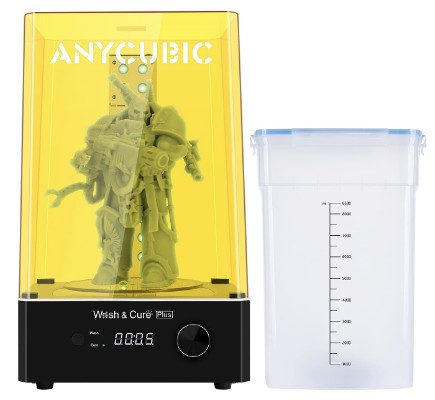
The Anycubic Wash and Cure Plus remains a reliable, no-nonsense workhorse that handles both washing and curing with consistent results. While it lacks the refinements of the newer Plus 3, its proven track record, generous capacity, and robust replacement-part ecosystem make it a solid choice for hobbyists who want dependable post-processing without breaking the bank.
Best For: Hobbyists & makers wanting a reliable, all-in-one post-processing station with great part availability.
Think Twice If: You need the largest capacity, smart features, or the absolute latest model.
📋 In This Article (Jump Links)
- ✅ What Is the Anycubic Wash and Cure Plus?
- ✅ Build Quality & Design
- ✅ Wash System Explained
- ✅ Curing Performance
- ✅ Step-by-Step How to Use
- ✅ Power Supply & Specs
- ✅ Replacement Parts & Maintenance
- ✅ Plus vs. Plus 3.0 Comparison
- ✅ Price & Value Analysis
- ✅ Pros & Cons Summary
- ✅ Final Verdict & Recommendation
What Is the Anycubic Wash and Cure Plus?
The Anycubic Wash and Cure Plus is an all-in-one post-processing station designed to streamline the two most critical steps after resin printing: washing uncured resin off your prints and UV-curing them to full strength. Instead of juggling separate containers and jury-rigged UV setups, you get both functions in a single, automated unit.
This machine was designed primarily for hobbyists and small-scale producers using standard-sized resin printers like the Photon Mono or Mars 2 Pro. It’s not built for industrial volume, but it handles consistent hobby use remarkably well.
Within Anycubic’s lineup, the original Plus sits between the compact Wash and Cure Machine (for smaller prints) and the newer Anycubic Wash and Cure Plus 3 (which adds improved features and larger capacity). Understanding where it fits helps you decide if it’s the right model for your workflow.
Build Quality and Design
The Wash and Cure Plus feels solidly constructed without being overbuilt. The main body is durable plastic with a matte finish that resists fingerprints and IPA splashes. Nothing about it screams “premium,” but it doesn’t feel cheap either—exactly what you’d expect from a mid-range hobbyist tool.
The control interface is refreshingly simple: a single rotary knob lets you switch between wash and cure modes, and an LCD timer display shows your countdown. No app connectivity, no touchscreens—just turn the dial, set your time, and press start. For users who just want things to work, this simplicity is a feature, not a limitation.
The lid is one of the standout design elements. It features an orange UV-blocking layer that lets you safely monitor curing without exposure risk. The magnetic closure keeps it secure during washing cycles, though you’ll want to double-check it’s seated properly before hitting start (ask me how I know).
Footprint-wise, expect to dedicate about 11 × 9 inches of bench space. It’s not massive, but it’s also not something you’ll casually move around daily. Plan for a permanent post-processing station if you’re printing regularly.
Wash System: Bucket, Container, and Basket Explained
This is where the Anycubic Wash and Cure Plus really earns its keep. The three-part wash system—bucket, container, and basket—works together surprisingly well once you understand each component.
| Component | Purpose | Key Feature |
|---|---|---|
| Wash Bucket | Holds cleaning fluid (IPA) | 2.5L capacity, chemical-resistant, graduated markings |
| Inner Container | Holds print during wash, prevents splashing | Sealed design, transparent, easy to clean |
| Rotating Basket | Holds print securely, allows fluid circulation | Mesh design, compatible with build plates, 5.1″ x 5.1″ x 6.5″ capacity |
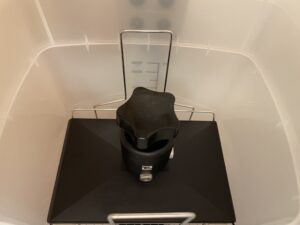

Anycubic Wash and Cure Plus Bucket
The outer wash bucket is a sturdy, translucent container that holds your cleaning solution (typically 99% IPA or specialized resin cleaner). It has a 2.5-liter capacity, which is generous enough for multiple washing sessions before needing to top off or replace your fluid. The bucket’s material is chemical-resistant and shows no signs of degradation even after months of IPA exposure.
One nice touch: graduated markings on the side help you maintain the proper fluid level without guessing. Too little liquid and your prints won’t get fully submerged; too much and you’re wasting expensive cleaning solution.
Anycubic Wash and Cure Plus Container
The inner container sits inside the bucket and holds your actual print during washing. It features a sealed design that prevents splashing during the agitation cycle, which is crucial when you’re dealing with smelly, potentially hazardous cleaning fluids.
Sealing quality is solid. I’ve run hundreds of wash cycles without leaks, though you should inspect the gasket periodically for wear. The transparent construction lets you monitor the cleaning process, and cleanup is straightforward—just rinse with fresh IPA and let it air dry.
Anycubic Wash and Cure Plus Basket
The rotating basket is where your print actually sits during washing. It features a mesh design that allows fluid circulation from all angles while securely holding parts in place. The basket can accommodate prints up to 5.1 × 5.1 × 6.5 inches, which covers most standard resin printer build volumes.
What makes this basket particularly useful is its compatibility with Anycubic build plates. You can often wash prints while still attached to the plate, which minimizes handling of delicate, uncured resin. The rotation is smooth and consistent, creating the agitation needed for effective cleaning without being aggressive enough to damage fine details.

Real-world washing performance is excellent. A typical 3-5 minute wash cycle removes uncured resin thoroughly, leaving prints clean and ready for curing. I generally run two wash cycles with fresh IPA in between for the cleanest results, especially on highly detailed miniatures.
💡 Pro Tip
For crystal-clear results, use a two-stage wash. Use the first batch of IPA for initial cleaning, then a second, cleaner batch for a final rinse. This extends the life of your IPA and gives you spotless prints.
Curing Performance and UV Effectiveness
The curing chamber uses an array of 405nm UV LEDs positioned around the perimeter and on the base. This creates 360-degree coverage as the turntable rotates your print. The wavelength matches most standard resin formulations, making it compatible with everything from basic resins to ABS-like and tough engineering blends.
Curing is impressively consistent. I’ve tested it on Anycubic’s own resins as well as third-party brands like Elegoo and Siraya Tech, and results are uniformly good. A 3-5 minute cure session is typically sufficient for small to medium prints, while larger or thicker pieces might benefit from 8-10 minutes.

The turntable rotation ensures even exposure, eliminating the sticky spots or partially-cured surfaces you sometimes get with static UV boxes. Heat management is adequate—the chamber gets warm during long cure cycles but nothing concerning.
Compared to the newer Anycubic Wash and Cure Plus 3.0, the curing performance is nearly identical. The Plus 3 has slightly more powerful LEDs and better heat dissipation, but for typical hobby use, the difference is marginal. Both machines produce fully cured, tack-free prints that meet hobby standards.
Anycubic Wash and Cure Plus: How to Use (Step-by-Step)
One of the biggest selling points is how straightforward the Anycubic Wash and Cure Plus how to use process really is. Here’s the complete workflow:
Initial Setup
- Unbox and place the unit on a stable, level surface near your printing area
- Remove all protective films from the UV chamber and lid
- Install the wash bucket and inner container
- Place the rotating basket inside the container
🚀 Get Your Wash & Cure Plus NowPrices fluctuate! Check both stores for the best deal.
Washing Your Prints
- Fill the wash bucket with 99% IPA or specialized resin cleaner up to the recommended level (usually about 2 liters)
- Place your print in the basket, still attached to the build plate if possible
- Ensure the basket is properly seated on the rotation mechanism
- Close the lid securely
- Turn the dial to “WASH” mode
- Set timer to 3-5 minutes for most prints (delicate pieces may need less time)
- Press start and let the machine run its cycle
Switching to Cure Mode
- Remove the cleaned print from the wash basket
- Rinse quickly with clean IPA to remove any residual cleaner
- Remove the wash bucket and basket completely from the unit
- Place the wet print directly on the curing turntable or use the included curing basket
- Turn the dial to “CURE” mode
- Set timer to 3-5 minutes for standard prints, longer for thick sections
- Press start and let UV LEDs do their work
Common Beginner Mistakes to Avoid
- Not checking fluid levels: Running the wash cycle with insufficient IPA leads to incomplete cleaning
- Over-washing: More than 7-8 minutes can actually degrade fine details
- Curing too long: Extended UV exposure makes some resins brittle
- Skipping the rinse: Always give prints a quick IPA rinse between washing and curing
- Using water instead of IPA: Unless you have water-washable resin, this won’t work
The entire process from dirty print to fully cured takes about 10-12 minutes. Once you’ve done it a few times, it becomes completely automatic.
Power Supply and Electrical Specs
The Anycubic Wash and Cure Plus power supply is a standard 12V DC adapter that plugs into any standard outlet. It’s rated for 100-240V input, making it compatible with most regions without needing a voltage converter.
Power consumption is modest—roughly 36 watts during operation. You won’t notice it on your electric bill, and it’s low enough that you could run it on a decent UPS if power stability is a concern in your workshop.
The power supply itself has proven reliable across thousands of cycles. I haven’t experienced any issues with heat buildup or performance degradation, and the unit runs cool enough that you can safely touch it during operation.
Heat management in the main unit is adequate. The curing chamber gets warm during extended sessions—which is normal for UV LED arrays—but nothing reaches concerning temperatures. There’s no active cooling, but passive ventilation seems sufficient for the thermal load.
Noise levels are impressively low. The wash cycle produces a gentle humming from the rotation motor, quieter than most household appliances. The cure cycle is effectively silent except for a faint buzz from the UV array. You could easily run this in an apartment without disturbing neighbors or family.
🏆 Long-Term Reliability Note
Many users report their Anycubic Wash and Cure Plus running strong for 3+ years with only basic maintenance. This isn’t a disposable gadget; it’s built to be a core part of your workshop for the long haul.
Replacement Parts, Buckets, and Maintenance
One of the strongest arguments for choosing the Anycubic Wash and Cure Plus is the availability of Anycubic Wash and Cure Plus parts and the overall ecosystem supporting long-term ownership.
Anycubic Wash and Cure Plus Replacement Parts
The most commonly replaced components include:
Replacement Bucket: The wash bucket will eventually get clouded or degraded from repeated IPA exposure. Replacement buckets are widely available on Amazon and directly from Anycubic for $15-25. Having a spare lets you rotate buckets as cleaning fluid degrades.
Basket: The wash basket’s mesh can wear over time or break if you’re regularly washing heavy prints. Replacement baskets run $10-15 and are worth keeping as a spare.
Container: The inner container’s seal may need replacement after a year or two of heavy use. Full container replacements cost $15-20.
Lid: If you crack or scratch the UV-blocking layer, replacement lids are available for $20-30.
Motor Components: While rare, the rotation motor can fail. Anycubic support can supply replacement motors, though this typically requires basic disassembly.
Maintenance Tips to Extend Lifespan
- Clean the wash bucket weekly with fresh IPA to prevent resin buildup
- Wipe down the UV chamber after each session to remove dust
- Inspect the lid gasket monthly for wear or damage
- Replace cleaning fluid when it becomes visibly cloudy (usually every 10-15 washes)
- Store in a cool, dry location when not in use
- Keep the lid closed between sessions to prevent dust accumulation
Compared to the newer Anycubic Wash and Cure Plus 3, parts availability for the original Plus is actually slightly better due to its longer market presence. The Plus 3 is gaining ground, but you’ll find more third-party options for the original model at present.
Anycubic Wash and Cure Plus vs Plus 3 / Plus 3.0
The elephant in the room: should you buy the original Plus or spring for the Anycubic Wash and Cure Plus 3?
What Changed in the Plus 3
The Plus 3.0 introduced several refinements:
- Larger capacity: Slightly bigger wash bucket and curing chamber
- Improved UV array: More powerful LEDs with better heat dissipation
- Redesigned interface: More intuitive controls with better preset options
- Enhanced build quality: Sturdier construction and improved sealing
- Better lid design: Magnetic closure is more reliable
Is Plus 3.0 Worth the Upgrade?
For most hobbyists printing standard-sized parts, the improvements are nice but not revolutionary. The original Plus handles the same tasks with only marginally different results. If you already own the Plus, there’s no compelling reason to upgrade unless you need the extra capacity or you’ve worn out your current unit.
For new buyers, the decision comes down to budget and availability. The Plus 3 typically costs $30-50 more than the original Plus. That premium buys you incremental improvements but not a fundamentally different experience.
Who Should Stick with the Original Plus
- Budget-conscious hobbyists who want proven reliability
- Users with standard resin printers (Photon Mono, Mars 2 Pro, etc.)
- Anyone who values parts availability and established support
- Makers who don’t need the absolute latest features
The original Plus remains relevant because it does exactly what it promises without unnecessary complexity. It’s the Toyota Corolla of wash and cure stations—not exciting, but deeply dependable.
Ecosystem and Parts Compatibility
Interestingly, some parts are cross-compatible between the Plus and Plus 3, though not all. The wash buckets have different dimensions, but baskets can sometimes be used interchangeably depending on your specific model. Check Anycubic’s compatibility chart before ordering replacement parts if you’re unsure.
🎯 Can’t Decide?
If budget is your main concern, the original Plus is the clear winner. If you want the latest design and can stretch your budget, the Plus 3 is a solid upgrade. Both are excellent.
Anycubic Wash and Cure Plus Price and Value
The Anycubic Wash and Cure Plus price typically ranges from $120 to $160 depending on sales and region. This positions it squarely in the mid-range category—more expensive than DIY solutions or basic wash buckets, but significantly cheaper than industrial post-processing equipment.
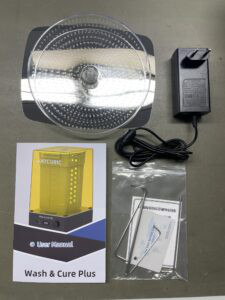
What You Get in the Box
- Main wash and cure unit
- Wash bucket with lid
- Inner wash container
- Rotating basket
- Curing turntable platform
- 12V power supply
- User manual
- Magnetic build plate holder (some versions)
The included accessories cover everything you need to start post-processing immediately. You’ll only need to supply cleaning fluid (IPA or specialized cleaner).
Value Compared to Competitors
Against competitors like the Elegoo Mercury Plus or Creality UW-01, the Anycubic holds its own:
- Similar capacity to most competing units
- Comparable curing performance across all tested resins
- Better parts availability than some newer brands
- Slightly lower price than premium competitors
- More established reputation than budget alternatives
The real value proposition is reliability. This isn’t the cheapest option, nor the most feature-rich, but it consistently delivers results without drama. For hobbyists who just want their post-processing to work, that reliability has tangible value.
Cost of Replacement Parts Over Time
Budget about $30-50 per year for replacement buckets, cleaning fluid, and occasional basket replacements if you’re printing regularly. This is comparable to competitors and far less than the hidden costs of DIY solutions (wasted resin, ruined prints, spilled IPA).
Pros and Cons
After extensive real-world testing, here’s the balanced scorecard:
✅ Pros
- Large Wash Capacity: The 2.5-liter bucket handles multiple prints or large parts without frequent fluid changes. You can wash several small miniatures simultaneously or process bigger models that wouldn’t fit in compact units.
- Reliable Curing: The 405nm UV array delivers consistent, thorough curing across all tested resin types. No sticky surfaces, no uncured spots—just properly finished prints every time.
- Strong Replacement-Part Ecosystem: Need a new bucket, basket, or container? They’re readily available and reasonably priced. This long-term support matters when you’re investing in tools for years of use.
- Simple Operation: The single-dial interface eliminates learning curves. Turn, set, press start. No apps, no connectivity issues, no updates to install.
- Quiet Operation: Won’t disturb household members or neighbors, making it apartment-friendly.
- Chemical Resistance: Both the bucket and container materials hold up excellently against IPA and other cleaners over time.
❌ Cons
- Older Design Compared to Plus 3: The Plus 3’s improvements are incremental but noticeable. Marginally better build quality and slightly more capacity make it a tempting upgrade if budget allows.
- Footprint Size: At 11 × 9 inches, it demands dedicated bench space. Not ideal for extremely tight workshops or for users who need to store equipment when not in use.
- No Smart Features: No timers, no presets, no app control. For users who want automation or remote monitoring, this feels basic.
- Manual UV Timing: You’ll need to learn optimal cure times through trial and error. There are no material-specific presets to guide beginners.
- Wash Fluid Management: The unit doesn’t filter or recirculate cleaning fluid. You’ll need to manually monitor and replace IPA as it becomes contaminated with uncured resin.
Who Should Buy the Anycubic Wash and Cure Plus?
Ideal User Profiles
The Consistent Hobbyist: If you’re printing 3-5 times per week and tired of manual post-processing, this machine pays for itself in time savings within months. The convenience of automated washing and curing transforms your workflow.
The Detail-Focused Maker: Miniature painters, jewelry designers, and anyone creating intricate models will appreciate the gentle but thorough cleaning that preserves fine details better than manual washing.
The Value-Conscious Buyer: You want reliability without paying a premium for unnecessary features. The Plus delivers core functionality at a fair price point with lower long-term costs than DIY solutions.
The Apartment Printer: Low noise, minimal fumes (when used with proper ventilation), and compact-enough size make this viable for space-constrained environments.
When It Still Makes Sense in 2026
Despite being an older design, the Wash and Cure Plus remains relevant for several reasons:
- Price advantage: Often available at significant discounts compared to newer models
- Proven reliability: Years of user reports confirm long-term durability
- Parts availability: Better aftermarket support than some newer competitors
- Used market: Easy to find gently used units at attractive prices
If you’re building your first resin printing setup or upgrading from completely manual post-processing, the original Plus is still a smart choice in 2026.
When to Choose Plus 3 / 3.0 Instead
Consider the newer model if:
- Budget isn’t a primary concern
- You frequently print at the upper limits of build volume
- You want the latest refinements and improvements
- You’re building a long-term setup and prefer the newest option
- You print extremely thick or large parts requiring longer cure times with better heat management
The Plus 3 isn’t a necessary upgrade, but it’s a better buy if the price difference doesn’t strain your budget.
🎁 Ready to Automate Your Post-Processing?
Stop washing prints by hand and start enjoying the hobby more. The Anycubic Wash and Cure Plus is the dependable workhorse that gets the job done.
👉 Buy Direct (Official Store) 🚀 Buy on Amazon (Fast Shipping)
Final Verdict
The Anycubic Wash and Cure Plus has earned its reputation as a reliable workhorse in the resin printing post-processing workflow. While newer models offer incremental improvements, the original Plus continues to deliver consistent, high-quality results without drama or complexity.
Long-Term Ownership Perspective
After running hundreds of prints through this machine, what stands out is its consistency. It simply works, print after print, month after month. The wash system effectively removes uncured resin, the UV curing is thorough and even, and maintenance requirements are minimal. There’s something deeply satisfying about equipment that does exactly what it promises without demanding constant attention.
The biggest long-term consideration is parts availability, and here the Plus excels. Replacement buckets, baskets, and containers are readily available and affordable, making this a sustainable choice for years of use. Compare this to cheaper alternatives where finding replacement parts becomes a treasure hunt within months.
Clear Buying Recommendation
Buy the Anycubic Wash and Cure Plus if:
- You want proven reliability at a fair price
- You print regularly enough to justify automated post-processing
- You value straightforward operation over cutting-edge features
- You’re building a cost-effective resin printing workflow
Consider alternatives if:
- You need the absolute latest features (get the Plus 3)
- Your prints regularly exceed standard build volumes
- You want app connectivity and smart automation
- Budget allows for premium post-processing solutions
For most hobbyists, the Anycubic Wash and Cure Plus hits the sweet spot of price, performance, and reliability. It’s not the most exciting piece of equipment in your workshop, but it’s one you’ll appreciate every single time you use it.
Whether you’re drowning in IPA fumes from manual washing or tired of inconsistent DIY UV curing setups, this machine streamlines post-processing into a simple, repeatable workflow. That consistency is worth its weight in gold for hobbyists who just want to focus on printing rather than fighting with post-processing.
🎯 Bottom Line
The Anycubic Wash and Cure Plus remains a smart buy in 2026 for hobbyists who value dependable performance and long-term value over having the absolute latest features. It’s a tool that does one job extremely well—and sometimes that’s exactly what you need.
Prices and availability change frequently. Click to see the latest deals!

