


You’ve spent an hour dialing in your slicer settings. Your temperatures look right, retraction is tuned, and you’ve leveled the bed more times than you care to admit. Yet when the print finishes, it’s covered in ugly strings, the surface looks rough and bubbly, and somehow the layers just don’t feel as strong as they should. Sound familiar?
If you’ve ruled out settings and it still happens, the most likely culprit is one that a lot of people overlook: wet filament. Moisture-saturated filament is responsible for more failed prints than almost any other hidden variable — and the frustrating part is that it looks perfectly fine sitting on the shelf.

The good news is that drying your filament is straightforward once you understand what you’re dealing with. This guide walks you through everything — why moisture matters, how to tell if your filament is wet, the right drying temperatures and times for every filament type, and the best ways to dry 3D printer filament at home. Whether you’re printing PLA on a Saturday afternoon or running overnight Nylon prints for functional parts, you’ll leave here knowing exactly what to do.
Grab our Filament Drying Temperature & Time Chart — a printable PDF you can tape to your wall next to your printer. Covers PLA, PETG, TPU, Nylon, ABS, ASA, and PVA with exact temps and times.
Quick Navigation
Why 3D Printer Filament Needs to Be Dried
Filament Is Hygroscopic
Here’s the thing most people don’t realize when they first get into 3D printing: filament actively pulls moisture out of the air. This property is called hygroscopicity, and virtually every common filament type has it to some degree.
When a spool sits on your desk, on a shelf, or even inside a partially open cabinet, it’s slowly absorbing water vapor from the surrounding environment. In a dry climate, this process can take weeks before it becomes a real problem. But in a humid environment — say, a basement workspace during summer, or anywhere near the coast — it can happen in a matter of days or even hours for the most sensitive materials.
The moisture doesn’t soak into the filament the way water soaks into a sponge. Instead, it bonds at the molecular level. That matters because once it’s in there, simply leaving the filament out to “air dry” won’t remove it — you need heat to drive the moisture out.
What Happens When You Print With Wet Filament?
When moisture-laden filament passes through a hot nozzle, the water instantly turns to steam. That trapped steam has to go somewhere, and it escapes through the molten plastic in a way that wrecks your print. Here’s what you’ll typically see:
- Excessive stringing between parts of the print
- Popping or crackling noises coming from the nozzle during extrusion
- Steam bubbles and pockmarks on the surface of prints
- Weak, brittle finished parts that snap more easily than expected
- Poor layer adhesion, leading to delamination
- Inconsistent extrusion that shows up as gaps or over-extrusion in random spots
- A general “rough” or “fuzzy” texture even at settings that normally produce smooth results
Which Filaments Absorb the Most Moisture?
Not all filaments are equally sensitive to moisture. Here’s a quick breakdown of how the most common materials compare:
| Filament | Moisture Sensitivity | How Quickly It Absorbs Water |
|---|---|---|
| PLA | Low to Moderate | Days to weeks |
| PETG | Moderate | Days |
| ABS | Low | Weeks |
| TPU | High | Hours to days |
| Nylon Most Care Needed | Extremely High | Hours |
| PVA | Extremely High | Very fast (hours) |
TPU and Nylon can absorb enough moisture in a single day to noticeably ruin print quality. If you’re working with either of these materials, drying before every print session should become a habit — not an afterthought.
How to Tell if Your Filament Is Wet
The 7 Most Common Signs of Wet Filament
Before you start adjusting settings, it’s worth checking whether moisture might be your real problem. Here are the most reliable signs:
- Stringing that appears suddenly, even though your retraction settings haven’t changed
- Small bubbles or pockmarks on print surfaces — these are where steam escaped through the plastic
- Hissing, popping, or crackling sounds from the hotend while printing
- Random under-extrusion that isn’t consistent with a clog or mechanical issue
- Brittle filament that snaps easily when you try to bend it — especially noticeable with PLA
- Fuzzy or rough surfaces even on prints that should come out smooth
- Lower strength than you’d expect from the same material previously
Quick Test: Is Your Filament Actually Wet?
If you’re not sure whether moisture is your issue, this simple test takes less than two minutes:
- Heat your nozzle to the material’s normal printing temperature.
- Extrude about 100 mm of filament manually (via your printer controls or slicer).
- Listen carefully — a dry spool should extrude nearly silently.
- Inspect the extruded strand as it comes out.
- If you hear popping or see a foamy, rough, or bubbly strand rather than a smooth, consistent one — the spool needs drying.
Still getting bad prints even after drying? The problem might be your printer, not your filament. Check out our top-rated printers that make moisture management easy with enclosed build plates and dry-box compatibility.
Wet Filament vs Incorrect Print Settings — How to Tell the Difference
Some print quality issues can look like wet filament when they’re actually a settings problem — and vice versa. This table helps you sort it out quickly:
| Problem | Usually Wet Filament? | Usually Print Settings? |
|---|---|---|
| Stringing | Yes | Sometimes (also retraction) |
| Brittle prints | Yes | Rarely |
| Elephant’s foot | No | Yes (first layer too close) |
| Layer shifts | No | Yes (mechanical issue) |
| Popping nozzle sounds | Yes | No |
| Rough/foamy surfaces | Yes | Rarely |
| Inconsistent extrusion | Yes | Sometimes (also clog) |
If the nozzle is popping or the extruded plastic looks foamy, it’s moisture — not your settings. No amount of retraction tuning will fix a wet spool.
Drying Temperatures and Times for Every Filament Type
This is where a lot of people go wrong — they either use a temperature that’s too low to actually remove moisture, or they crank it up too high and end up with a deformed spool they can’t use. The table below gives you the safe, effective range for the most common filament types:
| Filament | Drying Temperature | Drying Time |
|---|---|---|
| PLA Most Common | 45–50°C | 4–6 hours |
| PETG | 60–65°C | 4–6 hours |
| ABS | 65–70°C | 2–4 hours |
| TPU | 45–55°C | 4–6 hours |
| Nylon | 70–80°C | 6–12 hours |
| PVA | 45–55°C | 4–6 hours |
| ASA | 70–80°C | 4–6 hours |
⬆️ Bookmark this table — it’s the one reference you’ll come back to every time you need to dry a spool. Want a printable version? Grab our free cheat sheet below.
Why Temperature Matters More Than You Might Think
Too little heat and the drying process is ineffective — water molecules stay bonded to the polymer chains because there isn’t enough energy to break them free. If your oven or dryer runs even 5–10°C below the recommended temperature, you might end up with a spool that’s been sitting in heat for hours and is still just as wet as before.
Too much heat creates a different problem. Every filament type has what’s called a glass transition temperature — the point at which the material begins to soften. If your drying temperature gets close to or exceeds this point, the filament can start to warp inside the spool, fuse strands together, and become completely unusable. PLA, for example, has a fairly low glass transition temperature, which is why you should never try to dry it in an oven running at 70°C+.
Stick to the ranges in the table above and you’ll get moisture out without damaging the material.
How Long Should You Dry 3D Printer Filament?
The answer depends on how saturated the spool is. A spool that was left out overnight in a dry climate might only need 3–4 hours. A Nylon spool that’s been sitting in a humid workshop for a week could genuinely need 12+ hours to fully recover.
As a general rule: when in doubt, go longer. Drying for an extra hour or two does nothing harmful. Printing with a spool that needed more drying time costs you a failed print, wasted material, and time you don’t get back.
For TPU and Nylon specifically, overnight drying is often the most practical approach — just throw them in before bed and they’re ready for a morning print session.
Best Ways to Dry 3D Printer Filament
There are several methods for drying filament, and they vary quite a bit in terms of convenience, cost, and how well they actually work. Here’s an honest look at each one:
| Method | Cost | Temperature Accuracy | Convenience | Risk Level | Best For |
|---|---|---|---|---|---|
| Dedicated Filament Dryer | $30–$150 | Excellent | Excellent | Very Low | Everyone, especially TPU/Nylon users |
| Food Dehydrator | $30–$80 | Good | Good | Low | Budget-conscious hobbyists |
| Kitchen Oven | $0 (existing) | Poor | Fair | High | Emergencies only |
| Heated Bed + Box | $0 (existing) | Fair | Poor | Low | 2 AM emergencies |
| Microwave | $0 (existing) | N/A | N/A | Extreme | Never |
Use a Dedicated Filament Dryer (Best Overall Method)
If you print with any regularity, a dedicated filament dryer is genuinely one of the best investments you can make. These purpose-built devices maintain precise temperatures, circulate warm air evenly around the spool, and most importantly — many of them let you print directly from the dryer while drying continues.

That last feature is a bigger deal than it might sound. With other methods, you dry the spool and then transfer it to your printer, at which point it starts absorbing moisture again immediately. A filament dryer eliminates that window entirely. Hygroscopic materials like Nylon and TPU can start picking up moisture again within 30 minutes of being exposed to air — so being able to print directly from a sealed, actively-heated enclosure makes a real, measurable difference in print quality.
The advantages of using a dedicated filament dryer are hard to argue with:
- Precise temperature control keeps you safely in the ideal drying range
- Built-in fan circulation removes moisture-laden air and distributes heat evenly
- Sealed design prevents re-absorption while drying
- Print-while-drying capability eliminates the re-exposure window
- Purpose-built for filament, so there’s no improvisation required
If you’re serious about getting consistent results — especially with PETG, TPU, or Nylon — a dedicated filament dryer pays for itself quickly in failed prints avoided. We cover the best options currently available in our dedicated filament dryer buyer’s guide.
Ready to stop guessing and start printing with dry filament every time? Our buyer’s guide breaks down the best filament dryers for every budget — from $30 entry-level models to premium units with print-through capability.
Use a Food Dehydrator (Best Budget Method)
A food dehydrator is probably the most popular DIY solution among 3D printing hobbyists, and for good reason. These devices are designed to maintain steady, low-level heat with fan circulation — which is exactly what filament drying requires.

Unlike an oven, a dehydrator doesn’t have the dramatic temperature swings that can accidentally overheat your filament. It also typically sits at a lower temperature range, which makes it safer for PLA and TPU. The main limitation is that most standard dehydrators max out around 70–75°C, which means they’re suitable for most materials but can be borderline for Nylon and ASA that benefit from 75–80°C.
| Material | Dehydrator Temp Setting | Time |
|---|---|---|
| PLA | 45–50°C | 4–6 hours |
| PETG | 60–65°C | 4–6 hours |
| TPU | 45–55°C | 4–6 hours |
| Nylon | 70°C (max) | 8–12 hours |
One practical note: make sure the spool actually fits in your dehydrator before you buy one. Some larger spools — particularly 2 kg rolls — don’t fit standard models without modifying the tray arrangement. Check the internal diameter of the dehydrator against your spool size.
Use an Oven (Works, But Requires Caution)
A regular kitchen oven will dry filament, but it comes with some real caveats that make it a less ideal option than people expect.
The core problem is temperature accuracy. Most home ovens fluctuate by 10–20°C from their displayed setting, and some cheaper models can vary even more. That variance is risky when you’re trying to dry PLA at 45–50°C — a brief spike to 60°C can start softening the filament and fusing loops together on the spool.

Never use an oven’s convection mode at high temperatures for PLA. The fan + heat combination can push surface temps higher than the dial suggests. If you use an oven, use a separate oven thermometer to verify actual temperature, not just the dial setting.
If an oven is all you have access to, it can work — just keep these in mind: use an external thermometer, stick to the lowest reliable temperature your oven can hold, and check every hour or so. It’s not the best method, but it beats printing with wet filament.
Use Your Printer’s Heated Bed
This one’s worth knowing about as an emergency option. The basic idea: set your heated bed to the appropriate temperature for your filament, place the spool on the bed, and create a makeshift enclosure over it using a cardboard box or plastic bin. The trapped heat gradually warms the spool and drives out moisture.
This method is slower and less consistent than the others, and it ties up your printer for the entire drying duration (obviously, since you’re using the bed). But if you’re mid-project, it’s 2 AM, and your only filament is wet — knowing this works is useful.
For this method, run the bed at about 5°C below the recommended drying temperature to account for the fact that the spool is elevated above the bed surface. Drying times will be roughly 50% longer than with a proper dryer.
Can You Dry Filament in a Microwave?
Short answer: No. Longer answer: genuinely, no.
Microwaves heat by exciting water molecules — which sounds ideal in theory. In practice, this causes completely uneven heating that can melt sections of filament while leaving others cold. The microwave-safe plastic in the spool itself is also a concern, and there’s no way to control temperature with any meaningful precision. Some people on forums claim to have tried it successfully. The risk of damaging your filament, your spool, or your microwave isn’t worth it when better options are available.
Microwaving filament can melt the spool, ruin the filament unevenly, and potentially damage your microwave. There are zero benefits and plenty of risks. Use any of the four methods above instead.
How to Dry PLA, PETG, TPU, and Nylon
How to Dry PLA Filament
Can you dry PLA filament? Absolutely — and while PLA is the most forgiving of the common filament types, it still benefits meaningfully from drying, especially if it’s been sitting out for more than a few weeks.
PLA should be dried at 45–50°C for 4–6 hours. Staying below 50°C is important — PLA’s glass transition temperature is relatively low (around 55–60°C for standard PLA), and you don’t want to get close to that range while drying.
Signs that your PLA needs drying: it’s snapping easily as it feeds, prints are stringy despite good retraction settings, or surface texture looks rough and foamy. A quick 4-hour drying session often brings PLA back to like-new performance. For more detail on PLA-specific printing and care, check out our dedicated PLA guide.
Printing with PLA and want to master every aspect of it? Our complete PLA guide covers drying, optimal temperatures, bed adhesion, troubleshooting, and more.
How to Dry PETG Filament
PETG is more hygroscopic than PLA and is notorious for producing excessive stringing when wet. If you’ve ever wondered why PETG seems so much harder to tune than PLA, moisture is frequently a significant part of the explanation.
Dry PETG at 60–65°C for 4–6 hours. PETG tolerates higher temperatures better than PLA, so you have a bit more margin here. After drying, you’ll often notice that stringing reduces dramatically — even at retraction settings that weren’t touching the problem before. See our full PETG printing guide for more.
PETG stringing driving you crazy? Drying might be the fix you’ve been missing. Dive deeper into everything PETG in our comprehensive guide.
How to Dry TPU Filament
TPU is one of the fastest moisture absorbers out there. A spool left out in a typical indoor environment can absorb enough moisture to cause printing problems within a few hours. This makes proper storage especially critical for TPU — but since storage isn’t always perfect, drying before printing is often necessary.
Dry TPU at 45–55°C for 4–6 hours. The lower end of this range is safer if you’re unsure about your oven or dryer’s accuracy. Wet TPU often presents as excessive stringing and a rough, foamy extrusion texture rather than the smooth, elastic strands you’d expect from dry material.
If you print with TPU regularly, consider a filament dryer with print-through capability. TPU re-absorbs moisture so quickly that even transferring from a dehydrator to your printer can introduce enough moisture to affect the first few layers of a print.
How to Dry Nylon Filament
Nylon is in a category of its own when it comes to moisture absorption. If you’ve ever opened a fresh bag of Nylon filament and then waited a day to start printing, there’s a reasonable chance it absorbed enough moisture overnight to affect quality. Many experienced users treat Nylon as a material that almost always requires drying before printing — regardless of how recently it was opened.
Dry Nylon at 70–80°C for 6–12 hours. Overnight drying is a practical default. After drying, transfer immediately to a dry storage container or print directly from a sealed filament dryer — Nylon can start re-absorbing moisture within minutes in a humid environment.
- Exceptional layer adhesion
- High impact and tensile strength
- Smooth, professional surface finish
- Consistent extrusion with no popping
- Severe stringing and oozing
- Bubbly, foam-like extrusion
- Drastically reduced strength
- Poor bed adhesion and warping
How to Store Filament After Drying
Drying Is Only Half the Battle
This is the part that often gets skipped, and it’s where a lot of the effort invested in drying gets wasted. A properly dried spool of Nylon sitting on your desk in a humid room can reabsorb enough moisture to affect print quality within an hour. PETG and TPU aren’t much better. Even PLA will eventually pick up enough moisture to matter if left exposed.
The effort you put into drying filament is only preserved if you store it properly afterward. Fortunately, good filament storage doesn’t have to be complicated or expensive.
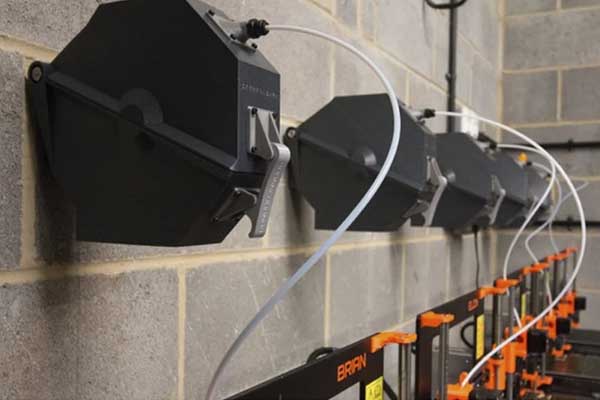
Best Ways to Store Filament
Here are the most effective storage methods, roughly in order of how well they work:
- Airtight containers with desiccant — food-grade storage bins or purpose-built filament dry boxes work well. Add fresh silica gel packs and they’ll stay dry for weeks.
- Vacuum-sealed bags — pulling the air out significantly slows moisture re-absorption. Works especially well for long-term storage of expensive or specialty materials.
- Resealable ziplock bags with silica gel — not as good as vacuum sealing, but a solid everyday solution for spools you rotate through regularly.
- Purpose-built dry boxes — these are sealed containers that often include built-in hygrometers and silica gel holders. Some double as print-while-stored systems.
- Silica gel packs — the desiccant itself is the key ingredient in all of the above. Keep a supply on hand and replace or recharge them when the color-indicating beads show saturation.
How Long Can Filament Stay Dry After Drying?
This varies quite a bit depending on the material and the humidity of your environment:
| Filament | How Long It Stays Dry (Sealed with Desiccant) | How Long It Stays Dry (Left in Open Air) |
|---|---|---|
| PLA | Days to weeks | 1–3 weeks |
| PETG | Several days to a week | A few days |
| TPU | A few days | Hours to a day |
| Nylon | Hours to a day (even sealed in high humidity) | Minutes to hours |
Keep a small hygrometer (humidity monitor) inside your filament storage containers. Aim to keep relative humidity below 20–25% for moisture-sensitive materials. These are inexpensive and available from most electronics or 3D printing supply stores.
Our Free Filament Drying Cheat Sheet includes the temperature/time chart PLUS a storage quick-reference. Print it, tape it near your printer, and never second-guess your drying settings again.
Frequently Asked Questions
How Important Is It to Dry 3D Printer Filament?
For PLA in a dry environment, you can often get away without drying — especially with freshly opened spools. For PETG, TPU, and Nylon, drying is significantly more important and directly impacts print quality, layer adhesion, and surface finish. If you’re consistently getting popping sounds from your nozzle, rough surfaces, or unexpected stringing, wet filament is one of the first things to check. The impact varies by material, but for hygroscopic filaments, it can be the difference between a usable print and a failed one.
Can You Dry PLA Filament?
Yes, you can absolutely dry PLA filament, and it’s worth doing if your PLA has been sitting out for more than a few weeks or shows signs of moisture. Use a temperature of 45–50°C for 4–6 hours. PLA is the most forgiving filament when it comes to moisture, but even dry PLA tends to print noticeably better than wet PLA in terms of surface quality and layer strength.
How Long Should I Dry My Filament?
Most filaments benefit from 4–6 hours at the appropriate temperature. Nylon typically needs 6–12 hours, and very saturated spools of any material may need to go longer. When in doubt, an extra hour or two of drying is always safer than under-drying. Overnight drying is a convenient default for TPU and Nylon.
What Is the Best Way to Dry 3D Printer Filament?
A dedicated filament dryer is the best overall method — it offers accurate temperature control, even heat distribution, and the ability to print directly from the dryer without re-exposing the spool to moisture. For budget-conscious makers, a food dehydrator is an excellent second choice. Both options outperform using a kitchen oven, which can have significant temperature fluctuations that risk damaging temperature-sensitive materials like PLA.
Does Every Filament Need to Be Dried?
Not every filament needs drying before every print. PLA that was just opened from a sealed bag and is being used in a dry environment is probably fine without drying. But for Nylon, TPU, and PETG — especially in humid environments or after the spool has been sitting out for a few days — drying is strongly recommended. The rule of thumb: if you hear any popping or crackling from the nozzle, or you see foamy extrusion, dry it before continuing.
If you’re dealing with a specific filament type or drying scenario not covered here, drop a comment below. We regularly update this guide based on reader questions and new filament formulations.
Final Verdict
Moisture is one of the most overlooked causes of poor 3D print quality — and it’s also one of the easiest to fix once you know what you’re dealing with. The fact that filament can look perfectly normal on the outside while being saturated enough to ruin prints is exactly why so many people chase their tails adjusting settings when the real fix is a drying cycle.
Here’s the simplified rule to take away from all of this:
- PLA and PETG: Dry when you notice problems, or proactively if the spool has been sitting out for more than a week
- TPU and Nylon: Dry before almost every print session — these materials don’t give you much leeway
- ABS and ASA: Less sensitive, but still worth drying if prints look rough or you hear nozzle noise
If you print often enough that moisture is a recurring concern — and most people who get serious about 3D printing find that it is — a dedicated filament dryer is genuinely worth the investment. The convenience of accurate temperature control, the ability to print while drying, and the elimination of re-absorption concerns add up to something that’s hard to replicate with improvised methods.
Ready to pick the right dryer for your setup? Head over to our Best Filament Dryers guide for a full breakdown of the top options currently available — including budget picks and premium models that handle Nylon and ASA without any fuss.
And if you’re working with specific materials and want to go deeper, our dedicated PLA and PETG guides have everything you need to get the most out of those filaments — dry or otherwise.
Stop Letting Moisture Ruin Your Prints
You now know exactly how to dry every filament type, how to spot wet filament before it wastes your time, and how to store spools so they stay dry. The only thing left is to pick the right tool for the job.

