


⚡ Quick Answer
A 3D Scanner is a device or app that captures the shape of a real object and converts it into a digital 3D model. Most 3D Scanners use lasers, structured light, LiDAR, or smartphone cameras and export files such as STL, OBJ, or PLY for editing or 3D printing.
What Is a 3D Scanner?
How It Works, Uses, Prices & Best Types in 2026
If you have ever looked at a broken part, a vintage object, or even your own hand and thought, ‘I wish I could just copy that digitally,’ you have already felt the pull of 3D scanning. And in 2026, turning that physical object into a perfect digital file has never been more accessible.
A 3D Scanner captures the shape, dimensions, and sometimes even the color of a real-world object and converts it into a digital 3D model you can edit, 3D print, archive, or share. What used to require expensive lab equipment is now available as a free app on your phone — or a handheld device that fits in your backpack.
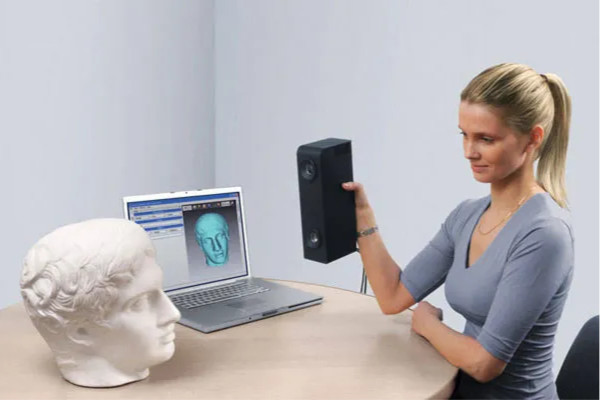
A hand-held 3D scanner
In this guide, you will learn exactly how 3D Scanners work, what they are used for in the real world, how much they cost across every budget, and which type is the right fit for 3D printing, reverse engineering, or professional use. Whether you are a maker, engineer, cosplay enthusiast, or just curious, this is everything you need to know before spending a single cent.
Need a scanner for 3D printing? See our picks for the best 3D scanners for beginners, makers, and professionals.
📑 In This Guide
- How Does a 3D Scanner Work?
- What Is a 3D Scanner Used For?
- What Is a 3D Scanner App?
- How Much Does a 3D Scanner Cost?
- Are There 3D Scanners Under $100?
- Best 3D Scanner for 3D Printing
- Using a 3D Scanner With Bambu Lab
- What Is a Professional 3D Scanner?
- What Is a 3D Body Scanner?
- What to Look For in Reviews
- Frequently Asked Questions
How Does a 3D Scanner Work?
This is usually the first question people ask, and for good reason. The technology sounds complicated, but the core idea is surprisingly simple.
The Basic Scanning Process
Every 3D Scanner — whether a $0 phone app or a $50,000 industrial system — follows roughly the same pipeline:
The scanner emits light (laser, structured light, or reads camera images) and captures millions of measurement points on the surface of an object.
Those measurement points are assembled into what is called a point cloud — essentially a constellation of dots that defines the object’s shape in 3D space.
Software connects those dots to create a mesh — a continuous surface made up of tiny polygons (usually triangles).
The mesh is cleaned up, repaired, and exported as a file format like STL, OBJ, or PLY that you can use for 3D printing, CAD, or visualization.
Simple in concept. Remarkably powerful in practice.

The 3D scanner easily reads data from parts of even complex configurations
Common 3D Scanning Technologies
Not all 3D Scanners work the same way. Here is a breakdown of the main technologies you will encounter:
Laser 3D Scanners: These project a laser line or dot across an object and measure how the beam distorts to calculate depth. They tend to be very accurate and work well on matte surfaces. Common in professional and industrial settings.
Structured Light 3D Scanners: Instead of a laser point, these project a pattern of light (usually stripes or dots) onto the object and use cameras to read how the pattern deforms. Structured Light 3D Scanners are fast, accurate, and popular in the consumer and prosumer range.
LiDAR 3D Scanners: LiDAR (Light Detection and Ranging) fires laser pulses and times how long they take to return. Apple has built LiDAR into iPhones and iPads since 2020, making LiDAR 3D Scanner capability available on phones most people already own. It is excellent for room-scale and architectural scanning.
Photogrammetry: This technique uses a series of overlapping photos taken from different angles. Software analyzes the photos and reconstructs a 3D model. Photogrammetry can produce stunning results — especially for objects with rich texture — and it requires nothing more than a camera or smartphone.
Smartphone 3D Scanner Apps: Apps like Polycam, Scaniverse, and RealityScan leverage your phone’s camera and (on compatible iPhones/iPads) LiDAR sensor to perform on-device scanning. Convenient, affordable, and genuinely useful for many everyday scanning tasks.
🔑 Key Insight — AI Changes Everything in 2026
AI-Powered Mesh Processing in 2026
This is where things get really exciting. In previous years, the quality of your scan depended almost entirely on your hardware. In 2026, software has changed that equation dramatically.
Modern scanning software now uses artificial intelligence to automatically fill holes in incomplete scans, repair broken geometry, reduce noise from imperfect captures, smooth surfaces, and even reconstruct missing sections of an object based on what it expects to be there. Some platforms have also introduced Gaussian Splatting — a newer technique that builds hyper-realistic volumetric representations from camera captures, resulting in cleaner, more lifelike 3D reconstructions than traditional mesh methods.
The practical takeaway? A decent scan from a $400 scanner, processed through great AI-powered software, can produce a printable model that would have required a $3,000 scanner just three years ago. When evaluating any 3D Scanner in 2026, always look at the software — it matters as much as the hardware, sometimes more.
File Types Created by 3D Scanners
After scanning, your model is exported as a file. Here are the formats you will encounter most often:
| Format | What It Does | Best For |
|---|---|---|
| STL | Geometry only — no color or texture | 3D printing (universal slicer compatibility) |
| OBJ | Geometry + color + texture maps | Rendering, CAD tools, archiving with detail |
| PLY | Raw point cloud data | Research and professional workflows |
| STEP | CAD format (not a scan format) | Engineering use after reverse engineering in CAD |
For 3D printing, STL is almost always what you want. For archiving or editing with texture detail, OBJ is typically the better choice.
Want a deep dive into the scanning pipeline from start to finish?
What Is a 3D Scanner Used For?
Honestly, the list of applications keeps growing. Here are the most common — and most useful — real-world uses you should know about.
3D Printing and Reverse Engineering
This is the use case that brings most people to 3D scanning in the first place. Scan an object, clean the mesh, and you have a printable replica. But the real power is in reverse engineering — using a scan as the starting point to modify, improve, or recreate something.
Imagine a bracket on your washing machine snaps. The manufacturer no longer stocks the part. You scan the broken piece, repair it in CAD software, and 3D print a replacement. This is happening in garages and workshops all over the world, and it is one of the most practically valuable applications of affordable 3D scanning technology.
Other popular 3D printing scan-to-print workflows include: scanning a product to create a custom-fitting case or enclosure, scanning an existing design to create an improved version, and duplicating legacy industrial parts that are no longer in production.
Cars and Mechanical Parts
Automotive enthusiasts and fabricators were early adopters of 3D scanning. Scanning brackets, engine components, interior trim pieces, and custom motorcycle parts allows for incredibly precise custom fabrication. If you can scan it, you can redesign it.
⚠️ Problem: Shiny Surfaces Kill Scans
There is a catch though: shiny and metallic surfaces are a nightmare for most scanners. Reflective objects scatter or absorb the scanner’s light, which causes failed scans, holes in the mesh, and general frustration.
The widely used solution is Scanning Spray — specifically, vanishing scanning sprays like AESUB.
AESUB Spray coats a reflective surface with a fine white matte layer that the scanner can read easily — and then the spray disappears on its own within a few hours, leaving no residue. If you plan to scan any metal, glossy plastic, or carbon fibre components, a can of AESUB Spray is one of the best investments you can make alongside your scanner.
Scanning replacement parts and printing them? Compare the best handheld scanners for functional 3D printing.
Miniatures, Cosplay, and Collectibles
The maker and cosplay community has embraced 3D scanning enthusiastically. Scanning figurines, props, helmets, and tabletop miniatures allows hobbyists to create custom duplicates, scale models, or modified versions. If you play tabletop games and want to recreate or customize a miniature, a 3D Scanner gives you a massive head start over modeling from scratch.
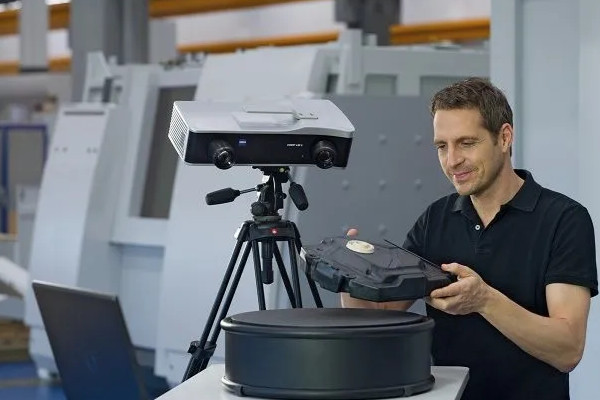
The use of 3D scanners in production saves time and money
High-detail structured light scanners shine here, capturing the fine textures and small features that make a miniature scan look polished when printed.
Medical and Body Scanning
A 3D Body Scanner captures the full shape of a person — which opens up a surprisingly broad range of applications. Custom prosthetics and orthotics are among the most impactful, where accurate body scans allow for medical devices that fit perfectly rather than relying on rough approximations.
Dental scanning has been transformed by 3D technology — most modern dental clinics now use intraoral scanners instead of messy physical impressions. The fitness industry uses body scans to track physique changes over time, and the fashion industry uses them for made-to-measure clothing. Even gaming and virtual reality use body scans for highly personalized digital avatars.
Architecture and Construction
LiDAR-equipped scanners can capture entire rooms, buildings, or historical sites with extraordinary precision. Architects use room scans to measure spaces before renovations. Construction teams use them for as-built documentation. Museums and preservation organizations use 3D scanning to create permanent digital archives of irreplaceable historical structures and artefacts.
For room-scale work, LiDAR smartphone apps have become a genuinely practical tool, especially for quick measurements and rough spatial models.
What Is a 3D Scanner App?
Not everyone needs to buy dedicated hardware. If you have a relatively recent smartphone, you may already have a surprisingly capable 3D Scanner in your pocket.
A 3D Scanner App uses your phone’s camera — and on LiDAR-equipped iPhones and iPads, the built-in depth sensor — to capture and reconstruct 3D models. In 2026, these apps have improved enormously, and for many casual use cases, they are genuinely good enough.
How 3D Scanner Apps Work
The process is intuitive: open the app, point your phone at the object you want to scan, and walk slowly around it while keeping it in frame. The app captures frames from multiple angles, identifies overlapping features, and reconstructs a 3D mesh in software. On LiDAR devices, real depth data is added to each frame, which improves accuracy significantly.
Types of 3D Scanner Apps
LiDAR Apps (e.g., Polycam, Scaniverse): Exclusive to LiDAR-equipped Apple devices. Fast, accurate for their class, and great for both objects and rooms.
Photogrammetry Apps (e.g., RealityScan, Qlone): Available on any phone. Take a series of photos and let the software do the reconstruction. Slower, but can work on Android too.
Face Scanning Apps: Capture facial geometry for avatars, animations, and personalized products.
Body Scanning Apps: Use multiple shots or slow rotations to capture full-body scans for clothing, fitness, or avatar creation.
iPhones and iPads with LiDAR (iPhone 12 Pro and later, iPad Pro 2020 and later) consistently outperform non-LiDAR devices. If you are choosing between an Android and an iPhone specifically for scanning, LiDAR is a real difference-maker.
Pros and Cons of 3D Scanner Apps
✅ Pros
- Free or very low cost — many excellent apps cost nothing
- No extra hardware required
- Easy to use — ideal for beginners
- Works well for room scans and larger objects with plenty of texture
❌ Cons
- Lower accuracy than dedicated hardware
- Struggles significantly with small objects (under about 5 cm)
- Fails on shiny, reflective, or transparent surfaces
- Not suitable for precision engineering work
- Results can require heavy manual cleanup
Best Uses for a 3D Scanner App
Apps are a great starting point for scanning furniture, household objects, outdoor sculptures, architectural spaces, and low-detail hobby projects. If you want to dip your toes into 3D scanning before committing to hardware, downloading a free LiDAR app (if you have a compatible iPhone) is the smartest first move.
Ready to explore what your phone can do? See our full roundup of the best 3D scanner apps.
How Much Does a 3D Scanner Cost?
3D Scanner Price varies enormously — we are talking from literally zero dollars to well over $100,000. But the middle of that range has gotten far more interesting in 2026, and there has never been a better time to buy.
2026 3D Scanner Price Table
| Type | Typical Price | Best For |
|---|---|---|
| Phone App | Free – $20 | Beginners, casual scanning |
| Budget Handheld Scanner | $100 – $400 | Hobby projects, basic reverse engineering |
| Consumer 3D Scanner | $400 – $800 | 3D printing, makers, small business Sweet Spot |
| Prosumer Scanner | $800 – $2,000 | Detailed functional parts, small professional use |
| Professional 3D Scanner | $2,000 – $20,000+ | Engineering, product design, manufacturing |
| Industrial Metrology Scanner | $20,000 – $100,000+ | High-precision manufacturing, aerospace |
💡 Why 2026 Is Different
The most exciting news for buyers in 2026: scanners in the $400–$800 range are now delivering accuracy and ease of use that previously required spending $2,000 or more. Consumer 3D Scanners have had a genuine leap in quality over the past 24 months, largely driven by better structured light sensors and — once again — AI-powered software.
What Affects 3D Scanner Price?
When you see a price difference between two scanners, here is what you are usually paying for:
Accuracy and Resolution: Higher-end scanners measure smaller details more precisely. Important for engineering, less critical for cosplay.
Scan Speed: Professional scanners can capture millions of points per second. Slower scanners require more patience and stable conditions.
Software Quality: Some scanners ship with outstanding AI-powered cleanup tools included. Others charge extra or leave you to figure out open-source options.
Wireless Scanning: Freedom from cables makes portable scanning dramatically more practical.
Color Capture: Budget scanners capture geometry only. Mid-range and up can also capture texture and color.
Build Quality and Support: Professional brands offer warranties, calibration services, and support teams — which matter when you are using a scanner for business.
Is a Cheap 3D Scanner Worth It?
For hobby use, cosplay, home projects, and casual 3D printing? Absolutely. A $300–$500 scanner will handle the vast majority of what most makers and hobbyists ever need to scan.
For high-precision engineering work — designing mechanical components that need to fit within tight tolerances, or creating parts for safety-critical applications — you will genuinely need to budget more. The accuracy difference between a $400 consumer scanner and a $5,000 professional model is real and measurable.
The sweet spot for most people reading this guide is the $400–$800 consumer range. These machines have hit a quality inflection point where the cost-to-capability ratio is exceptional.
Compare the best value 3D scanners across every budget.
Top Scanner Picks by Budget
CR Scan Otter
Best Under $500
Creality’s entry-level handheld scanner delivers surprising accuracy for the price. Ideal for hobbyists getting started with scan-to-print workflows.
Revopoint Inspire 2
Best Under $1,000
The best balance of accuracy, ease of use, and software quality in the consumer range. Our top recommendation for most makers in 2026.
CR Raptor Pro
Best Prosumer Value
Bridges the gap between consumer and professional with industrial-grade tracking and fast scan speeds for serious users.
Are There Any 3D Scanners Under $100?
This is one of the most searched questions in the 3D scanning space, and the honest answer is: real dedicated hardware under $100 is extremely rare and generally not worth your time in 2026. But there are legitimate, genuinely useful options at that budget — you just need to know what they actually are.
Best Realistic Options Under $100
Smartphone + Free LiDAR or Photogrammetry App: If you already own a compatible iPhone or any modern smartphone, you have a scanner. Free apps like Polycam (free tier), Scaniverse, or RealityScan can produce usable models at zero additional cost.
Turntable + Photogrammetry Software: A motorized turntable (often under $30), your phone camera, and free or low-cost photogrammetry software like Meshroom can produce surprisingly respectable scans of small, well-textured objects. It takes patience, but the results can be impressive.
Used First-Generation Handheld Scanners: Older models from brands like Revopoint or Creality occasionally show up on the used market under $100. They will not match current-generation performance, but for a beginner experimenting with the workflow, they can be a very low-risk entry point.
Who Should Buy a Sub-$100 Option?
If you are a student, a beginner, or someone who is not sure yet whether 3D scanning is going to become a serious hobby or workflow, the sub-$100 route is perfect. Spend nothing or very little, learn the scanning process, understand what file cleanup looks like, and figure out what your actual quality requirements are. Then upgrade from a position of knowledge rather than guesswork.
📥 Free 3D Scanner Buyer’s Checklist
Not sure which scanner fits your needs? Our printable checklist walks you through every factor — accuracy, software, budget, and use case — so you buy the right scanner the first time.
See all the realistic sub-$100 options and which ones are actually worth trying.
What Is the Best 3D Scanner for 3D Printing?
This is probably the most practical question in this entire guide, and it deserves a direct answer.
The best 3D Scanner for 3D Printing is not necessarily the most expensive one, or the most accurate one. It is the one that gives you clean, printable STL files with the least friction between scanning and your slicer. Ease of mesh cleanup and direct STL export are more important for printing workflows than raw accuracy specs.
What Matters Most for 3D Printing?
Clean STL Export: Your slicer needs a watertight, manifold mesh. Scanners with good built-in repair tools save enormous amounts of manual cleanup time.
Practical Accuracy for Your Use Case: Scanning a decorative prop? You need far less accuracy than scanning a mechanical bracket. Match the scanner to the task.
Easy Mesh Cleanup: Look for scanners that include AI-assisted hole filling and surface smoothing in their bundled software.
Slicer Compatibility: All major scanners export STL, which works with every slicer. But check that the software pipeline is smooth end-to-end.
The Typical Scan-to-Print Workflow
🔄 The 5-Step Scan-to-Print Pipeline
- Scan the object (apply AESUB Spray if the surface is reflective).
- Clean the mesh using the scanner’s software (or a dedicated tool like Meshmixer or ZBrush).
- Export as STL.
- Import into your slicer (Bambu Studio, PrusaSlicer, Cura, etc.).
- Slice and print.
The scanners that make this workflow fast and reliable are the ones that deserve to be called the best for 3D Printing — regardless of whether they win spec-sheet comparisons.
CR Scan Otter
Best Budget for 3D Printing
Affordable entry point with straightforward STL export and decent bundled software. Perfect for learning the scan-to-print workflow without a big investment.
Revopoint Mini 2
Best for Miniatures
High-detail scanning optimized for small objects. Captures the fine textures that make miniature prints look polished. A favourite among tabletop gamers.
Einstar 2
Best for Mechanical Parts
Excellent tracking and accuracy for functional part scanning. Clean mesh output with minimal post-processing needed before slicing.
Find your perfect match — budget, miniatures, or mechanical parts.
Can You Use a 3D Scanner With a Bambu Lab Printer?
Short answer: yes, absolutely. Bambu Lab does not make its own dedicated 3D Scanner, but that does not matter — virtually every scanner on the market today exports STL or OBJ files, which Bambu Studio imports without any issues whatsoever.
If you own a Bambu P1P, X1C, A1 Mini, or any other Bambu printer, your scanner workflow is the same as it would be with any other FDM machine. Scan, clean the mesh, export, import into Bambu Studio, slice, and print.
Best Workflow for Bambu Lab Users
Scan your object with any compatible scanner or app.
Clean the mesh in your scanner’s software — remove noise, fill holes, smooth surfaces.
If the mesh is very dense (high polygon count), simplify it before importing. Tools like Meshmixer’s Reduce function or online tools like Simplify3D Mesh Tools can help.
Import the STL into Bambu Studio.
Use Bambu Studio’s built-in mesh repair tools if needed.
Set your print settings, slice, and send to the printer.
⚠️ Bambu Users: Watch Your Polygon Count
High-Poly Meshes and Bambu Studio
One thing to be aware of: high-resolution scans produce very large, high-polygon meshes. A detailed scan of even a small object can have millions of polygons, which can make Bambu Studio slow to load and manipulate — and in extreme cases, can cause slicing timeouts.
Bambu Studio handles high-poly models better than many other slicers, but there is still a practical limit. For most scans, reducing the polygon count by 50–75% before importing results in a file that is far easier to work with, with no meaningful loss of visual detail at typical print resolutions.
This is especially relevant for fast-printing setups like the Bambu X1C: print speeds that would be forgiving on slower machines can exaggerate rough scan surfaces, so investing time in mesh cleanup before printing pays off in better surface quality.
Once you move past the consumer bracket, 3D Scanners start to feel like a completely different category of tool. A Professional 3D Scanner is not just a faster, more expensive version of a consumer model — it is a precision instrument designed for environments where accuracy, reliability, and repeatability are non-negotiable.
What Makes a Scanner ‘Professional’?
Accuracy: Professional scanners typically achieve 0.02 mm or better accuracy. Consumer models are usually in the 0.05–0.2 mm range.
Scan Volume Flexibility: Many professional scanners can switch between high-detail small-object mode and larger object capture mode.
Scan Speed: Professional systems capture millions of points per second, dramatically reducing scan time for large or complex objects.
Tracking Reliability: High-end scanners use multiple tracking methods simultaneously (visual, geometric, photogrammetric targets) to stay aligned during complex scans.
Software Ecosystem: Premium brands invest heavily in software that automates alignment, texture reconstruction, mesh repair, and export — saving engineers hours of manual work.
Software Matters More Than Ever in 2026
In previous generations of professional scanning, hardware was king. In 2026, the best Professional 3D Scanners are defined as much by their software ecosystems as by their sensor specifications.
AI-assisted mesh repair, automatic alignment across complex scan sessions, intelligent hole filling, texture reconstruction from photogrammetry data, and Gaussian Splatting integration have all become competitive differentiators at the professional level. When comparing professional scanners, download the trial software and use it before you buy the hardware — because you will live in that software every day.
Who Actually Needs a Professional 3D Scanner?
Being realistic about this is important, because a lot of people buy professional scanners when a consumer model would serve them perfectly well.
You genuinely need a Professional 3D Scanner if you are: a product designer or engineer working to tight mechanical tolerances; a manufacturer doing quality control or reverse engineering of industrial components; a dental professional scanning for crowns, bridges, or aligners; an automotive professional creating custom body components or scanning legacy vehicles; or someone whose business depends on scan accuracy in a legally or safety-significant way.
When a Consumer Scanner Is More Than Enough
For hobby 3D printing, cosplay props, home projects, DIY replacement parts with reasonable tolerances, or any use case where ‘close enough’ is genuinely close enough — a consumer scanner in the $400–$800 range will do everything you need. Do not let spec sheets or marketing pressure you into spending $3,000 if your actual workflow does not require it.
See our in-depth hands-on comparisons of professional-grade 3D scanners.
What Is a 3D Body Scanner?
A 3D Body Scanner is exactly what it sounds like — a system designed to capture the full three-dimensional shape of a human body, rather than a small object. The technology is the same at its core, but the implementation is quite different.
What Does a Body Scanner Do?
A 3D Body Scanner typically uses multiple cameras or sensors positioned around a subject to capture the entire body simultaneously — or uses a rotating system to capture different angles in a fast, continuous sweep. The result is a detailed full-body 3D model that accurately reflects the subject’s proportions, posture, and surface geometry.
Common Uses of 3D Body Scanners
Custom Clothing and Fashion: Made-to-measure garments based on precise body measurements, eliminating fitting room guesswork.
Fitness Tracking: Scanning body composition changes over time with objective, data-driven measurements — far more informative than a scale.
Medical Prosthetics and Orthotics: Custom-fit devices that actually conform to a patient’s unique anatomy.
Gaming and VR Avatars: High-fidelity personalized avatars for games, virtual meetings, and immersive experiences.
Cosplay: Scanning your own body to create perfectly fitted custom armour and costume components.
Medical Research: Tracking changes in patient morphology over time.
How a Body Scanner Differs From a Standard 3D Scanner
Body scanners require a much larger capture volume, much faster scanning (to freeze human motion), and typically more cameras working in parallel. Many commercial body scanner booths use a ring of 50–200 cameras that fire simultaneously, capturing the full body in a fraction of a second. Portable body scanning options using LiDAR phones have also become practical, though they require the subject to remain very still.
Explore full-body scanning options for fitness, fashion, cosplay, and medical use.
3D Scanner Reviews: What Should You Look For?
Before you click buy on any 3D Scanner, there are a few key factors that will determine whether you are happy with your purchase a month from now — or regretting it.
Features to Compare When Reading 3D Scanner Reviews
Accuracy and Resolution: Always check the manufacturer’s stated accuracy, but also read real-world reviews. Marketing specs and real-world performance sometimes diverge significantly.
Ease of Use: Does the learning curve match your experience level? A scanner with powerful features you cannot figure out is worse than a simpler scanner you can actually use.
Scan Speed: Faster is generally better, especially for scanning objects that might move or shift slightly. Check real-world scan times, not just theoretical speeds.
Software Quality and Updates: Is the bundled software actively developed? Check the brand’s update history. A scanner with improving software is a scanner that gets better after you buy it.
Price-to-Performance Ratio: The most expensive option is not always the best for your specific use case. Look for the scanner that delivers what you need at the price point you can justify.
After-Sales Support: Forum activity, official support responsiveness, and the quality of tutorial documentation matter enormously when you run into problems.
Common Buying Mistakes to Avoid
🚫 4 Costly Mistakes Buyers Make
- Buying purely on price: The cheapest scanner is rarely the best value. A scanner that requires 10 hours of manual cleanup per scan will cost you more in time than you saved on hardware.
- Ignoring software: As discussed earlier, software quality in 2026 is as important as hardware quality. Always evaluate the full package.
- Buying more accuracy than you need: If you are scanning cosplay props, you do not need sub-0.05mm accuracy. Over-speccing wastes money.
- Not considering your specific workflow: A scanner that works brilliantly with PrusaSlicer but has a clunky Bambu Studio export process is a poor choice for Bambu users. Check end-to-end compatibility.
Revopoint POP 3 Plus
Hands-On Review
We tested the POP 3 Plus extensively. Read our full review for real-world accuracy tests, scan samples, and an honest verdict on whether it lives up to the specs.
Creality CR Scan Otter
Hands-On Review
Budget-friendly but does it actually perform? We put the Otter through real scan-to-print tests to find out if it’s worth your money.
3DMakerPro Moose
Hands-On Review
Designed for larger objects and outdoor scanning. We tested the Moose on everything from car parts to furniture to see where it excels — and where it doesn’t.
Frequently Asked Questions About 3D Scanners
❓ FAQ #1
Can a phone really scan in 3D?
Yes — with meaningful caveats. iPhones and iPads with LiDAR sensors (iPhone 12 Pro and later) can produce genuinely useful 3D scans of medium-to-large objects using apps like Polycam or Scaniverse. Non-LiDAR phones using photogrammetry apps can also produce decent results for well-textured objects with good lighting. What phones struggle with: small objects, shiny or transparent surfaces, and anything requiring engineering-grade accuracy.
❓ FAQ #2
What is the difference between a 3D Scanner and a 3D Printer?
A 3D Printer builds physical objects from digital files by depositing material layer by layer. A 3D Scanner does the opposite: it reads a physical object and converts it into a digital file. Think of a 3D Scanner as a digital camera for shape, and a 3D Printer as the machine that makes physical copies from digital blueprints. They are complementary technologies — and using them together is one of the most powerful workflows in modern making.
❓ FAQ #3
What is the cheapest way to scan an object for 3D Printing?
If you already own a compatible iPhone or iPad, download a free LiDAR scanning app. That is genuinely zero additional cost. If you have any smartphone, try a free photogrammetry app like RealityScan. If you want to invest minimally in better results, a $20–$30 motorized turntable combined with free photogrammetry software like Meshroom can produce surprisingly respectable models.
❓ FAQ #4
Are 3D Scanner Apps accurate?
Accurate enough for many tasks — but not for precision engineering. LiDAR-based apps on compatible iPhones typically achieve 1–5mm accuracy in real-world conditions, which is perfectly fine for furniture scanning, room measurements, hobby props, and rough reverse engineering. For functional mechanical parts that need to fit precisely, dedicated hardware is necessary.
❓ FAQ #5 — Top Question
Can you scan shiny or transparent objects?
Standard 3D Scanners struggle significantly with shiny, reflective, or transparent surfaces. Shiny objects scatter the laser or structured light in unpredictable directions, causing holes, noise, and failed scans. Transparent objects let light pass through rather than reflecting it back, which most scanners cannot handle at all.
The solution used by professionals and experienced hobbyists alike is Scanning Spray — specifically, vanishing sprays like AESUB Blue or AESUB Orange. AESUB Spray applies a fine, temporary matte coating over the object that gives the scanner a consistent, readable surface. The spray is designed to sublimate (disappear) on its own within 1–4 hours, leaving no residue. This makes it safe to use on parts you cannot wash, including precision mechanical components, electronics, and finished surfaces.
❓ FAQ #6
What is AESUB Scanning Spray used for?
AESUB Spray is a vanishing scanning spray specifically designed to temporarily coat reflective, shiny, or transparent objects so that 3D Scanners can read their surfaces accurately. Unlike traditional chalk sprays or developer sprays, AESUB evaporates on its own after a few hours. It is widely used in automotive scanning, industrial reverse engineering, and by hobbyists who need to scan metal parts, carbon fibre, or glossy plastics.
❓ FAQ #7
Do you need a powerful computer for 3D Scanning?
For basic scanning with consumer-grade hardware, a modern mid-range laptop is usually sufficient. Where you need real computing power is in post-processing — especially when using photogrammetry software to reconstruct models from hundreds of photographs, or when applying AI-powered mesh repair to very high-resolution scans. For heavy professional workflows, a desktop with a dedicated GPU (NVIDIA recommended for most scanning software) will make a significant difference in processing speed.
❓ FAQ #8
Which 3D Scanner is best for Bambu Lab Printers?
Any scanner that exports clean STL files works perfectly with Bambu Lab printers. Bambu Studio imports STL and OBJ files without any special configuration. That said, for Bambu users who prioritize a fast, frustration-free scan-to-print workflow, scanners in the Revopoint RANGE 3 or Creality Raptor class (consumer to prosumer range) offer a great balance of scan quality, clean mesh output, and straightforward STL export. Always check that the scanner’s bundled software allows mesh simplification before export, as very high-polygon scan files can slow down Bambu Studio’s slicer.
Using a Bambu Lab printer? We tested scanners specifically for the Bambu workflow.
Conclusion: Which 3D Scanner Should You Get?
There is genuinely no single answer to that question — and anyone who gives you one without knowing your specific use case is either oversimplifying or trying to sell you something. What there is, however, is a clear framework for making the right decision for your situation.
If you are brand new to 3D scanning and want to understand what it can do before spending money, start with a free LiDAR app on a compatible iPhone or iPad. You will learn the workflow, understand the limitations, and form a clear picture of what you actually need.
If you are a maker, hobbyist, or 3D printing enthusiast who wants to start scanning objects for printing, replacement parts, or cosplay projects, the consumer scanner range ($400–$800) has never offered better value. In 2026, these machines are genuinely impressive, and the AI-powered software included with the best models closes the gap to professional quality for most everyday use cases.
If you are an engineer, product designer, dental professional, or manufacturer who depends on scan accuracy for technical or commercial work, a professional scanner is the right investment. The cost is justified by the accuracy, reliability, and software sophistication — and by the fact that errors in professional scanning can be expensive in ways that go beyond the hardware cost.
The technology has never been more accessible, the software has never been smarter, and the price-to-performance ratio has never been better. Whatever your budget and use case, there is a 3D Scanner that will change the way you work.
Quick Recommendation Guide
| Your Situation | Recommended Type | Budget | Top Pick |
|---|---|---|---|
| Complete beginner, want to try scanning | Phone App (LiDAR) | Free | Polycam / Scaniverse |
| Hobbyist, first dedicated scanner | Budget Handheld | $100–$400 | CR Scan Otter |
| Maker, 3D printing, cosplay | Consumer Scanner | $400–$800 | Revopoint Inspire 2 Best Value |
| Serious hobbyist, small business | Prosumer Scanner | $800–$2,000 | CR Raptor Pro |
| Engineer, professional use | Professional Scanner | $2,000+ | Revopoint MetroX |
| Miniatures & small detail work | High-Detail Consumer | $400–$700 | Revopoint Mini 2 |
Ready to Find Your 3D Scanner?
Now that you know what a 3D scanner is, how it works, and what to look for — compare the best options for your exact needs, budget, and use case.

