


If you’re a parent or teacher on the fence about a 3D pen for kids, here’s the short version: the 3Doodler Start+ is the real deal. It’s purpose-built for children — safe, simple, and genuinely fun — without the endless frustrations that come with cheap alternatives. Unlike those $15–$20 3D pens flooding Amazon that jam after the second session or require a supervising adult every five minutes, the Start+ is engineered to be clog-resistant and kid-proof from the ground up.
Table of Contents
- Quick Verdict
- Specs at a Glance
- What Is the 3Doodler Start+?
- Unboxing & First Setup
- What Can You Build in 10 Minutes?
- Design, Build Quality & Safety
- Key Features That Make the Start+ Stand Out
- Performance & Real-World Testing
- Refills, Cost & The Filament Math
- Pros & Cons
- 3Doodler Start+ vs. 3Doodler Create+
- The 3Doodler Ecosystem
- Who Should Buy the 3Doodler Start+?
- Educational Value
- Price & Value
- Final Verdict
- Frequently Asked Questions

3Doodler Start+ Specs at a Glance
| Feature | Details |
|---|---|
| Recommended Age | 6 and up |
| Filament Type | Eco-Plastic (PCL-based) |
| Nozzle Temperature | Cool-touch (no burns) |
| Heat-Up Time | ~60 seconds |
| Speed Settings | 2 speeds (slow/fast) |
| Power | USB rechargeable |
| Weight | Lightweight (~50g) |
| Auto Shut-Off | Yes |
| Clog Protection | Yes — proprietary internal drive system |
| Filament Compatibility | 3Doodler Start Eco-Plastic refills only |
| Price |
What Is the 3Doodler Start+?
Before we get into the nitty-gritty, let’s set the stage — especially if you’re new to this category. If you’re wondering what is 3D printing, a 3D pen is essentially a handheld device that extrudes heated plastic in real time, allowing you to draw in three dimensions. Instead of ink, it uses plastic filament. You can draw flat on paper, lift into the air, or trace over physical stencils to build freestanding 3D structures. Think of it as a supercharged glue gun meets miniature FDM printer — except you’re holding it and directing the outcome yourself.
The 3Doodler Start+ is 3Doodler’s flagship entry-level pen for children, designed specifically as a safe alternative to adult-oriented 3D pens and FDM desktop printers. Those machines come with hot nozzles (200°C+), complex software, and steep learning curves. The Start+ flips the script: no dangerously hot tip, no complicated setup, no software required.
It’s been positioned — and it succeeds at this — as an entry-level creative tool for STEM learning, artistic expression, and hands-on play. The “+” upgrade over the original Start model includes a more reliable motor, improved ergonomics, and better filament flow consistency. Those aren’t just marketing words; they translate into real improvements in day-to-day use, which we’ll get into below.
If you’re considering a 3D pen for your child but aren’t sure where to start, check out our comprehensive guide on the best 3D pens for kids to see how the Start+ compares to other options on the market.
Unboxing & First Setup
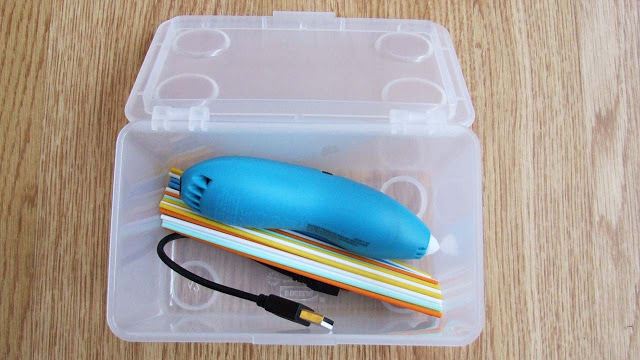
Getting started with the 3Doodler Start+ is refreshingly straightforward. Out of the box, you’ll find:
- The 3Doodler Start+ Pen
- USB charging cable
- A small pack of Eco-Plastic starter refill sticks (typically 2 colors)
- An Activity Guide with physical stencils and project templates
That Activity Guide and the included stencils deserve a special mention — they’re not an afterthought. For kids who are new to 3D drawing, being able to trace over a physical template is genuinely helpful. It gives them a structure to follow before they graduate to freehand 3D building. It bridges the gap between “this is overwhelming” and “wait, I just made a star.”
First-time setup takes all of about 60 seconds. Charge the pen via USB, insert a refill stick into the back slot, press the button, and within a minute the Eco-Plastic starts flowing. There’s no app to download, no firmware update to install, no calibration step. You literally charge it and go.
What Can You Build in 10 Minutes?
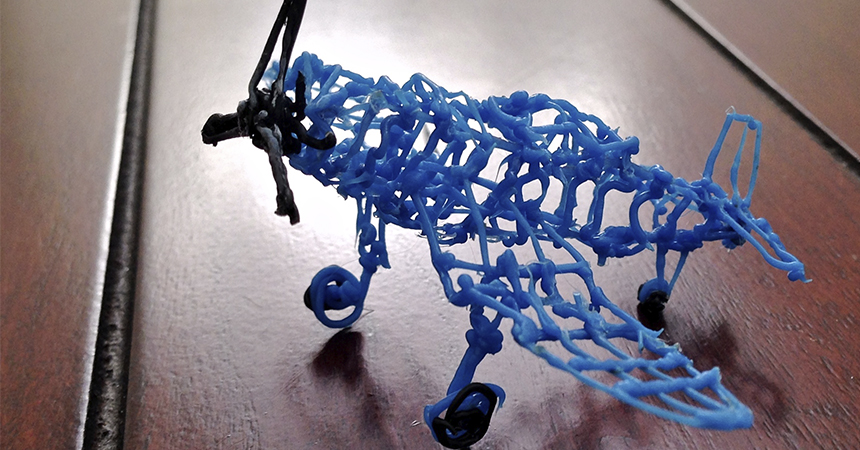
Here’s something that often surprises people: you don’t need hours to create something cool. Within the first 10 minutes, even a first-time user (including kids as young as 6 or 7 with minimal help) can produce:
- A pair of glasses frames — trace the template, pop them out, done
- A simple Eiffel Tower outline — using the included stencil guide
- A personalized name tag — freehand the letters or trace them
- A small phone stand — with a bit of practice, genuinely functional
The point isn’t that these are masterpieces. The point is that within minutes of opening the box, a child has something tangible in their hands that they made. That instant gratification loop is enormous for engagement, especially for kids who might otherwise lose interest in a craft activity that takes too long to show results.
Design, Build Quality & Safety
Ergonomics for Small Hands
The 3Doodler Start+ is noticeably light — it’s designed for smaller hands and extended play sessions. The cylindrical grip is comfortable to hold at different angles, which matters when you’re drawing upward or sideways. Adults with larger hands might find it slightly awkward, but for the target age group (6–14), it fits well.
The build quality feels solid without being bulky. It’s made from durable ABS-like casing that can handle the occasional drop without cracking. After several months of regular kid use, it holds up well. This isn’t a fragile piece of electronics.
The Safety Breakdown (The Big One)
Safety FirstThis is arguably the most important section for any parent reading this, so let’s be thorough.
Cool-Touch Nozzle: Unlike adult 3D pens that operate at 160–220°C (and can cause serious burns on contact), the Start+ uses low-temperature Eco-Plastic (PCL-based) that melts at around 60°C. The nozzle stays cool enough that brief skin contact is not going to cause injury. This is a genuine, engineered safety feature — not just a sticker claim.
Auto Shut-Off: If the pen is left idle for a few minutes, it powers down automatically. No risk of a distracted 8-year-old leaving it running all afternoon while they go watch TV.
Non-Toxic Plastic: The Eco-Plastic (PCL) filament used in the Start+ is non-toxic. There are no fumes or concerning off-gassing at these low operating temperatures, unlike some higher-temp filaments used in adult pens.
The combination of these three features makes the 3Doodler Start+ the only 3D pen category where unsupervised (or lightly supervised) use by children is genuinely reasonable. Most competitors in the same price range use materials or temperatures that still warrant close adult oversight. The Start+ genuinely doesn’t.
Key Features That Make the Start+ Stand Out
🔌 Wireless, USB-Rechargeable Operation
No tangled cords, no AA batteries burning through your supply. The Start+ charges via USB and runs on a rechargeable internal battery. This makes it genuinely portable — usable at a table, on the floor, or on a road trip.
🎛️ One-Button Simplicity
There’s a single button that controls everything: power on/off, extrusion start/stop, and speed toggle. Kids can operate this independently without needing a tutorial. That independence matters — children are more engaged when they feel in control of the tool.
⚡ Fast Heat-Up (~60 seconds)
Patience is not a strong suit for most kids. Thankfully, the Start+ is ready to use in about a minute. Compared to some adult pens that need 2–3 minutes, this is notably better for keeping kids from losing interest before they even start.
🧠 The Clog-Free Internal Drive System (This Is Important)
Let’s talk about the elephant in the room when it comes to cheap 3D pens: the clicking motor problem.
If you’ve ever used or read reviews of budget 3D pens ($15–$25 range), you’ve probably encountered this. The filament jams in the feed mechanism. The motor starts clicking, grinding, or skipping. The plastic stops coming out. You disassemble, try to clear the jam, reassemble — and sometimes it works, sometimes it doesn’t. For an adult doing a project, this is annoying. For an 8-year-old mid-session, it’s a creativity killer and a tantrum trigger.
The 3Doodler Start+ addresses this with a proprietary internal drive system designed specifically around the properties of low-temp Eco-Plastic. The feed mechanism and the operating temperature are calibrated together — meaning the plastic is always at the right viscosity when it hits the drive mechanism. It doesn’t jam, and it doesn’t grind.
In extended testing (multiple sessions, multiple colors, mid-stick filament swaps), the Start+ did not produce a single jam. That’s a claim most budget pens cannot even come close to making. This alone — this single feature — justifies the price premium over cheap alternatives for most families.
If you’re looking for more advanced features like higher precision and more material options, you might want to check out our 3Doodler Flow review which covers the professional tier of 3D pens.
Performance & Real-World Testing
Drawing Experience
The flow of plastic from the Start+ is smooth and consistent. At the slow speed setting, you get a fine, controlled stream that’s great for detailed tracing. At the fast setting, you get more volume for building up thicker structures quickly. Kids can figure out which speed works for what they’re doing within a couple of sessions.
Freehand drawing in the air takes a bit of practice. The plastic needs a moment to cool and stiffen before you can support the next layer. This isn’t a Start+ limitation — it’s physics. But the learning curve is gentle, and most kids figure out the “draw, pause, draw” rhythm quickly.
Structural Strength
Structures made with the Eco-Plastic (PCL) have a slight flexibility to them — more like a firm rubber than rigid plastic. This is actually a feature, not a bug: it means finished creations are less likely to snap if a child drops or squeezes them. Don’t expect rock-solid rigidity, but do expect structures that hold their shape and survive normal handling.
Battery Life
In real-world use with active extrusion, expect roughly 45–60 minutes of use per charge. With lighter, intermittent use (draw a bit, pause, draw a bit), that extends significantly. USB charging means you can top it up between sessions without needing to remember to buy batteries. A full charge from flat takes about 90 minutes.
Refills, Cost & The Filament Math You Need to Know
3Doodler Start+ Refills — The Proprietary System
Here’s the honest part that budget-conscious buyers need to understand: the 3Doodler Start+ uses proprietary Eco-Plastic refill sticks that only work in 3Doodler Start pens. You can’t substitute generic PLA or ABS filament from a roll. This is by design — the low-temp Eco-Plastic is what makes the cool-touch nozzle and safe operation possible.
Refills come in a wide range of colors and are available in various pack sizes, from small 24-stick packs to bulk 100-stick bundles.
 Buy on Amazon
The Real Cost Per Session
Here’s the math worth knowing:
- A single Eco-Plastic stick lasts roughly 10–15 minutes of active extrusion
- Kids in a focused session will burn through 3–5 sticks easily
- The starter refills included in the box run out fast — usually in the first or second session
This isn’t a criticism of the product — it’s just the nature of the medium. The filament is the consumable, the same way ink is the consumable for a printer. Plan accordingly.
The Value Bundle Strategy
💰 Save Money with the 100-Pack Bundle
Here’s the practical advice: Skip the small refill packs entirely and go straight for a 100-stick mixed-color bundle when you first purchase. Here’s why:
- The cost per stick drops significantly in larger packs
- Kids will want to use multiple colors in a single session
- Running out mid-session is a momentum-breaker that frustrates both kids and parents
- You’ll be reordering sooner than you think with small packs
The 100-pack is the sweet spot for families who plan to use this regularly. For gift-giving, pair the pen with a 100-pack bundle and you’ve given a genuinely complete setup rather than something that runs dry after two afternoons.
Best value for regular use
A Note on Eco-Plastic Sustainability
The Eco-Plastic (PCL-based) filament used in the Start+ is a lower-temperature, safer material compared to the PLA and ABS used in most adult pens and desktop 3D printers. PCL is generally considered more environmentally considerate than standard plastics due to its lower processing temperature and its documented biodegradability under specific industrial conditions. We’ll leave it at that — avoid any source claiming it’s compostable in your backyard compost pile, because that’s not how PCL works. But it is a better-considered material choice than most competitors at this price point.
✅ Pros
- Genuinely safe for unsupervised use by children 6+
- No clogs — the internal drive system works as advertised
- One-button operation kids can master independently
- Fast heat-up (~60 seconds)
- Wireless and rechargeable — no batteries to replace
- Durable, lightweight build
- Excellent starter Activity Guide with stencils included
- Wide range of available filament colors
- Non-toxic Eco-Plastic filament
- Auto shut-off for safety
❌ Cons
- Proprietary filament only (can’t use generic 3D pen refills)
- Refill sticks included in the box are minimal — buy more immediately
- Not for detailed or precision work
- Adult users may find the ergonomics a bit compact
- Eco-Plastic structures have slight flexibility (not rigidly structural)
3Doodler Start+ vs. 3Doodler Create+ — Which One Should You Buy?
This comparison comes up constantly, so let’s settle it cleanly.
| Feature | 3Doodler Start+ | 3Doodler Create+ |
|---|---|---|
| Best For | Kids 6–14 | Teens, adults, hobbyists |
| Nozzle Temp | Cool-touch (~60°C) | Hot (~200°C) |
| Filament | Eco-Plastic (PCL) only | PLA, ABS (wider compatibility) |
| Clog Risk | Very low | Moderate (as with any hot-end pen) |
| Complexity | Very simple (1 button) | More controls, more precision |
| Safety for Kids | ✅ Designed for unsupervised use | ⚠️ Requires adult supervision |
| Structural Rigidity | Flexible | More rigid |
| Price |
The VerdictThe decision is simple: If you’re buying for a child under 14, buy the Start+. If you’re buying for a teenager with genuine interest in the craft or for adult use, the Create+ is worth the step up.
The Start+ is not a “lesser” product — it’s a different product for a different user. It excels at exactly what it’s designed to do.
The 3Doodler Ecosystem: Understanding the Full Range
If you’re researching the Start+, it helps to understand where it sits in the broader 3Doodler lineup — this is what separates informed buyers from people who return perfectly good products because they bought the wrong one.
- 3Doodler Start+ → Designed for children. Safe, simple, fun. This review.
- 3Doodler Create+ → The step up for teens and hobbyists who want more precision, more material options, and more complex builds.
- 3Doodler Flow → The professional/advanced tier. Higher temperatures, finer control, faster extrusion — for serious creators and professionals who use 3D drawing as part of an artistic or design workflow.
Understanding this matters because buyers who grab a Create+ for a 7-year-old will have a bad time (dangerously hot nozzle, more complex operation), and buyers who grab a Start+ expecting professional results will be disappointed. Know what you’re buying and for whom.

Who Should Buy the 3Doodler Start+?
Parents looking for a creative STEM gift that will actually get used — not collect dust. The Start+ has a low enough barrier to entry that kids engage with it repeatedly, not just on day one.
Teachers and educators running STEM programs, art classes, or maker labs. The safety profile makes classroom deployment feasible without a one-to-one supervision ratio.
Beginners of any age who want to dip their toes into 3D drawing without committing to the complexity of a desktop 3D printer or an adult-oriented pen.
Anyone who’s tried a cheap 3D pen and returned it in frustration — this is what those pens were pretending to be.
Educational Value: Why This Matters Beyond “Just a Toy”
The 3Doodler Start+ sits at an interesting intersection of play and learning. Working with a 3D pen develops:
Spatial reasoning — understanding how 2D shapes combine into 3D objects is a fundamental math and engineering concept. Kids develop this naturally through use.
Fine motor skills — controlling the pen, managing speed, and guiding the filament all require and build fine motor coordination.
Creative problem-solving — figuring out how to build a stable structure, how to connect layers, how to fix a mistake with more material rather than starting over. These are genuine problem-solving habits.
STEM engagement — for many kids, this is their first tangible introduction to the idea that design and fabrication are real skills. It’s a gateway to broader interest in engineering and making.
The included Activity Guide with stencils is genuinely well-designed for educational use. It’s not filler — it scaffolds the learning process from tracing to freehand, from flat to 3D.
To get the most out of your 3Doodler Start+, consider checking out the best 3D printing accessories that can complement your pen and enhance your creative projects.
Price & Value — Is It Worth It?
The 3Doodler Start+ sits in the $40–$60 range depending on where you buy and what bundle you choose. Compared to:
- Generic cheap 3D pens ($15–$25): False economy. They clog, they break, they frustrate. Total cost including the inevitable replacement is often more.
- Tablets and iPads: A tablet is screen time. The Start+ is tactile, hands-on creation that builds real-world skills.
- LEGO sets in the same price range: Solid comparison. Both are creative, both are hands-on. The Start+ offers open-ended creation without the constraints of preset instructions.
Frame it not as a toy purchase but as a creativity tool investment. At $40–$60 for the pen — and ongoing refill costs that scale with how much it gets used — it’s reasonable for a tool that delivers months of genuine engagement.
The only financial trap to avoid is buying the pen without a solid refill supply. Don’t let the included starters give you a false sense of how long the filament lasts. Budget for a 100-pack from day one.
Final Verdict
Here’s the bottom line after thorough testing and extended use: the 3Doodler Start+ does exactly what it promises, and it does it better than any competitor in the kid-focused 3D pen space.
The clog-free performance is the standout feature — it’s not just marketing language, it’s a genuinely solved problem. The safety engineering is real and thoughtful. The simplicity is appropriate without being dumbed down. And the creative ceiling is higher than it looks on day one; kids who stick with it develop impressive skill over time.
If you’re buying a 3D pen for a child or for a beginner who just wants to have fun with the medium, the 3Doodler Start+ is not just the best option — it’s essentially the only option worth serious consideration.
⭐ Overall Rating: 4.6/5
Ready to Get Your 3Doodler Start+?
The 3Doodler Start+ is the perfect entry point into 3D drawing for kids and beginners. Safe, clog-free, and genuinely fun to use.
Frequently Asked Questions
Is the 3Doodler Start+ safe for kids?
Yes — genuinely, not just in the marketing sense. The Start+ uses a cool-touch nozzle that operates at around 60°C, compared to 160–220°C for adult pens. Brief nozzle contact won’t cause burns. Combined with non-toxic Eco-Plastic filament and an auto shut-off feature, it has the most child-appropriate safety profile of any 3D pen currently available. Kids aged 6 and up can use it with minimal supervision.
Does the 3Doodler Start+ clog?
In extended testing: no. The Start+ uses a proprietary internal drive system calibrated specifically for its Eco-Plastic (PCL-based) filament. This is the single biggest advantage over cheap 3D pens, which frequently suffer from the “clicking motor” problem — where the feed mechanism jams and stalls mid-session. The Start+ avoids this by design.
What refills does the 3Doodler Start+ use?
The Start+ uses 3Doodler’s proprietary Eco-Plastic refill sticks. These are specifically formulated to melt at low temperatures compatible with the cool-touch nozzle system. You cannot use generic PLA or ABS filament from other brands. Refills are available directly from 3Doodler and via Amazon in a wide range of colors and pack sizes.
How long do 3Doodler Start+ refills last?
Each individual refill stick lasts approximately 10–15 minutes of active extrusion. In a typical kid’s session with moderate to heavy use, expect to go through 3–5 sticks. The starter sticks included in the box will run out within the first session or two. The practical recommendation is to purchase a 100-pack bundle upfront rather than small packs.
Is the Eco-Plastic filament eco-friendly?
The Eco-Plastic used by 3Doodler is PCL-based — a lower-temperature material that’s more environmentally considered than standard PLA or ABS plastics used in most adult 3D pens. PCL is biodegradable under specific industrial conditions. It’s a more responsible material choice than most competitors offer at this price point, though it shouldn’t be claimed as home-compostable.
Can adults use the 3Doodler Start+?
Technically yes, but it’s not optimized for adult use. The ergonomics are sized for smaller hands, and the Eco-Plastic material has more flexibility than the rigid structures adult users typically want. Adults who want to try 3D pen drawing would be better served by the 3Doodler Create+, which offers more material options, higher precision, and adult-appropriate ergonomics.
Related Articles:
Best 3D Pens for Kids | What Is 3D Printing? | 3Doodler Flow Review | Best 3D Printing Accessories

