

An honest, in-depth look at the 3DMakerpro Whale Professional 3D Scanner for engineers, automotive pros, and serious makers.
Let me set the scene. You’re a mechanical engineer, an automotive professional, or maybe someone deep in a serious reverse engineering workflow. You’ve outgrown the entry-level scanners that blur edges and struggle with black surfaces. But a $30,000 or $50,000 metrology system is just not in the cards right now. So where do you land?
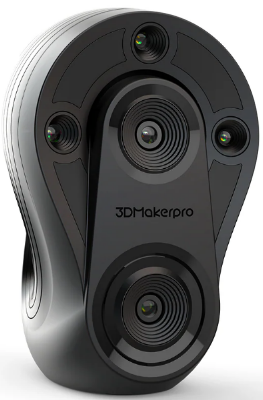
That’s exactly the gap the 3DMakerpro Whale 3D Scanner is designed to fill — and in 2026, it’s worth asking whether it still delivers on that promise. Spoiler: for the right user, it absolutely does. But this isn’t the scanner for everyone, and I want to be upfront about that from the start.
In this Whale 3D Scanner review, we’ll walk through everything you actually need to know — the real-world accuracy, the scanning workflow, the software, and how it stacks up against competitors in the current market. By the end, you’ll know exactly whether this is the right tool for your shop, studio, or workflow.
Table of Contents
- What Is the Whale 3D Scanner?
- Whale 3D Scanner Specs: What the Numbers Mean
- Whale 3D Scanner Price: Is It Worth It?
- The Dual-Core Scanning System
- Performance: Real-World Testing
- JMStudio Software Assessment
- Calibration: The Professional Workflow
- Whale vs. Competitors
- Pros and Cons
- Final Verdict
- Frequently Asked Questions
What Is the Whale 3D Scanner — And Who Is It For?
The Whale is a professional-grade handheld 3D scanner made by 3DMakerpro, a brand that has quietly built a solid reputation in the mid-to-high tier of the 3D scanning market. It’s not trying to be the lightest or the most beginner-friendly scanner on the shelf. Instead, it’s built around one core philosophy: get the data right, every time.
Think of the Whale as the industrial workhorse of 3D scanners in its price range. It’s heavy (relatively speaking), wired, and requires some learning to use well. But when you’re scanning an engine block, a car panel, or a precision-machined part and you need that data to be accurate enough to drive real engineering decisions — the Whale delivers.
Here’s the honest positioning: If you’re a hobbyist or someone looking to casually scan objects for 3D printing, this is probably overkill and overpriced. But if you’re an engineer doing reverse engineering, an automotive technician capturing body panels, or a manufacturer running quality inspection workflows, the Whale 3D Scanner is in serious contention.
- Are you an engineer? Needing reverse engineering or QA?
- Are you in automotive? Scanning panels, interiors, or engines?
- Do you need industrial accuracy? Tired of “toy-grade” results?
- Is your budget under $10k? Can’t swing a $30k Artec?
Whale 3D Scanner Specs: What the Numbers Actually Mean
Let’s go through the key specs — but more importantly, let me explain what they actually mean for your workflow. Spec sheets can be misleading, especially in 3D scanning, so I want to give you the real-world context.
| Specification | Detail | What It Means for You |
|---|---|---|
| Accuracy (Micro Core) | Up to 0.05mm | True engineering-level precision for small parts |
| Accuracy (Wide Core) | ~0.1mm | Solid accuracy for large objects like vehicles |
| Resolution | ~0.2mm | Fine surface detail capture |
| Scan Range | Up to 3 meters | Handles everything from small parts to full cars |
| Tracking | Marker-free (+ optional markers) | Flexible workflow, improved precision with markers |
| Weight | ~1.5 kg | Heavier than average; tripod recommended for long sessions |
| Connection | Wired (2-in-1 power + data) | Rock-solid data transfer; no battery anxiety |
| Price (Premium Kit) | ~$7,199 | Mid-tier professional pricing |
One of the most important things to understand about the Whale 3D Scanner specs is that this is an either-or system. The Micro Core and Wide Core are two different scanning modes, each optimized for a different use case.
Whale 3D Scanner Price: Is It Worth the Investment in 2026?
The Whale Professional 3D Scanner comes in at approximately $7,199 for the Premium Kit. That’s a meaningful investment, and I’d be doing you a disservice if I said otherwise. So let’s talk about what that number actually means in the context of the market.
For context, a comparable professional scanner from a brand like Artec or FARO starts well above $20,000 and can push into six figures for metrology-grade systems. The Whale’s pricing positions it as an accessible entry point for professional-grade accuracy — not a budget scanner with professional pretensions, but a genuine tool with professional capabilities at a fraction of the enterprise price.
That said, you can find capable competitors at lower price points in 2026. Here’s where the Whale sits in the current market:
| Scanner | Price Range | Best For | Key Advantage |
|---|---|---|---|
| Whale 3D Scanner | ~$7,199 | Engineers, Automotive | Accuracy + industrial reliability |
| Revopoint MetroX | $3K–$4K | Budget pros | Hybrid tech + lower price |
| Einstar 2 | ~$1K–$2K | Beginners | Ease of use + affordability |
| Einstar Vega | ~$2K–$3K | Mobile professionals | Fully wireless workflow |
The Whale’s price makes the most sense if your work genuinely requires the combination of high accuracy on small parts AND reliable performance on large objects, especially in challenging conditions like outdoor environments or with black and reflective surfaces. If you only need one of those things, a lower-cost competitor might serve you just as well.
The Dual-Core Scanning System: The Whale’s Biggest Differentiator
If there’s one feature that makes the Whale 3D Scanner stand out in its category, it’s the dual-core scanning system. Most scanners in this price range make you choose between accuracy and versatility. The Whale gives you both — in the same unit.
Micro Core Mode: Engineering-Level Precision
When you’re working on smaller objects — mechanical components, brackets, fasteners, turbine parts, dental models, jewelry — you’ll switch to Micro Core mode. This is where the Whale’s 0.05mm accuracy shines.
This level of precision is genuinely useful for reverse engineering workflows. When you need to capture a part with enough accuracy to drive a CAD model that will be machined or 3D printed to spec, 0.05mm gives you that confidence. You’re not guessing; you’re measuring.
- Ideal for: mechanical parts, mold components, small automotive parts, precision hardware
- Best workflow: use with the calibration board before a session for maximum consistency
- Pro tip: use markers for complex parts with repetitive geometry to assist tracking
Wide Core Mode: Large Object Coverage
Switch to Wide Core and you’re equipped for the big stuff — full vehicles, furniture, large castings, architectural elements. The accuracy steps down to approximately 0.1mm, but that’s still excellent for large-format applications where stitching multiple scans together is part of the workflow.
The Whale’s ability to scan objects up to 3 meters means it can handle a full car body without needing to stitch together dozens of partial scans from a shorter-range device. That matters for workflow efficiency — fewer passes, fewer alignment errors, faster output.
- Ideal for: vehicles, large equipment, furniture, industrial machinery
- Scan range: up to 3 meters — handles full-size car bodies with ease
- Pro tip: use the included tripod for large object scanning to reduce arm fatigue and improve alignment stability
Whale 3D Scanner Performance: Real-World Testing & Insights
1. Accuracy in Practice
On paper, 0.05mm looks like a spec sheet number. In practice, for Micro Core scans of mechanical parts, that accuracy is real and reproducible — provided you’re working in a controlled environment and running calibration before your session. We’ll get to calibration in a minute, but that step matters.
For Wide Core scanning, the 0.1mm accuracy is genuinely reliable for large-object workflows. You’re not sacrificing precision for scale; you’re getting the right tool for each job. That’s a mature engineering decision in the scanner’s design.
2. Black Surfaces and Outdoor Scanning: Where the Whale Dominates
This might be the Whale 3D Scanner’s most impressive real-world capability — and the one that most directly addresses the pain points of automotive and industrial professionals.
Most mid-range 3D scanners struggle with dark, black, or highly reflective surfaces. Near-infrared (NIR) based systems in particular tend to wash out on matte black or absorb light on glossy surfaces. The result is patchy, incomplete scan data that requires extensive post-processing or re-scanning with scanning spray.
The Whale doesn’t have this problem. Its optical system handles black surfaces, oily engine components, and shiny reflective panels without the drama. It also performs reliably in natural outdoor light — which is genuinely rare at this price point.
3. Tracking and Workflow Reliability
One of the quiet strengths of the Whale scanner is its tracking reliability. Marker-free scanning works well, particularly on objects with enough surface texture and geometry variation. Optional markers are available when you need extra precision — for example, on large flat surfaces or when scanning curved panels that lack distinctive features.
Reliable tracking directly translates to fewer rescans and a faster overall workflow. Every time a budget scanner loses its position and forces you to restart a section, you lose time and patience. The Whale’s tracking keeps the workflow moving.
4. Build Quality and Ergonomics
The Whale is built like industrial equipment. The housing is solid, the dual optical system is securely mounted, and the overall feel is that of a precision instrument rather than a consumer gadget. That’s exactly what you want in a professional tool.
That said, the weight reality needs to be acknowledged. At 1.5kg, the Whale is heavier than most handheld 3D scanners. For short scanning sessions on small parts, this isn’t a problem. For extended sessions — say, scanning a full vehicle — arm fatigue is a real consideration.
JMStudio Software: Honest Assessment for 2026
Software is where many hardware manufacturers stumble, and it’s worth being upfront about where JMStudio stands today.
The good news: JMStudio has improved significantly since earlier versions. Auto-alignment is stronger and more reliable, mesh processing workflows are more stable, and the overall experience is noticeably better than it was two or three years ago.
In terms of competitive positioning, JMStudio is genuinely comparable to EXScan — which is solid, professional software. It handles the core workflows well: capturing, aligning, merging, and exporting mesh data in standard formats (OBJ, STL, PLY) that feed cleanly into downstream applications like SolidWorks, Fusion 360, Geomagic Design X, or Artec Studio.
Where JMStudio falls short compared to the very best in the category is in advanced automation and surfacing. Artec Studio, for example, offers more sophisticated one-click CAD surfacing, better automated meshing, and more advanced tools for complex geometry. If those features are central to your workflow, it’s worth factoring that into the buying decision.
Calibration: The Professional Workflow Step That Matters
Here’s something that separates the Whale from entry-level scanners — and it’s worth treating as a feature, not a chore.
The Whale 3D Scanner includes a high-precision calibration board, and unlike budget-tier devices where calibration is optional or superficial, running a calibration session before your scanning work meaningfully improves both accuracy and long-term consistency.
Think of it like zeroing your CNC machine before a precision run. It takes a few minutes, and it’s the difference between data you can trust and data you have to question. For engineering and industrial workflows where accuracy has downstream consequences — parts that need to fit, molds that need to match, assemblies that need to align — calibration isn’t optional. It’s professional practice.
- Run a calibration session before starting any precision scanning work
- Recalibrate if the scanner has been transported or subjected to temperature changes
- Store the calibration board carefully — it’s a precision instrument in its own right
Whale 3D Scanner vs. Competitors: How It Stacks Up in 2026
The 3D scanning market has evolved considerably. Let’s be direct about where the Whale wins, where it doesn’t, and how that should inform your decision.
Whale vs. Revopoint MetroX
The MetroX has made a strong play for budget-conscious professionals with its hybrid scanning technology and a price tag in the $3,000–$4,000 range. If budget is your primary constraint, the MetroX deserves serious consideration.
Where the Whale wins: large-object workflow stability and overall tracking reliability. The Whale’s dual-core system is better optimized for the combination of precision work and large-format scanning. If your workflow spans both categories regularly, the Whale’s performance justifies the premium.
Whale vs. Einstar 2
The Einstar 2 at $1,000–$2,000 is genuinely impressive for its price and an excellent option for beginners and hobbyists stepping into professional scanning. But accuracy-wise, the Whale is significantly ahead. If your work requires engineering-grade precision — and especially if you’re working with industrial components — the Einstar 2 simply isn’t in the same league.
Whale vs. Einstar Vega
This is the most interesting competitive matchup in 2026. The Einstar Vega introduced wireless scanning in the $2,000–$3,000 range, and freedom of movement is genuinely valuable in some workflows — especially in complex environments where cable management is a real hassle.
But the Whale counters with raw scanning performance and reliability. Wireless convenience is real, but it comes with trade-offs in battery life, weight distribution, and data consistency. For professionals who prioritize accuracy and reliability over portability, the Whale still holds the advantage.
Pros and Cons: The Honest Summary
- True industrial-grade accuracy in Micro Core mode (0.05mm)
- Exceptional performance on black surfaces and reflective materials
- Dual-core versatility for small parts and large objects
- Reliable marker-free tracking speeds up workflow
- Solid build quality appropriate for the price point
- Strong value compared to $20k+ metrology systems
- At 1.5kg, fatigue is real in long sessions — use the tripod
- Wired operation feels dated compared to wireless rivals
- Not beginner-friendly — requires technique investment
- JMStudio lacks high-end automation of Artec Studio
- Premium price requires a clear professional use case
Who Should (and Shouldn’t) Buy the Whale 3D Scanner?
- A mechanical engineer using 3D scanning for reverse engineering or quality inspection
- An automotive professional who regularly scans body panels or engine components
- A prototyping studio or manufacturing facility needing reliable CAD data
- A professional scanning service provider handling dark surfaces and large objects
- An industrial inspection team requiring certified accuracy without a six-figure budget
- You’re new to 3D scanning — start with something like the Einstar 2
- Portability is your top priority — the wired, 1.5kg setup will frustrate you
- Your projects are exclusively small, simple objects — a less expensive scanner may suffice
- You primarily need wireless freedom on-site — consider the Einstar Vega
Final Verdict: Is the 3DMakerpro Whale Worth It in 2026?
Here’s my honest take after going through everything the Whale Professional 3D Scanner has to offer:
The Whale is not trying to be the most modern scanner on the market. It’s not wireless. It’s not lightweight. It doesn’t have the slickest software interface. In a market that’s increasingly moving toward wireless convenience and polished consumer UX, the Whale doubles down on accuracy, stability, and real-world industrial usability.
And for the right user, that’s exactly the right call.
If you’re an engineer or automotive professional who needs to capture complex geometry with precision — especially if your work involves dark surfaces, outdoor environments, or both small parts and large assemblies — the Whale delivers on its core promise in a way that significantly cheaper scanners simply cannot.
The $7,199 price tag is a real commitment. But measured against the cost of inferior scan data, scrapped parts, failed fits, or the alternative cost of a $25,000+ professional system, the Whale’s value proposition is genuinely compelling.
Quick Decision Guide: 3D Scanner ROI Calculator
Not sure if the investment makes sense? Download our free ROI calculation template to see how many billable hours or saved prototypes it takes for a pro scanner to pay for itself.
My recommendation: if you’ve read this far and you recognize your own workflow in the ideal user profile above, the Whale is worth a serious look. Request a demo if you can, or take advantage of any trial return window to verify performance on your specific use case. But if the spec sheet speaks to your daily challenges, there’s a good chance this scanner will become one of the most dependable tools in your shop.
Whale 3D Scanner: Final Scores
| Category | Score | Notes |
|---|---|---|
| Scanning Performance | 9 / 10 | Dual-core accuracy is genuinely impressive |
| Ease of Use | 7 / 10 | Learning curve exists; not for beginners |
| Portability | 6 / 10 | Wired + heavy; a real trade-off |
| Software (JMStudio) | 7.5 / 10 | Much improved in 2026; still not Artec-level |
| Value for Money | 8.5 / 10 | Strong for the accuracy and reliability offered |
| Overall Score | 8.6 / 10 | A serious tool for serious users |
Frequently Asked Questions About the Whale 3D Scanner
What is the accuracy of the Whale 3D Scanner?
The Whale achieves up to 0.05mm accuracy in Micro Core mode for small objects, and approximately 0.1mm accuracy in Wide Core mode for large objects. These are two distinct scanning modes — you cannot achieve 0.05mm on a full vehicle.
Is the Whale 3D Scanner good for automotive scanning?
Yes — it’s one of the strongest options in its price range for automotive applications. Its ability to scan black surfaces, reflective panels, and dark engine components without scanning spray is a genuine advantage over most mid-range scanners. It also handles the physical scale of automotive work well, with a scan range of up to 3 meters.
How does the Whale compare to the Revopoint MetroX?
The MetroX is a strong competitor at a lower price point. The Whale wins on large-object scanning stability and overall tracking reliability, while the MetroX is a more budget-friendly option with hybrid technology. If cost is your primary constraint, the MetroX deserves consideration. If performance and reliability are paramount, the Whale holds the edge.
Does the Whale 3D Scanner work outdoors?
Yes. The Whale performs reliably in natural outdoor light, which is uncommon for many scanners in this price range that struggle with ambient light interference. This makes it genuinely useful for on-site automotive and industrial scanning in real-world environments.
What software does the Whale 3D Scanner use?
The Whale uses JMStudio, which has been significantly improved in recent versions. It supports standard mesh export formats (OBJ, STL, PLY) that integrate with mainstream engineering software. While not as advanced as Artec Studio, JMStudio is solid for professional workflows.
Is the Whale 3D Scanner worth the price?
For engineers, automotive professionals, and industrial users with a genuine need for high accuracy and large-object scanning capability, yes. If your workflow justifies professional-grade accuracy and you work with challenging surfaces, the Whale’s price is well-supported by its performance. For hobbyists or casual users, there are better value options at lower price points.
Ready to Explore the Whale 3D Scanner?
If this review has helped clarify whether the Whale is the right fit for your workflow, the next step is to dig into the hands-on experience. Check the current pricing and kit options from 3DMakerpro, and if possible, connect with their team for a demonstration — especially if you want to see how it performs on surfaces or objects similar to what you work with daily.
The Whale isn’t the right scanner for everyone. But for the right user, it’s one of the most capable and reliable professional 3D scanners under $10,000 available in 2026. If that description fits your situation, it deserves a serious look.

