


So you’re thinking about getting a 3D pen — and honestly, it’s one of the most fun purchases you can make, whether it’s for yourself or as a gift. But here’s the thing: not all 3D pens are created equal, and buying the wrong one can turn an exciting hobby into a frustrating experience full of clogs, jams, and disappointment.
I’ve spent considerable time testing and researching the top 3D pens on the market in 2026, and what you’ll find below is a no-fluff, practical breakdown of the best options — organized by use case — so you can find the right pen for your exact situation without wading through marketing speak.
Let’s cut straight to what you need to know.
🔥 Ready to start creating? Check out our top-rated 3D pens below!
Quick Verdict: Best 3D Pens at a Glance
- Best Overall: MYNT3D Professional 3D Pen (USB-C Edition)
- Best 3D Pen for Kids: 3Doodler Start+ (Essentials Edition)
- Best 3D Pen for Beginners: SCRIB3D P1
- Best for Artists & Professionals: 3Doodler PRO+
- Best Budget Pick: SCRIB3D Junior
📑 Table of Contents
Comparison Table
| Model | Best For | Temp Range | Filament | Standout Feature | Action |
|---|---|---|---|---|---|
| MYNT3D Professional Top Pick | Overall | Up to 230°C | PLA, ABS, PETG | OLED display + stepless speed | Check Price |
| 3Doodler Start+ | Kids | Low-temp (60–70°C) | PCL (Eco-Plastic) | Burn-safe nozzle, one-button use | Amazon Official |
| SCRIB3D P1 | Beginners | Adjustable | PLA, ABS | Clog-resistant, simple controls | Amazon Walmart |
| 3Doodler PRO+ | Professionals | Wide range | PLA, ABS, Wood, Metal | Dual-drive system | Amazon Official |
| SCRIB3D Junior | Budget | Low-temp | PCL | Affordable + safe for young users | Amazon Walmart |
Why Trust This Review?
A lot of 3D pen reviews online are written by people who’ve never actually used the products for more than 20 minutes. This one isn’t that.
The criteria used in this evaluation go beyond the spec sheet. The focus here is on real-world performance — specifically:
- Flow consistency: Does the filament extrude evenly, or does it stutter and blob?
- Clog resistance: How often does the pen jam, and how easy is it to clear? (Check out our guide on how to fix clogged nozzles for related tips).
- “Time to First Creation”: How quickly can a new user actually start making something? This is arguably the most important UX metric for any 3D pen.
- 2026-specific testing: PETG filament compatibility (this is increasingly important as PETG becomes the hobbyist standard), USB-C usability with power banks and laptops, and long-session ergonomics.
🥇 Best Overall: MYNT3D Professional 3D Pen (USB-C Edition)
Who It’s For: Anyone who wants one pen that does everything well — from casual doodling to serious creative projects.
If you asked me to recommend just one 3D pen for an adult who wants the best experience money can buy without going completely pro-level, the MYNT3D Professional is that pen — and it’s not particularly close.
What Makes It Stand Out
The MYNT3D Professional gets so many details right that it’s almost unfair to the competition. Let’s start with the OLED display. This isn’t a gimmick — having a clear, readable screen showing your exact temperature and speed settings makes a huge practical difference, especially when you’re switching between filament types mid-project. No more guessing whether you’ve hit the right temperature. No more squinting at tiny LED indicators.
Then there’s the stepless speed adjustment. Most budget 3D pens give you a few discrete speed settings — low, medium, high. The MYNT3D lets you dial in any speed across a continuous range. Once you’ve used stepless speed control, you genuinely cannot go back. It gives you a level of creative control that click-based pens simply cannot match.
The adjustable temperature goes all the way up to 230°C, which is where the real 2026 value kicks in: this pen handles PETG filament. PETG is rapidly replacing ABS as the go-to filament for hobbyists because it’s stronger, less warpy, and easier to work with. If a pen can’t hit 220–235°C, it can’t use PETG — and that’s increasingly becoming a dealbreaker. The MYNT3D clears that bar comfortably. (Curious about the differences? Read our PETG vs PLA breakdown).
And then there’s USB-C Power Delivery support. This might sound like a minor upgrade, but it’s genuinely transformative for how you use the pen. You can power it from a laptop, a power bank, or essentially any modern charger. No more hunting for a dedicated DC adapter or being tethered to a wall outlet in an inconvenient spot. It’s the kind of quality-of-life upgrade that makes you wonder how you lived without it.
Performance in Practice
With PLA, ABS, and PETG, the MYNT3D delivers stable, consistent extrusion. There’s minimal blobbing at the start of strokes, which is one of the more annoying issues with cheaper pens. The pen heats up quickly and maintains temperature well even during longer sessions.
Ergonomically, it’s well-balanced and light enough to hold comfortably for extended creative sessions. Not everyone will care about this — but if you’re the type to sit down for an hour-long project, you’ll definitely notice the difference from heavier, bulkier alternatives.
- OLED display gives precise, real-time feedback
- Stepless speed control is a significant creative advantage
- PETG compatible (critical for 2026 users)
- USB-C PD support — use it anywhere
- Works well for both intermediate and advanced creators
- Stable, consistent extrusion across multiple filament types
- Higher price point than entry-level options
- Learning curve for users coming from fixed-temp pens
- Might be more pen than a casual user needs
Bottom line: If you’re buying a 3D pen for yourself and you want it to last, perform consistently, and grow with your skills, the MYNT3D Professional is the one. It’s the kind of purchase you make once.
👶 Best 3D Pen for Kids: 3Doodler Start+ (Essentials Edition)
Target Age Range: 6–12 years old
Keywords naturally covered: Best 3D pen for kids, best 3D pen for 8 year old, best 3D pen for 9 year old, best 3D pen for 10 year old
If you’re shopping for a child, safety is non-negotiable — and the 3Doodler Start+ was specifically engineered with that in mind. Everything about this pen says “designed for young creators.”


Why This Pen Wins for Kids
The single biggest differentiator is the low-temperature nozzle. The 3Doodler Start+ uses PCL (Polycaprolactone) filament, which melts at just 60–70°C. To put that in perspective: water boils at 100°C. The nozzle on this pen is warm to the touch, but it will not burn a child’s fingers if they accidentally make contact with it. For a parent, that peace of mind is worth a lot.
The filament itself — 3Doodler’s proprietary “Eco-Plastic” — is BPA-free and biodegradable. So not only is it safe for kids to handle, but it’s also better for the environment than standard ABS. That’s a win-win.
Now let’s talk about the “Time to First Creation” metric — this is where the 3Doodler Start+ absolutely shines. The pen operates with one-button simplicity. A child can unbox this, figure it out, and be creating something within minutes. No temperature settings to dial in, no speed adjustments to figure out, no filament compatibility charts to consult. You press a button, the pen feeds plastic, you make something. That’s it.
For parents, that simplicity directly translates to fewer frustrating moments, fewer “it’s broken!” complaints, and a much more positive first experience with 3D creativity. And a good first experience is what turns a casual gift into a lasting hobby.
Is It Right for Your Child’s Age?
- Ages 6–8: This is the ideal age group. Simple enough that they won’t get frustrated, engaging enough that they’ll actually use it.
- Ages 9–10: Still a great fit. Some kids this age may eventually want to upgrade to something with more control, but the Start+ keeps them engaged without overwhelming them.
- Ages 11–12: Works fine, but some kids at this age — especially those who are naturally technically inclined — might find it limiting. Check the SCRIB3D P1 below if that sounds like your child.
- Genuinely burn-safe nozzle — low-temp PCL operation
- BPA-free, biodegradable Eco-Plastic filament
- One-button operation — fastest Time to First Creation of any pen tested
- Designed specifically for young users (grip, weight, ergonomics)
- Minimal learning curve = fewer returns and complaints
- PCL-only limits what you can create (lower strength, less rigidity than PLA)
- Not suitable for adult or advanced use
- Less variety in compatible filament types
Bottom line: If you’re buying a 3D pen for a child between 6 and 12, the 3Doodler Start+ is the clear choice. Safety, simplicity, and a great out-of-box experience make it the best 3D pen for kids on the market right now.
🎓 Best 3D Pen for Beginners: SCRIB3D P1
Who It’s For: Adults or teens who are new to 3D pens and want a reliable, frustration-free introduction.
Here’s the honest truth about most beginner 3D pens: they’re bad. Not because they’re cheap, but because they’re unreliable in ways that make the learning curve feel steeper than it needs to be. Clogs. Inconsistent flow. Finicky controls. These are the things that make beginners give up.
The SCRIB3D P1 solves exactly those problems — and that’s why it’s the best 3D pen for beginners.

The “Honda Civic” of 3D Pens
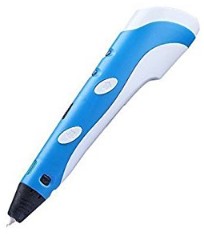
The SCRIB3D P1 isn’t trying to be flashy. It’s the Honda Civic of 3D pens: reliable, predictable, and remarkably competent for what it costs. You get what you expect, every time you pick it up.
The clog resistance is the star of the show here. The P1’s internal design minimizes the most common cause of clogging — filament residue left in the hot end during cooling. The feed and reverse system is well-implemented, making it easy to unload filament properly after a session (more on why that matters in the Common Problems section below). For a beginner who doesn’t yet know all the maintenance tricks, having a pen that’s forgiving by design is genuinely valuable.
The controls are approachable without being dumbed down. You get adjustable temperature and speed settings that are intuitive to use — none of the confusion that comes with more complex pens, but also none of the limitations that come with pens that offer no control at all. For a beginner, that balance is exactly right.
And the price point is hard to argue with. You’re getting a genuinely solid 3D pen without paying premium prices — which means if you discover that 3D pens aren’t quite your thing, you haven’t broken the bank finding out.
Who Should Buy This
- Adults who are curious about 3D pens but aren’t ready to invest in a premium model
- Teens aged 12 and up who want more capability than kid-focused pens offer
- Gift-givers who want a reliable option without overthinking it
- Anyone who’s tried a cheap no-name 3D pen and had a bad experience
- Highly clog-resistant design — solves the #1 beginner frustration
- Simple, intuitive feed/reverse system
- Compatible with PLA and ABS filaments
- Excellent value for the price
- Gradual learning curve — grows with the user’s skill
- Doesn’t support PETG (temperature ceiling is a limiting factor)
- No OLED display (LED indicators only)
- Not ideal for advanced or professional users
Bottom line: If someone you know is getting into 3D pens for the first time and you want to recommend something that won’t let them down, the SCRIB3D P1 is your answer. Reliable, clog-resistant, and genuinely beginner-friendly.
🧑🎨 Best 3D Pen for Artists & Professionals: 3Doodler PRO+
Who It’s For: Serious creators, professional artists, architects, designers, and makers who need the most capable tool available.
When professionals talk about what they need from a 3D pen, the conversation quickly moves past “does it work” to “does it give me control.” The 3Doodler PRO+ was built to answer that question with an emphatic yes.

Purpose-Built for Professional Work
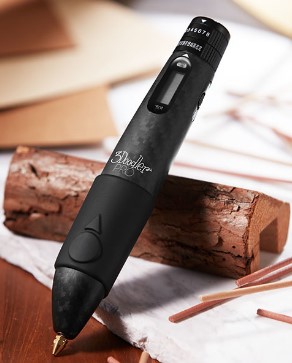
The headline feature of the PRO+ is its dual-drive system — a proprietary mechanism that grips and feeds filament from two sides simultaneously. The practical effect of this? Virtually no slipping, even at high speeds or with denser filament types. If you’ve ever used a consumer 3D pen and had the motor slip while you’re trying to maintain a consistent stroke, you know how maddening that is. The dual-drive system eliminates that problem.
Then there’s the filament range. The 3Doodler PRO+ isn’t limited to PLA and ABS. It supports wood, copper, and bronze filaments — materials that open up a completely different category of creative possibilities. You can create sculptures that look and feel metallic. You can add wood-texture details to models. For an artist or a professional making architectural models or industrial prototypes, this isn’t a nice-to-have — it’s essential.
The adjustable fan for controlling cooling speed is another pro-tier feature that might not sound exciting until you actually need it. When you’re building structures “in air” — freestanding shapes that need to hold their form quickly — controlling how fast the extruded filament solidifies gives you a precision advantage that changes what’s achievable.
Use Cases Where the PRO+ Excels
- Architecture and design models: The precision, filament variety, and structural strength make the PRO+ ideal for creating detailed scale models.
- Industrial prototyping: When a quick 3D-printed prototype isn’t available, the PRO+ can bridge the gap with surprising accuracy.
- Fine art and sculpture: Wood and metal filaments open aesthetic possibilities that no other 3D pen can match.
- Jewelry and accessories: The dual-drive precision allows for detail work that consumer pens simply can’t achieve.
- Dual-drive system eliminates filament slipping — major precision upgrade
- Supports wood, copper, bronze, and metal filaments
- Adjustable fan for precise cooling control
- Wide temperature range for maximum filament compatibility
- Professional build quality — feels like a tool, not a toy
- Significantly more expensive than consumer options
- Overkill for casual users or beginners
- Heavier than simpler pens — longer sessions may cause hand fatigue
- Steeper learning curve to use all features effectively
Bottom line: If you’re a professional creative who needs the most capable 3D pen available — or if you’re a serious hobbyist who has outgrown consumer-level pens — the 3Doodler PRO+ is the tool you’ve been looking for. It’s not cheap, but professionals know that the right tool pays for itself.
💰 Best Budget 3D Pen: SCRIB3D Junior
Who It’s For: Budget-conscious buyers, classroom settings, gifts under $35, young users who need a safe and affordable option.
Sometimes the goal isn’t to find the best 3D pen in the world — it’s to find the best 3D pen for the price. And for that, the SCRIB3D Junior delivers more than you’d expect.
Great Value Without the Compromises That Matter
Like the 3Doodler Start+, the SCRIB3D Junior uses low-temperature PCL filament — so the nozzle won’t burn young users’ fingers, and the Eco-Plastic material is safe and biodegradable. It’s a genuinely responsible choice for kids and for the environment.
Where the Junior differentiates itself from premium kids’ options is the price point. Coming in well under $35, it’s the kind of purchase you can make without overthinking it. For a classroom that needs several pens, for a birthday gift when you’re not sure how serious the recipient is about 3D pens, or for a parent who wants to try this out with a young child before investing in something more substantial — the Junior makes complete sense.
Don’t expect it to have the fit and finish of the 3Doodler Start+. The controls are more basic, the build feels lighter, and the filament variety is limited. But if you’re shopping with budget as the primary constraint, the Junior gets the job done.
- Very affordable — great for gifting or classroom use
- Low-temp PCL operation — safe for young users
- Simple enough for young children to use
- USB-powered — works with standard phone chargers
- Basic controls with limited adjustability
- PCL-only limits creative possibilities
- Build quality reflects the price
- Not suitable for adult or advanced use
Bottom line: If your budget tops out around $35 and you need something safe and functional for a child or classroom, the SCRIB3D Junior is the best budget 3D pen available. Go in with realistic expectations and you won’t be disappointed.
🖨️ Want to Level Up From Pens?
Download our free Beginner 3D Printing Guide and learn how to transition from handheld 3D pens to precision desktop 3D printers.
Buyer’s Guide: How to Choose the Right 3D Pen
If you’re still deciding which pen is right for you, this section breaks down the key factors — in plain language.
Filament Types: PLA vs. ABS vs. PETG vs. PCL
The filament is the “ink” in your 3D pen, and the type matters more than most people realize. For a deeper dive, check out our comprehensive 3D Printer Filament Guide.
PLA is the most beginner-friendly filament — it’s biodegradable, low-odor, and works at moderate temperatures. It’s the default choice for most non-professional users. Slightly brittle compared to other options, but excellent for learning and casual creating.
ABS is stronger and more heat-resistant than PLA, but it requires higher temperatures and releases slightly more fumes. It’s falling out of favor with hobbyists as PETG has become more accessible.
PETG is the 2026 filament to know. It combines the ease of PLA with the strength of ABS — less warping, better layer adhesion, and improved flexibility. The catch: PETG requires a pen that can reach 220–235°C. Only pens with adjustable high-range temperature control (like the MYNT3D Professional) can use it. If you’re buying a pen now and expect to use it seriously for the next few years, PETG compatibility is worth prioritizing. Learn more in our PLA vs PETG vs ABS comparison.
PCL is the safe-for-kids option. It melts at just 60–70°C, making it genuinely non-burn-risk for young users. The trade-off is that it’s less structurally rigid than other filament types. Great for children’s crafts, not suited for durable creations.
Temperature Control: Fixed vs. Adjustable
Fixed temperature pens are simpler to use and typically more affordable. They’re fine for beginners using a single filament type — usually PCL or PLA. The downside is that you can’t switch between filament types without changing pens.
Adjustable temperature pens are essential for anyone who wants to experiment with multiple filament types, use PETG, or achieve more precise creative control. If you’re buying a pen for yourself as an adult — especially if you want to grow with the hobby — adjustable temperature is worth the extra cost.
USB-C vs. DC Power: Why This Matters in 2026
This was barely worth mentioning two or three years ago. Now it’s one of the most practical buying factors.
USB-C Power Delivery support means you can power your 3D pen from a laptop, a power bank, a phone charger, or virtually any modern charging source. The practical benefits:
- No dedicated power adapter to hunt down or lose
- Portability — use your pen anywhere a power bank can go
- Cleaner desk setup
- Future-proof power compatibility
Pens with traditional DC power adapters aren’t bad — they’re just less flexible. If portability or convenience matters to you, USB-C should be on your shortlist.
Anti-Clog Design: The Feature Nobody Talks About Enough
Clogging is the #1 complaint among 3D pen users — and it’s almost always the result of poor design, not user error. Here’s what to look for:
- Internal drive systems that maintain consistent filament pressure
- Easy-access reverse functions for quickly clearing partial jams
- Smooth filament pathways that minimize friction and residue buildup
If a 3D pen has a reputation for clogging, no amount of other features will overcome that frustration in daily use.
The “Frustration Factor”
Beyond specs, the real question is: how quickly will someone be making things? Consider:
- Setup time from unboxing — how many steps before you can use it?
- Ease of loading/unloading filament — a fumble-free process makes a huge difference
- Jam frequency — the best pens just don’t jam in normal use
- Heat-up time — nobody wants to wait two minutes every time they pick up the pen
The pens ranked in this guide score well across all of these dimensions, which is a big part of why they made the list.
Best 3D Pen by Age Group
Best 3D Pen for 8 and 9 Year Olds
At this age, safety is everything and patience is limited. The 3Doodler Start+ is the unambiguous recommendation: burn-safe nozzle, one-button operation, and biodegradable filament. A child this age can genuinely use it independently without adult supervision, which makes it much more valuable as a creative tool.
Best 3D Pen for 10 and 12 Year Olds
Kids in this range are ready for a bit more complexity. The 3Doodler Start+ still works, but if your child is technically inclined or easily bored by limitations, the SCRIB3D P1 is worth considering. It’s safe for this age group, offers more filament options, and provides adjustable controls that let them experiment more freely.
Best 3D Pen for Teens
Teens aged 13 and up can handle a full-featured pen. The SCRIB3D P1 is an excellent starting point, and teens who show serious creative interest should look at the MYNT3D Professional — it’s the pen they won’t outgrow.
What Can You Actually Make with a 3D Pen?
More than you might think. Here’s what people are actually creating:
- 3D traced drawings (lay a template under a sheet, trace with the pen)
- Geometric shapes and sculptures
- Custom keychains and name plaques
- Decorative jewelry and accessories
- Miniature models and figurines
- Decorative home objects
- Architectural scale models
- Industrial prototype components
- Repairing cracked 3D-printed parts (great hybrid use case)
- Art installations and sculptures
The more capable your pen, the more ambitious these projects can get. This is part of what makes upgrading from a starter pen to something like the MYNT3D Professional or 3Doodler PRO+ such a satisfying experience — you suddenly realize what you’ve been missing.
Common Problems (And How to Fix Them)
Why Is My 3D Pen Not Extruding?
This usually comes down to one of three things:
- The pen hasn’t reached operating temperature yet. Most pens need 30–60 seconds to heat up. Wait for the indicator light before trying to feed filament.
- There’s a partial clog from previous use. Use the reverse function to try pulling the filament back, then reload. If that doesn’t work, try the Atomic Pull method (see below).
- The filament isn’t loaded correctly. Remove and reload, making sure the filament is fully inserted before pressing the feed button.
Why Does My 3D Pen Keep Clogging?
Here’s the real answer that most guides won’t tell you: 90% of clogs are caused by filament left inside the pen when it cools down. When you finish a session and let the pen cool with filament still loaded, the filament hardens inside the hot end and creates a blockage for the next session.
- Press the reverse/retract button while the pen is still hot
- Pull the filament out cleanly while it’s soft
- Then power off and let the pen cool empty
If you’re already dealing with a clog, the Atomic Pull method is your best friend: heat the pen to slightly above normal operating temperature, then turn the heat off and slowly but firmly pull the filament out as the pen cools. The filament will grab the clogged residue and pull it out. It works surprisingly well. (For similar techniques on printers, see our guide on how to fix clogged nozzles).
Why Is the Flow Inconsistent?
Inconsistent flow is usually a sign of:
- Incorrect temperature for the filament type — check the recommended temp range for your specific filament
- Speed set too high — reduce the feed speed and see if that stabilizes the flow
- Filament quality issues — cheaper third-party filaments sometimes have inconsistent diameter, which causes erratic extrusion
3D Pen vs. 3D Printer: Which One Do You Actually Need?
This is a question worth answering honestly, because they’re quite different tools.
The sweet spot: Many serious makers use both. A 3D printer handles precision work; a 3D pen handles repairs, finishing, embellishments, and on-the-fly creativity. If you already own a 3D printer, a pen like the MYNT3D Professional is an excellent complement — use it to repair cracks, add surface details, or build up areas that didn’t print cleanly.
If you don’t have either, a 3D pen is the lower-risk, lower-cost way to explore the world of 3D creation before committing to a printer.
Frequently Asked Questions
What is the best 3D pen for beginners?
The SCRIB3D P1 is the best 3D pen for beginners. It’s clog-resistant, has intuitive controls, works with standard PLA and ABS filaments, and is priced accessibly enough that a beginner doesn’t feel like they’re taking a big risk. It delivers reliable performance without a steep learning curve.
Are 3D pens safe for kids?
It depends on the pen. High-temperature pens (those using PLA or ABS at 160–230°C) are not safe for young children — the nozzle can cause burns on contact. Low-temperature pens using PCL filament (like the 3Doodler Start+ and SCRIB3D Junior) operate at 60–70°C and are genuinely safe for children aged 6 and up. Always check the operating temperature before buying a 3D pen for a child. For more kid-friendly options, see our Best 3D Pens for Kids guide.
What age is appropriate for a 3D pen?
Ages 6 and up with a low-temp PCL pen (like the 3Doodler Start+), with supervision recommended for younger children. Ages 12 and up can typically handle a standard adjustable pen like the SCRIB3D P1 safely with basic instruction. Adult-oriented pens with higher temperatures should stay with users aged 14+.
Can a 3D pen use PETG filament?
Yes, but only if the pen can reach 220–235°C. PETG requires higher operating temperatures than PLA or ABS. Of the pens in this guide, the MYNT3D Professional is the best choice for PETG use, with a temperature ceiling of 230°C and precise control over the heating range. PETG is increasingly popular in 2026 because it combines PLA’s ease of use with ABS’s strength, so PETG compatibility is worth prioritizing if you want future-proof functionality.
Do 3D pens clog easily?
The cheap ones? Yes. The better-designed ones? Much less often. The biggest driver of clogs isn’t the pen’s price — it’s the user’s habits. Always unload filament after every session and allow the pen to cool empty. This single habit eliminates the majority of clog issues. Among the pens in this guide, the SCRIB3D P1 has notably strong clog resistance by design.
Is USB-C important for a 3D pen?
More so in 2026 than ever before. USB-C Power Delivery support means you can use your pen anywhere — powered by a laptop, power bank, or any modern charger — without needing a specific DC adapter. It’s not a dealbreaker, but it’s a meaningful quality-of-life upgrade that makes a 3D pen significantly more convenient to use in varied settings.
Final Verdict: Which 3D Pen Should You Buy?
Here’s the clean summary:
If you want the best overall 3D pen and you’re an adult looking for a pen that handles everything from casual projects to serious creative work — get the MYNT3D Professional. The OLED display, stepless speed control, PETG compatibility, and USB-C support make it the most well-rounded 3D pen on the market in 2026.
If you’re buying for a child (ages 6–12) and safety is the priority — get the 3Doodler Start+. The burn-safe nozzle, biodegradable PCL filament, and one-button simplicity make it the best 3D pen for kids by a clear margin.
If you’re a first-time adult user who wants reliability without overspending — get the SCRIB3D P1. Clog-resistant, dependable, and the perfect introduction to what 3D pens can do.
If you’re a professional or serious creative who needs the most capable tool available — get the 3Doodler PRO+. The dual-drive system, metal filament support, and professional build quality make it the right choice for architects, designers, and artists.
If budget is the primary constraint — get the SCRIB3D Junior. Safe, functional, and genuinely good value for under $35.
The 3D pen that’s right for you is the one that matches your actual use case — not the one with the most specs. Pick the pen that fits who’s using it and what they’re trying to create, and you’ll have a great experience.
Ready to Start Creating?
Choose your perfect 3D pen and bring your ideas to life today.
Prices and availability subject to change. Always check current listings for the most up-to-date pricing.