


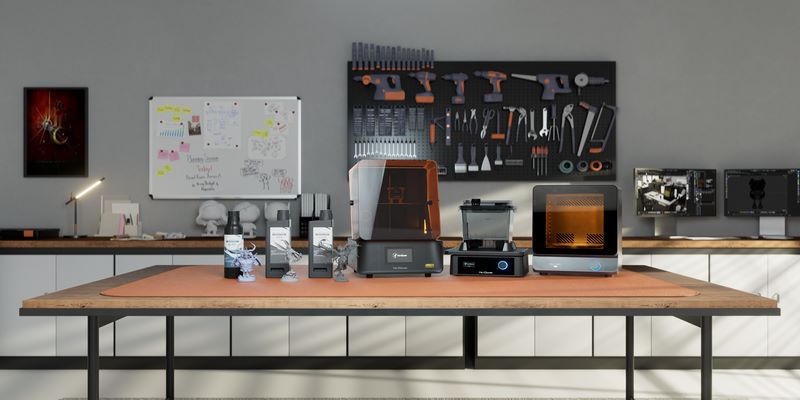
The Reflex RS Turbo 3D Printer is rapidly becoming one of the most talked-about machines in the resin printing space — and for good reason. Unlike many resin printers that require extensive setup, calibration, and parameter tweaking, the HeyGears Reflex RS Turbo is built around a different philosophy:
- Precision-engineered hardware
- Full workflow automation
- Beginner-friendly usability
- An optimized resin ecosystem
- Professional-grade print quality with minimal effort
Whether you’re a complete beginner looking for a frustration-free start, a miniature artist needing ultra-sharp detail, or a studio that wants a fast and consistent resin printing workflow, the Ultracraft Reflex RS Turbo 3D Printer hits a rare balance of simplicity and performance.
In this review, we’ll break down everything you need to know — from specs and print quality to workflow automation, resin compatibility, real-world performance, and whether this printer truly lives up to the hype.
🔥 Best Current Deal on the Reflex RS Turbo
Use coupon code DTECHVALLEYCOM for $60 off!
Let’s dive into what makes this machine different — and why it may be one of the most user-friendly resin printers released in recent years.
Reflex RS Turbo 3D Printer: Full Specifications & Key Details
The Reflex RS Turbo 3D Printer is engineered as a high-precision, high-speed MSLA machine optimized for ease of use. Below is a complete breakdown of its hardware, print capabilities, and workflow features. These specs make it one of the most refined options in the Reflex printers lineup.
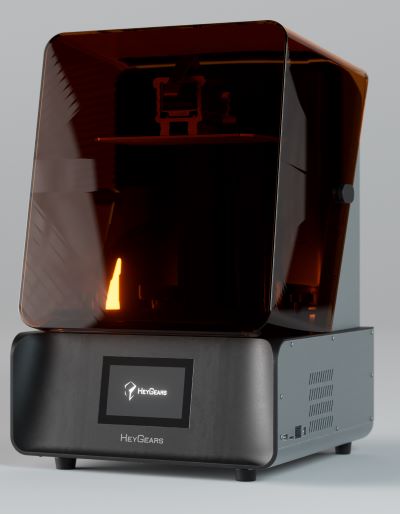
📊 Reflex RS Turbo 3D Printer Specifications
| Specification | Details |
|---|---|
| 3D Printing Technology | LCD (MSLA) |
| Screen | 10.3-inch 8K Amber Screen (566:1 contrast) |
| XY Resolution | 29.7 μm native pixel |
| Z-axis Accuracy | C5-grade Z-axis module (±2 μm) |
| Build Volume | 222 × 122 × 228 mm |
| Layer Thickness | 30 – 100 μm |
| High-Speed Printing | 4.5 seconds/layer (with supported resins) |
| Processing Algorithm | Dynamic Motion Algorithm 3.0 (+33% speed) |
| Weight | 20 kg |
| Connectivity | USB / WiFi |
| Compatible Resins | PAS10, PAP10, PAF10, PAH10, PAWW10/20, PARP10, PAWR10, PAU11 |
| Supported Languages | English, Simplified Chinese, Japanese |
💡 What These Specs Mean in Real-World Printing
- High contrast 8K Amber screen delivers crisp detail and fewer surface defects.
- C5-grade Z-axis ensures consistent layers with almost no banding — ideal for miniatures.
- Adaptive Z-axis compensation tunes motion per resin for smooth surfaces.
- Fast curing & optimized motion control cut print times dramatically.
- Large 222 × 122 × 228 mm build volume supports big prints or multiple small models per batch.
Paired with Blueprint Studio and HeyGears’ resin ecosystem, the Ultracraft Reflex RS Turbo 3D Printer operates more like a calibrated production tool than a hobbyist machine.
⚙️ View Full Specs & Current Pricing
See all technical details, combo options, and available discounts on the official product page.
What’s in the Box? Unboxing the Reflex RS Turbo 3D Printer
HeyGears ships the Reflex RS Turbo 3D Printer in premium protective packaging designed to keep internal components safe during transportation. Everything comes neatly organized to make setup fast even for first-time resin printing users.
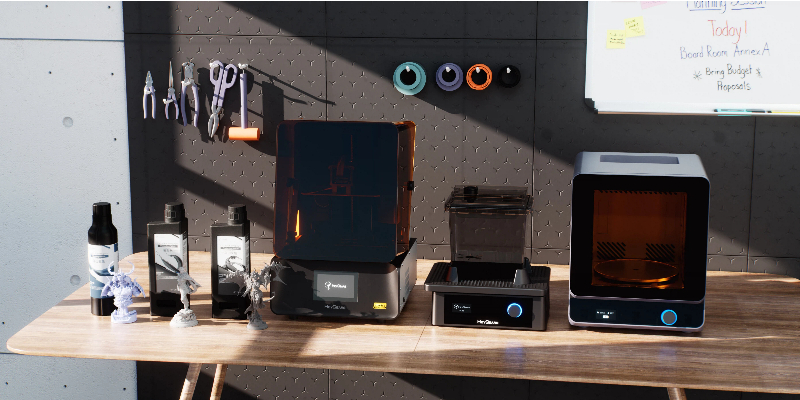
📦 Reflex RS Turbo – Box Contents
Here’s everything included in the standard Reflex RS Turbo package:
- UltraCraft Reflex RS Turbo 3D Printer (x1)
- Build Platform
- Resin Tank
- Power Cable
- Allen Key Set
- Scraper Tool
- Part Removal Tool
- User Manuals & Setup Documentation
These are the essential components required to begin printing right away — simply add resin, connect the machine, and follow the automated setup workflow.
Optional Bundles & Upgrades
For users who want a complete production setup, HeyGears offers several bundles that enhance workflow speed and print consistency:
- Reflex RS Turbo with Pulsing Release Module — improves release behavior for faster printing and fewer failures.
- Reflex RS Turbo Heated & Pulsing Release Resin Tank — maintains optimal resin temperature for consistent results.
- UltraCraft Wash — automated washing unit.
- UltraCraft Cure — high-performance curing chamber.
- Reflex RS Turbo Combo — complete package including printer, wash, cure, and accessories.

If you’re planning to print regularly (especially miniatures, engineering parts, or batch production), the combo packages are worth considering as they streamline post-processing and maintain quality consistency.
🎁 Check Reflex RS Turbo Bundles & Combos
Compare the printer-only option with bundle deals that include wash, cure, and upgrade modules.
🔗 View All Reflex RS Turbo Packages
Use coupon code DTECHVALLEYCOM for $60 off!
Now that you know what comes in the box, let’s examine the design and build quality — and what makes this machine feel more premium than most resin printers in its class.
Design & Build Quality: A Professional-Grade Resin Printer From the Ground Up
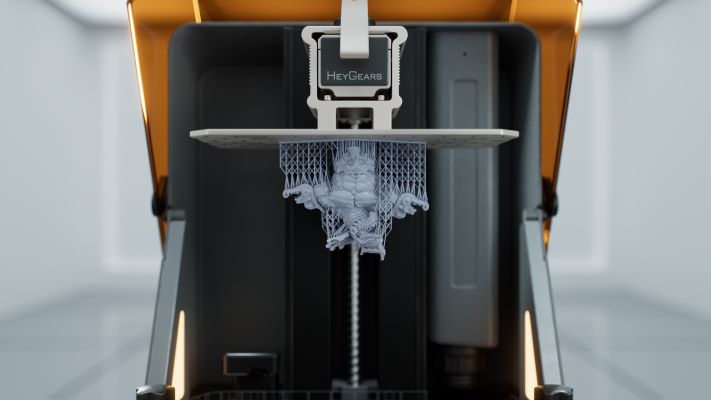
The Reflex RS Turbo 3D Printer isn’t just about high-resolution prints — it’s built with a strong focus on reliability, system integration, and long-term stability. From the moment you lift it out of the box, the machine feels like a precision tool engineered for consistent, repeatable results.
🛠️ Sturdy Construction & Premium Materials
With a weight of 20 kg, the RS Turbo has a solid footprint that minimizes vibration during high-speed printing. The reinforced chassis and tightly fitted components enhance structural rigidity — a critical factor for delivering smooth surfaces and accurate details at ±2 μm Z-axis precision.
🔶 The Amber Screen Housing
The front screen area is protected by a durable amber-tinted cover designed to shield internal components from stray UV light. It also makes the printer safer and more aesthetically unified, giving it a professional look suitable for studios, workshops, or office environments.
📐 Intelligent Internal Layout
HeyGears uses a purpose-built internal architecture that integrates:
- High-contrast 8K amber display optimized for detail clarity
- C5-grade Z-axis module mounted to reduce wobble and misalignment
- Force sensor module for residue monitoring and print failure detection
- Adaptive motion system designed to maintain layer accuracy even during fast prints
Everything from the resin tank mounts to the lift mechanism feels engineered with precision rather than off-the-shelf components.
💧 Ergonomic Resin Tank & Build Platform
The resin tank and build platform are designed for efficiency and ease of cleaning. The platform uses a durable surface coating for improved adhesion and quick print removal, while the resin tank integrates smoothly with optional upgrades like:
- Heated Resin Tank — maintains optimal material temperature
- Pulsing Release Module — reduces peel force and improves print success rates for high-viscosity materials. Simultaneously, it enables fewer and finer supports, thereby conserving resin.
Both accessories enhance print success rates and maintain consistent quality during long batch runs.
🔧 Minimal Maintenance Requirements
A major advantage of the RS Turbo is how little routine maintenance it requires. Thanks to strong hardware tolerances and a dependable Z-axis assembly, recalibration is rarely needed. The modular design makes occasional cleaning straightforward, even for beginners.
✨ See Build Quality & Internal Components in Detail
Explore the full design breakdown, internal structure highlights, and upgraded modules on the product page.
🔗 View Reflex RS Turbo on Official Store
Use coupon code DTECHVALLEYCOM for $60 off!
Ease of Use: Why the Reflex RS Turbo Is Ideal for Beginners
One of the biggest selling points of the HeyGears Reflex RS Turbo is just how easy it is to operate. Unlike many resin printers that require extensive calibration, profile tuning, and manual repairs, the RS Turbo handles most of the work automatically.

🟢 True One-Click Printing Workflow
The RS Turbo uses a printing workflow designed specifically for users who want professional-grade results without technical complexity:
- One-click slicing — no parameter tweaking needed
- Automatic model repair — fixes mesh holes, inverted normals, etc.
- One-click support generation — high-success supports with easy removal
- Auto-leveling — no manual leveling required
- Automatic resin refill — keeps large prints consistent
- Automatic resin heating (with heated tank) — improves flow & curing
This workflow dramatically reduces failed prints and eliminates the trial-and-error that beginners normally face when learning resin printing.
💡 Blueprint Studio: Beginner-Friendly Slicer
All printing is controlled through Blueprint Studio, HeyGears’ proprietary software. It’s designed to be clean, intuitive, and efficient — perfect for both newcomers and advanced users.
- Automated model repair ensures flawless slicing.
- Smart supports adapt to the shape and reduce scarring.
- Preset resin profiles remove guesswork entirely.
- Fast slicing — processes full-build prints in under 1 minute.
Compared to typical slicers, Blueprint Studio offers a tightly integrated system where software, resin, and hardware work together seamlessly.
🧩 Built-In Technical Support
Beginners often get stuck when something goes wrong — but the RS Turbo includes built-in technical assistance directly inside the system. If a print fails or parameters need adjusting, users can quickly access official guidance without hunting through forums or online communities.
📉 Far Lower Learning Curve
Many resin printers require:
- Manual leveling
- Exposure calibration
- Resin parameter adjustment
- Manual support design
- Trial-and-error troubleshooting
The RS Turbo eliminates almost all of these steps through automation, making it one of the few resin printers suitable for absolute beginners who want great results from day one.
🎉 Start Your 3D Printing Journey With Zero Learning Curve
The Reflex RS Turbo is designed so anyone — even complete newcomers — can print high-detail models effortlessly.
🔗 Get the Reflex RS Turbo (Beginner-Friendly Resin Printer)
Use coupon code DTECHVALLEYCOM for $60 off!
Print Quality & Performance: How Good Is the Reflex RS Turbo?
If there’s one area where the Reflex RS Turbo 3D Printer truly stands out, it’s print quality. From miniature details to engineering prototypes, the RS Turbo consistently delivers smooth surfaces, crisp edges, and highly accurate dimensions — all thanks to a combination of precision hardware and intelligent motion algorithms.
🔶 Sharper Detail With the Optimized Amber Screen
The RS Turbo uses a custom-engineered 10.3-inch 8K Amber LCD screen with a high contrast ratio of 566:1. This prevents light bleeding and ensures only the intended pixels cure — producing:
- Sharper edges
- Clean corners
- Higher micro-detail accuracy
- Less surface haze or micro defects
In practical terms, prints come out with exceptional clarity, especially on textured models, armor, and fine miniatures.
📐 C5-Grade Z-Axis = Smooth, Consistent Surfaces
The C5-grade Z-axis module offers motion accuracy within ±2 μm, which minimizes visible layer lines and reduces the risk of wobble. This precision is usually found in industrial-grade equipment.
Benefits include:
- Ultra-smooth surfaces requiring less sanding
- Excellent tall-model stability
- Precision for mechanical parts
- Improved assembly fit thanks to dimensional accuracy
⚙️ Adaptive Z-Axis Compensation
A unique feature of the RS Turbo is that it automatically adjusts Z-axis parameters based on resin characteristics. This helps maintain:
- Material consistency
- Reduced elephant’s foot
- Reduced top-layer distortion
- Better underside support geometry
This is one of the reasons users experience fewer failed prints and more predictable results.
🚀 High-Speed Printing Powered by Dynamic Motion Algorithm 3.0
Speed is another strong suit of the Ultracraft Reflex RS Turbo. HeyGears’ Dynamic Motion Algorithm 3.0 reads force sensor data up to 80 times per second and adjusts the printer’s lift speed, acceleration, and motion patterns in real time.
This results in:
- Up to 33% faster prints compared to standard motion systems
- Layer times as low as 4.5 seconds
- Higher success rates at speed
- Reduced stress on the LCD screen
📊 Real-World Performance Overview
| Performance Metric | Result (RS Turbo) |
|---|---|
| Detail Sharpness | Outstanding – crisp edges, high micro fidelity |
| Surface Smoothness | Very smooth – minimal layer visibility |
| Print Speed | Fast – 4.5 sec/layer (optimized) |
| Assembly Accuracy | ≤0.05 mm tolerance |
| Tall Model Stability | Excellent – C5 Z-axis stabilizes vertical motion |
✨ Want High-Precision, High-Speed Resin Prints?
The Reflex RS Turbo delivers professional-grade quality with beginner-friendly automation. Check pricing and bundles below:
🔗 View Reflex RS Turbo (High Detail Resin Printer)
Use coupon code DTECHVALLEYCOM for $60 off!
Software: Blueprint Studio & Full Automations
The Reflex RS Turbo is more than just hardware — it’s the software and automation that turn the machine into a reliable production tool. Blueprint Studio is HeyGears’ tightly integrated slicer and workflow manager, built to make advanced resin printing approachable for beginners while offering depth for power users. Together with the RS Turbo’s onboard sensors and automation features, Blueprint Studio creates a near fully-automated printing pipeline from model import to post-print handling.
🧭 One-Click Pre-Processing: Fast, Safe, Reliable
Blueprint Studio condenses the most error-prone steps of resin printing into a single automated flow:
- One-click slicing — pre-set resin parameters remove guesswork and let you slice complex builds in under a minute.
- Automatic model repair — the software detects and fixes common mesh issues (inverted normals, holes, intersecting shells) before they become failed prints.
- Intelligent auto-supports — auto-generated supports are tuned for high success rates and easy removal, reducing cleanup and scarring.
🔍 Real-Time Monitoring & Failure Prevention
The Reflex RS Turbo combines on-board hardware intelligence with Blueprint Studio to reduce print failures and speed troubleshooting:
- Force sensor residue detection — the RS Turbo’s force sensors detect resin residue down to 0.1 N sensitivity and can auto-stop or pause the job if an anomaly is detected.
- Failure detection intelligence — the system logs layer difficulty, motion parameters, and sensor data so Blueprint Studio can suggest fixes or automatically adapt future prints.
- NFC screen calibration — screen replacement data is kept in sync via NFC so exposure profiles remain consistent across screen swaps.
⚙️ Adaptive Automation Features
Blueprint Studio and the RS Turbo hardware work together to adapt to real-world variables automatically:
- Automatic pre-processing in 1 minute — import, repair, support, and slice a build quickly and reliably.
- Auto-leveling (Floating Screen) — the floating screen system self-levels before each print, removing manual leveling steps for beginners.
- Auto-refill & auto-heating — with the optional Heated & Pulsing Release Resin Tank the printer can maintain optimal resin temperature and automatically refill during long prints.
- Adaptive motion tuning — Dynamic Motion Algorithm 3.0 feeds sensor data into motion control to balance speed with reliability.
📈 One Ecosystem, Fewer Mistakes
Because Blueprint Studio ships with pre-configured resin profiles for PAS10, PAP10, PAH10, PAWW10/20 and more, users who buy into the HeyGears ecosystem get predictable, repeatable results. This reduces the learning curve dramatically — and it’s why the RS Turbo is often described as a beginner-friendly Reflex printer that still delivers engineering-grade outcomes.
🔧 Download Blueprint Studio & Get Official Support
Get the official slicer, user manual, and support resources to take full advantage of the RS Turbo automation features.
Resin Ecosystem: What Works Best With the Reflex RS Turbo
The Reflex RS Turbo is designed to run at peak performance when paired with HeyGears’ own resin library. Every resin formulation is pre-profiled inside Blueprint Studio, so exposure settings, motion curves, support strength, and viscosity behavior are already calibrated. That means no testing charts, no failed exposure dial-ins, and no guessing.
This isn’t just convenience — it’s accuracy. With Dynamic Motion Algorithm 3.0 and Adaptive Z-Axis Compensation, the RS Turbo adjusts lift forces, cure timing, and release motion depending on the resin you load. The result is predictable, repeatable detail quality across miniatures, mechanical housings, and proof-fit engineering prints.
🧪 Recommended Resins for the RS Turbo
Below are the primary resin choices optimized for the Reflex platform along with their best-use scenarios:
| Resin | Best Use Case | Advantages |
|---|---|---|
| PAS10 | Everyday miniatures & figurines | Balanced price, smooth finish, great detail fidelity |
| PAP10 | Ultra-detailed sculpts & textured surfaces | Extreme fine detail precision, ideal for display-grade minis |
| PAF10 | Figurine accessories, snap-fit parts, flexible pieces | Flexible yet dimensionally accurate — durable articulation |
| PAWW10 / PAWW20 | Fast prototyping + easy cleanup | Water-washable resin with high success tolerances |
| PAH10 (New) | Engineering housings, load-bearing parts, mold tooling | 3150 MPa tensile modulus, high deformation resistance, heat stability, near-zero warp |
🔥 Spotlight: PAH10 High-Stiffness Resin
The newest addition to the RS-compatible lineup, PAH10 Black, is engineered for industrial-grade usage. With 3150 MPa tensile modulus and resistance to heat up to 95°C, it’s built for durable, dimensionally stable prototypes.
- ±0.05 mm assembly tolerance across structural interfaces
- Ideal for component housings, load-bearing rigs, silicone mold masters
- Long-term dimensional stability in mechanical applications
🧬 Resin + Motion Optimization: Why Compatibility Matters
With generic resins, users often face layer slippage, over-curing, and support tear-out. On the RS Turbo, each HeyGears resin is paired with:
- Adaptive Motion Compensation for variable cross-sections
- Pre-set exposure curves stored in Blueprint Studio
- Auto-heating (optional tank) to stabilize viscosity for long batches
This creates a calibrated, repeatable print environment — which is why miniature artists, and Etsy studios report near-zero failed runs after switching to the Reflex ecosystem.
⚙️ Resin Rigidity: PAH10 vs PAS10
| Metric | PAH10 (Engineering) | PAS10 (General) |
|---|---|---|
| Tensile Modulus | 3150 MPa | 1900 MPa |
| Heat Distortion | 95°C | 65°C |
| Dimensional Stability | Industrial-grade (mold tooling, housings) | Consumer-grade (display minis, tabletop) |
🧪 Explore Full Resin Compatibility for the RS Turbo
Compare detail resins, flexible materials, engineering formulas, and water-washable options — all pre-profiled for the Reflex platform.
🔗 View Recommended RS Turbo Resins
Use coupon code DTECHVALLEYCOM for $60 off!
Workflow Integration: Full Resin Printing System with Wash & Cure
Where the Reflex RS Turbo truly separates itself from typical resin printers is not just in precision, but in end-to-end workflow continuity. When paired with the UltraCraft Wash, UltraCraft Cure, and optional Heated & Pulsing Release Tank, the RS Turbo becomes a production pipeline rather than a single device.
This is core to the HeyGears philosophy: hardware, software, resin, and post-processing working as one controlled ecosystem. The result isn’t just better surface quality — it’s faster turnaround, less human error, and far more predictable output across batches.
🧼 UltraCraft Wash: Precision Cleaning, Zero Guesswork
The UltraCraft Wash unit handles cleaning automatically, using timed agitation cycles tuned to HeyGears resin viscosities.
- No manual scrubbing
- No over-washing surface damage
- Optimized agitation for miniature supports & fine edges
For water-washable resins such as PAWW10/PAWW20, the cleaning process becomes fully streamlined — no solvent handling or IPA evaporation management.
🌞 UltraCraft Cure: Controlled Post-Cure Strength
Post-curing is often where models warp, discolor, or become brittle. The UltraCraft Cure solves this with:
- 360° UV uniformity for balanced curing
- Preset profiles & timed curing cycles matching RS resin chemistry
- Thermal-assisted curing that improves dimensional stability
Engineers working with PAH10 and PAU11 especially benefit from improved stiffness retention and reduced thermal distortion after curing.
🔥 Heated & Pulsing Release Resin Tank (Optional)
This upgrade is ideal for users printing large volumes or frequently alternating resin types.
- Auto-heating maintains optimal viscosity — critical for resin flow consistency
- Pulsing release tech reduces FEP strain and improves release speed
- Lower LCD stress for longer pixel lifespan
For studios printing long runs of miniatures, this reduces layer hesitation and supports smoother vertical transitions.
🚀 Why It Matters: Production-Level Output, Not Hobby-Level
The RS Turbo workflow isn’t just “easier” — it’s calibrated for repeatable shop-grade output. Combining printer + wash + cure delivers:
- Fewer manual steps → smoother handoff from print to finish
- Higher dimensional fidelity → supports fall away cleanly
- Batch consistency → ideal for Etsy sellers, studios & prototyping labs
- Faster turnaround → reduced post-processing bottlenecks
🛡️ Miniature Batch Optimization (Wash → Cure)
For large tabletop or figurine batches, optimal post-processing timing preserves fine bristle, scale texture, and embossed armor ridges.
| Step | PAS10 | PAP10 |
|---|---|---|
| UltraCraft Wash | 90s standard cycle | 75s gentle cycle |
| UltraCraft Cure | 7-min UV ramp + 30s thermal | 6-min UV low + 20s thermal |
Why: PAP10 captures soft cloth gradients and needs gentler wash turbulence to avoid micro-fray softening, while PAS10 armor plates benefit from firm cure consolidation for sharp bevel retention.
📐 Engineering Tolerance After Full Cure
| Material | Post-Cure Dimensional Shift | Ideal Use Cases |
|---|---|---|
| PAH10 | ≤0.05 mm deviation | Load-bearing components, enclosures, mold masters |
| PAS10 | 0.08–0.12 mm deviation | Figurines, medium-detail minis |
| PAP10 | 0.07–0.09 mm deviation | Soft surface miniatures, cloth textures, display sculpts |
✨ Build a Complete RS Turbo Production Setup
If you want a fully automated resin workflow, the RS Turbo Combo combines printer, wash, cure, and advanced tank systems into one production package.
🔗 View RS Turbo + UltraCraft Wash & Cure 🔗 Explore RS Turbo Combo Deals
Ready to Upgrade from Reflex RS?
If you currently own the Reflex RS, the Turbo is not just a refresh — it is a direct accuracy and workflow uplift, especially when printing fine-detail models.
🔗 View Reflex RS Turbo Upgrade Details
Use coupon code DTECHVALLEYCOM for $60 off!
User Experience & Community Feedback
The HeyGears Reflex RS Turbo has quickly gained traction among miniature painters, Etsy batch sellers, and tight-tolerance prototyping labs. The most consistent takeaway from long-term users is simple: it just works — with near-zero calibration fuss and extremely predictable results.
🧵 Miniature & Tabletop Community Responses
Painters and sculptors highlight the Turbo’s sharpness in ambient cloth texture and armor refraction, especially when pairing PAP10 for drapery wrinkles and PAS10 for armor bevels.
- “No lost detail in fabric gradients — robes and cloaks look hand-sculpted after curing.”
- “PAS10 + Turbo = razor plate edges with zero support tearing.”
- “Batch mini runs don’t shift between prints anymore — color-matched resin profiles help a lot.”
Batch consistency is repeatedly praised, especially by commission artists printing 40–100 units per week.
🏗️ Engineering & Precision Print Studios
Product designers and fit-test labs use the RS Turbo specifically for assembly tolerances, housing prototypes, and snap-fit structures. The C5-grade Z assembly is the standout talking point.
- “±2μm Z behavior is not marketing — clear mechanical repeatability.”
- “Motion Algorithm 3.0 cut turnaround by a full day per build cycle.”
- “Long prints can run overnight with zero drift or compression creep.”
⭐ Consistency is the Key Theme
Across all use categories — minis, prototyping — users praise not just quality but consistency. The Turbo’s automated error detection and calibrated resin profiles reduce workflow disruptions dramatically.
- Auto support success is notably high
- Less post-cure warping in geometry-heavy parts
- No random layer walk in tall models
- Near-zero bed recalibration even after multiple tanks
🎯 Real-World Summary
Owners often describe the Turbo as “production-stable” rather than hobby-focused. That reliability is what elevates it for business workflows — especially when paired with UltraCraft Wash, Cure, and the heated/pulsing resin tank.
Real World Print Predictability
If your goal is to print with professional consistency, the RS Turbo continues to stand out for creators who sell, not just display.
Next, we’ll break down exactly who should invest in this system and why certain user types see maximum ROI from the Reflex RS Turbo platform.
Who Should Buy the HeyGears Reflex RS Turbo?
The Reflex RS Turbo stands out because it serves both ends of the 3D printing spectrum — those who are just entering resin printing and those already running full production batches. No steep learning curve. No tuning spreadsheets. No constant Z-bed recalibration.
Its automation and repeatability make it more than a printer: it becomes a reliable production partner.
🎯 Ideal For:
- Miniature sculptors & painters printing layered armor, fabric, and micro-organic detail
- Etsy sellers & small studios producing consistent weekly batches
- Engineers & product designers developing precision fit assemblies
- Beginners who want plug-and-print success with automated slicing, support logic, and resin calibration
🏭 Production Workflows & Batch Sellers
For creators who sell 30–200 units per month, production-flow downtime is the enemy. The Turbo’s failure detection, pulsing release tank option, and wash/cure integration reduce manual oversight, making batch runs smooth and predictable.
- Stable overnight prints with no axis wander
- Resin presets remove guesswork entirely
- Auto exposure & motion tuning per resin profile
🧪 Precision Engineering & Proto Labs
When tolerances matter more than print volume, the C5-grade Z assembly becomes the difference between “close enough” and “production-verified.”
- ±2μm Z-axis linearity
- Clean hole-to-pin alignment on housings
- No final-stage cure distortion
👶 Why Beginners Should Consider It
The RS Turbo eliminates the traditional resin-learning grind:
- No manual leveling
- No exposure trial-and-error
- No slicer plugin confusion
- No FEP tearing from aggressive peel
If the printer is your first resin machine, it removes the most frustrating variables before you experience them.
Is the Reflex RS Turbo Right for You?
For precision, automation, and repeatable results without calibration anxiety, this printer hits the sweet spot between creative flexibility and production reliability.
🔗 Compare RS Turbo Bundles & Packages
Use coupon code DTECHVALLEYCOM for $60 off!
Reflex RS Turbo Pricing, Availability & Where to Buy
The Reflex RS Turbo 3D Printer is positioned as a premium, automated resin system offering professional-grade results with beginner-friendly usability. While it costs more than entry-level consumer machines, its automation, precision hardware, and ecosystem integration make it an exceptional long-term value for creators, studios, and production workflows.
💰 Current Reflex RS Turbo 3D Printer Price
The Reflex RS Turbo 3D printer price can vary depending on active promotions, regional discounts, and whether you select the printer alone or a bundle package.
- Reflex RS Turbo (Printer-Only) — Base model with standard tank & build platform.
- RS Turbo + Pulsing Release Module — Faster layer release & improved consistency.
- RS Turbo Heated Resin Tank Bundle — Optimal choice for batch printing and temperature-sensitive resin workflows.
- UltraCraft Wash & Cure Combos — Full workflow solution for studios and Etsy sellers.
- Reflex RS Turbo Combo — Complete ecosystem package including printer, wash, cure, and accessories.
Pricing updates frequently due to promotions, so checking the official store is recommended for the most accurate and current information.
🔥 Check Current Reflex RS Turbo Pricing
Use coupon code DTECHVALLEYCOM for $60 off!
🔗 View Reflex RS Turbo 3D Printer (Official Store)
🛒 Reflex RS Turbo 3D Printer for Sale
The RS Turbo is officially available through the HeyGears Online Store, which ensures:
- Authentic hardware with proper warranty
- Access to Blueprint Studio & firmware updates
- Support for resin profiles, calibration tools, and replacement screens
- Bundle-exclusive discounts not offered by third parties
If you’re seeing the Reflex RS Turbo for sale on third-party marketplaces, prices may not include warranty or accessories. Purchasing directly from HeyGears ensures full product support and guaranteed compatibility with the Reflex ecosystem.
📦 Optional Bundles & Add-ons
HeyGears offers several official bundle configurations designed to tailor the RS Turbo to different user needs:
- Creator Bundle: RS Turbo + Wash + Cure
- Production Bundle: RS Turbo + Heated Tank + Pulsing Release Module
- Reflex RS Turbo Complete Combo: Printer, heated tank, release technology, wash, cure, and starter resin options
These bundles offer substantial savings versus purchasing components separately, especially for studios or heavy production users.
🎁 Explore Reflex RS Turbo Bundles & Deals
Compare printer-only vs. full ecosystem combos to find the best value:
Use coupon code DTECHVALLEYCOM for $60 off!
Now that we’ve covered pricing and availability, let’s move on to a transparent breakdown of the real pros and cons to help you decide whether the RS Turbo fits your needs.
Reflex RS Turbo Pros & Cons
No 3D printer is perfect for everyone — even a highly optimized system like the HeyGears Reflex RS Turbo. Below is a balanced overview of strengths and limitations to help you make an informed decision based on your workflow, budget, and printing goals.
✅ Pros
- Beginner-Friendly Workflow — One-click slicing, auto-support, auto-repair, and auto-leveling make it ideal for new resin users.
- Extremely High Print Consistency — The C5-grade Z-axis and amber 8K screen deliver repeatable results with minimal maintenance.
- Exceptional Detail Quality — The 566:1 contrast amber screen produces crisp edges and reduces optical bleed, perfect for miniatures.
- High-Speed Printing — Dynamic Motion Algorithm 3.0 enables 4.5s/layer performance and up to 33% faster print times.
- Full Ecosystem Integration — Blueprint Studio, optimized resins, UltraCraft Wash, UltraCraft Cure, and the heated/pulsing tank create a seamless production workflow.
- Reduced Failure Rates — Force sensor residue detection, NFC calibration, and intelligent motion adjustments minimize print errors.
- Professional-Grade Accuracy — ±2 µm Z-axis performance and calibrated exposure profiles ensure dimensionally accurate prototypes.
⚠️ Cons
- Best Performance Requires Ecosystem Use — It works with third-party resins, but HeyGears materials deliver the most consistent and predictable results.
- Higher Upfront Investment — More expensive than entry-level printers, though automation and repeatability justify the price for serious creators.
- Advanced Features Unlock with Add-Ons — The heated tank and pulsing release module significantly enhance quality and speed but add to the cost.
🎯 Summary
The Reflex RS Turbo excels in precision, automation, and workflow efficiency. Its strengths make it a strong choice for hobbyists who want premium results without calibration struggles, as well as studios and professionals who need consistent, production-grade output.
Is the Reflex RS Turbo the Right Match for Your Workflow?
Evaluate the pros and cons, then explore bundles and pricing to find the ideal setup for your studio or hobby space.
🔗 View Reflex RS Turbo on Official Store
Final Verdict: Is the Reflex RS Turbo Worth It?
The HeyGears Reflex RS Turbo 3D Printer delivers a rare combination of precision, reliability, and full-system automation. Whether you’re a beginner looking for a frictionless entry into resin printing or a studio producing high-volume batches, the Turbo stands out as one of the most polished and dependable machines in its class.
This Reflex RS Turbo review has shown that the printer goes far beyond raw hardware specs. Its true strength lies in the ecosystem — Blueprint Studio, optimized resins, intelligent motion algorithms, debris detection, wash and cure systems, and optional heated/pulsing tanks all working together to eliminate guesswork and deliver consistent, production-grade results.
⭐ What Makes It Worth the Investment
- Precision without complexity — ±2 µm Z-axis, high-contrast amber screen, and advanced exposure control.
- Beginner-friendly automation — ideal for new users who want fast, successful prints.
- Professional consistency — batch-friendly stability for Etsy sellers and studios.
- Fast performance — 4.5s/layer printing and real-time motion tuning with Dynamic Motion Algorithm 3.0.
- Complete ecosystem workflow — pairing with UltraCraft Wash/Cure transforms it into a true production system.
🎯 Who Will Benefit the Most?
If you value speed, surface quality, accuracy, or the ability to print without constant calibration, the Ultracraft Reflex RS Turbo 3D Printer is easily one of the top choices available today.
- Miniature creators who need ultra-fine texture and batch consistency
- Etsy sellers and studios needing reliable overnight production
- Engineers requiring dimensionally accurate prototypes
- Beginners who want plug-and-print reliability instead of tuning headaches
🏆 Final Conclusion
The HeyGears Reflex RS Turbo is more than a resin printer — it’s an end-to-end production ecosystem. Its automation, precision hardware, and optimized material library make it one of the most advanced and user-friendly resin printers currently available.
If you’re looking for a machine that delivers high detail, consistent batches, fast print speeds, and minimal fuss, the Reflex RS Turbo is absolutely worth the investment.
Ready to Get the Reflex RS Turbo?
Use coupon code DTECHVALLEYCOM for $60 off!
Reflex RS Turbo FAQs
❓ What makes the Reflex RS Turbo different from the previous Reflex RS?
The Reflex RS Turbo introduces several major upgrades over the original Reflex RS, including:
- Amber 8K LCD with 566:1 contrast (sharper detail, less light bleed)
- C5-grade Z-axis with ±2 μm precision
- Dynamic Motion Algorithm 3.0 (up to 33% faster printing)
- Residue detection with 0.1 N sensitivity for failure prevention
- NFC screen calibration for consistent exposure tracking
Overall, the Turbo offers cleaner detail, faster prints, better stability, and smarter automation.
❓ Is the Reflex RS Turbo good for beginners?
Yes — it’s one of the most beginner-friendly resin printers available thanks to:
- One-click slicing in Blueprint Studio
- Automatic model repair
- Automatic support generation
- Auto-leveling (Floating Screen System)
- Optional auto-heating and auto-refill functions
New users can get production-quality results without calibration charts or exposure testing.
❓ What resins are compatible with the Reflex RS Turbo?
The RS Turbo supports the full lineup of HeyGears Reflex-optimized resins, including:
- PAS10 – everyday miniatures & prints
- PAP10 – ultra-detail resin for display minis
- PAF10 – flexible parts & snap-fits
- PAH10 – engineering, stiff, heat-resistant resin
- PAWW10 / PAWW20 – water-washable resins
- PARP10, PAWR10, PAU11 – additional specialized materials
These resins come with pre-configured profiles in Blueprint Studio for maximum consistency and print success.
❓ How fast is the Reflex RS Turbo?
The Ultracraft Reflex RS Turbo 3D printer can achieve:
- 4.5 seconds per layer with supported materials
- Up to 33% faster prints thanks to Dynamic Motion Algorithm 3.0
- Real-time motion tuning via force sensing up to 80 Hz
This makes it one of the fastest high-precision MSLA printers in its category.
❓ Does the Reflex RS Turbo require manual leveling?
No. The RS Turbo uses a Floating Screen auto-leveling system that calibrates itself before every print. This eliminates the bed-leveling routine typical of other resin printers.
❓ Where can I download the Reflex RS Turbo manual?
You can access the official Reflex RS Turbo 3D printer manual, setup guides, and troubleshooting documents directly from the HeyGears support page:
🔗 Download the Reflex RS Turbo Manual & Resources
The support section also includes firmware notes, screen replacement guides, and Blueprint Studio documentation.
❓ Is the Reflex RS Turbo suitable for professional applications?
Absolutely. The RS Turbo is widely used in:
- Miniature studios and tabletop sellers
- Etsy production shops
- Engineering prototyping (±2 μm Z accuracy)
Its automation, consistency, and detail quality make it capable of production-level performance, not just hobby usage.
❓ Is the Reflex RS Turbo noisy?
No — the RS Turbo is quieter than most MSLA printers. Its motion system and cooling profile are optimized for low operating noise, making it suitable for home studios, bedrooms, and offices.
❓ How long does the amber LCD last?
The specialized Amber 8K LCD used in the Reflex RS Turbo is rated for over 1,000,000 layers, extending screen longevity and reducing total cost of ownership.
Still Have Questions?
Explore additional documentation, resin profiles, firmware updates, and guided support directly from HeyGears.
Supporting Resources & Official Manuals
The HeyGears Reflex RS Turbo is supported by a complete library of documentation, software downloads, resin specifications, and setup guides. Below are the official resources every user should bookmark for quick access to manuals, calibration instructions, updates, and workflow optimization tools.
📘 Reflex RS Turbo 3D Printer Manual
The official Reflex RS Turbo 3D printer manual includes:
- Initial setup & safety instructions
- Resin tank preparation
- Build platform installation
- WiFi setup & connectivity
- Maintenance and cleaning
- LCD replacement & NFC calibration steps
You can download the official manual here:
🔗 Download Reflex RS Turbo Manual (Official Support Page)
💻 Blueprint Studio (Slicer) Download
Blueprint Studio is the slicing engine and workflow software designed specifically for the Reflex ecosystem. It includes:
- One-click slicing for all Reflex devices
- Automatic model repair
- Auto-support generation
- Preset resin profiles for PAS10, PAP10, PAF10, PAH10, PAWW10/20 & more
- Failure detection data and print logs
Download the latest version here:
🧪 Resin Specification Sheets
Every HeyGears resin is backed by full technical specification sheets covering:
- Exposure parameters
- Strength & modulus measurements
- Viscosity & temperature behavior
- Curing recommendations
- Water-washability & compatibility details
Access resin guides and material documentation below:
🔗 View Resin Specifications & Material Guides
⚙️ Setup Instructions & Calibration Resources
New users can follow HeyGears’ official setup tutorials to configure the RS Turbo correctly from day one. These include:
- Printer onboarding & WiFi setup
- Tank installation & priming
- Auto-leveling overview
- Resin loading and first-print checklist
- Using the residue detection system
- Screen calibration documentation (NFC-enabled)
Find the full list of setup instructions here:
🔗 Reflex RS Turbo Setup & Calibration Guides
🛠️ Troubleshooting & Support
If you encounter print inconsistencies, calibration issues, or resin questions, the official HeyGears support portal includes:
- FAQ database for common print problems
- Live chat & direct technical support
- Warranty information
- Firmware updates & release notes
- Screen replacement instructions
🔗 Visit the Official HeyGears Support Center
🎁 Recommended Accessories & Ecosystem Tools
The Reflex RS Turbo becomes a complete production system when paired with official accessories such as:
- UltraCraft Wash (automatic cleaning)
- UltraCraft Cure (UV + thermal post-cure)
- Heated Resin Tank (optimal viscosity control)
- Pulsing Release Module (faster layer peel, reduced screen stress)
Explore compatible accessories here:
🔗 Browse Reflex RS Turbo Accessories & Add-Ons
All Official Resources in One Place
Keep this section bookmarked for quick access to the manuals, slicer downloads, resin profiles, and setup guides that help you get the best performance from the Reflex RS Turbo.

