


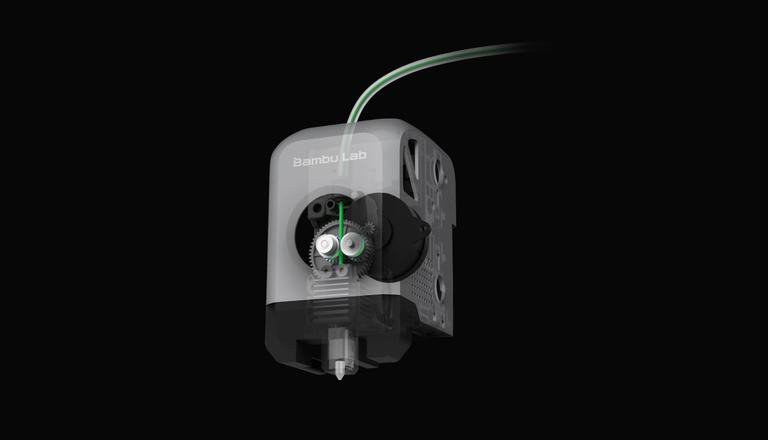
If you’ve ever watched a print fail at layer 47 — that slow, sinking feeling as your filament grinds and skips — you already know that the extruder is the heartbeat of your 3D printer. Get it right, and you unlock better prints, faster speeds, and materials you never thought possible. Get it wrong, and no amount of Klipper tuning or slicer voodoo will save you.
This guide cuts through the noise. Whether you’re a beginner upgrading your first Ender or an advanced builder chasing 600mm/s on a CoreXY machine, you’ll find exactly what you need here — no fluff, just honest recommendations from someone who has spent way too much time obsessing over gear ratios and flow rates.
🔥 Want to skip the research? Our #1 pick transforms almost any printer overnight.
📋 Jump to What Matters
- Quick Verdict
- Comparison Table
- What Is an Extruder?
- Extruder Types
- Bondtech LGX Lite V2
- LDO Orbiter 2.0
- E3D Revo Hemera XS
- Creality Sprite Pro
- Bondtech LGX Pro
- Flow Rate vs Speed
- Extruder Assembly
- Design Factors
- Nozzle Guide
- DIY Extruders
- Direct Drive vs Bowden
- Print Quality Impact
- Common Problems & Fixes
- Buyer’s Guide
- FAQ
- Conclusion
⚡ Quick Verdict: Best 3D Printer Extruders in 2026
Don’t have time to read everything? Here are the top picks right now:
1
Bondtech LGX Lite V2
Best Overall
Reliable, versatile, and built for CoreXY machines. Set it and forget it.
2
LDO Orbiter 2.0
Best Direct Drive Upgrade
Ultra-light, insane torque, perfect for Ender conversions and speed builds.
3
E3D Revo Hemera XS
Best for High-Speed 600mm/s+
Flow rate beast with tool-free nozzle swaps for maximum throughput.
4
Creality Sprite Pro
Best Budget Pick
Plug-and-play under $60, great for beginners upgrading from stock.
Still here? Good. Let’s go deep so you can make the best decision for your specific setup.
📊 Extruder Comparison Table (2026)
| Extruder Model | Type | Best For | Gear Ratio | Weight | Materials | Get It |
|---|---|---|---|---|---|---|
| Bondtech LGX Lite V2 Top Pick | Direct Drive | CoreXY, general use | 3:1 | ~175g | PLA, PETG, TPU, Nylon | |
| LDO Orbiter 2.0 | Direct Drive | Speed builds, Ender upgrades | 7.5:1 | ~135g | PLA, PETG, TPU | Check Price |
| E3D Revo Hemera XS | Direct Drive | High-speed, high-flow | 3:1 | ~160g | PLA, PETG, Nylon, CF | |
| Creality Sprite Pro | Direct Drive | Beginners, stock upgrades | 3.5:1 | ~195g | PLA, PETG, TPU | Check Price |
| Bondtech LGX Pro | Direct Drive | Engineering materials | 3:1 | ~185g | Nylon, CF, Abrasives | Check Price |
2026 Reality CheckWeight matters just as much as torque now. As printer acceleration climbs past 10,000 mm/s², a heavy toolhead becomes a liability. Light extruders aren’t just a luxury — they’re a performance requirement.
📥 Free Extruder Upgrade Compatibility Checklist
Not sure which extruder fits your printer? We built a printable checklist covering mount compatibility, firmware changes, and E-step calibration for every major extruder + printer combo.
🧠 What Is a 3D Printer Extruder? (And Why You Should Care)
Here’s the simplest way to think about it:
The Core ConceptThe extruder pushes filament. The hotend melts it.
That’s the one-liner. But if you’re making a buying decision, you need to understand what’s actually happening inside that little motor-and-gear assembly mounted to your printer.
The extruder is the motor-driven mechanism that grips your filament and feeds it — at a precise, controlled rate — into the hotend. It has to maintain consistent grip across thousands of millimeters of filament, handle varying back-pressure from the nozzle, and do all of this without grinding, slipping, or skipping.
When your extruder is working perfectly, you don’t notice it. When it’s working poorly, you see it everywhere: stringing, under-extrusion, blobs, layer gaps, and that terrible clicking sound that means your motor is skipping steps.
A good extruder is also the single highest-ROI upgrade you can make to most printers. Before you buy a new printer, consider: a $60–150 extruder upgrade can fundamentally transform what your current machine is capable of.
⚙️ 3D Printer Extruder Types: What’s What in 2026
Understanding the different 3D printer extruder types helps you make a smarter purchase. Here’s how they break down:
Direct Drive Extruder
The extruder sits directly on the toolhead, right above the hotend. The filament path from drive gears to melt zone is very short — sometimes just 20–30mm.
Why it dominates in 2026:
- Excellent retraction control (shorter retraction distances, typically 0.5–1.5mm vs 3–7mm for Bowden)
- Handles flexible materials like TPU much better
- More responsive — speed changes translate immediately to filament movement
- Now the clear standard in modern machines
The downside? Weight on the toolhead. But modern lightweight designs like the Orbiter 2.0 have largely solved this.
Bowden Extruder
Here, the extruder motor sits remotely on the frame, and filament travels through a PTFE tube (the “Bowden tube”) to the hotend. Less toolhead weight, but the long, sloppy filament path creates lag and retraction headaches. You can learn more about this setup in our dedicated Best Bowden Extruder guide.
In 2026, Bowden setups are niche. You’ll still find them in ultra-light speed rigs where every gram matters and the operator is printing only rigid filaments at known settings. For most people? Direct drive is the right call.
Dual-Gear Extruder
This is the baseline standard in 2026 — if an extruder only has one driven gear (with an unpowered idler bearing), that’s a red flag. Dual-gear designs grip filament from both sides, dramatically reducing slippage and grinding, especially at high speeds or with softer filaments.
Both the Bondtech LGX family and the Orbiter 2.0 use dual-gear designs. Don’t settle for less.
Planetary / Geared Extruders
High gear ratios (the Orbiter 2.0’s 7.5:1, for example) pack enormous torque into a tiny package using planetary or compound gear stages. This is critical for:
- Pushing viscous, high-temperature materials
- Maintaining grip at 500–600mm/s feed rates
- Printing with small nozzles that require precise flow control
If you’re building or upgrading to a 600mm/s+ machine, a high-ratio geared extruder is non-negotiable.
🏆 Best 3D Printer Extruders in 2026: Detailed Reviews
🥇 Best Overall: Bondtech LGX Lite V2
If you want one extruder that does everything well — and you never want to think about your extruder again — this is it.
The Bondtech LGX Lite V2 continues the legacy of Bondtech’s legendary reliability. The “LGX” stands for Large Gears eXtruder, and those large drive wheels are the key: they distribute the gripping force over more filament contact area, which means better grip with less deformation. That matters especially with softer filaments or when you’re pushing high speeds.
Why it’s the best overall:
- Rock-solid, consistent extrusion over thousands of hours
- Wide compatibility — it mounts to Voron, RatRig, and many other CoreXY platforms
- Dual-gear design handles everything from PLA to flexible TPU to Nylon
- Compact and well-engineered — the “Lite” version trims weight vs the full LGX
- Bondtech’s build quality is simply in a different league from budget options
✅ Pros
- Exceptional build quality and long-term reliability
- Large dual-gear grip handles all filament types
- Wide CoreXY mount compatibility
- Compact and lighter than full LGX
- Rarely needs replacement — buy once
❌ Cons
- Not the absolute lightest option available
- Premium price vs budget alternatives
- Overkill if you only print PLA at low speeds
Who should buy this: Anyone building or upgrading a CoreXY printer who wants reliability above all else. If you’re on a Voron 2.4 or RatRig V-Core 4, the LGX Lite V2 is a natural fit. It’s also a great choice if you print a wide variety of materials and don’t want to swap extruders.
The honest trade-off: It’s not the lightest option, and it costs more than budget picks. But you get what you pay for. People who buy Bondtech extruders rarely come back shopping for another one.
Best Overall — Bondtech LGX Lite V2
⚡ Best Direct Drive Upgrade: LDO Orbiter 2.0 (and 2.5)
Let me be direct: the LDO Orbiter 2.0 is the upgrade that made a lot of Ender-series users fall in love with their printers again.
At roughly 135 grams, it’s one of the lightest extruders available — and that weight saving is transformative when you’re pushing acceleration. Combined with its 7.5:1 gear ratio, you get a machine that has both the torque to grip firmly and the mass savings to let your motion system actually hit those high acceleration targets.
The Orbiter 2.0 specs that matter:
- ~135g — genuinely lightweight for direct drive
- 7.5:1 gear ratio — highest in this category, means big torque from a small motor
- Dual-gear grip — consistent filament control without slipping
- Compatible with a huge range of toolhead mounts, especially popular Klipper setups
- The 2.5 version adds minor refinements and improved filament path geometry
✅ Pros
- Ultra-lightweight at ~135g — less ringing and ghosting
- 7.5:1 gear ratio delivers massive torque
- Huge ecosystem of mount options for Klipper builds
- Excellent value for the performance
- Perfect for Ender-to-direct-drive conversions
❌ Cons
- Requires custom mount on most printers
- More installation effort than drop-in upgrades
- Not ideal for abrasive CF filaments (standard gears)
Who should buy this: Ender 3/5 owners converting to Klipper and direct drive. Voron Switchwire builders. Anyone who wants high torque in a lightweight package for mid-to-high-speed printing. It’s also a great match for printers using high-acceleration input shaping profiles.
The honest trade-off: The Orbiter requires more installation effort than a drop-in upgrade like the Sprite Pro. You may need a custom mount. For intermediate users, though, the payoff is absolutely worth it.
Best Direct Drive Upgrade — LDO Orbiter 2.0
🚀 Best for High-Speed Printing (600mm/s+): E3D Revo Hemera XS
If your goal is to print fast — really fast — the E3D Revo Hemera XS is where the conversation starts.
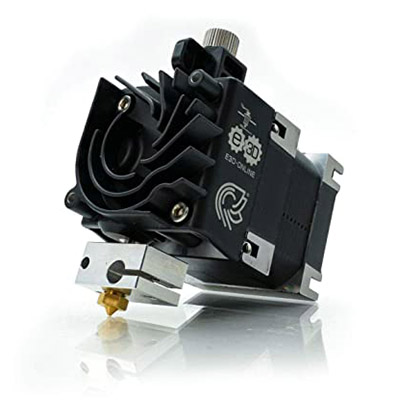

E3D designed the Hemera XS (“eXtra Small”) specifically for high-throughput applications. It achieves flow rates of 40–50 mm³/s, which is the territory you need to sustain 600mm/s+ print speeds without hitting the dreaded “flow rate wall” (more on that below). Paired with E3D’s Revo ecosystem, you also get tool-free nozzle swaps — change from a 0.4mm brass nozzle to a 0.6mm hardened steel in seconds without touching a wrench or heating the hotend.
What makes it special for speed printing:
- Integrated extruder + hotend design — the shortest possible filament path
- Flow rates that can actually keep up with fast motion systems
- Revo nozzle system means zero downtime for material changes
- Compact and well-balanced on the toolhead
✅ Pros
- 40–50 mm³/s flow rate — sustains 600mm/s+ printing
- Tool-free Revo nozzle swaps in seconds
- Integrated design eliminates filament path slop
- Excellent thermal management
- Built by E3D — proven engineering pedigree
❌ Cons
- Premium price — most expensive option here
- Overkill for casual or slow-speed printing
- Locked into E3D Revo nozzle ecosystem
Who should buy this: CoreXY builders (Voron, Bambu-style, Ratrig) who are tuning for maximum speed. Anyone printing with high-flow hotends who needs an extruder that can actually keep pace. If you’re investing in a full high-speed build, this is the extruder that matches the ambition.
The honest trade-off: This is a premium product at a premium price. You’re paying for engineering quality and the Revo ecosystem. If you’re printing at 150mm/s on an Ender, this isn’t your extruder. But if you’re chasing 400–600mm/s? This is where you look.
Best for 600mm/s+ — E3D Revo Hemera XS
💰 Best Budget Pick: Creality Sprite Pro
The Creality Sprite Pro is proof that you don’t have to spend a lot to make a meaningful improvement.
Creality built the Sprite Pro as a near-plug-and-play upgrade for their own Ender and CR series printers, and it shows. The mounting hardware, connectors, and firmware profiles are all designed to work with Creality machines out of the box. For someone who just wants to stop fighting their stock extruder and get back to printing, this is the fastest path to a better experience.
What makes it worth your money:
- All-metal, direct drive design replaces Creality’s notoriously weak stock extruder
- Simple installation — usually just a few bolts and a cable swap
- Dual-gear grip vs the single-gear stock unit
- Price typically lands well under $60
- Significantly better TPU and flexible filament handling than stock
✅ Pros
- Under $60 — incredible value
- Near plug-and-play for Creality printers
- Dual-gear upgrade over weak stock extruder
- Handles TPU much better than stock
- Perfect first upgrade for beginners
❌ Cons
- Gear ratio and grip don’t match premium options
- Limited to Creality ecosystem mostly
- Heavier than Orbiter or Hemera XS
Who should buy this: Beginners who just bought an Ender 3 or similar and want the most straightforward upgrade. People who don’t want to deal with custom mounts or firmware configuration. Anyone whose budget doesn’t stretch to Bondtech or Orbiter territory yet.
The honest trade-off: It’s a good extruder, not a great one. Gear ratio and overall grip don’t match the Orbiter or LGX. But for 90% of what beginners print — PLA, PETG, and occasional TPU — it’s more than capable.
Best Budget Pick — Creality Sprite Pro (Under $60)
🧱 Best for Engineering Materials: Bondtech LGX Pro
If you’re printing Nylon, carbon fiber-filled filaments, or abrasive composites, you need an extruder built for the job. Standard extruder gears wear quickly when dealing with abrasive materials. The Bondtech LGX Pro addresses this with hardened steel drive gears and a torque-focused design that won’t choke on high-viscosity engineering filaments — the kind of strongest 3D printer filaments that demand specialized hardware.
Why engineers and makers choose it:
- Hardened steel gears — won’t wear out against CF and abrasive filaments
- High torque output for pushing thick, viscous materials
- Reliable performance over long, high-temperature print sessions
- Bondtech’s proven reliability
✅ Pros
- Hardened steel gears survive abrasive filaments
- High torque for viscous engineering materials
- Bondtech reliability over long print sessions
- Future-proof investment for material expansion
❌ Cons
- Premium price for specialized use case
- Overkill for standard PLA/PETG printing
- Slightly heavier than Lite version
Who should buy this: Anyone printing regularly with carbon fiber, fiberglass, Nylon, or high-temp engineering materials. Functional parts printing. Professional users who can’t afford print failures from extruder wear.
Best for Engineering Materials — Bondtech LGX Pro
🧪 2026 Performance Insight: Flow Rate vs Speed (The Most Important Thing Most People Get Wrong)
Critical InsightPrint speed (mm/s) is not the same as printing performance. The real bottleneck is volumetric flow rate (mm³/s) — the actual volume of molten plastic your hotend and extruder can push through the nozzle per second.
Here’s the thing nobody talks about enough:
Print speed (mm/s) is not the same as printing performance.
The real bottleneck is volumetric flow rate — measured in mm³/s — which is the actual volume of molten plastic your hotend and extruder can push through the nozzle per second.
Think of it this way: your extruder could theoretically move filament at 600mm/s. But if your hotend can only melt filament at a rate that produces 20 mm³/s of output, you’ll hit the “flow rate wall” — the extruder skips, the hotend chokes, and your print fails or degrades.
The Hidden Failure ModeMost high-speed printing failures at 500–600mm/s aren’t motion system failures. They’re flow rate failures.
This is why pairing the right extruder with the right hotend matters so much. An Orbiter 2.0 paired with a standard V6 hotend will still hit flow rate limits before it hits its own mechanical limits. Pair it with a high-flow hotend (like the Phaetus Dragon UHF, Bambu-style high-flow hotend, or E3D’s Revo High Flow), and suddenly your extruder can actually express its torque capability.
The 2026 mindset: Think of your extruder and hotend as a matched system, not separate components. Your maximum speed is limited by whichever component in that chain is slowest.
For reference:
- Standard V6 hotend: ~8–15 mm³/s
- Phaetus Dragon (standard): ~15–25 mm³/s
- High-flow hotends: 30–60+ mm³/s
To sustain 600mm/s with a 0.4mm nozzle at 0.2mm layer height and 0.45mm line width, you need roughly 22+ mm³/s. With a 0.6mm nozzle, that number climbs. Plan accordingly.
🧩 3D Printer Extruder Assembly: What’s Inside and What Matters
Understanding the 3D printer extruder assembly helps you troubleshoot problems and appreciate why quality components cost more. Here’s what’s inside:
Drive Gears: The toothed wheels that actually grip the filament. Quality, precision-machined gears with sharp teeth are the difference between consistent extrusion and grinding. This is where Bondtech earns its reputation.
Idler Arm: Holds the passive (or second driven) gear against the filament on the other side. Adjustable tension is important — too tight and you deform soft filaments; too loose and you lose grip. The best designs let you set tension precisely.
Stepper Motor: Drives the whole system. Gear ratio determines how much torque the motor’s rotation becomes at the filament. A 7.5:1 ratio means the motor turns 7.5 times for every single revolution of the drive gear — more torque, slower filament movement per step, but finer control.
Filament Path: The tube or channel that guides filament from the entry point through the gears and out toward the hotend. Shorter and more constrained paths mean less “play” in the system — critical for retraction performance and print quality.
Tension System: Springs, screws, or levers that set how firmly the idler presses against the filament. The component that gets the most blame for problems and the least attention during setup.
Quality Priority OrderWhich parts affect print quality most? Drive gear quality and filament path geometry are the top two. Everything else can be tuned around; poor gears and a loose filament path create problems no amount of calibration fully fixes.
🔬 3D Printer Extruder Design in 2026: The Factors That Actually Matter
The best 3D printer extruder designs in 2026 are optimized around four competing factors:
Gear Ratio (Torque vs Speed): Higher ratios give more torque but require faster motor speeds for the same filament feed rate. 3:1 is solid for most applications; 7.5:1 like the Orbiter is for high-torque demanding setups. There’s no universal “best” — it depends on your materials and speed goals.
Filament Path Constraint: A well-constrained filament path means the filament goes exactly where you tell it, exactly when you tell it. Sloppy paths mean lag between what the printer commands and what the nozzle actually outputs — especially noticeable during direction changes and retractions.
Weight vs Acceleration: This is the 2026 reality. As CoreXY systems push 10,000–30,000 mm/s² acceleration, every gram on the toolhead directly affects print quality (ringing, ghosting) and how hard you’re working your motion system. The Orbiter 2.0’s ~135g vs a heavier extruder at ~200g+ might sound small, but at high acceleration those 65 grams create measurable resonance differences.
Heat Management: Modern integrated extruder-hotend designs need to prevent heat from creeping up from the melt zone into the filament drive area (heat creep). Good designs use heat breaks, cooling fins, and airflow to keep the filament cold and rigid right up to the moment it enters the melt zone.
2026’s Cutting-Edge Design Features
CAN-Bus Integration: High-end toolheads now communicate with the printer’s main controller via CAN-Bus — a single data cable replacing the bundle of motor, thermistor, fan, heater, and probe wires. Cleaner wiring, easier toolhead swaps, and modular upgrade paths. If you’re building a new machine in 2026, CAN-Bus toolheads are worth considering from day one.
Integrated Load Sensors (Auto Z-Offset): Some advanced toolheads integrate load cells that let the nozzle itself act as a probe — touching the bed and detecting contact through minute force changes. This means automatic Z-offset calibration, better first layer consistency, and one less separate probe component. It’s still emerging technology, but it’s becoming increasingly available in premium builds.
🔩 3D Printer Extruder Nozzle: What You Need to Know
People talk about extruders and hotends, but the 3D printer extruder nozzle is often the forgotten variable. Your nozzle size and material directly affect what your extruder has to push against.
Nozzle Size and Flow Rate:
- 0.4mm: The universal standard. Good balance of detail and speed.
- 0.6mm: Significantly higher flow rate, great for structural prints and speed printing. This is where high-speed machines often live.
- 0.8mm+: Maximum flow, excellent for large functional parts, limited detail.
Going larger doesn’t just affect aesthetics — it changes the back-pressure your extruder works against. A 0.6mm nozzle at the same settings flows more easily than a 0.4mm, which can actually let you push filament faster before hitting the flow wall.
Nozzle Materials:
- Brass: Standard, excellent thermal conductivity, cheap. Don’t use with abrasive filaments — it wears fast.
- Hardened Steel: For carbon fiber, glass-filled, and other abrasive materials. Slightly lower thermal conductivity than brass, but durability that lasts.
- Ruby/Nickel-plated: Niche high-performance materials. Excellent for food-safe or specialty applications.
Go DeeperLooking to go deeper on this topic? Check out our guide to the Best 3D Printer Nozzles for a full breakdown of sizing, materials, and top picks.
🛠️ Best 3D Printed Extruders: Are DIY Extruders Worth It?
The search term “best 3d printed extruder” gets a lot of traffic, and it’s a fair question. Can you just print your own extruder?
The short answer: yes, you can. The honest answer: you probably shouldn’t rely on it for serious printing.
The case for printed extruders:
- Extreme customization — you can design exactly what you need
- Cost savings on the housing, brackets, and idler arm
- Great for the community — designs like the Voron toolhead parts are genuinely excellent
- Fun if you’re into the DIY aspect
The case against relying on them:
- FDM-printed parts don’t have the dimensional precision or material properties of machined metal components
- Printed housings flex slightly under load, affecting grip consistency
- Drive gears must still be metal — the critical gripping surfaces cannot be printed
- For a part that runs continuously for hundreds of hours under tension and vibration, metal wins on durability
Our TakePrint your own mounts, brackets, and toolhead accessories. Buy your drive mechanism — gears, idler, and motor assembly — from a reputable manufacturer. The cost difference is small; the reliability difference is real.
⚔️ Direct Drive vs Bowden: The 2026 Decision
Let’s put this to bed clearly:
| Situation | Best Choice |
|---|---|
| Printing TPU or flexible filaments | Direct Drive — always |
| High-speed printing (300mm/s+) | Lightweight Direct Drive |
| Large format, ultra-light build plate | Bowden (niche use case) |
| Budget upgrade for Ender-style printer | Direct Drive (Sprite Pro) |
| CoreXY, Voron, RatRig builds | Direct Drive |
| Printing only PLA on stock hardware | Either works, Direct Drive preferred |
In 2026, direct drive is the dominant choice. The weight penalty that once made Bowden setups attractive has been significantly reduced by lightweight direct drive designs. Unless you have a very specific use case requiring remote motor mounting, go direct drive.
🧪 Real-World Print Quality Impact: What a Better Extruder Actually Changes
Upgrading your extruder isn’t just about preventing failures — it genuinely changes what your prints look like.
Retraction Control: Better extruders execute retraction commands precisely and immediately. The result? Less stringing, cleaner travel moves, and sharper corners on detailed prints. If you’ve ever fought a stringing nightmare with TPU, a good direct drive extruder is the solution.
Under-Extrusion Prevention: Inconsistent extrusion — visible as wavy lines, weak layer adhesion, or gaps in infill — usually traces back to extruder slip. A dual-gear extruder with proper tension grips filament consistently, even through the back-pressure spikes of complex geometry. If you’re seeing signs of under-extrusion, your extruder is often the culprit.
Layer Consistency: At high speeds, a weak extruder skips steps as pressure builds at direction changes and layer transitions. Quality extruders maintain consistent pressure throughout, producing cleaner layer surfaces and better dimensional accuracy.
The ROI RealityMany users who spend $600+ on a new printer would get better results spending $100 on a quality extruder upgrade for their current printer. The extruder is that important.
❌ Common Extruder Problems and How to Fix Them
Even good extruders have bad days. Here’s what’s probably happening and how to fix it:
Clicking / Skipping:
The motor is skipping steps because it can’t push filament fast enough. Causes: print temperature too low (increase hotend temp by 5–10°C), feed rate too high (reduce speed or flow), tension too high (back off the idler screw slightly), or clogged nozzle (clean or replace).
Grinding Filament:
The drive gears are chewing through filament rather than gripping it. Usually: tension too high (most common), or the filament is jammed downstream and the extruder is grinding against a blockage. Check the nozzle first.
Inconsistent Flow / Blobbing:
Variable extrusion width visible on surfaces. Often caused by loose idler tension, worn drive gears, or a partially clogged nozzle creating variable back-pressure. Recalibrate your flow/e-steps and check gear condition. This can also manifest as subtle over-extrusion in some areas.
Quick Fixes Checklist:
- Adjust idler tension (the single most underrated setting)
- Clean drive gears with a small brush
- Calibrate your E-steps or rotation distance (especially after any extruder change)
- Verify nozzle isn’t partially blocked
- Check hotend temperature accuracy with a separate thermometer
🔍 Click to reveal: How to properly calibrate E-steps after an extruder swap
After changing your extruder, your E-steps (or rotation distance in Klipper) must be recalibrated. Here’s the quick method:
- Mark your filament 120mm above the extruder entry point
- Command the extruder to extrude exactly 100mm
- Measure how far the mark moved. If it moved 98mm, your extruder is under-extruding by 2%
- Calculate new E-steps: (Requested / Actual) × Current E-steps = New E-steps
- Save and repeat to verify. You should be within 0.5mm accuracy.
In Klipper, use the CALIBRATE_EXTRUDER command for automated calibration.
💡 Buyer’s Guide: How to Choose the Right Extruder for Your Setup
Here’s how to make the decision without overthinking it:
Step 1 — Know your printer:
Is it a bed-slinger (Ender, Prusa style) or CoreXY (Voron, RatRig, Bambu style)? CoreXY builds benefit more from lightweight options. Bed-slingers are more forgiving on toolhead weight.
Step 2 — Know your materials:
- PLA / PETG only: Almost any quality direct drive will do. Sprite Pro or Orbiter 2.0 are great.
- TPU / Flexibles: You need good direct drive with proper filament path constraint. Orbiter 2.0 or LGX Lite V2.
- Nylon / CF / Abrasives: Hardened gears are non-negotiable. LGX Pro.
Step 3 — Know your speed goals:
- Under 200mm/s: Any quality extruder pairs fine with a standard hotend.
- 200–400mm/s: Lightweight direct drive + decent flow hotend. Orbiter 2.0 territory.
- 400–600mm/s+: Full system approach — Hemera XS or similar + high-flow hotend + CAN-Bus toolhead.
Step 4 — Know your budget:
- Under $60: Sprite Pro — significantly better than any stock Creality extruder
- $60–120: Orbiter 2.0 — best performance-per-dollar in this range
- $120–200: LGX Lite V2 — set it and forget it quality
- $200+: Hemera XS — high-speed specialist, invest wisely
⚡ 30-Second Decision:
Beginner → Creality Sprite Pro
Hobbyist wanting more speed → LDO Orbiter 2.0
Advanced / CoreXY builder → Bondtech LGX Lite V2 or E3D Revo Hemera XS
❓ Frequently Asked Questions
What is the best 3D printer extruder overall in 2026?
For most users, the Bondtech LGX Lite V2 is the best overall choice. It’s reliable, compatible with most modern CoreXY machines, handles a wide range of materials, and delivers Bondtech’s renowned build quality. If you want to upgrade once and stop thinking about your extruder, this is it.
Is direct drive better than Bowden in 2026?
Yes, in almost every practical scenario. Direct drive delivers better retraction control, better flexible filament handling, and more responsive extrusion. The weight disadvantage that once favored Bowden setups has been largely negated by lightweight designs like the Orbiter 2.0. Bowden still exists in niche applications, but for most users, direct drive is the clear winner.
Is a dual-gear extruder necessary in 2026?
Absolutely yes. Single-gear designs are effectively obsolete for anyone printing at modern speeds or with materials other than basic PLA. Dual-gear designs grip filament from both sides, which is essential for consistent extrusion, high-speed printing, and flexible materials. If an extruder is still running a single drive gear with a passive idler bearing, look elsewhere.
What is the best extruder for TPU and flexible filaments?
A lightweight direct drive extruder with a well-constrained filament path. The LDO Orbiter 2.0 and Bondtech LGX Lite V2 are both excellent. The key is minimizing the unsupported filament gap between the drive gears and the hotend entry — flexible filaments buckle in that gap. For more on choosing the right material, see our Best TPU Filament guide.
Do I actually need to upgrade my extruder?
If you’re printing fast (consistently above 150–200mm/s), printing with advanced materials (TPU, Nylon, CF), experiencing regular under-extrusion or clicking, or building a performance machine from scratch — yes, upgrading your extruder will make a noticeable difference. If you’re happy printing PLA at 60mm/s on a stock Ender and it’s working fine, your stock extruder may be adequate.
Can I 3D print my own extruder?
You can print the housing and mounting brackets, and this is common in the community (Voron designs encourage it). But the critical drive mechanism — gears, idler, and tensioning — needs to be metal. A fully printed extruder is a fun project but not reliable for production printing. Use printed parts where they make sense; buy precision metal drive components.
What extruder is best for carbon fiber filaments?
The Bondtech LGX Pro, with its hardened steel drive gears, is the top pick for abrasive materials. Standard extruder gears wear surprisingly quickly when in continuous contact with CF-filled filaments — hardened steel is worth the investment if you print this material regularly.
🏁 Your Extruder Is Your Most Important Upgrade
Here’s the bottom line: if you’ve been printing with a stock or aging extruder and wondering why your results don’t match what you see on forums and YouTube — your extruder is probably why.
A quality extruder is the highest-ROI hardware upgrade available for most 3D printers. It improves print quality, enables new materials, unlocks higher speeds, and eliminates the frustrating failures that make you want to give up on a print mid-way through.
The 2026 landscape makes this easier than ever:
Just getting started? → Creality Sprite Pro gives you direct drive reliability without complexity.
Ready to push your machine? → LDO Orbiter 2.0 delivers torque and low weight in one package.
Building the best CoreXY money can buy? → Bondtech LGX Lite V2 is the set-it-and-forget-it standard.
Chasing 600mm/s? → E3D Revo Hemera XS is built for exactly that ambition.
Stop letting a weak extruder hold your printer back. The prints you want are closer than you think — often just one upgrade away.
🔗 Related Guides You’ll Find Useful
- Best 3D Printers (2026): Full Breakdown by Category
- Best TPU Filament for Flexible Printing
- Best Nylon Filament for Engineering Parts
- Best PETG Filament: Top Picks for Every Budget
- Best 3D Printer Nozzles: Brass, Steel, and Ruby Options Compared
- 3D Printing Troubleshooting Guide: Fix Common Print Failures
- Best Bowden Extruder: Top Remote-Mount Options
- Best CoreXY 3D Printers in 2026
- Strongest 3D Printer Filament in 2026
- Ultimate Guide to 3D Printing Terms
Prices and availability may vary. Always check the manufacturer’s official store or authorized retailers for the most current pricing and compatibility information.