


If you’re trying to decide between a resin 3D printer and a filament (FDM) 3D printer, you’re not alone. These two technologies dominate the consumer 3D printing world, but they offer very different strengths, workflows, and end results. Choosing the right one depends heavily on the type of models you want to make, your experience level, and how hands-on you want the printing process to be.
In this guide, we break down the key differences in detail—print quality, material strength, cost of ownership, ease of use, maintenance, and safety—so you can confidently determine whether a resin or filament 3D printer is the better fit for your projects.
Whether you’re printing miniatures, functional parts, cosplay pieces, prototypes, or detailed models, this comparison will help you make an informed decision before buying your next machine.
Resin vs. Filament 3D Printers: Key Differences at a Glance
Before diving deeper, here’s a quick side-by-side look at how resin and filament (FDM) 3D printers compare across the features that matter most.
| Criteria | Resin 3D Printer | Filament (FDM) 3D Printer |
|---|---|---|
| Print Quality | Extremely detailed; smooth surfaces | Good but visible layer lines |
| Ease of Use | Messy; requires post-processing | Beginner-friendly; simple setup |
| Cost of Ownership | Higher (resin, IPA, consumables) | Lower (filament is inexpensive) |
| Best For | Miniatures, models requiring high detail | Large parts, durable functional models |
| Maintenance | Vat cleaning, resin handling | Nozzle cleaning, bed leveling |
What Is a Resin 3D Printer?
A resin 3D printer uses UV light to cure liquid photopolymer resin into solid layers. The most common types you’ll see today are MSLA (masked stereolithography), SLA, and DLP, all of which follow the same principle—exposing resin to light to create highly detailed models.
Resin printing is popular for producing incredibly smooth surface finishes and fine details that even the best filament printers struggle to match. This makes resin machines ideal for miniatures, detailed figurines, jewelry prototypes, dental models, and small precision parts.
However, resin printing comes with trade-offs. The liquid resin is messy, requires gloves and proper ventilation, and every print needs washing and curing. You’ll also deal with consumables like IPA, paper filters, and FEP or ACF film replacements. While the print quality is unmatched, resin printing demands more hands-on involvement compared to FDM.
Pros of Resin 3D Printers
- Exceptional detail and accuracy
- Ultra-smooth surface finish
- Great for small, intricate models
- Fast batch printing (entire layer cures at once)
Cons of Resin 3D Printers
- Messy and requires post-processing
- Resin can be toxic; needs proper ventilation
- Ongoing consumable costs
- Build volumes are typically smaller
What Is a Filament (FDM) 3D Printer?
A filament 3D printer, also known as an FDM (Fused Deposition Modeling) printer, creates models by melting plastic filament and depositing it layer by layer. This is the most common and beginner-friendly form of desktop 3D printing thanks to its affordability, simplicity, and wide compatibility with different materials.
Filament printers excel at producing large models, functional parts, prototypes, cosplay pieces, brackets, mechanical components, and everyday utility prints. They are extremely versatile, allowing you to switch between materials like PLA, PETG, ABS, TPU, Nylon, and more—each offering different levels of strength, durability, and flexibility.
While FDM prints may show visible layer lines and typically don’t match resin’s microscopic detail, the workflow is clean, straightforward, and easy to maintain. This makes FDM printers the preferred choice for beginners, makers, engineers, and anyone who needs strong, reliable parts.
Pros of Filament (FDM) 3D Printers
- Beginner-friendly and straightforward to operate
- Affordable machines and low-cost materials
- Great for strong, functional parts and large prints
- Wide range of filaments available
- Cleaner, less messy workflow compared to resin
Cons of Filament (FDM) 3D Printers
- Visible layer lines on most prints
- Requires calibration and tuning for best results
- Some materials like ABS need ventilation
- Less fine detail compared to resin printing
Resin vs. Filament 3D Printers: Detailed Comparison
Now that you understand how each technology works, let’s compare resin vs filament across the factors that matter most—print quality, durability, cost, ease of use, safety, and overall workflow. This section will help you clearly identify which type of 3D printer aligns with your projects and skill level.
Print Quality
If your priority is surface detail, resin wins by a large margin. Resin printers can achieve microscopic layer heights and produce smooth surfaces straight off the build plate. Filament printers, while improving with newer hardware, still produce visible layer lines.
- Resin: Best for miniatures, figurines, high-detail models.
- Filament: Best for large parts, prototypes, and functional items.
Print Speed
Resin printers cure entire layers at once, meaning print speed depends on model height—not complexity. This makes them excellent for batch printing miniatures. FDM printers vary widely in speed, depending on nozzle size, slicer settings, and machine quality.
- Resin: Faster for detailed or multiple small models.
- Filament: Faster for single, large objects with low detail needs.
Durability & Material Properties
Filament materials like PLA, PETG, ABS, and TPU offer superior strength, impact resistance, and functional performance. Most standard resins are more brittle, although flexible and tough resin formulas do exist at higher cost.
- Resin: High detail but often brittle.
- Filament: Strong, durable, and suitable for mechanical use.
Cost of Ownership
Resin printing generally costs more over time due to consumables such as resin, gloves, IPA, filters, and FEP/ACF films. Filament printing is the most economical entry point into 3D printing, with low-cost PLA and fewer consumables.
- Resin: Higher ongoing costs.
- Filament: Budget-friendly; ideal for beginners.
Ease of Use
Filament printers are cleaner and easier to operate, making them ideal for beginners. Resin printing requires more steps—washing, curing, and handling chemicals safely—so the learning curve is steeper.
- Resin: More steps; workflow is hands-on.
- Filament: Simple, approachable, and low-mess.
Maintenance
Resin machines require frequent vat cleaning, screen replacements, and resin handling. FDM printers need occasional nozzle cleaning, belt tensioning, and bed leveling—tasks that are easier for most users.
- Resin: Higher maintenance.
- Filament: Lower maintenance.
Safety Considerations
Uncured resin can irritate skin and produces fumes that require ventilation. Filament printing is generally safer, though materials like ABS release fumes and should be printed in a ventilated space.
- Resin: Requires gloves, proper ventilation, and safe disposal practices.
- Filament: Safe for home use, especially PLA and PETG.
Best Use Cases for Resin 3D Printers
Resin 3D printers shine in applications where detail, smooth surfaces, and accuracy matter most.
If your projects depend on small features, crisp textures, or professional-grade finishes, resin will almost always outperform filament.
Resin Is Ideal For:
- Miniatures & Figurines – Perfect for tabletop models, character prints, and collectibles where tiny details are critical.
- Jewelry Prototyping – Clean surface quality and sharp edges make resin the go-to for molds and pattern work.
- Dental Models – Smooth and dimensionally accurate prints used in orthodontics and prosthetic planning.
- Small Precision Parts – Components requiring tight tolerances, such as enclosures, gears, and micro-mechanisms.
- Art Sculptures & Display Pieces – Beautiful finish with minimal post-processing required.
In short, if your priority is detail and finish rather than strength or size, a resin 3D printer is the most suitable tool.
Best Use Cases for Filament (FDM) 3D Printers
Filament 3D printers deliver the best results when you need strength, durability, and larger print sizes.
They are highly versatile, handle a wide range of materials, and are ideal for both hobby and professional applications.
FDM Is Ideal For:
- Functional Parts – Brackets, hinges, enclosures, gears, and mechanical components where durability matters.
- Large Models – FDM printers offer bigger build volumes, making them perfect for helmets, props, and prototypes.
- Cosplay & Props – Lightweight, strong prints that are easy to sand, paint, and assemble into large costume pieces.
- Prototyping – Fast, low-cost iteration using materials like PLA or PETG for concept validation.
- Household Items & Practical Prints – Hooks, organizers, tools, replacement parts, and other everyday utilities.
If your goal is to print strong, functional, or large-scale objects with minimal mess and low operating costs,
a filament 3D printer is the best choice.
Which Should You Choose? Resin or Filament?
If you’re trying to decide which is better, resin or filament, the best choice comes down to what you want to print, your budget, and how much workflow complexity you’re comfortable with. Use the guide below to quickly determine the right type of 3D printer for your needs.
Choose a Resin 3D Printer If:
- You want the highest level of detail for miniatures, figurines, jewelry, or small precision models.
- Surface smoothness matters more than strength or size.
- You’re comfortable with washing, curing, and handling chemicals.
- You’re okay with higher ongoing costs for resin and consumables.
- You have a well-ventilated, dedicated workspace for post-processing.
Choose a Filament (FDM) 3D Printer If:
- You want strong, functional, or large prints at a low cost.
- You prefer a cleaner, simpler workflow with minimal post-processing.
- You’re a beginner looking for an easy, affordable starting point.
- You want to print household items, cosplay armor, mechanical parts, or prototypes.
- You need a machine that is safe and dependable in a home environment.
So, Which Is Better?
Both are excellent — it simply depends on your priorities.
- For detail and smooth surfaces: Resin is the top choice.
- For strength, size, and everyday utility: Filament is the better fit.
No matter which you choose, both technologies can deliver outstanding results when matched to the right type of project.
Best Resin 3D Printers & Best FDM 3D Printers
Here are the top resin and filament 3D printers that offer excellent performance, reliability, and value. Each model includes a feature-rich comparison table, pros and cons, and quick links to check prices.
Best Resin 3D Printers
1. Elegoo Saturn 4 Ultra
Delivers exceptional 12K resolution with innovative tilt features and AI assistance at a mid-range price. Perfect for detailed miniatures and prototypes.
| Feature | Details |
|---|---|
| Build Volume | 218.88 x 122.88 x 220 mm |
| XY Resolution | 19 x 24 microns (12K) |
| Max Print Speed | 150 mm/h |
| Interface | 4-inch capacitive touchscreen, USB, Wi-Fi |
Pros
- ✔ Ultra-high 12K resolution
- ✔ Tilt-release vat and hood
- ✔ AI camera monitoring and auto-leveling
Cons
- ✘ Medium build volume for some large projects
- ✘ Resin post-processing required
2. Elegoo Mars 5 Ultra
Perfect for ultra-high detail miniatures and jewelry with 18-micron XY resolution and smart AI features for automated leveling and detection.
| Feature | Details |
|---|---|
| Build Volume | 153.36 x 77.76 x 165 mm |
| XY Resolution | 18 x 18 microns (9K) |
| Max Print Speed | 150 mm/h |
| Interface | 4-inch capacitive touchscreen, USB, Wi-Fi |
Pros
- ✔ Ultra-high 18-micron detail
- ✔ Tilt-release and automated AI detection
- ✔ One-click auto-leveling
Cons
- ✘ Smaller build volume than Saturn 4 Ultra
- ✘ Requires post-processing
3. Anycubic Photon Mono M7 Max
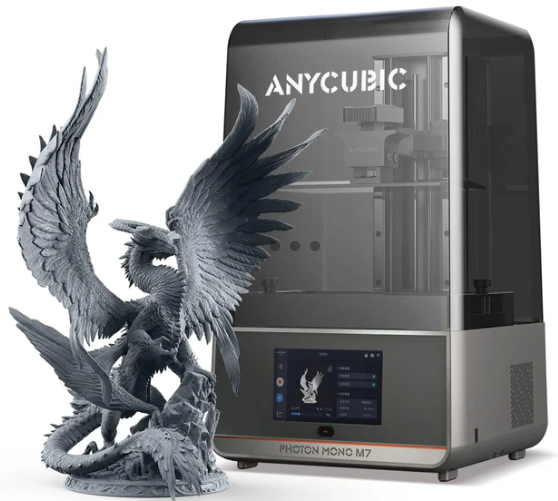

Best large-format resin printer with massive 298 x 164 x 300 mm build volume, smart resin management, and heated vat for consistent large prints.
| Feature | Details |
|---|---|
| Build Volume | 298 x 164 x 300 mm |
| XY Resolution | 46 x 46 microns (7K) |
| Max Print Speed | 86 mm/h (high-speed resin) |
| Interface | 4.3-inch TFT touchscreen, USB, Wi-Fi, LAN |
Pros
- ✔ Massive build volume for resin
- ✔ Heated resin vat and smart resin management
- ✔ Dual Z-axis linear rails for stability
Cons
- ✘ Slower than FDM printers for large parts
- ✘ Post-processing still required
Best FDM 3D Printers
1. Bambu Lab A1 Combo


Best overall for most users — combines speed, multi-color printing, and user-friendly features at an aggressive price point.
| Feature | Details |
|---|---|
| Build Volume | 256 x 256 x 256 mm³ |
| Print Speed | Up to 500 mm/s |
| Extruder | Single extruder with AMS lite 4-color system |
| Max Nozzle Temp | ≤300°C |
| Key Features | AI failure detection, 1-clip quick-swap nozzle, built-in camera, full-auto leveling |
Pros
- ✔ Very fast and accurate
- ✔ Multi-color printing capability
- ✔ Beginner-friendly with AI assistance
Cons
- ✘ Small build volume compared to K2 Plus
- ✘ Advanced features can be overwhelming for first-timers
2. Creality K2 Plus
Best for large format and power users — huge build volume, heated chamber, and advanced multi-color system.
| Feature | Details |
|---|---|
| Build Volume | 350 x 350 x 350 mm |
| Print Speed | Up to 600 mm/s |
| Extruder | Single direct-drive, dual-gear |
| Max Nozzle Temp | ≤350°C |
| Key Features | 16-color CFS, dual AI cameras, filament runout sensor, power loss recovery |
Pros
- ✔ Huge build volume
- ✔ Heated chamber and multi-color printing
- ✔ Advanced AI-assisted features
Cons
- ✘ More expensive than Bambu Lab A1 Combo
- ✘ Slightly more complex setup
3. Prusa CORE One
Best for precision and open-source enthusiasts — exceptional accuracy, CoreXY system, and upgradeable features.
| Feature | Details |
|---|---|
| Build Volume | ≈250 x 210 x 210 mm |
| Print Speed | Approx. 400-500 mm/s |
| Motion System | CoreXY |
| Key Features | Exceptional accuracy ±0.01mm, open-source, upgradeable, robust community |
Pros
- ✔ High precision and reliability
- ✔ Open-source with upgrade path
- ✔ Strong community support
Cons
- ✘ More expensive than entry-level printers
- ✘ Not as beginner-friendly as Bambu Lab A1
Frequently Asked Questions
Is resin stronger than filament?
Most standard resins are not as strong as filament materials like PLA, PETG, or ABS. Resin prints offer incredible detail but are usually more brittle. Filament is the better choice for functional or load-bearing parts.
Is resin more expensive than filament?
Yes. Resin is more expensive per print, and it also requires additional consumables such as IPA, gloves, filters, and curing supplies. Filament materials like PLA and PETG are much cheaper to use long term.
Is resin or filament better for beginners?
Filament is the better option for beginners. It’s easier to learn, cleaner to work with, and requires fewer safety precautions. Resin offers higher detail but has a steeper learning curve and requires more post-processing.
Are resin 3D prints safe?
Resin printing is safe when handled properly, but uncured resin can irritate the skin and produce fumes. Gloves, ventilation, and proper disposal are essential. Fully cured resin prints are safe to handle.
Is filament cheaper than resin?
Yes. Filament is significantly cheaper both in material cost and overall maintenance. Resin has higher material prices and requires extra consumables, making filament the more budget-friendly choice.