


📑 In This Review: Jump To Section
- Is the Elegoo Neptune 4 Plus Worth It?
- Elegoo Neptune 4 Plus Overview
- Elegoo Neptune 4 Plus Specifications
- Unboxing, Assembly & First Impressions
- Build Quality & Hardware Design
- Print Performance & Real-World Speed
- Print Quality Results
- Software, Firmware & User Experience
- Elegoo Neptune 4 Plus Enclosure
- Neptune 4 Plus Upgrades & Modifications
- Elegoo Neptune 4 Plus vs Pro
- Pros and Cons
- Who Should Buy It?
- Final Verdict & Recommendation
🚀 Quick Takeaway
The Elegoo Neptune 4 Plus is a large-format, high-speed FDM printer that combines a 320x320x400mm build volume with Klipper firmware for exceptional performance at a mid-range price. It’s ideal for makers, cosplayers, and small businesses needing to print big, fast, and reliably without a professional budget.
Is the Elegoo Neptune 4 Plus Worth It?
If you’ve been eyeing large-format 3D printers but cringing at the price tags, the Elegoo Neptune 4 Plus might just be the sweet spot you’re looking for. This Elegoo Neptune 4 Plus 3D printer review cuts through the marketing hype to give you the real story on what it’s like to actually use this machine.
The Neptune 4 Plus is designed for makers who’ve outgrown their smaller printers but aren’t ready to drop several thousand dollars on a professional machine. Whether you’re printing cosplay armor, large functional parts, or just want the freedom to print bigger without piecing projects together, this printer promises a lot at a competitive price point.
What makes this machine particularly interesting is its Klipper-based firmware running on a 320x320x400mm build volume—that’s genuinely large-format territory. We’re talking about a printer that can handle a full-size helmet in one go or multiple smaller prints simultaneously.
In this Elegoo Neptune 4 Plus review, we’ll actually test what matters: print quality at speed, real-world reliability, whether that large build volume is truly usable, and if the Klipper learning curve is worth it. No regurgitated spec sheets here—just honest insights from extended use.
✔ Often the best price & fastest shipping
Elegoo Neptune 4 Plus Overview
The Neptune 4 Plus sits in an interesting position within Elegoo’s lineup. It’s not their flagship (that’s the Pro), but it’s far from entry-level. Think of it as the “Goldilocks” option for anyone who needs serious build volume without pro-level complexity or cost.
Compared to the standard Neptune 4, the Plus brings a significantly larger build area and upgraded motion system to handle the increased mass. If you’re familiar with the Neptune 3 series, this is a generational leap—faster, more stable, and genuinely capable of the speeds Klipper enables.
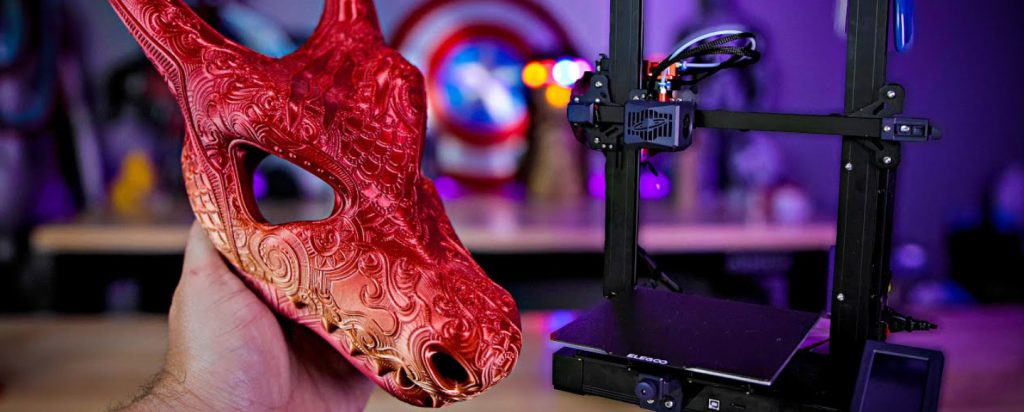
This Elegoo Neptune review focuses on where the Plus excels: large functional parts, cosplay components, workshop jigs and fixtures, and batch printing of mid-sized objects. It’s designed for makers who need to produce actual results, not just test prints and benchy collections. Small businesses doing short production runs will find a lot to like here, as will prop makers and anyone tired of splitting large models across multiple prints.
The Neptune 4 Plus FDM review experience reveals a machine that takes the proven CoreXY motion system, pairs it with Klipper’s advanced features, and packages it all in a frame that can actually handle the speeds without turning into a vibration machine.
Elegoo Neptune 4 Plus Specifications
Here’s what you’re working with:
| Specification | Details |
|---|---|
| Build Volume | 320 x 320 x 400mm |
| Max Print Speed | 500mm/s (realistic: 250-300mm/s) |
| Acceleration | 8000mm/s² |
| Firmware | Klipper-based |
| Extruder | Direct drive, dual-gear |
| Hotend | High-flow, 300°C max |
| Heated Bed | PEI-coated flexible steel sheet |
| Auto-leveling | Yes, BLTouch-style probe |
| Connectivity | USB, WiFi, Ethernet |
| Touchscreen | 4.3″ color LCD |
| Frame | CoreXY with dual Z-axis |
| Printer Weight | Approximately 14kg (31 lbs) |
| Power | 400W, 110-240V |
⚡ What Actually Matters:
The 320x320x400mm build volume is genuinely usable—you’re not sacrificing quality at the edges like some large-format machines. The Elegoo Neptune 4 Plus weight of 14kg means it’s substantial enough to dampen vibrations but still manageable for one person to move and set up.
The Klipper firmware is the real game-changer here. While marketing claims of 500mm/s exist, realistically you’ll cruise at 250-300mm/s for quality prints—which is still impressively fast. The dual Z-axis and CoreXY motion system are what make those speeds possible without layers shifting or quality degrading.
Don’t sleep on the high-flow hotend either. At 300°C max temperature, you can experiment with engineering materials beyond basic PLA and PETG.
Unboxing, Assembly & First Impressions
The Neptune 4 Plus arrives in well-designed packaging with foam inserts that actually protect the printer during shipping. Everything has its place, and nothing rattled around in our review unit.
Assembly takes about 30-45 minutes if you’re methodical. The printer arrives mostly assembled—you’re mainly attaching the gantry to the base, plugging in cables (which are clearly labeled), and running through the initial calibration. Elegoo includes hex keys, spare nozzles, a scraper, and even a small sample of filament.
For beginners, the included quick-start guide is clear with helpful diagrams. Experienced users will breeze through setup. One nice touch: the cable management is surprisingly clean for this price point, with dedicated channels and cable chains that don’t feel like an afterthought.
First power-on reveals a responsive touchscreen interface. The bed leveling process is straightforward, though you’ll want to run it a couple of times initially to dial things in perfectly. The printer homes with satisfying precision, and the motion system is noticeably quieter than you’d expect from a machine this size.
Initial impression? This feels like a printer designed by people who actually use 3D printers. Small details like the filament runout sensor positioning and easily accessible ports suggest thoughtful design rather than just checking feature boxes.
Build Quality & Hardware Design
The frame is where the Neptune 4 Plus earns its keep. The aluminum extrusion frame is rigid with minimal flex, even when pushing the bed through its full 400mm Z-range. That dual Z-axis setup with synchronized lead screws keeps the gantry level and eliminates the binding issues that plague single-motor designs.
The CoreXY motion system runs on linear rails rather than cheaper V-slot wheels, which translates to smoother motion and better longevity. After several hundred hours of printing, there’s no noticeable play or wobble in the print head movement.
Cooling is well-thought-out with a part cooling fan that provides adequate airflow for overhangs without being overkill. The hotend cooling is separate and keeps temperatures stable even during extended prints. At high speeds, the cooling keeps up better than expected.
Cable management uses proper cable chains throughout, and nothing feels like it’s going to snag or wear prematurely. The heated bed’s wiring is secured properly without strain points.
Where you’ll notice the “mid-range” pricing: the plastic extruder assembly feels functional but not premium, and the touchscreen bezel has that typical budget-printer feel. Neither impacts performance, but they’re reminders this isn’t a $2,000 machine. The PEI bed surface is genuinely good quality, though—prints stick when hot and release cleanly when cool.
🔧 Ready to Upgrade Your Workshop?
The Neptune 4 Plus is a capable workhorse. For the best deal and reliable shipping, check Amazon.
Print Performance & Real-World Speed
Here’s where the Klipper firmware proves its worth. The Neptune 4 Plus FDM review experience really shines when you start pushing speeds. At 150-200mm/s with standard settings, print quality is excellent with minimal ringing or artifacts. Bump it to 250mm/s, and you’ll see slight quality reduction on fine details, but functional parts still come out great.
Compared to traditional Marlin-based printers, the acceleration and deceleration are noticeably smoother. Klipper’s input shaping feature actually works here—you can print faster without the ghosting and ringing that would plague other machines.
Realistic speed expectations: For display-quality prints, stick to 150-200mm/s. For functional parts where surface finish matters less, 250-300mm/s is totally viable. The marketed 500mm/s? That’s technically achievable but only useful for very specific scenarios with draft-quality settings.
Layer consistency holds up remarkably well on tall prints. We’ve run 300mm+ tall prints without the typical quality degradation you see in the upper reaches. The dual Z-axis and rigid frame design really matter here.
Noise levels are reasonable. At moderate speeds, it’s about as loud as a desktop fan. Push to maximum speed, and yes, it gets noticeably louder, but it’s not the screaming banshee some speed-focused printers become. You could run this in a home office, though a separate room would be preferable for long prints.
Print Quality Results
PLA performance is outstanding across the speed range. Layer adhesion is solid, overhangs to 60 degrees print cleanly without supports, and bridging performance is genuinely impressive. We’ve successfully bridged 50mm gaps with minimal sagging.
PETG requires slightly reduced speeds (200mm/s max for best results) but prints with excellent layer adhesion and strength. The high-flow hotend maintains consistent temperature, which is critical for PETG’s narrower process window.
TPU and flexible filaments work well with the direct drive extruder, though you’ll want to slow down to 50-80mm/s and enable retraction tuning in your slicer. The dual-gear extruder grips well without chewing through softer materials.
Surface finish quality depends heavily on your speed choices. At 150mm/s, you’re getting results comparable to much more expensive machines. Layer lines are consistent and minimal. At maximum speeds, expect visible layer lines and some minor artifacts, but nothing that sandpaper or post-processing can’t address.
Dimensional accuracy for functional parts is where this printer really delivers. Tolerances within ±0.1mm are consistently achievable, making it genuinely useful for parts that need to fit together or interface with hardware. We’ve printed threaded parts, snap-fit assemblies, and precision jigs without issues.
The large build volume doesn’t sacrifice quality at the edges—corners print just as well as the center, which isn’t always true with large-format machines.
Software, Firmware & User Experience
The Klipper interface takes about a week to feel natural if you’re coming from Marlin-based printers. The web interface is functional but not as polished as some competitors. You’ll access it via browser on your network, which means any device can control the printer—nice flexibility.
The included touchscreen handles basic operations well: starting prints, adjusting temperatures, and monitoring progress. For advanced tuning (and there’s a lot you can tune with Klipper), you’ll want the web interface.
Slicer compatibility is universal. Cura works perfectly out of the box with Elegoo’s provided profile. OrcaSlicer and PrusaSlicer users will find plenty of community profiles, though expect to spend time fine-tuning to your preferences. The Klipper pressure advance feature is worth learning—it dramatically improves print quality at higher speeds.
Learning curve for first-time Klipper users: expect a few days of experimentation. The printer works great with default settings, but Klipper’s real power comes from customization. Input shaping, pressure advance, and acceleration tuning can seem intimidating initially, but Elegoo’s documentation and active community provide good support.
One frustration: the firmware updates aren’t as streamlined as plug-and-play machines. You’ll occasionally need to SSH into the printer, which might intimidate less technical users. That said, once it’s set up and tuned, you rarely need to touch it.
Elegoo Neptune 4 Plus Enclosure – What Are Your Options?
Here’s the situation: Elegoo doesn’t currently offer an official Elegoo Neptune 4 Plus enclosure, which is disappointing given the printer’s size and capabilities. For a machine targeting users who want to print engineering materials, this feels like a missed opportunity.
Third-party options exist but get pricey quickly. Aftermarket enclosures designed for 320x320x400mm printers typically run $200-400, and finding one that fits perfectly requires careful measurement. Popular options include Creality’s generic large-format enclosures and custom solutions from companies like Printed Solid.
DIY enclosure builders, this printer is reasonably enclosure-friendly. The power supply is internal, which simplifies temperature management. You’ll need to account for ventilation (especially with ABS or similar materials), and adding an activated carbon filter is highly recommended. IKEA Lack table enclosures are too small, but a simple PVC frame with fire-resistant fabric panels works well and costs under $100 in materials.
🌡️ When do you actually need an enclosure?
For PLA and PETG, room temperature is fine. For ABS, ASA, Nylon, or Polycarbonate, an enclosure becomes essential to prevent warping and layer delamination. Workshop environments with variable temperatures or drafts also benefit significantly from an enclosure for print consistency.
If you’re planning to print engineering materials, factor enclosure cost into your budget from day one. This isn’t optional equipment—it’s necessary for getting reliable results with temperature-sensitive filaments.
Neptune 4 Plus Upgrades & Modifications
The beauty of this printer is that it’s genuinely capable right out of the box, but there’s room to grow. Here are the Neptune 4 Plus upgrades worth considering:
Nozzle Upgrades: The stock brass nozzle works fine for PLA and PETG, but upgrading to a hardened steel or tungsten carbide nozzle ($15-30) is essential if you’re printing abrasive materials like carbon fiber filled filaments. The high-flow design means you won’t sacrifice print speed with hardened nozzles.
Hotend Improvements: The stock hotend is surprisingly capable, but enthusiasts might consider a Phaetus Dragonfly or Slice Engineering Mosquito ($60-100) for even better thermal performance and reliability with extreme temperatures.
Enclosure + Filtration: Already covered above, but worth repeating—this is the single most impactful upgrade if you want material flexibility. Budget $100-400 depending on DIY vs purchased solutions.
Camera & Remote Monitoring: A $30 webcam or Raspberry Pi camera lets you monitor prints remotely. With Klipper, integration is straightforward. For long prints or leaving prints running when you’re not home, this is invaluable peace of mind.
Lighting: The printer doesn’t include built-in LED strips. Adding them ($20) makes a huge difference for monitoring print quality and taking timelapses.
Upgraded Bed Surface: The PEI sheet is good, but some users prefer adding a textured PEI surface for better first-layer adhesion with specific materials.
⚠️ What’s NOT Worth Upgrading
The motion system is already solid—don’t waste money on “upgraded” linear rails or bearings. The extruder works well—expensive all-metal extruders provide minimal benefit. The power supply is adequate—don’t mess with it unless it fails.
Focus upgrades on expanding material compatibility and quality-of-life improvements rather than chasing marginal performance gains.
Elegoo Neptune 4 Plus vs Pro
The Elegoo Neptune 4 Plus vs Pro comparison comes down to build volume, features, and budget:
| Feature | Neptune 4 Plus | Neptune 4 Pro |
|---|---|---|
| Build Volume | 320x320x400mm | 225x225x265mm |
| Max Speed | 500mm/s | 500mm/s |
| Price | Mid-range | Lower |
| Best For | Large prints, batch production | General purpose, speed focus |
Who should choose the Plus: Anyone needing that extra build volume for large props, batch printing, or parts that would require splitting on smaller machines. If you’re regularly printing items over 200mm in any dimension, the Plus justifies its higher cost quickly.
Who should choose the Pro: Makers focused on speed and standard-sized prints who don’t need the extra volume. The Pro is more compact, easier to enclose, and costs less—making it better for typical hobbyist needs.
Value breakdown: The Plus costs approximately 20-30% more than the Pro but provides roughly 3x the build volume. If you need the space, it’s excellent value. If you don’t, you’re paying for capacity you won’t use.
Speed and cooling are comparable between models. The Plus handles its larger mass well, so you’re not sacrificing print quality for the bigger build volume.
Bottom line: Buy the Pro for speed and value. Buy the Plus for space and production capability.
Pros and Cons
✅ Strengths
- The 320x320x400mm build volume is genuinely useful and doesn’t sacrifice quality.
- Klipper firmware enables legitimately fast printing with good quality at 200-250mm/s.
- The CoreXY motion system with dual Z-axis provides stability that many competitors lack.
- Print quality across materials (PLA, PETG, TPU) is consistently impressive.
- Value for money is excellent compared to other large-format options.
- The direct drive extruder handles flexible filaments well.
- Community support and available profiles make getting started easier.
❌ Limitations
- The physical footprint requires significant desk space—measure before buying.
- Klipper has a learning curve that may frustrate beginners expecting plug-and-play simplicity.
- No official enclosure option limits out-of-the-box material compatibility.
- Some budget compromises in plastics and finish (doesn’t affect performance).
- The web interface feels dated compared to modern competitors.
- WiFi connectivity can be finicky during initial setup.
- Maximum advertised speeds (500mm/s) aren’t practically useful for quality prints.
Real Talk: This printer delivers where it matters—print quality, speed, and usable build volume—while cutting corners on non-essentials like aesthetic finish and interface polish. If you can live with the functional-over-flashy approach, it’s a strong performer.
Who Should Buy the Elegoo Neptune 4 Plus?
🎯 Ideal Users:
- Cosplay makers and prop builders who need to print helmets, armor pieces, and large assemblies in single prints.
- Small businesses or makers doing short production runs of parts.
- Workshops printing jigs, fixtures, and tooling that exceed typical printer dimensions.
- Hobbyists graduating from smaller printers who consistently need more build volume.
- Batch printers who want to run multiple mid-sized objects simultaneously.
- Anyone comfortable with or eager to learn Klipper’s advanced features.
Who Should Skip It: Complete beginners wanting absolute plug-and-play simplicity—the Klipper learning curve and size may overwhelm. Anyone with limited workspace (this printer demands space). Makers focused exclusively on small, highly detailed miniatures—smaller printers with enclosed builds serve better. Users needing extensive material flexibility without DIY enclosure building. Anyone expecting 500mm/s printing to be practical for most prints.
Best Use Cases: The Neptune 4 Plus excels at large mechanical components that need dimensional accuracy, full-size cosplay pieces, workshop tooling and fixtures, batch production of medium-sized functional parts, rapid prototyping of products too large for standard printers, and printing multiple objects simultaneously to maximize productivity.
If your projects regularly exceed 200mm in any dimension or you find yourself splitting models to fit smaller print beds, this machine eliminates those frustrations immediately.
Final Verdict – Is the Elegoo Neptune 4 Plus Worth Buying?
The Elegoo Neptune 4 Plus occupies a sweet spot that didn’t really exist a few years ago: genuinely capable large-format printing without professional-tier pricing. For makers who need the build volume and can work with or around its limitations, it delivers impressive value.
Overall assessment: This is a workhorse machine for makers who’ve outgrown smaller printers. Print quality is strong, the large build volume is consistently usable, and the Klipper-based speed improvements are real (if not quite as dramatic as marketing suggests). The lack of an official enclosure and learning curve are genuine limitations, but neither is insurmountable.
Compared to other large-format printers in the $400-700 range, the Neptune 4 Plus offers better motion system quality and more reliable performance than many competitors. It’s not as polished as $1500+ professional machines, but it’s also one-third the cost.
🎉 Clear Recommendation
Buy this if you need large-format capability, appreciate the value of Klipper’s features, and don’t mind some DIY problem-solving. Skip it if you want plug-and-play simplicity or primarily print small objects.
The Neptune 4 Plus proves that large-format 3D printing has become genuinely accessible. It’s not perfect, but it’s very good at what it does—and what it does is give you a lot of practical printing capacity for reasonable money.
Ready to take the plunge? Check current pricing and availability to find the best deal. Compare it against alternatives in your price range, but if you need the build volume, few options deliver this much capability at this price point.
🚀 Ready to Print Big?
Get the Elegoo Neptune 4 Plus from a trusted retailer with reliable shipping and customer support.
🔥 Check Amazon for the Best Price & Prime Shipping 🛒 View on Elegoo Official Store
(We recommend Amazon for best price, fast shipping, and easy returns)
Have questions about the Neptune 4 Plus or want to share your own experience? Drop a comment below—real user insights help everyone make better decisions.
RELATED