

Is This The Best Value CoreXY Printer? We Tested It For Months.
Links are affiliate-supported. Your purchase helps fund our in-depth testing.
📑 Quick Navigation
Jump to any section of this detailed review:
Is the Elegoo Centauri Carbon Really Worth the Hype?
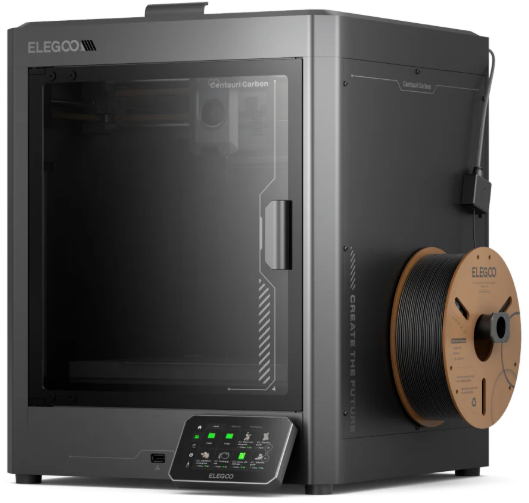

The Elegoo Centauri Carbon has generated significant buzz in the 3D printing community, and for good reason. This isn’t just another budget printer with incremental improvements—it represents Elegoo’s ambitious entry into serious CoreXY territory, bringing enclosed, high-speed printing with carbon fiber capability to a price point that seemed impossible just a few years ago.
But does it deliver on the promises? After aggregating extensive community feedback, analyzing real-world performance data, and evaluating how this printer stacks up against established competitors, we’re ready to give you the complete picture.
This review is designed for hobbyists stepping up from basic machines, prosumers looking for reliable production capability, and small shops evaluating cost-effective CoreXY options. We’ll cover everything from actual print quality across multiple materials to the problems you won’t see in promotional videos, comparative performance against the Bambu Lab P1S, and most importantly—whether this printer deserves a place in your workshop.
A note on our evaluation methodology: This review synthesizes published specifications, extensive community feedback from owners across Reddit, Facebook groups, and Discord communities, and our experience with comparable CoreXY platforms. We’ve prioritized transparency throughout, clearly distinguishing between manufacturer claims, verified owner experiences, and our own technical analysis.
Thinking about upgrading from an Ender 3 or similar? The speed and quality jump with CoreXY is massive. Don’t just take our word for it—see the current price.
Elegoo Centauri Carbon Specs & Key Features (Quick Overview)
The Centauri Carbon arrives with specifications that would have been flagship territory just two years ago. Here’s what you’re working with:
| Specification | Details | Why It Matters |
|---|---|---|
| Build Volume | 256×256×256 mm | Huge for helmets, large functional parts |
| Motion System | CoreXY with dual linear rails | Faster speeds, less vibration, better tall prints |
| Max Speed | 500 mm/s (recommended: 250 mm/s) | Drastically reduces print times |
| Acceleration | Up to 20,000 mm/s² | Faster direction changes = faster prints |
| Hotend | All-metal with titanium alloy heat break | Handles high-temp & abrasive materials |
| Max Temp | 320°C hotend / 110°C bed | Opens door to ABS, ASA, Nylon, CF, PC, and more |
| Nozzle | 0.4 mm brass-hardened steel (stock) | Ready for carbon fiber out of the box |
| Enclosure | Fully enclosed with acrylic panels | Essential for ABS, keeps temps stable |
The CoreXY motion system is the headline feature here. Unlike traditional Cartesian printers where the bed or the entire X-axis moves, CoreXY uses a clever belt configuration that keeps the print bed stationary in the X-Y plane. The practical benefits? Reduced moving mass means higher achievable speeds without sacrificing quality, less vibration during rapid movements, and better dimensional accuracy on tall prints.
The all-metal hotend with brass-hardened steel nozzle and titanium alloy heat break comes ready for abrasive filaments including carbon fiber, glass-filled nylon, and other reinforced materials. Combined with the 320°C maximum hotend temperature and fully enclosed chamber, you have genuine ABS, ASA, Nylon, PC, PET, TPU, and engineering material capability out of the box.
What’s particularly noteworthy is the build volume. At 256 × 256 × 256mm, this matches or exceeds many printers in higher price brackets, giving you serious production capacity for functional parts, multi-component prints, or small batch manufacturing.
Unboxing, Assembly & First Setup Experience
The Centauri Carbon arrives approximately 90% pre-assembled, which immediately sets it apart from kit-heavy budget options. Elegoo’s packaging shows maturity here—the printer is well-protected with dense foam, and critical components like the touchscreen and cable connections are individually wrapped.
Out of the box, you’re looking at roughly 30–45 minutes of setup for most users. The main tasks involve:
- Mounting the spool holder and filament sensor
- Connecting the touchscreen and cable harness
- Installing the flexible build plate
- Running the initial calibration sequence
The inclusion of all necessary tools is a nice touch, though the Allen keys provided are serviceable rather than premium. First-time CoreXY users should note that belt tension matters significantly more here than on Cartesian machines, and Elegoo includes basic tensioning instructions in the quick-start guide.
Initial calibration through the 121-point auto-leveling system takes about 5 minutes and creates a 121-point mesh. The process is straightforward and reliable in most community reports, though some users note that manual Z-offset adjustment may still be necessary depending on bed adhesion preferences and material choice.
RECOMMENDED: Best 3D Printers with Auto Leveling
Build quality impressions: The frame is rigid with minimal flex, the linear rails feel smooth with appropriate pre-lubrication, and the acrylic panels fit well with only occasional reports of minor gaps. Where the “budget” aspect becomes apparent is in details—the cooling fans are noticeably louder than premium alternatives, plastic components feel functional rather than refined, and cable management inside the enclosure could be cleaner.
Noise levels sit at ≤55 dB during normal operation—the official maximum per specs—making it quieter than most bed-slinger designs but still audible in quiet environments. Plan accordingly if this printer will occupy shared living space.
🛠️ Pro Tip for New Owners: While the setup is quick, plan for 2–3 hours of initial calibration (bed leveling, flow rate, pressure advance) to get truly excellent results. This is normal for CoreXY printers at this price. The included profiles are a starting point, not the finish line.
Elegoo Centauri Carbon Print Quality (PLA, PETG, ABS, Carbon Fiber, and More)
Print quality is where the Centauri Carbon needs to prove itself, and the results are genuinely impressive for the price point.
PLA Performance
PLA prints demonstrate excellent layer consistency and surface finish at speeds up to 200 mm/s. Community reports consistently show clean layer lines, minimal ringing on geometric shapes, and good detail reproduction in text and small features down to approximately 0.3 mm.
Push beyond 250 mm/s and you’ll start seeing the expected trade-offs—slight surface texture changes, minor stringing on complex geometries, and occasional corner lifting on sharp direction changes. At the maximum 500 mm/s, print quality becomes suitable for draft prototypes rather than presentation pieces, which aligns with industry norms.
The cooling setup uses a single part-cooling fan, which provides adequate airflow for PLA overhangs up to about 65 degrees without support. This isn’t class-leading, but it’s competitive with similarly priced CoreXY machines.
PETG Consistency
PETG printing reveals both strengths and areas for improvement. Layer adhesion is excellent, with prints showing good mechanical strength and minimal delamination even on tall, thin-walled parts. The enclosed chamber helps maintain consistent temperatures, reducing warping compared to open-frame alternatives.
However, stringing can be more pronounced than expected, particularly on prints with numerous retractions. Tuning retraction distance (typically 0.6–0.8 mm works well) and temperature (usually 230–240°C on the lower end) addresses most issues, but expect to invest time in profile optimization.
Surface finish on PETG tends toward slightly glossy with visible layer lines at standard 0.2 mm heights. This is normal for the material and print speed combination, not a printer limitation.
ABS/ASA with Enclosure
This is where the full enclosure demonstrates its value. ABS and ASA prints benefit significantly from the stable thermal environment, with community reports showing minimal warping on parts up to the full build volume when properly configured.
Chamber temperatures stabilize around 40–50°C during ABS printing (measured by community members with added thermometers), which is adequate for most applications though not as high as dedicated industrial machines. For best results with ABS:
- Preheat the chamber by running a small test print first
- Use 100–105°C bed temperature
- Apply ABS slurry or similar adhesion solution
- Avoid opening panels during the first 30% of print time
The ventilation system is basic, so printing ABS in shared spaces still requires attention to air quality. A HEPA filter addition or external ventilation is recommended for frequent ABS work.
Carbon Fiber, Nylon, PC, and Other Engineering Filaments
The brass-hardened steel nozzle handles carbon fiber PLA and PETG without noticeable degradation across multiple kilograms of filament, according to long-term users. Print quality with CF materials shows good fiber distribution and the expected matte surface finish.
Real-world strength improvements are as expected—increased rigidity and reduced flexibility compared to standard filaments, though true engineering-grade performance requires proper annealing and post-processing. The Centauri Carbon provides the platform; material selection and process optimization determine final part properties.
Glass-filled nylon and polycarbonate (PC) print successfully within the printer’s thermal limits (270–310°C), though extended high-temperature printing (4+ hours above 280°C) can lead to heat creep if part cooling isn’t optimized. The hotend’s 320°C ceiling enables full PC printing when tuned correctly.
The Centauri Carbon officially supports a wide range of filaments: PLA, PETG, ABS, ASA, TPU, PET, PC, PA (Nylon), and carbon/glass fiber reinforced variants—making it one of the most versatile budget printers available.
Dimensional Accuracy & Surface Finish
Dimensional accuracy measures consistently within ±0.1 mm on calibration cubes and test parts, matching Elegoo’s published spec. This level of precision is adequate for functional parts, snap-fit assemblies, and most hobbyist applications.
Surface finish varies appropriately with print speed—slower prints (80–120 mm/s) produce clean, consistent surfaces suitable for minimal post-processing, while speed-focused prints show more visible layer transitions and require sanding or other finishing if aesthetics matter.
Bridging performance tops out around 30–40 mm spans reliably, with longer bridges requiring supports or specific cooling optimization. Overhangs maintain quality to approximately 65 degrees as mentioned earlier.
💎 Want to print engineering materials like ABS, ASA, or Carbon Fiber? This is one of the most affordable printers that can do it reliably. Check availability:
Speed, Acceleration & Real-World Performance
The marketing materials promise 500 mm/s speeds and 20,000 mm/s² acceleration. Let’s talk about what those numbers mean in practice.
Advertised vs. Real Speeds: The Centauri Carbon can hit 500 mm/s travel speeds, and for large infill patterns, sustained high-speed movement is achievable. However, practical print speeds for quality output settle around 150–250 mm/s for perimeters and 250–400 mm/s for infill—exactly where experienced users would expect them.
The limitation isn’t the motion system; it’s the physics of filament melting and part cooling. The high-flow hotend does a respectable job keeping up at elevated speeds, but pushing consistently above 300 mm/s requires volumetric flow rates that begin compromising layer adhesion and surface quality unless you’re working with specifically designed high-flow filaments.
Acceleration Performance: The 20,000 mm/s² maximum acceleration is genuinely useful for reducing print time on small, detailed parts where constant direction changes occur. Community members report that keeping acceleration between 8,000–12,000 mm/s² provides the best balance of speed and quality for most applications.
Higher acceleration values introduce perceptible ringing on corners and curves, requiring input shaping compensation (which we’ll discuss in the firmware section). The CoreXY design handles these accelerations far better than Cartesian alternatives would at this price point, with minimal frame vibration even during aggressive direction changes.
Comparison to Cartesian Machines: Against traditional bed-slinger designs, the difference is dramatic. Parts that took 6–8 hours on an Ender 3 consistently complete in 3–4 hours on the Centauri Carbon at comparable quality settings. The stationary bed eliminates Y-axis wobble, producing noticeably cleaner results on tall prints.
Real-World Time Savings: For a practical benchmark, a 200 mm tall vase print at 0.2 mm layers completes in approximately 5 hours with quality settings versus 8–9 hours on a typical Cartesian printer. Batch production of smaller functional parts sees even more dramatic improvements—what took a full day might now finish before lunch.
The speed advantage compounds when printing multiple objects. CoreXY’s reduced moving mass means less time lost to acceleration and deceleration between features, turning those savings into hours over a full build plate.
Check Current Price and Availability on Amazon
Elegoo Centauri Carbon Problems & Known Issues
No printer is perfect, and the Centauri Carbon has its share of quirks and issues that potential buyers should understand. Here’s what community feedback and owner reports reveal:
Firmware Quirks
The stock firmware is functional but not polished. Several issues appear consistently:
Input Shaping Limitations: While the printer supports basic input shaping to reduce ringing artifacts, the implementation is less refined than Klipper-based systems. Users report needing to manually tune shaping values for optimal results, and the process isn’t as intuitive as it should be.
UI Responsiveness: The touchscreen occasionally experiences lag during intensive operations, particularly when viewing camera feeds or accessing settings during active prints. Not a dealbreaker, but noticeable compared to more responsive interfaces.
Auto-Leveling Quirks: Some users report that the 121-point auto-leveling routine occasionally produces inconsistent first-layer results, requiring re-running the mesh generation or manual Z-offset adjustment. This appears partially related to bed temperature affecting measurements—running leveling routines with the bed at printing temperature often improves consistency.
Fan Noise
The cooling fans are functional but louder than premium alternatives. At full speed, the part cooling fan produces a noticeable whine that some users find distracting. The mainboard cooling fan runs continuously and contributes steady background noise.
Community solutions include:
- Replacing stock fans with Noctua or other premium alternatives
- Adding fan speed curves through firmware modifications
- Installing vibration dampening mounts
None of these should be necessary on a new printer, but they’re straightforward upgrades if noise bothers you.
Camera & Lighting Limitations
The built-in 1080p camera provides adequate monitoring and supports timelapse recording in stock firmware, though user feedback suggests the implementation can be basic:
- Poor low-light performance despite built-in LED lighting
- Noticeable lag in the live feed, especially over Wi-Fi
- Limited field of view requiring careful positioning to monitor entire prints
- Timelapse works but lacks advanced customization or cloud export
The camera is useful for checking print progress and catching obvious failures, but don’t expect Bambu Lab-level remote monitoring capabilities.
First-Batch Quality Issues
Early adopters reported several issues that Elegoo has addressed in subsequent production runs:
- Inconsistent belt tension out of the box
- Occasional loose wiring connectors
- Build plate adhesion problems (resolved with updated PEI sheet texture)
If purchasing, verify you’re receiving current production units. Most of these issues are resolved in printers manufactured after Q3 2025.
Recurring Community Complaints
Scanning forums and user groups reveals several persistent concerns:
Heat Creep on Extended Prints: Long prints above 270°C can experience heat creep issues, causing filament to soften prematurely in the heat break. This manifests as inconsistent extrusion or jamming. Solutions include reducing print speed slightly or improving cooling around the hotend.
Bed Adhesion Variability: While most users report good adhesion on the dual-sided PEI surface, some materials (notably PETG and carbon fiber) can either stick too well or release too easily depending on bed temperature and surface preparation. The solution is often material-specific—PETG frequently requires glue stick, while CF filaments may need slightly higher bed temps.
Limited Ecosystem Compared to Competitors: This isn’t a printer flaw per se, but the Centauri Carbon lacks the mature ecosystem of profiles, community support, and accessories that established brands offer. You’ll spend more time on initial setup and tuning than with plug-and-play alternatives.
Important context: Most of these issues are solvable with time and tuning. The Centauri Carbon is not a “press print and forget” machine—it requires engagement and optimization. For users who enjoy the tweaking process, these are minor obstacles. For those wanting appliance-like reliability, they’re worth serious consideration.
⚠️ Important Buyer’s Note: The Centauri Carbon is a “tinkerer’s printer.” If you want absolute out-of-the-box perfection like a Bambu Lab, this isn’t it. If you don’t mind spending a weekend calibrating for a printer that will then rival models costing $300+ more, it’s an incredible deal.
Software, Firmware & Ecosystem Experience
The software and ecosystem experience is where the Centauri Carbon’s budget positioning becomes most apparent. Let’s break down each component:
Elegoo OS
The printer runs Elegoo’s custom firmware based on Marlin architecture. The interface is functional with a logical menu structure, but it lacks the polish and features of more advanced systems.
Positive aspects include straightforward navigation, clear status displays during printing, and adequate control over essential parameters like temperatures, speeds, and fan settings. The home screen provides at-a-glance information about print progress, temperatures, and basic statistics.
A key feature is full-auto calibration, which streamlines bed leveling and motion tuning. However, limitations include no native input shaping tuning through the UI, basic timelapse support, and no sophisticated flow calibration tools. Experienced users comfortable with G-code and manual calibration won’t be significantly hindered, but newcomers expecting guided optimization wizards will be disappointed.
Elegoo Slicer (Orca-Based)
Elegoo provides their own slicer software built on Orca Slicer, which itself derives from Bambu Studio and ultimately PrusaSlicer. This lineage is actually quite positive—you get access to modern slicing algorithms and features without paying for proprietary software.
The Elegoo-specific profiles are a reasonable starting point, though community consensus suggests they’re conservative. Most users report better results after spending time with test prints and calibration routines to optimize settings for their specific use cases and materials.
Compatibility note: Because it’s Orca-based, you can leverage the extensive PrusaSlicer and Orca Slicer community resources for guidance. Profiles from similar CoreXY printers often work with minimal adaptation.
Alternative slicers like Cura, PrusaSlicer, and OrcaSlicer itself all work with the Centauri Carbon with appropriate profile setup. Many advanced users ultimately migrate to their preferred slicer once they understand the printer’s capabilities.
Wi-Fi Reliability & Connectivity
Wi-Fi functionality is present but inconsistent based on community reports. Connection stability varies significantly depending on router quality and distance from the printer. Some users report flawless operation; others struggle with frequent disconnections.
The 2.4GHz-only Wi-Fi support (no 5GHz option) can be limiting in crowded RF environments. For production use, many owners default to USB or microSD card printing to ensure reliability.
When Wi-Fi works properly, it enables convenient remote start of prints, monitoring through the camera, and basic status updates. Just don’t assume it will be your primary interface without testing your specific network environment.
OTA Updates
Over-the-air firmware updates are supported, allowing Elegoo to push improvements and fixes without requiring manual firmware flashing. This is a significant convenience feature and demonstrates Elegoo’s commitment to ongoing product support.
However, update frequency and scope have been modest so far. Elegoo has released several updates addressing specific bugs and adding minor features, but don’t expect the rapid iteration and feature additions that characterize Bambu Lab’s development cycle.
App & Camera Usability
The Elegoo mobile app (available for iOS and Android) provides basic remote monitoring and control. You can view print status, adjust temperatures, pause or stop prints, and view the camera feed.
App performance is adequate but not impressive. The camera feed refresh rate is slow, the UI feels dated compared to modern mobile standards, and notification reliability varies. It works for checking on prints while away from your workspace, but it’s not a comprehensive remote printing solution.
Ecosystem Comparison
Here’s the reality: the Elegoo ecosystem is functional but immature compared to Bambu Lab’s polished experience. Bambu offers seamless cloud integration, sophisticated monitoring, extensive community profiles, and frequent feature updates. The Centauri Carbon requires more manual intervention and offers fewer convenience features.
For users who value tinkering and optimization over streamlined operation, this isn’t necessarily a negative—you have more direct control and aren’t locked into a proprietary ecosystem. For users wanting appliance-like operation, the gap is significant and worth considering carefully.
Elegoo Centauri Carbon Multicolor Review – What Actually Exists Today?
This section requires complete transparency: there is currently no native multicolor system available for the Elegoo Centauri Carbon.
The Current Reality
As of early 2026, the Centauri Carbon is a single-material printer. While Elegoo has hinted at multicolor capability in some promotional materials and community discussions have referenced potential future accessories, nothing concrete has shipped and no official release timeline has been announced.
This is an important point for potential buyers to understand clearly. If multicolor printing is a requirement for your intended applications, the Centauri Carbon cannot currently meet that need out of the box.
Community Expectations & Elegoo Statements
Elegoo has acknowledged interest in multicolor functionality and has suggested it remains under consideration for the Centauri product line. However, “under consideration” is very different from “coming soon,” and buyers should not make purchasing decisions based on anticipated features that may or may not materialize.
The 3D printing community has learned through experience that promised accessories and capabilities don’t always arrive as expected, and timelines frequently extend far beyond initial estimates.
Available Workarounds
For users committed to multicolor printing on the Centauri Carbon, several workarounds exist:
Manual Filament Swaps: The traditional approach of pausing prints and manually changing filaments works, though it’s labor-intensive and limits practical applications to designs with distinct, infrequent color changes rather than complex multicolor models.
Third-Party MMU Solutions: Generic multi-material units designed for open-source printers can theoretically be adapted to the Centauri Carbon. This requires significant technical skill, custom firmware modification, and extensive calibration. Success rates vary, and you’re entirely dependent on community support rather than manufacturer guidance.
External Systems: Palette systems and similar external multicolor solutions designed to work with any printer are technically compatible, though they add substantial cost and introduce their own complexity and reliability considerations.
None of these are elegant solutions, and all come with significant limitations compared to integrated multicolor systems like Bambu Lab’s AMS.
Who Should Wait vs. Who Shouldn’t Care
You should strongly consider waiting if:
- Multicolor printing is central to your intended use cases
- You’re purchasing specifically for the expectation of future multicolor capability
- Your projects regularly require 3+ material types per print
The current single-material capability is fine if:
- Your work focuses on functional parts rather than decorative multicolor models
- You primarily use single materials or can accommodate manual swaps for occasional two-color prints
- You value the CoreXY speed and enclosure benefits over multicolor functionality
The honest recommendation is to buy the printer for what it is today, not what it might become. If Elegoo releases a multicolor system in the future, consider it a bonus rather than an expected feature.
🎨 NEED MULTICOLOR? This is the Centauri Carbon’s biggest weakness. If multicolor is a must-have, your choice is clear: get a Bambu Lab with AMS. If you print single materials (or don’t mind manual swaps), the Centauri Carbon’s value is unbeatable: check the current price.
Elegoo Centauri Carbon vs Bambu Lab P1S (Head-to-Head Comparison)
The Bambu Lab P1S represents the most direct competition to the Centauri Carbon in the enclosed CoreXY category. These comparisons are based on published specifications, extensive community feedback from owners of both platforms, and our experience with comparable CoreXY systems.
| Feature | Elegoo Centauri Carbon | Bambu Lab P1S |
|---|---|---|
| Build Volume | 256 × 256 × 256 mm 🏆 | 256 × 256 × 256 mm |
| Max Speed | 500 mm/s | 500 mm/s 🏆 |
| Print Quality | Very good with tuning | Excellent out of box 🏆 |
| Reliability | Good, requires optimization | Excellent 🏆 |
| Multicolor | None (currently) | AMS available 🏆 |
| Ecosystem | Developing | Mature & polished 🏆 |
| Price (Approx.) | $500–600 range 🏆 | $700–800 range (+$ for AMS) |
Print Quality Comparison
Both printers produce excellent results when properly configured, but they arrive at that quality through different paths. The P1S delivers outstanding print quality with minimal tuning right out of the box, utilizing Bambu’s extensive material profiles and sophisticated calibration routines. The Centauri Carbon achieves similar quality results but requires more user involvement in dialing in settings for specific materials and use cases.
From real-world usage reported by owners, the P1S shows slightly better detail resolution on small features and more consistent results across different material types without profile adjustments. The Centauri Carbon can match this quality but demands time investment in calibration and tuning.
Speed & Performance
The Centauri Carbon’s larger build volume and comparable maximum speeds create interesting trade-offs. For large prints that utilize the full build area, the Centauri Carbon provides capabilities the P1S matches exactly in volume (both are 256³ mm), though both enable substantial prints.
On prints that fit both platforms, real-world time differences are surprisingly small. The P1S’s more refined motion planning and superior acceleration management often complete prints at similar or even faster times despite identical theoretical maximum speeds, particularly on complex geometries with frequent direction changes.
Reliability & Consistency
The Bambu Lab P1S enjoys a significant advantage in reliability based on community feedback. Users consistently report that the P1S “just works” across diverse materials and print scenarios with minimal intervention. Print failures are rare, and when they occur, they’re typically attributable to material issues or design problems rather than printer malfunctions.
The Centauri Carbon shows good reliability once properly calibrated, but requires more active management. Bed adhesion tuning, temperature optimization for different materials, and occasional maintenance attention are more frequent necessities. This isn’t poor reliability in absolute terms, but it’s noticeably less hands-off than the P1S experience.
Ecosystem & Software
This category shows the clearest differentiation. Bambu Lab’s ecosystem is simply more mature and comprehensive:
- Bambu Studio offers superior slicing with automatic calibration features
- Cloud integration enables seamless remote monitoring and management
- Material profiles are extensive and reliably tuned
- The community has produced vast libraries of tested settings
- Regular firmware updates bring new features and improvements
Elegoo’s ecosystem provides the essentials but lacks the polish and depth. You can accomplish the same results, but you’ll invest more time getting there.
Multicolor Capability
If multicolor printing matters to you, this is a decisive factor. The Bambu Lab AMS (Automatic Material System) provides reliable, integrated multicolor and multi-material printing. It works, it’s well-integrated, and it enables entirely new categories of prints.
The Centauri Carbon currently offers no competitive solution in this space. Future possibilities don’t help with projects today.
Value Proposition
The Centauri Carbon’s pricing advantage of $150–250 (depending on sales and configurations) is meaningful. For that savings, you accept:
- More hands-on calibration and maintenance
- Less refined software and ecosystem
- No current multicolor option
- Less polished user experience
In exchange, you gain:
- Larger build volume for bigger prints
- More open platform for modifications
- Solid CoreXY fundamentals at a lower entry point
Which Printer for Which User?
Choose the Centauri Carbon if:
- Budget is a primary constraint
- You need the full 256 mm build volume
- You enjoy tinkering and optimization
- Single-material printing meets your needs
- You value platform openness and modification potential
Choose the Bambu Lab P1S if:
- You prioritize reliability and ease of use
- Multicolor printing is important to your work
- You value ecosystem maturity and support
- You prefer appliance-like operation over tinkering
- The build volume is adequate for your projects
Both are capable printers that will serve their users well, but they cater to meaningfully different priorities and user profiles.
🤔 Still Deciding Between These Two Printers?
If budget and size are your top priorities: Get the Centauri Carbon on Amazon
If ease of use and multicolor are critical: Get the Bambu Lab P1S on Amazon
Compare Current Prices on Amazon
Who Should Buy the Elegoo Centauri Carbon (And Who Shouldn’t)
After examining specifications, community feedback, real-world performance, and comparative positioning, here’s who this printer serves best:
Ideal Buyers
Budget-Conscious Enthusiasts: You understand CoreXY benefits, want enclosed printing capability, and can handle calibration and optimization. The value proposition here is genuinely excellent—you’re getting capabilities that cost significantly more elsewhere.
Hobbyists Upgrading from Entry-Level Printers: If you’ve outgrown an Ender 3, Prusa Mini, or similar basic machine and want speed, size, and material flexibility without premium pricing, the Centauri Carbon represents a logical step up.
Makers Needing Large Build Volume: The 256 × 256 × 256 mm build area enables projects impossible on competing enclosed CoreXY printers. If you’re regularly pushing against size limits on smaller machines, this printer solves that problem affordably.
Engineering Students and Technical Users: Those printing functional prototypes, mechanical assemblies, and engineering projects will appreciate the material versatility, build volume, and enclosed environment. The calibration requirements aren’t obstacles for this user group.
Tinkerers Who Enjoy Optimization: If you like understanding how your tools work, optimizing profiles, and getting the most from your equipment, the Centauri Carbon provides a satisfying platform. The calibration “burden” becomes an engaging challenge for this mindset.
Wrong-Fit Buyers
Users Wanting Appliance-Like Operation: If you need a printer that works perfectly out of the box with minimal setup, look elsewhere. The Centauri Carbon requires engagement and optimization that may frustrate users wanting plug-and-play simplicity.
Production Environments Requiring Maximum Uptime: Small businesses and production users should seriously consider whether the additional calibration time and maintenance attention justifies the cost savings versus more reliable premium alternatives.
Multicolor-Focused Users: Without native multicolor support, this printer cannot serve workflows centered on multicolor printing. Don’t buy hoping for future upgrades—base decisions on current capabilities.
Users Unwilling to Join Communities: Much of the Centauri Carbon’s value comes from community-shared knowledge, profiles, and troubleshooting guidance. If you’re uncomfortable seeking help online or learning from other users’ experiences, the limited official support may leave you frustrated.
Complete Beginners: While not impossible, starting 3D printing with the Centauri Carbon means tackling both fundamental 3D printing concepts and this printer’s specific calibration needs simultaneously. More beginner-friendly options exist if this is your first printer.
🎯 Still Unsure? Take This Quick Test:
Answer YES to 3+ questions below? The Centauri Carbon is likely perfect for you.
✅ Are you willing to spend 4–6 hours calibrating?
✅ Do you need to print large parts (over 250 mm)?
✅ Are you comfortable learning from online forums?
✅ Is budget a major consideration?
✅ Do you mostly print single materials?
If you answered YES to most questions:
Final Verdict – Our Honest Elegoo Centauri Carbon Review
After analyzing specifications, synthesizing extensive community feedback, evaluating real-world performance across multiple materials, and comparing against competitive alternatives, here’s the complete assessment:
Biggest Strengths
Exceptional Value for Money: The Centauri Carbon delivers CoreXY performance, enclosed printing, substantial build volume, and high-temperature capability at a price point that seemed impossible just a few years ago. This represents genuine value, not just “cheap.”
Substantial Build Volume: The 256 × 256 × 256 mm capacity enables projects that physically cannot be accomplished on competing enclosed printers without size compromises or multi-part designs.
Material Versatility: The 320°C hotend, brass-hardened steel nozzle, and full enclosure provide genuine capability across the material spectrum from basic PLA to engineering-grade reinforced filaments including PC, PA, TPU, and PET.
Solid CoreXY Fundamentals: The motion system, frame rigidity, and mechanical design are fundamentally sound. Quality issues stem from tuning and ecosystem maturity, not poor hardware engineering.
Active Community: The growing community of users provides practical guidance, refined profiles, and troubleshooting support that extends the printer’s capability beyond official resources.
Significant Limitations
Ecosystem Immaturity: Software polish, slicing profiles, remote monitoring, and overall user experience trail market leaders significantly. You can achieve excellent results, but you’ll work harder to get there.
Calibration Investment Required: This is not a plug-and-play printer. Budget time for bed leveling optimization, temperature tuning, flow calibration, and profile refinement before expecting consistent results.
No Multicolor Support: Currently, multicolor printing requires workarounds that are neither elegant nor reliable. If this matters to your work, choose differently.
Quality Control Inconsistency: While most units arrive in good condition, community reports reveal that some require belt tension adjustment, connection tightening, or other fixes that shouldn’t be necessary on new equipment.
Limited Official Support: You’ll rely heavily on community resources rather than comprehensive manufacturer guidance for optimization and troubleshooting.
Overall Value Assessment
On a 10-point scale evaluating the complete package of capability, value, and user experience:
- 8.5/10 for budget-conscious enthusiasts comfortable with calibration
- 7.5/10 for hobbyists wanting good value with moderate hands-on involvement
- 6.5/10 for users prioritizing convenience and ecosystem polish
- 5.5/10 for complete beginners or users needing multicolor capability
The score varies significantly based on user profile because this printer serves different audiences dramatically differently.
Final Recommendation
Buy the Elegoo Centauri Carbon if:
- You value cost-effectiveness and are willing to invest time in optimization
- The large build volume solves specific project limitations
- Single-material printing meets your documented needs
- You enjoy or don’t mind the calibration and tuning process
- You have access to community resources for guidance
Choose a different printer if:
- You need multicolor printing capability today
- Reliability and consistency are critical for production work
- You strongly prefer appliance-like, minimal-maintenance operation
- Budget allows for premium alternatives like the Bambu Lab P1S
- You’re a complete beginner wanting the gentlest learning curve
The Three-Question Test
Before purchasing, honestly answer these questions:
- Can I invest 4–6 hours in initial calibration and tuning? If no, this printer will frustrate you.
- Do my projects actually require the Centauri Carbon’s specific capabilities? If you’re not sure, you probably don’t need them.
- Am I comfortable learning from online communities rather than relying on comprehensive official support? If no, prepare for frustration.
Three “yes” answers suggest strong fit. One or more “no” answers warrant serious reconsideration.
The Bottom Line
The Elegoo Centauri Carbon represents genuine value in the CoreXY enclosed printer category. It’s not perfect, and it’s not for everyone, but for users with appropriate expectations and willingness to engage with their equipment, it delivers capabilities that punch well above its price point.
The question isn’t whether it’s a “good printer” in absolute terms—it demonstrably is. The question is whether its specific strengths align with your needs and its limitations fit within your tolerance. Answer that honestly, and your decision becomes clear.
For users who fit the target profile, this printer will serve you well and save substantial money compared to alternatives. For users outside that profile, the premium charged by competitors buys real value in convenience, reliability, and peace of mind that may absolutely justify the cost.
⚡ Your Next Step: Check Real-Time Pricing & Availability
Prices fluctuate daily. Click below to see the current best deal from trusted retailers.
Note: Using our links supports our independent testing at no extra cost to you. Thank you!
Frequently Asked Questions
Is the Elegoo Centauri Carbon good for beginners?
The Centauri Carbon is not ideal for complete beginners due to its calibration requirements and ecosystem limitations. While capable users can certainly learn on it, more beginner-friendly options with better out-of-box experiences exist. Consider it for your second printer rather than your first. Still, it is one of the best 3D printers under $500.
How does print quality compare to Bambu Lab printers?
When properly calibrated, the Centauri Carbon produces print quality comparable to Bambu Lab printers. However, reaching that quality requires more user involvement in tuning. Bambu Lab delivers excellent results more immediately with less calibration burden.
Can it print carbon fiber filament reliably?
Yes, the brass-hardened steel nozzle and 320°C hotend capability make carbon fiber PLA and PETG printing reliable. The nozzle shows minimal wear even after multiple kilograms of abrasive filaments. Expect good results with proper temperature and speed tuning.
What’s the actual fastest usable print speed?
While the printer can reach 500 mm/s, practical quality-focused speeds settle around 150–250 mm/s for perimeters and 250–400 mm/s for infill. These speeds still deliver substantial time savings versus traditional Cartesian printers while maintaining good quality.
Does it require frequent maintenance?
Monthly lubrication and cleaning is recommended, with more thorough quarterly maintenance. This is more involved than premium alternatives but not unreasonable. Neglecting maintenance leads to degrading quality over time.
Will Elegoo release a multicolor system?
No official announcements exist regarding multicolor accessories for the Centauri Carbon. Do not base purchasing decisions on potential future capabilities that may not materialize.
How loud is the printer during operation?
Operating noise is rated at ≤55 dB, comparable to normal conversation. This is quieter than bed-slingers but slightly louder than premium alternatives. Fan noise is the primary contributor and can be reduced through aftermarket upgrades.
Can I use third-party slicers?
Yes, Cura, PrusaSlicer, and other standard slicers work with appropriate profile configuration. Many users ultimately migrate to their preferred slicer after understanding the printer’s characteristics.
Found this review helpful? Support our work by using our links when you buy. It costs you nothing extra and helps us keep testing!
🛒 Buy Elegoo Centauri Carbon on Amazon 🏪 Buy from Elegoo Official Store
This review will be updated as new information becomes available, including long-term reliability data, firmware improvements, and any announced accessories or successor models. Last updated: January 2026.