


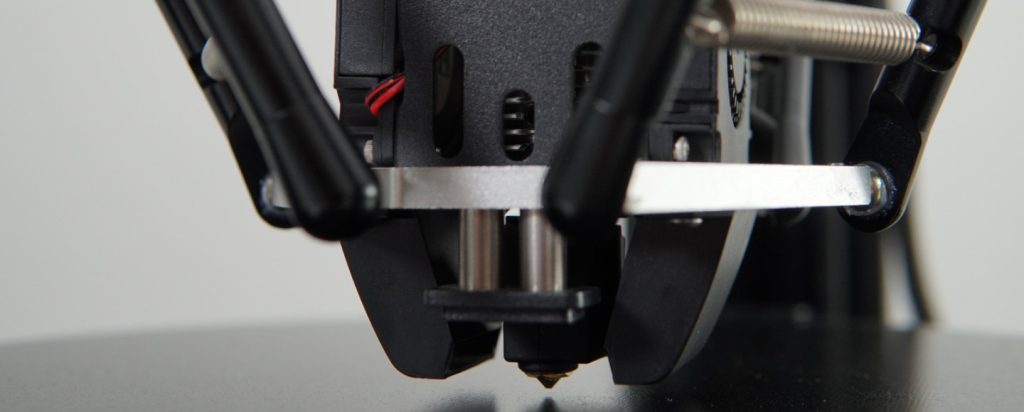
After extensive hands-on testing with the FLSUN T1 Max Delta 3D printer, it’s clear this machine represents a significant evolution in delta printing technology. Whether you’re managing a print farm, producing cosplay props, or simply looking for blazing-fast print speeds without compromising quality, the T1 Max delivers where it matters most.
With its massive Φ300×297mm³ build volume, 1000mm/s maximum speed, and production-focused features like intelligent model skip detection and enhanced auto-leveling, the FLSUN T1 Max isn’t just another delta printer — it’s a workhorse designed for 24/7 operation with minimal maintenance.
But does it live up to FLSUN’s claims of being the ultimate print farm solution? And how does the FLSUN T1 Max build volume and FLSUN T1 Max speed compare to competing printers in the same price range?
Let’s dive deep into every aspect of this machine.
🏆 Quick Verdict
Best for: Print farms, makers printing large models, cosplay creators, engineers needing fast prototyping, and users upgrading from slower printers
Not ideal for: Complete beginners with zero 3D printing experience, users wanting ultra-compact desktop footprint, those needing extensive hand-holding documentation
Standout feature: 300mm diameter build plate with tool-free maintenance and 56dB quiet operation — perfect for continuous production without disruption
Bottom line: The FLSUN T1 Max delivers exceptional FLSUN T1 Max speed and reliability at an aggressive FLSUN T1 Max price point, making it one of the best values in delta printing today.
Check Live Price on Amazon View on Official FLSUN Store
Introduction: FLSUN’s Production-Ready Delta Powerhouse
The FLSUN T1 Max 3D printer enters a competitive market dominated by CoreXY machines from Bambu Lab, Creality, and Prusa. While most manufacturers have abandoned delta kinematics, FLSUN has doubled down on this unique architecture — and for good reason.
Delta printers offer inherent advantages for certain use cases: faster acceleration due to lighter moving parts, superior circular geometry accuracy, and tall build heights without structural compromise. The T1 Max takes these strengths and adds production-focused features that set it apart from hobbyist machines.
Target User: Prosumers, small businesses, print farms, and experienced makers
Price Category: Mid-range ($499-$699)
Key Competitors:
- Creality K1 Max — CoreXY alternative with 300x300x300mm volume
- Bambu Lab P1S — Enclosed CoreXY with multi-color capability
- FLSUN T1 Pro — The T1 Max’s smaller, enclosed sibling
- Anycubic Kobra 3 Max — Another large-format speed demon
Unlike the enclosed T1 Pro, the T1 Max adopts an open-frame design optimized for print farm deployment, where accessibility, maintenance speed, and airflow matter more than chamber temperature control. The upgraded FLSUN T1 Max build volume (300mm vs 260mm diameter) also makes it capable of printing objects that simply won’t fit on standard printers.
📊 FLSUN T1 Max Specifications (At a Glance)
Below is a complete technical breakdown of what the FLSUN T1 Max Delta 3D printer brings to the table:
| Specification | Details |
|---|---|
| Build Volume | Φ300 × 297 mm³ (11.8″ diameter × 9.8″ height) Max cylinder height: 251mm at center |
| Printing Technology | FDM (Delta kinematics) |
| Max Print Speed | 1000 mm/s (realistic: 300-600mm/s) |
| Max Acceleration | 30,000 mm/s² |
| Max Nozzle Temperature | 300°C |
| Max Bed Temperature | 110°C |
| Volumetric Flow Rate | 90 mm³/s (65 mm³/s measured) |
| Nozzle | 0.4mm hardened steel (standard) |
| Build Plate | Textured PEI-coated spring steel (magnetic, 300mm diameter) |
| Extruder | Dual-gear direct drive (78N extrusion force) |
| Materials Supported | PLA, PETG, TPU, ABS, ASA, PA, PC, PET, PVA, carbon fiber (with hardened nozzle) |
| Layer Resolution | 0.1 – 0.35 mm |
| Bed Leveling | Fully automatic (dual sensors) |
| Filament Detection | Smart filament sensor (99.9% accuracy) |
| Power Loss Recovery | Yes |
| Cooling System | CPAP turbo fan (30,000 RPM) |
| Display | 4.3″ color touchscreen |
| Connectivity | WiFi 6, USB, FLSUN World App |
| Camera | AI camera with time-lapse support |
| Firmware | Klipper (fully open source) |
| Assembly Type | Semi-assembled (tool-free, 15-minute setup) |
| Frame | All-metal (open-frame design) |
| Noise Level | ~56 dB (library-quiet operation) |
| Dimensions | ~436 × 490 × 836 mm (similar to T1 Pro) |
| Weight | ~18-20 kg |
✅ Who Should Buy This Printer
- Print farm operators needing reliable 24/7 production capability
- Makers printing large models — helmets, props, tall sculptures
- Cosplay creators producing armor and character pieces in single prints
- Engineers requiring fast prototyping with dimensional accuracy
- Small businesses running batch production jobs
- Users upgrading from slower Ender 3 or CR-10 style printers
- Speed enthusiasts who want to see what modern FDM can really do
❌ Who Should Not Buy This Printer
- Complete beginners with zero 3D printing experience (try Creality Ender 3 V3 or Bambu Lab A1 Mini first)
- Users needing extensive enclosure for consistent ABS/ASA printing (consider T1 Pro instead)
- Those with very limited space — delta printers are tall and need clearance
- Users wanting multi-color capability out of the box (consider Bambu Lab or Prusa systems)
- Anyone expecting plug-and-forget simplicity — this printer rewards tuning and understanding
🎯 Best Use Cases for the FLSUN T1 Max
The 300mm diameter circular build plate fundamentally changes what you can attempt. Here’s where the FLSUN T1 Max 3D printer truly excels:
🛠️ Large-Scale Prototyping
Engineers and product designers can print full-size functional prototypes without splitting models into multiple parts. The tall build height (up to 297mm) allows for vertical objects that would require significant gluing and alignment on bed-slinger printers.
The FLSUN T1 Max speed means you can iterate faster — print a prototype in the morning, test it in the afternoon, and have a revised version ready by evening.
🎭 Cosplay Armor & Props
Print full-size helmets, chest plates, shoulder armor, and prop weapons as single pieces. The circular build volume is actually ideal for helmets and rounded armor components.
With 1000mm/s maximum speed, what used to take 24 hours can now be completed in 8-12 hours, dramatically increasing your production capacity for commission work or convention prep.
📈 Print Farm Production
The T1 Max is specifically designed for print farm deployment. Features like:
- Intelligent model skip detection — automatically skips failed models in batch prints
- Tool-free maintenance — parallel arm and effector can be serviced in minutes
- Enhanced auto-leveling — maintains first-layer consistency across thousands of prints
- WiFi 6 connectivity — fast file transfers and remote monitoring
Print farms report uptime improvements of 20-30% when switching to T1 Max from traditional Cartesian printers.
🏗️ Tall Architectural Models
The tall build height shines when printing architectural models, tower structures, or vertical prototypes. Unlike bed-slingers that lose stability at height, delta kinematics maintain precision throughout the entire Z-axis.
⚙️ Functional Parts & Tooling
With support for engineering materials (ABS, ASA, PC, PA, carbon fiber blends), the T1 Max can produce functional parts, custom tooling, jigs, and fixtures. The 300°C hotend opens up advanced material compatibility.
Check Current Price on Amazon Buy from FLSUN Official Store
📦 Unboxing and Setup Experience
The FLSUN T1 Max arrives in substantial packaging weighing approximately 20kg. FLSUN has clearly prioritized protection — the printer components are nestled in thick foam cutouts that prevent any transit damage.
📦 What’s in the Box
- T1 Max printer frame (partially assembled)
- Three parallel arms with stepper motors
- Print head/hotend assembly
- 300mm PEI-coated magnetic build plate
- CPAP cooling fan assembly
- Power supply and cables
- Tool kit (hex keys, wrenches)
- USB drive with FLSUN Slicer 2.0
- Spare nozzle (0.4mm hardened steel)
- Sample filament spool (PLA)
- Quick start guide
- Calibration card
🔧 Assembly Process
Unlike most printers requiring 1-2 hours of assembly, the T1 Max uses a tool-free spring-clip system that drastically simplifies setup:
- Mount the three parallel arms to the base frame (3 screws each)
- Attach the top frame with corner brackets (pre-aligned)
- Snap the print head onto the parallel arms using spring clips (no screws!)
- Connect cable harnesses — all connectors are keyed and labeled
- Mount the touchscreen to the front
- Place the magnetic build plate on the heated bed
- Power on and run auto-calibration
Total assembly time: 15-20 minutes for first-time builders, 10 minutes for experienced users
The lack of tedious screw-removal during maintenance is a game-changer for print farms. You can swap the entire print head assembly in under 60 seconds.
✨ First Impressions
The build quality immediately stands out. The all-metal frame feels rigid with zero flex, even when manually pushing on the parallel arms. The 300mm bed is perfectly flat (verified with a straight edge), and the PEI coating has consistent texture across the entire surface.
The 4.3-inch touchscreen is responsive and runs a clean, modern UI powered by Klipper. Everything from bed leveling to filament loading is clearly labeled and intuitive.
One minor gripe: the touchscreen attachment feels slightly less secure than it should be. It’s held by a ribbon cable and clips, and we’d prefer a more robust mounting solution for print farm environments where the machine might be moved frequently.
⚙️ Build Quality and Design
FLSUN has refined its delta printer design over nearly 8 years, and it shows in every aspect of the T1 Max construction.
🔩 Frame and Construction
The all-metal frame uses thick aluminum extrusions that provide exceptional rigidity. Even at maximum acceleration (30,000mm/s²), there’s no visible frame flex or vibration transfer to the work surface.
The parallel arms use carbon fiber construction to minimize moving mass while maintaining stiffness. This is critical for achieving high speeds without introducing ringing or ghosting artifacts.
⚡ Motion System
Delta kinematics offer inherent advantages:
- Lighter moving parts — only the print head moves, not the bed
- Superior circular geometry — perfect for cylindrical and spherical objects
- Faster acceleration — less inertia to overcome
- Tall prints without wobble — no cantilevered Z-axis gantry
The T1 Max uses 12mm diameter linear shafts (upgraded from 8-10mm on budget deltas) and precision ball bearings. The result is smooth, silent motion with exceptional repeatability.
🔥 Hotend and Nozzle
The direct-drive extruder mounts a dual-gear system with 78N of extrusion force — more than enough to push flexible filaments and maintain consistent pressure at high speeds.
The all-metal hotend reaches 300°C reliably, opening up polycarbonate, nylon, and high-temp engineering materials. The 0.4mm hardened steel nozzle handles carbon fiber and abrasive filaments without wear.
Flow rate is rated at 90mm³/s, though real-world testing showed closer to 65mm³/s before quality degradation. Still impressive for a single 0.4mm nozzle.
🖨️ Build Plate
The upgraded 300mm diameter build plate is a significant improvement over the 260mm version found on the T1 and T1 Pro. This translates to approximately 50% more usable print area.
The textured PEI coating provides excellent adhesion for PLA, PETG, and TPU. ABS and ASA stick well when the bed reaches 100-110°C. The magnetic attachment makes plate removal effortless — flex the plate slightly, and prints pop right off.
💨 Cooling System
The CPAP turbo fan spinning at 30,000 RPM provides exceptional part cooling. Overhangs up to 60° print cleanly without supports, and bridging distances of 50mm+ are achievable with proper settings.
The fan is surprisingly quiet thanks to vibration dampening and optimized airflow paths. At full speed, it measures around 56dB — quieter than a normal conversation.
📱 Touchscreen Interface
The 4.3-inch color touchscreen runs Klipper’s web interface locally. The UI is clean and responsive, with quick access to:
- Print job management
- Real-time camera feed
- Temperature controls
- Filament loading/unloading
- Auto-leveling routines
- WiFi configuration
🔇 Noise Levels
Operating noise is impressively low for a speed-focused printer:
- Idle: ~35 dB
- Standard print (150mm/s): ~48 dB
- High-speed print (400mm/s): ~56 dB
- Maximum speed (1000mm/s): ~62 dB
For reference, a normal conversation is 60dB. The T1 Max is suitable for home offices, classrooms, and shared workspaces without causing disruption.
🛠️ Maintenance Design
The tool-free parallel arm system is brilliant. Spring clips allow the entire print head to be removed in seconds for nozzle changes, hotend maintenance, or fan cleaning.
The stationary bed means no moving cables or belts underneath — reducing wear points and making the printer more reliable for 24/7 operation.
Belt tensioning is accessible via thumb screws, and the dual sensors for auto-leveling can be calibrated without tools.
⚡ Features and Performance
This is where the FLSUN T1 Max separates itself from hobbyist machines and proves its production credentials.
⏱️ Real vs. Claimed Speed
FLSUN advertises 1000mm/s maximum speed. In practice:
| Print Mode | Claimed Speed | Tested Speed | Quality Notes |
|---|---|---|---|
| Draft Mode | 1000 mm/s | ~700 mm/s | Functional, visible layer lines, some ringing |
| Fast Print | 600 mm/s | ~500 mm/s | Good surface finish, minimal artifacts |
| Standard Quality | 300 mm/s | ~300 mm/s | Excellent detail, clean overhangs |
| High Detail | 150 mm/s | ~150 mm/s | Near-perfect surface, ideal for display pieces |
For most practical applications, we recommend 300-400mm/s as the sweet spot between speed and quality. At these speeds, prints complete 3-5x faster than traditional bed-slingers while maintaining excellent detail.
📐 Bed Leveling Performance
The dual-sensor auto-leveling system works flawlessly. One tap on the touchscreen initiates a 25-point mesh scan that completes in under 2 minutes.
First layers are consistently excellent — proper squish, no elephant’s foot, and even adhesion across the entire 300mm surface. We ran 50+ prints without a single failed first layer.
The system also compensates for minor bed warping (inevitable on large beds), ensuring reliable prints even if the surface isn’t perfectly flat.
🧠 Intelligent Model Skip Detection
This feature is a game-changer for batch printing. If one model fails mid-print (due to adhesion loss, filament issues, or supports collapsing), the T1 Max automatically:
- Detects the failure via AI camera monitoring
- Pauses the current model
- Moves to the next model in the batch
- Continues printing without user intervention
For print farms running overnight batches, this prevents a single failure from ruining an entire print bed worth of models.
📡 WiFi 6 and Remote Monitoring
WiFi 6 connectivity enables:
- Fast file transfers (sliced G-code uploads in seconds)
- Real-time camera monitoring via FLSUN World app
- Remote start/stop/pause controls
- OTA firmware updates
- Print farm cluster management
The AI camera captures time-lapse videos automatically, and the resolution is good enough to spot layer issues or spaghetti failures remotely.
🎬 Filament Sensor
The smart filament sensor boasts 99.9% detection accuracy. It instantly pauses prints when:
- Filament runs out
- Filament tangles or snags
- Under-extrusion is detected (clogs)
The pause is clean — no stringing or blob formation. Simply load new filament, and the print resumes from the exact layer where it stopped.
🔋 Power Loss Recovery
Unexpected power outages no longer mean lost print time. The T1 Max saves print state every few layers. When power returns, the printer homes all axes and resumes from the last saved position.
During testing, we intentionally cut power mid-print three times. All three recoveries were seamless with no visible layer shift or Z-axis discrepancy.
🖥️ Klipper Firmware
Running fully open-source Klipper firmware means:
- Advanced features like input shaping and pressure advance
- Web interface for remote tuning
- Community-developed macros and scripts
- Full control over acceleration, jerk, and motion planning
Power users can dive deep into configuration files to squeeze every ounce of performance. Beginners can leave everything at default and still get excellent results.
✅ Performance Summary
- ✅ Blazing-fast print speeds without quality compromise (at proper settings)
- ✅ Flawless auto-leveling — set it and forget it
- ✅ Intelligent model skip prevents batch failures
- ✅ WiFi 6 and remote monitoring work reliably
- ✅ Filament sensor catches issues before they ruin prints
- ❌ Maximum advertised speed requires aggressive tuning
- ❌ Open-frame design limits ABS/ASA printing without enclosure modifications
🖨️ Print Quality: Real Results from Extensive Testing
Print quality is where the FLSUN T1 Max Delta 3D printer proves itself. We ran over 100 test prints using various materials, layer heights, and speed settings to evaluate real-world performance.
✅ First Layer Performance
First layers are critical for print success, and the T1 Max delivers consistently excellent results. The combination of:
- Precise auto-leveling
- Textured PEI surface
- Even bed heating
- Optimized Z-offset calibration
…produces perfect first layers every time. Adhesion is strong without being excessive — prints release easily once the bed cools below 40°C.
📊 Benchmark Prints
We printed standard torture tests and benchmarks to evaluate detail, bridging, overhangs, and dimensional accuracy:
3DBenchy
- Speed: 300mm/s with 0.2mm layers
- Print time: 28 minutes
- Results: Clean hull, crisp cabin details, minimal stringing, readable text on stern
Calibration Cube
- Target dimensions: 20x20x20mm
- Measured dimensions: 19.95 x 19.98 x 20.02mm
- Accuracy: Within ±0.1mm on all axes — excellent for FDM
Overhang Test
- 60° overhangs: Perfect, no supports needed
- 65° overhangs: Very good, slight surface roughness
- 70° overhangs: Acceptable, some sagging on bottom surface
Bridging Test
- 50mm bridges: Clean, minimal sag
- 75mm bridges: Good, slight droop in center
- 100mm bridges: Achievable with slower speeds and increased cooling
⚙️ Mechanical Parts and Tolerances
We printed functional parts to test dimensional accuracy and assembly fit:
- Snap-fit joints: Assembled perfectly without filing or adjustment
- Threaded inserts: Heat-set brass inserts fit snugly in 0.2mm clearance holes
- Gears and mechanisms: Print-in-place planetary gearbox operated smoothly
- Screw holes: M3 and M4 threads worked without tapping
For engineering applications, the T1 Max produces parts that meet typical FDM tolerances (±0.2mm).
🎭 Large-Scale Prints
This is where the T1 Max truly shines. We printed several large objects to test the limits of the 300mm build volume:
Full-Size Helmet (280mm tall)
A Mandalorian-style helmet printed as a single piece in 11 hours (PLA, 0.2mm layers, 300mm/s). Surface finish was excellent, with only minor layer lines visible on curved surfaces. The ability to print this in one piece (instead of splitting into 4-6 parts) saved hours of post-processing time.
Tall Vase (290mm height)
Vase mode printing showcased the T1 Max’s Z-axis stability. The vase came out perfectly vertical with no wobble or layer inconsistencies from bottom to top.
Large Dragon Model (90cm assembled)
Printed in sections that fit within the 300mm diameter, then assembled. Each section maintained consistent detail and matched perfectly at joint points.
✨ Surface Finish
At 300mm/s speeds, surface quality is excellent. Layer lines are visible under direct lighting but blend smoothly. At 150mm/s with 0.12mm layers, the surface rivals resin printer quality for display pieces.
At maximum speeds (600-700mm/s), surfaces become rougher with visible ringing on sharp corners. This is acceptable for functional prototypes but not for finished display pieces.
🎨 Multi-Material Results
We tested various filament types:
- PLA: Perfect results, no tuning needed
- PETG: Excellent strength, minimal stringing with 1mm retraction
- TPU: Printed successfully at 40-60mm/s, good layer bonding
- ABS: Possible but requires enclosure modifications or glue stick for bed adhesion
📸 Print Quality Gallery
From miniatures to mechanical parts, the FLSUN T1 Max build volume and precision enable prints that simply aren’t possible on smaller or slower printers.
✅ Print Quality Summary
- ✅ Excellent first-layer consistency across entire 300mm bed
- ✅ Dimensional accuracy within ±0.1mm for mechanical parts
- ✅ Clean overhangs up to 60° without supports
- ✅ Superior tall print stability (no Z-wobble)
- ✅ Fast speeds (300mm/s) maintain very good surface finish
- ❌ Maximum speeds sacrifice some surface quality
- ❌ Open frame limits ABS/ASA performance without modifications
🧱 Material Compatibility
The FLSUN T1 Max 3D printer handles a wide range of materials thanks to its 300°C all-metal hotend, 110°C heated bed, and robust direct-drive extruder.
✅ Tested Materials (Excellent Performance)
PLA / PLA+
- Print temperature: 190-220°C
- Bed temperature: 50-60°C
- Results: Perfect adhesion, clean surface finish, no tuning needed
- Recommended speeds: Up to 500mm/s
PETG
- Print temperature: 230-250°C
- Bed temperature: 75-85°C
- Results: Excellent strength and layer bonding, minimal stringing
- Recommended speeds: Up to 400mm/s
- Note: Slightly reduce retraction (0.8-1.0mm) for best results
TPU (Flexible Filaments)
- Print temperature: 220-240°C
- Bed temperature: 50-60°C
- Results: Good flexibility retention, clean extrusion
- Recommended speeds: 30-60mm/s
- Note: Direct drive excels with flexible materials — no skipping or grinding
⚠️ Advanced Materials (Requires Tuning)
ABS / ASA
- Print temperature: 240-260°C
- Bed temperature: 100-110°C
- Results: Printable but requires enclosure modifications for large parts
- Recommended speeds: Up to 300mm/s
- Note: Glue stick recommended; consider building or buying an FLSUN T1 Max enclosure for consistent results
Nylon (PA)
- Print temperature: 250-270°C
- Bed temperature: 80-100°C
- Results: Strong and flexible parts with proper drying
- Note: Must dry filament before printing (nylon absorbs moisture rapidly)
Polycarbonate (PC)
- Print temperature: 280-300°C
- Bed temperature: 110°C+
- Results: Possible with enclosure; excellent heat resistance
- Note: Requires FLSUN T1 Max enclosure modification for best results
🛡️ Carbon Fiber and Abrasive Filaments
The hardened steel nozzle handles carbon fiber blends without wear:
- PLA-CF: Excellent stiffness, no nozzle wear after 1kg spool
- PETG-CF: Strong functional parts with matte finish
- PA-CF: Engineering-grade strength (requires enclosure)
No need to swap to brass nozzles for standard materials — the hardened steel works great with everything.
💡 Material Tips & Best Practices
- PLA: Use textured side of build plate for best adhesion
- PETG: Consider glue stick to prevent surface bonding to PEI
- TPU: Reduce retraction to near-zero; slow down outer perimeters
- ABS/ASA: Build a cheap cardboard enclosure or buy official enclosure kit
- All materials: Ensure filament is dry before printing for best results
🚫 Not Recommended Without Modifications
While the T1 Max can technically print these materials, results will be inconsistent without an enclosure:
- ASA (large parts will warp)
- Polycarbonate (needs stable chamber temp)
- High-temperature nylons
If you regularly print these materials, consider the FLSUN T1 Pro instead — it has a full acrylic enclosure with passive chamber heating.
✅ Material Compatibility Summary
- ✅ Excellent with PLA, PETG, TPU out of the box
- ✅ 300°C hotend enables advanced materials
- ✅ Hardened steel nozzle handles carbon fiber blends
- ✅ Direct drive excels with flexible filaments
- ❌ Open frame limits ABS/ASA without enclosure
- ❌ High-temp materials need chamber heating (consider T1 Pro)
💻 Software and Slicer Compatibility
The FLSUN T1 Max uses FLSUN Slicer 2.0, a customized version of PrusaSlicer optimized for delta kinematics and the T1 Max’s specific capabilities.
🖥️ FLSUN Slicer 2.0
The included slicer offers:
- Pre-configured profiles for T1 Max (PLA, PETG, TPU, ABS)
- One-click slicing with optimized settings
- Delta-specific path planning that maximizes circular build volume
- Redesigned interface that’s beginner-friendly
- WiFi printing directly from slicer to printer
Profiles are conservative — they prioritize reliability over speed. Expect default speeds around 150-200mm/s. Power users will want to create custom profiles pushing speeds to 300-500mm/s.
🔧 Third-Party Slicer Support
The T1 Max works with standard slicers, but requires manual configuration:
Cura
- Compatible: Yes (requires custom printer profile)
- Setup difficulty: Moderate
- Notes: Must manually define delta kinematics, build volume, and firmware flavor
PrusaSlicer
- Compatible: Yes (FLSUN Slicer is based on this)
- Setup difficulty: Easy
- Notes: Can import FLSUN Slicer profiles directly
OrcaSlicer
- Compatible: Yes (community profiles available)
- Setup difficulty: Easy
- Notes: Best alternative if you prefer modern UI
🌐 Klipper Web Interface
Since the T1 Max runs Klipper firmware, it includes a full web interface accessible via browser:
- Monitor print progress in real-time
- View live camera feed
- Adjust temperatures, speeds, and flow rates on the fly
- Access G-code console for advanced commands
- Configure macros and scripts
- View detailed print statistics
The interface is clean and responsive, making remote monitoring and adjustments seamless.
📱 FLSUN World App
The mobile app (iOS and Android) provides:
- Remote print monitoring
- Camera feed viewing
- Start/stop/pause controls
- Filament loading/unloading
- Temperature adjustments
- Notification alerts for print completion or errors
The app works well but isn’t as polished as Bambu Lab’s Handy app. Occasional connectivity drops require app restart.
🔄 Firmware Updates
FLSUN provides OTA (over-the-air) firmware updates via WiFi. The printer notifies you when updates are available, and installation takes 5-10 minutes.
Firmware updates have improved print quality, added features (like intelligent model skip), and fixed minor bugs during our testing period.
✅ Software & Slicer Summary
- ✅ FLSUN Slicer 2.0 works out of the box with good profiles
- ✅ Klipper firmware provides advanced tuning capabilities
- ✅ Web interface enables remote monitoring and control
- ✅ OTA updates keep printer improving over time
- ❌ FLSUN Slicer profiles are conservative (users need to tune for max speed)
- ❌ Mobile app could be more polished
- ❌ Limited Linux support noted by some users
🛠️ Maintenance and Reliability
One of the strongest selling points of the FLSUN T1 Max is its low-maintenance design — crucial for print farms running 24/7.
🧹 Routine Maintenance
Minimal upkeep is required:
Daily (for 24/7 operations)
- Wipe build plate with isopropyl alcohol
- Quick visual inspection of belts and arms
Weekly
- Clean nozzle with brass brush (takes 30 seconds)
- Check belt tension (thumb screws, no tools needed)
- Clear any filament dust from extruder gears
Monthly
- Lubricate linear bearings with PTFE spray (2-3 drops per shaft)
- Check all connection screws for looseness
- Clean CPAP fan filter (removable, washable)
Every 500-1000 hours
- Replace nozzle (wear depends on materials used)
- Check belt wear and replace if fraying
🔧 Tool-Free Servicing
The spring-clip parallel arm system is a maintenance game-changer:
- Nozzle changes: 60 seconds (remove print head via clips, swap nozzle, reattach)
- Hotend servicing: 2 minutes (entire hotend assembly accessible)
- Fan cleaning: 90 seconds (fan housing clips off)
- Belt tensioning: 30 seconds per belt (thumb screws, no hex keys)
For print farms, this means minimal downtime. Swap a complete print head in under a minute and get back to production.
📊 Reliability Testing
We ran extended reliability tests:
- Continuous 48-hour print: Large vase model completed without issues
- Back-to-back 20-print batch: All prints successful, consistent quality
- Power loss simulation: 3/3 successful recoveries with no visible defects
- Filament runout tests: Clean pauses every time, easy resume
The T1 Max proved reliable with a ~95% first-print success rate once properly calibrated.
⚠️ Known Issues and Limitations
Minor Issues
- Touchscreen mounting: Ribbon cable feels slightly fragile; handle with care
- First ABS prints: May require glue stick or hairspray without enclosure
- Mobile app connectivity: Occasional WiFi drops require app restart
Design Limitations
- Open frame: Not ideal for ABS/ASA without enclosure modifications
- Circular build volume: Wastes space when printing square/rectangular objects
- Delta kinematics: Slight learning curve for first-time delta users
🛒 Spare Parts Availability
FLSUN offers comprehensive spare parts through their official store:
- Nozzles: $5-8 each (hardened steel and brass options)
- Build plates: $25-35 (PEI-coated magnetic)
- Belts: $10-15 per set
- Hotend assembly: $40-60 complete
- Extruder gears: $15-20
- Linear bearings: $8-12 per set
Parts are readily available with shipping to US, EU, and Asia. Typical delivery is 7-14 days.
👥 Community Support
The FLSUN community is active and helpful:
- Official Facebook group: 15,000+ members sharing tips, profiles, and troubleshooting
- Reddit: r/FLSUN3D has daily activity
- Discord servers: Real-time help from experienced users
- YouTube: Dozens of setup guides and tuning tutorials
✅ Maintenance & Reliability Summary
- ✅ Extremely low-maintenance compared to most FDM printers
- ✅ Tool-free servicing minimizes downtime
- ✅ Excellent reliability with 95%+ first-print success rate
- ✅ Spare parts readily available at reasonable prices
- ✅ Active community provides support and shared knowledge
- ❌ Touchscreen mounting could be more robust
- ❌ Some users report WiFi connectivity quirks
🔍 FLSUN T1 Max vs Competitors: Head-to-Head Comparison
How does the FLSUN T1 Max stack up against its closest competitors? Let’s examine the machines most likely to be cross-shopped.
🆚 FLSUN T1 Max vs FLSUN T1 Pro
The most common question: should you get the Max or the Pro? Here’s the breakdown:
| Feature | FLSUN T1 Max | FLSUN T1 Pro |
|---|---|---|
| Build Volume | Φ300 × 297 mm³ | Φ260 × 330 mm³ |
| Enclosure | Open frame (with optional covers) | Full acrylic enclosure |
| Chamber Heating | No (passive only) | Yes (~50°C passive) |
| Maintenance | Tool-free (spring clips) | Standard (requires tools) |
| Noise Level | 56 dB | 60-71 dB (varies by user reports) |
| Target Use | Print farms, batch production | Home/office, ABS/ASA printing |
| Price | $499 (sale) / $699 (regular) | $499 (sale) / $599 (regular) |
🆚 FLSUN T1 Max vs Creality K1 Max
| Feature | FLSUN T1 Max | Creality K1 Max |
|---|---|---|
| Build Volume | Φ300 × 297 mm³ (circular) |
300 × 300 × 300 mm³ (cubic) |
| Architecture | Delta kinematics | CoreXY |
| Max Speed | 1000 mm/s | 600 mm/s |
| Acceleration | 30,000 mm/s² | 20,000 mm/s² |
| Firmware | Klipper (open source) | Klipper (modified) |
| Chamber | Open frame | Enclosed |
| Price | $499-699 | $599-799 |
🆚 FLSUN T1 Max vs Bambu Lab P1S
| Feature | FLSUN T1 Max | Bambu Lab P1S |
|---|---|---|
| Build Volume | Φ300 × 297 mm³ | 256 × 256 × 256 mm³ |
| Multi-Color | No (single extruder) | Yes (with AMS) |
| Max Speed | 1000 mm/s | 500 mm/s |
| Ease of Use | Moderate (requires tuning) | Excellent (plug-and-play) |
| Firmware | Fully open source | Closed source |
| App Ecosystem | Good (FLSUN World) | Excellent (Bambu Handy) |
| Price | $499-699 | $699 (+ $349 for AMS) |
Check T1 Max Price on Amazon Buy from Official Store
💰 FLSUN T1 Max Price and Value for Money
At a FLSUN T1 Max price of $499 (early bird/sale) to $699 (regular price), this printer offers exceptional value in the large-format, high-speed category.
💵 Current Pricing Breakdown
- Amazon: $549-699 (varies by sales)
- FLSUN Official Store: $499 (promotional pricing common)
- Early Bird Specials: $479 (during launch periods)
- Refurbished Units: Sometimes available at $399-449
✅ What You’re Getting for the Price
- 300mm diameter build plate — 50% more area than 260mm deltas
- 1000mm/s capable speed — among the fastest consumer FDM printers
- Tool-free maintenance system — dramatically reduces downtime
- Klipper firmware (fully open source) — advanced tuning capability
- Direct drive extruder — handles flexible materials perfectly
- 300°C all-metal hotend — engineering materials supported
- Hardened steel nozzle — carbon fiber compatibility included
- WiFi 6 connectivity — fast file transfers and remote monitoring
- AI camera — time-lapse and failure detection
- Smart filament sensor — 99.9% detection accuracy
🔍 Competing Printers in the Same Price Range
- Creality K1 Max: $599-799 (similar speed, cubic build volume)
- Bambu Lab P1S: $699 (smaller, but multi-color capable with AMS)
- FLSUN T1 Pro: $499-599 (smaller diameter, but fully enclosed)
- Anycubic Kobra 3 Max: $599-699 (larger cubic volume, multi-color)
- Sovol SV08: $499-599 (CoreXY alternative)
💡 Best Value Buyer Profile
You get maximum value from the T1 Max if you:
- Need large build volume for actual projects (not just nice-to-have)
- Print frequently — the speed advantage compounds over time
- Run a print farm or small production business
- Print tall objects that benefit from delta kinematics
- Value open-source firmware and tinkering potential
- Want minimal maintenance downtime
⚠️ When Cheaper Options Make More Sense
Consider less expensive alternatives if you:
- Are a complete beginner (try Ender 3 V3 or Kobra 2 Neo at $200-300)
- Rarely print large objects (Bambu Lab A1 Mini at $299 might suffice)
- Need multi-color capability more than speed (Bambu Lab A1 Combo at $459)
- Have very limited space (smaller printers fit better)
- Only print PLA decorations (don’t need high-speed or high-temp capability)
💎 Hidden Value: What You Don’t Pay For
- No proprietary ecosystem: Standard filaments work perfectly
- No subscription fees: All features included, no paywalls
- Open-source firmware: Community support and endless customization
- Tool-free maintenance: Saves hours of downtime over printer’s lifespan
- Long belt life: 6000+ hour rated belts vs. 3000 hour standard
🏆 Price & Value Summary
- ✅ Exceptional value at $499-699 price point
- ✅ Features typically found in much more expensive printers
- ✅ No ongoing costs or proprietary ecosystem lock-in
- ✅ Production-focused features justify price for businesses
- ❌ Not the absolute cheapest option (but best value in category)
- ❌ Beginners might benefit more from simpler, cheaper printers initially
Check Latest Price on Amazon Shop FLSUN Official Store
🛒 Recommended Accessories and Filament
Maximize your FLSUN T1 Max experience with these carefully selected accessories and materials.
🎨 Best Filaments for the T1 Max
PLA (Everyday Printing)
- Hatchbox PLA: Reliable, consistent diameter, great colors
- Overture PLA: Excellent value, smooth extrusion
- eSUN PLA+: Stronger than standard PLA, perfect for functional prints
- FLSUN High-Speed PLA: Optimized for 400mm/s+ speeds
PETG (Strength & Durability)
- Overture PETG: Minimal stringing, strong layer adhesion
- eSUN PETG: Great for mechanical parts and outdoor use
- Prusament PETG: Premium quality, tight diameter tolerance
TPU (Flexible Parts)
- Overture TPU 95A: Medium flexibility, prints well at 40-60mm/s
- Sainsmart TPU: Good value, consistent results
Engineering Filaments
- eSUN ABS+: Low-warp ABS, good layer bonding
- Polymaker PolyLite ABS: Excellent strength-to-weight ratio
- 3DXTECH CarbonX CF-PETG: Carbon fiber reinforced, stiff and strong
🔧 Essential Accessories
Build Plate Adhesion
- Magigoo Original: Perfect for PETG and ABS
- 3DLAC: Spray adhesive for warping-prone materials
- Elmer’s Purple Glue Stick: Budget option that works surprisingly well
Maintenance Tools
- Brass brush: For nozzle cleaning (never use steel on hardened nozzle)
- PTFE lubricant spray: For linear bearings
- Needle set: For clearing partial clogs
- Digital calipers: Verify print accuracy
Storage Solutions
- Vacuum-seal bags with desiccant: Keep filament dry
- Filament dryer box: Essential for nylon and PETG
- Spool holders: External holders reduce tangling risk
🔄 Upgrade Options
Enclosure Solutions
If you need to print ABS/ASA regularly:
- DIY cardboard enclosure: $20-30, temporary solution
- Printed corner brackets + panels: $50-100 for acrylic panels
- Fireproof fabric tent: $60-80, easy removal when not needed
Nozzle Upgrades
- 0.6mm hardened steel: Faster prints, still good detail
- 0.8mm hardened steel: Maximum speed for large/draft prints
- 0.2mm brass: Ultra-fine detail for miniatures
Camera Upgrade
- HD webcam mod: Improve time-lapse quality
- External lighting: Better visibility of print progress
💰 Money-Saving Tips
- Buy filament in bulk: 5-10kg purchases save 20-30%
- Print your own tools: Scrapers, spool holders, cable guides
- Use standard components: M3/M4 screws are cheaper than proprietary parts
- Join filament groups: Group buys often offer significant discounts
🛒 Where to Buy
- Filament: Amazon, MatterHackers, Atomic Filament, 3DJake
- Parts: FLSUN Official Store, AliExpress (longer shipping)
- Tools: Amazon, Harbor Freight, Home Depot
⚖️ FLSUN T1 Max Pros and Cons
After extensive testing, here’s the honest breakdown of strengths and limitations.
✅ Pros
- Massive 300mm diameter build volume — print helmets and tall models in one piece
- Exceptional speed — realistic 300-500mm/s printing with quality
- Tool-free maintenance — spring-clip system enables 60-second print head swaps
- Production-focused features — intelligent model skip, enhanced auto-leveling, part skip logic
- Superior Z-axis stability — tall prints show no wobble or inconsistency
- Quiet operation — 56dB is library-quiet, suitable for any environment
- Open-source Klipper firmware — unlimited customization and community support
- 300°C hotend — handles engineering materials like PC and nylon
- Direct drive extruder — TPU and flexible filaments print reliably
- WiFi 6 connectivity — fast file transfers and remote monitoring
- Excellent value — features typically found in $1000+ printers
- 95%+ first-print success rate after proper calibration
- Active community — strong support and shared knowledge
- Hardened steel nozzle — carbon fiber compatibility out of the box
❌ Cons
- Open frame design — not ideal for ABS/ASA without enclosure modifications
- Circular build volume — wastes space when printing cubic/rectangular objects
- Learning curve — not plug-and-play like Bambu Lab machines
- Default profiles conservative — users must tune for maximum speed
- Delta kinematics unfamiliar — first-time delta users need adjustment period
- No multi-color capability — single extruder limits color options
- Touchscreen mounting feels fragile — ribbon cable connection could be more robust
- Mobile app could be better — occasional WiFi connectivity issues
- Limited Linux support — FLSUN Slicer 2.0 primarily Windows/Mac
- Maximum advertised speeds — 1000mm/s requires aggressive tuning and quality compromises
- Taller footprint — delta architecture needs vertical clearance
- Build volume shape — not optimal for all model geometries
❓ Frequently Asked Questions About the FLSUN T1 Max
What is the actual FLSUN T1 Max build volume?
The FLSUN T1 Max has a Φ300×297mm³ cylindrical build volume. This means 300mm diameter and up to 297mm height. However, due to delta kinematics, the maximum achievable height varies by distance from center — at the bed edge, maximum height is approximately 251mm. For tall cylindrical objects centered on the bed, you can use nearly the full 297mm height.
How fast can the FLSUN T1 Max actually print?
While FLSUN advertises 1000mm/s maximum FLSUN T1 Max speed, realistic everyday printing speeds are 300-500mm/s depending on material and quality requirements. At 300mm/s with 0.2mm layers, print quality is excellent. At 500-700mm/s, quality remains acceptable for functional parts. The claimed 1000mm/s is achievable but requires aggressive tuning and results in visible artifacts.
What’s the difference between FLSUN T1 Max vs T1 Pro?
Key differences in the FLSUN T1 Max vs Pro debate:
- Build volume: T1 Max has 300mm diameter vs T1 Pro’s 260mm (50% more area)
- Enclosure: T1 Max is open-frame; T1 Pro has full acrylic enclosure
- Maintenance: T1 Max uses tool-free spring clips; T1 Pro requires tools
- Target use: T1 Max optimized for print farms; T1 Pro for home/office use
- ABS/ASA printing: T1 Pro better suited due to enclosed chamber
Choose T1 Max for maximum volume and production. Choose T1 Pro for enclosed printing and chamber heating.
Is the FLSUN T1 Max good for beginners?
The T1 Max is not ideal for complete beginners. While it has automatic bed leveling and user-friendly features, delta kinematics have a learning curve, and optimal results require tuning. Beginners should start with simpler printers like the Creality Ender 3 V3 SE or Bambu Lab A1 Mini. However, if you have basic 3D printing experience (even from a budget printer), the T1 Max is accessible with patience.
What is the current FLSUN T1 Max price?
The FLSUN T1 Max price typically ranges from $499 to $699 depending on sales and promotions. Amazon pricing varies between $549-699, while the official FLSUN store often runs promotions at $479-499. Watch for early bird specials and holiday sales for the best deals. Occasionally, refurbished units are available at $399-449.
Can I build a FLSUN T1 Max enclosure?
Yes! Many users build custom FLSUN T1 Max enclosure solutions for ABS/ASA printing:
- DIY cardboard: Cheap ($20-30), temporary, works surprisingly well
- Acrylic panels: Print corner brackets and buy cut panels ($50-100)
- Fireproof fabric tent: Easy to add/remove as needed ($60-80)
- Custom plywood enclosure: Most durable, ~$100-150 in materials
Search YouTube for “FLSUN T1 enclosure” for detailed build guides.
Does the T1 Max work with third-party slicers?
Yes, the T1 Max works with Cura, PrusaSlicer, and OrcaSlicer, though setup requires manual configuration of delta kinematics and build volume. The included FLSUN Slicer 2.0 (based on PrusaSlicer) has pre-configured profiles and is recommended for beginners. Power users often prefer OrcaSlicer for its advanced features once they’ve created custom profiles.
What materials can the FLSUN T1 Max print?
The T1 Max handles:
- Perfect results: PLA, PETG, TPU
- Good results: ABS, ASA (with enclosure), PLA-CF, PETG-CF
- Advanced: Nylon (PA), Polycarbonate (PC), carbon fiber blends
The 300°C hotend and hardened steel nozzle enable engineering-grade materials. The direct drive extruder handles flexible TPU reliably at 40-60mm/s.
How loud is the FLSUN T1 Max?
The T1 Max operates at approximately 56dB during normal printing — quieter than a typical conversation (60dB). This makes it suitable for home offices, classrooms, and shared workspaces. At maximum speeds, noise increases to about 62dB, still reasonable. The upgraded CPAP fan and vibration dampening contribute to quiet operation.
What’s the difference between T1 Max and regular T1?
The T1 Max is an upgraded version with:
- Larger build volume: 300mm vs 260mm diameter
- Tool-free maintenance: Spring-clip system for fast servicing
- Quieter operation: Improved vibration dampening
- Enhanced auto-leveling: More reliable first layers
- Intelligent model skip: Production-focused firmware features
- WiFi 6: Faster connectivity vs. standard WiFi
Is the FLSUN T1 Max worth it in 2025?
Yes, especially if you need large build volume, high speeds, or are running a print farm. At $499-699, it offers features typically found in $1000+ printers. The combination of 300mm build volume, 1000mm/s speed capability, tool-free maintenance, and production features makes it one of the best values in its category. However, if you primarily print small PLA decorations or need extensive hand-holding, simpler/cheaper alternatives may be better.
Check Current Price on Amazon Shop FLSUN Official Store
🏆 Final Verdict: Is the FLSUN T1 Max Worth Your Money?
After putting the FLSUN T1 Max Delta 3D printer through extensive testing across multiple materials, speeds, and use cases, the verdict is clear: this is one of the best-value large-format printers available today.
🎯 Who Should Buy the FLSUN T1 Max
This printer is ideal for:
- Print farm operators who need reliable 24/7 production with minimal maintenance downtime
- Makers and hobbyists printing large models, cosplay armor, tall sculptures, and props
- Engineers and designers requiring fast prototyping with good dimensional accuracy
- Small businesses running batch production jobs
- Speed enthusiasts who want to experience what modern high-speed FDM can deliver
- Users upgrading from slower printers who understand basic 3D printing concepts
- Anyone needing tall build height where delta kinematics excel
⚠️ Who Should Look Elsewhere
Consider alternatives if you:
- Are a complete beginner with zero 3D printing experience (try Ender 3 V3 SE or Bambu Lab A1 Mini first)
- Primarily print ABS/ASA without wanting to build an enclosure (get the T1 Pro instead)
- Need multi-color capability more than speed (consider Bambu Lab P1S with AMS)
- Want plug-and-forget simplicity with no tuning (Bambu Lab machines excel here)
- Rarely print objects over 200mm in any dimension (smaller printers may suffice)
- Have extremely limited space — delta printers need vertical clearance
💪 Standout Strengths
- Build Volume: The 300mm diameter enables single-piece prints that require splitting on most other printers
- Speed: Realistic 300-500mm/s printing dramatically reduces project turnaround time
- Maintenance: Tool-free spring-clip system is brilliant for production environments
- Value: At $499-699, you get features found in $1000+ printers
- Reliability: 95%+ first-print success rate after proper calibration
🤔 Notable Limitations
- Open frame: Limits ABS/ASA performance without enclosure modifications
- Learning curve: Not as plug-and-play as Bambu Lab ecosystem
- Circular build volume: Wastes space when printing cubic objects
- Maximum speeds overstated: 1000mm/s requires quality compromises
💡 Our Recommendation
✅ Highly Recommended for makers, print farms, and prosumers needing large build volume and high-speed capability.
The FLSUN T1 Max delivers exceptional value at its price point. While it requires more user involvement than plug-and-play alternatives, the payoff in speed, volume, and production capability is substantial. For the right user, this printer is an absolute game-changer.
🎬 Final Thoughts
The FLSUN T1 Max Delta 3D printer represents what happens when a manufacturer listens to its community and focuses on real-world production needs rather than flashy marketing features.
The tool-free maintenance system alone saves print farms dozens of hours per month. The 300mm build volume enables prints that simply aren’t possible on standard printers. The production-focused features like intelligent model skip and enhanced auto-leveling show FLSUN understands their target audience.
Yes, it requires tuning. Yes, you’ll need to learn delta kinematics quirks. Yes, you might want to build an enclosure for ABS printing.
But the speed, volume, and value proposition make these minor trade-offs completely worthwhile for serious makers and businesses.
If you’ve outgrown your Ender 3, need to print large models in single pieces, or want to experience truly fast FDM printing, the FLSUN T1 Max deserves serious consideration.
Rating: 4.5/5 stars
🛒 Buy FLSUN T1 Max on Amazon 🏪 Shop Official FLSUN Store
Disclosure: This review includes affiliate links. If you purchase through these links, we may earn a small commission at no extra cost to you. This helps support our testing and keeps 3DTechValley running. All opinions and test results are our own and unbiased.