

FlashForge AD5X Multicolor 3D Printer Review – Is It Worth It in 2026?
The FlashForge AD5X represents a significant step forward in making multicolor 3D printing accessible to everyday users. As FlashForge’s answer to the growing demand for affordable multicolor printing, the Adventurer AD5X brings features typically reserved for high-end machines to hobbyists, families, and educators. But does this FlashForge AD5X review reveal a printer that truly delivers on its promises, or are there compromises that might make you reconsider?
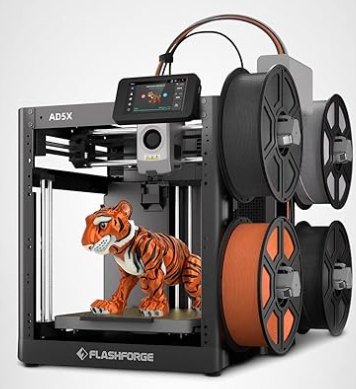

In this comprehensive FlashForge Adventurer AD5X review, we’ll examine everything from build quality and multicolor performance to real-world usability and value for money. Whether you’re a first-time printer owner curious about multicolor capabilities or a maker looking to upgrade, this review will help you determine if the AD5X is the right choice for your needs.
Ready to See This Printer in Action?
Check current pricing and availability with exclusive discounts:
✅ View Best Price on Amazon 🔗 Official FlashForge Website
Amazon typically has faster shipping and better return policies
FlashForge AD5X Overview: What Makes It Different?
The FlashForge AD5X multicolor review begins with understanding what sets this printer apart in an increasingly crowded market. Unlike budget single-color printers or intimidating professional-grade systems, the AD5X occupies a sweet spot designed for users who want multicolor capabilities without complexity.
At its core, the FlashForge AD5X printer review highlights a philosophy of accessible innovation. Built on the proven Adventurer series foundation, this model integrates a streamlined multicolor system that doesn’t require extensive technical knowledge. The printer features an automated material switching mechanism that handles the complexity behind the scenes, allowing users to focus on creativity rather than calibration.
The Adventurer lineage brings reliability and user-friendly design DNA to the AD5X. FlashForge has refined their enclosed design approach over multiple generations, and the AD5X benefits from years of feedback and iteration. The result is a printer that feels familiar to anyone who’s used previous Adventurer models while offering significantly expanded capabilities through its multicolor system.
What truly distinguishes the AD5X is its approach to multicolor printing. Rather than requiring multiple independent extruders or complex manual filament swaps, the system uses a single hotend with automated material switching. This design choice reduces mechanical complexity while maintaining reasonable print quality and color accuracy for most applications.
FlashForge AD5X Specs and Technical Details
Understanding the FlashForge AD5X specs helps set realistic expectations for what this printer can accomplish. Here’s a comprehensive breakdown of the technical specifications that define the AD5X’s capabilities:
| Specification | Details |
|---|---|
| Build Volume | 220 × 220 × 220 mm (8.7 × 8.7 × 8.7 inches) |
| Nozzle Diameter | 0.4 mm (swappable) |
| Layer Resolution | 0.05-0.4 mm |
| Print Speed | Up to 150 mm/s |
| Filament Compatibility | PLA, ABS, PETG, TPU (1.75 mm) |
| Color Capacity | 4 colors simultaneously |
| Connectivity | Wi-Fi, USB, FlashCloud app |
| Operating Noise | <50 dB |
| Power Requirements | 100-240V AC, 50/60Hz, 350W |
| Heated Bed | Yes, up to 110°C |
| Auto-Leveling | Yes, automatic bed leveling |
The 220mm cubic build volume provides sufficient space for most household and hobby projects without demanding excessive desk real estate. While not massive, this size accommodates typical miniatures, functional parts, decorative objects, and prototypes that benefit from multicolor design.
Print speeds up to 150 mm/s place the AD5X in the mid-range category. Multicolor prints naturally take longer due to material switching, but single-color prints can achieve reasonable speeds when quality settings permit. The automatic bed leveling feature eliminates one of the most frustrating aspects of 3D printing for beginners, while the heated bed enables successful printing with various materials including ABS and PETG.
FlashForge AD5X Enclosure Design and Build Quality
The FlashForge AD5X enclosure represents one of the printer’s most compelling features, particularly for households with children, pets, or shared spaces. This fully enclosed design serves multiple practical purposes beyond aesthetics.
Safety considerations drive much of the FlashForge AD5X enclosure review discussion. The complete enclosure prevents curious fingers from reaching hot components during operation, contains any potential fumes from printing (especially when using ABS or other materials that emit odors), and significantly reduces noise levels. For classrooms and family spaces, these safety features prove invaluable.
Temperature stability benefits from the enclosed design as well. The chamber retains heat more effectively than open-frame printers, reducing warping issues with temperature-sensitive materials like ABS and ASA. The enclosure maintains more consistent ambient temperatures around the print, leading to better layer adhesion and reduced failure rates.
Build quality combines sturdy metal framing with durable plastic panels. The metal frame provides rigidity that minimizes vibrations during printing, while the plastic panels remain lightweight enough for easy portability. The front door opens smoothly with a secure magnetic closure, allowing convenient access without compromising the enclosure’s integrity during prints.
Interior lighting illuminates the build chamber adequately for monitoring prints without opening the door. The integrated camera enables remote monitoring through the FlashCloud app, though image quality in low-light conditions could be better. Airflow management includes strategically placed vents that balance temperature retention with preventing excessive heat buildup.
The enclosure’s compact footprint measures approximately 480 × 420 × 530 mm, making it desk-friendly while maximizing internal build volume. The top-loading filament bay keeps spools organized and protected from dust, though accessing filaments during prints requires brief door openings.
Multicolor Printing Performance: Real-World Results
The heart of any FlashForge AD5X multicolor review lies in examining how well the system delivers on its core promise. After extensive testing with various models and color combinations, the AD5X demonstrates both impressive capabilities and inherent limitations of its multicolor approach.
Color switching speed averages 20-30 seconds per transition, depending on how much purge material the slicer deems necessary. This timing adds up quickly on complex multicolor models. A simple two-color print might add only a few minutes to total print time, while intricate four-color designs with frequent switches can double or triple the duration compared to single-color prints.
Color alignment accuracy generally meets expectations for hobbyist applications. Sharp color boundaries appear clean on well-designed models, though some minor bleeding can occur at transitions if purge settings aren’t optimized. Fine details under 2mm may show slight color mixing, but anything larger maintains distinct separation.
The four-color capacity handles most projects adequately. Miniature painters appreciate printing bases with integrated terrain colors. Functional parts benefit from color-coded components. Decorative models gain visual interest through strategic color placement. While professional applications might demand more colors, four proves sufficient for the AD5X’s target audience.
Print consistency across colors maintains acceptable standards. Different filament brands sometimes exhibit slight variations in flow characteristics, but the AD5X compensates reasonably well. Sticking to quality filaments from established manufacturers minimizes issues. Surface finish quality matches or slightly exceeds standard Adventurer models, with layer lines visible at coarser settings but smoothing nicely at higher resolutions.
Single-Color vs Multicolor Print Quality
Single-color prints on the AD5X perform comparably to dedicated single-color Adventurer models. Layer consistency, dimensional accuracy, and surface finish all meet expected standards when multicolor features aren’t engaged. Users won’t sacrifice quality when printing simple projects.
Multicolor prints naturally introduce additional variables. The switching mechanism, purge requirements, and multiple filament paths create opportunities for minor imperfections. Most users find the tradeoff acceptable given the creative possibilities multicolor printing enables. Professional applications requiring absolute perfection might need industrial-grade solutions, but hobbyists and educators will find the AD5X’s multicolor quality perfectly serviceable.
Want to See Multicolor Prints Yourself?
The FlashForge AD5X makes multicolor printing accessible without breaking the bank. Check customer photos and reviews:
Print Quality and Speed Testing
Beyond multicolor capabilities, the FlashForge AD5X printer review must evaluate fundamental print quality metrics. Extensive testing with standard benchmarks reveals performance characteristics that help set realistic expectations.
Layer consistency maintains tight tolerances across most print speeds. At 0.2mm layer height with standard quality settings, layer lines appear uniform with minimal banding. Pushing to finer 0.1mm layers produces noticeably smoother surfaces, though print times increase proportionally. The 0.3mm draft mode sacrifices some smoothness but delivers acceptable results for functional parts where appearance matters less.
Overhangs and bridges demonstrate solid performance within reasonable limits. The AD5X successfully prints 45-degree overhangs without support, and manages 50-55 degrees with minor sagging. Bridge spans up to 20mm cross reliably, while 30mm bridges show some drooping but remain functional. These results compare favorably to other enclosed printers at similar price points.
Dimensional accuracy measures within ±0.2mm for calibration cubes and test prints. Parts designed for mechanical fit typically require minimal post-processing. Hole diameters print slightly undersized (0.1-0.15mm on average), a common characteristic addressable through slicer compensation settings. Overall dimensional consistency satisfies hobbyist and light prototyping needs.
Speed versus quality tradeoffs follow expected patterns. Maximum advertised speeds of 150 mm/s produce acceptable results with simple geometries and coarser layers. Complex models benefit from moderate 60-80 mm/s speeds where quality remains high and print failures decrease. The automatic leveling and enclosed environment help maintain consistency across speed ranges better than open-frame budget alternatives.
Compared to single-color Adventurer models, the AD5X performs essentially identically when multicolor features aren’t active. The addition of multicolor components doesn’t compromise baseline printing capabilities. Users upgrading from earlier Adventurers will notice familiar quality characteristics with the bonus of color options.
How to Use the FlashForge AD5X (Beginner Experience)
Understanding FlashForge AD5X how to use procedures determines whether beginners succeed or become frustrated. FlashForge designed the AD5X with accessibility in mind, and the setup process reflects this philosophy.
Unboxing reveals well-protected components with clear labeling. Setup time averages 15-20 minutes for most users. The printer arrives substantially pre-assembled, requiring only removal of shipping restraints, installation of the filament guide tube, and loading initial filament. The quick-start guide walks through each step with helpful diagrams, though video tutorials on FlashForge’s website provide additional clarification for visual learners.
First-print experience starts with the included test model on the USB drive. Following prompts on the 4.3-inch color touchscreen, users initiate automatic bed leveling, watch the nozzle temperature climb, and observe their first layers depositing. The test print typically completes successfully, building confidence before tackling custom projects.
The touchscreen interface balances simplicity with functionality. Main menus provide clear options for starting prints, loading filament, adjusting settings, and monitoring progress. Icon-based navigation helps users who might struggle with text-heavy interfaces. Response time feels snappy, and the screen remains readable from various angles thanks to decent viewing quality.
FlashPrint slicer workflow begins with model import, either STL or OBJ files. The software automatically detects whether models benefit from multicolor treatment and prompts users to assign colors to different parts or layers. Preset profiles for various materials simplify settings selection. Beginners can achieve good results without deep technical knowledge by sticking to recommended presets.
The FlashCloud app extends functionality beyond the printer’s physical location. Users can upload sliced files directly to the printer over Wi-Fi, monitor print progress through the built-in camera, and receive notifications when prints complete or errors occur. The app works reliably on both iOS and Android, though camera image quality could improve for better remote monitoring detail.
Loading and unloading multicolor filament follows a guided process. The printer heats the nozzle automatically when initiating filament changes through the menu. Users feed each filament into its designated tube until the extruder grabs it. The system purges until clean color appears, then prompts for the next color. Unloading reverses the process with clear on-screen instructions throughout.
Overall, the beginner experience skews positive. Users with zero 3D printing experience report success within their first few prints. The combination of automatic features, clear instructions, and forgiving error recovery makes the AD5X accessible to the printer’s target audience of families, educators, and hobbyists entering the multicolor space.
Perfect For First-Time 3D Printer Owners
If you’re new to 3D printing, the FlashForge AD5X eliminates the steep learning curve with:
- ✅ Automatic bed leveling (no manual calibration)
- ✅ Guided filament loading with on-screen instructions
- ✅ Pre-sliced test models to build confidence
- ✅ Fully enclosed design for safety
- ✅ One-touch printing from the mobile app
Software and Ecosystem (FlashPrint & App)
FlashPrint serves as the AD5X’s primary slicing software, available for Windows, macOS, and Linux. The interface balances accessibility for beginners with sufficient advanced options for experienced users who want fine control.
Multicolor slicing capabilities distinguish FlashPrint from generic slicers. The software intelligently recognizes multi-part models and allows individual color assignment to each component. Users can also paint colors onto model surfaces or assign colors by layer height for gradient effects. The purge tower configuration options let users balance color purity against material waste based on their priorities.
Profiles and presets cover common scenarios well. Material presets for PLA, ABS, PETG, and TPU provide good starting points that require minimal adjustment. Quality presets range from draft to high resolution. Users can create custom profiles for specific filament brands or unusual materials after gaining experience.
Remote monitoring through the FlashCloud ecosystem works adequately for checking print progress and catching obvious failures. The camera provides basic visual confirmation, though resolution limits detailed inspection. Users can pause or cancel prints remotely, and the app sends push notifications when prints finish or errors occur requiring attention.
Camera usage benefits basic monitoring but doesn’t match higher-end systems offering time-lapse recording or AI failure detection. The fixed camera angle covers most of the build plate, though tall prints may extend beyond the frame. Night vision or enhanced low-light performance would improve usefulness during evening monitoring.
Firmware updates arrive periodically through the app or USB connection. FlashForge generally addresses bugs and adds incremental features through updates. The update process runs smoothly, though users should avoid interrupting power during firmware installation to prevent bricking risks.
The FlashPrint ecosystem remains somewhat closed compared to open-source alternatives like Cura or PrusaSlicer. Advanced users might feel constrained by limited customization options or preference for their familiar slicer. However, FlashPrint’s integration with FlashForge hardware generally produces reliable results with minimal tweaking.
FlashForge AD5X Upgrades and Modding Potential
Examining FlashForge AD5X upgrades reveals both opportunities and limitations inherent to the printer’s design. FlashForge supports certain official upgrades while the enclosed design and proprietary components restrict extensive modification.
Official upgrades include nozzle varieties beyond the standard 0.4mm. FlashForge offers 0.2mm nozzles for fine detail work and 0.6mm or 0.8mm options for faster prints with thicker layers. Nozzle swaps follow straightforward procedures, and the printer recognizes different sizes to adjust settings automatically when properly configured.
Accessory options from FlashForge include additional filament spools, replacement build plates, and spare parts for maintenance. The company’s direct support for wear components means users can source official replacements easily, avoiding compatibility concerns that plague some aftermarket modifications.
Third-party compatibility proves limited compared to open-source printer platforms. The enclosed design and proprietary hotend assembly make extensive mechanical modifications impractical for most users. Electronics access requires significant disassembly, discouraging casual tinkering.
Maintenance and wear parts deserve consideration for long-term ownership. Nozzles eventually require replacement due to wear or clogs, particularly when printing abrasive filaments. Build plate surfaces show wear after hundreds of prints but remain available through FlashForge. PTFE tubing in the filament path benefits from periodic inspection and replacement if printing temperatures approach its limits.
Long-term upgrade limitations mean the AD5X essentially remains as purchased regarding core capabilities. Users seeking to add features like direct drive extrusion, larger build volumes, or alternative motion systems should consider these needs before purchase rather than planning future upgrades. The AD5X serves its intended purpose well but doesn’t evolve into a different class of machine through modifications.
This limited upgradability suits the printer’s target audience. Beginners and casual users typically prefer reliability over customization potential. The enclosed design and proprietary components that restrict modifications also contribute to the printer’s safety and ease of use that make it appealing initially.
FlashForge AD5X Reviews and Complaints (What Users Say)
Aggregating FlashForge AD5X reviews and complaints from actual users provides valuable perspective beyond controlled testing. Real-world experiences reveal both consistent praise and recurring frustrations that potential buyers should consider.
Common praise points cluster around several themes. Users frequently compliment the plug-and-play experience, noting that the printer works reliably without extensive calibration or technical knowledge. The enclosed design receives appreciation from parents and teachers who value safety features. Multicolor capability at this price point earns consistent positive mentions, particularly from users upgrading from single-color printers.
Print quality satisfaction varies by user expectations. Those coming from budget open-frame printers often express delight with the AD5X’s consistent results. Users with experience on premium machines sometimes note limitations in speed or fine detail resolution, though most acknowledge these tradeoffs seem reasonable given the price difference.
Recurring complaints warrant attention. Noise levels, while lower than many competitors, still bother users in quiet environments or apartments with thin walls. The enclosed design helps muffle sound, but stepper motor whine and fan noise remain audible during operation. Printing overnight in bedrooms proves disruptive for light sleepers.
Material waste from multicolor printing generates frequent discussion. Users new to multicolor printing often underestimate purge waste, leading to surprise when filament consumption exceeds expectations. Some users develop strategies to minimize waste through careful model design and slicer tuning, while others accept it as an inherent cost of the multicolor approach.
Print speed complaints arise from users expecting performance matching current-generation speed-focused printers. While the AD5X’s speeds prove adequate for most applications, users accustomed to machines printing 2-3x faster experience adjustment difficulties. Multicolor prints particularly feel slow compared to single-color alternatives.
Software limitations frustrate some advanced users who prefer ecosystem flexibility. FlashPrint works well for its intended purpose but lacks features found in open-source slicers. Third-party slicer compatibility exists but often sacrifices multicolor features or requires workarounds.
Multicolor system reliability proves generally positive with proper maintenance. Users report consistent color switching when following recommended procedures for filament loading and regular nozzle cleaning. Problems typically arise from user error (incorrect loading) or neglected maintenance rather than inherent system flaws.
Support and warranty experiences receive mixed feedback. FlashForge’s customer service responsiveness varies, with some users reporting quick helpful resolution while others describe frustrating communication delays. The warranty covers manufacturing defects adequately, though users should document issues promptly and maintain clear communication records.
FlashForge AD5X vs Bambu Lab A1
The FlashForge AD5X vs Bambu A1 comparison addresses a question many potential buyers face when considering multicolor options. These printers target similar audiences but take different approaches to achieving multicolor printing.
| Feature | FlashForge AD5X | Bambu Lab A1 |
|---|---|---|
| Multicolor System | Integrated 4-color | AMS Lite (optional addon) |
| Print Speed | Up to 150 mm/s | Up to 300 mm/s |
| Build Volume | 220 × 220 × 220 mm | 256 × 256 × 256 mm |
| Enclosure | Fully enclosed | Open frame |
| Software | FlashPrint (proprietary) | Bambu Studio (open ecosystem) |
| Price Point | Mid-range with multicolor included | Lower base, higher with AMS |
| Target User | Families, schools, safety-focused | Speed-focused hobbyists |
Which Should You Buy?
Choose the FlashForge AD5X if safety, enclosure benefits, and included multicolor capability matter most. The fully enclosed design suits households with children or pets, classrooms requiring enhanced safety, and users printing temperature-sensitive materials. The integrated multicolor system comes ready to use without additional purchases.
Choose the Bambu Lab A1 if print speed, larger build volume, and software flexibility take priority. The A1 prints significantly faster, offers more build space, and provides access to Bambu’s sophisticated slicer ecosystem. However, adding multicolor requires purchasing the AMS Lite separately, increasing total investment. The open frame design provides excellent visibility but lacks the safety benefits of enclosure.
Both printers serve their target audiences well. The AD5X emphasizes safety and convenience with all features included. The A1 prioritizes performance and expandability with modular options. Consider which factors align better with your specific needs and environment.
Still Deciding? Here’s a Simple Test:
If you answer YES to any of these, get the AD5X:
- 🔒 You need a safe printer for kids or classrooms
- 🎨 You want multicolor included (not as an extra $250+ addon)
- 🏠 You’ll print in a living space and care about noise
- 🔄 You print ABS, ASA, or other temp-sensitive materials
FlashForge AD5X Price and Value for Money
Understanding FlashForge AD5X price positioning helps evaluate whether this printer delivers sufficient value for your investment. Pricing typically ranges from $599 to $799 depending on retailer, promotions, and regional availability.
What’s included justifies much of the cost. The base package contains the fully assembled printer with enclosed design, integrated four-color system, automatic bed leveling, heated build plate, touchscreen interface, sample filament, build plate adhesive, necessary tools, and comprehensive user documentation. No critical features require additional purchases to begin printing.
Ongoing costs deserve consideration when calculating long-term value. Multicolor printing consumes 10-40% additional filament for purge waste compared to single-color prints. Quality PLA filament costs $20-30 per kilogram, meaning material expenses add up with frequent multicolor use. Replacement nozzles, build surfaces, and maintenance items remain reasonably priced through FlashForge’s direct channels.
Value versus competitors depends heavily on priorities. Budget single-color printers cost $200-400 less but lack multicolor capability entirely. Competing multicolor systems either require expensive addon modules (Bambu AMS) or cost significantly more (Prusa MMU-equipped machines). The AD5X bundles everything needed for multicolor printing at a competitive total price.
Who gets the most value from the AD5X? Users specifically seeking multicolor capability without extensive technical expertise find excellent value. The enclosed design adds value for safety-conscious buyers. Educators appreciate the combination of safety features and engaging multicolor output that makes 3D printing accessible to students. Hobbyists wanting to explore multicolor design without professional-grade investment receive solid value.
Users who primarily print single-color objects might find better value in dedicated single-color printers offering similar or superior quality at lower prices. Speed-focused users may resent the AD5X’s more moderate pace when faster alternatives exist. Those requiring extensive customization might view the proprietary ecosystem as limiting rather than convenient.
Current Pricing and Availability
Check the latest deals and bundles to maximize value:
💰 View Current AD5X Pricing on Amazon 🌐 Check Official Website
Amazon Prime members get free shipping and easy returns
Pros and Cons of the FlashForge AD5X
✅ Pros
- Beginner-friendly setup and operation requiring minimal technical knowledge
- Fully enclosed design enhancing safety for households, schools, and shared spaces
- Integrated four-color system included without requiring expensive addon purchases
- Automatic bed leveling eliminating frustrating manual calibration
- Consistent print quality meeting hobbyist and educational standards
- Enclosed design improves temperature stability for various materials
- Reliable performance with minimal calibration or ongoing adjustment
- FlashCloud app enabling convenient remote monitoring and control
- Competitive pricing for included multicolor features versus modular alternatives
❌ Cons
- Moderate print speeds lagging behind current-generation speed-focused printers
- Significant material waste (10-40%) from multicolor purging requirements
- Proprietary software ecosystem limiting flexibility for advanced users
- Limited upgrade and modification potential due to enclosed design
- Audible operation noise potentially bothering quiet environments
- Smaller 220mm build volume compared to some similarly priced alternatives
- Camera quality limits detailed remote monitoring effectiveness
- Multicolor prints take significantly longer than single-color equivalents
- Mixed customer service experiences reported by users
Who Should Buy the FlashForge AD5X?
The FlashForge AD5X serves specific user groups particularly well. Understanding whether you fit these profiles helps determine if this printer matches your needs.
Beginners entering 3D printing:
The AD5X removes many obstacles that frustrate newcomers. Automatic bed leveling, enclosed safety, and straightforward software lower the learning curve significantly. Users can achieve successful prints quickly without deep technical knowledge or extensive troubleshooting. The multicolor feature provides immediate visual appeal that maintains engagement during the learning process.
Families with children:
Parents appreciate the fully enclosed design preventing accidental contact with hot components. Multicolor capability captures children’s imagination better than monochrome prints. The printer’s reliability means less parental intervention during prints, while safety features provide peace of mind when kids participate in design and printing activities.
Schools and makerspaces:
Educational environments benefit from the AD5X’s combination of safety, reliability, and engaging multicolor output. Teachers can focus on educational objectives rather than printer maintenance. The enclosed design meets safety requirements for classroom use. Multicolor prints make demonstrations more visually effective and help students understand design concepts through color coding.
Casual multicolor hobbyists:
Makers who want multicolor capability without professional-grade complexity or investment find good value in the AD5X. The integrated system eliminates researching, purchasing, and installing separate multicolor addons. Users can experiment with multicolor designs immediately without extensive setup or calibration.
Speed-focused users frustrated by wait times should consider faster alternatives. The AD5X’s moderate speeds feel particularly slow during multicolor prints with frequent color changes. Users printing frequently and valuing time efficiency over other factors will find better options.
Advanced users seeking extensive customization might chafe against the proprietary ecosystem. Tinkerers who enjoy modifying and upgrading printers will find limited opportunities with the AD5X’s enclosed design and integrated components. Open-source platforms offer more modification freedom.
Professional applications requiring maximum precision or large build volumes need industrial-grade equipment. The AD5X serves hobbyist and educational needs well but lacks specifications demanded by professional prototyping or production environments.
Budget-conscious users primarily printing single-color objects find better value in dedicated single-color printers. Paying for multicolor capability that goes unused doesn’t make economic sense. Single-color alternatives offer similar or better performance at lower prices.
Final Verdict: Is the FlashForge AD5X a Good Multicolor 3D Printer?
This FlashForge AD5X review concludes that the printer succeeds admirably at its intended purpose: making multicolor 3D printing accessible to mainstream users. FlashForge hasn’t created the fastest printer or the most customizable platform, but they’ve delivered a reliable, safe, user-friendly system that brings multicolor capability within reach of beginners, families, and educators.
The AD5X’s greatest strength lies in its integrated approach. Everything needed for multicolor printing comes included and configured. Users avoid researching compatible addons, troubleshooting installation issues, or wrestling with complex calibration. This convenience particularly benefits the printer’s target audience who value simplicity over ultimate performance or customization potential.
Limitations exist and deserve acknowledgment. Print speeds trail current-generation competitors. Material waste from purging proves significant. The proprietary ecosystem restricts advanced users. However, these tradeoffs seem reasonable for the target audience. Speed matters less to casual users than reliability. Purge waste represents the cost of accessible multicolor printing. Proprietary software works well enough for intended applications.
The fully enclosed design provides genuine value beyond marketing hype. Safety benefits matter for households and classrooms. Temperature stability improves print success rates. Noise reduction makes the printer more pleasant in shared spaces. These features justify premium pricing versus open-frame alternatives.
Clear Buying Recommendation:
Buy the FlashForge AD5X if: you’re entering 3D printing and want multicolor capability without complexity, need enclosed safety features for children or educational settings, value reliability and ease of use over maximum performance, or want an all-in-one multicolor solution at competitive pricing.
Skip the FlashForge AD5X if: you prioritize print speed above other factors, primarily print single-color objects and don’t need multicolor capability, want extensive customization and modification options, or require professional-grade precision and larger build volumes.
Best Alternatives:
Budget-conscious single-color users should consider the Creality Ender 3 V3 or AnkerMake M5, both offering good quality at lower prices without multicolor features. Speed-focused buyers wanting multicolor should examine the Bambu Lab A1 with AMS Lite, accepting open-frame design for faster printing. Users seeking premium enclosed multicolor printing should research the Prusa MK4 with MMU3, understanding it costs significantly more but offers professional-grade features.
The FlashForge AD5X occupies a valuable niche in the 3D printing market. It’s not the cheapest, fastest, or most advanced printer, but it effectively balances accessibility, safety, and multicolor capability for its target audience. Users matching that profile will find the AD5X a satisfying and capable machine that delivers on its promises.
Ready to Add Multicolor Printing to Your Creative Toolkit?
The FlashForge AD5X makes professional-looking multicolor prints accessible to everyone.
🚀 Get the FlashForge AD5X on Amazon
Check current availability, pricing, and customer reviews
Frequently Asked Questions About the FlashForge AD5X
Q: How many colors can the FlashForge AD5X print?
A: The FlashForge AD5X can print with four colors simultaneously. The integrated multicolor system manages automatic switching between four loaded filament spools during a single print job.
Q: Does the AD5X require assembly?
A: No, the AD5X arrives substantially pre-assembled. Setup involves removing shipping restraints, installing the filament guide tube, and loading filament—typically taking 15-20 minutes before you can start printing.
Q: What software does the FlashForge AD5X use?
A: The AD5X primarily uses FlashPrint, FlashForge’s proprietary slicing software available for Windows, macOS, and Linux. The printer also integrates with the FlashCloud mobile app for remote monitoring and control.
Q: How much waste does multicolor printing generate?
A: Multicolor printing typically generates 10-40% additional material waste depending on model complexity and color change frequency. The printer purges residual filament during color transitions to prevent contamination, creating a waste block or purge tower alongside your actual print.
Q: Can the AD5X print with flexible filaments?
A: Yes, the AD5X supports TPU and other flexible filaments, though multicolor capabilities work best with rigid materials like PLA, ABS, and PETG. Flexible filament printing may require reduced speeds and specific settings.
Q: How loud is the FlashForge AD5X?
A: The AD5X operates at under 50 decibels, quieter than many printers thanks to its enclosed design. While not silent, it’s suitable for home and classroom environments, though overnight printing in bedrooms may still disturb light sleepers.
Q: What is the AD5X’s build volume?
A: The build volume measures 220 × 220 × 220 mm (approximately 8.7 × 8.7 × 8.7 inches), providing sufficient space for most household projects, miniatures, functional parts, and decorative objects.
Q: Does the AD5X require manual bed leveling?
A: No, the AD5X features automatic bed leveling that eliminates manual calibration. The printer probes the bed surface before each print and compensates automatically for any variations, significantly simplifying the printing process for beginners.
Q: Can you use third-party filament with the AD5X?
A: Yes, the AD5X works with standard 1.75mm filament from any manufacturer. While FlashForge sells proprietary filaments, the printer doesn’t require them. Using quality third-party filaments typically produces excellent results and costs less than brand-specific options.
🎁 Bonus: Limited Time Offer for Readers
When you purchase through our links, you often get: