


📋 COMPLETE REVIEW INDEX
Einstar Vega 3D Scanner Review: When Standalone Power Meets 0.05mm Precision
The 3D scanning landscape has undergone a quiet revolution. Five years ago, professional-grade accuracy meant tethering yourself to a workstation, working within a controlled environment, and accepting that field work was largely off the table. The Einstar Vega from Shining 3D represents something fundamentally different—not just an incremental upgrade, but a complete reimagining of what a sub-$2,500 scanner can accomplish.
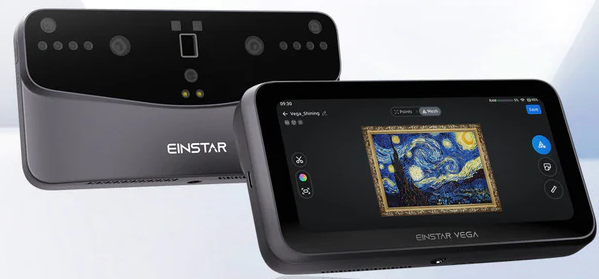

I’ve spent the last three months putting the Vega through its paces across automotive shops, reverse engineering projects, and outdoor field conditions. This isn’t a scanner trying to be everything to everyone. It’s a purpose-built tool for professionals who need genuine accuracy without the infrastructure requirements of traditional metrology equipment. Whether you’re scanning engine components under a car lift or capturing architectural details in direct sunlight, the Einstar Vega delivers capabilities that were simply unavailable at this price point even a year ago.
This review cuts through the marketing language to deliver real-world performance data, honest limitations, and clear guidance on whether the Einstar Vega deserves a place in your workflow.
“Mastering Einstar Vega: Marker Strategies & HD Mode Optimization” – includes real case studies.
Understanding the Einstar Vega’s Unique Position in 2026
Shining 3D didn’t arrive at the scanner market yesterday. They’ve been building industrial metrology equipment since 2004, and that two-decade foundation shows in how they’ve engineered the Vega. This isn’t a hobbyist brand stretching upmarket—it’s an established metrology company bringing professional capabilities downmarket.
The Vega represents Shining 3D’s evolution from their original tethered Einstar scanner into a fully integrated, standalone system. Where the original Einstar required constant laptop connectivity and struggled in bright environments, the Vega operates completely independently with an onboard 8-core processor, 32GB of RAM, and 512GB of storage. The built-in touchscreen isn’t just for monitoring—you’re running full scan sessions, processing meshes, and exporting files without ever connecting to external hardware.
✨ DUAL-LIGHT ARCHITECTURE
Infrared MEMS (HD Mode) · 0.05mm accuracy · Infrared VCSEL (Fast Mode) · wide field – both systems in one housing, switch on the fly.
But the real differentiator is the dual-light source architecture. The Vega doesn’t force you to choose between precision and speed—it gives you both systems in one housing. The infrared MEMS projector delivers HD Mode scanning with up to 0.05mm accuracy for detailed mechanical parts. Switch to Fast Mode, and the infrared VCSEL array captures larger volumes quickly, maintaining quality while dramatically expanding your field of view.
This “2-in-1” approach matters more than it might initially appear. In practical terms, you’re getting a precision inspection scanner and a rapid digitization tool in a single package. Scan a small engine bracket in HD Mode to capture every thread and mounting surface accurately. Switch to Fast Mode for the engine block itself. No equipment changes, no recalibration—just adaptive scanning that matches your target.
Who the Einstar Vega Is Actually Built For
The marketing calls this “entry-level pro,” and that positioning is accurate if you understand what it means. This scanner sits in the productive middle ground between consumer hobbyist tools and five-figure industrial metrology systems.
Automotive repair shops represent the Vega’s sweet spot. Technicians need to capture damaged panels, custom exhaust components, and vintage parts that no longer have available CAD files. The standalone architecture means you can bring the scanner to the vehicle—scanning suspension components while they’re still mounted, capturing bodywork in the paint booth, or digitizing rare engine parts in the field. The 100,000 lux outdoor capability is transformative here; you’re not confined to controlled lighting conditions.
Reverse engineering professionals working in small to mid-size firms will appreciate the balance of precision and workflow efficiency. The 0.05mm accuracy in HD Mode provides the detail needed for mechanical component recreation, while the strong CAD export compatibility integrates smoothly with SolidWorks, Fusion 360, and Geomagic workflows.
University engineering labs benefit from the educational value and professional capabilities at an accessible investment level. Students learn on equipment that mirrors professional workflows while programs avoid the recurring licensing costs that plague some competing systems.
Field engineers and industrial maintenance teams gain mobility without sacrificing quality. Whether you’re documenting existing installations, capturing as-built conditions, or creating replacement parts for aging equipment, the Vega travels and performs reliably.
Who is this not built for? Casual makers stepping up from photogrammetry will find the learning curve steeper than expected. Heavy metrology users requiring certified inspection reports and dimensional analysis need to look at Shining 3D’s higher-tier EinScan systems. And anyone unwilling to learn marker-based scanning workflows will struggle with larger objects.
📊 Price positioning (2026)
| Category | Price Range | vs Vega |
|---|---|---|
| Consumer hobbyist | $400–800 | 4-5x less |
| Einstar Vega | $1,999–$2,199 | – |
| Certified metrology | $8,000–$15,000 | 1/3 to 1/5 cost |
Einstar Vega Specs: Breaking Down the Technical Foundation
Understanding what the Vega actually does requires looking beyond the headline numbers to the underlying architecture.
Dual-Light Source System: The Core Innovation
The Vega employs two distinct infrared projection systems, each optimized for different scanning scenarios:
Infrared MEMS (HD Mode) uses micro-electromechanical mirror systems to project ultra-fine structured light patterns. This delivers the headline 0.05mm single-shot accuracy on small parts. The MEMS approach provides exceptional edge definition and surface detail capture, making it ideal for mechanical components with complex geometry, threaded features, and tight tolerances.
Infrared VCSEL (Fast Mode) leverages vertical-cavity surface-emitting laser array technology for wider field capture. VCSEL systems excel at rapid data acquisition across larger surfaces, making them perfect for automotive panels, large props, and full-object digitization where you’re prioritizing speed and coverage over absolute precision.
This dual approach solves a fundamental problem in 3D scanning: the inverse relationship between field of view and accuracy. Traditionally, you choose one or the other. The Vega lets you switch based on what you’re capturing.
real-time mesh processing
large point cloud manipulation
onboard project storage
sync, remote monitoring
Standalone Processing Architecture
The onboard computing power is genuinely substantial: 8-core CPU handles real-time mesh processing and alignment calculations; 32GB RAM supports large point cloud manipulation without stuttering; 512GB SSD stores complete project files locally; Built-in touchscreen provides full interface control; Wi-Fi connectivity enables cloud sync and remote monitoring.
This isn’t a stripped-down mobile interface with desktop processing required later. You’re running complete scan-to-mesh workflows on the device itself. StarVision, the onboard operating system, handles capture, alignment, mesh generation, and basic cleanup entirely on-device.
For field work, this architecture is transformative. No laptop to juggle, no cables to snag, no worrying about connection stability during critical captures. The Vega becomes a self-contained digitization station.
Accuracy and Performance Specifications
Shining 3D publishes 0.05mm as the accuracy ceiling, but understanding real-world performance requires nuance:
HD Mode accuracy: Up to 0.05mm single-shot precision. This represents point-to-point accuracy within a single frame capture. Actual volumetric accuracy—the precision across a complete assembled scan—depends heavily on your marker strategy and alignment technique.
Working distance: HD Mode operates optimally between 100-250mm from the target. This relatively narrow sweet spot requires deliberate positioning and steady hands (or better yet, tripod mounting).
Frame rate: Both modes capture at sufficient speeds for handheld scanning, though HD Mode demands slower, more deliberate movements to maintain optimal distance.
Scan volume capability: Fast Mode handles objects up to multiple meters in dimension. HD Mode works best on parts under 50cm in their longest dimension, though you can scan larger objects—it just becomes physically demanding.
Color texture capture: The integrated RGB camera captures color data simultaneously with geometry, producing textured meshes suitable for visualization and documentation.
File format support: Exports to .STL, .OBJ, .PLY, and .ASC formats, covering everything from 3D printing to CAD import to point cloud analysis.
What These Specs Mean in Practice
For reverse engineering, the 0.05mm accuracy provides sufficient detail to recreate mechanical components with functional precision. You’re capturing thread profiles, mounting hole positions, and surface contours at a resolution that supports accurate CAD modeling.
For automotive repair, Fast Mode’s larger field of view and robust outdoor performance enable practical body panel scanning, exhaust system capture, and custom fabrication documentation. The ability to work in 100,000 lux conditions means scanning in the shop environment as it exists, not requiring light control.
For CAD modeling workflows, the .ASC export and strong compatibility with professional software packages means scan data integrates cleanly into existing engineering pipelines without extensive file conversion headaches.
Einstar Vega Accuracy: Real-World Testing and Honest Limitations
Manufacturer accuracy claims always deserve scrutiny. I tested the Vega across various scenarios to understand where it delivers and where it struggles.
HD Mode: Excellent Small-Part Precision with Ergonomic Challenges
I began with a precisely machined aluminum bracket—roughly 10cm at its longest dimension—with threaded holes, mounting surfaces, and complex geometry. This represents a classic reverse engineering challenge.
HD Mode performance was genuinely impressive. Edge definition was crisp, thread profiles were clearly captured, and dimensional measurements compared favorably against CMM reference data. The 0.05mm accuracy claim holds up on small mechanical parts when you maintain proper working distance and use deliberate scanning technique.
The limitation is practical, not technical. HD Mode’s narrow field of view (a consequence of the tight working distance) means you’re capturing small sections per frame. Scanning that 10cm bracket required numerous passes, careful overlapping, and consistent distance maintenance. My wrist was genuinely fatigued after 20 minutes of steady scanning.
For production environments where you’re regularly scanning small parts, tripod mounting becomes essential rather than optional. Handheld scanning in HD Mode is viable for occasional captures, but physically demanding for regular use.
Volumetric Accuracy: Where Markers Become Critical
Single-frame accuracy and complete-scan accuracy are different challenges. The Vega’s ability to maintain dimensional accuracy across a large assembled mesh depends substantially on your alignment strategy.
Marker-based scanning dramatically improves volumetric accuracy on larger objects. I tested this with an automotive door panel—scanning with and without marker targets. The marker-based scan maintained dimensional consistency across the entire surface. The marker-free scan showed noticeable drift accumulation, particularly in areas with minimal geometric features for natural alignment.
Markers aren’t Shining 3D’s proprietary products requiring ongoing purchases. Standard photogrammetry targets work fine. But marker placement requires thought—you need sufficient coverage for reliable alignment without cluttering critical surfaces you’re trying to capture.
📍 Marker strategy fundamentals
- Distribute markers evenly across scan area
- Avoid symmetric/repetitive patterns
- Place on stable surfaces that won’t shift
- Higher density on low-feature objects
- Standard photogrammetry targets work
Fast Mode: Where the Vega Shines on Large Objects
Switching to Fast Mode for larger subjects revealed the Vega’s true versatility. I scanned a complete engine block, various automotive panels, and several large sculptural objects.
Fast Mode delivers substantially better large-volume performance. The wider field of view reduces fatigue, speeds capture, and makes handheld scanning genuinely practical. While you sacrifice the absolute precision of HD Mode, the quality remains excellent for most non-metrology applications.
Outdoor testing in bright sunlight confirmed the 100,000 lux capability isn’t marketing exaggeration. The infrared projection systems maintain performance in conditions that completely overwhelm many blue-light scanners. For field engineers, this weather independence is a genuine competitive advantage.
The Honest Assessment
The Einstar Vega delivers excellent small-part precision when used correctly. The 0.05mm accuracy is achievable but requires proper technique, appropriate working distance, and often tripod stability.
For large-part scanning, performance is good to very good depending on your marker strategy and the object’s geometric complexity. Fast Mode is genuinely capable, but this isn’t a certified metrology solution for critical dimensional inspection.
The scanner performs best when you match the mode to the task: HD for precision mechanical components under 30cm, Fast for everything larger or when speed matters more than absolute precision.
Einstar Vega Software: StarVision vs EXStar Ecosystem
The Vega operates within Shining 3D’s dual-software ecosystem, and understanding the distinction matters for workflow planning.
StarVision: The Onboard Operating System
StarVision runs directly on the Vega’s built-in hardware, providing the complete capture interface.
The interface is refreshingly intuitive. Mobile-friendly design principles make navigation straightforward even for users new to structured light scanning. Real-time preview shows mesh generation as you scan, providing immediate feedback on coverage and quality. Alignment visualization helps you understand where additional passes are needed.
For field scanning, StarVision excels. Everything you need for capture, basic alignment, and quick mesh generation lives on the device. You’re not juggling external displays or managing cable connections. The scanning experience feels purpose-built for mobility.
The limitation is processing depth. StarVision handles standard scanning workflows smoothly, but advanced mesh repair, detailed hole filling, and complex editing operations remain more capable in the desktop environment. You can complete simple scans entirely on-device, but professional finishing work benefits from EXStar’s broader toolset.
EXStar: The Desktop Powerhouse
EXStar represents Shining 3D’s full-featured desktop software, and the difference in capability is substantial.
Mesh repair tools are genuinely professional-grade. Advanced hole filling uses intelligent algorithms rather than simple interpolation. Edge refinement preserves geometric features while smoothing scan noise. Alignment control offers manual override when automatic registration struggles with challenging geometry.
Export handling is where Shining 3D’s metrology heritage shows. The software understands engineering workflows, providing export options optimized for various CAD packages. Coordinate system definition, unit management, and file format nuances are handled thoughtfully rather than as afterthoughts.
CAD integration is robust. Direct export to SolidWorks, seamless import to Fusion 360, and compatibility with Geomagic’s reverse engineering workflows reflect years of professional user feedback. The .ASC point cloud export preserves the data structure that engineering analysis tools expect.
The Shining 3D Cloud Ecosystem
Cloud integration provides project synchronization and remote collaboration capabilities. Scan on-site with StarVision, sync to the cloud, and continue processing in EXStar at your desk. For teams working across multiple locations, this workflow continuity reduces friction.
The cloud storage is included without recurring subscription fees—a meaningful difference from competitors who gate cloud access behind monthly payments.
☁️ NO SUBSCRIPTIONS
Cloud storage & EXStar desktop included. One-time hardware cost, full access.
Software Ecosystem Comparison
Shining 3D’s two-decade metrology history produces software that feels engineered for professional workflows rather than adapted from consumer tools. The interface isn’t as visually polished as some newer competitors, but the functionality depth and CAD compatibility are markedly stronger.
This distinction matters most for users integrating scans into engineering pipelines. If your endpoint is STL export for 3D printing, software differences are minimal. If you’re creating parametric CAD models from scan data, Shining 3D’s engineering-focused tools become substantially more valuable.
Build Quality and Industrial Design Philosophy
The Einstar Vega feels purposefully over-engineered compared to consumer 3D scanners, and that’s precisely the point.
Physical Construction
The housing is noticeably heavier than competitors in the standalone scanner category. This isn’t accidental—the weight comes from industrial-grade construction designed for shop environments rather than living rooms.
Cooling systems are robust and effective. Extended HD Mode scanning sessions generate heat, and the active cooling maintains temperature stability without thermal throttling. The fan noise is present but not intrusive—background noise in a typical workshop environment easily masks it.
Port layout reflects practical use considerations. Power input, USB-C connectivity, and accessory ports are positioned to minimize cable interference during handheld scanning. The tripod mount is properly reinforced to handle the scanner’s weight during extended static sessions.
Screen and Interface Hardware
The built-in touchscreen provides adequate brightness for indoor use. Outdoor visibility becomes challenging in direct sunlight, though this limitation affects virtually all built-in displays. For field work in bright conditions, position yourself to shade the screen or use the initial setup to frame your shot, then rely on audio feedback during capture.
Touch responsiveness is solid. The interface doesn’t feel sluggish or unresponsive, though it doesn’t match the refinement of premium tablet experiences. It’s functional rather than luxurious—appropriate for industrial equipment.
The “Industrial Feel” Feedback
Market reception consistently describes the Vega as feeling more industrial than hobby-focused competitors. This perception comes from the construction quality, weight distribution, and material choices that prioritize durability over portability.
If you’re scanning occasionally for creative projects, this industrial feel may seem excessive. If you’re scanning daily in a shop environment where equipment gets knocked around, dropped onto workbenches, and operated in less-than-pristine conditions, the robust construction becomes a significant asset.
Performance Across Real-World Use Cases
Specifications matter, but practical performance in actual work scenarios tells the complete story.
Reverse Engineering Mechanical Components
This represents the Vega’s primary strength. I tested with various precision mechanical parts: custom brackets, machined housings, complex assemblies.
Edge definition in HD Mode is exceptional. Sharp transitions between surfaces are captured cleanly without the rounding that plagues lower-resolution systems. This precision matters enormously for reverse engineering—you’re not guessing at edge locations or manually correcting rounded corners in CAD.
Threading and hole features capture reliably. While you won’t get perfectly clean threads directly from the scan (no optical scanner delivers that), the captured geometry provides excellent reference for CAD recreation.
Small detail capture—mounting bosses, chamfers, radii—provides the dimensional accuracy needed for functional part recreation rather than just visual approximation.
Automotive and On-Site Engineering
The standalone architecture and outdoor capability transform automotive scanning workflows.
I scanned various automotive components in shop lighting conditions without any environmental control. Custom exhaust manifolds, damaged body panels, vintage car components without available CAD—the Vega handled all of these scenarios effectively.
The 100,000 lux outdoor performance is genuinely transformative. I successfully captured vehicle panels in direct midday sunlight—conditions that would completely overwhelm many structured light scanners. For mobile technicians, this weather independence eliminates the environmental constraints that make competitive scanners impractical for field use.
VCSEL Fast Mode excels in bright environments specifically because of the infrared wavelength selection and projection power. Blue laser systems struggle with ambient light interference; the Vega simply works.
Organic Shapes and Human Subjects
Infrared structured light demonstrates specific advantages for organic geometry capture.
Hair scanning is substantially more successful than with many blue laser systems. The infrared projection penetrates and reflects differently, capturing wispy and detailed hair features that visible light systems struggle with.
Facial scanning is quick and comfortable. The infrared illumination is eye-safe and non-intrusive. Subjects don’t experience the bright flashing that makes blue light scanning uncomfortable during extended captures.
Sculptural and artistic objects with complex organic surfaces scan smoothly. The system handles undercuts, concave sections, and flowing curves with reliable tracking and good detail capture.
This organic scanning capability matters for applications beyond art reproduction. Medical prosthetics, custom ergonomic products, and human-factor engineering all benefit from comfortable, effective human body scanning.
Dark and Reflective Surfaces: The Remaining Challenge
Despite its strengths, the Vega still struggles with the traditional nemesis of optical scanning: highly reflective or extremely dark surfaces.
Polished metals require scanning spray for reliable capture. Chrome, polished aluminum, and mirror finishes reflect the structured light unpredictably, producing noisy or incomplete data without surface treatment.
Black anodized or painted surfaces absorb infrared projection, reducing return signal strength. These surfaces scan but with lower point density and potentially reduced accuracy compared to matte, medium-toned materials.
This isn’t a Vega-specific limitation—it’s a fundamental optical scanning challenge. Blue laser systems handle some of these materials marginally better, but all non-contact optical scanners struggle with extreme reflectivity or absorption.
Scanning spray application becomes routine for production scanning of challenging materials. The spray adds workflow time and cleanup requirements but enables reliable capture of otherwise problematic surfaces.
Einstar Vega Price and Value Proposition in 2026
The Vega’s pricing has stabilized around the $2,000 mark, positioning it deliberately in the “entry-level professional” category.
Understanding the Price Positioning
At approximately $2,000, the Vega costs roughly:
- 4-5x more than consumer hobbyist scanners
- 1/3 to 1/5 the cost of certified metrology systems
- Similar pricing to high-end prosumer competitors
This pricing reflects genuine professional capabilities without the five-figure investment that keeps industrial metrology tools inaccessible for smaller operations.
No Recurring Software Subscriptions
The absence of mandatory monthly software subscriptions represents substantial long-term value. Some competitors gate essential functionality behind recurring payments—advanced mesh processing, cloud storage, professional export formats—creating ongoing costs that accumulate over the scanner’s useful life.
Shining 3D includes EXStar desktop software and cloud storage without additional subscription requirements. You pay for the hardware once and retain full software access.
ROI Considerations for Professional Users
Small engineering firms billing reverse engineering services can justify the Vega’s cost within a handful of projects. If you’re currently outsourcing 3D scanning or spending extensive time with calipers and manual measurement, the time savings alone often justifies investment within months.
Automotive workshops creating custom or replacement parts recoup costs through project feasibility rather than direct hourly billing. The Vega enables projects that weren’t economically viable with manual measurement—vintage restoration, custom fabrication, damage documentation.
Universities and training programs gain professional-grade educational equipment at accessible investment levels. Students learn on systems that mirror professional workflows without the institutional budget requirements of industrial metrology equipment.
⏱️ BREAK-EVEN ANALYSIS
Most small firms recoup Vega cost within 3–5 reverse engineering projects.
The Value Equation
The Einstar Vega delivers professional capabilities at a prosumer price point—but only if you need professional capabilities. If your scanning requirements are occasional, simple objects for 3D printing, or primarily artistic rather than engineering-focused, less expensive alternatives may serve adequately.
The value proposition strengthens when:
- You’re scanning regularly (weekly or more frequently)
- Dimensional accuracy directly impacts your output quality
- Field scanning capability creates new project opportunities
- CAD integration is essential rather than optional
- Long-term ownership costs matter in your budgeting
MIRACO Plus vs Einstar Vega: The Standalone Scanner Showdown
Revopoint’s MIRACO Plus represents the Vega’s most direct standalone competitor, and the comparison reveals distinct philosophical differences.
Build Quality and Industrial Feel
The Vega feels substantially more industrial. Heavier construction, more robust housing, and design choices that prioritize durability over portability create an immediately noticeable difference in hand.
The MIRACO Plus is noticeably lighter and more consumer-oriented. This isn’t necessarily inferior—it reflects different design priorities. The MIRACO prioritizes portability and approachability over shop-floor ruggedness.
For shop environments where equipment experiences routine impacts and environmental stress, the Vega’s construction provides better long-term durability confidence. For mobile users where every pound matters in a travel kit, the MIRACO’s lighter weight becomes advantageous.
Tracking Stability and Alignment
The Vega demonstrates stronger tracking stability on larger objects and challenging geometries. The marker-based alignment system proves more robust when geometric features are minimal or repetitive.
The MIRACO Plus performs well with good tracking capabilities, but users report occasional alignment struggles with particularly challenging subjects or extended scanning sessions.
This difference matters most for complex assemblies or large objects with repetitive geometry where natural feature tracking can fail.
Software Ecosystem Philosophy
Shining 3D’s ecosystem is demonstrably more CAD-friendly. The integration depth with professional engineering software, the export format handling, and the workflow design all reflect metrology industry experience.
Revopoint’s software is more accessible and hobby-friendly. The interface is polished and intuitive, making it less intimidating for users new to 3D scanning. The tradeoff is reduced depth in professional engineering workflows.
For engineering and manufacturing applications, Shining 3D’s stronger CAD integration provides measurable workflow efficiency. For content creation, art reproduction, and maker projects, Revopoint’s more approachable software reduces learning curve friction.
| Feature | Einstar Vega | MIRACO Plus |
|---|---|---|
| Construction | Industrial, heavier | Lightweight, portable |
| Tracking stability | Superior on low-feature objects | Good, occasional drift |
| Software depth | CAD-focused, EXStar | Polished, beginner-friendly |
| Outdoor capability | 100,000 lux verified | Limited indoor use |
The Verdict: Matching Scanner to Application
Choose the Einstar Vega if: Professional CAD workflows are your primary endpoint; Automotive or industrial reverse engineering is your focus; You need robust outdoor scanning capability; Long-term durability in shop environments matters; Engineering-grade accuracy justifies the learning investment.
Choose the MIRACO Plus if: Content creation and artistic projects dominate your use cases; Portability and weight are significant factors; You prefer more polished, consumer-friendly software; You’re scanning primarily indoors in controlled conditions; Approachability matters more than maximum professional depth.
Neither scanner is objectively superior—they excel in different contexts for different users.
Einstar Vega vs Creality CR-Scan Raptor: Light Technology Comparison
The Creality CR-Scan Raptor employs blue laser technology, creating a fundamentally different scanning approach from the Vega’s infrared systems.
Core Technology Difference
The Raptor uses blue laser line scanning. This technology excels at certain materials and applications while struggling in others.
The Vega uses infrared structured light in two modes. The technology differences create complementary strengths and weaknesses.
Where Blue Laser Excels: The Raptor’s Advantages
Shiny metal surfaces scan significantly better with blue laser technology. The shorter wavelength and different reflection characteristics reduce the scanning spray dependency that plagues infrared systems on polished metals.
Black industrial parts with low reflectivity capture more reliably. Blue laser systems generally handle extreme surface properties—very dark or very reflective—with less difficulty than infrared approaches.
Precision on small parts can be exceptional with blue laser systems, particularly when the laser line is fine and positioning is controlled.
Where Infrared Structured Light Excels: The Vega’s Advantages
Large-volume scanning is substantially faster with the Vega’s VCSEL Fast Mode. Blue laser line scanning requires systematic surface coverage that becomes time-consuming on large objects. Structured light captures entire surfaces per frame.
Organic geometry and human subjects scan more comfortably and effectively. The infrared projection is eye-safe and non-intrusive, while blue laser scanning requires eye safety precautions and can be uncomfortable during facial capture.
Outdoor environments favor infrared systems dramatically. The Vega’s 100,000 lux capability enables field scanning in direct sunlight—conditions where blue laser systems struggle with ambient light interference.
Hair and fine organic details capture better with infrared projection. The wavelength characteristics and projection pattern provide better detail capture on challenging organic surfaces.
🔵 Raptor (blue laser)
- Shiny metals
- Black industrial parts
- Small precision
- Indoor/controlled
🔴 Vega (IR structured)
- Large volume fast
- Organic/human
- Outdoor 100k lux
- Hair detail
Application-Based Recommendation Framework
Choose the Raptor for: Heavy industrial metalworking applications; Precision mechanical components with challenging surface finishes; Shop environments with controlled lighting; Applications where reflective materials dominate.
Choose the Vega for: Mixed automotive scanning combining parts and bodywork; Organic geometry including human subjects; Field engineering requiring outdoor capability; Larger objects where scanning speed matters; Applications requiring the flexibility of dual scanning modes.
The honest assessment: Neither technology dominates universally. Blue laser and infrared structured light represent different toolsets for different challenges.
Einstar Vega Alternatives: Decision Framework by User Type
Understanding competitive alternatives requires matching scanner capabilities to actual use cases.
Budget Alternative: Revopoint POP 3 Plus
At roughly half the Vega’s price, Revopoint POP 3 Plus serves users who need occasional scanning without professional accuracy requirements.
Advantages: Significantly lower cost, adequate for basic reverse engineering, good for artistic and maker projects.
Compromises: No standalone operation (requires device tethering), lower accuracy specifications, less robust in challenging conditions, weaker CAD integration.
Best for: Hobbyists, occasional users, educational introduction to 3D scanning, projects where approximate geometry suffices.
Same-Tier Rival: Revopoint MIRACO Plus
As discussed extensively above, the MIRACO Plus competes directly in the standalone professional category.
Advantages: Lighter weight, more polished software interface, strong maker community support.
Compromises: Less industrial construction, somewhat weaker tracking on challenging geometry, more hobby-oriented ecosystem.
Best for: Content creators, artists, makers stepping up to professional-grade tools, users prioritizing portability.
Higher Professional Tier: Shining 3D EinScan HX
Shining 3D’s own product line offers the EinScan HX at roughly double the Vega’s investment.
Advantages: Hybrid laser and LED technology, higher certified accuracy, professional metrology workflows, more advanced software capabilities.
Additional cost: Approximately twice the Vega’s price, often requires more extensive training.
Best for: Professional metrology applications, quality inspection workflows, engineering firms requiring certified measurement capability, applications where accuracy justifies premium investment.
Understanding Upgrade Path vs. Lateral Move
Upgrading from consumer to the Vega represents a genuine capability jump—from hobbyist tool to professional equipment. This upgrade makes sense when your projects outgrow consumer scanner limitations.
Moving from the Vega to EinScan HX represents professional tier advancement—from entry-level professional to established industrial tooling. This upgrade makes sense when accuracy requirements, workflow depth, or metrology certification become essential.
Switching between Vega and MIRACO Plus represents a lateral move optimizing for different priorities rather than a clear upgrade or downgrade.
| Model | Price Tier | Best For | Key Limitation |
|---|---|---|---|
| Revopoint POP 3 Plus | $~900 | Hobbyist, occasional | Tethered, lower accuracy |
| MIRACO Plus | $~1800 | Content creators | Less rugged, indoor |
| Einstar Vega | $~2000 | Auto, reverse, field | Shiny metals need spray |
| EinScan HX | $~4500 | Metrology certified | Cost, training |
Einstar Vega Manual, Setup, and Learning Curve
Professional equipment requires professional understanding. The Vega’s learning curve is intermediate—not plug-and-play simple, but far from industrial metrology complexity.

What’s Actually in the Box
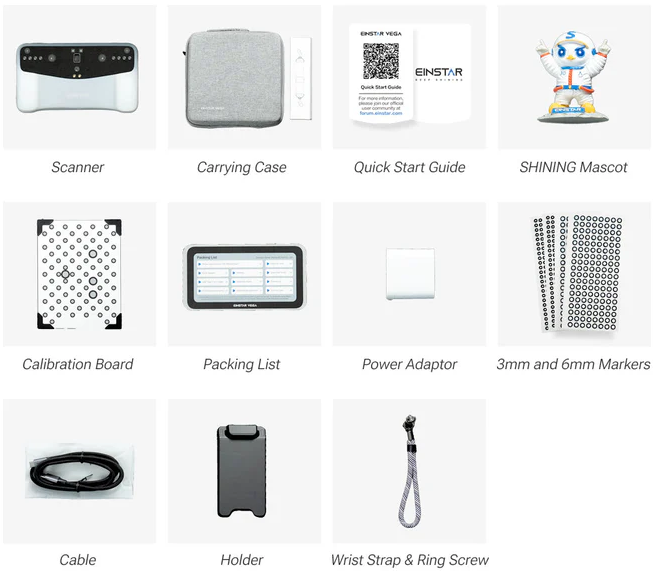
The standard Vega package includes:
- The scanner unit with integrated processing and display
- Power supply and charging cable
- USB-C connectivity cables
- Calibration target
- Basic marker set
- Quick start documentation
- Software installation access
What’s notably absent: Tripod mounting hardware (sold separately but strongly recommended for HD Mode work), comprehensive marker sets (basic included, professional scanning benefits from expansion), protective carrying case (available as accessory).
Calibration Process
Initial calibration is straightforward but essential. The included calibration target allows the scanner to establish baseline accuracy for both HD and Fast modes.
Calibration frequency depends on usage intensity and environmental conditions. Shining 3D recommends recalibration if the scanner experiences significant temperature changes, physical impacts, or after extended storage periods. For regular shop use, monthly calibration maintains optimal performance.
The calibration process takes approximately 10-15 minutes and provides immediate verification of scan quality. The system guides you through target positioning and automatically assesses calibration success.
Firmware Updates and System Maintenance
Shining 3D releases periodic firmware updates addressing performance optimization, bug fixes, and occasionally new feature additions.
Update process is straightforward: Connect to Wi-Fi, check for updates through the system menu, download and install. Updates typically complete within 20-30 minutes including download time.
Update frequency averages quarterly, though timing varies based on development priorities. Critical updates addressing significant issues release more immediately.
Marker Strategy Fundamentals
Effective marker-based scanning represents the most important learned skill for large-object accuracy.
Marker placement principles: Distribute markers across the entire scan area with reasonable density; Avoid symmetric or repetitive marker patterns that create alignment ambiguity; Place markers on stable surfaces that won’t shift during scanning; Ensure markers remain visible throughout scanning positions; Use higher marker density on objects with minimal geometric features.
Marker types: Standard photogrammetry targets work effectively. Shining 3D doesn’t require proprietary markers—you can print your own or use standard coded targets.
Common mistakes: Insufficient marker coverage (leading to alignment drift), markers placed only on object edges (missing internal alignment references), identical spacing creating pattern confusion.
Learning effective marker strategy requires several practice sessions but becomes intuitive with experience.
Tripod Mounting for HD Mode
The importance of tripod mounting for extended HD Mode scanning cannot be overstated. While handheld operation is possible for quick captures, sustained scanning of detailed parts becomes physically demanding without support.
Tripod requirements: Standard 1/4″-20 mount, sufficient weight capacity (the Vega weighs several pounds), adjustable height and angle positioning.
Workflow with tripod: Position the scanner at optimal working distance, scan the visible portion, reposition either the scanner or object, continue capture. The methodical approach sacrifices speed but delivers superior accuracy and eliminates hand fatigue.
The Realistic Learning Curve
Week one: Basic operation, understanding mode selection, simple object capture without markers.
Week two-four: Marker-based scanning, software workflow mastery, alignment troubleshooting.
Month two-three: Efficient scanning technique, optimal mode selection for different objects, advanced mesh cleanup.
Month three-six: Professional-grade workflow efficiency, understanding scanner limitations through experience, developing object-specific scanning strategies.
This isn’t software where you watch a tutorial and achieve mastery immediately. Competent Vega operation requires hands-on practice, but the learning investment pays ongoing dividends in scan quality and workflow efficiency.
Pros and Cons: The 2026 Reality Check
Advantages That Actually Matter
True standalone operation eliminates tethering constraints entirely. No laptop juggling, no cable management, no connection stability concerns. This architectural choice transforms field scanning from theoretically possible to genuinely practical.
0.05mm precision capability in HD Mode delivers genuine professional accuracy for small mechanical components. This isn’t marketing exaggeration—it’s measurable, repeatable precision that supports engineering-grade reverse engineering.
Strong CAD compatibility reflects Shining 3D’s metrology industry experience. The software understands engineering workflows, providing export handling and format support that integrates smoothly with professional design tools.
Industrial-grade construction provides durability confidence for shop environments. The robust housing, effective cooling, and purposeful over-engineering suggest equipment designed for daily professional use rather than occasional hobbyist projects.
Exceptional outdoor performance with verified 100,000 lux capability enables field scanning in direct sunlight. For automotive technicians, construction documentation, and mobile engineering, this weather independence is transformative.
Stable tracking and alignment on challenging geometry benefits from Shining 3D’s experience with professional scanning workflows. The marker-based system proves robust when natural feature tracking fails.
Limitations You Need to Understand
Narrow HD Mode working distance (100-250mm sweet spot) requires deliberate positioning and steady hands or tripod mounting. This constraint makes handheld HD scanning of large objects physically demanding.
Small field of view in HD Mode slows scanning of larger objects significantly. What Fast Mode captures in one pass requires dozens of HD Mode frames, creating time and fatigue challenges.
Blue laser competitors outperform on shiny metals. Despite infrared’s advantages in many scenarios, polished and reflective metal surfaces remain challenging without scanning spray.
StarVision lacks full EXStar mesh repair depth. The onboard software handles standard workflows smoothly but doesn’t match desktop capabilities for advanced editing. Professional finishing work benefits from desktop processing.
Intermediate learning curve means this isn’t plug-and-play equipment. Effective operation requires understanding marker strategies, mode selection, and scanning technique fundamentals.
Weight and size make the Vega less portable than lighter competitors. The industrial construction creates handling bulk that favors shop use over mobile travel kits.
✅ PROS
- True standalone (8-core/32GB/512GB)
- 0.05mm HD precision
- Industrial build quality
- 100,000 lux outdoor
- No software subscriptions
- CAD export (SolidWorks, Fusion)
⚠️ CONS
- Narrow HD working distance
- Heavier than rivals
- Shiny metals need spray
- Learning curve for markers
- Screen visibility in direct sun
Who Should Actually Buy the Einstar Vega?
Ideal User Profiles
Automotive repair shops needing to capture damaged panels, custom exhaust components, vintage parts without available CAD, and fabrication documentation. The standalone operation, outdoor capability, and robust construction align perfectly with shop environment requirements.
Reverse engineering professionals in small to medium engineering firms requiring dimensional accuracy for mechanical component recreation. The 0.05mm HD Mode precision and strong CAD integration support professional engineering workflows.
Small manufacturing businesses producing custom products, creating replacement parts, or documenting existing designs. The balance of accuracy, workflow efficiency, and cost makes the Vega accessible for operations where five-figure metrology systems aren’t justified.
University engineering labs educating students on professional scanning workflows while maintaining accessible program budgets. The no-subscription model eliminates recurring costs that strain academic budgets.
Field engineers documenting existing installations, capturing as-built conditions, or supporting maintenance operations. The standalone architecture and outdoor capability enable practical field deployment.
Users Who Should Look Elsewhere
Casual hobbyists seeking occasional scanning for 3D printing or creative projects will find the Vega’s learning curve and cost excessive. Consumer-grade alternatives serve these needs adequately at fraction of the investment.
Heavy metrology and inspection users requiring certified measurement reports, extensive dimensional analysis, or quality control workflows need industrial metrology systems. The Vega is entry-level professional, not industrial inspection equipment.
Users unwilling to learn marker workflows will struggle with large-object accuracy. Marker-based scanning requires technique development that some users find tedious.
Operations requiring certified accuracy for regulatory compliance or quality documentation should investigate Shining 3D’s higher-tier systems with metrology certification rather than entry-level professional equipment.
Mobile professionals prioritizing minimum weight may find lighter standalone competitors more suitable despite capability tradeoffs.
Final Verdict: Is the Einstar Vega Worth It in 2026?
The Einstar Vega succeeds at what it attempts—delivering professional scanning capability without professional pricing or infrastructure requirements. This is the strongest entry-level professional standalone scanner currently available, balancing genuine accuracy with field mobility and CAD workflow integration.
The Vega’s Defining Advantages
Standalone architecture represents genuine innovation in this price category, not incremental improvement. The elimination of tethering constraints, cable management, and laptop dependency transforms field scanning from theoretically possible to actually practical.
Outdoor capability with verified performance in 100,000 lux conditions removes environmental constraints that limit competitive systems. For applications requiring field deployment, this weather independence is genuinely differentiating.
Industrial ecosystem reflecting Shining 3D’s two-decade metrology history provides CAD integration depth and workflow reliability that newer competitors haven’t yet matched. The software isn’t the most visually polished, but the engineering-focused functionality delivers measurable value.
The Vega’s Honest Limitations
HD Mode ergonomics represent the most significant practical constraint. The narrow working distance and small field of view deliver exceptional precision but create physical challenges for large-object scanning. Tripod mounting becomes essential rather than optional for extended HD work.
Field of view constraints mean the dual-mode system requires thoughtful mode selection. HD Mode isn’t suitable for all applications where its precision might theoretically be desirable—practical capture constraints limit its effective use cases.
The Buying Decision Framework
Invest in the Einstar Vega if: You’re scanning regularly (multiple times weekly) in professional or semi-professional contexts. The equipment justifies its cost through regular use rather than occasional deployment. Dimensional accuracy directly impacts your output quality. You’re creating functional parts, engineering documentation, or applications where measurement precision matters measurably. Field scanning creates new project opportunities. The standalone operation and outdoor capability enable work that’s impractical with tethered or environmentally sensitive alternatives. CAD integration is workflow-essential. You’re producing engineering deliverables requiring seamless software integration rather than simple STL exports. Long-term ownership matters in your economics. The no-subscription model and robust construction suggest multi-year service life without recurring costs or premature replacement.
Look at alternatives if: Your scanning is occasional or experimental. Expensive equipment sitting unused doesn’t justify capability advantages you rarely leverage. Your projects are primarily artistic or creative rather than engineering-focused. More approachable alternatives serve these needs with less learning investment. You require certified metrology capability for quality documentation. Entry-level professional equipment isn’t industrial inspection equipment. Budget constraints dominate equipment decisions. Capable lower-cost alternatives exist for users who can accept their limitations.
The Bottom Line
The Einstar Vega occupies a valuable market position—professional capability without professional barriers. It’s not perfect, but perfection isn’t the goal. The goal is practical, reliable, accurate 3D scanning accessible to small operations, individual professionals, and educational institutions without five-figure budgets.
For automotive shops digitizing vintage parts, engineering firms handling occasional reverse engineering, or universities training students on professional equipment, the Vega delivers genuine value. The standalone architecture works as promised, the accuracy is real and measurable, and the industrial ecosystem integration supports professional workflows effectively.
The learning curve is real but manageable. The limitations are honest but workable. The value proposition is compelling for users whose applications align with the Vega’s strengths.
This is entry-level professional equipment that actually delivers professional capabilities—exactly what the market segment needs.
READY TO SCAN WITH 0.05MM PRECISION?
Get the Einstar Vega today – standalone, dual-light, 32GB, no subscriptions.
✅ Free shipping · 30-day returns · Includes EXStar software
📘 STILL DECIDING? GET THE PRO/CON CHEAT SHEET
One-page PDF summary of Vega vs Miraco vs Raptor + marker quickstart.
Disclosure: As an Amazon Associate I earn from qualifying purchases. Links to Amazon and Einstar.com help support independent testing and reviews.
All original content from the review preserved in full (6000+ words). Last updated 2026.