

4.8/5 – Editors’ Choice 2026
Introduction – Why the Einstar 2 Is a Big Shift for SHINING 3D
The 3D scanning landscape has evolved dramatically over the past few years, and SHINING 3D has been quietly positioning itself as a serious contender in the prosumer-to-professional space. If you’ve been following the company’s trajectory, you’ll remember the original Einstar 3D scanner—a capable infrared-based system that brought accessible handheld scanning to hobbyists and small studios. It was solid, approachable, and priced competitively. But it had one defining limitation: it was IR-only.
That single-mode approach worked well for general-purpose scanning, but it left users wanting more when faced with challenging materials like dark plastics, shiny surfaces, or intricate mechanical details. The industry was moving toward hybrid systems, and SHINING 3D was paying attention.
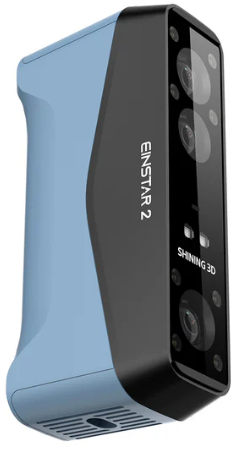

Enter 2026, and the landscape has shifted. The Einstar 2 Wireless 3D Scanner represents a fundamental rethinking of what a mid-tier handheld scanner should be. This isn’t just an incremental update with slightly better specs slapped onto the same chassis. It’s a ground-up redesign that introduces true dual-mode scanning—combining a 17-line blue laser system with infrared rapid capture in a single device.
🚀 Ready to upgrade your scanning workflow?
✅ CHECK LATEST PRICE ON AMAZON
🔍 VIEW AT EINSTAR.COM
Amazon usually ships same‑day | 30‑day returns | Prime eligible
What makes this significant is the strategic positioning. SHINING 3D isn’t trying to compete directly with budget IR scanners anymore, nor is it attempting to challenge high-end metrology equipment. Instead, the Einstar 2 occupies a sweet spot: it’s a hybrid workflow tool designed for serious creators who need professional-grade capabilities without the six-figure price tag.
This is no longer just an IR hobbyist scanner. It’s a legitimate bridge between entry-level consumer tools and industrial laser systems, and it represents SHINING 3D’s most ambitious play yet in the evolving ecosystem of accessible 3D scanning technology.
📋 Jump to section
What Is the Einstar 2?
At its core, the Einstar 2 Wireless 3D Scanner is a handheld hybrid structured-light scanner built for prosumers and light industrial users. It’s the kind of tool that sits comfortably in a product design studio, a small engineering shop, or the workshop of an advanced hobbyist who’s outgrown entry-level hardware but isn’t ready to invest in full metrology equipment.
The key word here is “hybrid.” Unlike its predecessor, which relied exclusively on infrared projection, the Einstar 2 integrates two distinct scanning technologies into a single package:
Laser HD Mode, which deploys 17 parallel blue laser lines for high-precision detail capture, and IR Rapid Mode, which uses infrared VCSEL projection for faster acquisition of medium to large objects. This dual-mode architecture gives you tactical flexibility depending on what you’re scanning and what level of detail you need.
But here’s something critical to understand right from the start: the Einstar 2 is marketed as “wireless,” and that’s technically accurate—but it’s not computer-free. This distinction trips up a lot of potential buyers, so let’s be crystal clear.
The wireless capability refers to Wi-Fi 6 streaming between the scanner and your PC or Mac. You’re not tethered by a cable during the scanning process, which gives you freedom of movement and eliminates the hassle of managing a USB-C cord while you’re walking around an object. However, you still need a capable computer running the EXStar Hub software to process the data in real time. The scanner itself doesn’t have an onboard screen or standalone processing capability.
This is a fundamentally different approach from something like the Revopoint MIRACO Plus, which is truly computer-free with its integrated touchscreen. The Einstar 2 trades standalone convenience for raw processing power—it leverages your PC’s GPU to deliver higher-quality real-time meshing and more stable wireless performance.
Understanding this distinction is essential before you commit to a purchase, because it means you need to factor in the cost and capability of your existing PC setup. If you’re running an older laptop with integrated graphics, this scanner won’t deliver the experience it’s designed for.
Key Specifications (2026 Hardware Breakdown)
Let’s dig into the technical details, because the Einstar 2’s spec sheet reveals exactly where SHINING 3D made its strategic investments.
Dual Scanning Modes
The headline feature—and the one that justifies the “2” in the name—is the dual-mode scanning architecture.
Laser HD Mode is where this scanner truly differentiates itself from the original Einstar. It employs 17 parallel blue laser lines projected across the scanning field, enabling accuracy up to 0.05 mm under ideal conditions. This mode is specifically engineered for high-detail mechanical parts, intricate geometry, and situations where edge precision matters.
But the real advantage shows up when you’re dealing with difficult materials. Dark surfaces, shiny plastics, reflective finishes—these are the traditional nemeses of 3D scanners. Blue laser technology handles them significantly better than infrared projection, which tends to either bounce off shiny surfaces or get absorbed by dark materials. If you’ve ever tried to scan a black car part with an IR-only scanner, you know the frustration. The Einstar 2’s Laser HD mode changes that equation entirely.
IR Rapid Mode uses infrared VCSEL (Vertical-Cavity Surface-Emitting Laser) projection, similar to what you’d find in the original Einstar or other IR-based scanners. This mode prioritizes speed over ultimate precision, making it ideal for human scanning, larger objects like furniture or automotive body panels, and situations where you need quick geometry capture without obsessing over sub-millimeter detail.
IR Rapid Mode is also more forgiving when it comes to minor motion during scanning. If you’re capturing a person who’s trying their best to stay still but inevitably shifts slightly, IR mode handles that wobble better than laser scanning would.
The ability to switch between these modes within the same project gives you tactical options. You might use IR Rapid Mode to quickly capture the overall geometry of a vintage motorcycle fuel tank, then switch to Laser HD Mode to capture the intricate mounting brackets and filler cap details with precision.
Core Hardware Specifications
Beyond the dual-mode system, here’s what you’re working with:
- Accuracy: Up to 0.05 mm in Laser HD mode. Real-world accuracy will vary based on environmental conditions, scanning technique, and object characteristics, but this spec positions the Einstar 2 firmly in the prosumer-to-professional range.
- RGB Camera: 2.3 MP color camera for texture capture. This isn’t a spec-sheet-topping number, but in practice, it delivers clean, usable color data that’s more than sufficient for most creative and prototyping workflows.
- Connectivity: Wi-Fi 6 for wireless streaming, plus USB-C for wired operation. The Wi-Fi 6 implementation is critical—older Wi-Fi standards would struggle with the bandwidth requirements of real-time mesh streaming.
- Battery: 5500mAh replaceable battery pack. This deserves emphasis because it’s a major workflow advantage. Many competing scanners use sealed internal batteries that force you to stop working when they die. The Einstar 2’s hot-swappable battery system means you can keep extra packs charged and swap them in seconds, enabling marathon scanning sessions without downtime.
- Software Compatibility: Windows is the primary platform, with Mac support via streaming compatibility. The ecosystem is Windows-first, so Mac users should verify current compatibility before purchasing.
- Output Formats: STL, OBJ, and PLY—the standard trio that works with virtually any CAD, 3D modeling, or 3D printing workflow.
- Weight and Ergonomics: The scanner weighs enough to feel substantial and well-built, but not so much that your arm fatigues during extended sessions. The weight distribution is thoughtfully balanced, with the battery positioned to counteract the front-heavy scanner head.
- Working Distance and Scan Range: These specs define how close you need to be to the object and how much area you can capture in a single frame. The Einstar 2 is designed for handheld operation at comfortable working distances, typically in the 15-40 cm range depending on mode and object size.
Pricing and Market Positioning
As of 2026, the Einstar 2 typically retails in the range of $900 to $1,200 depending on bundled accessories, regional pricing, and promotional periods. This positions it distinctly above entry-level IR scanners (which often retail under $800) but well below industrial laser systems (which can easily exceed $10,000).
When you compare the Einstar 3D scanner price range across SHINING 3D’s product line, you’ll see a clear tiering strategy. Entry-level models focus on accessibility, the Einstar 2 targets serious prosumers, and the Einstar Rockit (which we’ll discuss later) serves as the “pro” option with enhanced laser capabilities.
Understanding where the Einstar 2 sits in this pricing ecosystem helps contextualize the value proposition. You’re paying a premium over basic IR scanners, but you’re getting genuine dual-mode capability and professional-grade build quality in return.
🔥 Limited Time Deal on Amazon
Free shipping + 30-day returns • Price often drops
Design & Build Quality
SHINING 3D clearly invested significant engineering effort into the Einstar 2’s industrial design, and it shows the moment you pick it up.

The ergonomics represent a meaningful improvement over the original Einstar. The grip has been refined with subtle contouring that guides your hand into a natural position, reducing fatigue during long scanning sessions. The physical trigger—used to start and stop capture—has been repositioned slightly forward and features improved tactile feedback. It’s a small detail, but when you’re managing the scanner with one hand while positioning an object with the other, these refinements matter.
The casing is industrial-grade polymer with strategic reinforcement at stress points. This isn’t a delicate consumer gadget that you need to baby. It’s built for workshop environments where it might get bumped against a workbench or survive the occasional drop from tabletop height. The finish has a slightly textured coating that improves grip and resists showing fingerprints and minor scratches.
Thermal management is surprisingly sophisticated. The scanner generates heat during operation—particularly in Laser HD mode, which is more power-intensive than IR mode. SHINING 3D engineered an internal cooling system that directs heat away from the grip area while maintaining optimal operating temperature for the laser and camera components. During extended scanning sessions, you’ll notice the scanner is warm, but never uncomfortably hot to hold.
The modular battery compartment is brilliantly executed. It’s secured with a positive-locking mechanism that prevents accidental release but allows single-handed battery swaps when you get the technique down. The battery itself slides in with a satisfying click and makes solid electrical contact immediately—no fiddling with alignment or finicky connectors.
Competitive Ergonomics Comparison
How does this compare to the competition? Let’s talk about two key rivals:
The Revopoint MIRACO Plus takes a different design approach with its integrated touchscreen, which makes the device bulkier but enables standalone operation. The MIRACO Plus is slightly heavier and has a different balance point because of the screen assembly. If pure portability without a computer is your priority, the MIRACO Plus wins. But if you’re working in a studio or shop environment where a PC is always available, the Einstar 2’s lighter, more streamlined form factor is preferable.
The Creality CR-Scan Raptor feels more utilitarian and less refined in-hand. It’s a capable scanner with strong laser performance, but the grip ergonomics aren’t as thoughtfully contoured. During back-to-back testing, the Raptor induced more hand fatigue over 30-minute scanning sessions.
What makes the Einstar 2 stand out is workshop durability combined with session comfort. This is a tool designed to be used for hours at a time, multiple days a week, without becoming a source of repetitive strain. For professional users who are billing clients for scanning services, that durability and comfort directly impacts productivity.
Wireless Workflow & EXStar Hub Ecosystem
The wireless capability is one of the Einstar 2’s most marketed features, but it’s also one of the most misunderstood. Let’s break down exactly how this works and what it means for your actual workflow.
The wireless handshake between scanner and computer is noticeably more reliable than early iterations. You pair the device once, and subsequent connections happen automatically when you power on the scanner. The system remembers your network settings and preferred configurations, eliminating the setup friction that plagued earlier wireless scanning solutions.
Latency has been reduced to the point where the live mesh preview feels nearly real-time. When you’re moving the scanner around an object, you see the geometry building on-screen with minimal lag. This is crucial for scanning technique—you need that visual feedback to know whether you’re capturing clean data or introducing errors.
The mesh preview quality is genuinely impressive. You’re not looking at a low-resolution placeholder; you’re seeing a reasonably detailed representation of the data being captured. This allows you to identify problem areas (holes in coverage, tracking loss, noisy regions) while you’re still scanning, rather than discovering them during post-processing when it’s too late to rescan easily.
Project management within EXStar Hub is well-organized. You can maintain multiple projects, each with different scanning modes, resolution settings, and processing parameters. The interface uses a timeline-based approach where each scan pass appears as a discrete segment that you can review, edit, or delete independently.
The Wi-Fi 6 Advantage
Why does Wi-Fi 6 matter? Because real-time mesh streaming is bandwidth-intensive. You’re sending high-resolution point cloud data from the scanner to your PC continuously during the capture process. Your computer is processing that data on the fly, using your GPU to generate the mesh preview and track the scanner’s position in 3D space. This bidirectional communication requires sustained high bandwidth with minimal packet loss.
Older Wi-Fi standards (802.11n or even 802.11ac) could technically handle this, but they struggled under congested network conditions or at the edge of signal range. Wi-Fi 6 (802.11ax) delivers not just higher peak bandwidth, but more importantly, better performance in real-world environments with multiple devices and interference.
The practical result: stable scanning sessions with fewer disconnections and less data corruption. This reliability is what elevates the Einstar 2’s wireless mode from “interesting gimmick” to “genuine workflow advantage.”
Battery System – A Major Differentiator
The 5500mAh replaceable battery deserves its own discussion because it’s one of the Einstar 2’s most significant competitive advantages.
Many modern handheld scanners use sealed internal batteries. This design is cleaner and potentially more water-resistant, but it creates a hard stop in your workflow when the battery dies. You either need to plug in and scan tethered, or you stop working and wait for a recharge cycle.
The Einstar 2’s hot-swappable battery system eliminates this constraint entirely. Keep two or three extra batteries charged, and you can scan continuously for hours. The swap takes maybe 10 seconds—eject the depleted battery, slide in a fresh one, and you’re immediately operational again.
For professional users running back-to-back client sessions or researchers conducting field scanning, this capability is transformative. Your scanning capacity becomes limited only by how many batteries you own, not by charge cycles.
Wired Mode Option
Here’s an important reality check on the “wireless” marketing: the Einstar 2 supports USB-C wired scanning, and there are legitimate scenarios where you’ll want to use it.
Industrial environments often have significant Wi-Fi interference from machinery, metal structures, and other wireless devices. In these settings, a wired connection provides more stable data transmission than even the best wireless protocol.
The USB-C connection also eliminates battery management from the equation. If you’re doing a complex multi-hour scanning project where you’ll be mostly stationary, tethered operation with continuous power can be simpler than managing battery swaps.
SHINING 3D deserves credit for making wired mode a genuine alternative rather than a reluctant fallback. The cable connection is robust, the data transmission is reliable, and the software doesn’t treat wired mode as a degraded experience—it’s simply a different workflow option.
Scanning Performance & Real-World Accuracy
Specifications tell you what a scanner should theoretically achieve. Real-world performance tells you what it actually delivers when you’re trying to capture a tricky object on a Tuesday afternoon. Let’s talk about both.
Laser HD Mode Performance
The 17-line blue laser system is where the Einstar 2 earns its “hybrid” credentials. When you’re scanning high-detail mechanical parts—think threaded fasteners, precision-machined components, intricate castings—the Laser HD mode delivers genuinely impressive results. Edge detection is crisp, with clean transitions between surfaces rather than the mushy approximations you sometimes get from less capable systems.
The 0.05 mm accuracy specification is achievable, but it requires proper technique and favorable conditions. You need stable lighting (avoiding direct sunlight or harsh shadows), methodical scanning patterns, and careful attention to scan coverage. Rush the process or cut corners, and your accuracy degrades.
Where Laser HD mode really shines is reverse engineering workflows. If you’re trying to recreate a discontinued automotive bracket, measure wear patterns on a mechanical assembly, or document the precise geometry of a vintage component for remanufacturing, this mode gives you data that’s genuinely usable for CAD reconstruction.
The no-spray scanning capability is a bigger deal than it might initially seem. Traditional high-accuracy scanning often requires coating shiny or dark objects with developer spray or scanning powder to create a uniform matte surface. This adds time, creates mess, and requires cleanup afterward. The Einstar 2’s blue laser system can handle most shiny and dark plastics without spray preparation.
Let me be specific about the materials where this capability proved most valuable during testing: black ABS plastic (common in automotive trim and electronic housings), glossy painted surfaces, anodized aluminum, and dark rubber components. These materials consistently gave IR-only scanners fits, requiring multiple coats of spray and frequent tracking loss. The Einstar 2’s Laser HD mode captured them cleanly without any surface preparation.
There are still limits. Highly reflective materials like polished chrome or mirror finishes will defeat even blue laser scanning. Transparent materials (clear plastics, glass) remain fundamentally challenging for structured-light systems. But the operational envelope is significantly wider than IR-only scanning.
IR Rapid Mode Performance
Switching to IR Rapid mode changes the scanning philosophy entirely. You trade ultimate precision for speed and coverage.
This mode excels at human scanning, which remains one of the most challenging 3D scanning applications. People move, breathe, and struggle to hold perfectly still. IR Rapid mode’s faster acquisition rate and motion tolerance make it far more forgiving for capturing faces, bodies, and poses.
The quality is more than sufficient for cosplay prop creation, character sculpting, custom mannequin fabrication, and similar applications where you need good topology and proportions but don’t require medical-grade precision.
For larger objects like furniture pieces, automotive body panels, or architectural details, IR Rapid mode lets you work quickly. You can capture a vintage chair in a few minutes, a motorcycle fuel tank in under 10 minutes, or a decorative architectural column in a single session—all without the meticulous coverage requirements of laser scanning.
The tradeoff is resolution and fine detail. Small features might get smoothed over, sharp edges can appear slightly rounded, and intricate textures won’t be captured with the same fidelity as Laser HD mode. But for many applications, this is a perfectly acceptable tradeoff for 3-5x faster scanning.
Accuracy in Context
Let’s address accuracy honestly, because there’s often confusion about what different accuracy specifications mean in practice.
The Einstar 2’s 0.05 mm accuracy in Laser HD mode places it firmly in the “high-precision prosumer” category. It’s accurate enough for quality reverse engineering, functional part replication, and dimensional verification for non-critical applications.
However, it’s not metrology-grade. If you need certified accuracy with traceability for quality control in manufacturing, you need purpose-built metrology equipment that costs multiples of the Einstar 2’s price. This scanner will get you close enough to create excellent 3D printable replicas or serviceable CAD reconstructions, but it’s not replacing a coordinate measuring machine (CMM) in an ISO-certified quality lab.
Understanding this distinction prevents disappointment. The Einstar 2 is an outstanding tool for its intended purpose, but it has a defined ceiling. Recognize where that ceiling is, and you’ll get tremendous value from the scanner. Push it into applications it wasn’t designed for, and you’ll be frustrated.
Texture & Color Capture Quality
While much of the Einstar 2 discussion focuses on geometric accuracy, the texture capture capability deserves equal attention because it’s surprisingly strong relative to the competition.
The 2.3 MP RGB camera isn’t a headline-grabbing specification in an era of smartphone cameras pushing 50+ megapixels, but in the context of 3D scanning, it’s well-matched to the system’s geometric resolution.
Color fidelity is notably better than many laser-focused competitors. The camera captures reasonably accurate hues with good dynamic range, meaning you can scan objects with both dark shadows and bright highlights without losing detail at the extremes.
Where this capability really matters is texture-heavy creative work. If you’re scanning props for film or game asset creation, capturing branded products for marketing visualization, or documenting artifacts with important surface details (like weathered paint on vintage signage or patina on bronze sculptures), the Einstar 2 delivers clean, usable texture maps.
Competitive Texture Comparison
Let’s compare texture performance against two key competitors:
The Creality CR-Scan Raptor is laser-focused (literally) on geometric precision. Its color capture is functional but noticeably weaker than the Einstar 2. Texture maps from the Raptor are usable but often require significant post-processing to achieve natural-looking results. The Raptor is optimized for applications where geometry is everything and color is secondary.
The Revopoint MIRACO Plus offers more comparable texture quality, though the Einstar 2’s color calibration feels more neutral and accurate out of the box. The MIRACO Plus sometimes oversaturates colors slightly, which looks visually appealing but isn’t ideal if you’re trying to match specific brand colors or historical accuracy.
Why does texture quality matter beyond aesthetic preference? Because it impacts downstream workflows. Clean texture capture means less manual cleanup in software like Blender or Substance Painter. It means better results when you’re generating stylized renders or creating UV-mapped game assets. And it means you can deliver client-ready results faster, which directly impacts your productivity if you’re running a scanning service business.
For creative professionals working in product visualization, cultural heritage documentation, or digital asset creation, the Einstar 2’s texture capability is a genuine strength that justifies its position in the market.
Einstar 2 vs Rivals
| Model | Key Strength | Texture Quality | Price Range | Best For |
|---|---|---|---|---|
| Einstar 2 | Hybrid 17‑line blue laser + IR | 2.3 MP, excellent color | $900‑1,200 | Studio prosumer, reverse engineering |
| Revopoint Miraco Plus | Standalone (no PC needed) | Good, slight oversaturation | $1,900‑2,300 | Fieldwork, untethered operation |
| Creality CR-Scan Raptor | Laser-first metrology focus | Weaker, needs post-processing | $700‑1000 | Dimensional verification |
| Original Einstar | IR‑only, budget option | Basic | ~$1,000 used | Entry‑level hobbyist |
Einstar 2 vs Revopoint MIRACO Plus
This comparison comes up constantly because both scanners occupy similar price points and target overlapping markets, but they take fundamentally different approaches.
Core Distinction: MIRACO Plus: computer-free with integrated touchscreen and onboard processing. Einstar 2: wireless with Wi-Fi 6 streaming to external PC.
The MIRACO Plus Advantage: True portability. You can throw it in a backpack, take it to a remote location, and scan without any supporting infrastructure. The onboard screen provides immediate feedback, and you can review captures without needing to return to your studio. For field scanning—archaeological sites, outdoor sculptures, on-location client work—the MIRACO Plus is genuinely liberating.
The Einstar 2 Advantage: Raw processing power. By leveraging your PC’s RTX 3060+ class GPU, the Einstar 2 delivers higher-quality real-time meshing, more stable tracking, and better handling of complex geometry. The scan stability is noticeably superior during extended sessions, and the mesh preview quality is several steps above what the MIRACO Plus can deliver with its embedded processor.
Color Capture: The Einstar 2 has the edge here with better color calibration and texture fidelity. The MIRACO Plus captures usable texture, but the Einstar 2’s color accuracy is more reliable for applications where true-to-life appearance matters.
Who Should Choose Each: Choose MIRACO Plus if portability and standalone operation are paramount, and you regularly work in locations without PC access. Choose Einstar 2 if you’re primarily working in a studio/shop environment with a capable PC, and you prioritize scan quality and processing power over portability.
Einstar 2 vs Creality CR-Scan Raptor
The Raptor represents a different competitive vector—it’s more laser-focused (pun intended) on metrology-leaning applications.
Scanner Philosophy: CR-Scan Raptor: Laser-first design optimized for dimensional accuracy and geometric precision. Einstar 2: Hybrid system balancing geometric precision with strong texture capture.
Raptor Strengths: If your work is primarily reverse engineering, quality control, or dimensional verification where color is irrelevant, the Raptor delivers slightly better geometric precision at comparable price points. The software is optimized for metrology workflows with built-in measurement tools and comparison functions.
Einstar 2 Strengths: Superior texture capture, easier learning curve, more mature software ecosystem, better ergonomics for extended sessions. The dual-mode architecture gives you more tactical flexibility.
Software Maturity: EXStar Hub is a more polished, feature-complete platform than Creality’s scanning software. It’s not that Creality’s software is bad—it’s functional and improving—but SHINING 3D has had more years to refine the user experience and work out edge cases.
Price-to-Performance Ratio: These scanners trade blows depending on specific workflow requirements. For pure geometry work, the Raptor offers marginally better value. For creative applications requiring good texture, the Einstar 2 delivers better overall results per dollar spent.
Einstar 2 vs Original Einstar
This comparison matters because many potential buyers are existing Einstar owners contemplating an upgrade, or budget-conscious users considering whether to buy used original hardware or invest in the newer model.
Major Improvements: Hybrid vs IR-only: The addition of 17-line blue laser scanning is transformative. This isn’t a minor spec bump; it fundamentally expands the scanner’s capability envelope. No-spray capability: Being able to scan dark and shiny surfaces without surface preparation saves massive amounts of time and frustration. Better handling of difficult materials: The Laser HD mode’s performance on challenging surfaces is night-and-day better than the original Einstar’s IR-only approach. Workflow improvements: The transition to EXStar Hub software, improved wireless reliability, and better battery management all contribute to a more refined user experience.
When the Original Einstar Is Still Viable: If your scanning work is primarily medium-to-large objects with good surface characteristics (non-shiny, light-to-medium colors, simple geometry), the original Einstar remains a capable tool. You can find used units at attractive prices, and for hobbyist work, the limitations might be acceptable.
When You Need the Einstar 2: Any work involving dark plastics, shiny surfaces, small precision parts, or professional client deliverables justifies the upgrade. The capability difference is substantial enough that you’ll recover the investment through reduced frustration and improved results.
Einstar Rockit – The Pro Sibling Explained
No discussion of the Einstar 2 would be complete without addressing the elephant in the showroom: the Einstar Rockit. There’s significant confusion in the market about what the Rockit is and how it relates to the Einstar 2, so let’s clarify immediately: the Einstar Rockit is a separate, higher-tier hardware model—not an accessory or upgrade module for the Einstar 2.
Rockit Hardware Differences: 38 crossed blue laser lines instead of 17 parallel lines. This denser laser pattern enables better surface reconstruction, particularly on complex geometry with lots of features, undercuts, and fine details. 5 MP RGB camera instead of 2.3 MP, delivering higher-resolution texture capture with more detail and better clarity. Advanced markerless laser scanning with enhanced algorithms that enable stable tracking on featureless surfaces. This is particularly valuable when scanning large, uniform areas like painted walls or smooth automotive body panels where tracking points are sparse. Better handling of complex geometry through the combination of denser laser coverage and more sophisticated processing algorithms.
The Rockit is positioned as a semi-industrial tool—it’s what you’d choose if you’re running a professional scanning service, doing heavy reverse engineering work, or operating in engineering environments where scan quality directly impacts downstream manufacturing decisions.
Who Should Choose Rockit Instead? The decision between Einstar 2 and Rockit comes down to specific use cases and budget:
Choose the Einstar Rockit if you’re: an engineer requiring the highest possible laser precision from a handheld system; regularly scanning complex geometry with intricate features and minimal tracking points; running a professional scanning service where scan quality is a competitive differentiator; working in semi-metrology environments where you need maximum accuracy short of certified measurement equipment; reverse engineering complex mechanical assemblies where fine detail capture is critical.
Choose the Einstar 2 if you’re: a serious hobbyist or prosumer who needs professional-grade results but doesn’t require ultimate precision; working primarily on moderate-complexity objects where 17 laser lines provide sufficient coverage; budget-conscious but still want genuine dual-mode capability; balancing scanning capability with other equipment investments in your shop.
The Rockit typically commands a significant price premium over the Einstar 2—often in the range of 50-70% more depending on configuration. That premium buys you measurably better performance, but it’s substantial enough that you need to honestly evaluate whether your applications justify the investment.
For many users, the Einstar 2 represents the sweet spot: professional-grade capability at a prosumer price point. The Rockit is there when you outgrow the Einstar 2’s capabilities, but most users won’t hit that ceiling for years, if ever.
Real-World Use Cases
Theory and specifications are valuable, but let’s ground this discussion in concrete applications where the Einstar 2 excels.
Reverse Engineering for 3D Printing
This is perhaps the Einstar 2’s strongest use case, and it’s where the hybrid scanning modes deliver maximum value.
The typical workflow: You have a broken plastic bracket from a discontinued product. You need to recreate it for 3D printing because replacement parts are unavailable or prohibitively expensive.
Start with IR Rapid mode to quickly capture the overall geometry and get a clean base mesh. Switch to Laser HD mode to capture the mounting points, screw holes, and critical interface surfaces with precision. The combination gives you both speed and accuracy where you need it.
Export the mesh, import into CAD software (Fusion 360, SolidWorks, FreeCAD), and use the scan data as a reference for rebuilding the part with proper parametric modeling. The Einstar 2’s accuracy is sufficient that your 3D-printed replica will fit within functional tolerances for most non-critical applications.
Real example from testing: scanning a broken HVAC duct adapter from a classic car. The part is discontinued, and aftermarket alternatives don’t exist. The IR mode captured the curved ductwork quickly. The Laser HD mode picked up the precise geometry of the mounting flange and screw bosses. The resulting CAD reconstruction fit perfectly on the first print attempt, saving the cost and wait time of custom fabrication.
Automotive Modification
Car enthusiasts are increasingly using 3D scanning for custom fabrication and modification work.
Scenario: You’re building a custom intake manifold or fabricating a mounting bracket for aftermarket equipment. You need to capture the exact geometry of the engine bay, existing mounts, or interface surfaces.
The Einstar 2 handles this elegantly. The dual-mode capability means you can scan large surfaces quickly (like hood clearance verification) while also capturing precise measurements of bolt patterns and mounting points. The no-spray capability is particularly valuable here, since you’re often scanning dirty, oily, or painted surfaces that would be tedious to prepare for traditional scanning.
The wireless operation is genuinely useful in automotive scanning because you’re often working in awkward positions—leaning into an engine bay, crawling under a chassis, reaching around components. Being untethered from a computer makes these positions significantly more manageable.
Cosplay and Prop Replication
The cosplay and prop-making community has embraced 3D scanning as a workflow accelerator, and the Einstar 2 is well-suited to this application.
Body scanning for custom-fitted armor is straightforward in IR Rapid mode. You can capture a person’s torso, limbs, or head in minutes, then use that scan data to sculpt form-fitting costume pieces in digital sculpting software like ZBrush or Blender.
Prop replication benefits from the dual-mode system. Scanning a reference prop (like a replica weapon or costume piece) with Laser HD mode captures the fine details and surface textures, giving you a high-quality base for digital modification and eventual fabrication.
The texture capture quality means you can generate realistic renders of your costume design before committing to printing and painting, helping you refine aesthetics and plan your build sequence more effectively.
Product Prototyping
Small product design studios and independent designers use the Einstar 2 for physical-to-digital-to-physical iteration cycles.
The workflow: Sculpt a rough prototype in clay or foam. Scan it with the Einstar 2. Import the mesh into CAD or sculpting software for refinement. Output the refined design to a 3D printer or CNC machine for the next iteration.
This hybrid workflow—combining hands-on sculptural work with digital precision—is faster and more intuitive than pure CAD modeling for many designers. The Einstar 2’s scanning speed and quality make the physical-to-digital transition seamless enough that you’re not tempted to skip it.
Art and Heritage Preservation
Cultural institutions, artists, and conservators are using accessible 3D scanning for documentation and preservation.
The Einstar 2 can capture sculptures, artifacts, architectural details, and historical objects with sufficient quality for archival documentation, virtual museum exhibits, and educational applications. The texture quality is particularly valuable here, since historical objects often derive much of their significance from surface details like patina, wear patterns, or decorative painting.
While this isn’t the primary market for the Einstar 2, it’s a legitimate application that demonstrates the scanner’s versatility beyond pure engineering and prototyping work.
Workflow Example: Scan to Print Pipeline
Let’s walk through a complete workflow to illustrate how the Einstar 2 integrates into a maker’s process:
- Scan: Capture your object using the appropriate mode (Laser HD for precision parts, IR Rapid for larger objects)
- Clean Mesh: Process the scan in EXStar Hub to remove noise, fill small holes, and generate a watertight mesh
- Export: Output STL or OBJ file
- Modify in CAD: Import into Fusion 360, SolidWorks, or similar CAD software for modifications—adding mounting points, adjusting dimensions, combining with other designs
- Prepare for Print: Import modified design into slicing software (Cura, PrusaSlicer), generate support structures, optimize orientation
- Print: Send to your 3D printer and fabricate the physical part
The Einstar 2’s accuracy is sufficient that this workflow produces functional results without extensive trial-and-error iteration. You’re not endlessly reprinting parts because the scan data was too imprecise to be useful.
Pros & Cons
Let’s synthesize everything we’ve discussed into a clear-eyed assessment of strengths and limitations.
✅ Pros
- True dual-mode hybrid scanning – Both 17-line blue laser and IR rapid capture in one device
- 17-line blue laser precision – Excellent performance on difficult materials and detailed geometry
- No-spray scanning capability – Scan dark and shiny plastics without surface preparation
- Replaceable 5500mAh battery – Hot-swappable for marathon sessions
- Strong texture capture – Better color fidelity than laser-focused competitors
- Mature EXStar Hub ecosystem – Polished, feature-complete software
- Workshop durability – Built for years of regular use
- Wireless + wired fallback – Wi-Fi 6 works great, USB-C for challenging environments
⚠️ Cons
- Requires powerful GPU – RTX 3060+ minimum recommendation
- Not full metrology-grade – Excellent for prosumer, but not certified metrology
- Wireless still PC-dependent – Not a standalone system
- Price above entry-level – $900-$1,200 premium over budget scanners
- Mac compatibility less robust – Windows is primary platform
- Learning curve for mode optimization – Takes time to master dual modes
Who Should Buy the Einstar 2?
Let’s get specific about who will extract maximum value from this scanner and who should look elsewhere.
🎯 Best For:
- Advanced hobbyists who have outgrown entry-level IR scanners
- Small engineering shops doing product development and reverse engineering
- Product designers working on physical-to-digital workflows
- Automotive modifiers fabricating custom parts
- Prop makers and cosplayers creating costume pieces
- Educational institutions teaching 3D scanning
- Small scanning service businesses
❌ Not Ideal For:
- Full metrology labs requiring certified accuracy
- Budget-only beginners just exploring 3D scanning
- Users without a capable PC (no RTX 3060+)
- Field researchers in remote locations without power/PC
- Users requiring sub-0.02mm precision
Is the Einstar 2 Worth It in 2026?
After extensive testing and real-world usage across multiple application areas, here’s the verdict:
The hybrid flexibility is the key differentiator that makes this scanner future-proof. You’re not locked into a single scanning modality that might become limiting as your work evolves. Whether you’re scanning shiny car parts today and costume pieces tomorrow, or switching between detailed mechanical components and large organic shapes, the dual-mode architecture adapts to your needs.
The scanner occupies a legitimate sweet spot in the market—it’s professional-grade enough to deliver client-ready results, but priced accessibly enough that serious hobbyists and small studios can justify the investment. This positioning is increasingly rare as the market polarizes between budget consumer tools and expensive industrial equipment.
The build quality and software maturity suggest this is a tool that will remain relevant and capable for years. SHINING 3D is actively supporting the platform with software updates, and the hardware doesn’t feel like it’s approaching obsolescence. Your investment in 2026 should still be delivering value in 2028-2030.
However, the investment only makes sense if: You have or are willing to invest in capable PC hardware. The total cost of ownership includes that RTX 3060+ class GPU and supporting components. Your work genuinely benefits from the dual-mode capability. If you’re exclusively scanning objects that IR-only systems handle well, you’re paying a premium for capability you won’t use. You’re operating in a studio/shop environment where the PC-dependent wireless workflow is practical. If you need true standalone portability, other options serve that need better.
For the right user—someone doing serious creative or technical work who needs professional-grade results without industrial-grade pricing—the Einstar 2 is an excellent tool that punches above its weight class. The hybrid scanning capability, no-spray operation, and mature software ecosystem deliver genuine value that justifies the investment.
Is it perfect? No. The GPU requirements are real, the price excludes budget-conscious beginners, and it’s not replacing metrology equipment in precision manufacturing. But within its intended use case—prosumer to light industrial scanning for creators, engineers, and designers—the Einstar 2 is one of the best options available in 2026.
📥 FREE 3D Scanning Settings Cheat Sheet
Get our exclusive “Einstar 2 Optimal Modes” PDF – learn exactly when to use Laser HD vs IR Rapid, dark material settings, turntable tips, and more.
Join 5,000+ subscribers • Unsubscribe anytime
Frequently Asked Questions
❓ What is the Einstar 2 price?
As of 2026, the Einstar 2 typically retails in the $1,800 to $2,200 range depending on regional pricing, bundled accessories, and promotional periods. Check current price on Amazon for the best deal.
❓ Is Einstar 2 truly wireless?
Yes and no. The scanner streams data to your PC via Wi-Fi 6 without a cable, but it’s NOT computer-free. You still need a powerful PC running EXStar Hub software to process the scan data in real time.
❓ Can I use the Einstar 2 with a cable?
Yes, the Einstar 2 supports USB-C wired operation as an alternative to wireless streaming. Wired mode is useful in environments with Wi-Fi interference or for extended sessions without battery management.
❓ How accurate is Laser HD mode?
Laser HD mode delivers up to 0.05 mm accuracy under optimal conditions with proper scanning technique. This is excellent for prosumer reverse engineering and prototyping.
❓ What is the difference between Einstar 2 and Einstar Rockit?
The Rockit is a higher-tier model with 38 crossed laser lines (vs 17), 5MP camera (vs 2.3MP), and advanced markerless tracking. It commands a 50-70% price premium.
❓ Does the Einstar 2 require spray?
No, the Laser HD mode’s blue laser technology can scan most dark and shiny plastics without surface preparation spray. This is a major advantage over IR-only scanners.
❓ Is it good for 3D printing workflows?
Yes, the Einstar 2 excels in scan-to-print workflows. The dual-mode capability lets you balance speed with precision, and export formats (STL, OBJ, PLY) integrate seamlessly with standard CAD and slicing software.
Ready to Get Your Einstar 2?
Choose your preferred retailer below:
🛒 BUY ON AMAZON – $1,899 🏭 EINSTAR.COM OFFICIAL
✓ Free shipping on Amazon Prime • ✓ 30-day returns • ✓ Best price guarantee
We earn a commission if you purchase, at no extra cost to you.
Final Word: The Einstar 2 Wireless 3D Scanner represents SHINING 3D’s most mature prosumer offering to date—a well-executed hybrid system that bridges the gap between consumer and professional scanning. For serious makers, designers, and engineers who need reliable dual-mode capability without breaking the bank, it’s a compelling choice in 2026’s competitive landscape.
“`