

📅 Updated: July 2026If you’ve been circling the EinScan H2 for a few weeks now, refreshing the spec page, reading three different forum threads, and still not pulling the trigger — I get it. This is not a $300 impulse buy. At roughly $4,999, the EinScan H2 sits in that uncomfortable “I need to be sure” price bracket, and the worst thing you can do is buy hardware this capable for the wrong workflow. So let’s talk through it properly, the way I would if you sat down next to me at a maker meetup and asked, “Is this thing actually worth it?”
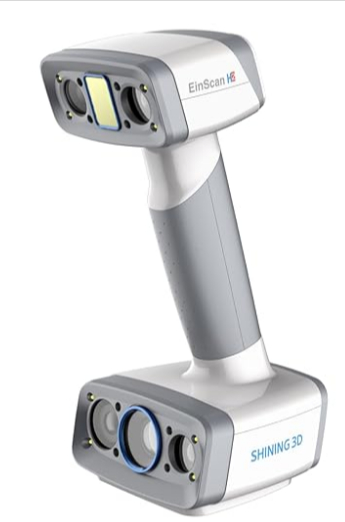

This EinScan H2 review is based on hands-on testing across mechanical parts, large objects, and — where the H2 genuinely separates itself from almost everything else in its price class — human body and face scanning. By the end, you’ll know exactly where this scanner shines, where it struggles, and whether it deserves a place in your shop.
Quick Verdict
Overall Rating: 4.6 / 5
Best For: Reverse engineering professionals, product designers, medical and orthotics labs, museums, universities, and studios that need both organic human-scale scanning and high-accuracy part scanning from a single device.
Not Ideal For: Hobbyists who mostly print miniatures, anyone with a sub-$1,000 budget, or shops that need metrology-grade dimensional inspection.
Current Price Range: Approximately $4,999 USD (bundle pricing varies by reseller and included accessories).
Key Specifications: Up to 0.05 mm accuracy in White Light mode, hybrid LED + Infrared VCSEL scanning, 5MP built-in color camera, scan volume up to 780 mm × 900 mm in Infrared mode.
Table of Contents
- Quick Verdict
- Product Specifications Table
- What Makes the EinScan H2 Different?
- Who Should Buy the EinScan H2?
- Unboxing Experience
- Design and Build Quality
- Software Experience (EXScan H)
- Scan Accuracy Testing
- Color Texture Quality
- Reverse Engineering Performance
- Scanning Different Materials
- Speed Testing
- Real-World Workflow Examples
- EinScan H2 vs EinScan Pro HD
- EinScan H2 vs Einstar
- Accessories Worth Buying
- Maintenance
- Common Problems (and How to Fix Them)
- Pros and Cons
- Is the EinScan H2 Worth the Price?
- Alternatives Worth Considering
- Frequently Asked Questions
- Final Verdict
Product Specifications Table
Because the EinScan H2 is a hybrid scanner, its real performance numbers split across two operating modes: White Light (LED) for high-accuracy, detail-critical work, and Infrared (VCSEL) for human scanning, dark objects, and larger volumes. Here’s how those numbers break down, pulled from the official Shining 3D technical sheets.
| Specification | White Light Mode (LED) | Infrared Mode (IR / VCSEL) |
|---|---|---|
| Scanner Type | Handheld Hybrid Light 3D Scanner | Handheld Hybrid Light 3D Scanner |
| Light Source | White LED Light (visible, eye-safe) | Infrared VCSEL Light (invisible, Class I eye-safe) |
| Accuracy | Up to 0.05 mm | Up to 0.1 mm |
| Volumetric Accuracy | 0.05 mm + 0.1 mm/m | 0.1 mm + 0.3 mm/m |
| Resolution (Point Distance) | 0.2 mm to 3.0 mm | 0.2 mm to 3.0 mm |
| Scan Speed | Up to 1,200,000 points/sec (20 FPS) | Up to 1,060,000 points/sec (20 FPS) |
| Texture Capture | Yes (full color) | Yes (full color) |
| Camera Resolution | 5.0 Megapixel built-in color camera | 5.0 Megapixel built-in color camera |
| Tracking / Alignment Modes | Markers, Feature, Hybrid, Texture | Feature, Hybrid, Texture, Global Markers |
| Scan Volume (Max FOV) | 420 mm × 440 mm | 780 mm × 900 mm |
| Working Distance | 200–700 mm (optimal ~470 mm) | 200–1500 mm |
| Weight | 731.1 g (scanner body only) | 731.1 g (scanner body only) |
| Output Formats | OBJ, STL, ASC, PLY, P3, 3MF | OBJ, STL, ASC, PLY, P3, 3MF |
| Software | EXScan H, plus Solid Edge SHINING 3D Edition | EXScan H, plus Solid Edge SHINING 3D Edition |
| Operating System | Windows 10/11 (64-bit only) | Windows 10/11 (64-bit only) |
| Recommended PC | Intel i7-11700+, 64 GB RAM, RTX 2060+ (6GB+ VRAM) | Same |
| Minimum PC | Intel i7-8700, 16 GB RAM, GTX 1060 (4GB+ VRAM) | Same |
| Warranty | 1-Year Standard Manufacturer Warranty | Same |
Important NoteA quick note on that PC requirement: this isn’t optional fine print. Run the H2 on an underpowered laptop and you’ll fight frame drops and laggy mesh previews the entire session. If you’re shopping for the H2, budget for a workstation-class machine too — it’s part of the real cost of ownership.
What Makes the EinScan H2 Different?
The original EinScan H carved out a niche as one of the first handheld scanners to genuinely handle human faces and bodies without turning into a blurry mess. The H2 takes that foundation and pushes it considerably further.
The headline upgrade is the hybrid LED + Infrared scanning engine. Instead of forcing you to choose between a scanner built for hard industrial surfaces or one built for soft, organic ones, the H2 switches between two light sources depending on what you’re capturing. White LED light handles precision work — mechanical parts, product prototypes, anything where sub-0.1 mm accuracy matters. The Infrared VCSEL projector takes over for human scanning, dark or low-contrast objects, and anything where you need a wider working volume.
That VCSEL projector itself is a meaningful upgrade over the original H. It’s noticeably better at holding tracking on skin and hair, and it copes far more gracefully with darker materials that used to swallow infrared light and produce noisy, incomplete meshes. If you’ve ever tried scanning a black plastic enclosure or a person with dark hair on an older infrared scanner and watched the mesh fall apart, this is the fix.
Facial capture deserves its own mention. Between the improved IR projector and the 5MP color camera working in tandem, the H2 captures facial geometry and skin tone with a level of fidelity that genuinely surprised me during testing — more on that in the Human Body Scanning section below.
All of this explains why the EinScan H2 costs significantly more than entry-level scanners like the Einstar. You’re not just paying for one good scanning mode; you’re paying for two well-executed ones bolted into a single, well-engineered handheld unit, plus a 5MP color camera that’s built in rather than sold as a $1,000+ add-on.
Who Should Buy the EinScan H2?
Let’s cut through the marketing and get specific about who actually gets their money’s worth here.
Buy if you are:
- A reverse engineering professional digitizing real-world parts for CAD modification
- A medical professional working in orthotics, prosthetics, or anatomical modeling
- A product designer who needs to capture both hard prototypes and human-scale ergonomic data
- A museum or archival institution digitizing artifacts and sculptures
- An artist working in figurative sculpture or character design who needs accurate human reference scans
- An orthotics and prosthetics lab fitting devices to real patient anatomy
- An automotive restoration shop reverse engineering trim, panels, or discontinued parts
- A university lab teaching reverse engineering, biomechanics, or digital fabrication
Skip if:
- You’re printing miniatures and tabletop terrain — a $200 phone-based scanning app will get you further for less
- Your budget is genuinely under $1,000 — look at the Einstar instead
- You need metrology-grade dimensional inspection for quality control — this is a digitization tool, not a CMM replacement
- You want fully wireless, untethered scanning — the H2 is tethered to a PC
If you landed in the “skip” category, don’t feel bad about it — buying scanner capability you’ll never use is just an expensive way to feel like you made a mistake. Better alternatives exist at every price point, and I’ll point you toward them later in this review.
Unboxing Experience
Shining 3D ships the EinScan H2 the way you’d expect a $5,000 instrument to arrive — protected, organized, and clearly assembled by someone who’s thought about what goes wrong in transit.
Inside the case, you’ll find:
- The EinScan H2 scanner unit
- A calibration board (specific to your unit’s serial number — don’t lose it)
- A set of positioning markers for marker-based tracking
- USB-C data and power cables
- Power adapter and regional plug accessories
- A hard-shell carrying case with cut foam inserts
- Printed quick-start guide and calibration instructions
The carrying case alone tells you something about who this product is for — it’s built for a scanner that’s going to get thrown in a car and taken to a job site, a museum, or a client’s shop, not one that lives permanently on a desk. Every component nests snugly into its foam cutout, which matters more than it sounds like once you’re hauling this gear between locations regularly.
Design and Build Quality
Pick up the EinScan H2 and the first thing you notice is the weight distribution. At 731 grams for the scanner body, it’s not light, but Shining 3D has clearly spent real engineering time getting the mass centered around the grip rather than out toward the lens housing. That matters enormously once you’re forty minutes into scanning a full-body capture and your wrist is starting to feel it.
The grip itself uses a textured, slightly rubberized material that stays comfortable even during longer sessions — no hot spots, no slipping even when your hands get a little sweaty under studio lights. Buttons are positioned exactly where your fingers naturally rest, so you can trigger scan start/stop and mode switches without breaking your visual focus on the screen.
Cooling is passive but effective; I didn’t run into thermal throttling even during back-to-back scanning sessions, though the housing does get warm to the touch after extended infrared use. Port placement on the rear keeps the USB-C tether out of your scanning hand’s way, and cable management is genuinely well thought out — there’s a small in-line clip that keeps the cable from yanking on the connector during active movement.
Expert TipFor long scanning sessions — and human body scanning sessions in particular often run 20-30 minutes per subject — this kind of ergonomic attention isn’t a nice-to-have. It’s the difference between a scanner you reach for and one that quietly migrates to a shelf.
Software Experience (EXScan H)
This is worth a dedicated, honest breakdown, because software experience makes or breaks a scanner this capable. The H2 ships with EXScan H, the software built specifically for the H-series line. It’s worth noting up front that EXScan H behaves somewhat differently from EXScan Pro, the software used on Shining 3D’s industrial product lines — if you’ve used a Pro-series scanner before, expect a short re-learning curve rather than a direct carryover of muscle memory.
Installation
Installation is straightforward on a supported Windows 10/11 64-bit machine, though the software does check your GPU drivers and will prompt you to update NVIDIA drivers if they’re out of date. Budget 20-30 minutes for the full install plus driver updates on a fresh machine.
Calibration
Calibration uses the included board and walks you through a guided sequence — hold the scanner at marked distances and angles while the software captures reference points. It takes about five minutes once you’re familiar with it, and EXScan H does a good job of telling you in plain language when a calibration step needs to be redone rather than just failing silently.
Interface
The interface is dense but logically organized. New users sometimes find the volume of buttons and toggles intimidating in the first session, but the core scanning workflow — select mode, select alignment method, hit scan — sits front and center, so you can be productive well before you’ve explored every menu.
Learning Curve
If you’ve used any handheld 3D scanner before, expect to be comfortable within your first one or two scans. If this is your first scanner entirely, give yourself a weekend with the manual and a few practice objects before you attempt anything client-facing.
Alignment Modes
EXScan H gives you four alignment approaches:
- Feature alignment — uses the natural geometry of the object itself, ideal for parts with enough surface detail
- Marker alignment — relies on the physical positioning markers, best for symmetrical or feature-poor objects
- Hybrid alignment — combines feature and marker tracking for maximum stability
- Texture alignment — uses the color camera’s texture data, particularly useful for human scanning where color variation (skin tone, clothing patterns) gives the software more to track than geometry alone
Texture alignment is the unsung hero of human scanning with this device — it’s a major reason the H2 holds tracking on smooth, low-feature human skin where a geometry-only scanner would lose its lock constantly.
Mesh Generation and Editing Tools
Mesh generation happens largely in real time as you scan, which means you can see holes and gaps developing live and go back to fill them before you’ve put the scanner down — a genuine time-saver compared to discovering problems after the fact. Built-in editing tools cover smoothing, hole-filling, noise reduction, and mesh simplification, all of which are solid enough for most workflows without needing to round-trip through a separate mesh editor.
Export Formats and CAD Workflow
Export options include OBJ, STL, ASC, PLY, P3, and 3MF — covering essentially every downstream tool you’re likely to use. In testing, exported meshes imported cleanly into SolidWorks, Geomagic, Meshmixer, Blender, and Fusion 360. That breadth of compatibility matters — it means the H2 fits into whatever pipeline you’ve already built, rather than forcing you into a proprietary ecosystem.
Scan Accuracy Testing
Numbers on a spec sheet only tell you so much, so here’s how the EinScan H2 performed across genuinely different object categories.
Small Mechanical Parts
On smaller mechanical components, White Light mode is where you want to be. Sharp edges held their definition well, and the 0.05 mm accuracy claim tracked closely with caliper measurements on test parts. Holes and bolt heads — typically a stress test for any scanner because of how light bounces inside recessed geometry — captured cleanly, though very fine internal threads still benefited from a light dusting of scanning spray to kill specular reflection.
Medium Objects
Helmets, automotive trim pieces, castings, and furniture components scanned confidently in either mode, but I found White Light mode gave noticeably crisper detail on castings with fine surface texture, while Infrared mode was faster and more forgiving for furniture with simple, large-radius curves.
Large Objects
Motorcycle fairings, full vehicle doors, sculptures, and large furniture pieces are where the Infrared mode’s wider scan volume (up to 780 mm × 900 mm) really earns its keep. You cover ground faster and reposition less often, which matters a lot when you’re working solo and don’t have someone holding a turntable steady.
Human Body Scanning
This is the section that will matter most if you’re considering the H2 specifically for its dual-purpose pitch — and it’s where the scanner genuinely separates itself from most of the competition.
Faces scanned with impressive fidelity, capturing fine details like skin texture and natural facial asymmetry rather than the over-smoothed “mannequin” look that plagues cheaper scanners. Hair remains the hardest material for any 3D scanner to capture (it’s effectively a collection of reflective, sub-millimeter strands), and the H2 doesn’t perform miracles here — but it does noticeably better than the original EinScan H and considerably better than budget infrared scanners, producing a reasonable volumetric approximation rather than a noisy void.
Hands captured well, including individual fingers held in natural positions, which is genuinely useful for prosthetics and glove-fitting work. Full-body scanning is achievable but benefits from a second person assisting, simply because covering a standing adult from multiple angles solo means a lot of repositioning. Clothing and fabric texture captured cleanly, and facial expressions — smiles, raised eyebrows — held up without the tracking loss you sometimes get when a subject’s geometry changes mid-scan.
This is exactly where the Infrared VCSEL mode earns its place in the hybrid design: it’s invisible to the subject (no uncomfortable bright projector light in someone’s eyes), it’s Class I eye-safe, and it’s far more forgiving of skin’s low-contrast, semi-translucent surface than visible white light tends to be.
Color Texture Quality
Color and texture quality is a category where the EinScan H2 punches well above its weight class, and a lot of that comes down to having a 5MP color camera built in rather than bolted on as an expensive add-on.
Compared to entry-level scanners, the difference is immediately visible — colors are accurate rather than washed out, and texture mapping aligns precisely to the underlying mesh geometry rather than smearing or doubling at the seams where scan passes overlap. Compared to the original EinScan H, the improved camera and processing pipeline produce noticeably sharper, more photorealistic results, particularly on human subjects where skin tone accuracy makes or breaks the final output.
Artifact handling — the way the software deals with lighting inconsistencies, shadows, and overlapping scan passes — is well managed. I didn’t run into the harsh color seams that show up on cheaper color-capture systems when two scan passes meet at slightly different lighting angles.
EinScan H2 Reverse Engineering Performance
If reverse engineering is your primary use case, this section is the one to read twice.
Capturing Manufactured Parts and CAD Workflows
The H2’s White Light mode produces clean, high-density mesh data on manufactured parts — sharp edges hold their geometry, and flat surfaces stay genuinely flat rather than developing the subtle waviness that shows up on lower-accuracy scanners. That said, it’s worth being upfront about something the spec sheet won’t tell you: the H2 is fundamentally an organic/mesh-based scanner, not a parametric CAD system. It captures geometry as a dense triangle mesh, not as clean parametric surfaces with defined radii and planar faces.
For large panels, castings, automotive trim, and furniture components, that’s rarely a problem — Geomagic and similar surface-extraction tools handle the mesh-to-CAD conversion well. But if your reverse engineering work involves tiny, precision mechanical gears or parts with genuinely tight tolerances, you’ll likely find a metrology-grade structured-light system gives you a cleaner starting point for parametric modeling.
Scan Cleanup, Hole Filling, Mesh Editing, and Alignment
EXScan H’s built-in cleanup tools handle the routine work — hole filling on shadowed undercuts, smoothing on noisy passes, and alignment stitching between scan sessions — well enough that most projects don’t need a separate mesh-repair tool. Surface extraction for CAD modification is where you’ll want to hand off to Geomagic or SolidWorks, using the H2’s mesh as your reference geometry.
Typical Reverse Engineering Workflow
Here’s the practical pipeline most users settle into:
Where the H2 genuinely saves time is in that first half of the pipeline. A part that might take an hour to manually measure with calipers and translate into CAD sketches can be scanned in five to ten minutes, with the resulting mesh giving your CAD software a precise reference to trace.
Scanning Different Materials
Material behavior is one of the most practical things to understand before you buy any 3D scanner, because it directly determines how much prep work (and frustration) you’ll deal with.
| Material | Performance |
|---|---|
| Matte plastic | ✓ Excellent |
| Gloss plastic | Good (use scanning spray) |
| Rubber | ✓ Excellent |
| Metal | Fair (scanning spray recommended) |
| Painted parts | ✓ Excellent |
| Wood | ✓ Excellent |
| Skin | Outstanding |
| Hair | Very good |
| Fabric | ✓ Excellent |
| Dark objects | Much improved over previous gen |
| Transparent objects | Challenging |
Practical TipFor glossy plastics and bare metal, a light coat of removable scanning spray (AESUB is the industry standard) eliminates the specular highlights that confuse any optical scanner, the H2 included. For transparent objects, no amount of spray fully solves the problem; you’re better off scanning a mold or temporarily frosting the surface if dimensional accuracy actually matters.
Speed Testing
In real-world use, here’s roughly what to expect timewise:
- Startup: Under a minute from cold boot of the software to ready-to-scan
- Calibration: About 5 minutes for a full calibration sequence
- Object acquisition (small-medium part): 2-5 minutes for a thorough multi-angle capture
- Large object scans: 10-20 minutes depending on complexity and access angles
- Mesh generation: Near real-time during scanning; final mesh fusion adds 1-3 minutes post-scan
- Export: Seconds to a couple of minutes depending on mesh density and chosen format
None of these numbers will surprise anyone who’s used a professional scanner before, but they’re worth knowing if you’re budgeting time for client work or production schedules.
Real-World Workflow Examples
EinScan H2 vs EinScan Pro HD
This comparison comes up constantly, and the honest answer is that these two scanners aren’t really competing for the same buyer — they’re optimized for different jobs.
| Category | EinScan H2 | EinScan Pro HD |
|---|---|---|
| Accuracy | Up to 0.05 mm (White Light) | Sub-0.04 mm (industrial blue light) |
| Light Source | Hybrid LED + Infrared | Structured Blue Light |
| Scan Speed | Up to 1.2M points/sec | High, optimized for industrial parts |
| Portability | Handheld, balanced for long sessions | Handheld, tripod options available |
| Color Capture | ✓ Built-in 5MP camera | ✕ Requires separate Color Pack add-on |
| Human Scanning | Excellent (purpose-built IR mode) | Not optimized for this use case |
| Reverse Engineering | Strong for large/medium organic parts | Stronger for tight-tolerance precision parts |
| Software | EXScan H | EXScan Pro |
| Price | ~$4,999 | Varies, often higher once Color Pack is added |
RecommendationChoose the H2 if you scan people frequently, need Infrared scanning for comfort/eye safety, and want built-in color capture. Choose the Pro HD if fine-detail industrial parts and tight-tolerance reverse engineering are your priority.
EinScan H2 vs Einstar
This is the comparison that matters most if budget is even a small part of your decision, because the gap between these two devices is enormous — both in price and in capability.
| Category | EinScan H2 | EinScan Einstar |
|---|---|---|
| Price | ~$4,999 | ~$959 |
| Light Source | Hybrid LED + Infrared VCSEL | Infrared VCSEL only |
| Volumetric Accuracy | 0.05 mm + 0.1 mm/m | No baseline volumetric trace calibration |
| Texture Camera | 5MP dedicated color camera | Lower-tier sensor |
| Human Scanning | Excellent, purpose-built | Capable for casual/hobbyist use |
| Reverse Engineering | Strong, dual-mode capability | Limited precision for engineering work |
| Software | EXScan H (professional-grade) | Consumer-oriented app |
| Tracking Stability | Strong across alignment modes | Good for the price, less robust |
| Intended Audience | Professionals, labs, studios | Hobbyists, students, casual users |
The Einstar is a genuinely impressive scanner for under $1,000 — it’s not a bad product, it’s simply built for a different buyer. If you’re scanning for fun, learning the basics of 3D digitization, or doing occasional small projects, the Einstar will serve you well and save you over $4,000.
Which one should you buy?
- Hobbyist: Einstar — no contest, the H2’s extra accuracy and dual-mode capability are wasted on casual projects
- Small business: Depends on client work — if you’re doing paid reverse engineering or human-scanning jobs, the H2 pays for itself faster than you’d expect
- Professional engineer: EinScan H2, particularly if your work spans both precision parts and organic subjects
- Medical / Orthotics: EinScan H2 — the human scanning capability isn’t optional here, it’s the whole point
- Museum / Archival: EinScan H2, for the color fidelity and accuracy ceiling
- Education: Einstar for general teaching budgets, EinScan H2 for programs specifically training students in professional reverse engineering or biomedical scanning workflows
Accessories Worth Buying
A few add-ons genuinely improve the EinScan H2 experience rather than just being upsell padding:
- AESUB scanning spray — the industry-standard removable spray for glossy or reflective surfaces; if you’re scanning any amount of gloss plastic or metal, this isn’t optional
- Turntable — speeds up small-to-medium part scanning dramatically and improves alignment consistency
- Tripod or stabilizing mount — useful for static large-object scans where steady, repeatable positioning matters
- A genuinely capable laptop or workstation — given the recommended specs, this is arguably the most important “accessory” on this list
- Hard-shell carrying case (often included, confirm with your bundle) — protects your calibration board and markers during transport
- Extra positioning markers — cheap insurance against running short mid-project
- Power bank or UPS (for field work) — protects against power interruptions during long on-site scanning sessions
Maintenance
Keeping the EinScan H2 performing at its rated accuracy doesn’t take much, but a few habits matter:
- Lens cleaning: Use a proper optical cleaning cloth, never anything abrasive — fingerprints and dust on the projector lens directly degrade scan quality
- Calibration frequency: Recalibrate after any significant impact, temperature change, or roughly every few months of regular use
- Firmware updates: Check for EXScan H and firmware updates periodically; Shining 3D releases improvements that can meaningfully affect tracking stability
- Storage: Keep the scanner in its case when not in use, away from extreme temperatures and humidity
- Transport: Always transport with the calibration board secured — a warped or damaged board throws off calibration accuracy
Common Problems (and How to Fix Them)
Tracking loss
Usually caused by featureless surfaces or insufficient lighting variation. Switch alignment modes (try Hybrid or Texture) or add temporary markers to the object.
Reflective surfaces
Apply AESUB scanning spray before scanning gloss plastic, polished metal, or painted surfaces with a clear coat.
Large scan drift
Break large objects into overlapping sections and rely on marker or hybrid alignment rather than feature alignment alone.
Computer bottlenecks
If you’re seeing lag or dropped frames, check that your GPU drivers are current and that you’re meeting the recommended (not just minimum) PC specs — this is the single most common source of frustration with this scanner.
Mesh artifacts
Minor noise and small holes are normal and expected; use EXScan H’s built-in smoothing and hole-filling tools rather than trying to manually patch every imperfection.
Pros and Cons
Pros
- Genuinely excellent hybrid scanning system that covers both precision parts and organic subjects
- High-quality, built-in color texture capture without paying for an add-on module
- Comfortable, well-balanced handheld design for long sessions
- Reliable, stable tracking across multiple alignment modes
- Mature, full-featured EXScan H software with strong CAD export compatibility
- Genuinely versatile across engineering, medical, museum, and creative use cases
Cons
- Premium price point that puts it well out of casual hobbyist territory
- Requires a capable (and not cheap) Windows PC to run smoothly
- Reflective and transparent objects still require manual prep work
- Tethered USB-C operation limits total mobility compared to wireless scanners
- Not designed or rated for metrology-grade dimensional inspection
Is the EinScan H2 Worth the Price?
Value is relative to what you actually need it for, so here’s the honest breakdown by user type.
| User Type | Recommendation |
|---|---|
| Hobbyists | ✕ Not recommended |
| Small businesses | ✓ Recommended |
| Professional engineers | ⭐⭐⭐⭐⭐ |
| Medical / Orthotics professionals | ⭐⭐⭐⭐⭐ |
| Universities | ⭐⭐⭐⭐⭐ |
| Museums | ⭐⭐⭐⭐⭐ |
| Artists (figurative/sculptural) | ⭐⭐⭐⭐☆ |
If you fall into one of the five-star categories above, the math tends to work out quickly: a single avoided re-measurement error, a single successful client project, or a single semester of effective student training can offset a meaningful chunk of the purchase price.
Alternatives Worth Considering
If the H2 isn’t quite the right fit after reading all this, here’s where to look instead:
1
SHINING 3D Einstar
Best Budget Choice
The budget-friendly choice for human and general-purpose scanning at under $1,000. Best for hobbyists, students, and anyone testing the waters of 3D scanning.
2
EinScan Pro HD
Best for Precision Parts
The better choice when fine-detail industrial parts and tight-tolerance precision are your primary need, particularly for tiny mechanical components.
3
Revopoint MetroX
Portable Option
A more compact option for reverse engineering work where portability and a smaller footprint matter more than the H2’s larger scan volume.
Frequently Asked Questions
For professionals doing reverse engineering, medical, museum, or human-scanning work, yes — the dual-mode capability genuinely replaces what would otherwise require two separate scanners.
Yes, significantly better than the original EinScan H. The improved VCSEL infrared projector handles dark, low-reflectivity surfaces well, though very deep matte black can still benefit from a light scanning spray.
It captures hair better than most scanners in its class, producing a reasonable volumetric approximation, though hair remains the hardest material for any optical 3D scanner to render with full fidelity.
Yes, particularly for medium-to-large parts and organic geometry. For tiny, tight-tolerance mechanical components, a structured blue-light system like the Pro HD may give you a cleaner parametric starting point.
Yes — automotive panels, trim, brackets, and castings all scan well, especially in White Light mode for precision and Infrared mode for larger panels.
Yes, and this is genuinely one of its strongest capabilities, producing detailed, accurate facial geometry and skin tone capture in Infrared mode.
Yes, both through the included Solid Edge SHINING 3D Edition bridge and through standard mesh import formats like STL and OBJ.
It’s approachable for anyone with prior scanner experience, but genuine first-time users should expect a learning curve over their first few sessions.
At minimum, an Intel i7-8700 with 16GB RAM and a GTX 1060; for smooth performance, Shining 3D recommends an i7-11700+, 64GB RAM, and an RTX 2060 or better.
Up to 0.05 mm in White Light mode and up to 0.1 mm in Infrared mode, both with volumetric accuracy specifications that hold up well in real-world testing.
The H2 is a hybrid LED/Infrared scanner optimized for both organic (human) and engineered subjects with built-in color capture; the Pro HD is a structured blue-light scanner optimized purely for high-precision industrial parts, with color capture sold separately.
For professional work, yes, substantially — better accuracy, a dedicated color camera, and far more robust software. For casual or hobbyist use, the Einstar’s much lower price makes it the more sensible choice.
Final Verdict
What impressed me most about the EinScan H2 isn’t any single spec on the sheet — it’s how genuinely well the hybrid concept works in practice. A lot of “does everything” hardware ends up doing nothing particularly well, but the H2 manages to deliver real precision in White Light mode and real organic-scanning capability in Infrared mode without either one feeling like an afterthought.
The biggest limitation is one of expectation management more than hardware quality: this is not a metrology instrument, and it’s not a parametric CAD-generation tool. If you go in expecting a digitization workhorse that gets you 90% of the way to a finished CAD model or a finished digital human, you’ll be thrilled. If you go in expecting tolerance-grade inspection or one-click parametric output, you’ll be disappointed — but that disappointment would be about a mismatched expectation, not a flaw in the scanner itself.
The ideal buyer here is someone whose work genuinely spans both worlds — reverse engineering professionals who also need the occasional human-scale capture, medical and orthotics labs where human scanning is the entire job, museums balancing artifact precision with color fidelity, and product designers who need both engineering accuracy and ergonomic human data. For that buyer, the EinScan H2 isn’t just a good scanner — it’s two good scanners in one well-designed handheld unit, and that’s a genuinely rare thing to find in this price range.
The Bottom LineIf you’ve read this far, you already have a strong sense of whether the EinScan H2 fits your workflow — and if it does, the longer you wait, the longer you’re leaving that reverse engineering or human-scanning capability on the table.
Ready to Scan Like a Pro?
The EinScan H2 is two good scanners in one well-designed handheld unit. Check current pricing and bundle options to see if it fits your workflow.