


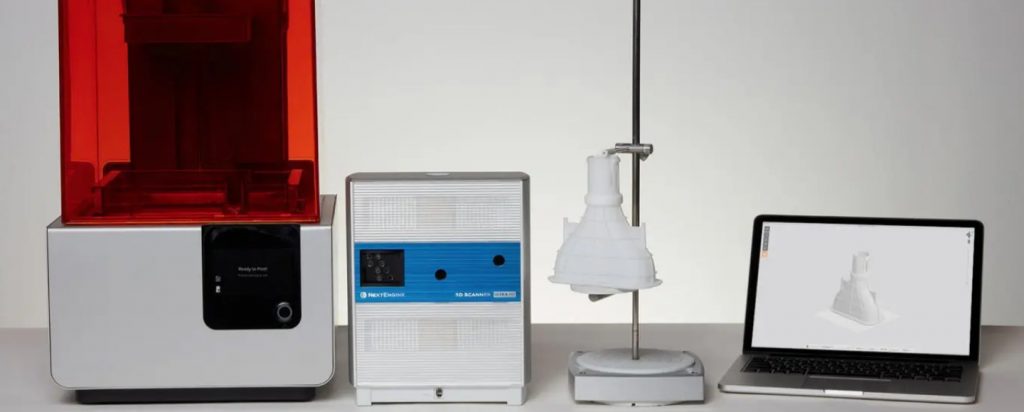
Most 3D scans don’t fail during the scan. They fail at the printer.
You’ve spent 20 minutes carefully scanning an object, the point cloud looks beautiful on screen, and then you try to slice it — and Cura or PrusaSlicer throws up a wall of errors. Holes in the geometry. Non-manifold edges. A mesh so noisy it looks like it was dragged through static. This is the silent killer of scan-to-print workflows, and it’s the reason choosing the best 3D scanner for 3D printing isn’t just about spec sheets.
In 2026, the 3D scanner market has matured dramatically. We now have standalone devices with onboard processors, AI-assisted tracking, dual-mode laser systems that handle black and shiny surfaces without scanning spray, and software pipelines smart enough to patch holes automatically. But with all that choice comes decision fatigue — and the wrong choice means hours of mesh cleanup, wasted filament, or worse, a scanner that collects dust.
This guide cuts through the noise. We’ve tested and researched the latest models — including the Revopoint MIRACO, POP 3 Plus, 3DMakerpro Moose, Einstar 2, Revopoint MINI 2, INSPIRE 2, Einstar Rockit, and Revopoint MetroX — with one focus: print-ready results. Not just scanning specs.
Whether you’re a hobbyist, a maker, a product designer, or someone who needs to scan car parts for custom fabrication, there’s a right tool in this list for you. Let’s find it.
Table of Contents
- Quick Comparison Table
- What Makes a 3D Scanner Good for Printing?
- Best 3D Scanners for 3D Printing — Top Picks
- Best Budget 3D Scanner (Under $500)
- Best 3D Scanner Under $1,000
- Best 3D Scanner for Beginners
- Best 3D Scanner for Car Parts
- Best 3D Scanner Apps
- How to Go From Scan to Print
- Common Problems & Fixes
- Final Verdict
- FAQ
Quick Comparison Table: Best 3D Scanners for 3D Printing (2026)
| Scanner | Real-World Accuracy | Price Range | Best For | Mesh Quality | Output Formats |
|---|---|---|---|---|---|
| Revopoint MIRACO | 0.02–0.05 mm | ~$1,300–$1,900 | All-in-one prosumer workflow | ⭐⭐⭐⭐⭐ | STL, OBJ, PLY |
| Revopoint POP 3 Plus | 0.05–0.08 mm | ~$526–$789 | Best value overall | ⭐⭐⭐⭐ | STL, OBJ, PLY |
| 3DMakerpro Moose | 0.03 mm | ~$399–$599 | Beginners, makers | ⭐⭐⭐⭐ | STL, OBJ, PLY |
| Einstar 2 | ~0.05 mm | ~$699–$999 | Wireless mid-range | ⭐⭐⭐⭐ | STL, OBJ, PLY |
| Revopoint MINI 2 | ~0.02 mm | ~$912+ | Miniatures, jewelry, small detail | ⭐⭐⭐⭐⭐ | STL, OBJ, PLY |
| Revopoint INSPIRE 2 | 0.05 mm | ~$549 | Best budget that actually works | ⭐⭐⭐⭐ | STL, OBJ, PLY |
| Einstar Rockit | ~0.05 mm | ~$1,700–$1,900 | Automotive, field scanning | ⭐⭐⭐⭐⭐ | STL, OBJ, PLY |
| Revopoint MetroX | 0.02–0.03 mm | ~$3,000–$4,000 | Industrial/mechanical parts | ⭐⭐⭐⭐⭐ | STL, OBJ, PLY |
What Makes a 3D Scanner Actually Good for 3D Printing?
Before we get into specific recommendations, let’s talk about what separates a scanner that produces great prints from one that produces great frustration. This matters more than any single spec.
1. Watertight vs. Non-Manifold Meshes — The Most Important Thing No One Talks About
Here’s the thing most scanner reviews skip: a watertight mesh is a printable mesh. A non-manifold mesh is not.
A watertight mesh means every edge in your 3D geometry is shared by exactly two faces. There are no holes, no overlapping faces, no T-junctions. When your slicer sees a watertight mesh, it can calculate solid walls, infill, and supports without confusion.
A non-manifold mesh is the opposite — open edges, holes, geometry that doesn’t fully enclose a volume. Slicers like Cura will try to repair these automatically, but beyond a certain level of damage, the model either fails to slice correctly or prints with missing sections.
The best 3D scanners for 3D printing in 2026 produce meshes that are either watertight out of the box or require only minimal touch-up with built-in tools. That’s your north star when evaluating any scanner.
2. Mesh Quality Matters More Than Raw Accuracy
It sounds counterintuitive, but a scanner with 0.1 mm accuracy and a clean, well-structured mesh will serve you better in most print workflows than a scanner with 0.02 mm accuracy and a noisy, chaotic point cloud.
“Mesh noise” refers to tiny surface irregularities, floating points, and inconsistent topology that make your model look fuzzy or bumpy when printed. Cheap scanners — especially early-generation structured-light devices — are notorious for this. The mesh looks acceptable on screen, but when you print at 0.2 mm layer height, every imperfection shows.
What you want is clean topology: evenly distributed triangles, smooth curvature transitions, and minimal reconstruction artifacts. This is where software quality becomes as important as hardware. More on that in a moment.
3. Matching Scan Resolution to Your Print Technology
Not all 3D printing is created equal, and your scanner’s resolution should match your output:
- FDM printing (0.4 mm nozzle, 0.2 mm layers): You genuinely don’t need sub-0.1 mm scan accuracy here. A clean mesh with 0.1 mm accuracy will print beautifully. Over-engineering your scan resolution for FDM is a waste of money.
- Resin printing (0.025–0.05 mm layer heights): Here, high-resolution scanning pays dividends. Fine details like text, filigree, and surface texture are captured and reproduced faithfully. Scanners like the Revopoint MINI 2 or MIRACO shine in this application.
- SLS / industrial FDM: Functional parts with tolerances matter. You’ll want 0.05 mm or better accuracy with dimensional stability across the full part.
4. Tolerance Tier Guide — What Accuracy Do You Actually Need?
Here’s a practical framework for matching scanner accuracy to your application:
| Tier | Tolerance | Use Case | Recommended Scanners |
|---|---|---|---|
| Tier 1 — Artistic & Organic | 0.1 mm tolerance | Figurines, cosplay props, decorative objects, sculptures. Almost any mid-range scanner handles this. | Focus on mesh cleanliness and color capture. |
| Tier 2 — General Utility | 0.05 mm tolerance | Replacement brackets, enclosures, jigs, custom mounts. | POP 3 Plus, INSPIRE 2, Moose tier covers this. |
| Tier 3 — Mechanical Precision | 0.02 mm tolerance | Gears, engine brackets, car body panels, fitment parts. | Laser scanners — MetroX, Rockit, MINI 2. |
5. Software Is the Real Differentiator in 2026
Hardware has commoditized. The gap between a $400 scanner and a $1,500 scanner in terms of raw sensor quality has narrowed dramatically. What hasn’t commoditized is the software that turns point cloud data into print-ready meshes.
The scanners that win in 2026 have software that does the heavy lifting:
- Revo Scan 5 (Revopoint ecosystem): Auto-fill holes, intelligent tracking, real-time mesh preview, and a clean export pipeline. The upgrade from previous versions is significant.
- EXStar Hub (Einstar Rockit and Einstar 2): Unified processing platform with reduced system load, faster scanning throughput, and solid mesh optimization tools.
- JMStudio (3DMakerpro Moose): Auto-alignment, automatic noise removal, and hole-filling. Particularly good for beginners who don’t want to wrestle with manual cleanup.
- KIRI Engine (app-based): Neural surface reconstruction that punches above its weight class for featureless objects.
Best 3D Scanners for 3D Printing — Top Picks for 2026
1. Revopoint MIRACO — Best All-in-One Scan-to-Print Workflow
“The scan → mesh → export pipeline is the shortest and most reliable we’ve tested.”
If you want one device that handles everything from small figurines to large mechanical assemblies, the Revopoint MIRACO is the answer in 2026. And the reason it tops this list isn’t just about specs — it’s about how it handles the full pipeline from scan to print-ready file.
The MIRACO is Revopoint’s flagship standalone scanner. No PC required. No cables dangling from your wrist. An onboard 8-core processor with 16 GB (or 32 GB in the Pro version) of RAM handles all post-processing directly on the device, displayed on a 6-inch 2K AMOLED touchscreen with a 180-degree flip for awkward scanning angles.
Under the hood, quad-depth cameras enable dual Near and Far mode scanning in a single device — switching seamlessly between capturing a small object on a turntable and scanning a full car body panel without changing hardware. Precision reaches 0.02 mm in near mode, and the 48MP RGB camera delivers color capture that’s genuinely impressive for 3D printing applications where texture matters.
For print workflows specifically, the MIRACO’s greatest strength is how clean its meshes come out. Revo Scan 5’s auto-fill technology patches most holes automatically during processing, and the built-in editing tools let you refine scans before you ever touch a desktop computer. The scan → mesh → export pipeline is the shortest and most reliable we’ve tested.
Export formats include STL, OBJ, and PLY — all the formats your slicer needs. Wi-Fi 6 and USB-C connectivity mean transferring to Cura or PrusaSlicer is frictionless.
The MIRACO isn’t cheap. Prices start around $1,300 and reach $1,900+ for the Plus version. But if you’re serious about scan-to-print work and want to stop losing evenings to mesh repair, the MIRACO’s time savings justify the investment many times over.
- Best for: Prosumers, product designers, serious hobbyists who want the cleanest pipeline from scan to print.
- Not ideal for: Ultra-tight tolerances on mechanical parts (look at the MetroX for that).
2. Revopoint POP 3 Plus — Best Value for Most Users
For most people reading this guide, the Revopoint POP 3 Plus is the sweet spot. It’s not the cheapest scanner on this list, but it consistently delivers print-ready results without the premium price tag of the MIRACO.
The POP 3 Plus introduced optical zoom — a genuinely significant upgrade over the POP 3 that improves mesh density on small objects considerably. This means you can scan a 30 mm mechanical fitting and get enough detail to print a functional replacement, not just a visual approximation.
Accuracy sits at 0.08 mm single-frame and 0.05 mm fused point distance, which lands squarely in Tier 2 of our tolerance guide. For 90% of 3D printing applications — props, replacement parts, hobby projects, custom enclosures — this is more than sufficient.
At around $526 for the standard edition and $789 for the advanced edition (which includes the dual-axis turntable), the POP 3 Plus represents outstanding value. The turntable bundle in particular makes desktop scanning — coins, figurines, small mechanical parts — effortless.
- Best for: Makers, hobbyists, and product designers who want a genuine workhorse scanner without breaking the bank.
- Not ideal for: Wireless field scanning or scanning dark/reflective surfaces without spray.
3. 3DMakerpro Moose — Best for Beginners (and a Quiet Overachiever)
The 3DMakerpro Moose doesn’t get the attention it deserves in comparison roundups, but ask anyone who’s used one: it’s the scanner that makes beginners look like experienced operators.
The reason is the AI-powered visual tracking. Most scanners at this price require careful, deliberate movement to maintain tracking — drift and lose track too often and your scan session becomes a frustrating series of restarts. The Moose’s tracking algorithm is substantially more forgiving. Combined with JMStudio’s automatic noise removal and hole filling, the gap between “first scan” and “print-ready mesh” is smaller than on any competing device at this price.
The full-color Moose model uses blue LED structured light with 24-bit color capture and reaches 0.03 mm accuracy — genuinely impressive at the ~$399–$599 price point. The scanning volume covers medium-format objects comfortably, from a coffee mug to a helmet.
For someone picking up their first 3D scanner and wanting results they can print within the first week without a manual-reading marathon, the Moose is our strongest beginner recommendation.
- Best for: First-time 3D scanner users, makers, educators, artists who want results fast.
- Not ideal for: Wireless workflows, dark or highly reflective surfaces.
4. Einstar 2 — Best Wireless Mid-Range Scanner
Einstar 2 from Shining 3D is the scanner for people who hate cables as much as they hate compromising on mesh quality. The fully wireless design with a 3-hour battery and integrated Wi-Fi means you can walk around a car, a piece of furniture, or an outdoor sculpture without managing a tethering ecosystem.
Compared to its predecessor, the Einstar 2 brings improved usability, a refined scanning workflow, and the new EXStar Hub software that significantly streamlines the scan-to-mesh pipeline. The 17-line blue laser array captures solid detail on most surfaces, and the resulting meshes are clean enough for printing without extensive rework.
Where the Einstar 2 shines is in scanning larger objects where freedom of movement matters. Holding a scanner with a cable trailing to a laptop while circling a motorbike engine bay is genuinely awkward. The Einstar 2 eliminates that entirely.
Pricing sits around $699–$999 depending on the bundle, though promotional pricing frequently brings it lower. Strong value for what it delivers.
- Best for: Users who need wire-free scanning freedom for medium to large objects.
- Not ideal for: Highly reflective surfaces, black objects without scanning spray.
5. Revopoint MINI 2 — Best 3D Scanner for Small Objects and High Detail
When your 3D printing project involves miniatures, jewelry, dental models, coins, or mechanical components smaller than a fist, the standard scanner landscape disappoints. Most scanners in the $400–$800 range simply don’t capture enough surface detail to make a resin-printable model that looks faithful to the original.
The Revopoint MINI 2 changes that equation. Designed specifically for small-object scanning, the MINI 2 achieves approximately 0.02 mm precision — territory that rivals professional metrology equipment — and produces mesh quality that makes resin printing results genuinely stunning.
The USB Type-C connectivity with Wi-Fi 6 support keeps setup clean, and Revo Scan 5 compatibility means the same software pipeline you’d use with any other Revopoint scanner. Export in STL, OBJ, or PLY, drop into your slicer, and print.
At ~$912 with a comprehensive kit including a mini turntable, the MINI 2 isn’t cheap for what is technically an entry-level scanner. But if small-object detail is your primary use case — jewelry designers, miniature painters, collectors, dental professionals — there’s nothing in this price class that comes close.
- Best for: Miniatures, jewelry, coins, dental models, any sub-100mm object where fine surface detail matters.
- Not ideal for: Large object scanning (use the MIRACO or POP 3 Plus for that).
Best Budget 3D Scanner for 3D Printing (Under $500)
Let’s be honest about what “budget 3D scanner” really means. A cheap scanner that generates “mesh salad” — tangled, hole-ridden geometry that requires hours of manual repair — isn’t a budget purchase. It’s an expensive time sink.
With that context, the Revopoint INSPIRE 2 is our top recommendation for budget-conscious buyers in 2026.
At $549 (just above the strict $500 barrier, but worth the extra $49), the INSPIRE 2 delivers something that used to cost $1,500+: genuine dual-mode scanning. An infrared structured light mode handles general objects, while an 11-line IR laser mode tackles dark and metallic surfaces that would defeat most scanners in this class — without scanning spray.
Real-world accuracy of 0.05 mm is exceptional at this price. At 190 grams, it’s light enough for extended handheld sessions. Wi-Fi 6 connectivity and mobile scanning support via the Revo Metro app add flexibility that was previously a premium-tier feature.
For 3D printing specifically, the INSPIRE 2 produces meshes that require minimal cleanup in most scenarios. Props, medium-sized objects, decorative parts, hobby projects — it handles them all with results you can print the same day.
Best 3D Scanner for 3D Printing Under $1,000
The $500–$1,000 range is genuinely the sweet spot of the 2026 3D scanner market. This is where you get better tracking, cleaner meshes, and software that actually reduces your cleanup time rather than creating more of it.
Three scanners dominate this tier:
Revopoint POP 3 Plus
~$526–$789
The most versatile performer. Optical zoom, 0.05 mm fused accuracy, and Revo Scan 5 make this the best rounded package in the range.
3DMakerpro Moose
~$399–$599
AI tracking that makes beginners look experienced. Best choice if your primary pain point is failed scans rather than maximum accuracy.
Einstar 2
~$699–$999
Best in class for wireless scanning freedom. If cables are your nemesis, this is your scanner.
The meaningful upgrade from sub-$500 devices is tracking stability. Better tracking means fewer failed scans, fewer restarts, and cleaner data from the start — which cascades into cleaner meshes, less post-processing, and faster time-to-print.
Best 3D Scanner for 3D Printing for Beginners
If you’re new to 3D scanning, here’s the most common mistake people make: prioritizing accuracy above everything else. “I want the highest accuracy scanner I can afford” sounds reasonable — but for a beginner, a scanner with excellent tracking and easy software will give you more successful prints in the first three months than a technically superior scanner with a steep learning curve.
What Beginners Actually Need
- ✅ Stable tracking so scans don’t abort halfway through an object.
- ✅ Easy, guided software that doesn’t require a photogrammetry background to operate.
- ✅ Automatic mesh cleanup so you can go from scan to print without knowing what a non-manifold edge is.
Our top pick for beginners: 3DMakerpro Moose. The AI-assisted tracking is genuinely forgiving for newcomers, JMStudio’s automated cleanup handles most problems without manual intervention, and the blue LED structured light produces color captures that are immediately satisfying for display printing.
Runner-up: Revopoint POP 3 Plus. The Revo Scan 5 software has excellent documentation, an active community, and enough automation that beginners aren’t thrown in the deep end. The dual-axis turntable bundle makes desktop object scanning a guided, almost foolproof process.
Common Beginner Mistakes to Avoid:
- Over-prioritizing raw accuracy specs over software usability
- Ignoring the PC requirements (scanners at this tier often need a capable GPU)
- Scanning without adequate, even lighting (outdoor bright light or studio lighting works best)
- Moving the scanner too fast during capture
Best 3D Scanner for Scanning Car Parts for 3D Printing
This is where generic 3D scanner recommendations fail you. Automotive scanning has unique challenges that eliminate most of the scanners discussed so far: dark paint, shiny chrome, curved reflective surfaces, large scan volumes, and dimensional accuracy requirements that are measured in millimeters that must fit, not millimeters that look close.
If you need a 3D scanner for car parts — bumpers, body panels, engine components, brackets, custom accessories — here’s what the requirements actually look like:
- Challenge 1: Dark and black surfaces absorb structured light, causing gaps or complete scan failure.
- Challenge 2: Metallic and glossy surfaces reflect structured light chaotically, producing noise.
- Challenge 3: Large objects require consistent volumetric accuracy, not just single-frame precision.
- Challenge 4: Parts need dimensional fidelity good enough that printed or CNC’d replicas actually fit.
Einstar Rockit — Best 3D Scanner for Automotive Scanning
The Einstar Rockit from Shining 3D is built specifically for challenges like this. Its 38-line crossed blue laser array with 7 additional parallel lines creates a multi-plane projection geometry that handles curved reflective surfaces far more confidently than single-plane scanners — without requiring matte scanning spray on every panel.
At 90 fps with marker alignment and genuine wireless freedom (built-in Wi-Fi 6, swappable batteries for up to 3 hours of continuous scanning), the Rockit is genuinely at home in an automotive workshop. Laser HD mode operates under ambient light up to 110,000 Lux — meaning you can scan outdoors under bright conditions without losing accuracy.
The EXStar Hub software handles the full workflow and delivers clean, high-resolution mesh output ready for post-processing in Geomagic or direct export for printing.
Priced at $1,700–$1,900, the Rockit is an investment. But for car shops, custom fabricators, and automotive enthusiasts who scan regularly, it pays back in time saved on every session.
Revopoint MetroX — Best Prosumer/Industrial Hybrid for Mechanical Parts
For engine bays, precision mechanical components, and anything requiring Tier 3 tolerance (0.02–0.03 mm), the Revopoint MetroX is the tool. Multi-line blue laser technology combined with full-field structured light in four scanning modes makes this one of the most versatile precision instruments in the sub-$4,000 category.
The MetroX is overkill for casual car part scanning. But if you’re doing reverse engineering on gearbox components, custom suspension geometry, or precision instrumentation, the 0.02–0.03 mm accuracy and industrial-grade software pipeline are exactly what the job requires.
Raw scans capture the shape of an object, but they don’t capture design intent. A scanned gear will have surface noise, slight asymmetries from wear, and reconstruction artifacts. To produce a functional printed replacement, the correct workflow is:
Scan → Mesh cleanup → CAD refinement (Fusion 360 or Geomagic) → Print
This isn’t a limitation of the scanner — it’s a fundamental reality of reverse engineering. The scanner gets you 80% of the way there quickly. The remaining 20% requires intelligent CAD work that a slicer can’t automate.
Best 3D Scanner App for 3D Printing
Sometimes you don’t need hardware — or you want to see what’s possible before investing in a dedicated scanner. Mobile app-based photogrammetry and 3D scanning has taken significant strides, and in 2026 there are genuinely useful options:
KIRI Engine — Best App for 3D Printing Prep
KIRI Engine’s Neural Surface Reconstruction is the most significant development in mobile 3D scanning recently. Rather than traditional photogrammetry (which struggles with featureless or textureless surfaces), KIRI Engine uses machine learning to infer surface geometry from image data with impressive results for organic shapes.
For medium-sized objects with reasonable surface texture — a shoe, a hand, a decorative piece — KIRI Engine can produce meshes that are closer to print-ready than you’d expect from a phone camera.
Polycam — Best for Quick Scans and Interiors
Polycam’s ease of use is its greatest strength. For objects where speed matters more than precision — generating a rough reference mesh, quickly digitizing a prop, capturing an interior space — Polycam delivers results without a learning curve.
RealityScan — Good Photogrammetry for Larger Objects
Unreal Engine’s photogrammetry app produces strong results for medium-to-large objects with adequate texture. Not ideal for small or featureless subjects, but solid for architecture, environments, and sculpted objects.
- None of these are suitable for Tier 2 or Tier 3 tolerance printing.
- They cannot replace dedicated hardware for functional mechanical parts, tight-fitting components, or anything requiring better than ~0.5 mm dimensional accuracy.
- They require significant mesh cleanup before slicing in most cases.
- Use them for artistic printing and experimentation — not for production.
3D Scanner App vs. Dedicated Scanner for 3D Printing
Here’s the honest comparison:
- Apps are good enough when: You’re printing organic shapes for display, you want a quick reference mesh to build upon in CAD, budget is the primary constraint, and you have time for substantial mesh cleanup.
- Dedicated scanners win when: You need dimensional accuracy for functional parts, you’re scanning challenging surfaces (dark, shiny, black), you want a repeatable, reliable workflow, and your time is valuable. A dedicated scanner in the $500–$1,000 range will save the average user 3–5 hours of mesh repair per project compared to app-based scanning.
For serious 3D printing workflows, the math is simple: a $549 INSPIRE 2 pays for itself in time savings within the first month if you scan more than occasionally.
How to Go From 3D Scan to Finished 3D Print — Step by Step
Even with the best scanner, the path from raw scan data to a printed object has steps that trip up newcomers. Here’s the full workflow:
- Step 1 — Scan the Object
Use a turntable for small objects (greatly improves scan completeness). Ensure even, bright lighting. Move slowly and deliberately. Use markers on featureless surfaces to help tracking. - Step 2 — Process the Point Cloud
In your scanner’s software (Revo Scan 5, JMStudio, EXStar Hub), process the raw point cloud into a mesh. Apply the software’s built-in noise reduction and hole-filling before export. This is faster and often more accurate than fixing problems after export. - Step 3 — Clean the Mesh
Import into Meshmixer (free) or Blender. Check for: Holes in the geometry (the Inspector tool in Meshmixer finds these automatically), Non-manifold edges (Blender’s Mesh Analysis mode highlights these), Floating disconnected geometry. - Step 4 — Fix Non-Manifold Issues
In Meshmixer: Analysis → Inspector → Auto Repair All. In Blender: Edit Mode → Select All → Mesh → Clean Up → Merge by Distance, then Fill Holes. - Step 5 — Scale Correctly
This is missed more often than you’d think. Verify the model dimensions in your slicer before printing. Scanners can have slight scale drift, particularly on large objects. Measure your physical object with calipers and compare to your 3D model dimensions. - Step 6 — Export as STL
Export from your mesh editing software as STL (binary format for smaller file sizes). OBJ is also acceptable; 3MF is useful if you need to preserve color information for multi-color printing. - Step 7 — Slice
Import into Cura, PrusaSlicer, or your preferred slicer. If the slicer reports errors, use the repair function first. If errors persist, return to Step 3. - Step 8 — Print
📥 Download the Scan-to-Print Checklist
Get our free PDF checklist to ensure perfect prints every time. Covers scanning settings, mesh repair, and slicer configuration.
Common Problems When 3D Printing Scanned Models (and How to Fix Them)
| Problem | Cause | Fix |
|---|---|---|
| Non-manifold mesh errors in slicer | Overlapping faces, open edges, T-junctions from scan reconstruction. | Use Meshmixer’s Auto Repair, or Netfabb (free online version available). Prevention: choose a scanner with better mesh quality algorithms. |
| Holes in the printed model | Holes in the mesh geometry that the slicer interpreted as intentional. | Fill holes in Meshmixer (Inspector tool) or Blender (Fill Holes function) before slicing. |
| Wrong scale / parts don’t fit | Scale drift from scanning or incorrect export settings. | Always measure your physical object with digital calipers and verify model dimensions match exactly. Apply a uniform scale correction if needed. |
| Noisy, bumpy surface on the print | Mesh noise from the scanner — tiny surface reconstruction artifacts. | Apply Smooth Shading in Meshmixer (Filters → Smooth) or use the Smooth modifier in Blender. Prevention: choose a scanner with better noise reduction algorithms. |
| Warping during print | This is usually a printing issue (bed adhesion, temperature), not a scanning issue. | Apply a brim, increase bed temperature, or use an enclosure for ABS/ASA. |
| Missing geometry on dark or shiny areas | Structured light absorbed by dark surfaces or scattered by reflective ones. | Apply temporary matte scanning spray (Aesub Orange or similar), or switch to a laser-mode scanner like the INSPIRE 2, Rockit, or MetroX that handles these surfaces natively. |
Final Verdict: Which 3D Scanner Should You Buy?
Let’s make this simple. Based on everything above:
- Best overall 3D scanner for 3D printing → Revopoint MIRACO. The cleanest scan-to-print pipeline on the market. Worth the investment if you print regularly and value your time.
- Best value 3D scanner for 3D printing → Revopoint POP 3 Plus. Outstanding performance at a reachable price. The scanner most people should buy.
- Best 3D scanner for 3D printing beginners → 3DMakerpro Moose. Forgiving AI tracking and automated cleanup make it the most accessible path from first scan to first successful print.
- Best budget 3D scanner for 3D printing → Revopoint INSPIRE 2. Dual-mode scanning at $549 is extraordinary value in 2026. The entry-level scanner that actually works.
- Best 3D scanner for small objects and high detail → Revopoint MINI 2. Miniatures, jewelry, dental models — no competitor comes close at this price.
- Best 3D scanner for car parts → Einstar Rockit (wireless, large-format, automotive surfaces) or Revopoint MetroX (precision mechanical parts, industrial grade).
Whatever your use case, the right answer isn’t the most expensive scanner — it’s the scanner that matches your workflow, your objects, and your tolerance for post-processing. The perfect scanner for a miniature painter is a disaster for an automotive engineer, and vice versa.
One final thought: the hours you spend wrestling with non-manifold meshes, patching holes, and re-scanning failed captures have a cost. A scanner that eliminates those problems isn’t a luxury expense — it’s a productivity investment. Buy accordingly.
FAQ — Best 3D Scanner for 3D Printing
Can you 3D print directly from a scan?
Technically yes, but practically speaking, most scans need some degree of mesh cleanup before printing reliably. Scanners with strong built-in mesh reconstruction (MIRACO, POP 3 Plus, Moose) minimize this significantly, but a quick check for non-manifold geometry is always worthwhile.
What file format is best for 3D printing from a scan?
STL is the universal standard and works with every slicer. OBJ is useful when you want to preserve color/texture information. 3MF is increasingly supported and can store color data for multi-material printing. For pure geometry printing, STL is fine.
Are phone scanner apps accurate enough for 3D printing?
For decorative, artistic, and organic shapes — yes, often good enough with cleanup. For functional parts, brackets, and anything requiring dimensional accuracy better than approximately 0.5 mm — no, dedicated hardware is required.
What accuracy do I need for 3D printing?
For FDM printing: 0.1 mm is more than sufficient for most applications. For resin printing of detailed models: 0.05 mm gives excellent results. For functional mechanical parts: 0.02–0.05 mm with a post-scan CAD refinement step.
Do I need to use CAD software after scanning for mechanical parts?
For display and artistic prints: no, a clean mesh exports directly to print. For functional mechanical parts that need to fit or interlock with other components: yes. Scans capture geometry but not design intent. CAD refinement in Fusion 360 or similar transforms a scan into a dimensionally reliable, print-ready model.
What’s the difference between watertight and non-manifold mesh?
A watertight mesh fully encloses a volume with no gaps — every edge is shared by exactly two faces. Slicers can print this reliably. A non-manifold mesh has open edges, holes, or inconsistent geometry that confuses slicers. The best 3D scanners for 3D printing in 2026 produce watertight (or nearly watertight) meshes by default.
Prices reflect March 2026 availability and may vary by retailer and bundle configuration. Always verify current pricing before purchase.