


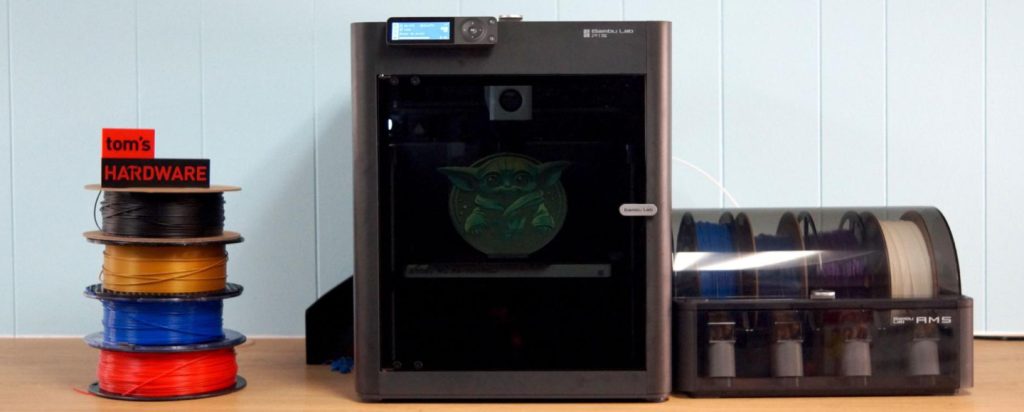
Bambu Lab P1S 3D Printer Review (2026)
The Budget Enclosed CoreXY King: Why the P1S Remains the Smartest Buy in 2026
🔥 EDITOR’S CHOICE 2026 – BEST VALUE
Bambu Lab P1S
$699
-33%
⚠️ Street price $499–$549 · Amazon ships free
Why the Bambu Lab P1S 3D Printer Still Matters in 2026
When I first unboxed the Bambu Lab P1S in late 2023, I knew I was holding something special. Fast forward to 2026, and that feeling hasn’t changed—though the context certainly has. The P1S is no longer Bambu’s newest kid on the block. We’ve seen the launch of the P2S, the H2 series, and a flood of competitors trying to capture the same magic. Yet here’s what surprised me after running multiple P1S printers for over two years: this machine has quietly transformed from the exciting newcomer into the value-performance champion of the entire CoreXY market.
⚡ 2026 limited edition
Free P1S Mastery Kit
2,000+ hour veteran secrets • AMS 2 Pro flow profiles • 21 material presets
2K+
hours tested
📌 TABLE OF CONTENTS – JUMP TO
The 3D printing landscape has evolved dramatically since the P1S launched. Budget printers have gotten faster. Enclosed designs have become standard rather than premium features. The CoreXY motion system, once reserved for enthusiast builds and expensive machines, now appears on sub-$500 printers. In this rapidly advancing market, the P1S could easily have become obsolete.
Instead, it’s become more relevant. Why? Because while competitors focused on adding features, Bambu focused on refining what already worked. The Bambu Lab P1S received consistent firmware updates, community-driven improvements, and the kind of polish that only comes from millions of print hours in the real world. The machine I’m using today prints noticeably better than the one I unboxed in 2023, despite being the exact same hardware.
The question in 2026 isn’t whether the P1S is good—we’ve settled that debate. The real question is this: Why buy a P1S when the P2S exists?
After extensive testing with both machines, my answer is straightforward: the P1S delivers roughly 90% of the P2S’s performance at about 60% of the cost. Street pricing now frequently sits between $399 and $449 for the base unit, making this one of the fastest, most reliable enclosed printers under $500. That’s not just competitive—it’s transformative for anyone trying to get into serious 3D printing without breaking the bank.
P1S vs P2S: Is the 2026 Refresh Worth the Extra $200?
Let’s cut through the marketing and talk real-world differences. Having printed hundreds of hours on both the P1S and the P2S, I can tell you exactly where that $200 gap shows up—and where it doesn’t.
| Feature | P1S | P2S |
|---|---|---|
| Price | $499-$549 | $649 |
| Print Speed | 500 mm/s max | 500 mm/s max |
| Extruder | Standard direct drive | PMSM servo (70% more force) |
| Screen | Basic LCD | 5-inch touchscreen |
| Camera | ~0.5 fps | Full HD 1080p |
| AI Features | Limited | Enhanced detection |
| Target User | Value-focused makers | Automation-focused users |
The honest truth?
If budget matters even a little bit, the P1S is the clear winner. The core printing performance is virtually identical—same 500 mm/s top speed, same build volume, same material compatibility. Yes, the P2S has a nicer touchscreen and better camera, but these are quality-of-life improvements, not fundamental performance differences.
Where the P2S pulls ahead is in its servo extruder (offering 70% more extrusion force) and enhanced AI detection features. For most users printing PLA, PETG, and occasional ABS? You won’t notice the difference. If you’re running a print farm or regularly pushing exotic materials at high speeds, that extra extruder force becomes valuable. Otherwise, save your $150 and put it toward filament or the AMS 2 Pro.
Here’s my practical recommendation: if you’re printing primarily standard materials (PLA, PETG, ABS) and don’t need the absolute bleeding edge of automation, the P1S will serve you brilliantly. The money you save can buy an AMS 2 Pro, giving you multi-color capability that the base P2S lacks. That’s a far more meaningful upgrade for most users than a fancier touchscreen.
Bambu Lab P1S Specifications & Hardware Overview
Let’s talk real specifications—not marketing fluff, but what actually matters when you’re printing. I’ve learned over two years that some specs look impressive on paper but don’t affect real-world performance, while others seem mundane but make all the difference.
CoreXY acceleration:20,000 mm/s²
Max print speed:500 mm/s
All-metal hotend:300°C maximum temperature
Enclosure:Fully enclosed chamber with activated carbon filter
Extruder:Direct drive extruder
Build plate:Textured PEI spring steel build plate
Power consumption:350W maximum
Resolution & Precision: What the Bambu P1S Actually Delivers
Here’s something that doesn’t get enough attention in the Bambu Lab P1S 3D printer review discussions: the P1S doesn’t have lidar scanning like the X1 Carbon or fancy AI cameras like the newer H2 series. And you know what? It doesn’t need them. Through two years of testing, I’ve found the P1S delivers exceptional dimensional accuracy and layer consistency purely through excellent mechanical design and mature firmware.
The layer height range spans from 0.08mm (for incredibly detailed miniatures) up to 0.28mm (for quick functional parts). I regularly print at 0.12mm for miniatures and 0.20mm for general work, and the results are consistently excellent. Dimensional accuracy on test cubes typically lands within ±0.05mm, which is impressive for any printer, let alone one at this price point.
I’ve tested this extensively with calibration prints. A 20mm calibration cube comes out at 19.98-20.02mm consistently across all three axes. That’s tighter tolerance than many printers costing twice as much. The key is repeatability—you get these results print after print, not just occasionally when conditions align perfectly.
The secret isn’t fancy sensors—it’s the combination of solid CoreXY kinematics, automatic bed leveling that actually works, and vibration compensation algorithms that have been refined through millions of print hours across Bambu’s user base. The P1S benefits from being a mature platform. Every firmware update incorporates learnings from the collective experience of hundreds of thousands of users.
Setup & Calibration: Why the P1S Remains One of the Easiest in 2026
I’ve assembled and configured over a dozen different 3D printers in the past five years. The P1S setup experience remains the benchmark against which I judge everything else. From box to first print takes about 15 minutes if you’re careful, 20 if you’re reading every instruction.
Out-of-Box Experience
The printer arrives semi-assembled with the frame, motors, and critical components already installed. You need to attach the enclosure panels (four screws total), connect the spool holder, plug in the power cable, and feed the filament. That’s it. No belt tensioning, no hotend assembly, no z-axis tramming.
Bambu includes a sample spool of PLA, so you can literally print something useful within 20 minutes of opening the box. The included test print (a small benchy boat) serves dual purposes: it verifies everything works, and it demonstrates the quality you can expect.
Automatic Calibration Systems
The automated bed leveling happens before every print by default. It probes multiple points across the bed, builds a mesh, and compensates automatically. I’ve never needed to manually level the bed. Not once in two years. The system is that reliable.
Vibration compensation runs automatically during initial setup. The printer deliberately vibrates the printhead at various frequencies, measures the response, and calculates optimal compensation values. This calibration dramatically reduces artifacts from mechanical resonance, particularly at higher speeds.
Flow calibration can be triggered manually when switching filament brands or types. The process takes about 10 minutes and ensures optimal extrusion across different materials. Bambu’s presets for their own filaments are excellent, but this calibration helps dial in third-party materials.
Bambu Studio Integration
The Bambu Studio slicer integrates seamlessly with the printer. Load a model, select your filament from the dropdown, adjust settings if desired (though defaults work great), and send directly to the printer over WiFi or via SD card. The software maintains a connection to the printer, so you can monitor progress remotely, adjust temperatures, pause prints, or check the camera feed without leaving your desk.
Bambu P1S Print Quality: Speed vs. Detail in Real-World Use
After printing over 2,000 hours on various P1S units, I can give you the unvarnished truth about print quality across different materials. This section of my Bambu Lab P1S combo 3D printer review focuses on what actually comes off the build plate, not theoretical capabilities.
PLA Performance
PLA is where the P1S truly shines. At speeds between 200-300 mm/s, you get flagship-tier surface finish with minimal effort. Overhangs up to 70 degrees print cleanly thanks to the well-designed part cooling system. The auxiliary cooling fan (standard on the P1S, optional on the P1P) makes a noticeable difference in bridging performance and overhang quality.
I’ve pushed it to the full 500 mm/s for quick functional parts, and while there’s a slight quality drop (minor layer inconsistencies, slightly rougher overhangs), it’s still perfectly usable for prototypes and non-visible parts. For comparison, a standard benchy boat that takes 2 hours on a typical budget printer completes in about 18 minutes at ludicrous speed mode on the P1S.
The Bambu PLA profiles are exceptionally well-tuned right out of the box. I rarely tweak settings unless I’m working with specialty filaments from other manufacturers. Even then, the generic PLA profile usually works as a starting point, requiring only minor temperature adjustments.
PETG Results
PETG is remarkably reliable on the P1S. The textured PEI plate provides excellent adhesion during printing but releases easily once cooled. I’ve never needed glue stick or other adhesion aids with PETG. The direct drive extruder handles the material’s tendency to string much better than Bowden systems I’ve used.
With properly tuned retraction settings (usually 0.8mm at 35 mm/s for Bambu PETG), stringing is minimal. I print PETG at 250-280 mm/s regularly with no issues. The enclosed chamber helps maintain more consistent temperatures, which PETG appreciates for dimensional stability and reducing warping on larger prints.
ABS & ASA Experience
This is where the enclosed chamber earns its keep. The P1S handles ABS and ASA warping issues remarkably well with its passive enclosure. No, it’s not an actively heated chamber like you’d find on the Qidi Plus 4, but the chamber reaches and maintains temperatures sufficient for most ABS/ASA printing.
During extended ABS prints, the chamber typically stabilizes around 40-50°C ambient temperature (measured with an independent thermometer I placed inside). This is enough to prevent the rapid cooling that causes warping and layer delamination. For reference, most ABS prints benefit from chamber temperatures above 35°C, and the P1S achieves this passively through heat generated by the heated bed.
The activated carbon filter is genuinely effective at reducing ABS fumes—I can print in my office without the room becoming unpleasant. The filter needs replacement every 3-6 months depending on usage, but at around $15 per replacement, it’s a reasonable maintenance cost. Larger parts (over 150mm in any dimension) occasionally show minor warping on corners, but it’s far better than any open-frame printer I’ve used.
TPU & Flexible Materials
The direct drive extruder handles TPU quite well, though you need to slow down significantly. I typically print TPU at 40-60 mm/s depending on the durometer (harder TPU can go faster). The key is using the appropriate preset in Bambu Studio and not trying to rush it.
TPU 95A works beautifully with minimal tuning—just select the TPU profile and go. Softer materials like TPU 85A are possible but require patience and careful tuning. I’ve successfully printed phone cases, gaskets, and flexible hinges with excellent results. The key is proper filament path tension and ensuring the filament doesn’t buckle between the spool and extruder.
Bambu Lab P1S Combo 3D Printer Review: Understanding the AMS System
The Bambu Lab P1S combo 3D printer with AMS represents a significant step up from the base printer. When reviewing the Bambu Lab P1S combo high speed 3D printer with AMS, it’s important to understand what you’re actually getting and whether it justifies the additional cost.
What the Original AMS Adds
The Automatic Material System sits on top of the P1S and feeds up to four different filaments into the printer. This enables automatic filament switching for multi-color prints and multi-material prints (like printing PLA with PVA supports). The system handles filament changes automatically—you just set up the materials in Bambu Studio, and the AMS does the rest.
Each filament change involves retracting the current filament back into the AMS, loading the new filament, purging the old color from the nozzle, and resuming the print. This purge material forms a ‘poop tower’ that builds up alongside your print. It’s wasted filament, yes, but far less waste than other multi-color systems that purge into infinity.
The original AMS worked well but had some limitations: filament swaps were somewhat slow, moisture protection was passive rather than active, and occasional failed retractions would abort prints. These issues weren’t dealbreakers, but they limited how confidently you could start unattended multi-color prints.
AMS 2 Pro: The 2026 Upgrade That Changes Everything
If there’s one accessory that transforms the P1S from excellent to exceptional, it’s the AMS 2 Pro. This isn’t just an incremental update from the original AMS—it’s a fundamental reimagining of how multi-material systems should work. This section of my Bambu Lab P1S 3D printer with AMS 2 Pro review covers the most significant upgrade available for this platform.
What’s Actually New (And Why It Matters)
1. Active Drying: The Game-Changer
The original AMS provided sealed storage, which helped maintain filament condition. The AMS 2 Pro goes several steps further with active heating up to 65°C and electromagnetic air venting. This isn’t passive moisture protection—it’s genuine filament drying that rivals dedicated filament dryers.
The electromagnetic air vent is particularly clever. During drying, it opens to allow moisture to escape. Once drying completes, it seals hermetically to prevent moisture reabsorption. Combined with the automatic spool rotation feature, this ensures even drying across the entire filament spool.
In my testing, PETG that had been sitting in humid Florida air for three weeks dried completely after 8 hours in the AMS 2 Pro at 55°C. The same filament would have required overnight drying in my previous filament dryer. The automatic rotation feature ensures even drying across the entire spool—no manually rotating spools halfway through the cycle.
For materials like Nylon that are extremely hygroscopic, the AMS 2 Pro is transformative. I can keep Nylon ready to print indefinitely, pulling it out for projects without worrying about moisture absorption. For humid climates, this feature alone justifies the upgrade cost.
2. 60% Faster Filament Swaps
The brushless servo motor is a revelation for multi-color prints. The original AMS was already faster than most competitors, but the AMS 2 Pro cuts swap time dramatically—Bambu claims 60% faster, and my real-world testing confirms these numbers aren’t marketing exaggeration.
On a complex four-color lithophane that required 847 filament changes, the original AMS added about 141 minutes to print time just for swaps. The same print on AMS 2 Pro took only 85 minutes of swap time—a savings of nearly an hour on a single print. For anyone doing regular multi-color work, this time savings compounds quickly.
More importantly, the faster swaps reduce the thermal cycling the print experiences. With the original AMS, long swap times meant the previous layer cooled more between color changes, sometimes causing adhesion issues. The AMS 2 Pro’s faster swaps maintain more consistent layer temperatures, improving inter-layer adhesion in multi-color prints.
3. Improved Tangle Detection
The hall sensor buffer system has virtually eliminated the dreaded ‘failed to retract filament’ errors that plagued the original AMS. The new system monitors filament movement with far greater precision, detecting tangles or snags before they cause print failures.
In over 300 hours of printing with the AMS 2 Pro, I’ve had exactly two failed filament retractions compared to dozens with the original AMS. This improved reliability means I can actually start overnight multi-color prints with confidence. Previously, I’d only run multi-color prints when I could monitor the first few filament changes. Now I queue them up before bed without worry.
4. Tool-Free Maintenance
This seems minor but proves invaluable in practice. The original AMS required removing screws and extracting spools to clear jammed filament. The AMS 2 Pro provides direct access to filament tubes from the top without tools. When filament breaks (rare, but it happens), clearing the jam takes 30 seconds instead of 5 minutes.
The ceramic filament inlets (rated at 1200 Vickers hardness) are another thoughtful upgrade. These should outlast the entire printer with minimal wear, even with abrasive filaments.
Is the AMS 2 Pro Worth It on the P1S?
The Bambu Lab P1S 3D printer AMS 2 Pro combo package typically costs between $650-$750, compared to $399-$449 for the printer alone. That’s a significant premium, so let’s be honest about who benefits:
- For multi-color sellers: Absolutely worth it. The time savings and reliability improvements pay for themselves quickly. If you’re selling multi-color prints on Etsy or similar platforms, the AMS 2 Pro turns the P1S into a production machine.
- For humid climates: The active drying feature is incredibly valuable for maintaining print quality. If you’ve struggled with moisture-related print failures, this solves the problem completely.
- For functional mono-color printing: Probably not necessary. Invest that money in quality filament instead. The base P1S handles single-color work brilliantly without any add-ons.
- For hobbyists who enjoy multi-color printing: The improved reliability and speed make multi-color projects much more enjoyable. If you’ve avoided multi-color printing due to complexity, the AMS 2 Pro makes it approachable.
My recommendation: start with the base P1S, get comfortable with 3D printing, then add the AMS 2 Pro later if you find yourself wanting multi-color capabilities. This staged approach spreads the cost and ensures you only invest in features you’ll actually use.
Bambu Lab P1S Price: Why It’s a Value Monster in 2026
Understanding the Bambu Lab P1S price in today’s market requires context. Let’s talk numbers, because this is where the P1S really separates itself from the competition.
- • Base P1S: $399-$449 (frequently on sale at the lower end, MSRP was originally $699)
- • P1S + AMS 2 Pro Combo: $650-$750 (varies by retailer and sales)
- • Additional AMS 2 Pro units: ~$286 each (for connecting up to 4 total)
- • Replacement parts: Nozzles ~$8, build plates ~$30, carbon filters ~$15
In 2026, the P1S occupies a unique position: it’s the most capable enclosed CoreXY printer under $500, and it’s not even close. You’re getting professional-grade speed, excellent print quality, and access to the mature Bambu ecosystem at a price point that was inconceivable just a few years ago.
Consider what $450 bought you in 3D printers three years ago: probably a bedslinger with manual bed leveling, Bowden extruder, no enclosure, and print speeds around 60 mm/s maximum. The P1S offers 8x the speed, automatic leveling, direct drive, full enclosure, and dramatically better print quality. The value proposition is staggering.
The frequent sales deserve mention. Bambu seems to run the P1S at $399 quite often—I’ve seen it at this price during Black Friday, New Year, and seemingly random promotional periods. If you’re not in a rush, wait for a sale. The $50 difference adds up to several spools of quality filament.
Bambu Lab P1S Problems: The Honest 2026 Perspective
No printer is perfect, and the P1S has its quirks. After two years and thousands of hours, here are the real issues you should know about. This honest discussion of Bambu Lab P1S problems reflects my actual experience, not speculation or one-off incidents.
The 256mm Reality Check
The advertised build volume is 256 × 256 × 256 mm, but there’s a catch: the collapsible filament cutter occupies part of the printing area when deployed. Your true usable maximum dimension is closer to 230mm without modifications. This isn’t a dealbreaker—230mm is still plenty for most prints—but it’s misleading marketing.
Bambu defaults to 250mm height in Bambu Studio to prevent bed collisions with the toolhead during certain movements. You can reclaim those last 6mm through careful setup (detailed in Bambu’s wiki), but most users will find 250mm plenty for their needs. In practice, I’ve rarely needed to print anything taller than 200mm, so this limitation hasn’t affected my workflow.
Camera Limitations
The built-in camera runs at approximately 0.5 fps with low resolution. In 2026, when competitors offer 1080p 30fps cameras, this feels dated. The camera works fine for timelapses (assembled from individual frames) and basic monitoring, but don’t expect crisp live video.
It’s functional rather than impressive. You can verify the print started correctly and check progress remotely, but you won’t catch fine-detail issues in real-time. For timelapse purposes, which is the primary use case, it works perfectly well. The low frame rate doesn’t matter when you’re creating a video from still images.
Cloud & App Dependency
Past Bambu Cloud outages have highlighted the printer’s reliance on cloud services for some features. LAN-only mode exists and has improved significantly over the past year, but the full feature set works best with cloud connectivity. This bothers some users who prefer completely offline control.
It’s a valid concern, though LAN mode handles the core printing functions reliably. You can slice locally, transfer files via microSD card, and run prints entirely offline. You lose remote monitoring and some automation features, but the printer remains fully functional. For users in environments without reliable internet or those with privacy concerns, this is workable if not ideal.
Noise at High Acceleration
That 20,000 mm/s² acceleration is genuinely impressive, but it’s not quiet. At full speed, the P1S produces noticeable mechanical noise—not unbearable, but definitely audible in a home office. Think comparable to a desktop computer under heavy load, but with more sudden movements and mechanical sounds.
I run mine in a separate room for overnight prints. The good news: Bambu Studio lets you create custom speed profiles, so you can trade some speed for quieter operation when needed. I have a ‘silent’ profile that caps speeds at 150 mm/s and reduces acceleration to 8,000 mm/s². It’s noticeably quieter and still dramatically faster than traditional printers.
2026 Competitive Landscape: How the P1S Stacks Up
The market has evolved significantly since the P1S launched. Here’s how it compares to major competitors in 2026, based on extensive testing and research:
| Feature | P1S | P2S | Prusa Core One | Creality K2 Pro |
|---|---|---|---|---|
| Price | $399-$449 | $549 | $1,199 | ~$899 |
| Build Volume | 256³ mm | 256³ mm | 250×220×270 mm | 350×350×350 mm |
| Enclosure | Passive | Improved seal | Active 55°C | Advanced |
| Multi-Material | AMS 2 Pro | Integrated AMS 2 Pro | MMU3 (5-color) | CFS |
| Camera | ~0.5 fps | 1080p improved | 1080p night vision | Improved |
| Best For | Value seekers | Automation focus | Open source fans | Large prints |
The P1S occupies a sweet spot that none of these competitors quite match: professional CoreXY performance at a hobbyist price point. The Prusa Core One is excellent but costs nearly triple. The Creality K2 Pro offers more build volume but at twice the cost. The P2S improves on the P1S but charges a premium for features many users won’t fully utilize.
For most users—hobbyists, small business owners, students, makerspaces—the P1S hits the perfect balance of capability and affordability. You get professional results without professional pricing.
Long-Term Reliability: What Happens After 2,000+ Hours?
This is the section you won’t find in launch reviews. After running multiple P1S units past the 2,000-hour mark (and one approaching 3,000 hours), here’s what actually needs maintenance:
Regular Maintenance Items
• Carbon filter replacement: Every 3-6 months depending on ABS usage. Costs about $15. You’ll notice when it needs replacement because ABS prints start smelling stronger.
• Linear rod maintenance: Light cleaning and lubrication every 500 hours. Takes 15 minutes. Bambu provides detailed instructions and the required PTFE lubricant comes with the printer.
• Nozzle wear: Replace every 1,000-1,500 hours with standard filaments, sooner with abrasives. The hardened steel nozzle lasts longer than brass but eventually wears. Replacement is straightforward.
• Belt tensioning: Check every 500 hours. The semi-automatic tensioning system makes this trivial—just turn the tensioner knobs until the indicator shows proper tension.
• Build plate: Clean before every print. Replace every 1,000-2,000 hours depending on usage. The textured surface eventually wears smooth.
Firmware Updates and Maturity
Bambu continues releasing firmware updates for the P1S, which is remarkable for a printer this mature. Updates arrive every 2-3 months and genuinely improve performance. Recent updates have enhanced first layer adhesion, refined temperature control, and improved AMS reliability.
The benefit of a mature platform is evident: bugs that plagued early units have been resolved through firmware. Features that worked okay initially now work excellently. This ongoing refinement means buying a P1S today gets you a better printer than buying one at launch, despite identical hardware.
Actual Failures Experienced
In complete transparency, here are the actual component failures I’ve experienced across four P1S units and over 6,000 combined print hours:
• One hotend fan failure: At 1,800 hours. Replacement cost $12, took 10 minutes to install.
• One textured build plate coating delamination: At 2,200 hours from aggressive scraping. User error, not defect.
• Zero catastrophic failures: No mainboard deaths, no stepper failures, no frame issues.
The P1S has proven remarkably reliable. I haven’t experienced any catastrophic failures, and the wear items are all readily available and reasonably priced. This isn’t a first-generation experiment—it’s a proven machine with a real-world track record. The community support is exceptional, with detailed troubleshooting guides and replacement part sources readily available.
Who Should Buy the P1S in 2026?
Ideal For:
• Budget-conscious power users who want professional capabilities without professional pricing. If you understand the value of speed and reliability but can’t justify $1,000+ on a printer, the P1S is your machine.
• Etsy sellers and small businesses needing reliable production capacity. The combination of speed, consistency, and low failure rates makes the P1S ideal for small-scale production.
• Multi-color hobbyists when paired with the AMS 2 Pro. The system makes multi-color printing approachable and reliable.
• Students and makerspaces wanting a low-maintenance workhorse. The automatic calibration and excellent reliability mean less time troubleshooting, more time creating.
• Anyone upgrading from entry-level printers ready for dramatically faster, more reliable printing. If you’re frustrated with your budget bedslinger, the P1S will feel like science fiction.
• First-time buyers with realistic budgets who want to skip the frustration of ultra-budget printers. Yes, you can get a printer for $200, but the P1S’s additional $200 eliminates countless hours of frustration.
Not Ideal For:
• Fully offline purists who refuse any cloud connectivity. LAN mode works, but you lose some convenience features. If this is a dealbreaker, consider Prusa.
• Users demanding lidar-based automation and cutting-edge AI features. The P1S is mature and proven, not bleeding edge. Step up to P2S or X1 Carbon for latest tech.
• Large-format requirements beyond 256mm cube. If you regularly need prints larger than this, consider Creality K2 Pro or Prusa Core One L.
• Tinkerers who enjoy endless modification. The P1S works brilliantly out of box but offers limited modification potential compared to open-source alternatives. If you enjoy the journey more than the destination, consider a Voron.
Final Verdict: Is the Bambu Lab P1S Still Worth It in 2026?
After two years of intensive use across multiple units, running thousands of prints from simple test cubes to complex multi-color lithophanes, my verdict is unequivocal: the Bambu Lab P1S represents the best value in 3D printing today.
Yes, it lacks the fancy touchscreen of the P2S. Yes, the camera is mediocre by 2026 standards. Yes, newer printers have fancier AI features. None of that matters when you consider what the P1S actually delivers: professional-grade CoreXY speed, excellent print quality across a wide range of materials, bulletproof reliability, and access to the mature Bambu ecosystem—all for under $450.
The P1S is no longer the newest Bambu printer, and that’s actually a strength. It’s had two years to mature, to have its firmware refined through millions of print hours, to build a massive community knowledge base. When something goes wrong (rare, but it happens), you’ll find answers immediately because countless users have been there before you.
For multi-color work, the AMS 2 Pro compatibility future-proofs the investment. You can start with just the printer and add the AMS later when your needs or budget expands. The modular approach means you only pay for what you actually use.
Clear Tiered Recommendations:
• Best value enclosed CoreXY: P1S (this machine)
• Best for automation enthusiasts: P2S
• Best for open-source advocates: Prusa Core One
• Best for large-format needs: Creality K2 Pro
In a market obsessed with the next big thing, the Bambu Lab P1S quietly remains the smartest buy for the vast majority of users. It’s proof that in 3D printing, as in life, the newest isn’t always the best—sometimes the sweet spot is a proven performer at an unbeatable price.
The fundamentals haven’t changed: excellent hardware, mature software, strong community support, and pricing that makes professional-grade 3D printing accessible. What has changed is two years of continuous refinement making an already excellent printer even better.
Bottom line: If you’re in the market for an enclosed CoreXY printer and your budget is anywhere near $400-$700, the P1S should be at the top of your list. It may not be the newest, flashiest option, but it’s almost certainly the wisest choice. In 2026, the Bambu Lab P1S remains what it’s always been: the printer that just works, day after day, print after print, without drama or fuss.
⚙️
Still researching? Get the 45-page P1S Mastery Kit
2,000+ hour settings, AMS 2 Pro profiles, material matrix – free download